
Snaffler Impacket port - find credentials and sensitive data on SMB shares

Project description
snaffler-ng
Impacket port of Snaffler.
snaffler-ng is a post-exploitation / red teaming tool designed to discover readable SMB shares, walk directory trees, and identify credentials and sensitive data on Windows systems.
Features
- SMB share discovery via SRVSVC (NetShareEnum)
- DFS namespace discovery via LDAP (v1 + v2), merged and deduplicated with share enumeration
- Parallel directory tree walking with intra-share fan-out
- 103 built-in regex-based file and content classification rules
- NTLM authentication (password or pass-the-hash)
- Kerberos authentication (with ccache support)
- Multithreaded scanning (DNS / share / tree / file stages) with automatic thread rebalancing
- DNS pre-resolution with TCP port 445 probe to filter stale AD objects
- Archive peeking — scan filenames inside ZIP, 7z, and RAR archives without extraction
- Tree depth limiting (
--max-depth) - Finding post-filter (
--match) — regex filter on findings by hostname, filename, rule, or content - Host exclusion file (
--exclusions) - Optional file download ("snaffling")
- Resume support via SQLite state database (auto-resume on existing DB)
- Share and path filtering by glob pattern (
--share,--exclude-share,--exclude-unc) - Compatible with original and custom TOML rule sets
- Deterministic, ingestion-friendly logging (plain / JSON / TSV)
- Custom DNS resolution (
--nameserver) for internal AD hostname resolution through SOCKS tunnels - SOCKS proxy pivoting (
--socks) - OPSEC mode (
--stealth) — pads LDAP queries to break IDS signatures - Live web dashboard (
--web) for real-time scan monitoring snaffler resultssubcommand to query findings from a scan database (plain / JSON / HTML)- Runtime hotkeys: press
dfor DEBUG,ifor INFO during a scan - Pipe-friendly: accepts NetExec (nxc)
--sharesoutput via--stdin
Installation
pip / pipx
pip install snaffler-ng
# or
pipx install snaffler-ng
Optional extras:
pip install snaffler-ng[socks]  # SOCKS proxy support
pip install snaffler-ng[web]    # Live web dashboard
pip install snaffler-ng[7z]     # 7-Zip archive peeking
pip install snaffler-ng[rar]    # RAR archive peeking
# pipx: use --pip-args
pipx install snaffler-ng --pip-args="[socks,web]"
Standalone Binary
Pre-built single-file executables (no Python required) are attached to each GitHub Release:
| Platform | File |
|---|---|
| Linux x86_64 | snaffler-linux-x86_64 |
| Windows x86_64 | snaffler-windows-x86_64.exe |
Kali / Debian
sudo dpkg -i snaffler-ng_*.deb
Quick Start
Full Domain Discovery
Providing only a domain triggers full domain discovery:
snaffler \
  -u USERNAME \
  -p PASSWORD \
  -d DOMAIN.LOCAL
This will automatically:
- Query Active Directory for computer objects
- Discover DFS namespace targets via LDAP (v1
fTDfs+ v2msDFS-Linkv2) - Resolve hostnames and probe port 445 reachability
- Enumerate SMB shares on discovered hosts
- Merge and deduplicate DFS and SMB share paths
- Scan all readable shares
When using Kerberos, set KRB5CCNAME to a valid ticket cache and use hostnames/FQDNs:
snaffler \
-k \
--use-kcache \
-d DOMAIN.LOCAL \
--dc-host CORP-DC02
Targeted Scans
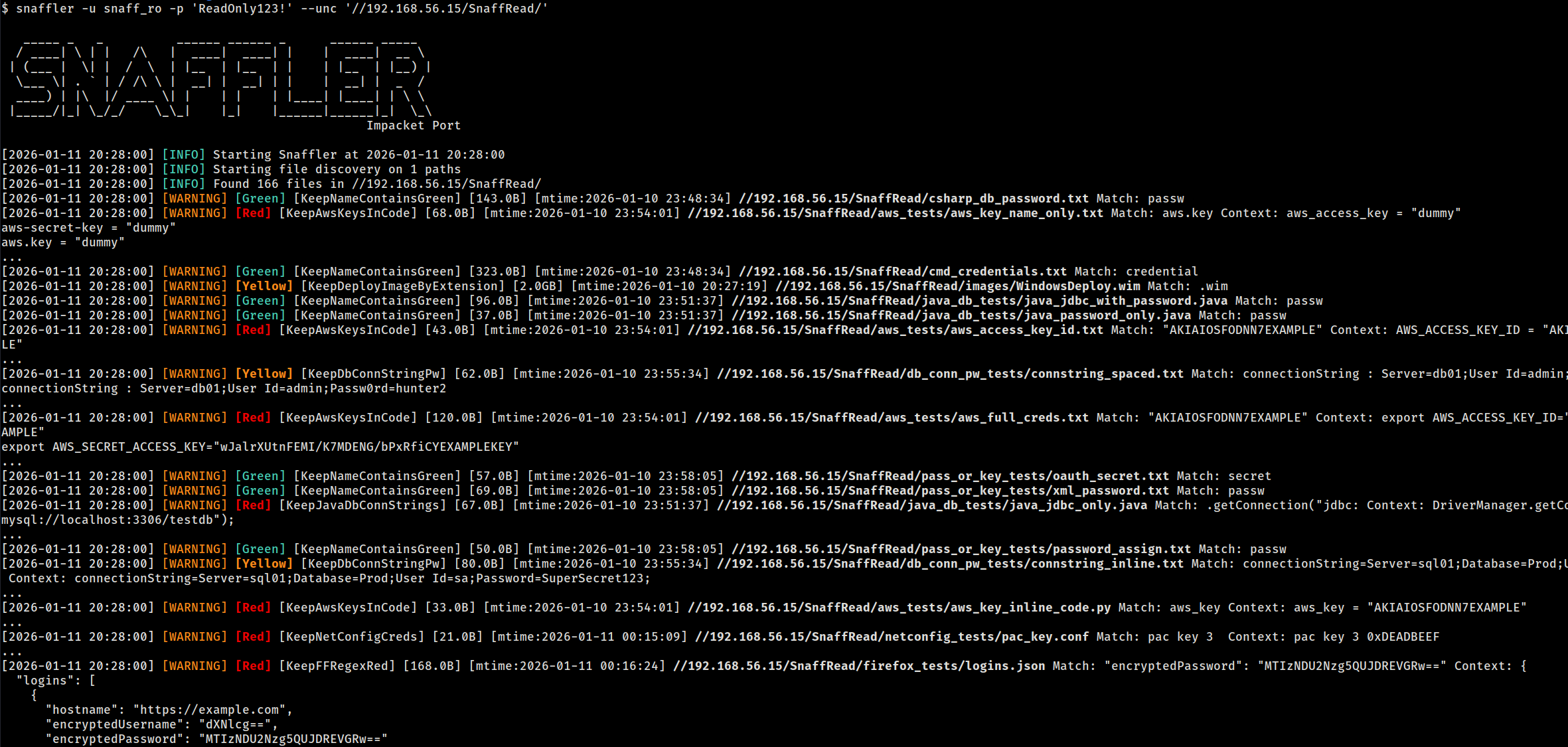
Scan a specific UNC path (no discovery):
snaffler \
  -u USERNAME \
  -p PASSWORD \
  --unc //192.168.1.10/Share
Scan multiple computers (share discovery enabled):
snaffler \
  -u USERNAME \
  -p PASSWORD \
  --computer 192.168.1.10 \
  --computer 192.168.1.11
Load target computers from file:
snaffler \
  -u USERNAME \
  -p PASSWORD \
  --computer-file targets.txt
Archive Peeking
snaffler-ng can look inside ZIP, 7z, and RAR archives without extracting files. Archive members are matched against file rules — if an archive contains web.config or id_rsa, it gets flagged:
# ZIP works out of the box. For 7z and RAR, install optional extras:
pip install snaffler-ng[7z,rar]
Filtering Shares and Directories
Only scan specific shares:
snaffler -u USER -p PASS -d DOMAIN.LOCAL --share "SYSVOL" --share "IT*"
Exclude shares and paths by glob:
snaffler -u USER -p PASS -d DOMAIN.LOCAL \
  --exclude-share "IPC$" --exclude-share "print$" \
  --exclude-unc "*/Windows/*" --exclude-unc "*/.snapshot/*"
Depth Limiting and Post-Filtering
Limit directory recursion depth to avoid deep trees:
snaffler -u USER -p PASS -d DOMAIN.LOCAL --max-depth 5
Filter findings by regex (matches against hostname, filename, rule name, or content):
snaffler -u USER -p PASS -d DOMAIN.LOCAL --match "password|connectionstring"
Exclude specific hosts from scanning:
snaffler -u USER -p PASS -d DOMAIN.LOCAL --exclusions hosts_to_skip.txt
Pipe from NetExec (nxc)
Pipe nxc smb --shares output directly into snaffler-ng with --stdin:
nxc smb 10.8.50.20 -u user -p pass --shares | snaffler -u user -p pass --stdin
This parses NXC's share output, extracts UNC paths, and feeds them into the file scanner. Snaffler's existing share/directory rules handle filtering.
Custom DNS Server
Use --nameserver (or --ns) to resolve hostnames through a specific DNS server instead of the system resolver. Useful for lab environments, split DNS, or any setup where the system resolver can't reach the target domain:
# Point at the DC for name resolution
snaffler -u USER -p PASS -d DOMAIN.LOCAL --dc-host 192.168.201.11 --ns 192.168.201.11

# Combine with SOCKS — DNS queries use TCP and route through the tunnel automatically
snaffler -u USER -p PASS -d DOMAIN.LOCAL --dc-host 192.168.201.11 \
  --socks socks5://127.0.0.1:1080 --ns 192.168.201.11
Web Dashboard
Launch a live web dashboard to monitor scan progress and findings in a browser:
snaffler -u USER -p PASS -d DOMAIN.LOCAL --web --web-port 8080
Requires the web extra (pip install snaffler-ng[web]).
Logging & Output Formats
snaffler-ng supports three output formats, each with a distinct purpose:
Plain(default, human-readable)JSON(structured, SIEM-friendly)TSV(flat, ingestion-friendly)
When using -o/--output, the format is auto-detected from the file extension (.json → JSON, .tsv → TSV). Use --log-type to override.
Resume Support
Large environments are expected. Scan state is tracked in a SQLite database (snaffler.db by default).
Scans auto-resume when the state database exists:
# First run — creates snaffler.db
snaffler -u USER -p PASS --computer-file targets.txt

# Interrupted? Just re-run the same command — it picks up where it left off
snaffler -u USER -p PASS --computer-file targets.txt
Use --state to specify a custom database path, or --fresh to ignore existing state and start clean:
snaffler -u USER -p PASS -d DOMAIN.LOCAL --state /tmp/scan1.db
snaffler -u USER -p PASS -d DOMAIN.LOCAL --fresh
Querying Results
After a scan, use snaffler results to query findings from the state database:
snaffler results                              # plain text summary
snaffler results -f json                      # JSON output
snaffler results -f html > report.html        # HTML report with search bar
snaffler results -b 2                         # Red+ severity only
snaffler results -s /path/to/snaffler.db      # custom DB path
Authentication Options
- NTLM username/password
- NTLM pass-the-hash (
--hash) - Kerberos (
-k) - Kerberos via existing ccache (
--use-kcache) - SOCKS proxy pivoting (
--socks) - Custom DNS server (
--nameserver/--ns)
Release history Release notifications | RSS feed


Download files
Download the file for your platform. If you're not sure which to choose, learn more about installing packages.
Source Distribution
Built Distribution
Filter files by name, interpreter, ABI, and platform.
If you're not sure about the file name format, learn more about wheel file names.
Copy a direct link to the current filters
File details
Details for the file snaffler_ng-1.3.0.tar.gz.
File metadata
- Download URL: snaffler_ng-1.3.0.tar.gz
- Upload date:
- Size: 147.4 kB
- Tags: Source
- Uploaded using Trusted Publishing? No
- Uploaded via: twine/6.1.0 CPython/3.13.7
File hashes
| Algorithm | Hash digest | |
|---|---|---|
| SHA256 |
76fcff42a01bf53a31830425b393ce2a483e262984e75b1936d4b679d24d7fdc
|
|
| MD5 |
e15325c5d4003f92d36ac33acfb93dbe
|
|
| BLAKE2b-256 |
b875c2218bec5553c0a79a3c3730332ea628440950711af167708db954eaf7a0
|
File details
Details for the file snaffler_ng-1.3.0-py3-none-any.whl.
File metadata
- Download URL: snaffler_ng-1.3.0-py3-none-any.whl
- Upload date:
- Size: 190.0 kB
- Tags: Python 3
- Uploaded using Trusted Publishing? No
- Uploaded via: twine/6.1.0 CPython/3.13.7
File hashes
| Algorithm | Hash digest | |
|---|---|---|
| SHA256 |
f2904d768cb116fa1dc1ebc25f25ff4398dd6dc32e270bf6c7de26be71a465aa
|
|
| MD5 |
383a7ea0b2636fce20e7f159dad57784
|
|
| BLAKE2b-256 |
4f6f85ee330ff3763b98da18f892d4bf48de73e1911c8e0b2109d7e7c03cb220
|






