
spotify_monitor







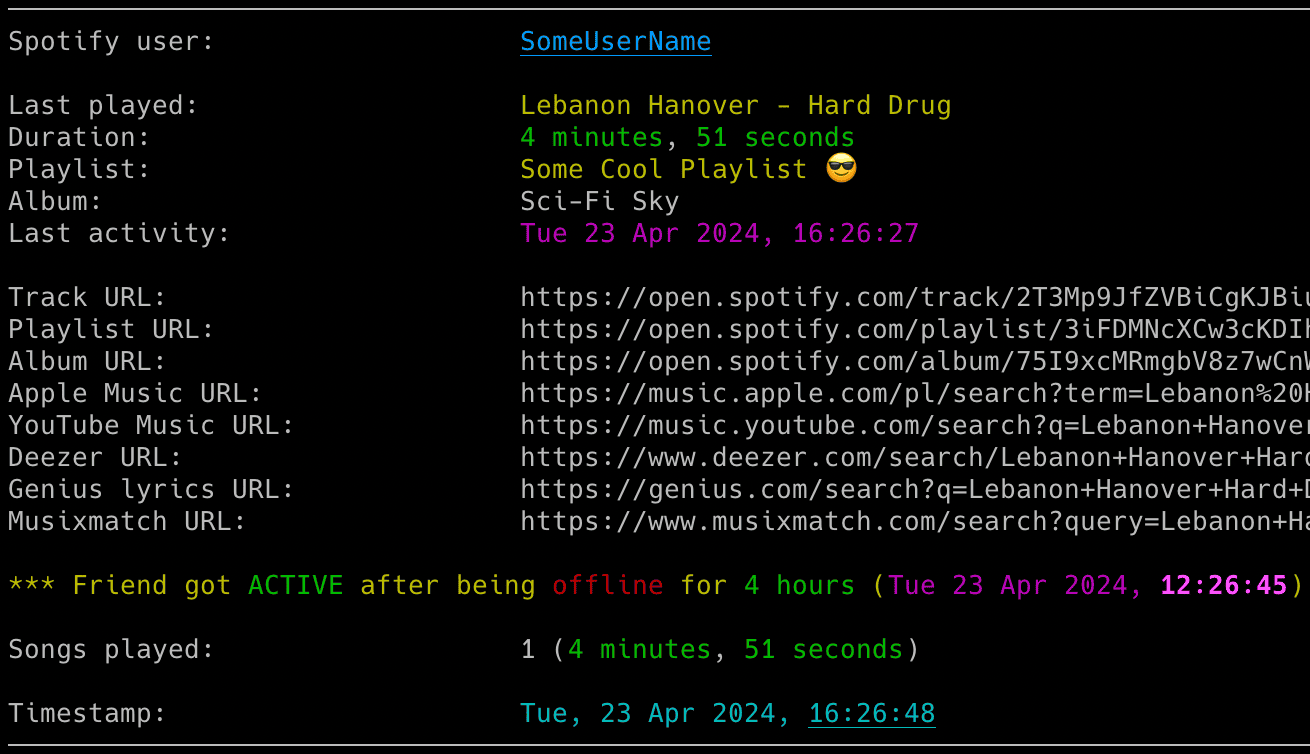
Track Spotify friend listening activity, play reported tracks in your local Spotify client and receive activity notifications.
🚀 Quick Install & Run
Python from PyPI
New to Python or unsure what is installed? Follow the Python install walkthrough first.
pip install spotify_monitor
Run setup for friend activity mode (Spotify friend's shared tracks, playback state and listening session):
spotify_monitor --setup
Or for Last.fm scrobble health mode (checks whether plays from your Spotify account reach your Last.fm profile):
spotify_monitor --setup-scrobble-health
The wizard asks for few details and optional notifications. Review the settings before saving them. See Setup & First Run for the other options.
Docker image - fastest container setup
The Docker commands below run Friend Activity setup. For Last.fm scrobble health, replace the final --setup with --setup-scrobble-health.
macOS or Windows
Use a macOS shell or Windows PowerShell with a Docker-compatible runtime that provides the docker CLI.
docker run --rm --pull=always -it --init -v "${PWD}:/data:z" misiektoja/spotify-monitor:latest --setup
In Windows Command Prompt replace ${PWD} with %cd% above.
Linux
Run the container with your numeric user and group IDs (--user "$(id -u):$(id -g)" below). This lets the container write files that your host account can edit.
docker run --rm --pull=always -it --init --user "$(id -u):$(id -g)" -v "$PWD:/data:z" misiektoja/spotify-monitor:latest --setup
Docker Compose - shorter recurring commands
Download the Compose file:
curl -fsSLO https://raw.githubusercontent.com/misiektoja/spotify_monitor/refs/heads/main/docker-compose.yml
Linux container engine requires to export your numeric user ID and group ID so files created in the current directory belong to you instead of root.
export SPOTIFY_MONITOR_UID="$(id -u)"
export SPOTIFY_MONITOR_GID="$(id -g)"
Docker-compatible runtimes on macOS and Windows normally do not need these values.
Run setup wizard:
docker compose run --rm --pull=always spotify_monitor --setup
For the manual single-file method, optional extras and upgrade commands, see Installation.
Features
🔍 Real-time Tracking
- Friend Activity: Track what your friends are listening to.
- Scrobble Health: Detect and alert when Spotify scrobbles stop showing up on Last.fm.
- Presence Detection: Detect when friends get online or offline.
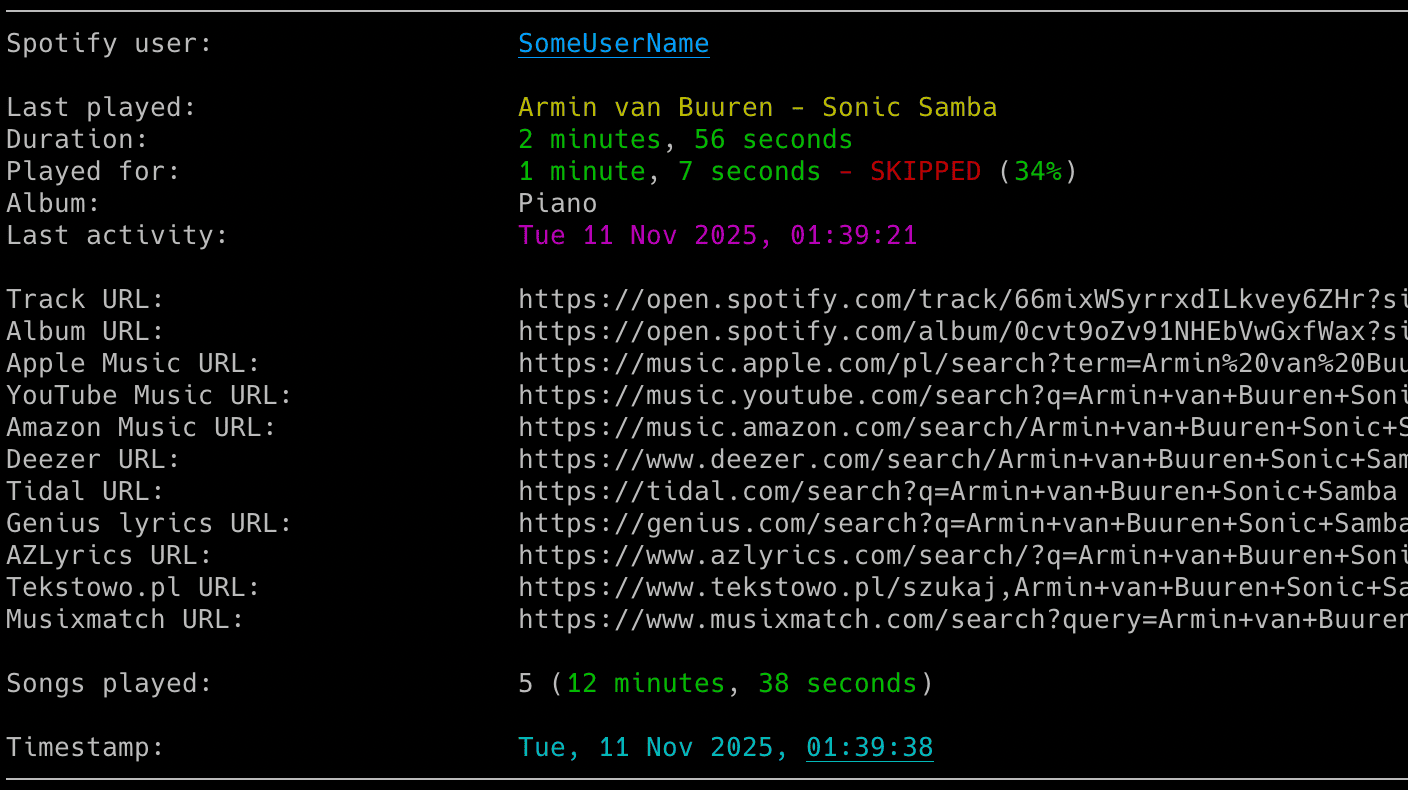
- Session Stats: Display duration, track counts, pauses and songs on loop.
🎮 Playback Control
- Auto-Sync: Automatically play friends' songs in your local Spotify client.
- Smart Pause: Pause or switch tracks when the monitored user goes offline.
- Crossfade Support: Detect and annotate crossfaded songs during transitions.
📊 Rich Insights
- Track Context: View playlist, artist and album info with clickable URLs.
- Skip Detection: See skipped songs and how long each song was played.
- Global Search: Instant links to Spotify, YouTube Music, Apple Music, Tidal, lyrics and more.
- Coloured Output: Readable terminal colours with a customizable theme, while log files stay plain text.
🔔 Smart Notifications
- Multi-Channel: Instant alerts via Email and Webhooks (Discord, ntfy etc.).
- Detailed Alerts: Choose activity, tracked-song, every-song, loop and error alerts.
- Session Summaries: Receive detailed reports when a friend finishes a session.
- Error Reporting: Be notified if the monitoring process hits a snag.
⚙️ Power Features
- Auth Flexibility: Sign in with a browser cookie or the Spotify Desktop Client, no developer app required.
- CSV Logging: Save every listened song with full timestamps to a CSV file.
- Flexible Config: Support for files, dotenv and environment variables.
- Signal Control: Manage the running script via system signals (macOS/Linux).
- Docker Ready: Run through Docker Hub, Docker Compose or a local image with persistent configuration, secrets and output.
For track progress indicators and offline scrobble history, see lastfm_monitor.
For Spotify profile and playlist change tracking, see spotify_profile_monitor.
For Spotify Web Player token and TOTP utilities, see Debugging Tools.
Before Monitoring
Spotify only shows a person's listening activity when both of these conditions are met:
- The Spotify account used by Spotify Monitor follows the person you want to monitor.
- That person has enabled listening activity sharing in Spotify.
The setup wizard checks whether the monitoring account follows the target. It can send the follow request after you confirm. To follow manually, open the target's profile in the Spotify desktop or mobile app. You can use Share > Copy link to profile and paste the complete link into the wizard. You do not need to extract the user ID. See Following the Monitored User.
Common Commands
Use Quick Install & Run above for first-time setup. The table uses PyPI commands. For manual script, direct Docker and Docker Compose equivalents, see Run Individual Commands.
Replace the target placeholders with a complete Spotify profile URL, a spotify:user: URI or a user ID.
| I want to... | Run this |
|---|---|
| Configure the target, credentials and alerts | spotify_monitor --setup |
| Start monitoring with existing authentication | spotify_monitor <spotify_target> |
| Check authentication, connectivity and one target | spotify_monitor --doctor <spotify_target> |
| List Spotify friends visible to the configured account | spotify_monitor --list-friends |
| Import a Spotify login from Firefox | Open Spotify Web Player in Firefox, sign in then run spotify_monitor --import-browser-cookie --browser firefox |
Enter or replace securely a manually extracted SP_DC_COOKIE |
Run spotify_monitor --set-sp-dc and enter sp_dc at the hidden prompt |
Enter or replace securely LASTFM_API_KEY |
Run spotify_monitor --set-lastfm-credentials and enter the key at the hidden prompt |
| Configure and test webhook alerts | Use the setup wizard or follow Webhook Settings |
| Start scrobble health monitoring from saved settings | spotify_monitor --monitor-mode scrobble_health |
| Select the monitoring mode for one run | spotify_monitor --monitor-mode friend_activity <spotify_target> or spotify_monitor --monitor-mode scrobble_health |
| Save an SMTP password for email alerts | spotify_monitor --set-smtp-password |
| Send a test email | spotify_monitor --send-test-email |
| Save a new webhook URL | spotify_monitor --set-webhook-url |
| Send a test webhook | spotify_monitor --send-test-webhook |
| List every supported command-line flag | spotify_monitor --help |
Running the tool with no arguments offers the wizard if you have not saved a target. If a target is already saved, it starts monitoring that target.
The tool runs until interrupted (Ctrl+C). Use tmux or screen for persistence and run multiple copies to monitor several targets.
For authentication, saved targets, configuration backups and setup recovery, see the full Setup & First Run guide.
For browser profiles, manual cookie extraction, Docker authentication, email and webhook setup, see Configuration. For notification choices, playback controls and output files, see Usage.
If a run fails, start with Doctor Preflight.
Documentation
Full documentation is available at misiektoja.github.io/spotify_monitor:
| Page | What it covers |
|---|---|
| Installation | Python walkthrough, PyPI, manual script and Docker installation, upgrades |
| Setup & First Run | Setup wizard, authentication, the first monitoring run |
| Configuration | Config file, Spotify login, targets, SMTP, webhooks, storing secrets, check intervals |
| Usage | Command formats, monitoring modes, container operation, notifications, playback, terminal output |
| Troubleshooting | --doctor preflight checks, what to do when something fails, --verbose and --debug output |
| Debugging Tools | TOTP token testing and secret extraction |
| Testing | Running the offline suite, the linter and the docs build |
| About | Change log, contributing, security, license, support |
Change Log
See RELEASE_NOTES.md for details.
Contributing
Bug reports, documentation fixes and code contributions are welcome. See CONTRIBUTING.md for the development setup, the checks CI enforces and what a change needs before it is merged. Participation is covered by the Code of Conduct.
Security
Report a suspected vulnerability privately through GitHub security advisories, never as a public issue. SECURITY.md covers the reporting process, the supported versions and the security posture of stored secrets, configuration loading and local playback.
Maintainers
- misiektoja (@misiektoja)
- tomballgithub (@tomballgithub)
License
Licensed under GPLv3. See LICENSE. Dependency licenses are listed in THIRD_PARTY_NOTICES.md.
Support
Questions, bug reports and vulnerability reports each have a place, listed in SUPPORT.md.
If the project is useful to you, you can support its development through GitHub Sponsors or Buy Me a Coffee.
1 maintainer

Metadata
1 maintainer
Release files for spotify-monitor 3.4
For a detailed explanation of source distributions (sdists) and built distributions (wheels), please see the package formats documentation.
Source distribution (sdist)
| File | Size | Uploaded | |
|---|---|---|---|
| spotify_monitor-3.4.tar.gz | 439.1 kB | Details |
Built distribution (wheel)
| File | Interpreter | ABI | Platform | Reset |
|---|---|---|---|---|
| spotify_monitor-3.4-py3-none-any.whl | Python 3 | none | any | Details |
Total release size: 651.2 kB
Release files / spotify_monitor-3.4.tar.gz
| Download URL | spotify_monitor-3.4.tar.gz |
|---|---|
| Size | 439.1 kB |
| Tags | Source |
|
SHA-256 checksum How to use checksums |
e84e65a97d89e21677b4d04bdb88e80a5457eff0ec129b65f96cdf43808855c5
|
|
BLAKE2b-256 checksum How to use checksums |
6dbfb2440fc28a7830551d864486ef1e13791c2635b7247cd7a1506275499632
|
| Upload date | |
|
Uploaded using Trusted Publishing? What is trusted publishing? |
Yes |
| Uploaded via |
twine/7.0.0 CPython/3.13.14
|
Provenance
Provenance describes where a file came from. On PyPI, provenance is shared via attestations, which provide a verifiable record of the build or publishing details. View details, limitations and caveats.


PyPI Publish Attestation
PyPI verified that this artifact, at this checksum, originated from the publisher listed below.
Signed by GitHub Actions, verified by PyPI on Sep 18, 2026.
Transparency logRelease files / spotify_monitor-3.4-py3-none-any.whl
| Download URL | spotify_monitor-3.4-py3-none-any.whl |
|---|---|
| Size | 212.2 kB |
| Tags | Python 3 |
|
SHA-256 checksum How to use checksums |
a915c738b5d0d33086ab158239949b7df7e7ef387e92b635205501eb020ddb56
|
|
BLAKE2b-256 checksum How to use checksums |
7ece1af282ef905d883fbd1c69c823238502f6716a6c5d4e2ed9cad954037358
|
| Upload date | |
|
Uploaded using Trusted Publishing? What is trusted publishing? |
Yes |
| Uploaded via |
twine/7.0.0 CPython/3.13.14
|
Provenance
Provenance describes where a file came from. On PyPI, provenance is shared via attestations, which provide a verifiable record of the build or publishing details. View details, limitations and caveats.
PyPI Publish Attestation
PyPI verified that this artifact, at this checksum, originated from the publisher listed below.
Signed by GitHub Actions, verified by PyPI on Sep 18, 2026.
Transparency log













