
superbased-observer

Track what every AI coding agent costs. See the limit coming. See what 50 AI coding tools cost, Claude Code, Codex and Cursor included, per session and per model, from the tokens your provider actually billed. Free, Apache-2.0, and it runs on your machine.




Try it without installing
uvx --from superbased-observer observer usage
Reads the session logs your coding agents already keep on disk, prints a 30-day cost table by tool
and model, and deletes its temporary database on exit. No config, no network. (The package is
superbased-observer; the command is observer.)
Install
uv tool install superbased-observer    # or: pipx install superbased-observer
observer --version
Each wheel bundles its platform's prebuilt binary (manylinux2014 x86_64 and aarch64, macOS 13 or later on Intel and Apple Silicon, win_amd64): no compile step, no download at install time, no Go toolchain. The same binary ships on npm and the VS Code Marketplace with the same version numbers; install from one channel only.
Why SuperBased
One local binary that tracks Claude Code token usage, Codex cost and Cursor spend side by side, and helps you control them.
- Provider-exact cost, not estimates. An optional local proxy records the tokens your provider returned: net input, 5-minute vs 1-hour cache writes, reasoning tokens and long-context repricing.
- Every coding agent in one place. 50 adapters normalize Claude Code, Codex, Cursor, GitHub Copilot, Gemini CLI, Cline, Aider, Kiro, Devin, OpenCode, Junie and more into one local database.
- Runs on your computer. Everything lives in one SQLite file under
~/.observer/. Sign in for a personal dashboard you can open anywhere; your sessions leave your computer only when you connect, after you approve it. - Know the next bill before it lands. Prompt-cache tracking with expiry warnings, a cost band for your next message, and a 5-hour and weekly limit gauge for proxied sessions.
- Guardrails on your own agents. Built-in and custom rules for destructive commands, secrets
egress, MCP pinning and budgets. Observe mode by default;
observer guard simulatefirst. - Your agents as terminals. Launch agent CLIs from the dashboard, join a running session from a paired device over your Tailscale tailnet, and hand a session from one tool to another.
Get started

observer start    # proxy + watcher + dashboard; opens http://localhost:8081
observer scan     # backfill history from the session logs already on disk
observer doctor   # check the install
Sign in (recommended)
observer connect          # your personal dashboard
observer connect acme     # or the team with the short name acme
One command signs you in and connects this machine. Your browser opens a page on
cloud.superbased.app that shows the machine and what will be shared; nothing is sent until you
click Connect. A personal dashboard gets Summary only (usage totals, not your prompts or
file paths). A team gets Full detail (prompts, responses and file paths, readable by the
team's admins). Not now keeps you signed in with nothing sent, and observer disconnect
stops sending at any time. You can also click Sign in in the local dashboard's top bar.
On a machine with no browser, observer connect --no-browser prints a code to enter at
cloud.superbased.app/connect.
Starting from scratch on a new machine? One command installs Observer, runs it as a background service and connects:
curl -fsSL https://superbased.app/connect.sh | sh              # macOS and Linux
curl -fsSL https://superbased.app/connect.sh | sh -s -- acme   # straight into a team
irm https://superbased.app/connect.ps1 | iex # Windows
Everything else in this README works without an account. See Start here.
For provider-exact tokens, route your agent through the proxy: in the dashboard open Compression,
click your tool's status pill and choose Route through the observer proxy (it previews the
config change and writes only when you confirm), or run observer claude / observer codex for a
one-off proxied session. observer init additionally registers the opt-in MCP server.
Prefer a plain download? superbased.app/download has the Windows setup program, macOS and Linux downloads and every version, with SHA-256 checksums.
macOS needs version 13 Ventura or later. Observer is built with Go 1.27, which no longer runs on macOS 12 Monterey. On macOS 12, stay on v1.36.0 or upgrade macOS first. v1.36.0 was meant to carry an advance notice of this and did not. Linux and Windows are not affected.
What you get
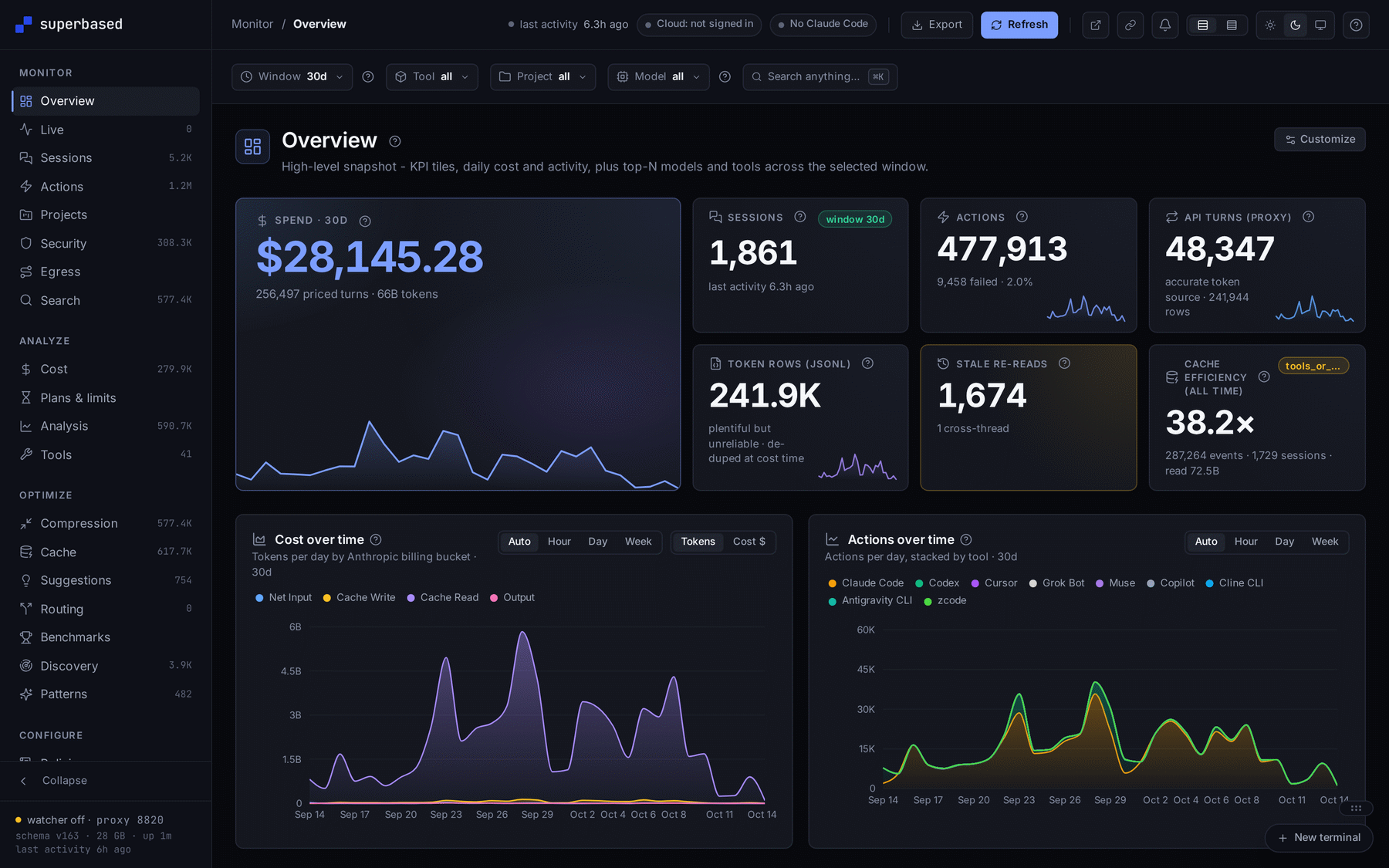
- A local dashboard for sessions, cost, cache, security and live activity, filterable by tool and project.
- Cost per session, model, project and tool, with cache read/write splits down to each API turn.
- An opt-in MCP server so your agents can query their own history across tools.
- Waste detection: stale re-reads, repeated commands and files several agents fight over.
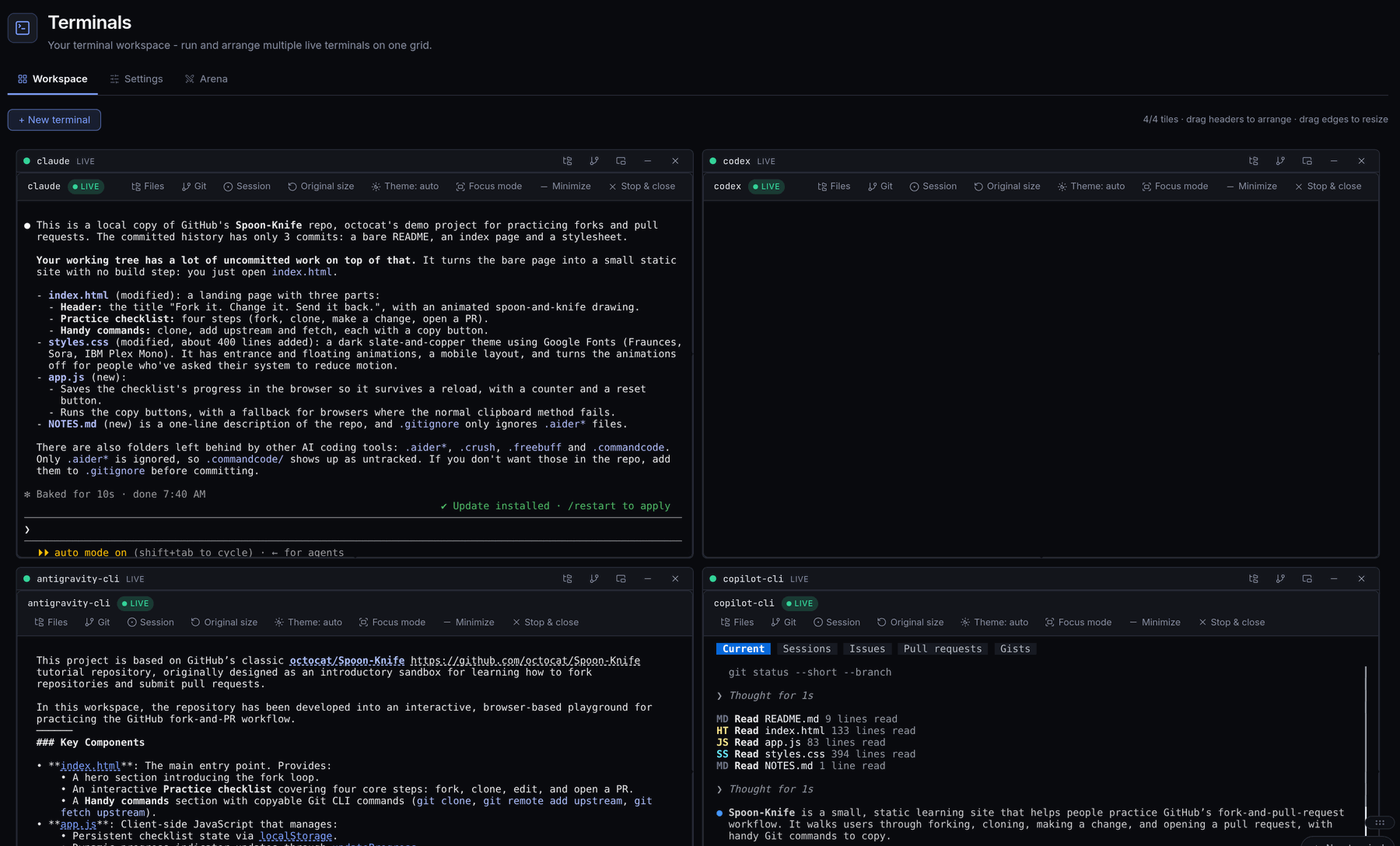
- Dashboard terminals with multi-seat join and native resume.
- A CLI for everything:
observer usage,cost,predict,tail,statusline.
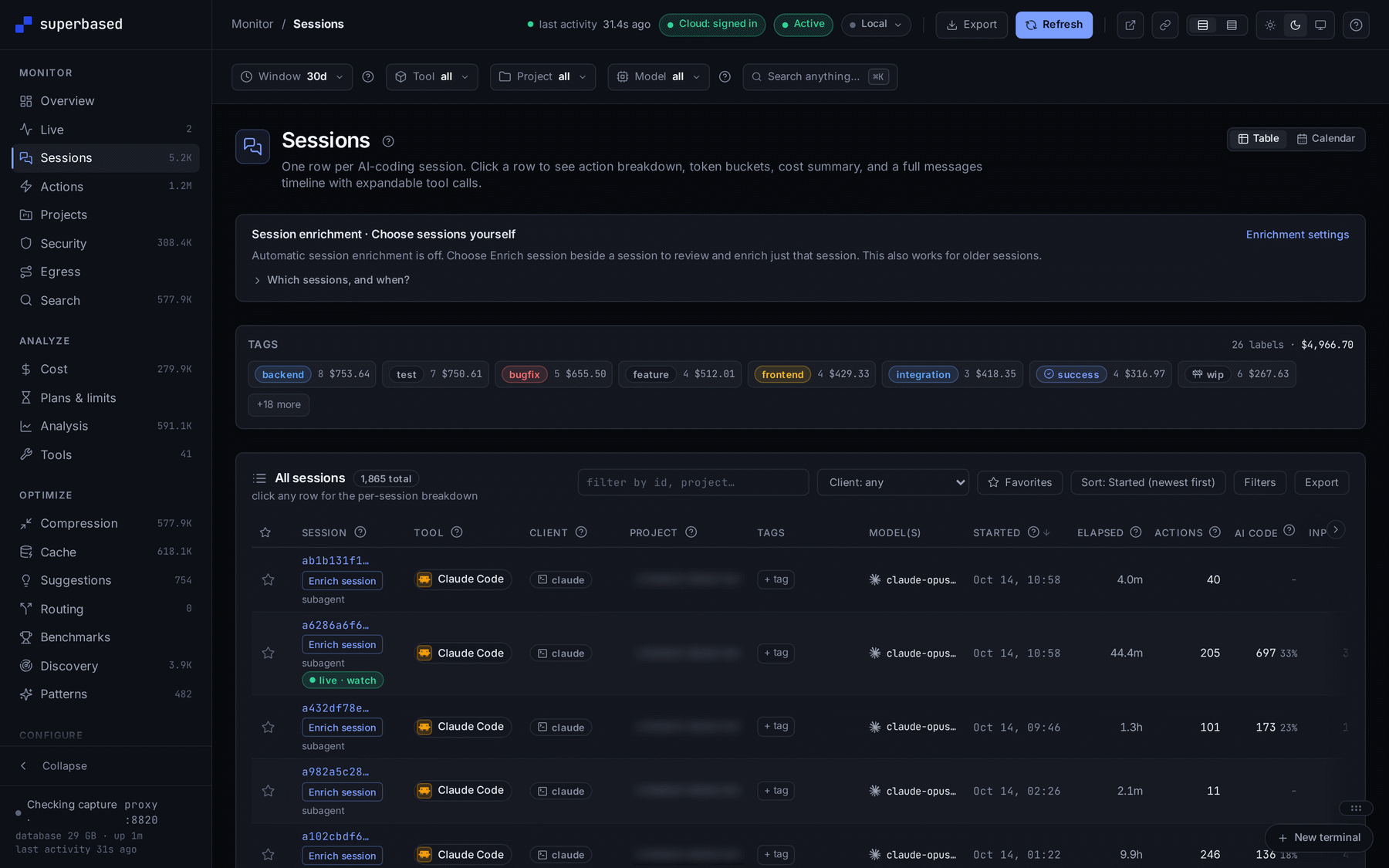 Sessions: every session from every agent, with cost and tags. |
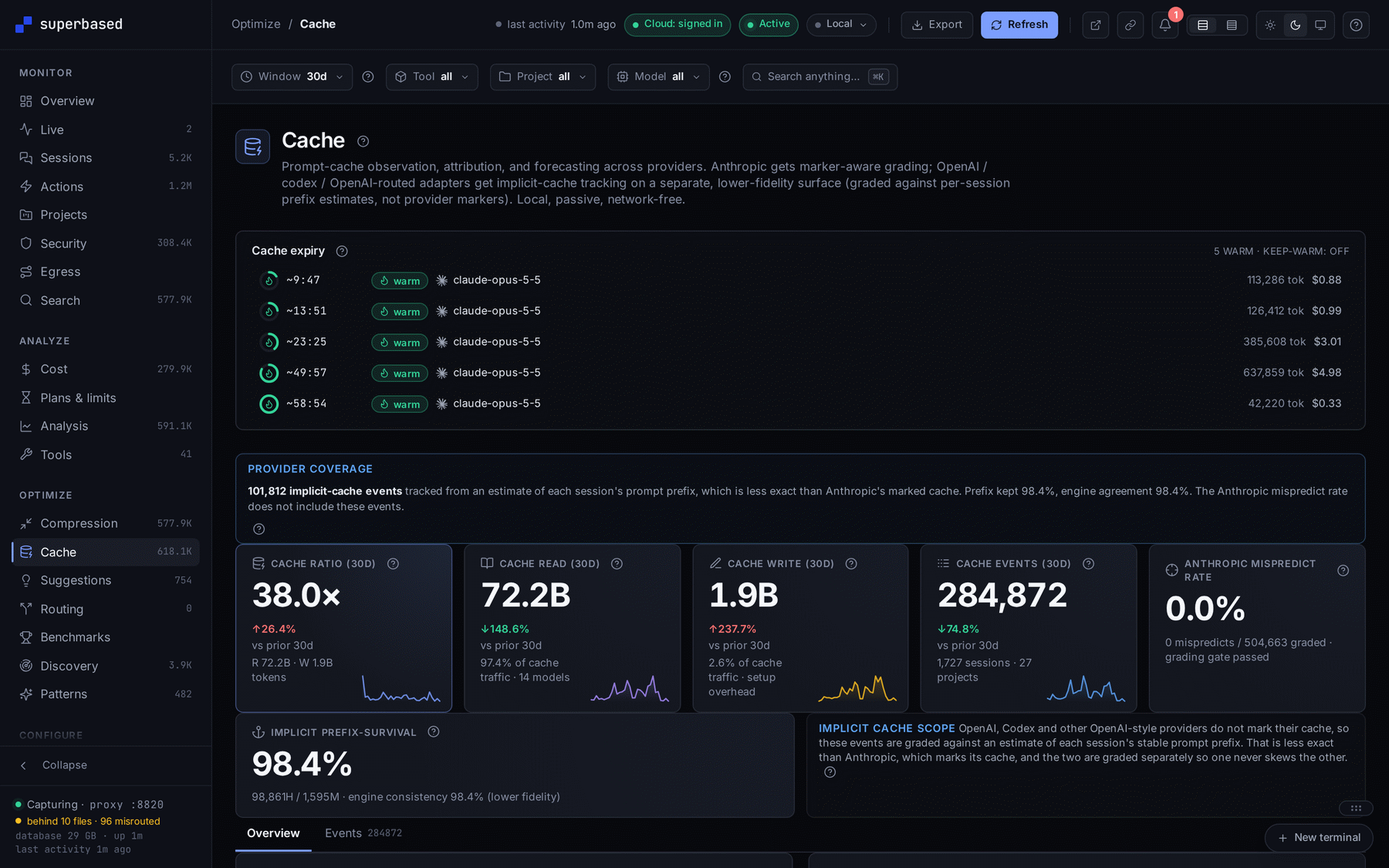 Cache: which prompt caches are warm and when they go cold. |
Inside a session
Click any session to open its detail view. Four of its tabs:
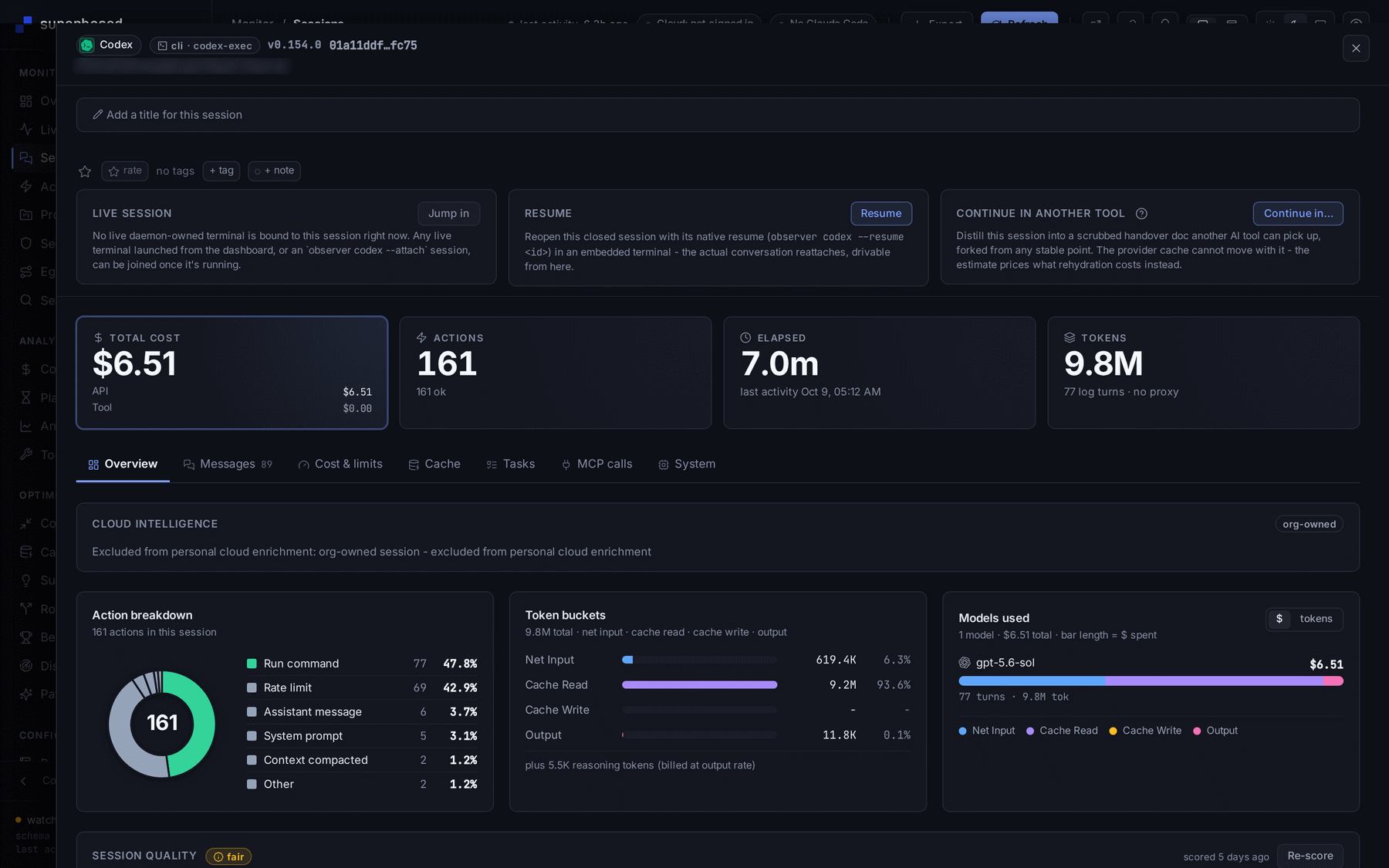 Overview: cost, tokens by billing tier and the models used. |
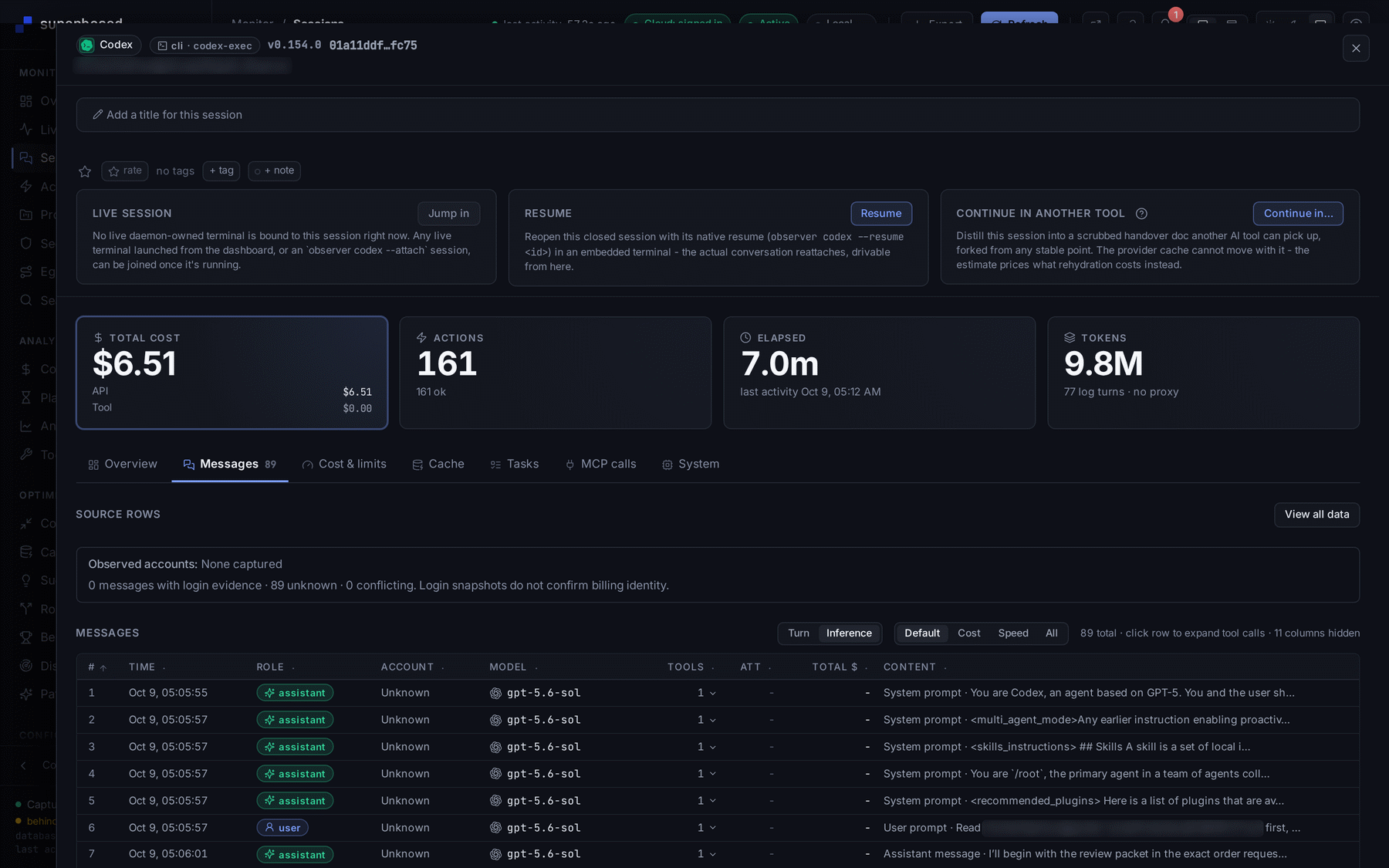 Messages: each message with its model, tool calls and cost. |
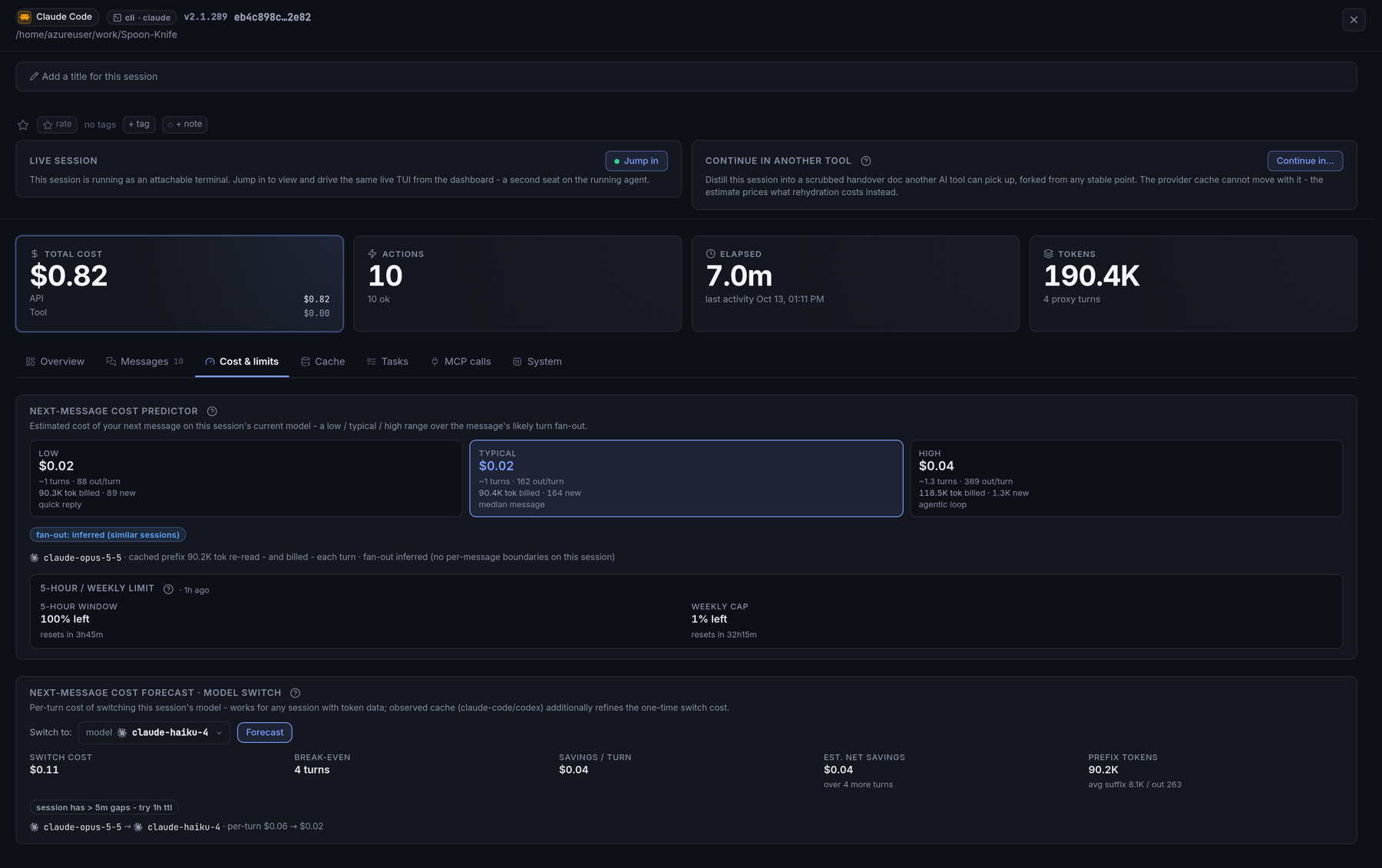
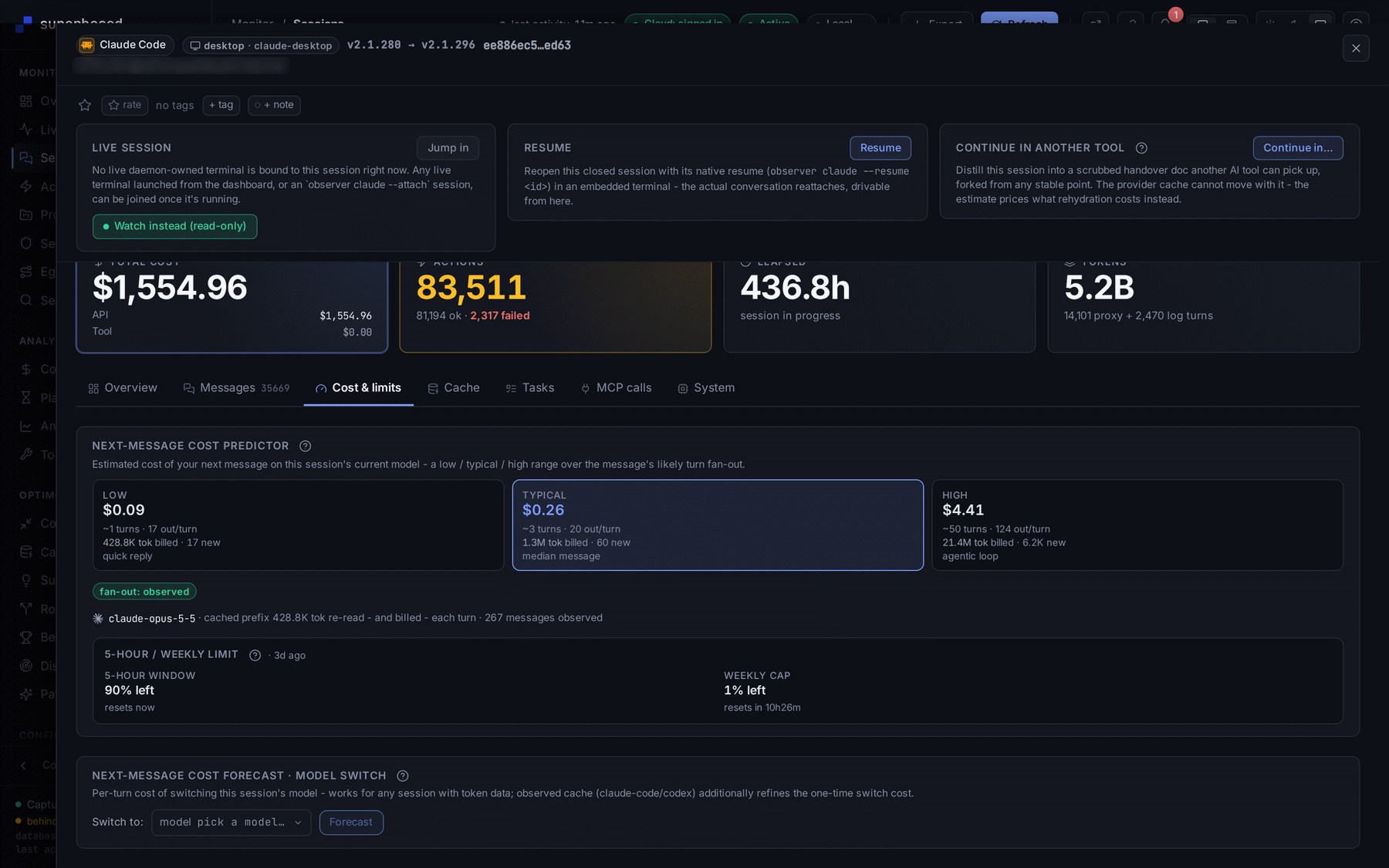 Cost & limits: what the next message will cost and how much of your limit is left. |
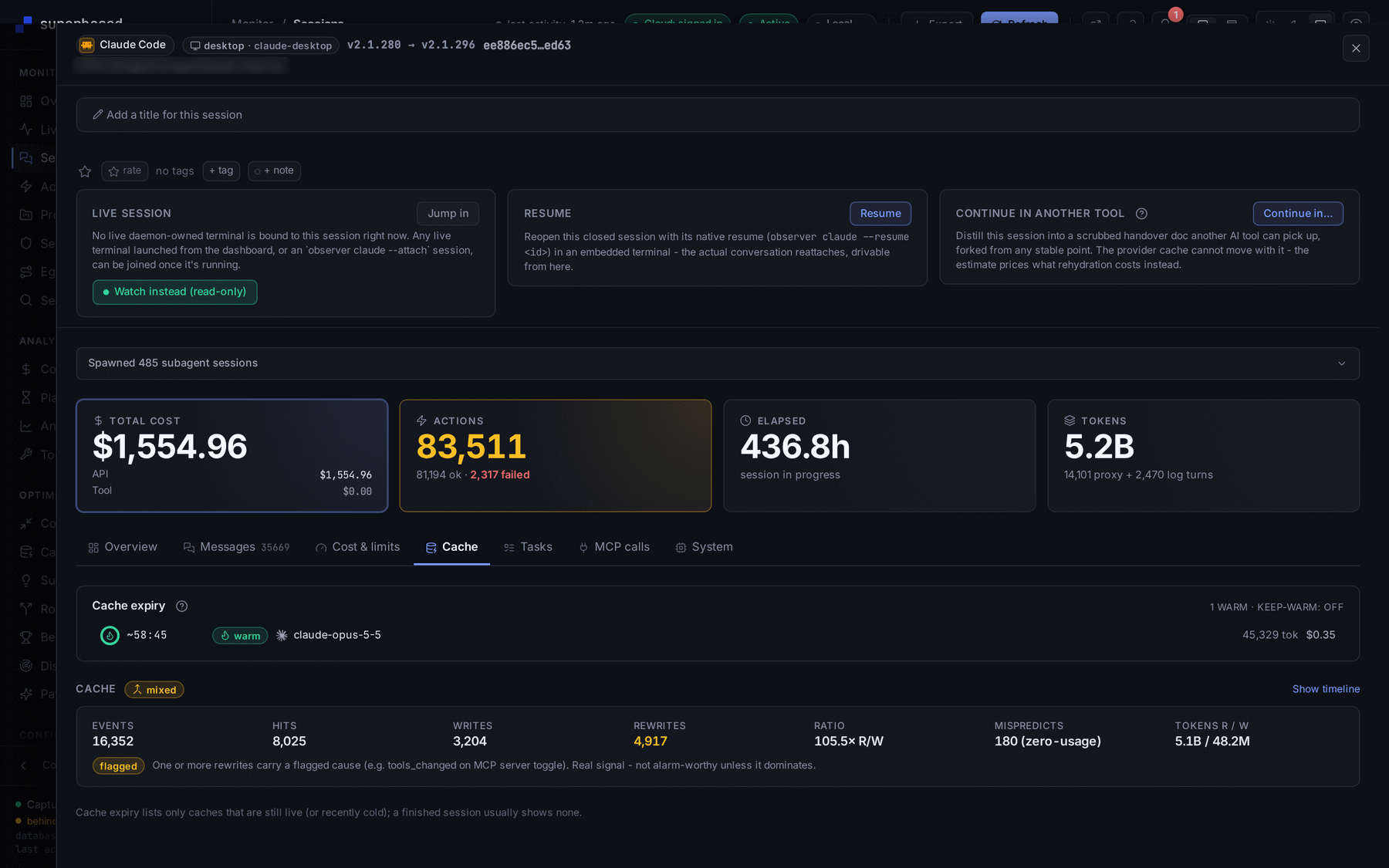 Cache: the session's live cache, hits, writes and rewrites. |
Privacy
No account needed. Today the default install sends us no usage statistics, analytics or crash
reports, and your sessions leave your computer only when you connect. SuperBased stores paths,
commands and short excerpts, scrubs secrets before writing, and binds the proxy and dashboard to
127.0.0.1 by default. The proxy forwards your own requests, unchanged, to the provider you
already use. See PRIVACY.md.
What Observer contacts by default
| What | Host | When | What it sends | Turn it off |
|---|---|---|---|---|
| Model price list | superbased.app | when Observer starts, then daily | nothing about you: a plain download of a signed public file | [pricing.feed] enabled = false |
| Package lists for the install check | superbased.app | every 6 hours | nothing about your projects: the same signed public files for everyone | [security.deps] index_download = false |
| Connection warm-up | chatgpt.com, api.openai.com | once when the proxy starts | a bare HEAD request, no body and none of your data | [proxy] prewarm_targets = [] |
Everything else needs you to turn it on: your AI tool's own requests pass through the proxy only
when you route that tool through it, and your sessions go to cloud.superbased.app only after you
run observer connect and approve the machine. The vulnerability databases download only after
you accept them once. observer privacy lists every outbound request this build can make.
Learn more
- Documentation and quickstart
- Supported agents and per-tool setup
- How SuperBased compares
- Source, issues and changelog
Troubleshooting
externally-managed-environmentfrom pip: your distro protects the system Python (PEP 668). Useuv tool installorpipx install, which give the tool its own environment.observer: command not found: make sure the installer'sbindirectory (usually~/.local/bin) is onPATH;pip show -f superbased-observerlists the exact path.- Port 8820 or 8081 already in use: another
observer startis running; stop it first.
License
Apache 2.0. This package is a small Python launcher that runs the prebuilt binary bundled in the wheel.
1 maintainer

Metadata
1 maintainer
Release files for superbased-observer 1.41.0
For a detailed explanation of source distributions (sdists) and built distributions (wheels), please see the package formats documentation.
Built distributions (wheels)
| File | Actions Reset | |||
|---|---|---|---|---|
| superbased_observer-1.41.0-py3-none-win_amd64.whl | Python 3 | none | Windows x86-64 | Details for superbased_observer-1.41.0-py3-none-win_amd64.whl |
| superbased_observer-1.41.0-py3-none-manylinux2014_x86_64.whl | Python 3 | none | Linux glibc 2.17+ x86-64 | Details for superbased_observer-1.41.0-py3-none-manylinux2014_x86_64.whl |
| superbased_observer-1.41.0-py3-none-manylinux2014_aarch64.whl | Python 3 | none | Linux glibc 2.17+ ARM64 | Details for superbased_observer-1.41.0-py3-none-manylinux2014_aarch64.whl |
| superbased_observer-1.41.0-py3-none-macosx_13_0_x86_64.whl | Python 3 | none | macOS 13.0+ x86-64 | Details for superbased_observer-1.41.0-py3-none-macosx_13_0_x86_64.whl |
| superbased_observer-1.41.0-py3-none-macosx_13_0_arm64.whl | Python 3 | none | macOS 13.0+ ARM64 | Details for superbased_observer-1.41.0-py3-none-macosx_13_0_arm64.whl |
Total release size: 267.8 MB
Release files / superbased_observer-1.41.0-py3-none-win_amd64.whl
| Download URL | superbased_observer-1.41.0-py3-none-win_amd64.whl |
|---|---|
| Size | 58.6 MB |
| Tags | Python 3 Windows x86-64 |
|
SHA-256 checksum How to use checksums |
27fc1d2133cff4924c5019d1b6cb90677a2e7389482cba7e1ebc2a7787a477f1
|
|
BLAKE2b-256 checksum How to use checksums |
d8906a79f739d4de42b5c70ebc4d7b0fc211ee7ce3734b286232310ec94d0e32
|
| Upload date | |
|
Uploaded using Trusted Publishing? What is trusted publishing? |
No |
| Uploaded via |
twine/7.0.0 CPython/3.13.14
|
Release files / superbased_observer-1.41.0-py3-none-manylinux2014_x86_64.whl
| Download URL | superbased_observer-1.41.0-py3-none-manylinux2014_x86_64.whl |
|---|---|
| Size | 55.3 MB |
| Tags | Linux glibc 2.17+ x86-64 Python 3 |
|
SHA-256 checksum How to use checksums |
da960bd38cc15972825801dd149ec7eb863e10f8234fd12f47c2a0a8b3282a32
|
|
BLAKE2b-256 checksum How to use checksums |
38a151bc25e86cf1aba1a535f86044d9527a5473d1f821313226370a00850ab0
|
| Upload date | |
|
Uploaded using Trusted Publishing? What is trusted publishing? |
No |
| Uploaded via |
twine/7.0.0 CPython/3.13.14
|
Release files / superbased_observer-1.41.0-py3-none-manylinux2014_aarch64.whl
| Download URL | superbased_observer-1.41.0-py3-none-manylinux2014_aarch64.whl |
|---|---|
| Size | 51.2 MB |
| Tags | Linux glibc 2.17+ ARM64 Python 3 |
|
SHA-256 checksum How to use checksums |
94e4128db7d17cc506426cc97f59b7a935f7d59debef1d0dc2d8b7d3585e356a
|
|
BLAKE2b-256 checksum How to use checksums |
ccf72c3cc77d7793d74b3b05a47fce509ca9acadfad050a1a27f17893dc356c1
|
| Upload date | |
|
Uploaded using Trusted Publishing? What is trusted publishing? |
No |
| Uploaded via |
twine/7.0.0 CPython/3.13.14
|
Release files / superbased_observer-1.41.0-py3-none-macosx_13_0_x86_64.whl
| Download URL | superbased_observer-1.41.0-py3-none-macosx_13_0_x86_64.whl |
|---|---|
| Size | 53.3 MB |
| Tags | Python 3 macOS 13.0+ x86-64 |
|
SHA-256 checksum How to use checksums |
498fd8ce2cb3d3de2b0a28afb4fa20f59cf602cff4a573a854ce654bb73ec738
|
|
BLAKE2b-256 checksum How to use checksums |
21dfcf94fa47109651da5098d36d0ee63e9692deb97c87aefcb7b79e251458d8
|
| Upload date | |
|
Uploaded using Trusted Publishing? What is trusted publishing? |
No |
| Uploaded via |
twine/7.0.0 CPython/3.13.14
|
Release files / superbased_observer-1.41.0-py3-none-macosx_13_0_arm64.whl
| Download URL | superbased_observer-1.41.0-py3-none-macosx_13_0_arm64.whl |
|---|---|
| Size | 49.3 MB |
| Tags | Python 3 macOS 13.0+ ARM64 |
|
SHA-256 checksum How to use checksums |
e6956b8820d6200797f6960a3333f78254a06764336e998afe66b8a7b59d3843
|
|
BLAKE2b-256 checksum How to use checksums |
41861a3164b37cd4d7d5f1be713af51dca40587fd721265d83fe4d27867c973b
|
| Upload date | |
|
Uploaded using Trusted Publishing? What is trusted publishing? |
No |
| Uploaded via |
twine/7.0.0 CPython/3.13.14
|
Security for superbased-observer 1.41.0
Provenance
Provenance describes where a file came from. On PyPI, provenance is shared via attestations, which provide a verifiable record of the build or publishing details. View details, limitations and caveats.
No provenance found
None of the files in this release were uploaded with provenance metadata.
A note on package security
PyPI is a repository for distributing packages, not a service for auditing them. While third-party security researchers and our staff do their best to detect and remove malicious packages, PyPI cannot guarantee the quality, security or suitability of any given package.
To learn more about protecting yourself from malicious actors, visit our package security documentation.














