
TachyPy





TachyPy is a psychophysics engine for Python focused on precise visual timing with OpenGL rendering, a GLFW-first display/input backend, and experiment-friendly stimulus helpers.
Why "TachyPy"?
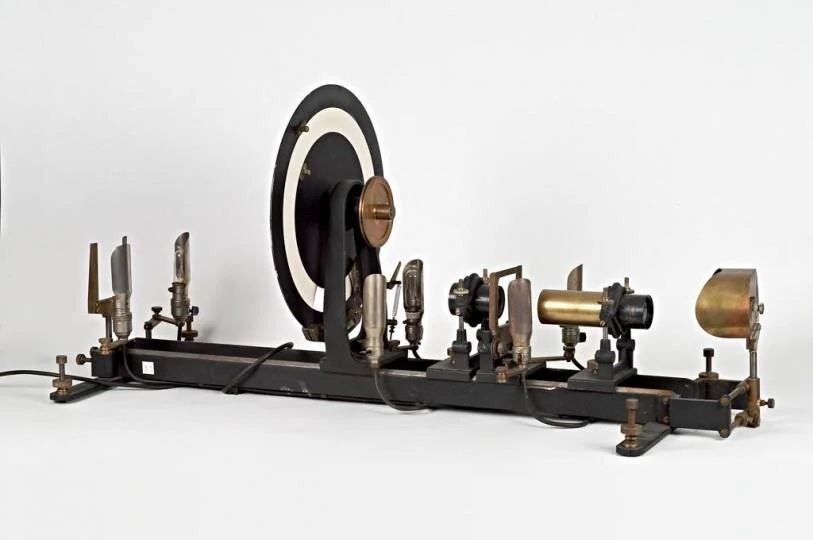
The name TachyPy comes from the tachistoscope: a classic laboratory instrument used to present visual stimuli for precisely controlled, brief durations. TachyPy aims to bring that timing discipline into Python experiments while keeping stimulus code readable and inspectable.
Timing Validation
TachyPy's GLFW backend was tested with a photodiode setup using a centrally presented white square on a uniform gray background. The white square was shown for one frame on a 60 Hz monitor. The photodiode was placed at the screen center, over the white square, and the recording captured both serial trigger events and the photodiode signal.
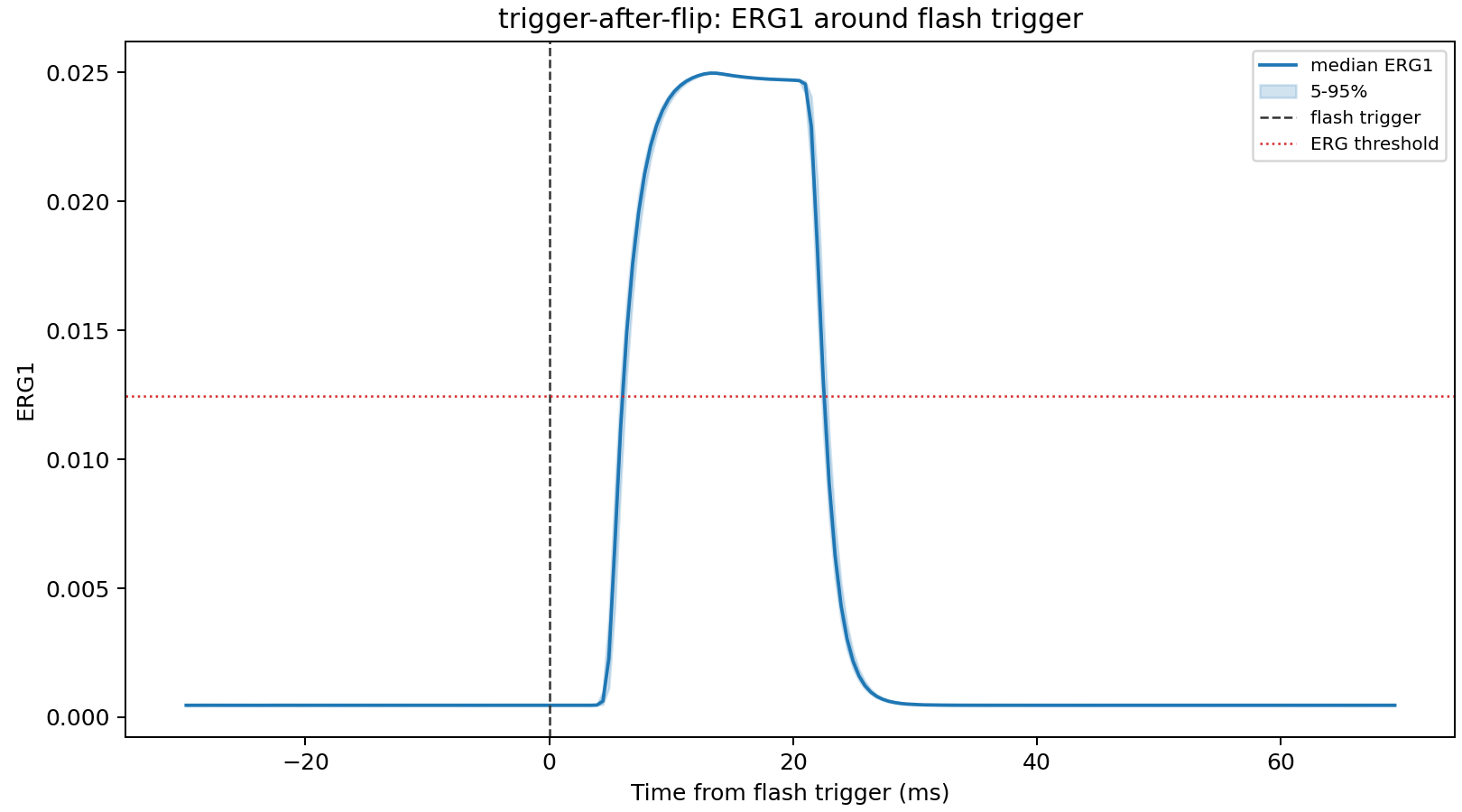
In the after-flip trigger condition shown here, the dashed line marks the serial flash trigger. The blue trace is the median photodiode waveform, with the shaded region showing the 5th to 95th percentile range across flashes.
Summary for this run:
- Median rise after flash trigger:
6.35 ms - SD of rise after flash trigger:
0.20 ms - Median photodiode pulse width:
16.60 ms - SD of photodiode pulse width:
0.18 ms
These measurements are hardware/display dependent, but they provide a concrete validation pattern for TachyPy timing tests: combine serial trigger logging, photodiode measurements, and TachyPy flip timestamps rather than relying on software timestamps alone.
Highlights
- OpenGL stimulus rendering (
Texture,Shapes, fixation, etc.). - GLFW-first window/input handling via
Screenfor tighter display control. - Backend-aware input handling through
ResponseHandler. Textfor text rendering: system fonts via FreeType + HarfBuzz, drawn as OpenGL quads.- Psychophysics helpers (
make_gabor, gratings, normalization, dithering). - Audio playback utility (
Audio) backed bytachyaudio. - Optional Wooting analog-keyboard integration (
tachypy[wooting]): on-screen pressure feedback, analog scrollbar interaction, andWOOTING_ACQUISITIONstraight fromtachypy. Animated keypad demos (tachypy.instruction_demos) can be played while presenting instructions. - Test suite for core logic and regressions.
Installation
Install base package:
pip install tachypy
The base install includes GLFW, PyOpenGL, FreeType, HarfBuzz, pyserial, and
TachyAudio. Pygame is no longer supported.
TachyPy requires tachyaudio>=0.2.0b4,<2, which includes native scheduling on
macOS, Linux, and Windows. Compatible platform wheels install automatically.
Editable install for development:
git clone https://github.com/Charestlab/tachypy.git
cd tachypy
pip install -e .
Optional extras:
pip install -e ".[test]"        # pytest
pip install -e ".[wooting]"     # Wooting analog-keyboard integration
Wooting analog-keyboard integration
pip install "tachypy[wooting]" adds support for Wooting analog keyboards
(pressure acquisition, logging, visual feedback, and analog scrollbar
interaction):
from tachypy import Screen, WOOTING_ACQUISITION

acq = WOOTING_ACQUISITION(threshold=0.8)
acq.initialize_keyboard()
acq.wait_light_press_visual(target_keys=["c", "z"], screen=Screen(fullscreen=False))
Scripted animations of the keypad (fixation-cross hold, slider) can be shown while presenting the instructions, to explain the principle before participants use the keys:
from tachypy.instruction_demos import GifUwuFixationCross, GifUwuScrollbar
See the Wooting docs page for details and gifs.
Audio dependency
TachyPy audio uses tachyaudio>=0.2.0b4,<2, with native timing by
default on macOS, Linux, and Windows. Linux requires an explicit ALSA hardware
device; Windows requires the endpoint mix rate and uses its default buffer period. TachyPy no longer depends on
sounddevice or requires users to install PortAudio separately. Hardware/audio
device validation should still be done on the lab machine that will run the
experiment.
Quick Start
from tachypy import Screen, ResponseHandler

screen = Screen(
    screen_number=0,
    fullscreen=False,
    width=1280,
    height=720,
)
responses = ResponseHandler(screen=screen)

running = True
while running:
    screen.fill((128, 128, 128))
    screen.flip()

    responses.get_events()
    if responses.should_quit() or responses.was_key_pressed("esc"):
        running = False
    if responses.was_key_pressed("space"):
        print("Space pressed")

screen.close()
To run the full demo:
python example_tachypy.py
To run the fullscreen GLFW clock/stop-timer demo:
tachypy-clock-demo
From a source checkout:
python clock_timer_demo.py
Use Esc to quit, click START/STOP/RESET, or use Space and R.
For development, use tachypy-clock-demo --windowed or python clock_timer_demo.py --windowed.
Choose a font for demo text rendering with GLFW Text:
TACHYPY_FONT="Avenir Next, Helvetica, Arial" python example_tachypy.py
Backend Notes
Screen(backend="glfw"): GLFW-managed window/events, with top-left logical coordinate handling aligned to TachyPy conventions.Screen(...)defaults to GLFW, so most code does not need a backend argument.Screen(...)also presents 60 neutral warmup frames by default before experiment timing begins; setwarmup_frames=0to disable or choose another count for a specific display.- Initialize
ResponseHandler(screen=screen)for input. It callsscreen.poll_events()and owns keyboard/mouse state;Screendoes not track participant responses directly. DraggableManagerreads mouse transitions throughResponseHandler(screen=screen).
Text Rendering Notes
Textis the only renderer. It uses FreeType + HarfBuzz and draws OpenGL quads.font_nameaccepts a family, comma-separated fallback list (for example,"Avenir Next, Helvetica, Arial"), or direct font path. Missing fonts use a built-in default with a warning; construction raises only if none resolve.
API Naming
The psychophysics module exposes modern English APIs (for example
make_gabor, make_sine_grating, normalize_to_unit_interval).
Legacy French names remain as compatibility wrappers and emit
DeprecationWarning.
Testing
Run tests:
pip install -e ".[test]"
pytest
Current suite covers audio timing helpers, response/key state handling, backend behavior, psychophysics invariants, text layout/renderer basics, and other regression-prone utility paths.
CI uses mocked TachyAudio streams for deterministic unit tests. Keep hardware audio-device validation as a dedicated local or lab-machine test.
Documentation
Expanded docs live in /docs and include:
- getting started
- backend behavior and input routing
- text rendering options
- audio backend guidance
- Wooting analog-keyboard integration
- examples and contribution workflow
Hosted docs (Read the Docs): https://tachypy.readthedocs.io/
If Read the Docs is not auto-updating after pushes, reconnect GitHub in RTD and re-sync project webhooks from the RTD project settings.
Main Modules
screen.py: display/context lifecycle and backend abstraction.responses.py: keyboard/mouse event handling and key-state queries.text.py: text rendering (Text).textures.py,shapes.py,draggable.py,scrollbar.py: visual primitives.psychophysics.py: stimulus generation and normalization utilities.audio.py: sound playback and timing helpers.
Contributing
- Fork and clone the repository.
- Create a branch for your change.
- Add tests for behavioral changes.
- Run
pytest. - Open a pull request.
License
MIT. See LICENSE.
TachyPy 1.x follows semantic versioning for its documented runtime API. See API stability and release validation.
1 maintainer

Metadata
1 maintainer
Release files for tachypy 1.0.0
For a detailed explanation of source distributions (sdists) and built distributions (wheels), please see the package formats documentation.
Source distribution (sdist)
| File | Size | Uploaded | Provenance | Actions |
|---|---|---|---|---|
| tachypy-1.0.0.tar.gz | 240.4 kB | Without provenance | Details for tachypy-1.0.0.tar.gz |
Built distribution (wheel)
| File | Interpreter | ABI | Platform | Actions Reset |
|---|---|---|---|---|
| tachypy-1.0.0-py3-none-any.whl | Python 3 | none | any | Details for tachypy-1.0.0-py3-none-any.whl |
Total release size: 445.0 kB
Release files / tachypy-1.0.0.tar.gz
| Download URL | tachypy-1.0.0.tar.gz |
|---|---|
| Size | 240.4 kB |
| Tags | Source |
|
SHA-256 checksum How to use checksums |
ba8fd55544ccd3df54f825733468d858c9aa7238cad16cfe6a752ea09e0d45e7
|
|
BLAKE2b-256 checksum How to use checksums |
80041a3b74ce23cd87ff73fb61d8797e23814edbc2679796e7c1d9595c5116a5
|
| Upload date | |
|
Uploaded using Trusted Publishing? What is trusted publishing? |
No |
| Uploaded via |
twine/6.2.0 CPython/3.14.5
|
Release files / tachypy-1.0.0-py3-none-any.whl
| Download URL | tachypy-1.0.0-py3-none-any.whl |
|---|---|
| Size | 204.6 kB |
| Tags | Python 3 |
|
SHA-256 checksum How to use checksums |
bfff03629853e6187172c8e45dd079094e48ec3d9e4450fcc17b72030039ec0b
|
|
BLAKE2b-256 checksum How to use checksums |
b0eb1a7fa2514f77569418cb6796a6448881ca42cf064bb54ea19a9bcdf71a52
|
| Upload date | |
|
Uploaded using Trusted Publishing? What is trusted publishing? |
No |
| Uploaded via |
twine/6.2.0 CPython/3.14.5
|
Security for tachypy 1.0.0
Provenance
Provenance describes where a file came from. On PyPI, provenance is shared via attestations, which provide a verifiable record of the build or publishing details. View details, limitations and caveats.
No provenance found
None of the files in this release were uploaded with provenance metadata.
A note on package security
PyPI is a repository for distributing packages, not a service for auditing them. While third-party security researchers and our staff do their best to detect and remove malicious packages, PyPI cannot guarantee the quality, security or suitability of any given package.
To learn more about protecting yourself from malicious actors, visit our package security documentation.














