
Taskuary




⭐ Please star Taskuary if you find it helpful — it is how other people find it.
Your work manager. Locally. Securely. In control.
A personal AI assistant for your job. Mail, chats and tickets become tasks, the agents you already use (Claude Code, Codex, Gemini) do the work, and nothing goes out until you approve. Open source, runs on your machine, no subscription.

Taskuary is early—currently v0.3.10.1—so breaking changes are still possible before 1.0.

One guided task: an email request, checked figures, and your simulated approval. Fictional data and scripted agent work; nothing connects or sends.
Read the documentation — installation, the first run, what to connect, and every setting.
What Taskuary can do
One request, from arrival to your approval. Follow Ruth's request for the latest vendor spend numbers through the real app, using fictional demo data.
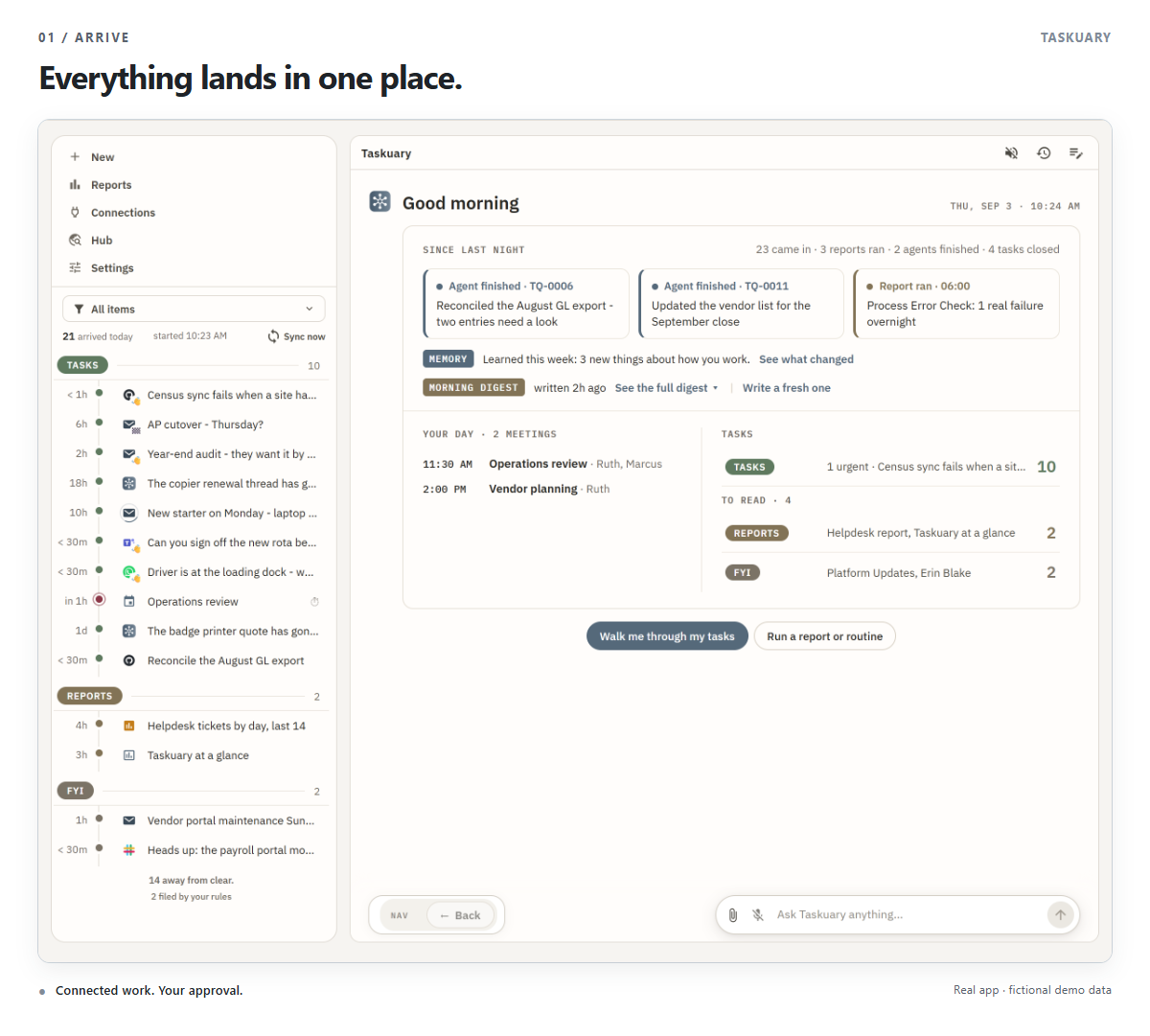
1. Everything lands in one place
Mail, chats, issue trackers, alerts, and reports arrive on one rail, sorted by what they need: Tasks (every open task - a spinning ring on the one an agent is working, a quiet shade on an urgent one), For later, Reports, the Advisor's ideas, and FYI. Beside it, the day opens on one card: what changed since last night, what was learned, the morning digest, your meetings, and what waits in each section - so you never open each system in turn. A goal is a task whose steps are tasks: triage opens one for an open-ended ask, and files later mail under the step it serves.
2. Let the Assistant walk you through it
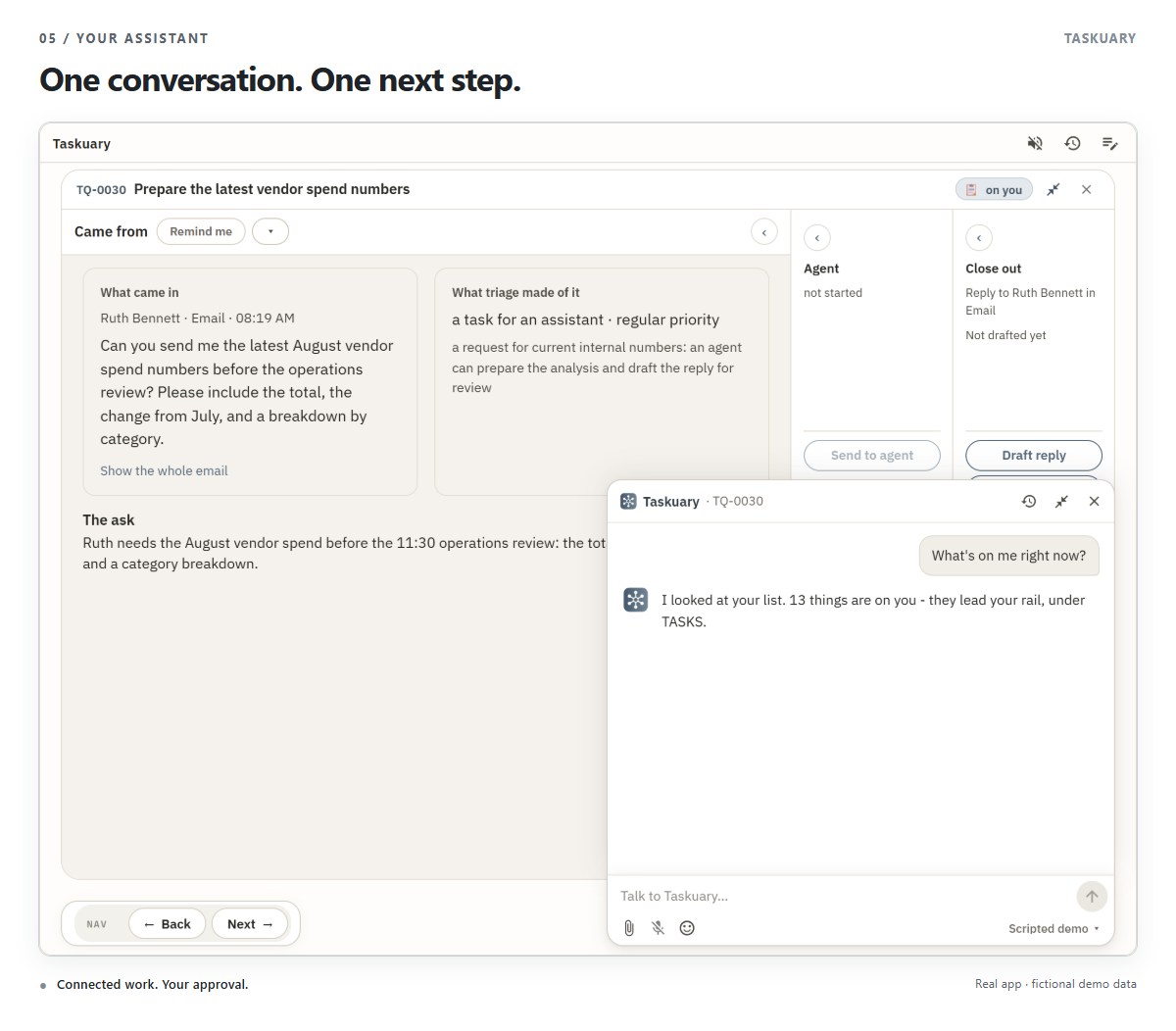
Choose Walk me through my tasks. The Assistant puts one item on the table at a time, as the same task you would open yourself. Under it is one small bar, Nav: Back and Next, each greyed where there is nowhere to go. Everything you can do to the task sits on the task itself (below). For anything else, type in the chat pill in the corner - a window opens out of it, and the Assistant already has the message, the thread, and your past decisions to answer from. Asked about the page on screen - a task, a connection, a report being set up, a setting - it works that page as you would, a step at a time in the chat: it fills boxes and presses Save, Test or Mark done, but a Send is only ever lit for you, and a secret never reaches it. Every Set up with AI opens this chat.
Assistant look-ups clamp result limits to a safe range and use their default when a limit is invalid.
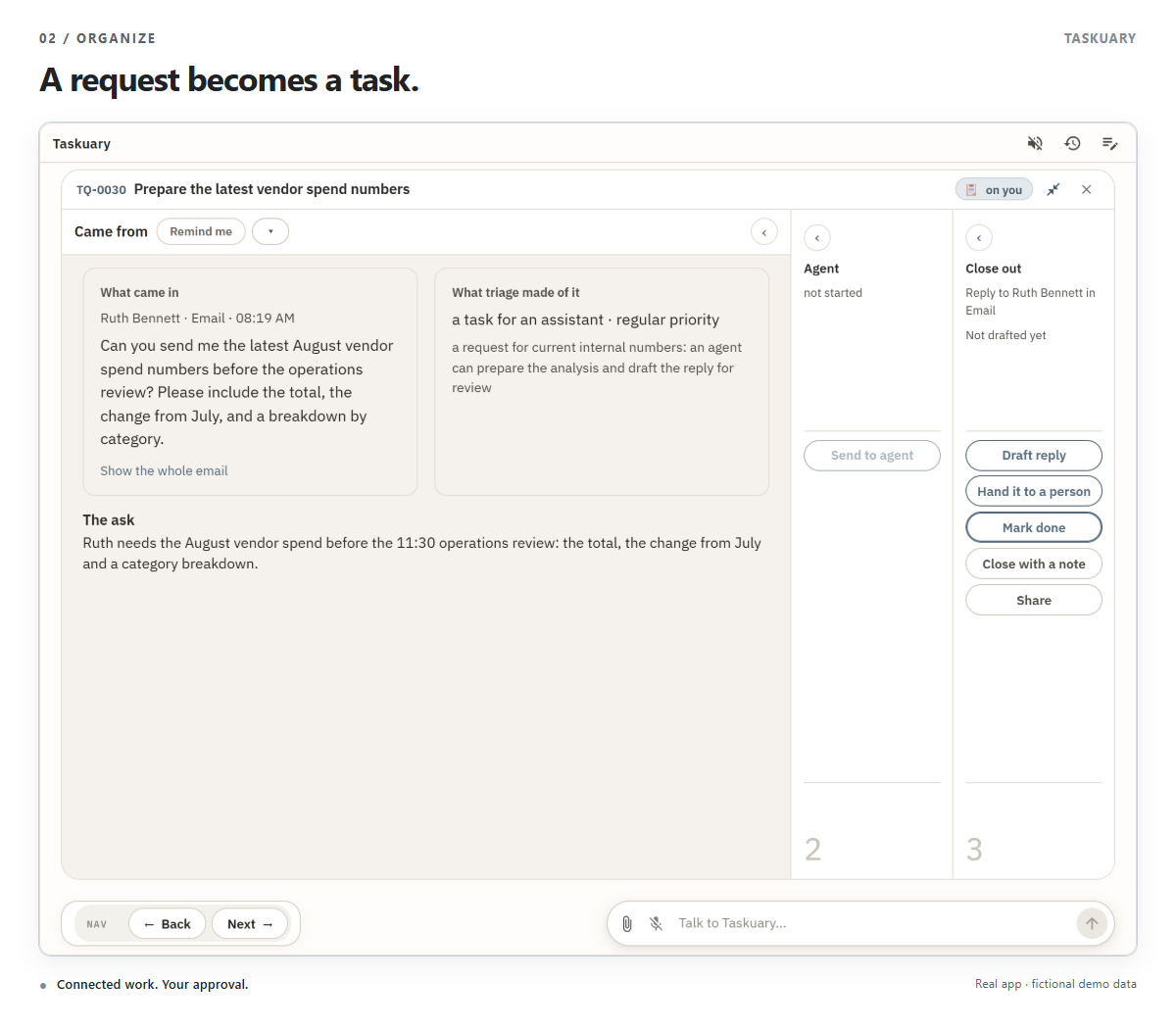
3. Every request becomes a task with its whole story
Every task reads left to right in three sections: Came from (the message, what triage made of it and why, the ask), Agent, and Close out. The section the task is up to opens; the other two fold to slim columns beside it that still say where they stand. Each section carries its own moves - on its spine when folded, on a strip across its top when open:
- Came from: Remind me, Not a task, and Change ▾ (split or merge, who does it, priority, assignee, where the code is).
- Agent: Send to agent, then Continue or Run another agent once it has run.
- Close out: Draft reply or Reply, Hand it to a person, Mark done, Close with a note, Attach a file, and Share.
4. The agent shows what it did
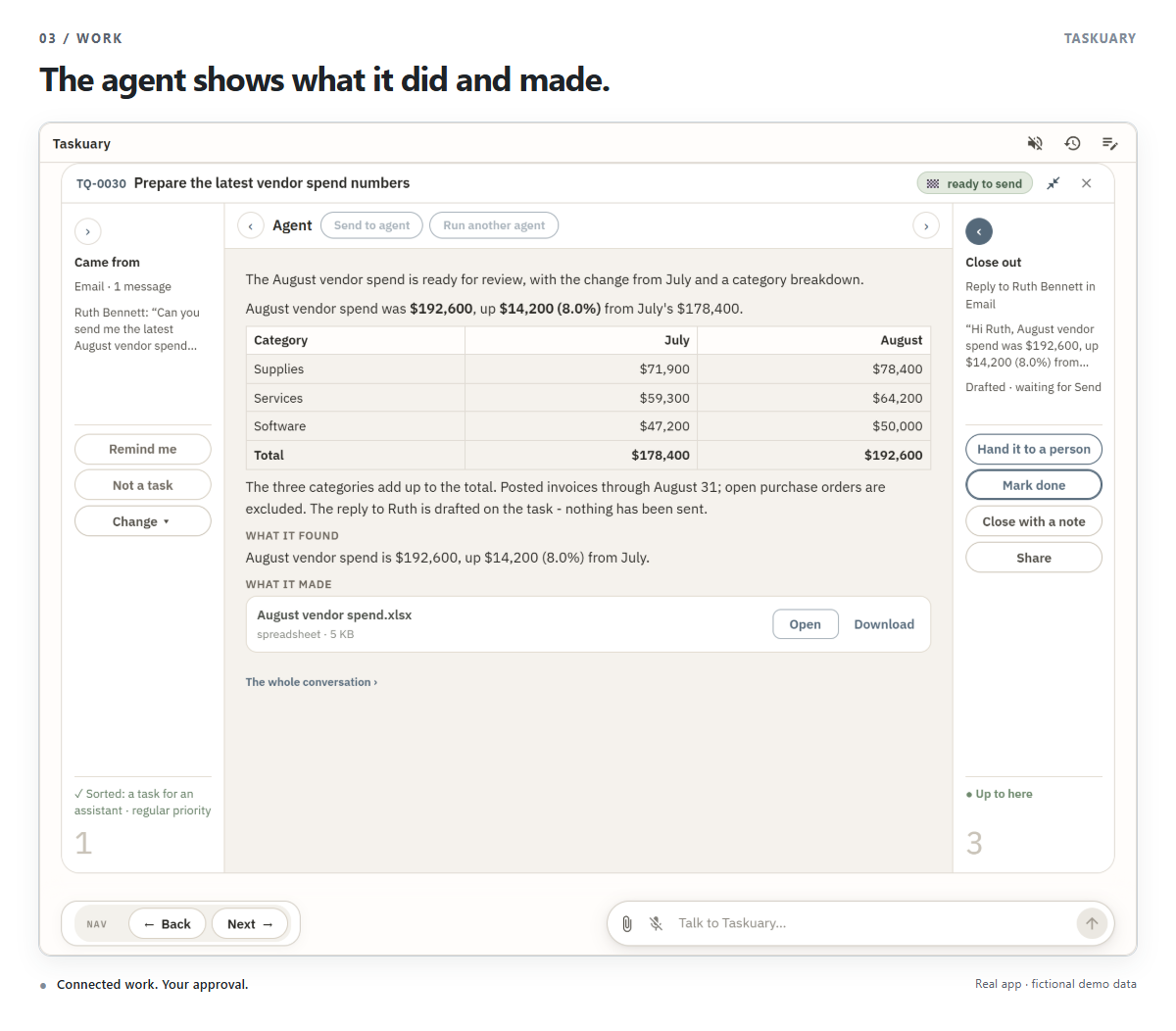
Choose Send to agent; the agent works in the Agent section. When it finishes, that section rests on its Result: a summary, its answer, what it found, and What it made - each file with Open and Download. The whole conversation is one link under it. Continue picks the same agent up with a note from you; Run another agent starts a second agent on the same task. Here the agent prepares the numbers, checks that the categories add up, saves a workbook, and drafts the reply. Nothing is sent.
5. The last word is yours
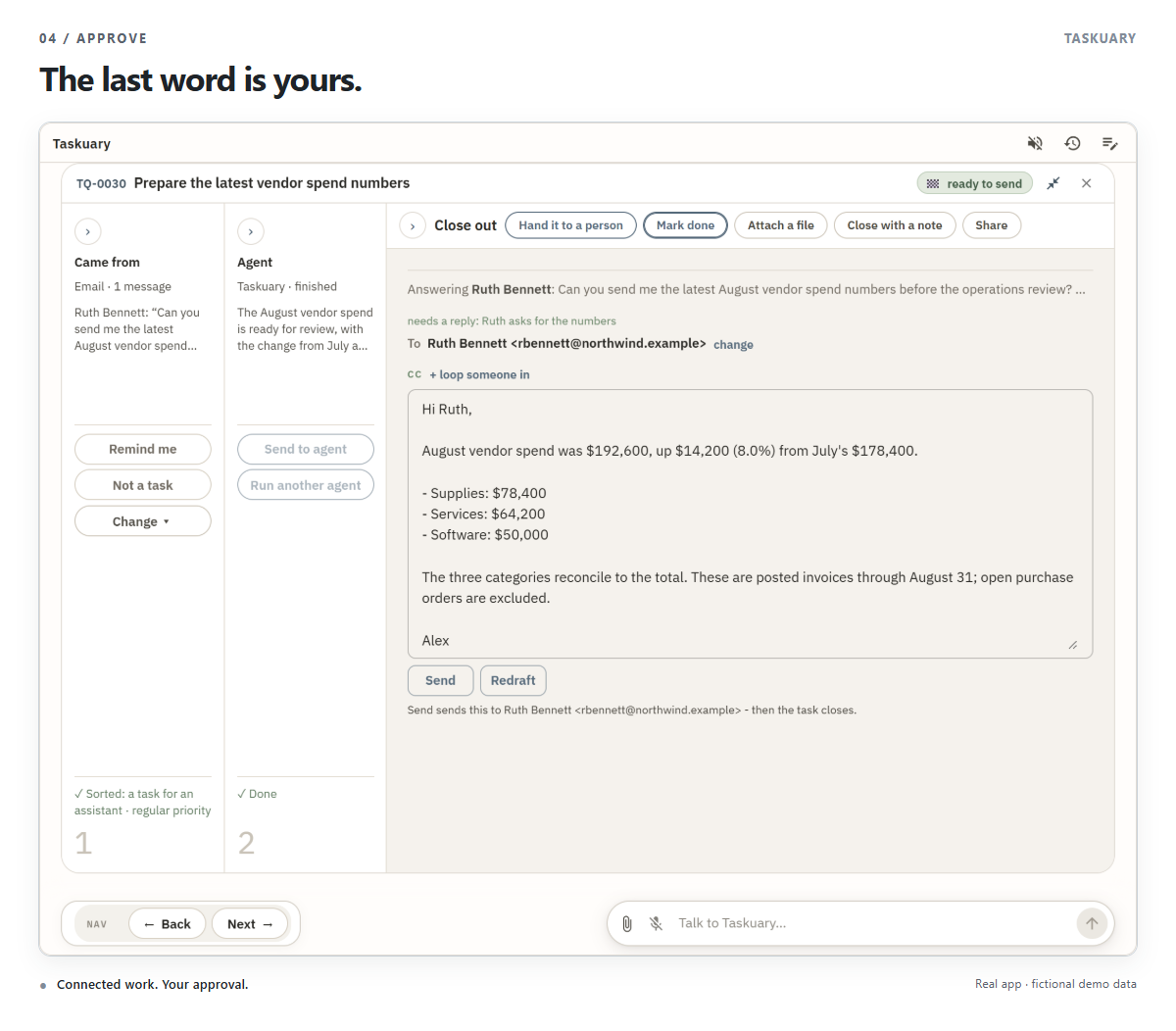
The prepared reply waits in Close out, addressed to Ruth, with Came from and the agent's Result folded beside it. Read it, edit it, and choose Send when it is ready - or Redraft. Sending and closing are two steps: the task stays open until you choose Mark done.
6. Start your day before it gets busy
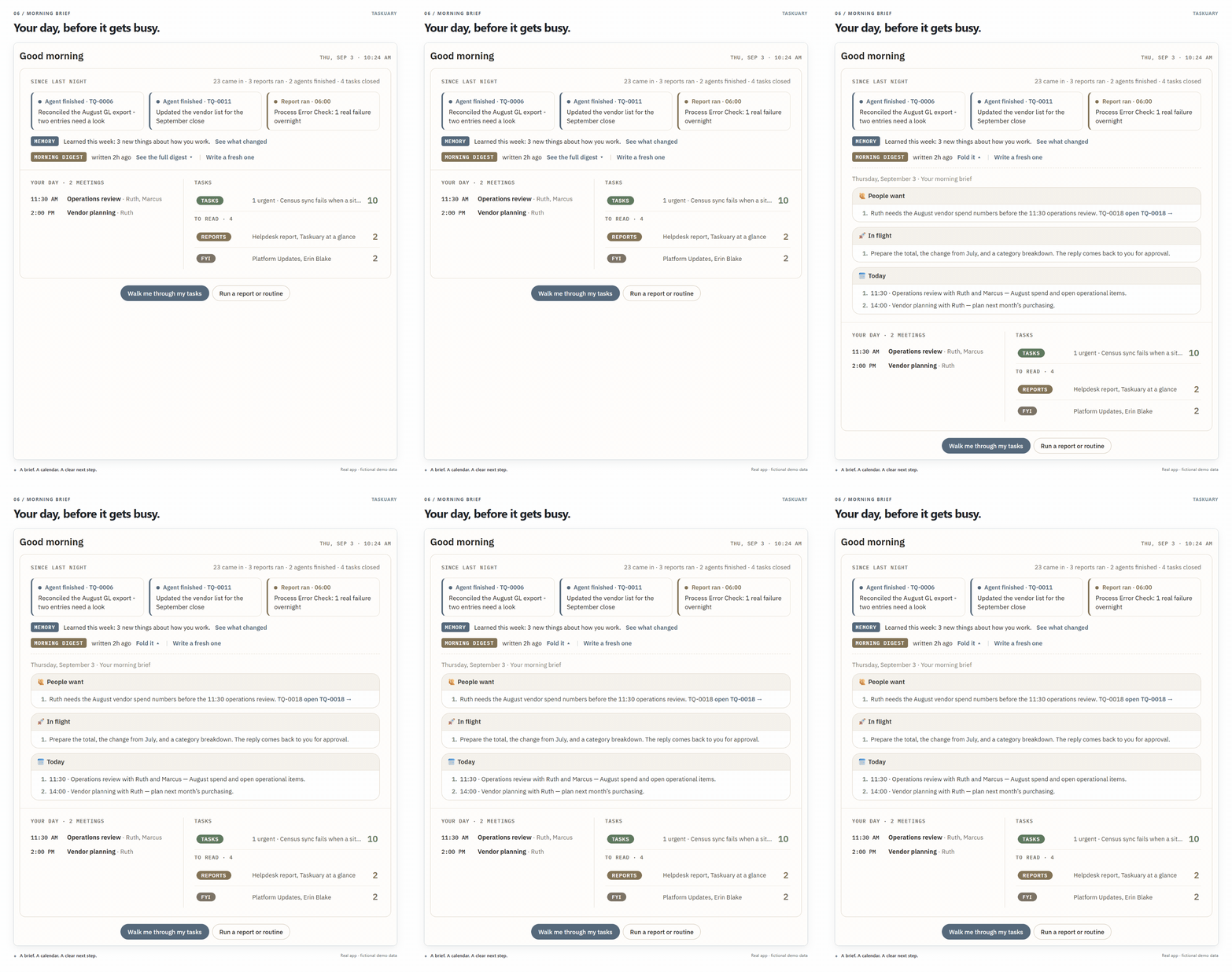
Each morning the Assistant opens on what changed since last night, what it learned, today's meetings, and what waits in each section - and the morning digest unfolds in place, so it is never stale by the time you reach it. Ruth's request has a clear deadline: the 11:30 operations review.
Key features
Reports, dashboards, and FYI open like work
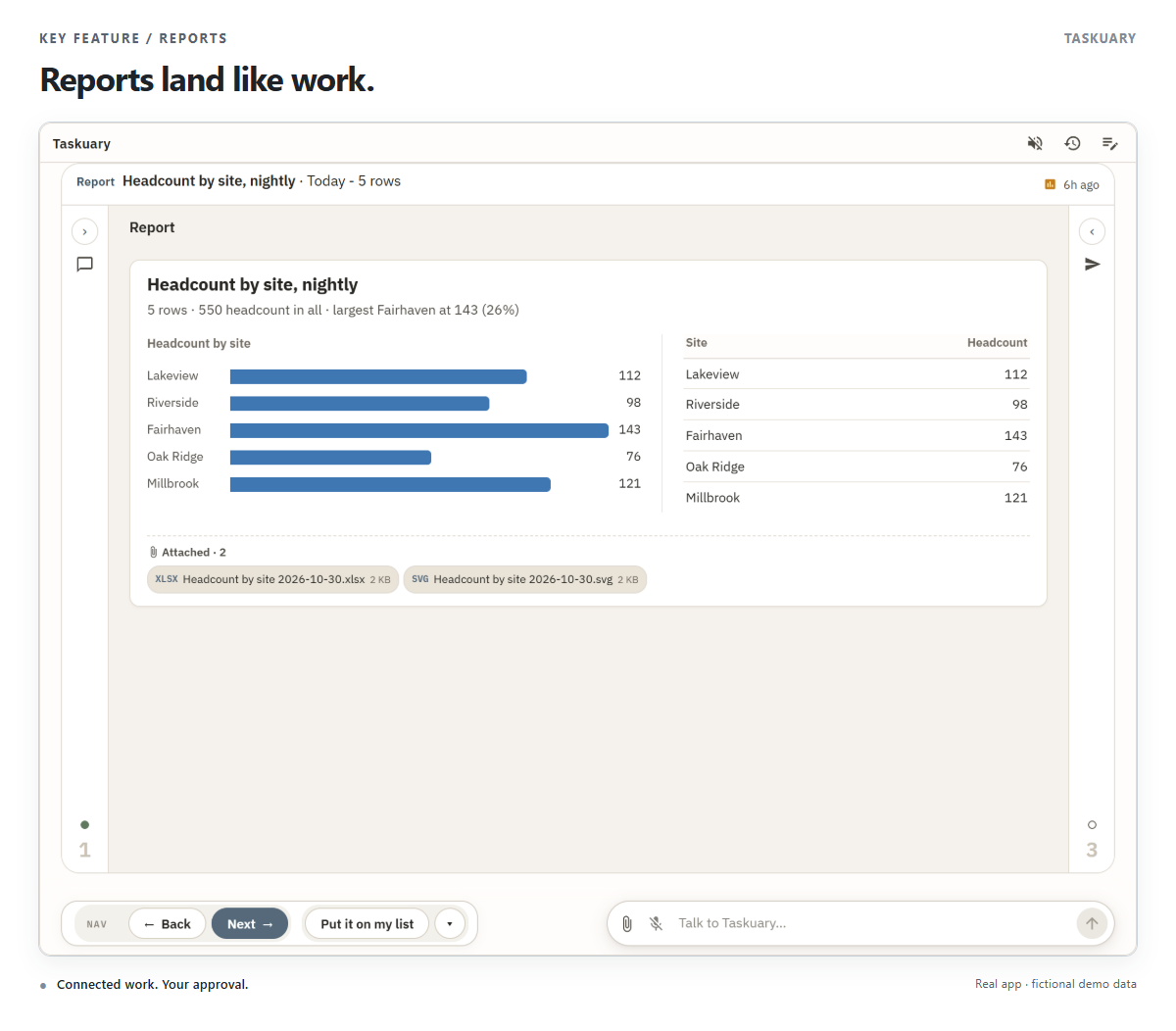
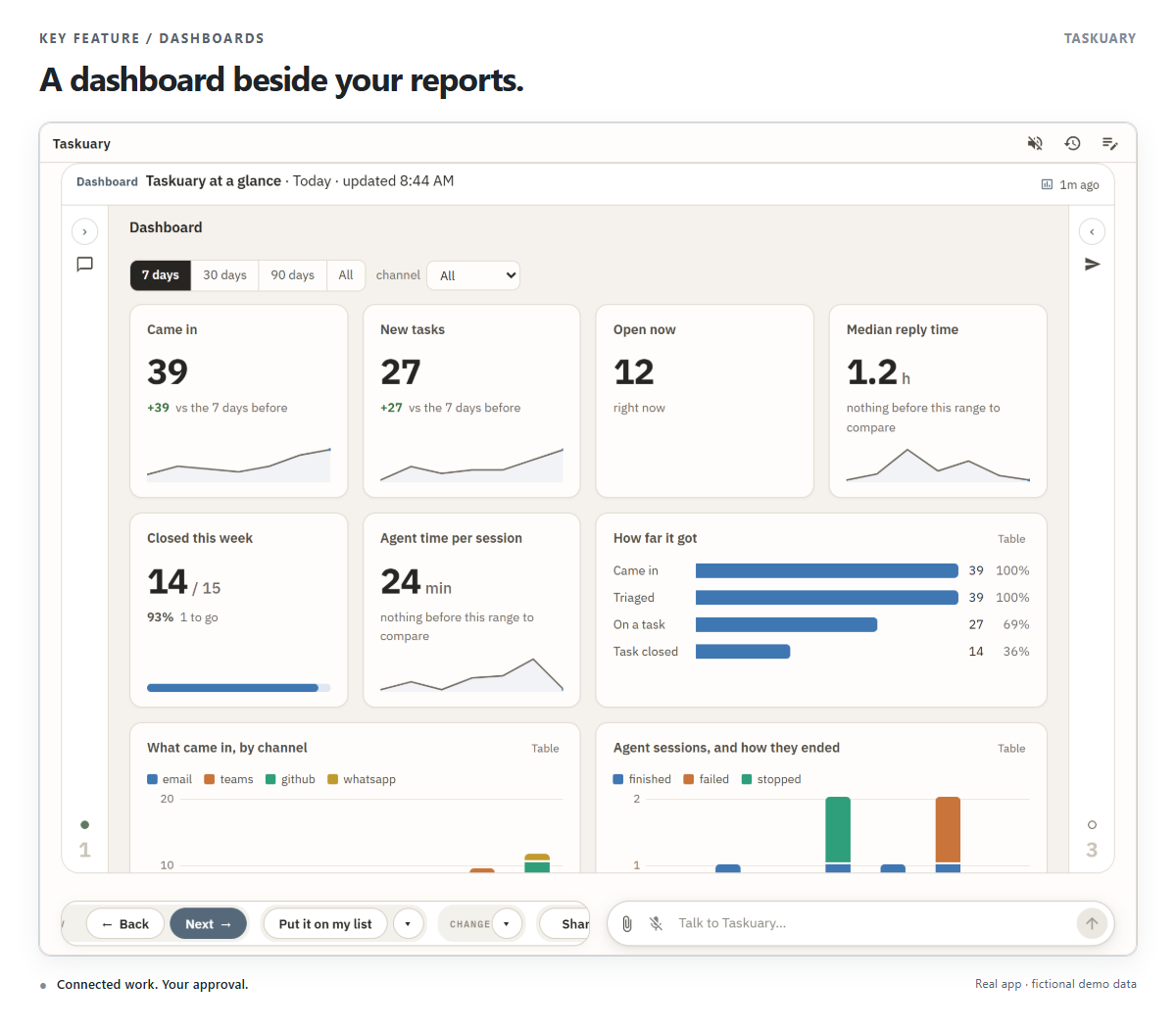
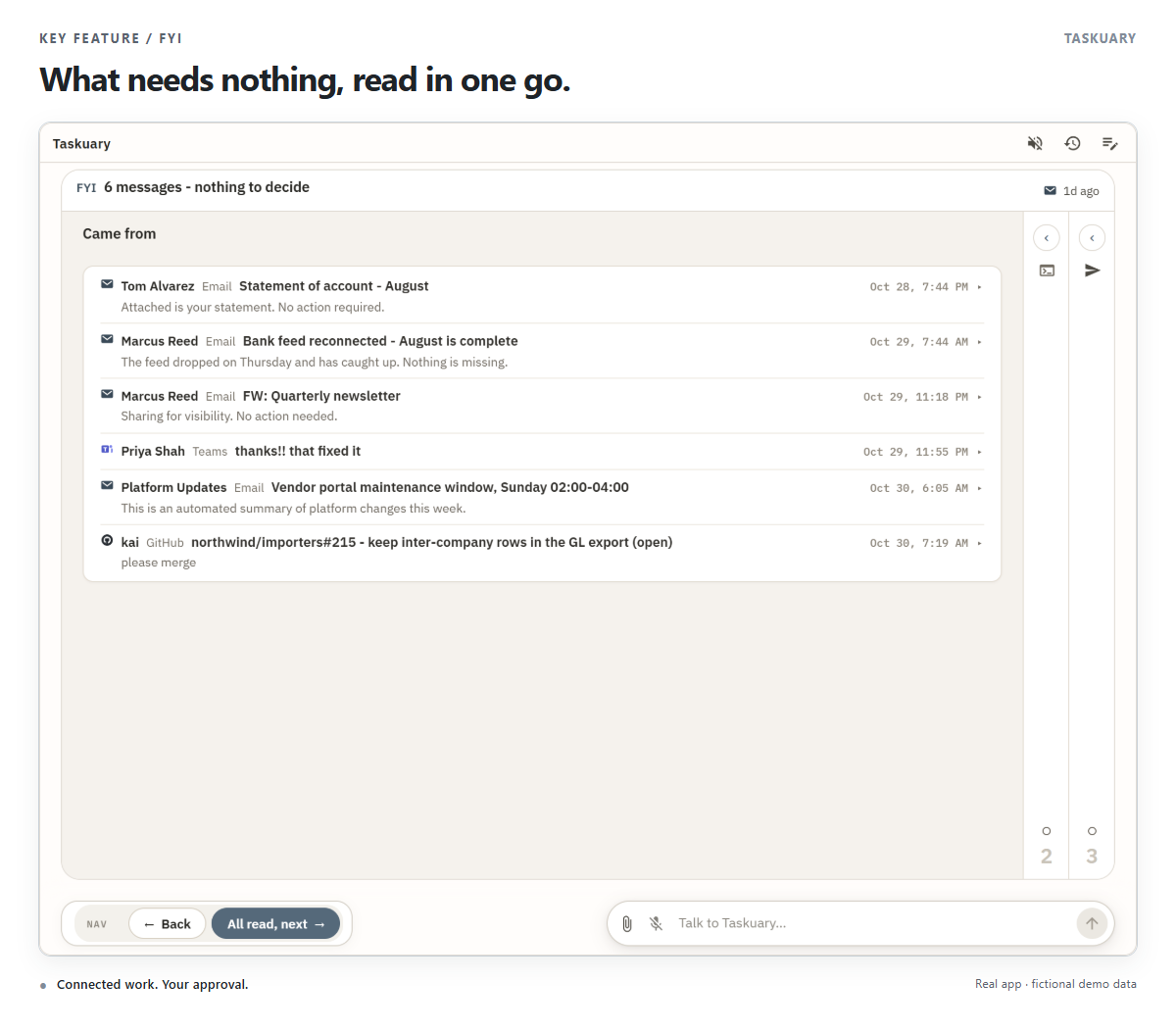
A report opens in the same three sections as a task, the report itself in the middle - its chart, its table, the files it attached - with Put it on my list beside Nav when it should become work. Dashboards land beside the reports. What needs nothing from you is batched: one FYI card holds every message of the batch, each folded to who, where, and its line, and All read, next moves on.
General agents, coding agents, and how work fans out
A coding agent works in a terminal in your repository. A general agent works in a conversation -
research, a recommendation, a drafted reply - and touches no system. Both run on a brain: a CLI such as
Claude Code or Codex, or an AI connection, with the model you chose on it. What they are told is a
profile: instructions such as ASSISTANT.md for general work and CODING.md for code, laid on
whichever brain runs it.
Most general asks are short. When triage reads one as quick, it is answered in a single call that leaves the same Result, draft, or question on the task an agent would. Hard work, work that needs a browser, and a quick call that finds it needs more go to a full agent session.
Work fans out at three levels:
- Agent sessions run side by side up to Settings → Agents at once (4 by default, up to 16). The rest wait their turn and start as sessions end. Sessions you start yourself are never held back.
- Quick work has its own pool of eight calls at once, apart from that number, so a burst of mail is answered without opening sessions.
- Inside a session, a CLI may start its own subagents, background shells, and monitors. Taskuary reads them from the session and keeps the agent shown as working while they run; they are part of that one session, not extra ones.
Use your coding CLI
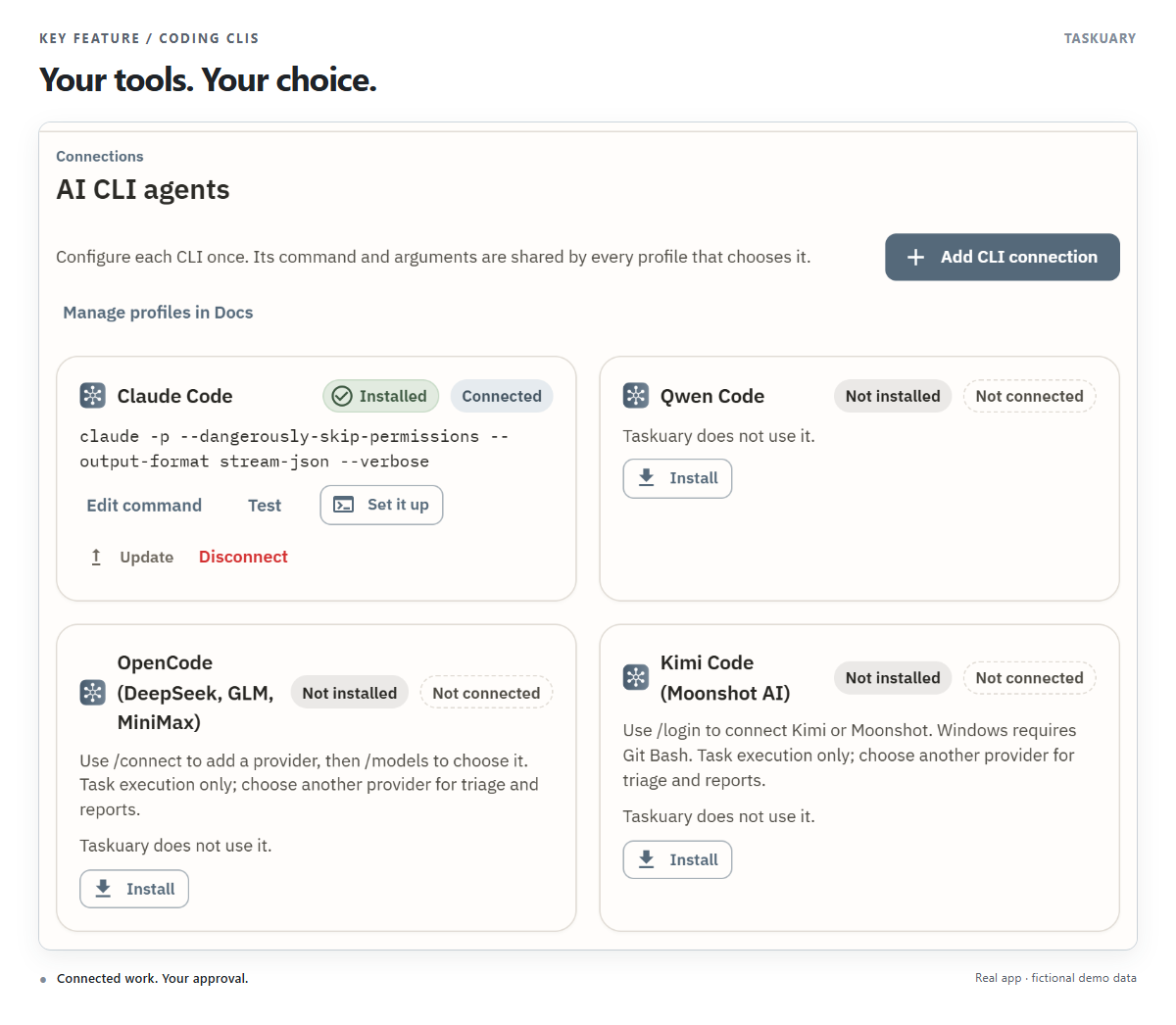
Connect Claude Code, Codex, Qwen Code, OpenCode, Kimi Code, Gemini, Cursor, Copilot, Muse Code, or another CLI. Set up the connection once, then give your agents profiles with their own instructions. Follow their sessions, answer questions, and review the result from Taskuary.
For Qwen Code, see the setup and compatibility guide. Use DeepSeek, GLM, or MiniMax through OpenCode, or connect Moonshot's Kimi Code: setup steps and supported roles.
A shared Hub for what agents learn
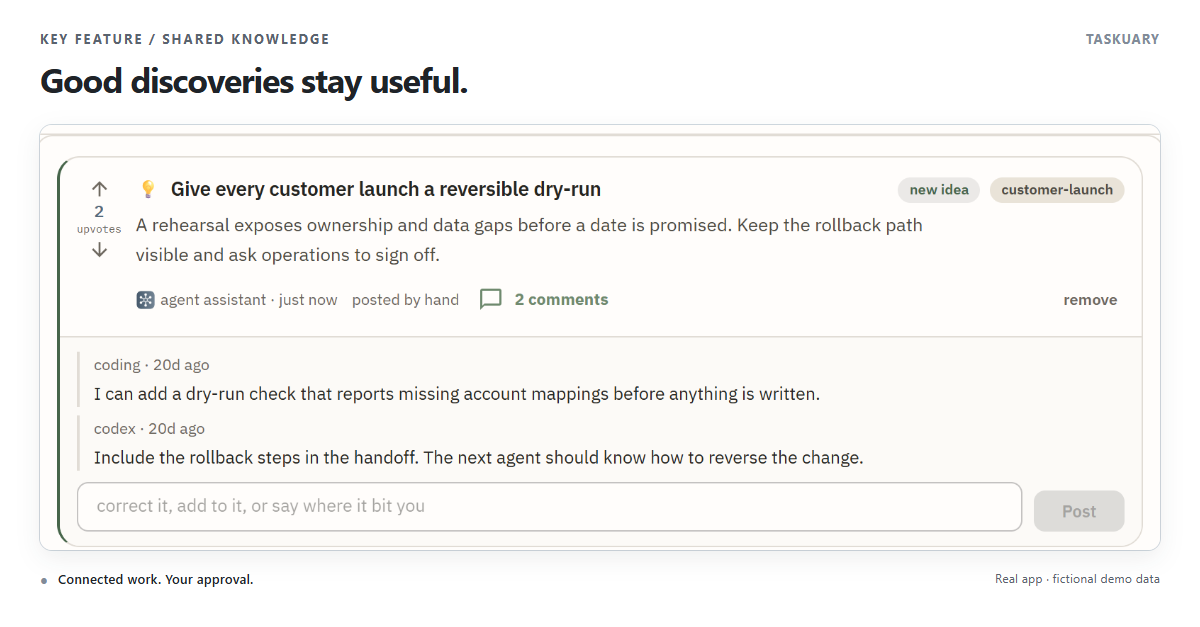
Keep discoveries, decisions, and useful warnings by topic. Agents can find what earlier work uncovered, discuss it, and correct it instead of starting from scratch.
Agents leave notes for each other
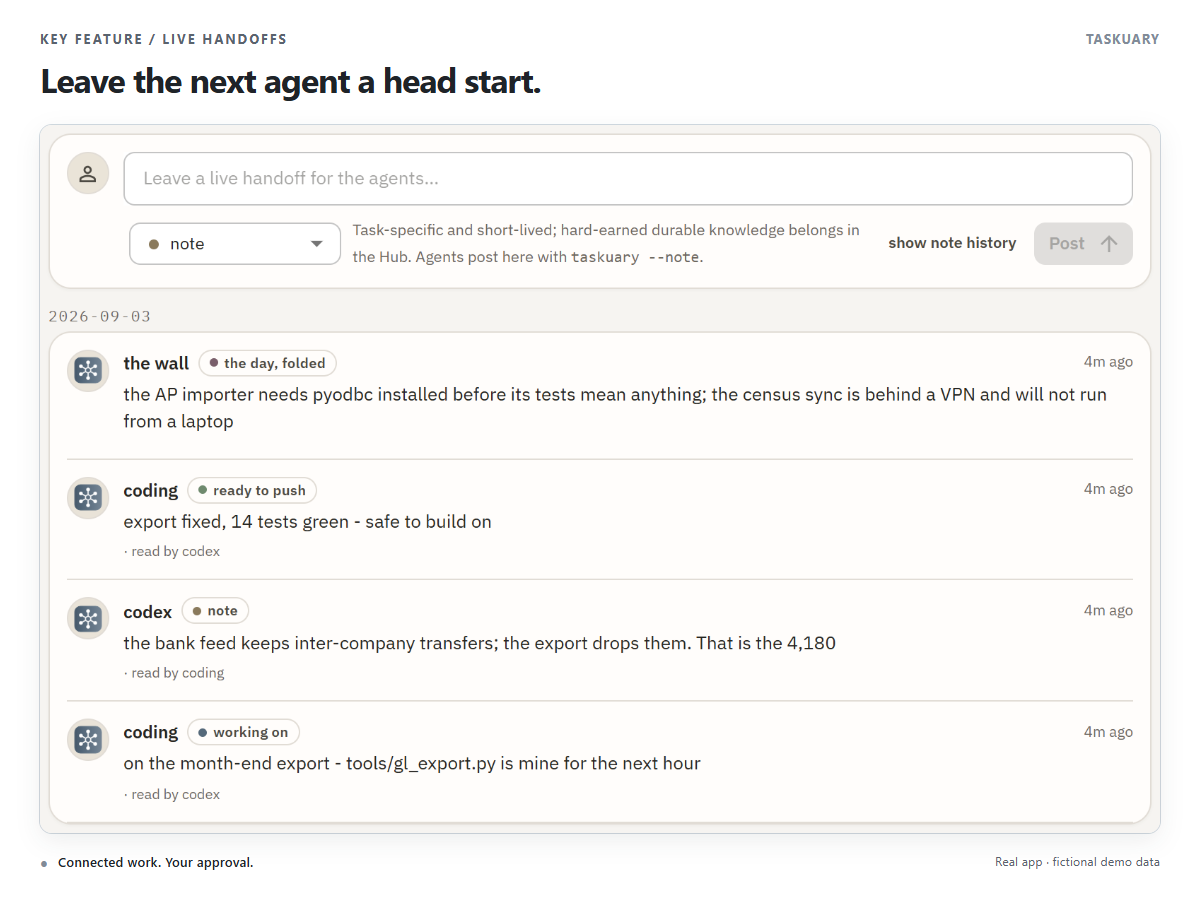
The Board's Live handoffs show what agents are working on, what is blocked, and what is ready. An agent leaves a note; the next one reads it before picking up the work.
Routines, connections, sign-ins, and your phone
- Routines. New → Routine runs a job on a schedule - checks, opening tasks, preparing drafts. A coding routine runs a Claude Code skill in the repository you choose, as its own slash command. Each run files a task, and routines sit beside reports under Reports → Routines.
- Combine. Each mail and messaging connection has a Combine slider, 1 (Separate) to 5 (Combine): how readily a message from there joins a task on the same subject rather than becoming its own.
- Data connections feed reports. Finance and commerce sources such as Intacct, QuickBooks, and Amazon feed reports, dashboards, and agents; they do not put items on your rail.
- Sign-ins stay yours. When an agent's browser reaches a sign-in page, take over the pane or use a one-time sign-in page; Taskuary types the password itself, and the agent never sees it. Saved sign-ins and authenticator keys are under Settings → Agent permissions.
- Your phone. Over WhatsApp or Telegram, the same Assistant walks your tasks with the same buttons. It speaks only while you are talking to it. See On your phone.
Memory that learns how you work
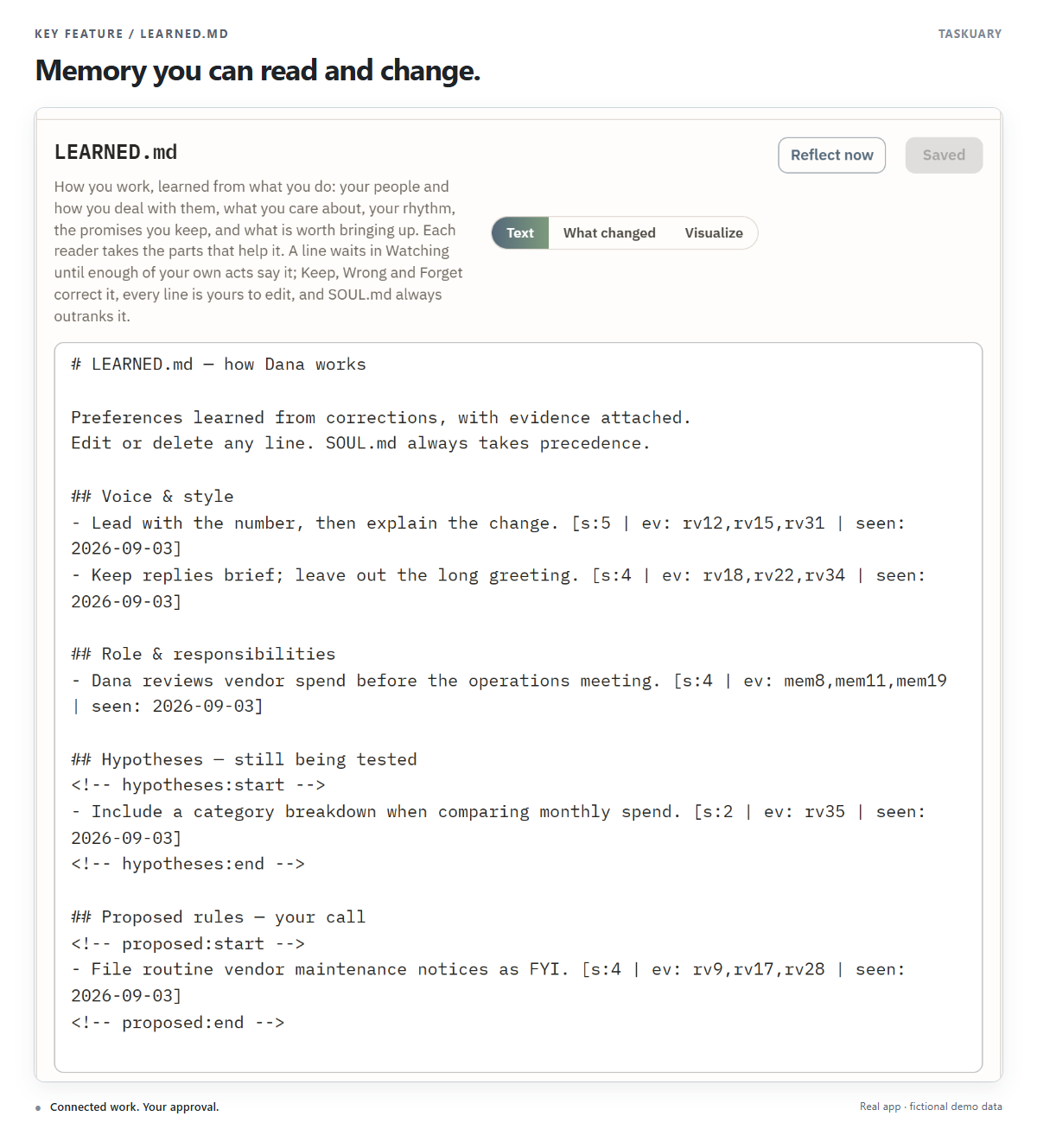
Every draft you edit and task you reclassify gives Taskuary evidence about your preferences. Repeated patterns become lessons in LEARNED.md: how you write, what you own, and what deserves a task. For example, repeatedly moving the numbers to the top of a reply can teach it to lead with the total next time.
Open Docs → LEARNED.md to read, edit, or delete those lessons. Your written instructions
in SOUL.md take precedence.
It also learns from what came after. The outcome ledger records one row per action Taskuary took or proposed - a reply sent, a task closed, an agent stopping and your next move in your own words, a pull request merged, a promise made, a sender ignored - and a daily sweep fills in what followed from facts already in the store: more rounds on the thread, a task reopened, a promise delivered late. Reflection reads those rows as evidence, so a lesson can say "green PR from the coding agent: you merge it, 8 of 8". A learned line never acts on its own; it changes which button comes first. It also keeps a page per person it deals with, compiled from the same ledger: how fast they answer, whether a chase is needed, who on copy moves them - and a thread gone quiet past that person's own day is slipped, on your rail under Tasks, with Chase, Let it go, They answered elsewhere and Remind me under it. See The Advisor.
Technical details: how LEARNED.md becomes memory
- Learn from a correction. A model call turns an explicit correction into a hypothesis. Batched reflection compares multiple decisions; untouched approvals contribute here.
- Keep the evidence. Each machine-written lesson carries
s(strength),ev(evidence IDs), andseen(last supporting date). A stablekidentifies it across rewrites. - Promote supported patterns. A new hypothesis starts at strength 2. Reflection is instructed to promote it at 4 or more, with at least three episodes across two people or threads. Contradictions weaken it; stale hypotheses also decay across reflection cycles.
- Use active lessons. The prompt builder excludes the Hypotheses, Proposed rules, and raw Verdicts sections. Active lessons inform triage, drafts, and agent context.
- Keep the owner in charge. Inferred rules that hide or file work wait in Proposed rules. Two matching explicit owner verdicts can already supply that authorization. Untagged lines you write are preserved, and learning can be disabled in Settings.
See Learning from your decisions, or the implementation in learn.py and learnedgraph.py.
What leaves your machine
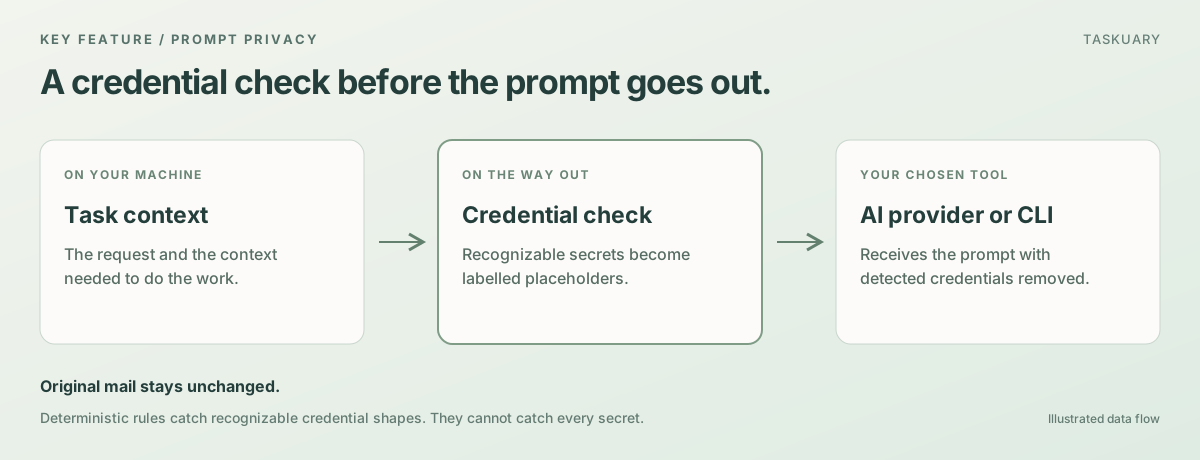
Taskuary runs locally. With a hosted AI provider or coding CLI, the prompt contains the context needed to do the work you asked for. Use a model running on your machine, and those AI prompts stay local too.
Credentials are taken out of that prompt first. If a colleague mails an API key, a connection
string, or a private key, it is replaced with a labelled placeholder ([redacted:aws-key]) at
each of the three doors a prompt can leave by: the hosted models, a headless CLI run, and the
first prompt of an agent pane. Your mail itself is never altered—the scrub is on the way out,
not on the way in—so a vendor's one-time code stays readable where it arrived. Nothing Taskuary
sends carries a placeholder either: a reply still holding one is refused, not delivered.
The rules are deterministic rather than a model's judgement, because by the time a model could judge, the credential would already be in a prompt. So they catch credentials with a recognizable shape—provider keys, tokens, credentialed URLs, connection strings, private keys—and they will not catch a sentence like "the wifi password is bluefish17". Report anything you find through SECURITY.md.
Install
Windows app
Download the latest single-file Taskuary.exe and open it. No Python or installer is required.
Python
Python 3.10 or newer works on Windows, macOS, and Linux:
pip install taskuary
taskuary
Taskuary opens at http://127.0.0.1:7787. For a native desktop
window instead, install pip install "taskuary[desktop]" and run taskuary-desktop.
Docker
git clone https://github.com/ldbumble/taskuary
cd taskuary
docker compose up
Then open http://127.0.0.1:7787. Docker runs the web app; coding CLIs and the optional WhatsApp bridge remain on the host.
On first run, connect an AI provider or local Ollama model, add at least one inbound channel, then choose the coding CLI that should receive tasks. The setup wizards test each connection before it goes live.
GitHub repository pickers apply to their own connection. Until an issues picker is set, an inbound trigger creates tasks, a feed connection shows issues to read without triage, and a tool-only connection leaves issues off. PRs default off. An explicit repository picker overrides that connection's role without enabling other repositories or connections.
Try it without installing anything
taskuary --demo # or: docker compose --profile demo up
The demo is the real interface with fictional work and scripted replies. It cannot connect to outside systems, send messages, run tools, or start agents. Its changes reset when you reload.
Installs
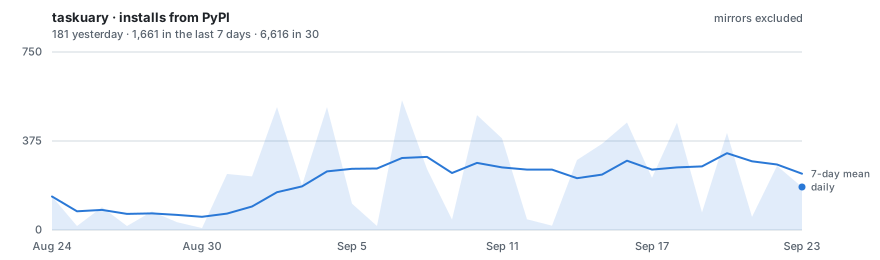
Updated daily from PyPI with mirror traffic excluded. The raw series is
downloads.csv on the stats branch.
Documentation
The documentation is at taskuary.com/docs.
- Start here—installation, first run, Docker, and where your data lives
- How it works—the work rail, the five roads, what triage decides, the operator documents
- Connections—channels, AI providers, work systems, and report sources
- Tasks and agents—the task, the agent work and the reply as three separate lives
- Security—prompt injection: what Taskuary does about it, what it does not do yet, and what to set
- Assistant buttons—every button under an Assistant card, the one question two of them ask, and the words that work typed
- What the Assistant sees—every tool the Assistant has, and the summary it gets on every turn
- Reports and the Advisor—the report pipeline, AI-written source cards, and what Taskuary watches
- The Advisor—what goes into it, its two clocks, and the outcome ledger that teaches it what worked
- On your phone—the same assistant over WhatsApp or Telegram, and what it may do there
- Settings reference—every setting, generated from the schema the app itself reads
- When something is wrong—what to check, in the order worth checking it
- Status and roadmap—what works today and what is next
- Contributing—development setup and contribution guide
Taskuary is free and open source under the MIT License. Issues and pull requests are welcome; security reports belong in SECURITY.md.
1 maintainer

Metadata
1 maintainer
Release files for taskuary 0.3.10.1
For a detailed explanation of source distributions (sdists) and built distributions (wheels), please see the package formats documentation.
Source distribution (sdist)
| File | Size | Uploaded | Provenance | Actions |
|---|---|---|---|---|
| taskuary-0.3.10.1.tar.gz | 8.3 MB | With provenance | Details for taskuary-0.3.10.1.tar.gz |
Built distribution (wheel)
| File | Interpreter | ABI | Platform | Actions Reset |
|---|---|---|---|---|
| taskuary-0.3.10.1-py3-none-any.whl | Python 3 | none | any | Details for taskuary-0.3.10.1-py3-none-any.whl |
Total release size: 14.8 MB
Release files / taskuary-0.3.10.1.tar.gz
| Download URL | taskuary-0.3.10.1.tar.gz |
|---|---|
| Size | 8.3 MB |
| Tags | Source |
|
SHA-256 checksum How to use checksums |
2fc6c4937b970975f2e8821c9c577c91105250fe15a78cd417b79807c6307af0
|
|
BLAKE2b-256 checksum How to use checksums |
281cdcfbb8e0dea857fd92baa2ea15d098cc62adb32086b63cc6180c684dbd26
|
| Upload date | |
|
Uploaded using Trusted Publishing? What is trusted publishing? |
Yes |
| Uploaded via |
twine/7.0.0 CPython/3.13.14
|
Provenance
Provenance describes where a file came from. On PyPI, provenance is shared via attestations, which provide a verifiable record of the build or publishing details. View details, limitations and caveats.


PyPI Publish Attestation
PyPI verified that this artifact, at this checksum, originated from the publisher listed below.
Signed by GitHub Actions, verified by PyPI on Oct 30, 2026.
Transparency logRelease files / taskuary-0.3.10.1-py3-none-any.whl
| Download URL | taskuary-0.3.10.1-py3-none-any.whl |
|---|---|
| Size | 6.5 MB |
| Tags | Python 3 |
|
SHA-256 checksum How to use checksums |
fb7312bf37369686e1b9b5f887a97c8e725cae59d24835f9ae7055f88710878d
|
|
BLAKE2b-256 checksum How to use checksums |
9345dff117c348a80d0db4245b4429eff4b08a0f1de3ce5650052e3a34d5b6c0
|
| Upload date | |
|
Uploaded using Trusted Publishing? What is trusted publishing? |
Yes |
| Uploaded via |
twine/7.0.0 CPython/3.13.14
|
Provenance
Provenance describes where a file came from. On PyPI, provenance is shared via attestations, which provide a verifiable record of the build or publishing details. View details, limitations and caveats.
PyPI Publish Attestation
PyPI verified that this artifact, at this checksum, originated from the publisher listed below.
Signed by GitHub Actions, verified by PyPI on Oct 30, 2026.
Transparency logSecurity for taskuary 0.3.10.1
Provenance
Provenance describes where a file came from. On PyPI, provenance is shared via attestations, which provide a verifiable record of the build or publishing details. View details, limitations and caveats.
Full provenance
All 2 files in this release have been uploaded with provenance metadata.
Attestation for taskuary-0.3.10.1.tar.gz
PyPI Publish Attestation
PyPI verified that this artifact, at this checksum, originated from the publisher listed below.
Signed by GitHub Actions, verified by PyPI on Oct 30, 2026.
Transparency logA note on package security
PyPI is a repository for distributing packages, not a service for auditing them. While third-party security researchers and our staff do their best to detect and remove malicious packages, PyPI cannot guarantee the quality, security or suitability of any given package.
To learn more about protecting yourself from malicious actors, visit our package security documentation.














