
 TurboQuantDB




An embedded vector database with a Python API. Built around the TurboQuant algorithm (arXiv:2504.19874) — two-stage quantization with zero training time and 5–10× compression at near-paper recall.
100k vectors at d=1536 fit in ~84 MB on disk (b=4) or ~47 MB (b=2) and run queries with ~200 MB RAM. No daemon, no
train()step, no eval set required to start.
Why TurboQuantDB?
- 🪶 Lightweight —
pip install tqdbis a 10 MB install with no Python dependencies beyond numpy. Runs in your process; no server, no sidecar. - 🧠 No training — codebooks are derived from a closed-form Beta(d/2) marginal at construction; vectors are quantized on the very first insert.
- 💾 5–10× disk compression with strong recall — benchmarked across d=65–3072 with recall / storage / latency trade-offs documented in
docs/BENCHMARKS.md. At d=1536, TQDB reaches near-paper recall under the benchmark configuration while cutting disk ~5×. - ⚡ Low query-time RAM — n=100k at d=200 needs ~17 MB for active search structures; d=1536 needs ~200 MB. Fits comfortably on a laptop.
- 🛡️ Crash-safe by default — writes go through a CRC-protected WAL with truncation guards; reopen replays automatically after crash or power loss. No manual
flush()for normal use. (WAL writes are batched for throughput; an explicitdb.checkpoint()forces durable persistence to a segment.) - 🌍 Cross-platform pre-built wheels — Linux (x86_64 + aarch64), macOS Apple Silicon, Windows. One
pip installeverywhere.
Use TQDB if you're building RAG / search on a laptop, edge device, or single VM and want compression without a training pipeline.
Look elsewhere if you need managed cloud, multi-node replication, SQL joins, or a full enterprise search platform. If your corpus is tiny (<10k vectors), raw-vector stores may be simpler and the compression benefit may not matter yet.
Install
pip install tqdb
Optional integration extras: tqdb[langchain], tqdb[llamaindex], tqdb[migrate] (Chroma + LanceDB import). Build from source: see DEVELOPMENT.md. Upgrading from v0.8 dense-mode databases: see docs/QUANTIZER_MODES.md.
Quick Start
Five lines, no domain knowledge — tqdb.open picks the defaults:
import numpy as np, tqdb

embedding = np.random.rand(1536).astype("f4")   # your embedding model's output
db = tqdb.open("./my_db", 1536)                 # reopen later with just tqdb.open("./my_db")
db.insert("doc1", embedding, document="Rust uses ownership for memory safety.")
print(db.search(embedding, top_k=5))
The full version, with a real embedding model and every knob spelled out:
import numpy as np
from sentence_transformers import SentenceTransformer
from tqdb import Database

model = SentenceTransformer("sentence-transformers/all-MiniLM-L6-v2")
dim = model.get_sentence_embedding_dimension()  # 384

db = Database.open("./my_db", dimension=dim, bits=4, metric="ip", rerank=True)

docs = [
    ("rust",   "Rust uses ownership and borrowing for memory safety."),
    ("python", "Python prioritizes readability and rapid prototyping."),
    ("vector", "A vector database stores embeddings for nearest-neighbour search."),
]
ids   = [d[0] for d in docs]
texts = [d[1] for d in docs]
db.insert_batch(ids, model.encode(texts, normalize_embeddings=True).astype("f4"), documents=texts)

q = model.encode("How do I avoid memory bugs?", normalize_embeddings=True).astype("f4")
for r in db.search(q, top_k=2):
    print(f"  [{r['score']:.3f}] {r['id']} — {r['document']}")
Output:
  [0.687] rust   — Rust uses ownership and borrowing for memory safety.
  [0.298] vector — A vector database stores embeddings for nearest-neighbour search.
➡️ Runnable end-to-end demo: examples/quickstart.py. RAG retriever loop: examples/rag.py. Migrate from Chroma: examples/migrate_from_chroma.py.
What makes TurboQuantDB different?
TurboQuantDB is built around a few deliberate design choices:
- Compression-first storage — embeddings are quantized on insert, so large corpora can fit on laptops, edge devices, and small VMs.
- Zero-training quantization — no PQ/IVF training phase, no sample corpus, no eval set required to start.
- Embedded-first deployment — the default path is
pip install tqdband in-process Python usage, not operating a separate service. - RAG-ready retrieval — document storage, MongoDB-style metadata filters, hybrid BM25+dense search, and LangChain/LlamaIndex integrations are built in.
- Durability without ceremony — writes go through a CRC-protected WAL, and crash recovery replays automatically on reopen.
- Server-capable when needed — an optional Axum HTTP server adds API keys, RBAC, quotas, async jobs, snapshots, restore, and Prometheus metrics.
Where TurboQuantDB fits
TurboQuantDB is not a managed vector database and not a distributed search cluster. It is built for developers who want compressed local vector search inside a Python or Rust application.
Use it for
- local / private RAG
- laptop-scale document search
- edge deployments
- compressed embedding stores
- bring-your-own-embedding workflows
- migration experiments from existing local vector stores
Use something else when you need
- multi-node clustering or replication
- managed cloud operations
- SQL joins and relational transactions
- enterprise search pipelines
- hosted embedding / reranking services
Benchmarks
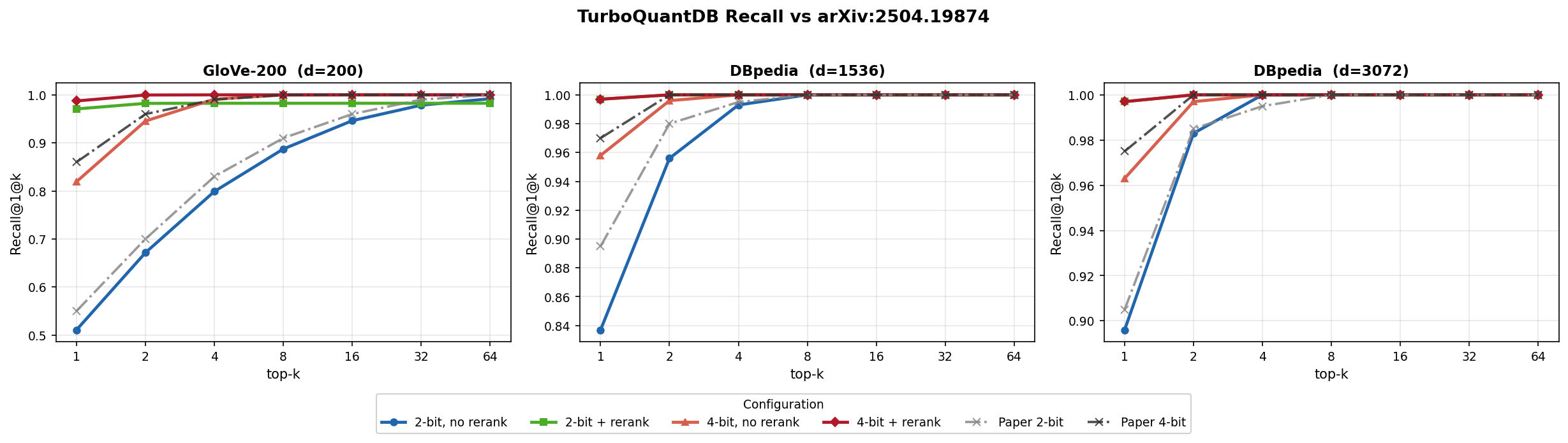
All numbers below come from runs on a single Windows laptop; absolute values will differ on your hardware. Reproduction commands are in docs/BENCHMARKS.md. The three sub-tables below are distinct runs with different configs — read the "Config" line under each header carefully.
A. Paper-validation (n=100k, brute-force, fast_mode=True)
Config: dbpedia-1536, b=4, rerank=True, brute-force, quantizer_type=None (auto-selects "srht" at this dimension). Matches arXiv:2504.19874 Figure 5b's bit allocation; pin quantizer_type="dense" when you need the paper-faithful QR rotation.
| Metric | Value |
|---|---|
| Recall@1 | 99.7% |
| Recall@4 | 100.0% |
| Disk (incl. INT8 rerank vectors) | 230.4 MB |
Disk (codes only, rerank=False) |
83.6 MB |
| p50 latency (3-iter median) | 12.8 ms |
B. Rerank unlocks recall at low bit-rate (n=10k, brute-force, fast_mode=True)
Config: quantizer_type=None, brute-force, fast_mode=True. bits=2 + rerank=True matches bits=4 + rerank=True recall at ~10% less disk.
| Dataset | b=2, no rerank | b=4, no rerank | b=2 + rerank | b=4 + rerank |
|---|---|---|---|---|
| GloVe-200 (d=200) | 0.528 (1.8 MB) | 0.822 (2.3 MB) | 0.992 (3.8 MB) | 0.992 (4.2 MB) |
| arXiv-768 (d=768) | 0.426 (7.4 MB) | 0.696 (9.2 MB) | 0.978 (14.7 MB) | 0.978 (16.6 MB) |
| GIST-960 (d=960) | 0.294 (10.4 MB) | 0.566 (12.7 MB) | 0.974 (19.6 MB) | 0.974 (21.9 MB) |
C. Coverage across dimensions (n=10k, b=4, rerank=True, brute-force, fast_mode=True)
R@1 ≥ 0.87 across 9 benchmark datasets spanning d=65 to d=3072.
| Dataset | d | R@1 | Disk | p50 |
|---|---|---|---|---|
| lastfm-64 | 65 | 0.874 | 2.0 MB | 1.1 ms |
| deep-96 | 96 | 0.980 | 2.5 MB | 1.2 ms |
| glove-100 | 100 | 0.990 | 2.6 MB | 1.4 ms |
| glove-200 | 200 | 0.992 | 4.2 MB | 1.7 ms |
| nytimes-256 | 256 | 0.992 | 5.2 MB | 2.0 ms |
| arXiv-768 | 768 | 0.978 | 16.6 MB | 7.6 ms |
| GIST-960 | 960 | 0.974 | 21.9 MB | 7.3 ms |
| DBpedia-1536 | 1536 | 0.998 | 41.1 MB | 10.3 ms |
| DBpedia-3072 | 3072 | 1.000 | 117.0 MB | 46.8 ms |
Full tables (all 8 configs × 3 datasets) including ANN runs: docs/BENCHMARKS.md.
Config Advisor
Not sure whether to use b=2 or b=4, rerank, ANN, or fast mode? The interactive Config Advisor recommends settings from benchmark data for your embedding dimension and retrieval priorities, with adjustable weights for recall, compression, and speed.
👉 jyunming.github.io/TurboQuantDB/advisor.html

Migrate from Chroma or LanceDB
Already have a local vector store? TQDB can import an existing collection into a compressed TurboQuantDB database in one command — IDs, vectors, metadata, and document text are preserved.
pip install 'tqdb[migrate]'
python -m tqdb.migrate chroma   ./chroma_db ./tqdb_db
python -m tqdb.migrate lancedb  ./lancedb   ./tqdb_db --table docs
Programmatic API + verification example: examples/migrate_from_chroma.py. Full migration guide: docs/MIGRATION.md.
Hybrid retrieval
Dense vectors are good at semantic similarity, but RAG queries often include exact terms: paper IDs, product names, function names, error messages, or code symbols. TQDB maintains a BM25 keyword index from the document field and can fuse sparse + dense results with Reciprocal Rank Fusion.
results = db.search(
    query_vec,
    top_k=10,
    hybrid={"text": "error message WAL replay", "weight": 0.3, "rrf_k": 60},
)
Omit hybrid= for pure dense search — behaviour is unchanged. The BM25 index builds incrementally as documents are inserted; no separate train() or build_text_index() call required.
Text is analysed before indexing — Snowball stemming plus a stopword list — so "running shoes" retrieves a document that says "run shoe". On BEIR/scifact that lifts BM25 recall@10 from 0.773 to 0.808 and halves query latency (stopwords remove the highest-frequency postings). Configure or disable it at open time:
db = Database.open("./my_db", dimension=1536, text_language="german") # or "none"
Tuning weight blind is guesswork, so explain() returns the same ranking with each retriever's own verdict attached — which leg found the document, and where it placed it:
for r in db.explain(query_vec, text="error message WAL replay", top_k=3):
    print(r["id"], r["fused_score"], r["dense_rank"], r["sparse_rank"])
A None rank means that retriever never surfaced the document at all — usually the first thing worth knowing when a result looks wrong.
Framework integrations
pip install 'tqdb[langchain]'
pip install 'tqdb[llamaindex]'
TQDB ships native vector-store classes for LangChain v2 and LlamaIndex; both expose the same TurboQuantVectorStore class name in their respective namespaces. Use these for new RAG applications.
# LangChain v2
from tqdb.vectorstore import TurboQuantVectorStore as LCStore
store = LCStore.from_texts(texts, embedding=my_embedder, path="./db", dimension=384)

# LlamaIndex
from tqdb.llama_index import TurboQuantVectorStore as LIStore
vstore = LIStore.open("./db", dimension=1536)
For simple scripts and backward compatibility, the older tqdb.rag.TurboQuantRetriever wrapper remains available.
Detailed setup, pagination, hybrid wiring, and async patterns: LangChain integration | LlamaIndex integration.
Async API
For FastAPI / Starlette / async RAG services, AsyncDatabase exposes awaitable versions of every long-running operation. Calls are dispatched through a ThreadPoolExecutor, so concurrent awaits do not block the event loop; Rust engine calls release the GIL while they run.
import asyncio
from tqdb.aio import AsyncDatabase

async def main():
    db = await AsyncDatabase.open("./db", dimension=1536, bits=4)
    await db.insert("doc-1", vec, document="...")
    hits = await db.search(query_vec, top_k=5)
    await db.close()

asyncio.run(main())
Pass executor= to share a thread pool across multiple databases or to control its size.
Configurations for common goals
rerank=True stores raw INT8 vectors alongside compressed codes for exact second-pass rescoring. The default is rerank=False for compression-first storage; turn it on when you need the extra recall.
When do you actually need rerank? Below d ≈ 768 the recall lift from rerank is large (+15–30 pp R@1) and worth the disk. From d ≥ 1536 with
bits=4, brute-forcererank=Falsealready hits R@1 ≈ 0.96 — rerank pushes that to 0.997 but doubles disk. For most production embedding shapes (1536, 3072),rerank=Falseis the right default.
fast_mode=True (default) uses MSE-only quantization — optimal for d < 1536.
from tqdb import Database

# Best recall, any dimension — brute-force, default INT8 rerank
db = Database.open("./db", dimension=384, bits=4, rerank=True)
# DBpedia-1536 benchmark: R@1 ≈ 0.997 | ~231 MB disk
# arXiv-768 benchmark:    R@1 ≈ 0.98  | ~116 MB disk
# GloVe-200 benchmark:    R@1 ≈ 1.00  |  ~30 MB disk

# Compression-first rerank — same recall ceiling at ~31% less disk (b=4 only)
db = Database.open("./db", dimension=1536, bits=4,
                   rerank=True, rerank_precision="residual_int4")
# DBpedia-1536 benchmark: R@1 ≈ 0.985 (vs 0.995 int8)  |  ~158 MB disk (vs 230 MB int8)
# Note: at b=2 the residual is larger; int8 still preferred for compression-first b=2 setups.

# Best recall, high-d (d ≥ 1536) — also enable QJL residuals
db = Database.open("./db", dimension=1536, bits=4, rerank=True, fast_mode=False)

# Minimum disk — MSE codes only (no rerank file at all)
db = Database.open("./db", dimension=384, bits=4)

# Low latency at N ≥ 100k — HNSW index
db = Database.open("./db", dimension=384, bits=4, rerank=True)
db.create_index()
results = db.search(query, top_k=10, _use_ann=True)       # benchmarked p50 < 10 ms at d≥1536

# Tune rerank oversampling at query time (default 10×)
results = db.search(query, top_k=10, rerank_factor=20)    # higher recall, higher latency
Full configuration guide: docs/CONFIGURATION.md.
Rerank precision picker (rerank_precision=)
| Value | Disk per vector at d=1536 | Recall vs int8 (b=4) | When to pick |
|---|---|---|---|
"int8" (default) |
1540 B | baseline (R@1 ≈ 0.995) | Best recall; pick when disk isn't the bottleneck |
"residual_int4" |
772 B | −0 to −1pp at b=4 | Compression-first: same effective recall at half the disk |
"f16" |
3076 B | matches int8 | Higher precision needed for non-normalized vectors |
"f32" |
6144 B | exact | Debugging or when storage is free |
"int4" |
772 B | strictly worse than rerank=False |
Deprecated — kept for backward compat with existing dbs only |
Server Mode
For team deployments, the optional Axum server adds REST access, API-key auth, RBAC, quotas, async index/compaction/snapshot jobs, snapshot/restore, and Prometheus metrics. The binary is bundled in the tqdb wheel — no extra install on Linux x86-64, macOS, or Windows.
pip install tqdb
tqdb-server                            # listens on 127.0.0.1:8080
In the default local setup, the server can bootstrap an auth_store.json with a development API key (dev-key) under tenant dev. Replace it before production use. Three minimal curl examples — create a collection, insert vectors, query:
AUTH='Authorization: ApiKey dev-key'

# 1. Create a 3-dim collection (dimension is fixed at creation; production uses 384/768/1536)
curl -X POST http://127.0.0.1:8080/v1/tenants/dev/databases/main/collections \
  -H "$AUTH" -H 'Content-Type: application/json' \
  -d '{"name": "docs", "dimension": 3, "bits": 4}'

# 2. Insert two vectors (length must equal the collection dimension)
curl -X POST http://127.0.0.1:8080/v1/tenants/dev/databases/main/collections/docs/add \
  -H "$AUTH" -H 'Content-Type: application/json' \
  -d '{
    "ids": ["doc-1", "doc-2"],
    "embeddings": [[0.10, 0.20, 0.30], [0.40, 0.50, 0.60]],
    "metadatas": [{"source": "faq"}, {"source": "blog"}],
    "documents": ["FAQ entry", "Blog post"]
  }'

# 3. Query for the top 5 nearest neighbours
curl -X POST http://127.0.0.1:8080/v1/tenants/dev/databases/main/collections/docs/query \
  -H "$AUTH" -H 'Content-Type: application/json' \
  -d '{"query_embeddings": [[0.10, 0.20, 0.30]], "n_results": 5}'
Full endpoint reference, environment variables, and the Server Recovery Runbook: docs/SERVER_API.md.
Advanced features
- Two quantizer modes —
quantizer_type=Noneauto-selectsdensebelow d=1024 andsrhtat d>=1024. Pindensefor paper-faithful QR/no-padding storage orsrhtfor faster high-dimensional ingest and p50. Seedocs/QUANTIZER_MODES.md. - Optional ANN index — HNSW graph for low-latency search at n ≥ 100k; auto-fallback to brute-force when N is small.
- IVF coarse routing —
db.create_coarse_index(n_clusters=256)+nprobe=Nto score ~6% of the corpus at very large N. - MongoDB-style metadata filters —
$eq $ne $gt $gte $lt $lte $in $nin $exists $and $or $contains;$in / $nin / $oruse O(1) indexed fast-paths. - Per-query rerank tuning —
rerank_factor=exchanges recall and latency at query time, no rebuild required.
Preview: Multi-vector / ColBERT-style retrieval
MultiVectorStore lets each document hold N token vectors and scores queries with MaxSim (Σ_i max_j <q_i, d_j>), useful for late-interaction retrieval experiments.
This is currently a Python-layer wrapper over the single-vector engine; native engine-level support remains a future hardening item. The public API is designed to stay stable across that move. See docs/MULTI_VECTOR.md.
Python API at a glance
db = Database.open("./db", dimension=1536, bits=4, metric="ip", rerank=True)
db.insert("id", vector, metadata={"source": "docs"}, document="...")
hits = db.search(query, top_k=10, filter={"source": "docs"})
Supported operations:
insert/insert_batch/upsert/update/update_metadatadelete/delete_batch/get/get_many/list_all/list_ids/count/statssearch(brute /_use_ann=True/nprobe=N/hybrid={...}) and batchedquerycreate_index(HNSW),create_coarse_index(IVF)checkpoint(WAL flush + segment compaction)- container protocol:
len(db)/"id" in db
Full reference with every parameter and shape: docs/PYTHON_API.md.
Dataset Recovery (WAL)
TurboQuantDB replays wal.log automatically on reopen. For a local crash/power-loss recovery:
- Stop all writers to the DB directory.
- Make a copy of the DB folder (
manifest.json,live_codes.bin,live_ids.bin,wal.log, etc.). - Reopen the DB normally:
db = Database.open("./my_db")
- Validate state:
db.stats()["vector_count"]- sample
db.get(...)/db.search(...)
- Persist a clean post-recovery state:
db.checkpoint()   # flush WAL + compact
db.close()
If files are corrupted beyond WAL replay, restore from a snapshot/backup copy (server mode also supports snapshot/restore jobs; see docs/SERVER_API.md).
Troubleshooting
Database.open requires dimension — how do I find mine?
Embed one document and read the array shape:
vec = model.encode("hello")            # sentence-transformers
print(vec.shape)                       # (384,) → dimension=384
# Or: model.get_sentence_embedding_dimension()
For OpenAI text-embedding-3-small it's 1536; text-embedding-3-large is 3072. The dimension is fixed for the lifetime of the DB — it's persisted in manifest.json.
ImportError: DLL load failed / symbol not found on macOS Apple Silicon
You likely have an Intel-built wheel installed. Reinstall with the right architecture:
pip uninstall tqdb && pip install --no-cache-dir tqdb
If you still see the error, check python -c "import platform; print(platform.machine())" — should report arm64 on Apple Silicon.
WAL replay is slow on reopen for a large DB
Replay is O(uncheckpointed-writes). Run db.checkpoint() before close to flush the WAL into a segment so subsequent reopens skip the replay. Schedule this after big batch ingests.
Search returns scores near 0 or in unexpected ranges Two common causes:
- Forgot to L2-normalize embeddings before insert — for
metric="ip"(default), most embedding models expect normalized inputs to make IP scores meaningful (<a, b> = cos(a, b)only for unit vectors). Usemodel.encode(..., normalize_embeddings=True)or normalize manually. - Mixed
metric=between insert and query — the metric is fixed atDatabase.opentime and cannot be changed without rebuilding.
io error: unexpected end of file when opening a database written by tqdb ≤ 0.8.3
The store is not damaged. v0.8.4 changed how the dense rotation matrix is stored in quantizer.bin (f32 → bf16) and the layouts are not interchangeable, so the database has to be regenerated from its source vectors. Since v0.9.1 the error says this outright instead of reporting EOF. Note that 0.8.3 used the dense quantizer at every dimension, so every pre-0.8.4 store is affected — not only those below d=1024.
[Errno 22] Invalid argument / os error 1224 when resizing or replacing a DB file on Windows (pre-v0.8.5)
close() used to leave the memory mapping of live_codes.bin in place until the Database object was garbage-collected, so a still-referenced closed database blocked any resize of its files. Fixed in v0.8.5 — close() now releases every handle immediately, and Database is a context manager:
with Database.open("./my_db", dimension=384) as db:
    db.insert("a", vec)
# files are fully released here
Multi-query batch returned wrong scores under metric="cosine" (pre-v0.8.3)
Fixed in v0.8.3 — score_batch_brute was applying doc_norm on the cosine path. Upgrade to tqdb >= 0.8.3 or pass single queries through db.search(...) instead of db.query(...).
For more, see the closed GitHub issues and docs/CONFIGURATION.md.
Research Basis
This is an independent implementation of ideas from the TurboQuant paper. The algorithm itself was authored by the original researchers.
Zandieh, A., Daliri, M., Hadian, M., & Mirrokni, V. (2025). TurboQuant: Online Vector Quantization with Near-optimal Distortion Rate. arXiv:2504.19874
@article{zandieh2025turboquant,
  title={TurboQuant: Online Vector Quantization with Near-optimal Distortion Rate},
  author={Zandieh, Amir and Daliri, Majid and Hadian, Majid and Mirrokni, Vahab},
  journal={arXiv preprint arXiv:2504.19874},
  year={2025}
}
License
Apache License 2.0 — see LICENSE.
1 maintainer

Release files for tqdb 0.9.1
For a detailed explanation of source distributions (sdists) and built distributions (wheels), please see the package formats documentation.
Source distribution (sdist)
| File | Size | Uploaded | |
|---|---|---|---|
| tqdb-0.9.1.tar.gz | 1.4 MB | Details |
Built distributions (wheels)
Total release size: 59.3 MB
Release files / tqdb-0.9.1.tar.gz
| Download URL | tqdb-0.9.1.tar.gz |
|---|---|
| Size | 1.4 MB |
| Tags | Source |
|
SHA-256 checksum How to use checksums |
342c3393b548b103c04d2431c3cff48fdbcaa54071aafbf1db63de15f0f6a989
|
|
BLAKE2b-256 checksum How to use checksums |
52b0a75d6c343c1f49f502d040ec68a79e85ec4ca31a26dcddfb5a1c2e755258
|
| Upload date | |
|
Uploaded using Trusted Publishing? What is trusted publishing? |
Yes |
| Uploaded via |
maturin/1.15.0
|
Release files / tqdb-0.9.1-cp313-cp313-win_amd64.whl
| Download URL | tqdb-0.9.1-cp313-cp313-win_amd64.whl |
|---|---|
| Size | 3.8 MB |
| Tags | CPython 3.13 Windows x86-64 |
|
SHA-256 checksum How to use checksums |
9170c7badb69eca9d9f82ed711108cf50a17cf2d3d3bb46d9eba014ba7e047ef
|
|
BLAKE2b-256 checksum How to use checksums |
a74cba04cc8f4e143c3dd11093f91a2ba196801cf01edc1a929e423469cb018b
|
| Upload date | |
|
Uploaded using Trusted Publishing? What is trusted publishing? |
Yes |
| Uploaded via |
maturin/1.15.0
|
Release files / tqdb-0.9.1-cp313-cp313-manylinux_2_28_aarch64.whl
| Download URL | tqdb-0.9.1-cp313-cp313-manylinux_2_28_aarch64.whl |
|---|---|
| Size | 1.4 MB |
| Tags | CPython 3.13 Linux glibc 2.28+ ARM64 |
|
SHA-256 checksum How to use checksums |
9b09403332378390c2f8044d07b429bc31737d75d1d353ba67cc9d9c94e8f691
|
|
BLAKE2b-256 checksum How to use checksums |
653297b930e0876a1de04e2bdddc9b91718ae7bb0cf9b15e64592e5151890f49
|
| Upload date | |
|
Uploaded using Trusted Publishing? What is trusted publishing? |
Yes |
| Uploaded via |
maturin/1.15.0
|
Release files / tqdb-0.9.1-cp313-cp313-manylinux_2_17_x86_64.manylinux2014_x86_64.whl
| Download URL | tqdb-0.9.1-cp313-cp313-manylinux_2_17_x86_64.manylinux2014_x86_64.whl |
|---|---|
| Size | 4.2 MB |
| Tags | CPython 3.13 Linux glibc 2.17+ x86-64 |
|
SHA-256 checksum How to use checksums |
31c67464ac2f6b8d73ebc8913a1ae38c0af508d1a8188c1aa28ce9a4c3203b8a
|
|
BLAKE2b-256 checksum How to use checksums |
9dc77aebb6269dd35cf59dfca68a146e334770f3bb74093b9dda70b62385a7e9
|
| Upload date | |
|
Uploaded using Trusted Publishing? What is trusted publishing? |
Yes |
| Uploaded via |
maturin/1.15.0
|
Release files / tqdb-0.9.1-cp313-cp313-macosx_10_12_x86_64.macosx_11_0_arm64.macosx_10_12_universal2.whl
| Download URL | tqdb-0.9.1-cp313-cp313-macosx_10_12_x86_64.macosx_11_0_arm64.macosx_10_12_universal2.whl |
|---|---|
| Size | 5.0 MB |
| Tags | CPython 3.13 macOS 10.12+ universal2 (ARM64, x86-64) macOS 10.12+ x86-64 macOS 11.0+ ARM64 |
|
SHA-256 checksum How to use checksums |
aa9da3eb78b4f7ee0c2188a6f492619f18b2c1660e1a7181a6f3a3824c0d6a97
|
|
BLAKE2b-256 checksum How to use checksums |
09df34ed39328d2a5017bcc184cc318ac1eb30ce44df7f35683699cd3dc891ff
|
| Upload date | |
|
Uploaded using Trusted Publishing? What is trusted publishing? |
Yes |
| Uploaded via |
maturin/1.15.0
|
Release files / tqdb-0.9.1-cp312-cp312-win_amd64.whl
| Download URL | tqdb-0.9.1-cp312-cp312-win_amd64.whl |
|---|---|
| Size | 3.8 MB |
| Tags | CPython 3.12 Windows x86-64 |
|
SHA-256 checksum How to use checksums |
a6584fb435cdea6e3584710b3ea1f3d8631d30cce33c94108143d6fa197e7889
|
|
BLAKE2b-256 checksum How to use checksums |
40b8a1082542d80ca0aaf807a97f48245aa7ab83af2f9c2194df4658ea2cc36e
|
| Upload date | |
|
Uploaded using Trusted Publishing? What is trusted publishing? |
Yes |
| Uploaded via |
maturin/1.15.0
|
Release files / tqdb-0.9.1-cp312-cp312-manylinux_2_28_aarch64.whl
| Download URL | tqdb-0.9.1-cp312-cp312-manylinux_2_28_aarch64.whl |
|---|---|
| Size | 1.4 MB |
| Tags | CPython 3.12 Linux glibc 2.28+ ARM64 |
|
SHA-256 checksum How to use checksums |
700ea63eb5fb9a75189cff4f86816e7a408d6e13c85c5fd49f8bf378c74f8b02
|
|
BLAKE2b-256 checksum How to use checksums |
1cd3a408addd1e97ca2bbcf03a622bf4d3193a3dcec27b0271cb46c502a047dd
|
| Upload date | |
|
Uploaded using Trusted Publishing? What is trusted publishing? |
Yes |
| Uploaded via |
maturin/1.15.0
|
Release files / tqdb-0.9.1-cp312-cp312-manylinux_2_17_x86_64.manylinux2014_x86_64.whl
| Download URL | tqdb-0.9.1-cp312-cp312-manylinux_2_17_x86_64.manylinux2014_x86_64.whl |
|---|---|
| Size | 4.2 MB |
| Tags | CPython 3.12 Linux glibc 2.17+ x86-64 |
|
SHA-256 checksum How to use checksums |
2a089d5a4e1fd02429bf1662909c860680c9ca9a617ba03b549a44133fafa076
|
|
BLAKE2b-256 checksum How to use checksums |
e9ab0e774733e5b661faa04675fbf889582835cc16b95734a6a03aeaf3609ef0
|
| Upload date | |
|
Uploaded using Trusted Publishing? What is trusted publishing? |
Yes |
| Uploaded via |
maturin/1.15.0
|
Release files / tqdb-0.9.1-cp312-cp312-macosx_10_12_x86_64.macosx_11_0_arm64.macosx_10_12_universal2.whl
| Download URL | tqdb-0.9.1-cp312-cp312-macosx_10_12_x86_64.macosx_11_0_arm64.macosx_10_12_universal2.whl |
|---|---|
| Size | 5.0 MB |
| Tags | CPython 3.12 macOS 10.12+ universal2 (ARM64, x86-64) macOS 10.12+ x86-64 macOS 11.0+ ARM64 |
|
SHA-256 checksum How to use checksums |
6c8f86836f3a8d966a93ff9d22be40b0a51b3077d37fa6ae35b45b1d9c6c6d6a
|
|
BLAKE2b-256 checksum How to use checksums |
2a64a680349074aee041655d492179c36be44aebfcee412b8835dfe5f7b20980
|
| Upload date | |
|
Uploaded using Trusted Publishing? What is trusted publishing? |
Yes |
| Uploaded via |
maturin/1.15.0
|
Release files / tqdb-0.9.1-cp311-cp311-win_amd64.whl
| Download URL | tqdb-0.9.1-cp311-cp311-win_amd64.whl |
|---|---|
| Size | 3.8 MB |
| Tags | CPython 3.11 Windows x86-64 |
|
SHA-256 checksum How to use checksums |
f52276f4251b77cab9efce98259620fb008485949bd562e9235147eef3678a34
|
|
BLAKE2b-256 checksum How to use checksums |
cfd7d6d01c28c0c966d6a7f1bcb6ccedd5fdd9d77f76c485cc1a61f509bdb064
|
| Upload date | |
|
Uploaded using Trusted Publishing? What is trusted publishing? |
Yes |
| Uploaded via |
maturin/1.15.0
|
Release files / tqdb-0.9.1-cp311-cp311-manylinux_2_28_aarch64.whl
| Download URL | tqdb-0.9.1-cp311-cp311-manylinux_2_28_aarch64.whl |
|---|---|
| Size | 1.4 MB |
| Tags | CPython 3.11 Linux glibc 2.28+ ARM64 |
|
SHA-256 checksum How to use checksums |
25cc9c06310160b02f333098d4a71ec31cf3e8d4e7cbcdefc2db273dcb324c24
|
|
BLAKE2b-256 checksum How to use checksums |
fe984a373d008c496899b6df8b04d6c725286d54c4147958ccfaf568e0459a87
|
| Upload date | |
|
Uploaded using Trusted Publishing? What is trusted publishing? |
Yes |
| Uploaded via |
maturin/1.15.0
|
Release files / tqdb-0.9.1-cp311-cp311-manylinux_2_17_x86_64.manylinux2014_x86_64.whl
| Download URL | tqdb-0.9.1-cp311-cp311-manylinux_2_17_x86_64.manylinux2014_x86_64.whl |
|---|---|
| Size | 4.2 MB |
| Tags | CPython 3.11 Linux glibc 2.17+ x86-64 |
|
SHA-256 checksum How to use checksums |
264262ed6b0b35f1c7f052e076bf46440242aa1ed3a23d7d76bcdb0480e2ab25
|
|
BLAKE2b-256 checksum How to use checksums |
5b48d17792b7738b637d2bc83de10be6881ce8e5a7ad05ebfd3f22f09ea344ff
|
| Upload date | |
|
Uploaded using Trusted Publishing? What is trusted publishing? |
Yes |
| Uploaded via |
maturin/1.15.0
|
Release files / tqdb-0.9.1-cp311-cp311-macosx_10_12_x86_64.macosx_11_0_arm64.macosx_10_12_universal2.whl
| Download URL | tqdb-0.9.1-cp311-cp311-macosx_10_12_x86_64.macosx_11_0_arm64.macosx_10_12_universal2.whl |
|---|---|
| Size | 5.0 MB |
| Tags | CPython 3.11 macOS 10.12+ universal2 (ARM64, x86-64) macOS 10.12+ x86-64 macOS 11.0+ ARM64 |
|
SHA-256 checksum How to use checksums |
b2983d423a7ea48d998f224ae9894e4a90be612be58c1efe3dba6eeda9756c18
|
|
BLAKE2b-256 checksum How to use checksums |
d4859a25039e8c6ea5267465d979102a5b0e4ec9c88fa4ccf8b279c4a85c1517
|
| Upload date | |
|
Uploaded using Trusted Publishing? What is trusted publishing? |
Yes |
| Uploaded via |
maturin/1.15.0
|
Release files / tqdb-0.9.1-cp310-cp310-win_amd64.whl
| Download URL | tqdb-0.9.1-cp310-cp310-win_amd64.whl |
|---|---|
| Size | 3.8 MB |
| Tags | CPython 3.10 Windows x86-64 |
|
SHA-256 checksum How to use checksums |
a29c2bbc9581a0030f750ab23e6ce49efb22148a8e598ee510bef8a4cba6cf5a
|
|
BLAKE2b-256 checksum How to use checksums |
0e24c9369cb9ad25393ac1500304ebb6105dbd57a3e41e975b1c5fc9003088de
|
| Upload date | |
|
Uploaded using Trusted Publishing? What is trusted publishing? |
Yes |
| Uploaded via |
maturin/1.15.0
|
Release files / tqdb-0.9.1-cp310-cp310-manylinux_2_28_aarch64.whl
| Download URL | tqdb-0.9.1-cp310-cp310-manylinux_2_28_aarch64.whl |
|---|---|
| Size | 1.4 MB |
| Tags | CPython 3.10 Linux glibc 2.28+ ARM64 |
|
SHA-256 checksum How to use checksums |
4c244784ea7c1b451d3d55137774ab12dcd464fb2be543fa978c7af130a45482
|
|
BLAKE2b-256 checksum How to use checksums |
686d14fec9e5779d4a3cb384df005d4349bfaa4302d96aa1924b866151a7e48c
|
| Upload date | |
|
Uploaded using Trusted Publishing? What is trusted publishing? |
Yes |
| Uploaded via |
maturin/1.15.0
|
Release files / tqdb-0.9.1-cp310-cp310-manylinux_2_17_x86_64.manylinux2014_x86_64.whl
| Download URL | tqdb-0.9.1-cp310-cp310-manylinux_2_17_x86_64.manylinux2014_x86_64.whl |
|---|---|
| Size | 4.2 MB |
| Tags | CPython 3.10 Linux glibc 2.17+ x86-64 |
|
SHA-256 checksum How to use checksums |
4f628f829ea68b551ae81341fd55343845f152b4c8312213dc23fb438ff475a8
|
|
BLAKE2b-256 checksum How to use checksums |
f175e0a516eb1e536bce063bd8076384ed7b13397198ac12e77dcbfe7e6517eb
|
| Upload date | |
|
Uploaded using Trusted Publishing? What is trusted publishing? |
Yes |
| Uploaded via |
maturin/1.15.0
|
Release files / tqdb-0.9.1-cp310-cp310-macosx_10_12_x86_64.macosx_11_0_arm64.macosx_10_12_universal2.whl
| Download URL | tqdb-0.9.1-cp310-cp310-macosx_10_12_x86_64.macosx_11_0_arm64.macosx_10_12_universal2.whl |
|---|---|
| Size | 5.0 MB |
| Tags | CPython 3.10 macOS 10.12+ universal2 (ARM64, x86-64) macOS 10.12+ x86-64 macOS 11.0+ ARM64 |
|
SHA-256 checksum How to use checksums |
ed748bbac7aac9a82fe937ba68e2736c849cfea5d133e61443537ca64185fc5c
|
|
BLAKE2b-256 checksum How to use checksums |
7ebdee4175a9deecef5fa9da2f0d40ba280a0dae076cf7dbbf5d46f3a4a85a7a
|
| Upload date | |
|
Uploaded using Trusted Publishing? What is trusted publishing? |
Yes |
| Uploaded via |
maturin/1.15.0
|














