



trikedb
A knowledge graph your agent can read, in one file you can diff.
Your agent already reads your code. What it cannot read is everything that is not in the code: which job feeds which table, who owns what, which of two similar-looking services is the live one. So it guesses, and the guess is a plausible name that does not exist.
trikedb is where you write that down — one YAML file, in the repo, next to the code it describes:
triples:
  - {s: salesflow-crm, p: PROVIDES, o: crm-sync-job}
  - {s: crm-sync-job, p: INGESTS_TO, o: RAW_CRM_CONTACTS, schedule: hourly}
  - {s: LEGACY_DUMP, p: MIGRATED_TO, o: RAW_CRM_CONTACTS, deprecated: true}
That file is the database. No server, no daemon, no deployment. It diffs in git like any other file, a human can read it, and an agent can query it with real SPARQL 1.1 — executed by Oxigraph, not a homegrown subset — or just open the file and read it.
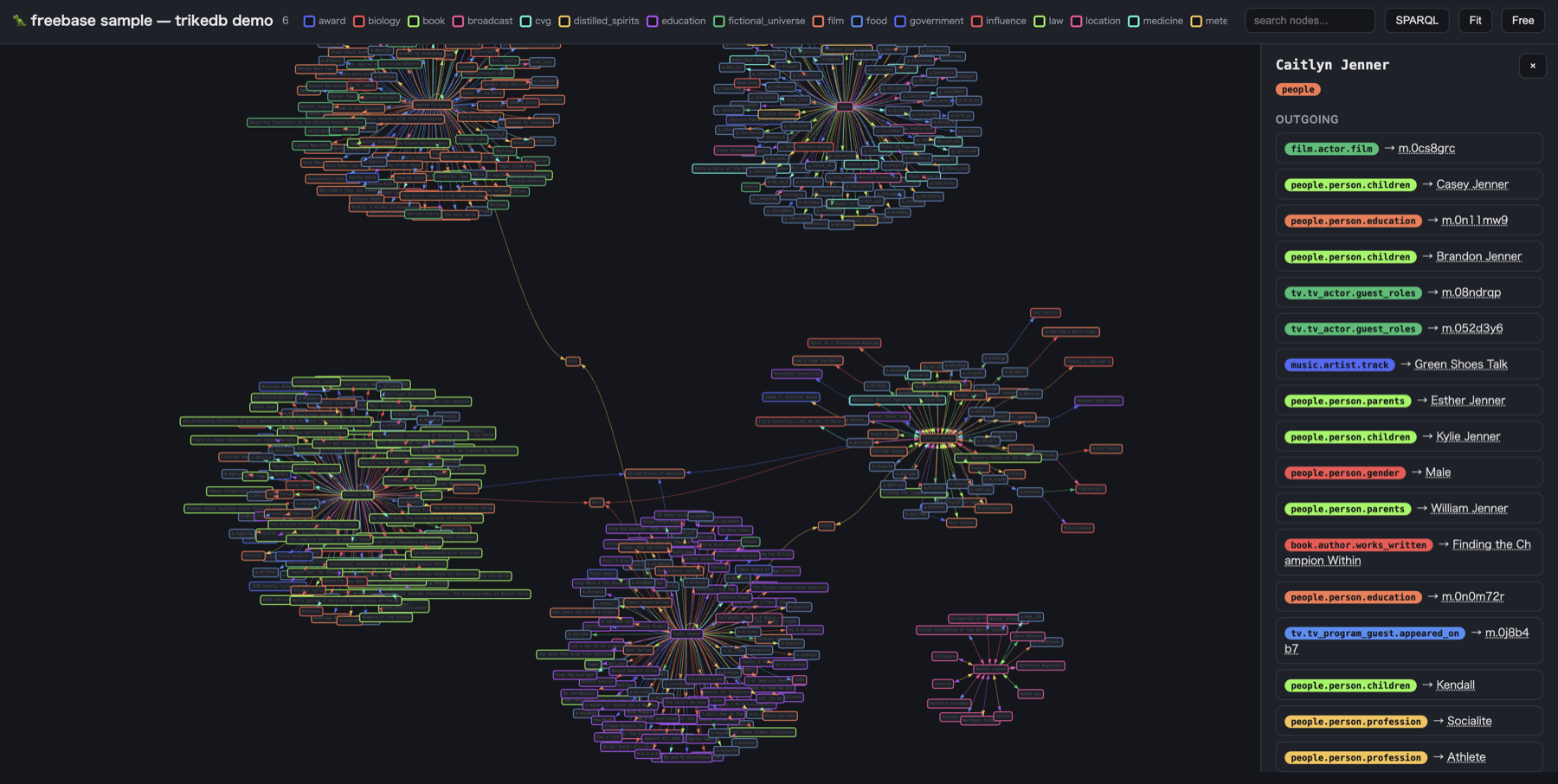
Live demos — a company as five graphs · a data platform with an action log · 600 real facts, filterable, with an in-browser SPARQL console
Install
pip install trikedb          # library + CLI
pip install 'trikedb[mcp]'   # + MCP server, so an agent can use it
pip install 'trikedb[all]'   # + serve, OAuth, SHACL, OWL, semantic search, S3/warehouse graphs
Every optional feature is an extra, so the core stays PyYAML + rdflib + pyoxigraph. The full list is in the reference.
Start with three facts
No schema, no modelling session. Write facts, look at them:
from trikedb import TrikeDB

db = TrikeDB("graph.yaml")               # the file is created on first write
db.add("salesflow-crm", "PROVIDES", "crm-sync-job")
db.add("crm-sync-job", "INGESTS_TO", "RAW_CRM_CONTACTS", schedule="hourly")
db.set_node("RAW_CRM_CONTACTS", type="table", pii=True)

db.query(["?vendor PROVIDES ?job", "?job INGESTS_TO ?table"])
db.to_html("graph.html")                 # a clickable page for your teammates
Or from a blank repo, without writing any Python:
trikedb init graph.yaml --template agent-memory   # a starting graph with a real shape
trikedb add graph.yaml salesflow-crm PROVIDES crm-sync-job
trikedb query graph.yaml -w "?vendor PROVIDES ?job"
trikedb ui graph.yaml                             # open it in a browser
Model an ordered workflow in YAML
The workflows: section is a concise way to author a business or data process.
It is an authoring form for a regular knowledge graph, not a separate
workflow database: TrikeDB compiles it into RDF nodes and triples that can be
saved, diffed, and queried with SPARQL through PyOxigraph.
workflows:
  customer-refresh:
    label: Refresh customer data
    summary: Validate CRM records and publish them for analytics
    tags: [domain:customer-data, cadence:daily]
    workflow_facets:
      - label: Data source
        values: [CRM]
      - label: Transform tool
        values: [dbt]
    steps:
      - id: extract-records
        label: Extract from CRM
        next: [validate-records]
      - id: validate-records
        label: Validate records
        next: [publish-records, request-review]
      - id: publish-records
        label: Publish for analytics
      - id: request-review
        label: Request data review
        next: [publish-records]
Each workflow and step has a stable ID. A step's next field names its
immediate successor or successors; multiple targets express a branch, and
multiple incoming links express a rejoin. This makes the direction explicit:
the example says extraction comes before validation, then either review or
publication, with review rejoining at publication. Labels, YAML list position,
and tags do not infer or change the sequence.
On load, TrikeDB creates a workflow node, a process_step node for each
step, one HAS_STEP relation per step (with its order), and a directed
NEXT_STEP relation for each next target. These are ordinary RDF facts, so
the workflow can be queried alongside the rest of the graph. Saving normalizes
the shorthand to the canonical nodes: / triples: representation.
The loader checks the workflow structure: IDs must be unique, every next
target must exist in that workflow, and the step graph must be connected and
acyclic. Explicit order values must increase along each NEXT_STEP edge;
when omitted, order follows the step list. Branches and rejoins are valid.
Put decision conditions in a step's description or properties; the
sequence graph records order, not the business meaning of a branch.
Open and explore a workflow
The standard HAS_STEP and NEXT_STEP predicates enable the workflow picker
automatically in the HTML workbench:
from trikedb import TrikeDB

db = TrikeDB("graph.yaml")
db.to_html("graph.html")
Or generate it from the command line with trikedb ui graph.yaml. The picker
searches workflow names and filters by one tags value. Select a workflow to
see its ordered process, then use 全体表示 to return to the whole graph.
Graphs with a custom vocabulary can pass workflow_predicates and
workflow_membership_predicate to to_html() or the corresponding CLI
options.
Keep workflow order separate from context
Only process steps belong in the NEXT_STEP sequence. Model tools, platforms,
dbt models, and specific data objects as their own graph nodes, then connect
them to the relevant step with relations such as IMPLEMENTED_BY, USES,
RUNS_ON, READS_FROM, or WRITES_TO. The workbench displays this related
context in separate lanes; it does not turn those nodes into steps or let them
change the process order. Record the concrete model or object when it is known.
Use tags to classify and filter workflows (for example, by domain or
cadence). Use workflow_facets for descriptive values shown on workflow
cards, such as a data source or tool category. Neither replaces graph nodes
and relations that identify the actual systems and data used. For the complete
field list, RDF form, and custom-predicate options, see the
workflow and HTML workbench reference.
The four you actually need
There are more, but a graph that earns its keep is usually built out of these:
db.add(s, p, o, **attrs) |
state a fact. Any keyword becomes an edge attribute — prov= is the one worth standardizing on, so every fact can be traced back to its source |
db.act(s, p, o, by=…, state=…) |
record something that happened: it is stamped with a time, appended to the node's history, and moves the node to the state it left behind |
db.find(question, where=…) |
the retrieval an agent wants: search by meaning, then filter on exact properties |
db.sparql(query) |
the full query language, when patterns are not enough |
Everything else — inference, SHACL, workspaces, S3 and warehouse storage, the HTTP server — is there when you need it and costs nothing until then. See the reference.
Then lock it down
A graph is only worth reading if it cannot fill up with junk. Declare what may be said, and every write path — yours, the CLI's, an agent's — is held to it. A shape is checked wherever the node's type is known, in either direction:
db = TrikeDB("graph.yaml", ontology={
    "PROVIDES":   "SaaS vendor -> ingestion job",
    "INGESTS_TO": {"description": "ingestion job -> warehouse table",
                   "domain": "job", "range": "table"},
})

db.set_node("crm-sync-job", type="job")
db.set_node("RAW_CRM_CONTACTS", type="table")

db.add("crm-sync-job", "OWNS", "anything")                # OntologyError: undeclared predicate
db.add("RAW_CRM_CONTACTS", "INGESTS_TO", "crm-sync-job")  # OntologyError: written backwards
Actions can declare when they may run and who may sign them — the half a type check cannot reach. An order delivered before it ever shipped breaks no type; a price change approved by nobody is type-correct. Both are refused here:
db.declare_link("DELIVERED_TO", domain="order", range="region",
                requires="SHIPPED_FROM",   # this has to have happened first
                by="courier")              # and this is who may do it

db.act("ORD-25101", "DELIVERED_TO", "Riverside", by="Kai")   # OntologyError: never shipped
Hand it to an agent
Register the graph as an MCP server and the agent gets sixteen tools —
sparql, match, search, find, get_node, history, ontology, stats
to read, add_triple, act, set_node, remove_triples, import_source to
write, and extraction_prompt, preview_triples, add_triples to turn a
document into facts without guessing at the vocabulary:
{
  "mcpServers": {
    "kg": {
      "command": "uvx",
      "args": ["--from", "trikedb[mcp]", "trikedb", "mcp", "/absolute/path/to/graph.yaml"]
    }
  }
}
Writes autosave to the YAML, so an agent's contribution arrives as a reviewable git diff, and the ontology rejects any predicate it tries to invent. That is the answer to "just throw the docs at it": the agent is the extractor, trikedb is the validated write path. Extraction stays flexible; the vocabulary does not.
No MCP client? Then the whole integration is one line in your agent's project
instructions — "before any task touching the pipeline, read graph.yaml" —
and the file does the rest.
Point it at a document
trikedb holds no model. It writes the prompt and judges the answer; who makes
the one call in between is up to you, and there are three ways to do it. The
prompt is built from the graph being written into — its declared predicates,
its existing node names — which is why whoever answers does not invent
EMPLOYED_BY beside WORKS_AT, or open a second node for a company already in
the file.
The route that needs least is the shell, split in two. No key, no SDK. What stands in the middle is a person and whichever chat window is already open:
trikedb extract graph.yaml report.docx > prompt.txt # paste it anywhere
trikedb import graph.yaml answer.md --dry-run       # what it would do
trikedb import graph.yaml answer.md                 # what it did
If you work through an agent, you don't even paste.
Register the graph as an MCP server and
extraction_prompt → preview_triples → add_triples walk the same path. The
model is already sitting in front of you; there is nothing to set up.
If you already pay for a model and want this inside a script, make that one
call yourself. llm is any callable taking the prompt and returning text —
three lines around whichever SDK you use, and five of them are written out in
examples/extract_providers.py:
from extract_providers import anthropic      # examples/extract_providers.py

rows = db.extract(open("press-release.md").read(), llm=anthropic())
Whichever route you take, the last gate is the same one — --dry-run,
preview_triples and db.preview return the same verdicts. Before anything is
written, one row at a time:
for f in db.preview(rows):          # nothing is written yet
    print(f["verdict"], f["triple"], f["detail"])

# new       Acme BASED_IN Osaka
# new       Sato WORKS_AT Acme
# conflict  Tanaka WORKS_AT Globex
#           └ WORKS_AT is declared functional and Tanaka already holds 'Acme'
A Word file goes in as it is: a .docx is a zip with an XML document inside,
so reading one costs no dependency. Google Docs exports Markdown directly
(File → Download → Markdown), which trikedb already reads.
--dry-run is worth having on its own, and works on any source — CSV, Markdown,
another graph. Every row comes back as new, same, update, rejected or
conflict, with the reason, and nothing is written until you have read them.
A conflict is not a guess: a predicate declared functional may hold one
object per subject, so a second one is a contradiction the graph can prove.
How well does the constrained prompt actually do? Run it and see — the cases, the answer sheets and the scorer are in evals/, along with the unconstrained baseline to compare against. No scores are committed there, because a committed score is one model on one day.
What people put in it
- An agent's memory of your systems. Which warehouse role can read what, which ingestion job is the live one, which repo a change belongs in. None of it is in the code, all of it is what an agent gets wrong.
- A service and ownership map. Who calls whom, who is on call, which of the three similarly named services is deprecated.
- A decision and incident log with preconditions.
act()plusrequiresmeans "deployed" cannot be recorded for something that was never approved — enforced on write, not in a review checklist. - A data governance ledger. PII tables, who may access them, retention.
by:andrequires:are an authorization model that diffs in a pull request.
The common thread: a few hundred to a few thousand facts that somebody curates on purpose. That is the size where a graph is both possible and worth trusting.
Why not just a Markdown file?
Because a Markdown file cannot refuse a bad write, and neither can the agent writing to it. Every fact here passes the same guard — predicate declared, direction right, precondition met — whoever writes it. And once the facts are structured you can ask questions no grep answers: everything two hops from this table, every PII column with no owner, what changed since March.
It also measurably helps the model. On WebQSP
(knowledge-graph QA), the same local model answers 42.7% alone vs 77.7% with a
trikedb graph as context — Hits@1 over 300 questions, paired McNemar p = 9e-20,
0.59 s per question. Method, caveats, and an honest scoring-sensitivity analysis:
benchmarks/.
What trikedb is not
- Not an extraction pipeline. It will not call a language model, hold your
key, or parse your PDFs. It writes the prompt from your ontology and judges
every row against it before the write — the model and the decision stay
yours. Extracted graphs inherit hallucinations; this is the part that makes
them visible before they land. The only model trikedb ever runs itself is
the small embedding one behind the optional
[semantic]search, fetched once and then run locally. - Not for millions of triples. Everything is in memory and scans are linear. Hundreds to thousands is the range where a curated graph is even possible.
- Not its own SPARQL engine. Reads run on Oxigraph, updates and OWL/SHACL on rdflib. Graduating to a full triple store later is an export, not a rewrite.
- Not a replacement for Obsidian if what you want is human notes. This is for facts a machine has to be right about.
Where to go next
- docs/REFERENCE.md — every feature, the file format, and the compatibility and safety contract · 日本語 · 简体中文
- docs/ARCHITECTURE.md — the layering, and where new code goes
- docs/SCALING.md — measured limits at 1k / 10k / 100k triples
- examples/ — the graphs behind the demos, plus a runnable notebook
- evals/ — extraction cases, the scorer, and the baseline to measure against
- CONTRIBUTING.md — how to run the tests and what a good pull request looks like
License
MIT. Copyright (c) 2026 Ryuto Yoda.
Bundled data
One third-party dataset is shipped, and one is not:
- Freebase — the
examples/graphs/freebase/*.yamlgraphs are a small extract of the Freebase dump, licensed CC BY 2.5. They are in the repository so the demo pages can be rebuilt from their source. - WebQSP — the benchmark questions and gold answers come from
The Value of Semantic Parse Labeling for KBQA
(Yih et al., 2016), via the
rmanluo/RoG-webqsprepack. No dataset content is committed here:benchmarks/webqsp_bench.py preparedownloads the test split at run time. What is tracked isbenchmarks/*_data.json— the scored results the charts and the number above are read from.
Neither is required to use trikedb.
1 maintainer

Metadata
1 maintainer
Release files for trikedb 0.46.1
For a detailed explanation of source distributions (sdists) and built distributions (wheels), please see the package formats documentation.
Source distribution (sdist)
| File | Size | Uploaded | Provenance | |
|---|---|---|---|---|
| trikedb-0.46.1.tar.gz | 633.8 kB | Without provenance | Details |
Built distribution (wheel)
| File | Interpreter | ABI | Platform | Reset |
|---|---|---|---|---|
| trikedb-0.46.1-py3-none-any.whl | Python 3 | none | any | Details |
Total release size: 785.8 kB
Release files / trikedb-0.46.1.tar.gz
| Download URL | trikedb-0.46.1.tar.gz |
|---|---|
| Size | 633.8 kB |
| Tags | Source |
|
SHA-256 checksum How to use checksums |
f9c189e5c87f0ce4e96de235fc55cacbc86aeeb6a79ed4061047353a325423c4
|
|
BLAKE2b-256 checksum How to use checksums |
a9784b3a7cebabd44e659aed1f77a982d221268aa011d03f236c4f1abe92cd62
|
| Upload date | |
|
Uploaded using Trusted Publishing? What is trusted publishing? |
No |
| Uploaded via |
uv/0.12.19 {"installer":{"name":"uv","version":"0.12.19","subcommand":["publish"]},"python":null,"implementation":{"name":null,"version":null},"distro":{"name":"macOS","version":null,"id":null,"libc":null},"system":{"name":null,"release":null},"cpu":null,"openssl_version":null,"setuptools_version":null,"rustc_version":null,"ci":null}
|
Release files / trikedb-0.46.1-py3-none-any.whl
| Download URL | trikedb-0.46.1-py3-none-any.whl |
|---|---|
| Size | 152.0 kB |
| Tags | Python 3 |
|
SHA-256 checksum How to use checksums |
55e5cd74cb67d262d026052b59862a2eb138e31c514bb5ddafc1a523adf28fa0
|
|
BLAKE2b-256 checksum How to use checksums |
e55771964b21a1adc9605d912e2f2022a70ee56e3ffc9edd1297351bb885e453
|
| Upload date | |
|
Uploaded using Trusted Publishing? What is trusted publishing? |
No |
| Uploaded via |
uv/0.12.19 {"installer":{"name":"uv","version":"0.12.19","subcommand":["publish"]},"python":null,"implementation":{"name":null,"version":null},"distro":{"name":"macOS","version":null,"id":null,"libc":null},"system":{"name":null,"release":null},"cpu":null,"openssl_version":null,"setuptools_version":null,"rustc_version":null,"ci":null}
|
Security for trikedb 0.46.1
Provenance
Provenance describes where a file came from. On PyPI, provenance is shared via attestations, which provide a verifiable record of the build or publishing details. View details, limitations and caveats.
No provenance found
None of the files in this release were uploaded with provenance metadata.
A note on package security
PyPI is a repository for distributing packages, not a service for auditing them. While third-party security researchers and our staff do their best to detect and remove malicious packages, PyPI cannot guarantee the quality, security or suitability of any given package.














