
twitter_openapi_python
Twitter scraping with data validation by pydantic.
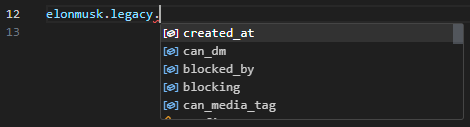
Setup
pip install twitter-openapi-python
Usage
import json
import datetime

from pathlib import Path
from tweepy_authlib import CookieSessionUserHandler
from twitter_openapi_python import TwitterOpenapiPython

# login by tweepy_authlib
if Path("cookie.json").exists():
    with open("cookie.json", "r") as f:
        cookies_dict = json.load(f)
        if isinstance(cookies_dict, list):
            cookies_dict = {k["name"]: k["value"] for k in cookies_dict}
else:
    auth_handler = CookieSessionUserHandler(
        screen_name=input("screen_name: "),
        password=input("password: "),
    )
    cookies_dict = auth_handler.get_cookies().get_dict()

# To extract cookies from Windows (Linux by default)
# If you use tweepy_authlib, you must be on Windows
client = TwitterOpenapiPython()
client.additional_api_headers = {
    "sec-ch-ua-platform": '"Windows"',
}
client.additional_browser_headers = {
    "sec-ch-ua-platform": '"Windows"',
}

# get client from cookies
𝕏 = client.get_client_from_cookies(cookies=cookies_dict)

# tweet "Hello World!!" with current time
time = datetime.datetime.now().strftime("%Y-%m-%dT%H:%M:%SZ")
𝕏.get_post_api().post_create_tweet(tweet_text=f"Hello World!!{time}")

# get user info
response = 𝕏.get_user_api().get_user_by_screen_name("elonmusk")
Login
from twitter_openapi_python import TwitterOpenapiPython

# guest client
𝕏 = TwitterOpenapiPython().get_guest_client()
tweet = 𝕏.get_default_api().get_tweet_result_by_rest_id("1349129669258448897")
assert tweet.data is not None
assert tweet.data.tweet.legacy is not None
print(tweet.data.tweet.legacy.full_text)
Multiple OS
The Token can only be used on the same OS that issued the Token In other words, if the sec-ch-ua-platform does not match, the Token cannot be used. This library uses the Linux Chrome header by default. To use Token issued by Windows, do the following.
client = TwitterOpenapiPython()
client.additional_api_headers = {
  "sec-ch-ua-platform": '"Windows"',
};
Development
cd twitter_openapi_python
uv sync
uv run pytest test/api
uv build
uv publish
License
This project is dual licensed. You can choose one of the following licenses:
1 maintainer

Metadata
1 maintainer
Release files for twitter-openapi-python 0.1.0
For a detailed explanation of source distributions (sdists) and built distributions (wheels), please see the package formats documentation.
Source distribution (sdist)
| File | Size | Uploaded | |
|---|---|---|---|
| twitter_openapi_python-0.1.0.tar.gz | 27.0 kB | Details |
Built distribution (wheel)
| File | Interpreter | ABI | Platform | Reset |
|---|---|---|---|---|
| twitter_openapi_python-0.1.0-py3-none-any.whl | Python 3 | none | any | Details |
Total release size: 62.3 kB
Release files / twitter_openapi_python-0.1.0.tar.gz
| Download URL | twitter_openapi_python-0.1.0.tar.gz |
|---|---|
| Size | 27.0 kB |
| Tags | Source |
|
SHA-256 checksum How to use checksums |
7ae1d0837c012ba439bfa0261379d7066cba25af4690f7744017d61a541ae9ad
|
|
BLAKE2b-256 checksum How to use checksums |
94285628592caf504bbc085b9db9d110885e0f8555ecbff5ff93418707151c1c
|
| Upload date | |
|
Uploaded using Trusted Publishing? What is trusted publishing? |
Yes |
| Uploaded via |
twine/7.0.0 CPython/3.13.14
|
Provenance
Provenance describes where a file came from. On PyPI, provenance is shared via attestations, which provide a verifiable record of the build or publishing details. View details, limitations and caveats.


PyPI Publish Attestation
PyPI verified that this artifact, at this checksum, originated from the publisher listed below.
Signed by GitHub Actions, verified by PyPI on Oct 16, 2026.
Transparency logRelease files / twitter_openapi_python-0.1.0-py3-none-any.whl
| Download URL | twitter_openapi_python-0.1.0-py3-none-any.whl |
|---|---|
| Size | 35.3 kB |
| Tags | Python 3 |
|
SHA-256 checksum How to use checksums |
89bcdc2bc1e1faefb287523fa064ee8cb243857e9a67ada0290ffe1b5b3b740f
|
|
BLAKE2b-256 checksum How to use checksums |
e2cc388075b2b94e4e597a0ee9b0a0efa33674c7ff1cfb30448d14b90961e754
|
| Upload date | |
|
Uploaded using Trusted Publishing? What is trusted publishing? |
Yes |
| Uploaded via |
twine/7.0.0 CPython/3.13.14
|
Provenance
Provenance describes where a file came from. On PyPI, provenance is shared via attestations, which provide a verifiable record of the build or publishing details. View details, limitations and caveats.
PyPI Publish Attestation
PyPI verified that this artifact, at this checksum, originated from the publisher listed below.
Signed by GitHub Actions, verified by PyPI on Oct 16, 2026.
Transparency log













