
This release is a pre-release and may not be stable for production use.





Introduction
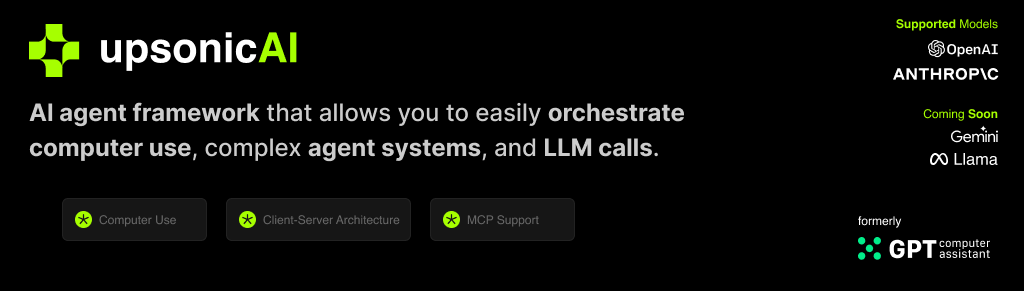
Upsonic is a reliability-focused framework designed for real-world applications. It enables trusted agent workflows in your organization through advanced reliability features, including verification layers, triangular architecture, validator agents, and output evaluation systems.
Why Choose Upsonic?
Upsonic is a next-generation framework that makes agents production-ready by solving three critical challenges:
1- Reliability: While other frameworks require expertise and complex coding for reliability features, Upsonic offers easy-to-activate reliability layers without disrupting functionality.
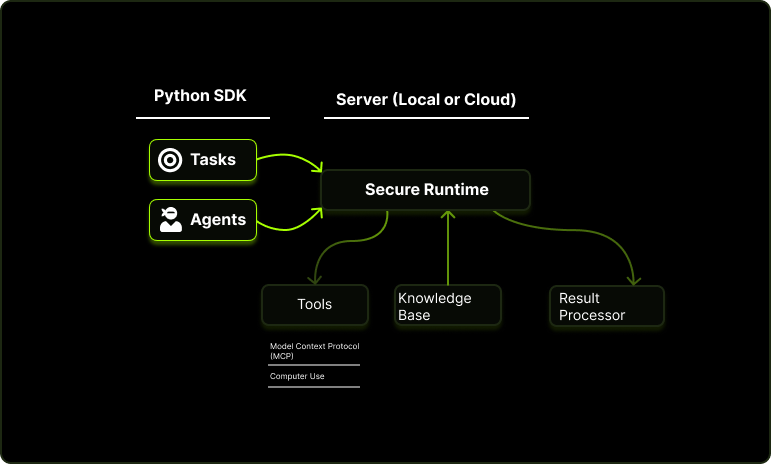
2- Model Context Protocol: The MCP allows you to leverage tools with various functionalities developed both officially and by third parties without requiring you to build custom tools from scratch.
3- Secure Runtime: Isolated environment to run agents
Key features:
- Production-Ready Scalability: Deploy seamlessly on AWS, GCP, or locally using Docker.
- Task-Centric Design: Focus on practical task execution, with options for:
- Basic tasks via LLM calls.
- Advanced tasks with V1 agents.
- Complex automation using V2 agents with MCP integration.
- MCP Server Support: Utilize multi-client processing for high-performance tasks.
- Tool-Calling Server: Exception-secure tool management with robust server API interactions.
- Computer Use Integration: Execute human-like tasks using Anthropic’s ‘Computer Use’ capabilities.
- Easily adding tools: You can add your custom tools and MCP tools with a single line of code.
📙 Documentation
You can access our documentation at docs.upsonic.ai. All concepts and examples are available there.
🛠️ Getting Started
Prerequisites
- Python 3.10 or higher
- Access to OpenAI or Anthropic API keys (Azure and Bedrock Supported)
Installation
pip install upsonic
Basic Example
Set your OPENAI_API_KEY
export OPENAI_API_KEY=sk-***
Start the agent
from upsonic import Task, Agent

task = Task("Who developed you?")

agent = Agent("Coder")

agent.print_do(task)
Reliability Layer
LLM output reliability is critical, particularly for numerical operations and action execution. Upsonic addresses this through a multi-layered reliability system, enabling control agents and verification rounds to ensure output accuracy.
Verifier Agent: Validates outputs, tasks, and formats - detecting inconsistencies, numerical errors, and hallucinations
Editor Agent: Works with verifier feedback to revise and refine outputs until they meet quality standards
Rounds: Implements iterative quality improvement through scored verification cycles
Loops: Ensures accuracy through controlled feedback loops at critical reliability checkpoints
class ReliabilityLayer:
  prevent_hallucination = 10

agent = Agent("Coder", reliability_layer=ReliabilityLayer)
Tool Integration via MCP
Upsonic officially supports Model Context Protocol (MCP) and custom tools. You can use hundreds of MCP servers at https://glama.ai/mcp/servers or https://smithery.ai/ We also support Python functions inside a class as a tool. You can easily generate your integrations with that.
from upsonic import Agent, Task, ObjectResponse

# Define Fetch MCP configuration
class FetchMCP:
    command = "uvx"
    args = ["mcp-server-fetch"]

# Create response format for web content
class WebContent(ObjectResponse):
    title: str
    content: str
    summary: str
    word_count: int

# Initialize agent
web_agent = Agent(
    "Web Content Analyzer",
    model="openai/gpt-4o",  # You can use other models
)

# Create a task to analyze a web page
task = Task(
    description="Fetch and analyze the content from url. Extract the main content, title, and create a brief summary.",
    context=["https://upsonic.ai"],
    tools=[FetchMCP],
    response_format=WebContent
)

# Usage
web_agent.print_do(task)
print(result.title)
print(result.summary)
Agent with Multi-Task Example
Distribute tasks effectively across agents with our automated task distribution mechanism. This tool matches tasks based on the relationship between agent and task, ensuring collaborative problem-solving across agents and tasks. The output is essential for deploying an AI agent across apps or as a service. Upsonic uses Pydantic BaseClass to define structured outputs for tasks, allowing developers to specify exact response formats for their AI agent tasks.
from upsonic import Agent, Task, MultiAgent, ObjectResponse
from upsonic.tools import Search
from typing import List

# Targeted Company and Our Company
our_company = "https://redis.io/"
targeted_url = "https://upsonic.ai/"


# Response formats
class CompanyResearch(ObjectResponse):
   industry: str
   product_focus: str
   company_values: List[str]
   recent_news: List[str]

class Mail(ObjectResponse):
   subject: str
   content: str


# Creating Agents
researcher = Agent(
   "Company Researcher",
   company_url=our_company
)

strategist = Agent(
   "Outreach Strategist",
   company_url=our_company
)


# Creating Tasks and connect
company_task = Task(
   "Research company website and analyze key information",

   context=[targeted_url],
   tools=[Search],
   response_format=CompanyResearch
)

position_task = Task(
   "Analyze Senior Developer position context and requirements",
   context=[company_task, targeted_url],
)

message_task = Task(
   "Create personalized outreach message using research",
   context=[company_task, position_task, targeted_url],
   response_format=Mail
)


# Run the Tasks over agents
results = MultiAgent.do(
   [researcher, strategist],
   [company_task, position_task, message_task]
)


# Print the results
print(f"Company Industry: {company_task.response.industry}")
print(f"Company Focus: {company_task.response.product_focus}")
print(f"Company Values: {company_task.response.company_values}")
print(f"Company Recent News: {company_task.response.recent_news}")
print(f"Position Analyze: {position_task.response}")
print(f"Outreach Message Subject: {message_task.response.subject}")
print(f"Outreach Message Content: {message_task.response.content}")
Direct LLM Call
Direct LLM calls offer faster, cheaper solutions for simple tasks. In Upsonic, you can make calls to model providers without any abstraction level and organize structured outputs. You can also use tools with LLM calls.
from upsonic import Direct

Direct.do(task1)
Reliable Computer Use
Computer use can able to human task like humans, mouse move, mouse click, typing and scrolling and etc. So you can build tasks over non-API systems. It can help your linkedin cases, internal tools. Computer use is supported by only Claude for now.
from upsonic.client.tools import ComputerUse

...

tools = [ComputerUse]
...
Telemetry
We use anonymous telemetry to collect usage data. We do this to focus our developments on more accurate points. You can disable it by setting the UPSONIC_TELEMETRY environment variable to false.
import os
os.environ["UPSONIC_TELEMETRY"] = "False"
Coming Soon
- Dockerized Server Deploy
- Verifiers For Computer Use
1 maintainer

Release files for upsonic 0.44.1a1739912278
For a detailed explanation of source distributions (sdists) and built distributions (wheels), please see the package formats documentation.
Source distribution (sdist)
| File | Size | Uploaded | |
|---|---|---|---|
| upsonic-0.44.1a1739912278.tar.gz | 203.0 kB | Details |
Built distribution (wheel)
| File | Interpreter | ABI | Platform | Reset |
|---|---|---|---|---|
| upsonic-0.44.1a1739912278-py3-none-any.whl | Python 3 | none | any | Details |
Total release size: 281.7 kB
Release files / upsonic-0.44.1a1739912278.tar.gz
| Download URL | upsonic-0.44.1a1739912278.tar.gz |
|---|---|
| Size | 203.0 kB |
| Tags | Source |
|
SHA-256 checksum How to use checksums |
e697f1033b409a756165e98c914e77083a2bee1d4ee9e1eb7d079104bc1eeb09
|
|
BLAKE2b-256 checksum How to use checksums |
a489fa8143ecb8a4b4fe3f11fdb2bbc4511993c3311d84356a498219357d6554
|
| Upload date | |
|
Uploaded using Trusted Publishing? What is trusted publishing? |
No |
| Uploaded via |
uv/0.6.1
|
Release files / upsonic-0.44.1a1739912278-py3-none-any.whl
| Download URL | upsonic-0.44.1a1739912278-py3-none-any.whl |
|---|---|
| Size | 78.7 kB |
| Tags | Python 3 |
|
SHA-256 checksum How to use checksums |
7b71706b6d3b5ca4730888fff30dc6fed97476f9ea613c1ea85668f9219ba79f
|
|
BLAKE2b-256 checksum How to use checksums |
e66abda9f96d1db859bf72438675f937d5fae5aab46f126cd5604824f8501f2a
|
| Upload date | |
|
Uploaded using Trusted Publishing? What is trusted publishing? |
No |
| Uploaded via |
uv/0.6.1
|














