
Agent Framework For Fintech

Project description

Upsonic
Production-Ready AI Agent Framework with Safety First







Overview
Upsonic is an open-source AI agent framework for building production-ready agents. It supports multiple AI providers (OpenAI, Anthropic, Azure, Bedrock) and includes built-in safety policies, OCR, memory, multi-agent coordination, and MCP tool integration.
What Can You Build?
- Document Analysis: Extract and process text from images and PDFs
- Customer Service Automation: Agents with memory and session context
- Financial Analysis: Agents that analyze data, generate reports, and provide insights
- Compliance Monitoring: Enforce safety policies across all agent interactions
- Research & Data Gathering: Automate research workflows with multi-agent collaboration
- Multi-Agent Workflows: Orchestrate tasks across specialized agent teams
Quick Start
Installation
uv pip install upsonic
# pip install upsonic
Basic Agent
from upsonic import Agent, Task

agent = Agent(model="anthropic/claude-sonnet-4-5", name="Stock Analyst Agent")

task = Task(description="Analyze the current market trends")

agent.print_do(task)
Agent with Tools
from upsonic import Agent, Task
from upsonic.tools.common_tools import YFinanceTools

agent = Agent(model="anthropic/claude-sonnet-4-5", name="Stock Analyst Agent")

task = Task(
    description="Give me a summary about tesla stock with tesla car models",
    tools=[YFinanceTools()]
)

agent.print_do(task)
Agent with Memory
from upsonic import Agent, Task
from upsonic.storage import Memory, InMemoryStorage

memory = Memory(
    storage=InMemoryStorage(),
    session_id="session_001",
    full_session_memory=True
)

agent = Agent(model="anthropic/claude-sonnet-4-5", memory=memory)

task1 = Task(description="My name is John")
agent.print_do(task1)

task2 = Task(description="What is my name?")
agent.print_do(task2)  # Agent remembers: "Your name is John"
Ready for more? Check out the Quickstart Guide for additional examples including Knowledge Base and Team workflows.
Key Features
- Autonomous Agent: An agent that can read, write, and execute code inside a sandboxed workspace, no tool setup required
- Safety Engine: Policy-based content filtering applied to user inputs, agent outputs, and tool interactions
- OCR Support: Unified interface for multiple OCR engines with PDF and image support
- Memory Management: Session memory and long-term storage with multiple backend options
- Multi-Agent Teams: Sequential and parallel agent coordination
- Tool Integration: MCP tools, custom tools, and human-in-the-loop workflows
- Production Ready: Monitoring, metrics, and enterprise deployment support
Core Capabilities
Autonomous Agent
AutonomousAgent extends Agent with built-in filesystem and shell tools, automatic session memory, and workspace sandboxing. Useful for coding assistants, DevOps automation, and any task that needs direct file or terminal access.
from upsonic import AutonomousAgent, Task

agent = AutonomousAgent(
    model="anthropic/claude-sonnet-4-5",
    workspace="/path/to/project"
)

task = Task("Read the main.py file and add error handling to every function")
agent.print_do(task)
All file and shell operations are restricted to workspace. Path traversal and dangerous commands are blocked.
Safety Engine
The Safety Engine applies policies at three points: user inputs, agent outputs, and tool interactions. Policies can block, anonymize, replace, or raise exceptions on matched content.
from upsonic import Agent, Task
from upsonic.safety_engine.policies.pii_policies import PIIAnonymizePolicy

agent = Agent(
    model="anthropic/claude-sonnet-4-5",
    user_policy=PIIAnonymizePolicy,  # anonymizes PII before sending to the LLM
)

task = Task(
    description="My email is john.doe@example.com and phone is 555-1234. What are my email and phone?"
)

# PII is anonymized before reaching the LLM, then de-anonymized in the response
result = agent.do(task)
print(result)  # "Your email is john.doe@example.com and phone is 555-1234"
Pre-built policies cover PII, adult content, profanity, financial data, and more. Custom policies are also supported.
Learn more: Safety Engine Documentation
OCR and Document Processing
Upsonic provides a unified OCR interface with a layered pipeline: Layer 0 handles document preparation (PDF to image conversion, preprocessing), Layer 1 runs the OCR engine.
uv pip install "upsonic[ocr]"
from upsonic.ocr import OCR
from upsonic.ocr.layer_1.engines import EasyOCREngine

engine = EasyOCREngine(languages=["en"])
ocr = OCR(layer_1_ocr_engine=engine)

text = ocr.get_text("invoice.pdf")
print(text)
Supported engines: EasyOCR, RapidOCR, Tesseract, PaddleOCR, DeepSeek OCR, DeepSeek via Ollama.
Learn more: OCR Documentation
Upsonic AgentOS
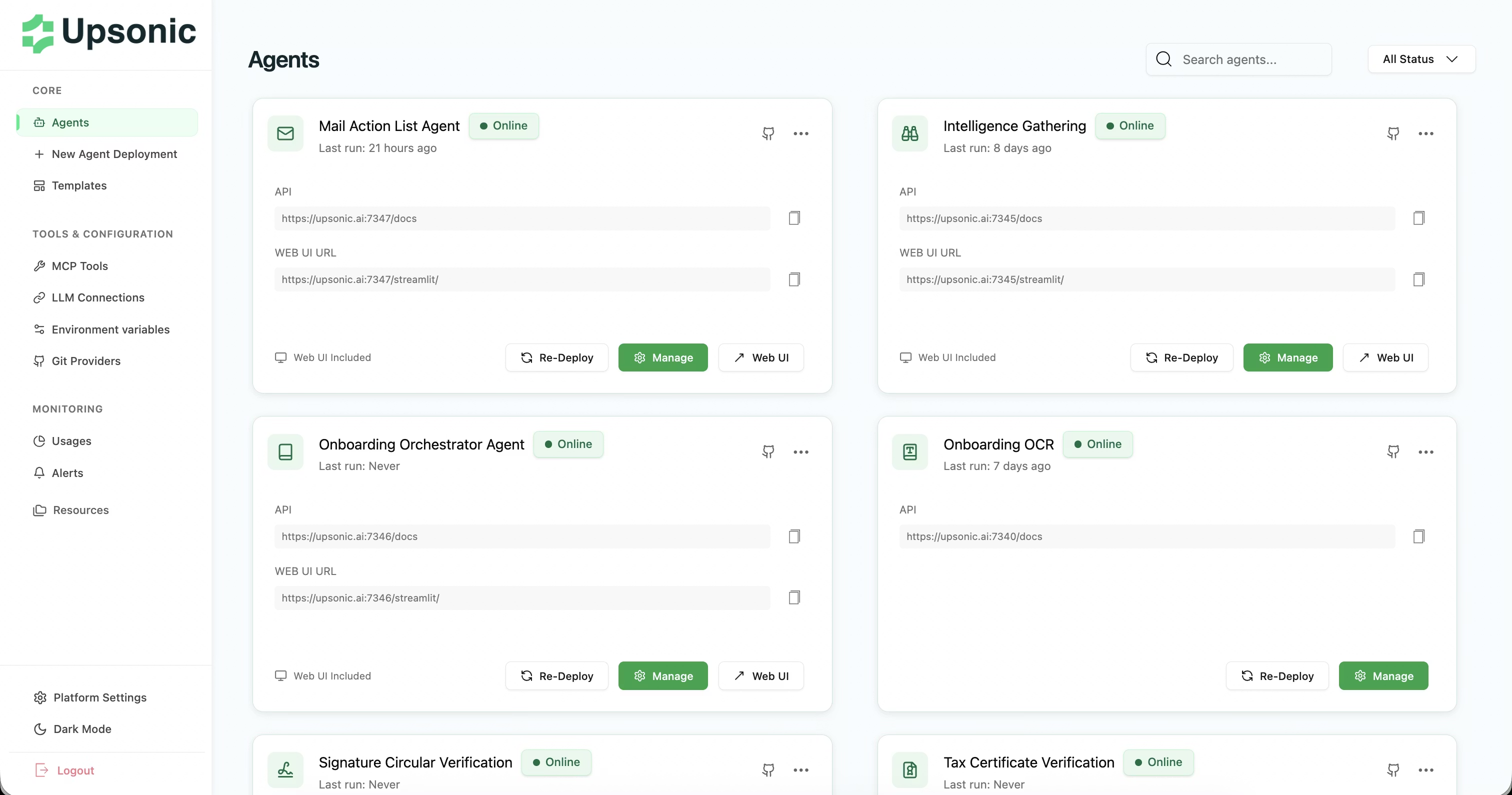
AgentOS is an optional deployment platform for running agents in production. It provides a Kubernetes-based runtime, metrics dashboard, and self-hosted deployment.
- Kubernetes-based FastAPI Runtime: Deploy agents as isolated, scalable microservices
- Metrics Dashboard: Track LLM costs, token usage, and performance per transaction
- Self-Hosted: Full control over your data and infrastructure
- One-Click Deployment: Automated deployment pipelines
IDE Integration
Add Upsonic docs as a source in your coding tools:
Cursor: Settings → Indexing & Docs → Add https://docs.upsonic.ai/llms-full.txt
Also works with VSCode, Windsurf, and similar tools.
Documentation and Resources
- Documentation - Complete guides and API reference
- Quickstart Guide - Get started in 5 minutes
- Examples - Real-world examples and use cases
- API Reference - Detailed API documentation
Community and Support
💬 Join our Discord community! — Ask questions, share what you're building, get help from the team, and connect with other developers using Upsonic.
- Discord - Chat with the community and get real-time support
- Issue Tracker - Report bugs and request features
- Changelog - See what's new in each release
License
Upsonic is released under the MIT License. See LICENCE for details.
Contributing
We welcome contributions from the community! Please read our contributing guidelines and code of conduct before submitting pull requests.
Learn more at upsonic.ai
Release history Release notifications | RSS feed


Download files
Download the file for your platform. If you're not sure which to choose, learn more about installing packages.
Source Distribution
Built Distribution
Filter files by name, interpreter, ABI, and platform.
If you're not sure about the file name format, learn more about wheel file names.
Copy a direct link to the current filters
File details
Details for the file upsonic-0.74.1.tar.gz.
File metadata
- Download URL: upsonic-0.74.1.tar.gz
- Upload date:
- Size: 2.6 MB
- Tags: Source
- Uploaded using Trusted Publishing? No
- Uploaded via: uv/0.10.11 {"installer":{"name":"uv","version":"0.10.11","subcommand":["publish"]},"python":null,"implementation":{"name":null,"version":null},"distro":{"name":"Ubuntu","version":"24.04","id":"noble","libc":null},"system":{"name":null,"release":null},"cpu":null,"openssl_version":null,"setuptools_version":null,"rustc_version":null,"ci":true}
File hashes
| Algorithm | Hash digest | |
|---|---|---|
| SHA256 |
0f6097955fe978d842490a8fc7190e9275fc184e60c04b21c74c4ae4a833d212
|
|
| MD5 |
5c847e4665411e7a339a56facc10a0c6
|
|
| BLAKE2b-256 |
89abc18ac6f1abce020a9c37c9df9fe0dcf6b74397e77e00619e0641dc27d828
|
File details
Details for the file upsonic-0.74.1-py3-none-any.whl.
File metadata
- Download URL: upsonic-0.74.1-py3-none-any.whl
- Upload date:
- Size: 1.6 MB
- Tags: Python 3
- Uploaded using Trusted Publishing? No
- Uploaded via: uv/0.10.11 {"installer":{"name":"uv","version":"0.10.11","subcommand":["publish"]},"python":null,"implementation":{"name":null,"version":null},"distro":{"name":"Ubuntu","version":"24.04","id":"noble","libc":null},"system":{"name":null,"release":null},"cpu":null,"openssl_version":null,"setuptools_version":null,"rustc_version":null,"ci":true}
File hashes
| Algorithm | Hash digest | |
|---|---|---|
| SHA256 |
5db36b6ad1327e5be4a1435e4de02311566b76350c30463e41cdc8e5ab833f17
|
|
| MD5 |
725bc31e5bafb9e3e7c12d567a427b26
|
|
| BLAKE2b-256 |
d9cc289b23cd5c453db371bb2527bf7cb5f91aeb09d537ac996c1a1e205d9328
|






