
VimLM - AI-Powered Coding Assistant for Vim/NeoVim
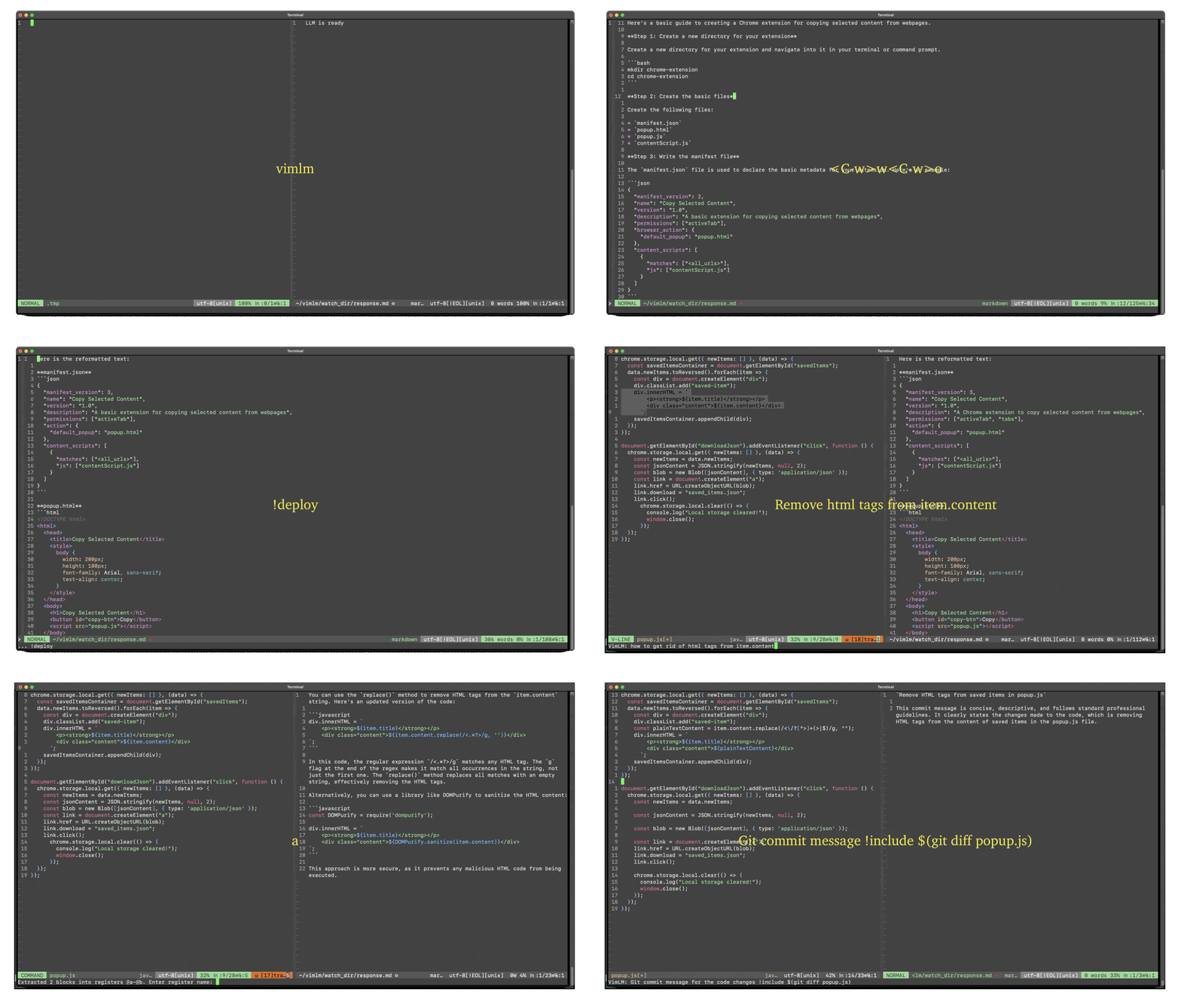
VimLM brings the power of AI directly into your Vim workflow. Maintain focus with keyboard-driven interactions while leveraging AI for code generation, refactoring, and documentation.
Get started quickly with the tutorial.
Features
- Native Vim Integration - Split-window responses & intuitive keybindings
- Offline First - 100% local execution with MLX-compatible models
- Contextual Awareness - Integrates seamlessly with your codebase and external resources
- Conversational Workflow - Iterate on responses with follow-up queries
- Project Scaffolding - Generate and deploy code blocks to directories
- Extensible - Create custom LLM workflows with command chains
Requirements
- Apple Silicon (M-series)
- Python v3.12.8
- Vim v9.1 or NeoVim v0.10.4
Quick Start
pip install vimlm
vimlm
Smart Autocomplete
Basic Usage
| Key Binding | Mode | Action |
|---|---|---|
Ctrl-l |
Insert | Generate code suggestion |
Ctrl-p |
Insert | Insert generated code |
Ctrl-j |
Insert | Generate and insert code |
Example Workflow:
- Place cursor where you need code
def quicksort(arr):
    if len(arr) <= 1:
        return arr
    pivot = arr[len(arr) // 2]
    # <Cursor here>
    middle = [x for x in arr if x == pivot]
    right = [x for x in arr if x > pivot]
    return quicksort(left) + middle + quicksort(right)
- Use
Ctrl-jto autocomplete
Repository-Level Code Completion
| Option | Description |
|---|---|
--repo |
Paths to include as repository context |
The --repo option enhances autocomplete by providing repository-level context to the LLM.
Example Workflow:
- Launch VimLM with repo context:
vimlm main.py --repo utils/* - In Insert mode, place cursor where completion is needed
Ctrl-lto generate suggestions informed by repository contextCtrl-pto accept and insert the code
Conversational Assistance
| Key Binding | Mode | Action |
|---|---|---|
Ctrl-l |
Normal/Visual | Prompt LLM |
Ctrl-j |
Normal | Continue conversation |
Ctrl-p |
Normal/Visual | Import generated code |
Esc |
Prompt | Cancel input |
1. Contextual Prompting
Ctrl-l to prompt LLM with context:
- Normal mode: Current file + line
- Visual mode: Current file + selected block
Example Prompt: Create a Chrome extension
2. Conversational Refinement
Ctrl-j to continue current thread.
Example Prompt: Use manifest V3 instead
3. Code Substitution
Ctrl-p to insert generated code block
- In Normal mode: Into last visual selection
- In Visual mode: Into current visual selection
Example Workflow:
- Select a block of code in Visual mode
- Prompt with
Ctrl-l:Use regex to remove html tags from item.content - Press
Ctrl-pto replace selection with generated code
Inline Directives
:VimLM [PROMPT] [!command1] [!command2]...
! prefix to embed inline directives in prompts:
| Directive | Description |
|---|---|
!include PATH |
Add file/directory/shell output to context |
!deploy DEST |
Save code blocks to directory |
!continue N |
Continue stopped response |
!followup |
Continue conversation |
1. Context Layering
!include [PATH] # Add files/folders to context
!include(no path): Current folder!include ~/projects/utils.py: Specific file!include ~/docs/api-specs/: Entire folder!include $(...): Shell command output
Example: Summarize recent changes !include $(git log --oneline -n 50)
2. Code Deployment
!deploy [DEST_DIR] # Extract code blocks to directory
!deploy(no path): Current directory!deploy ./src: Specific directory
Example: Create REST API endpoint !deploy ./api
3. Extending Response
!continue [MAX_TOKENS] # Continue stopped response
!continue: Default 2000 tokens!continue 3000: Custom token limit
Example: tl;dr !include large-file.txt !continue 5000
Command-Line Mode
:VimLM prompt [!command1] [!command2]...
Simplify complex tasks by chaining multiple commands together into a single, reusable Vim command.
Examples:
" Debug CI failures using error logs
:VimLM Fix Dockerfile !include .gitlab-ci.yml !include $(tail -n 20 ci.log)

" Generate unit tests for selected functions and save to test/
:VimLM Write pytest tests for this !include ./src !deploy ./test

" Add docstrings to all Python functions in file
:VimLM Add Google-style docstrings !include % !continue 4000
Configuration
1. Model Settings
Edit ~/vimlm/cfg.json:
{
  "LLM_MODEL": "mlx-community/DeepSeek-R1-Distill-Qwen-7B-4bit",
  "NUM_TOKEN": 32768
}
2. Key Customization
{
  "USE_LEADER": true,
  "KEY_MAP": {
    "l": "]",
    "j": "[",
    "p": "p"
  }
}
License
Apache 2.0 - See LICENSE for details.
1 maintainer

Release files for vimlm 0.1.2
For a detailed explanation of source distributions (sdists) and built distributions (wheels), please see the package formats documentation.
Source distribution (sdist)
| File | Size | Uploaded | |
|---|---|---|---|
| vimlm-0.1.2.tar.gz | 16.8 kB | Details |
Built distribution (wheel)
| File | Interpreter | ABI | Platform | Reset |
|---|---|---|---|---|
| vimlm-0.1.2-py3-none-any.whl | Python 3 | none | any | Details |
Total release size: 34.0 kB
Release files / vimlm-0.1.2.tar.gz
| Download URL | vimlm-0.1.2.tar.gz |
|---|---|
| Size | 16.8 kB |
| Tags | Source |
|
SHA-256 checksum How to use checksums |
e50c9b9852f8ab8fcb72dddbf30fe83215ec448f302f72dbbe6525c27c6ff5c7
|
|
BLAKE2b-256 checksum How to use checksums |
b3b8ff825b6f8467a751e0d72ff35d58a9583024d0fb942b361c528735670f30
|
| Upload date | |
|
Uploaded using Trusted Publishing? What is trusted publishing? |
No |
| Uploaded via |
twine/6.1.0 CPython/3.12.8
|
Release files / vimlm-0.1.2-py3-none-any.whl
| Download URL | vimlm-0.1.2-py3-none-any.whl |
|---|---|
| Size | 17.2 kB |
| Tags | Python 3 |
|
SHA-256 checksum How to use checksums |
7775dc469bbce9fb0b34597a489baeac5f5f75190f00e7eaf24c113001c1d934
|
|
BLAKE2b-256 checksum How to use checksums |
b8c30f951d0c60c2320fc7680a111a9e4f759cbf708189eedda082ec40359925
|
| Upload date | |
|
Uploaded using Trusted Publishing? What is trusted publishing? |
No |
| Uploaded via |
twine/6.1.0 CPython/3.12.8
|














