
VimLM - LLM-powered Vim assistant

Project description
VimLM - Local LLM-Powered Coding Assistant for Vim
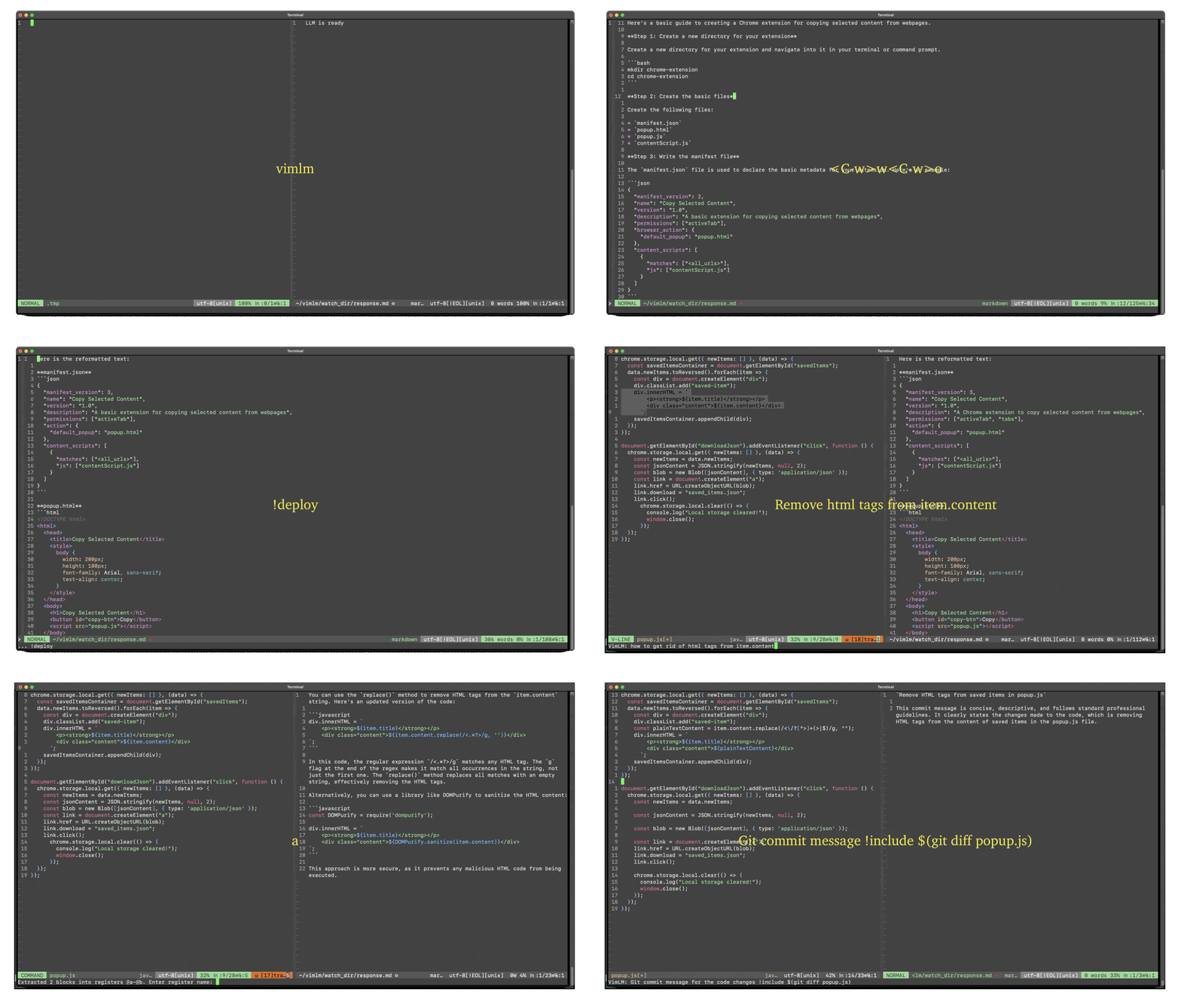
LLM-powered coding companion for Vim, inspired by GitHub Copilot/Cursor. Integrates contextual code understanding, summarization, and AI assistance directly into your Vim workflow.
Features
- Model Agnostic - Use any MLX-compatible model via a configuration file
- Vim-Native UX - Intuitive keybindings and split-window responses
- Deep Context - Understands code context from:
- Current file
- Visual selections
- Referenced files
- Project directory structure
- Conversational Coding - Iterative refinement with follow-up queries
- Air-Gapped Security - 100% offline - no APIs, no tracking, no data leaks
Requirements
- Apple M-series chip
- Python 3.12.8
Quick Start
pip install vimlm
vimlm
Basic Usage
1. From Normal Mode
Ctrl-l: Add current line + file to context
Example prompt: "Regex for removing HTML tags from item.content"
2. From Visual Mode
Select code → Ctrl-l: Add selected block + current file to context
Example prompt: "Convert this to async/await syntax"
3. Follow-Up Conversations
Ctrl-j: Continue current thread
Example follow-up: "Use Manifest V3 instead"
4. Code Extraction & Replacement
Ctrl-p: Insert code blocks from response into:
- Last visual selection (Normal mode)
- Active selection (Visual mode)
Workflow Example:
- Select a block of code in Visual mode
- Prompt with
Ctrl-l:"Convert this to async/await syntax" - Press
Ctrl-pto replace selection with generated code
5. Inline Commands
!include - Add External Context
!include [PATH] # Add files/folders to context
!include(no path): Current folder!include ~/projects/utils.py: Specific file!include ~/docs/api-specs/: Entire folder
Example: "AJAX-ify this app !include ~/scrap/hypermedia-applications.summ.md"
!deploy - Generate Project Files
!deploy [DEST_DIR] # Extract code blocks to directory
!deploy(no path): Current directory!deploy ./src: Specific directory
Example: "Create REST API endpoint !deploy ./api"
!continue - Resume Generation
!continue [MAX_TOKENS] # Continue stopped response
!continue: Default 2000 tokens!continue 3000: Custom token limit
Example: "tl;dr !include large-file.txt !continue 5000"
!followup - Thread Continuation
!followup # Equivalent to Ctrl-j
Example:
Initial: "Create Chrome extension"
Follow-up: "Add dark mode support !followup"
Command Combinations
Chain multiple commands in one prompt:
"Create HTMX component !include ~/lib/styles.css !deploy ./components !continue 4000"
6. Command-Line Mode :VimLM
:VimLM "prompt" [!command1] [!command2]...
Use predefined command chains for repetitive tasks:
Example 1 – CI/CD Fixer Macro:
" Debug CI failures using error logs
:VimLM Fix Dockerfile !include .gitlab-ci.yml !include $(tail -n 20 ci.log)
Example 2 – Test Generation Workflow:
" Generate unit tests for selected functions and save to test/
:VimLM Write pytest tests for this !include ./src !deploy ./test
Example 3 – Documentation Helper:
" Add docstrings to all Python functions in file
:VimLM Add Google-style docstrings !include % !continue 4000
Key Bindings
| Binding | Mode | Action |
|---|---|---|
Ctrl-l |
Normal/Visual | Send current file + selection to LLM |
Ctrl-j |
Normal | Continue conversation |
Ctrl-p |
Normal/Visual | Replace the selection with generated code |
Esc |
Prompt | Cancel input |
Advanced Configuration
VimLM uses a JSON config file with the following configurable parameters:
{
  "LLM_MODEL": null,
  "NUM_TOKEN": 2000,
  "USE_LEADER": false,
  "KEY_MAP": {},
  "DO_RESET": true,
  "SHOW_USER": false,
  "SEP_CMD": "!",
  "VERSION": "0.0.7",
  "DEBUG": true
}
Custom Model Setup
- Browse models: MLX Community Models on Hugging Face
- Edit config file:
{
  "LLM_MODEL": "mlx-community/DeepSeek-R1-Distill-Qwen-7B-4bit",
  "NUM_TOKEN": 9999
}
- Save to:
~/vimlm/cfg.json - Restart VimLM
Custom Key Bindings
You can also configure shortcuts:
{
  "USE_LEADER": true,   // Swap Ctrl for Leader key
  "KEY_MAP": {          // Remap default keys (l/j/p)
    "l": "a",           // <Leader>a instead of <Leader>l
    "j": "s",           // <Leader>s instead of <Leader>j
    "p": "d"            // <Leader>d instead of <Leader>p
  }
}
License
VimLM is licensed under the Apache-2.0 license.
Release history Release notifications | RSS feed


Download files
Download the file for your platform. If you're not sure which to choose, learn more about installing packages.
Source Distribution
Built Distribution
Filter files by name, interpreter, ABI, and platform.
If you're not sure about the file name format, learn more about wheel file names.
Copy a direct link to the current filters
File details
Details for the file vimlm-0.0.7.tar.gz.
File metadata
- Download URL: vimlm-0.0.7.tar.gz
- Upload date:
- Size: 14.2 kB
- Tags: Source
- Uploaded using Trusted Publishing? No
- Uploaded via: twine/6.1.0 CPython/3.12.8
File hashes
| Algorithm | Hash digest | |
|---|---|---|
| SHA256 |
dce198a486fcb3c4476515e7012b80bc69ee1d68fe076577c5e0c798dca1a2c3
|
|
| MD5 |
cfe2967d1113ef03c55d182284131130
|
|
| BLAKE2b-256 |
d5e19aa9f8c02785302858f3c5fdb84e56ac3a8b4c7088f53d3d73551565ca3f
|
File details
Details for the file vimlm-0.0.7-py3-none-any.whl.
File metadata
- Download URL: vimlm-0.0.7-py3-none-any.whl
- Upload date:
- Size: 14.6 kB
- Tags: Python 3
- Uploaded using Trusted Publishing? No
- Uploaded via: twine/6.1.0 CPython/3.12.8
File hashes
| Algorithm | Hash digest | |
|---|---|---|
| SHA256 |
3b2d9992d6d12e125d86c28b42a56c56edfbe21bee98d53e1097de3310921557
|
|
| MD5 |
fa4ca4a60d61975b28387d84121beaf8
|
|
| BLAKE2b-256 |
133f1030d0e173244d7f6174a73af680369e5b530ff5864182d29dcd0aad6651
|






