
VimLM - LLM-powered Vim assistant

Project description
VimLM - AI-Powered Coding Assistant for Vim
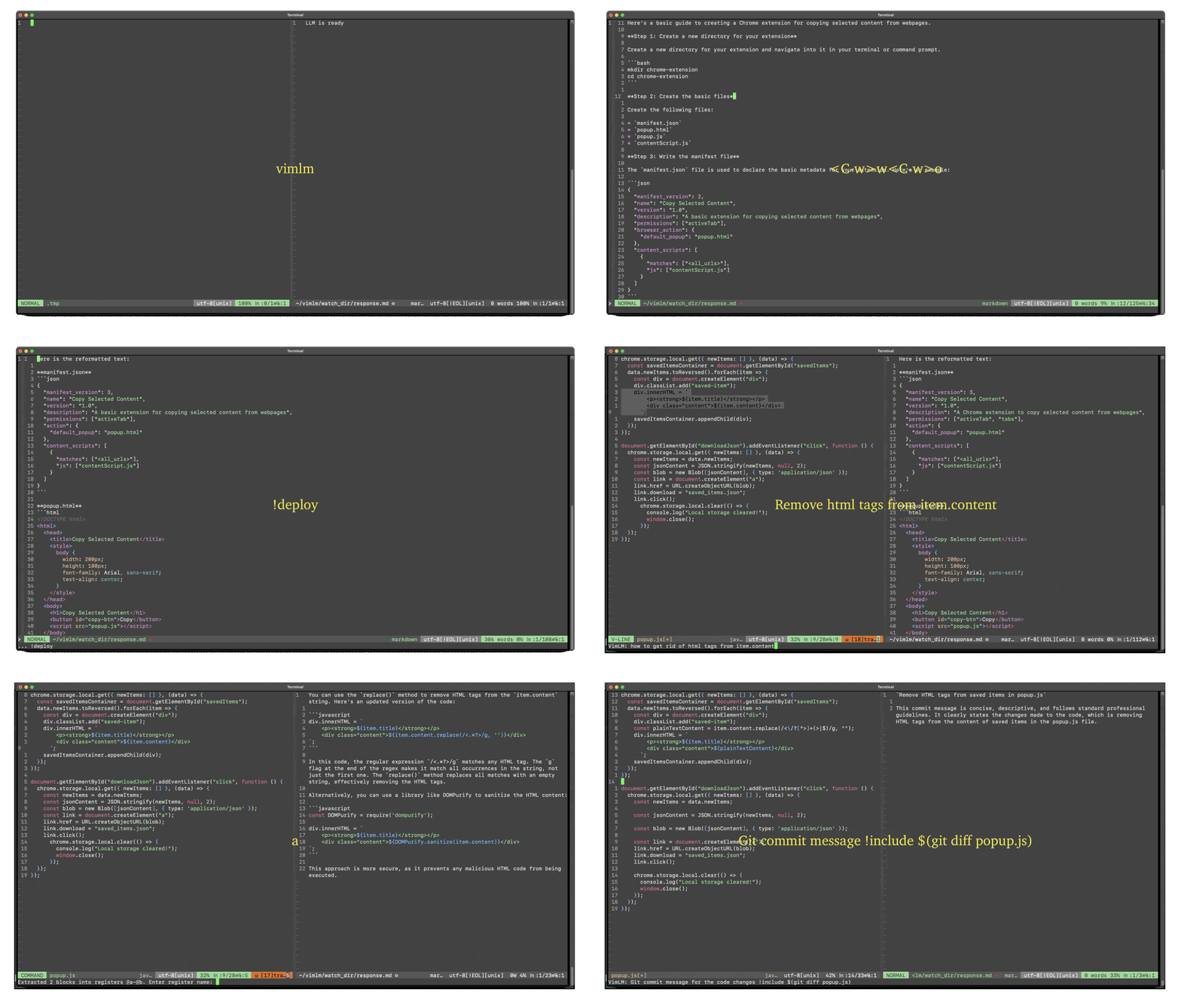
VimLM brings the power of AI directly into your Vim workflow. Maintain focus with keyboard-driven interactions while leveraging AI for code generation, refactoring, and documentation.
Get started quickly with the tutorial.
Features
- Native Vim Integration - Split-window responses & intuitive keybindings
- Offline First - 100% local execution with MLX-compatible models
- Contextual Awareness - Integrates seamlessly with your codebase and external resources
- Conversational Workflow - Iterate on responses with follow-up queries
- Project Scaffolding - Generate and deploy code blocks to directories
- Extensible - Create custom LLM workflows with command chains
Requirements
- Apple Silicon (M-series)
- Python 3.12.8
- Vim 9.1
Quick Start
pip install vimlm
vimlm
Basic Usage
| Key Binding | Mode | Action |
|---|---|---|
Ctrl-l |
Normal/Visual | Prompt LLM |
Ctrl-j |
Normal | Continue conversation |
Ctrl-p |
Normal/Visual | Import generated code |
Esc |
Prompt | Cancel input |
1. Contextual Prompting
Ctrl-l to prompt LLM with context:
- Normal mode: Current file + line
- Visual mode: Current file + selected block
Example Prompt: Create a Chrome extension
2. Conversational Refinement
Ctrl-j to continue current thread.
Example Prompt: Use manifest V3 instead
3. Code Substitution
Ctrl-p to insert generated code block
- In Normal mode: Into last visual selection
- In Visual mode: Into current visual selection
Example Workflow:
- Select a block of code in Visual mode
- Prompt with
Ctrl-l:Use regex to remove html tags from item.content - Press
Ctrl-pto replace selection with generated code
Inline Directives
:VimLM [PROMPT] [!command1] [!command2]...
! prefix to embed inline directives in prompts:
| Directive | Description |
|---|---|
!include PATH |
Add file/directory/shell output to context |
!deploy DEST |
Save code blocks to directory |
!continue N |
Continue stopped response |
!followup |
Continue conversation |
1. Context Layering
!include [PATH] # Add files/folders to context
!include(no path): Current folder!include ~/projects/utils.py: Specific file!include ~/docs/api-specs/: Entire folder!include $(...): Shell command output
Example: Summarize recent changes !include $(git log --oneline -n 50)
2. Code Deployment
!deploy [DEST_DIR] # Extract code blocks to directory
!deploy(no path): Current directory!deploy ./src: Specific directory
Example: Create REST API endpoint !deploy ./api
3. Extending Response
!continue [MAX_TOKENS] # Continue stopped response
!continue: Default 2000 tokens!continue 3000: Custom token limit
Example: tl;dr !include large-file.txt !continue 5000
Command-Line Mode
:VimLM prompt [!command1] [!command2]...
Simplify complex tasks by chaining multiple commands together into a single, reusable Vim command.
Examples:
" Debug CI failures using error logs
:VimLM Fix Dockerfile !include .gitlab-ci.yml !include $(tail -n 20 ci.log)

" Generate unit tests for selected functions and save to test/
:VimLM Write pytest tests for this !include ./src !deploy ./test

" Add docstrings to all Python functions in file
:VimLM Add Google-style docstrings !include % !continue 4000
Configuration
1. Model Settings
Edit ~/vimlm/cfg.json:
{
  "LLM_MODEL": "mlx-community/DeepSeek-R1-Distill-Qwen-7B-4bit",
  "NUM_TOKEN": 32768
}
2. Key Customization
{
  "USE_LEADER": true,
  "KEY_MAP": {
    "l": "]",
    "j": "[",
    "p": "p"
  }
}
License
Apache 2.0 - See LICENSE for details.
Release history Release notifications | RSS feed


Download files
Download the file for your platform. If you're not sure which to choose, learn more about installing packages.
Source Distribution
Built Distribution
Filter files by name, interpreter, ABI, and platform.
If you're not sure about the file name format, learn more about wheel file names.
Copy a direct link to the current filters
File details
Details for the file vimlm-0.0.8.tar.gz.
File metadata
- Download URL: vimlm-0.0.8.tar.gz
- Upload date:
- Size: 14.3 kB
- Tags: Source
- Uploaded using Trusted Publishing? No
- Uploaded via: twine/6.1.0 CPython/3.12.8
File hashes
| Algorithm | Hash digest | |
|---|---|---|
| SHA256 |
99fa86f3808bf550e085e45fe5a64876f50b1ded8062a89fc969ae453e628e53
|
|
| MD5 |
b16b18e79e7f1239baff0ec2122a168c
|
|
| BLAKE2b-256 |
26441ffccb18b2ad00a1c42e620d32546c45fce3e36ef9cfbeaa170fbad591a8
|
File details
Details for the file vimlm-0.0.8-py3-none-any.whl.
File metadata
- Download URL: vimlm-0.0.8-py3-none-any.whl
- Upload date:
- Size: 14.7 kB
- Tags: Python 3
- Uploaded using Trusted Publishing? No
- Uploaded via: twine/6.1.0 CPython/3.12.8
File hashes
| Algorithm | Hash digest | |
|---|---|---|
| SHA256 |
cabaee37e5d7c1c95b3397bf6fc27527b75e7e9bcc7d0c86392267cbcf32359a
|
|
| MD5 |
3efd968247fed26919afe8bdadeb1c0a
|
|
| BLAKE2b-256 |
45c28bad867b5e60ee44976ac68734b6da4eccf7238c0d5e929c658e41e90f93
|






