

vinoWhisper




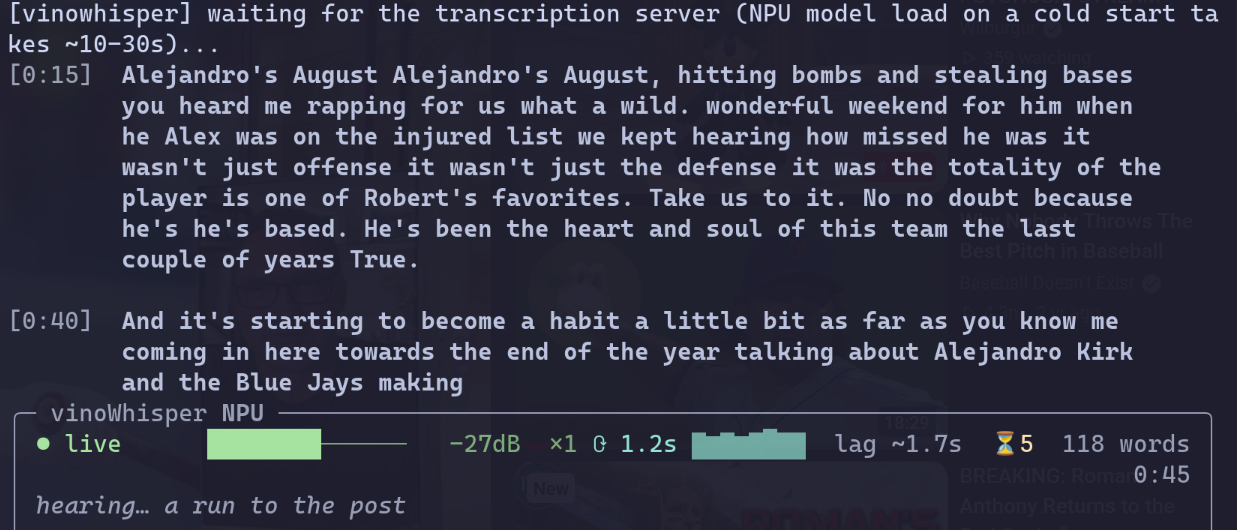
Local live captions and dictation for Linux, running on an Intel NPU. All audio capture and transcription happens on your machine with no cloud services or accounts. Captions appear in your terminal or in an optional floating overlay above other windows, and the overlay also supports hold-to-talk and hands-free dictation.
pip install vinowhisper && vinowhisper-setup && vinowhisper-caption
Background
Live captioning is a continuous, latency-sensitive workload that fits well on a 16 TOPS Intel NPU. Offloading transcription to the NPU leaves the CPU and GPU free and avoids spinning up the fan. vinoWhisper runs openvino-genai's WhisperPipeline with device="NPU" (similar in approach to vinoAuthFace).
Measured on a Wildcat Lake laptop (stepping A0) with whisper-small.en on the NPU (2026-09-12):
| Metric | Result |
|---|---|
generate() per 12s window (default) |
0.70s mean, 0.85s p90 |
| Caption lag behind audio | ~1.5s at best |
| First streamed token | 0.204s |
| Idle resource usage after stopping | 0 (server exits automatically) |
The Intel iGPU decodes the same 12s window in 0.95s and the CPU in 2.30s, so both fallbacks are usable with higher latency.
Key features
- Append-only transcript: Words are committed only after two overlapping windows agree on them (LocalAgreement-2), so printed text stays in terminal scrollback without being rewritten. A dimmed
hearing…line shows pending words that have not yet been confirmed. See Latency. - On-demand server: Loading the model onto the NPU takes 10–30s, so a background server holds it across sessions. The first client starts the server on a private Unix socket, and the server exits automatically after 5 minutes of inactivity. See Architecture.
- Verified model downloads: The Hugging Face source repository is pinned to a commit with per-file SHA-256 verification, and the exported OpenVINO IR is checked against
vinowhisper/model_digests.json. See SECURITY.md. - Explicit hardware fallback: Device selection tries NPU, then GPU, then CPU. Any fallback is reported in the server log,
/health,vinowhisper-doctor, and as a red status-bar border. See Hardware. - Distro-aware diagnostics: Error messages and
vinowhisper-doctorprint remediation commands using your distribution's package names. - Optional native overlay:
vinowhisper-trayis a 6.3 MB Rust binary that floats captions above other windows, including fullscreen video. It links only libc and adds no dependencies to the Python package. - Dictation in the overlay: Hold
Meta+H, speak, and release to type into the focused window. An optional local LLM cleanup pass on the NPU can remove fillers, stammers, and spoken edits ("scratch that") by deleting words only, without inserting or rewording text. See Overlay and dictation.
Install
curl -fsSL https://github.com/karanshukla/vinoWhisper/releases/latest/download/install.sh | bash
The installer verifies the release wheel, installs it with uv, and runs vinowhisper-setup, which prints every command and asks for confirmation before running it.
| Goal | Command |
|---|---|
| Install the overlay and dictation | vinowhisper-setup --gui |
| Install via pip instead of the script | pip install vinowhisper && vinowhisper-setup (Python 3.11–3.13) |
| Install the Flatpak bundle | flatpak install --user vinowhisper-x86_64.flatpak from the release (Flatpak test status) |
| Upgrade | Check for updates in Settings → About, or vinowhisper-upgrade |
| Uninstall | vinowhisper-upgrade --uninstall (removes models; keeps sessions and settings) |
pip install installs the Python commands, while vinowhisper-setup handles the NPU driver checks and model export. See Installing for details on each installation method.
Requirements
| Requirement | Details |
|---|---|
| OS | Linux (developed on Fedora 45 / KDE Plasma 6 / Wayland; see Supported distros) |
| Audio | PipeWire (pw-record) or PulseAudio (parec), detected automatically |
| Accelerator | Intel NPU for the benchmark numbers above; Intel GPU and CPU fallbacks work with higher latency; AMD NPUs are detected as unsupported (no OpenVINO plugin) |
| Python | 3.11 to 3.13 (Python 3.14 cannot export the model) |
| Disk | ~1.5 GB for the exported model |
| Overlay (optional) | A Wayland compositor supporting wlr-layer-shell (KDE Plasma 6, Sway, Hyprland, niri, COSMIC; not GNOME) |
The Intel NPU requires a userspace compiler library that Linux distributions do not fully package; vinowhisper-doctor identifies which component is missing. See docs/hardware.md for troubleshooting NPU detection.
Supported distros
vinowhisper-setup and vinowhisper-doctor read /etc/os-release and format install commands for eight distribution families: Fedora, Debian, Arch, openSUSE, Gentoo, Void, Alpine, and NixOS (including derivatives and image-based variants like Fedora Atomic and openSUSE Aeon). Only Fedora has been tested directly. See the supported distros table for per-family NPU driver details.
Commands
vinowhisper-caption                       # caption system audio
vinowhisper-caption --source mic          # caption microphone input
vinowhisper-caption --source both         # caption a call (mic and system audio in two lanes)
vinowhisper-caption --list-targets        # capture one app instead of the whole sink
vinowhisper-caption --debug               # per-cycle timings, levels, raw transcript
vinowhisper-caption --record ~/sess       # save session audio and events for replay
vinowhisper-caption --plain > out.txt     # plain output without status bar (implied when piped)
vinowhisper-caption --json                # one JSON event per line (used by the overlay)

vinowhisper-transcribe lecture.mp3        # transcribe an audio/video file into a saved session

vinowhisper-setup --language fr           # set up multilingual model (fr, de, es, auto)
vinowhisper-setup --language auto --task translate   # caption foreign speech in English

vinowhisper-tray                           # start the floating overlay and tray icon
vinowhisper-tray toggle                    # show/hide overlay (same as Meta+Alt+C)
vinowhisper-tray dictate                   # start/stop dictation (same as holding Meta+H)
vinowhisper-tray --install --autostart     # install launcher entry and autostart at login
                                           #   (or enable "Start at login" in the tray menu)

vinowhisper-setup                         # guided setup (idempotent, safe to re-run)
vinowhisper-setup --dry-run               # print planned steps without making changes
vinowhisper-server --stop                 # unload the model immediately; next client restarts it
vinowhisper-setup --gui                   # install only the optional overlay and dictation
vinowhisper-setup --ovfetch               # install ovfetch for NPU driver/platform diagnostics
vinowhisper-upgrade --uninstall           # remove app and models (keeps sessions and settings)

vinowhisper-doctor                        # check devices, models, digests, audio, and live levels
vinowhisper-doctor --json                 # JSON diagnostic output for bug reports
vinowhisper-doctor --no-probe             # skip the 2s-per-target live level probe

vinowhisper-replay ~/sess --restitch      # re-run stitcher offline against recorded transcripts
vinowhisper-replay ~/sess --sweep 8,12,20 # benchmark window sizes against recorded audio
Documentation
| Page | Description |
|---|---|
| Installing | Installers, OpenVINO version floor, digest verification, Flatpak, and terminal window pinning |
| Terminal captions | Scrollback behavior, paragraph breaks, level meter, transcripts, and plain output |
| Overlay and dictation | Floating caption box, tray icon, shortcuts, dictation, local LLM cleanup, compositor support, and Rust implementation |
| Saved sessions | .vwsession bundle format, background summaries, file transcription, and exporting |
| Speech models | Whisper and Canary 1B v2, multilingual support, translation, and custom step decoding |
| Hardware | Device selection, NPU vs. stateful exports, driver checks, and NPU troubleshooting |
| Audio capture | PipeWire vs. PulseAudio, distro support, mute behavior, and Silero VAD gating |
| Latency | Cycle-time latency, window sizing, stitcher overlap rules, fast speech, and language switches |
| Debugging | --record, offline replay, and vinowhisper-doctor |
| Architecture | On-demand server lifecycle, scale-to-zero behavior, Unix socket, and power measurements |
| Development | Hardware-free test setup, local builds, packaging, CI workflows, and releases |
Other languages
French, German, and Spanish are supported offline via Whisper's multilingual whisper-small model, and --task translate captions them in English. Enable it with vinowhisper-setup --language fr (multilingual Whisper has not been benchmarked on the NPU). See Speech models for details, including Canary 1B v2 support for 25 European languages.
Limitations
- Single-machine benchmarks (n=1): All numbers above were measured on one Wildcat Lake laptop with early-silicon NPU drivers. GPU and CPU fallbacks were tested only on its Xe3 iGPU and Core 5 320, where 2 of 15 GPU model loads segfaulted inside OpenVINO's GPU plugin.
- Two-cycle latency floor: Captions trail audio by roughly twice the cycle time because two consecutive windows must agree before committing a word. See docs/latency.md for tuning
--window. - Cross-window wording drift: Re-decoding overlapping windows with changing right-context causes occasional phrasing changes; the stitcher suppresses most but not all of them.
- Overlay requires
wlr-layer-shell: Tested on KDE Plasma 6.7 on hardware and headless Sway 1.9 in a VM with a stubbed model. GNOME does not exposewlr-layer-shell, so the overlay cannot start there (use the terminal UI instead). Hyprland, niri, and COSMIC are untested. Compositors without a global shortcuts portal can bindvinowhisper-traycommands directly (examples). - Dictation focus and portal requirements: Wayland does not expose which window has focus, so dictation types into whichever window is currently focused. Typing uses the
RemoteDesktopportal (available on KDE and GNOME, but not Sway, niri, or COSMIC). See docs/tray.md. - Untested non-Fedora distros and PulseAudio: Package names for the other seven distro families come from their package indexes and may contain mistakes. The PulseAudio (
parec) capture backend has not been run against a live PulseAudio server. - NPU export requires
transformers<5.4: Version 5.4.0 and later export a Whisper decoder that compiles on the NPU but fails atgenerate()(bisected 2026-09-04). Thevinowhisper[export]extra holds this pin.transformers5.3.0 has two open CVEs that require exporting a malicious model repository; the default pinnedopenai/whisper-small.enis unaffected. See docs/install.md for the bisect table.
More
- CONTRIBUTING.md and docs/development.md
- SECURITY.md: local data handling and server trust boundaries
- CHANGELOG.md
Reports from other hardware and distributions are welcome; open an issue with the output of vinowhisper-doctor --json.
MIT licensed.
1 maintainer

Metadata
1 maintainer
Release files for vinowhisper 1.9.0
For a detailed explanation of source distributions (sdists) and built distributions (wheels), please see the package formats documentation.
Source distribution (sdist)
| File | Size | Uploaded | Provenance | Actions |
|---|---|---|---|---|
| vinowhisper-1.9.0.tar.gz | 345.7 kB | Without provenance | Details for vinowhisper-1.9.0.tar.gz |
Built distribution (wheel)
| File | Interpreter | ABI | Platform | Actions Reset |
|---|---|---|---|---|
| vinowhisper-1.9.0-py3-none-any.whl | Python 3 | none | any | Details for vinowhisper-1.9.0-py3-none-any.whl |
Total release size: 546.5 kB
Release files / vinowhisper-1.9.0.tar.gz
| Download URL | vinowhisper-1.9.0.tar.gz |
|---|---|
| Size | 345.7 kB |
| Tags | Source |
|
SHA-256 checksum How to use checksums |
81399792287f367c0b49671abb5ea9dc7bbf8787a7dab8e9e943e24170178a7a
|
|
BLAKE2b-256 checksum How to use checksums |
818f4b9106670d4364a94debd84268be20dbc72475596a6d33405897aad8aae2
|
| Upload date | |
|
Uploaded using Trusted Publishing? What is trusted publishing? |
Yes |
| Uploaded via |
uv/0.13.9 {"installer":{"name":"uv","version":"0.13.9","subcommand":["publish"]},"python":null,"implementation":{"name":null,"version":null},"distro":{"name":"Ubuntu","version":"26.04","id":"resolute","libc":null},"system":{"name":null,"release":null},"cpu":null,"openssl_version":null,"setuptools_version":null,"rustc_version":null,"ci":true}
|
Release files / vinowhisper-1.9.0-py3-none-any.whl
| Download URL | vinowhisper-1.9.0-py3-none-any.whl |
|---|---|
| Size | 200.8 kB |
| Tags | Python 3 |
|
SHA-256 checksum How to use checksums |
6cc207bc52031e093a77316c05d691f15549e3f244cfa3a8af8b0ac6f5f32546
|
|
BLAKE2b-256 checksum How to use checksums |
139384c00be62d188173b75caac33257a0892ef72bdb8d2517edeaebbf1bc23a
|
| Upload date | |
|
Uploaded using Trusted Publishing? What is trusted publishing? |
Yes |
| Uploaded via |
uv/0.13.9 {"installer":{"name":"uv","version":"0.13.9","subcommand":["publish"]},"python":null,"implementation":{"name":null,"version":null},"distro":{"name":"Ubuntu","version":"26.04","id":"resolute","libc":null},"system":{"name":null,"release":null},"cpu":null,"openssl_version":null,"setuptools_version":null,"rustc_version":null,"ci":true}
|
Security for vinowhisper 1.9.0
Provenance
Provenance describes where a file came from. On PyPI, provenance is shared via attestations, which provide a verifiable record of the build or publishing details. View details, limitations and caveats.
No provenance found
None of the files in this release were uploaded with provenance metadata.
A note on package security
PyPI is a repository for distributing packages, not a service for auditing them. While third-party security researchers and our staff do their best to detect and remove malicious packages, PyPI cannot guarantee the quality, security or suitability of any given package.
To learn more about protecting yourself from malicious actors, visit our package security documentation.














