
Wandas
English | 日本語





Signal analysis that feels like working with a data frame.
Wandas is a Python library that treats audio, vibration and sensor waveforms as one frame (ChannelFrame) that carries the sampling rate, channel names, units and processing history. Reading, preprocessing, frequency analysis and plotting are written as a method chain.
import wandas as wd

x = wd.read("https://raw.githubusercontent.com/kasahart/wandas/main/learning-path/sample_audio.wav", end=15)  # first 15 s
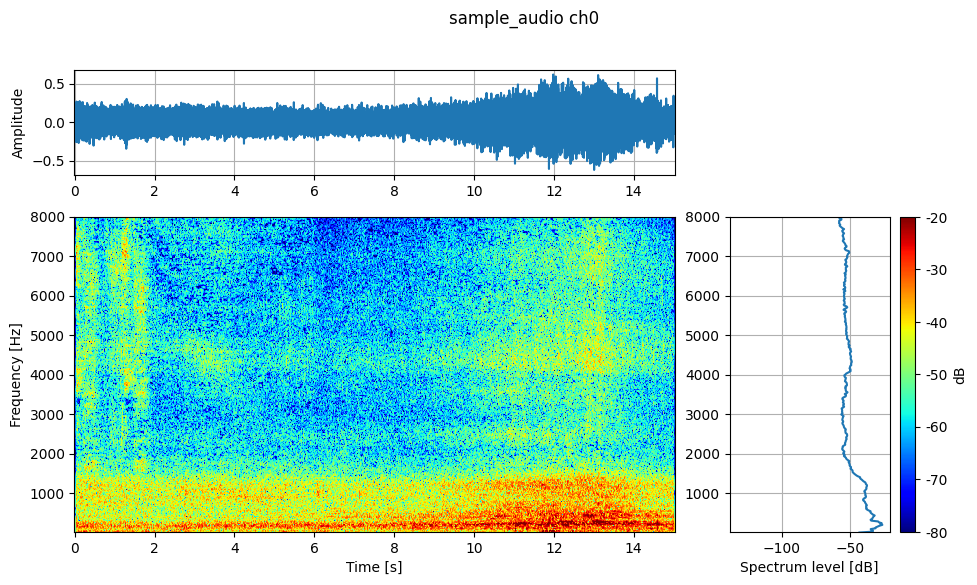
x.describe()                                               # waveform, spectrogram and spectrum at a glance
x.remove_dc().high_pass_filter(cutoff=100).welch().plot()  # preprocess, then a Welch spectrum
Why Wandas
With NumPy and SciPy alone, you keep track of the sampling rate, channel names, units and "what was done" yourself.
# NumPy / SciPy: you carry the array and the sampling rate yourself
import scipy.signal

a, fs = x.data, x.sampling_rate
sos = scipy.signal.butter(4, 100, "highpass", fs=fs, output="sos")
y_np = scipy.signal.sosfiltfilt(sos, a - a.mean(axis=-1, keepdims=True))

# Wandas: the same 4th-order zero-phase Butterworth
y = x.remove_dc().high_pass_filter(cutoff=100)
y.operation_history  # [{'operation': 'wandas.audio.remove_dc', ...}, ...]
- Methods never change the original frame; each returns a new one, and the processing history stays on the result.
- A processing chain can be saved and re-applied to another recording (
RecipePlan).
What you can do
| Area | Main features |
|---|---|
| Input | WAV / FLAC / OGG / MP3 / CSV, URLs, NumPy arrays |
| Preprocessing | DC removal, high/low/band-pass, A-weighting, resampling, trimming |
| Levels | Per-channel calibration, RMS, dB SPL |
| Frequency analysis | FFT, Welch, STFT, 1/N-octave bands, coherence, transfer functions |
| Psychoacoustics | Loudness, roughness, sharpness (via MoSQITo) |
| Many files | Build a recording list from folders or CSV and process it in one go |
| Browser | Core processing and WAV in the browser with Pyodide, without a local Python install |
Installation
pip install wandas
pip install "wandas[marimo]"          # audio playback in describe() on Jupyter / marimo
pip install "wandas[psychoacoustic]"  # psychoacoustic metrics
pip install "wandas[io]"              # WDF save and load
pip install "wandas[effects]"         # librosa-backed audio effects
pip install "wandas[ml]"              # PyTorch / TensorFlow tensor conversion
Check with a known signal
Add a DC offset to 750 Hz and 1500 Hz tones, then remove the DC and apply a 1 kHz low-pass filter.
import numpy as np
import wandas as wd

sr = 48_000
t = np.arange(sr) / sr
samples = 0.25 + 0.20 * np.sin(2 * np.pi * 750 * t) + 0.05 * np.sin(2 * np.pi * 1500 * t)

signal = wd.from_numpy(samples, sampling_rate=sr, ch_labels=["Original"], ch_units="Pa")
processed = signal.remove_dc().low_pass_filter(cutoff=1_000).rename_channels({0: "After DC removal + 1 kHz low-pass"})

comparison = signal.concat_frame(processed)
comparison.plot(overlay=True, xlim=(0, 0.02))
comparison.fft().plot(overlay=True, xlim=(0, 4_000)).set_ylim(30, 90)  # amplitude level, dB re 20 µPa
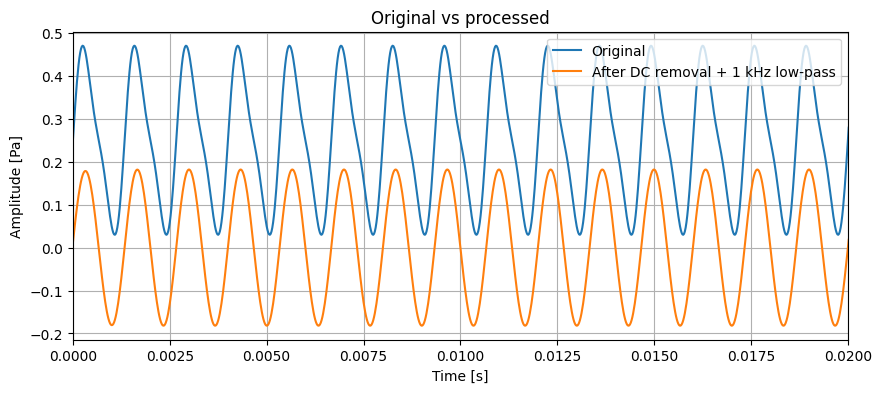
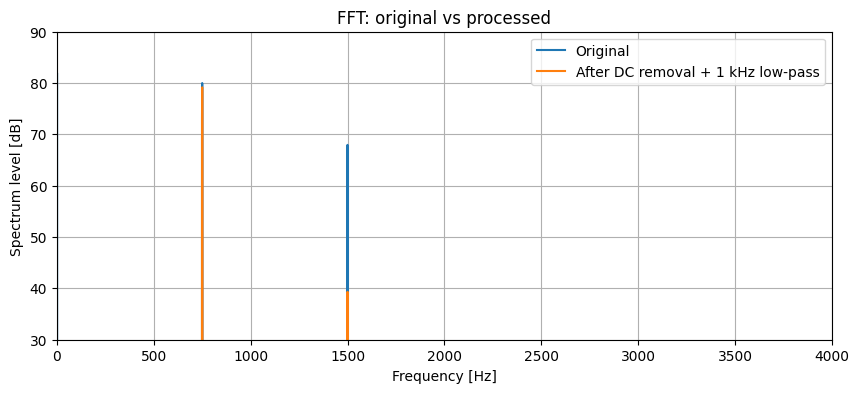
The 750 Hz tone stays and the 1500 Hz tone is attenuated.
Work with many files
import wandas as wd

# recordings/
# ├── label=ok/  a.wav, b.wav, ...
# └── label=ng/  c.wav, d.wav, ...
dataset = wd.from_folder("recordings/", recursive=True, path_metadata=True)
ok = dataset.select(label="ok")
spectra = ok.trim(0, 5).resample(16_000).stft(n_fft=512)  # first 5 s
spectra[0].data  # NumPy array (channel, frequency, time); mono has no channel axis
from_folder() and select() do not open any audio file, so selection stays fast even for many files. Each recording is read and computed only when you take a result out, such as spectra[0].
Learn more
License
MIT License. Bug reports and ideas are welcome in the issue tracker.
1 maintainer

Metadata
1 maintainer
Release files for wandas 0.11.0
For a detailed explanation of source distributions (sdists) and built distributions (wheels), please see the package formats documentation.
Source distribution (sdist)
| File | Size | Uploaded | Provenance | Actions |
|---|---|---|---|---|
| wandas-0.11.0.tar.gz | 5.7 MB | Without provenance | Details for wandas-0.11.0.tar.gz |
Built distribution (wheel)
| File | Interpreter | ABI | Platform | Actions Reset |
|---|---|---|---|---|
| wandas-0.11.0-py3-none-any.whl | Python 3 | none | any | Details for wandas-0.11.0-py3-none-any.whl |
Total release size: 6.0 MB
Release files / wandas-0.11.0.tar.gz
| Download URL | wandas-0.11.0.tar.gz |
|---|---|
| Size | 5.7 MB |
| Tags | Source |
|
SHA-256 checksum How to use checksums |
f49e6cf3bb35365ba0bf0c0c341ccbd2b9d4dc3a92079e063a890afd326787a9
|
|
BLAKE2b-256 checksum How to use checksums |
0d3b64a886fc9508c5963bee93e87311b837947946b8220d65072f1e2f52793b
|
| Upload date | |
|
Uploaded using Trusted Publishing? What is trusted publishing? |
No |
| Uploaded via |
twine/7.0.0 CPython/3.13.16
|
Release files / wandas-0.11.0-py3-none-any.whl
| Download URL | wandas-0.11.0-py3-none-any.whl |
|---|---|
| Size | 317.9 kB |
| Tags | Python 3 |
|
SHA-256 checksum How to use checksums |
f158bd041e0c4fa272b5c64a52bf3ce852c30298e1e1309ec9ba5dedf7bd3a50
|
|
BLAKE2b-256 checksum How to use checksums |
773f2414c7608f9c9b19cc4d43f15002a461cbef687b38d537f0b944193de9db
|
| Upload date | |
|
Uploaded using Trusted Publishing? What is trusted publishing? |
No |
| Uploaded via |
twine/7.0.0 CPython/3.13.16
|
Security for wandas 0.11.0
Provenance
Provenance describes where a file came from. On PyPI, provenance is shared via attestations, which provide a verifiable record of the build or publishing details. View details, limitations and caveats.
No provenance found
None of the files in this release were uploaded with provenance metadata.
A note on package security
PyPI is a repository for distributing packages, not a service for auditing them. While third-party security researchers and our staff do their best to detect and remove malicious packages, PyPI cannot guarantee the quality, security or suitability of any given package.
To learn more about protecting yourself from malicious actors, visit our package security documentation.














