


Introduction
Whisper command line client compatible with original OpenAI client based on CTranslate2.
It uses CTranslate2 and Faster-whisper Whisper implementation that is up to 4 times faster than openai/whisper for the same accuracy while using less memory.
Key features:
- ✅ 4x faster than OpenAI's Whisper at the same accuracy (up to 16X faster with batched inference)
- ✅ OpenAI Whisper CLI compatibility (easier migration)
- ✅ Docker image with pre-loaded models
- ✅ Speaker Diarization (Speaker Identification)
- ✅ Voice Activity Detection (VAD) Filter to improve quality
- ✅ Load your own fine-tuned Whisper models
- ✅ Live transcription from microphone
- ✅ Color-coded confidence visualization
Installation
Python package
To install the latest stable version, just type:
pip install whisper-ctranslate2
Using prebuild Docker image
You can use build docker image. First pull the image:
docker pull ghcr.io/softcatala/whisper-ctranslate2:latest
The Docker image includes the small, medium and large-v2 models.
To run it:
docker run --gpus "device=0" \
    -v "$(pwd)":/srv/files/ \
    -it ghcr.io/softcatala/whisper-ctranslate2:latest \
    /srv/files/e2e-tests/gossos.mp3 \
    --output_dir /srv/files/
Notes:
- --gpus "device=0" gives access to the GPU. If you do not have a GPU, remove this.
- "$(pwd)":/srv/files/ maps your current directory to /srv/files/ inside the container
If you always need to use a model that is not in the image, you can create a derived Docker image with the model preloaded or use Docker volumes to persist and share the model files.
CPU and GPU support
GPU and CPU support is provided by CTranslate2.
It has compatibility with x86-64 and AArch64/ARM64 CPU and integrates multiple backends that are optimized for these platforms: Intel MKL, oneDNN, OpenBLAS, Ruy, and Apple Accelerate.
GPU execution requires the NVIDIA libraries cuBLAS for CUDA 12 and cuDNN 9 for CUDA 12 to be installed on the system. Please refer to the CTranslate2 documentation
By default the best hardware available is selected for inference. You can use the options --device and --device_index to control manually the selection.
Usage
Same command line as OpenAI Whisper.
To transcribe:
whisper-ctranslate2 inaguracio2011.mp3 --model medium
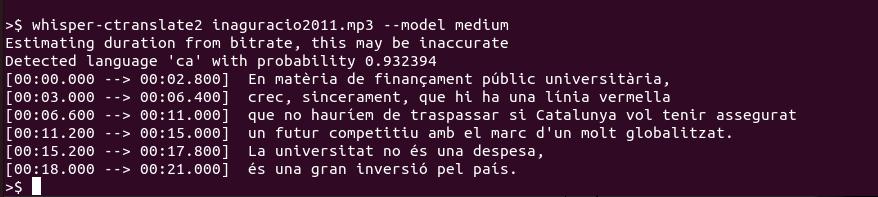
To translate:
whisper-ctranslate2 inaguracio2011.mp3 --model medium --task translate

Whisper translate task translates the transcription from the source language to English (the only target language supported).
Additionally using:
whisper-ctranslate2 --help
All the supported options with their help are shown.
CTranslate2 specific options
On top of the OpenAI Whisper command line options, there are some specific options provided by CTranslate2 or whiper-ctranslate2.
Batched inference
Batched inference transcribes each segment independently which can provide an additional 2x-4x speed increase:
whisper-ctranslate2 inaguracio2011.mp3 --batched True
You can additionally use the --batch_size to specify the maximum number of parallel requests to model for decoding.
Batched inference uses Voice Activity Detection (VAD) filter and ignores the following parameters: compression_ratio_threshold, logprob_threshold, no_speech_threshold, condition_on_previous_text, prompt_reset_on_temperature, prefix, hallucination_silence_threshold.
Quantization
--compute_type option which accepts default,auto,int8,int8_float16,int16,float16,float32 values indicates the type of quantization to use. On CPU int8 will give the best performance:
whisper-ctranslate2 myfile.mp3 --compute_type int8
Loading the model from a directory
--model_directory option allows to specify the directory from which you want to load a CTranslate2 Whisper model. For example, if you want to load your own quantized Whisper model version or using your own Whisper fine-tuned version. The model must be in CTranslate2 format.
Using Voice Activity Detection (VAD) filter
--vad_filter option enables the voice activity detection (VAD) to filter out parts of the audio without speech. This step uses the Silero VAD model:
whisper-ctranslate2 myfile.mp3 --vad_filter True
The VAD filter accepts multiple additional options to determine the filter behavior:
--vad_threshold VALUE (float)
Probabilities above this value are considered as speech.
--vad_min_speech_duration_ms (int)
Final speech chunks shorter min_speech_duration_ms are thrown out.
--vad_max_speech_duration_s VALUE (int)
Maximum duration of speech chunks in seconds. Longer will be split at the timestamp of the last silence.
Print colors
--print_colors True options prints the transcribed text using a color coding strategy based on whisper.cpp to highlight words with high or low confidence:
whisper-ctranslate2 myfile.mp3 --print_colors True

Live transcribe from your microphone
--live_transcribe True option activates the live transcription mode from your microphone:
whisper-ctranslate2 --live_transcribe True --language en
https://user-images.githubusercontent.com/309265/231533784-e58c4b92-e9fb-4256-b4cd-12f1864131d9.mov
Diarization (speaker identification)
Diarization support using pyannote.audio to identify speakers. At the moment, the support is at segment level.
To enable diarization you need to follow these steps:
- Install
pyannote.audiowithpip install "pyannote.audio==4.0" - Accept
pyannote/speaker-diarization-community-1user conditions - Create an access token at
hf.co/settings/tokens.
And then execute passing the HuggingFace API token as parameter to enable diarization:
whisper-ctranslate2 myfile.mp3 --hf_token YOUR_HF_TOKEN
and then the name of the speaker is added in the output files (e.g. JSON, VTT and SRT files):
[SPEAKER_00]: There is a lot of people in this room
The option --speaker_name SPEAKER_NAME allows to use your own string to identify the speaker.
Need help?
Check our frequently asked questions for common questions.
Contact
Jordi Mas jmas@softcatala.org
1 maintainer

Metadata
1 maintainer
Release files for whisper-ctranslate2 0.5.9
For a detailed explanation of source distributions (sdists) and built distributions (wheels), please see the package formats documentation.
Source distribution (sdist)
| File | Size | Uploaded | Provenance | Actions |
|---|---|---|---|---|
| whisper_ctranslate2-0.5.9.tar.gz | 25.5 kB | Without provenance | Details for whisper_ctranslate2-0.5.9.tar.gz |
Built distribution (wheel)
| File | Interpreter | ABI | Platform | Actions Reset |
|---|---|---|---|---|
| whisper_ctranslate2-0.5.9-py3-none-any.whl | Python 3 | none | any | Details for whisper_ctranslate2-0.5.9-py3-none-any.whl |
Total release size: 71.8 kB
Release files / whisper_ctranslate2-0.5.9.tar.gz
| Download URL | whisper_ctranslate2-0.5.9.tar.gz |
|---|---|
| Size | 25.5 kB |
| Tags | Source |
|
SHA-256 checksum How to use checksums |
63c85600d3d9c9d3a84794b2109d7cf178828bb5227d671040df9522d9a9182d
|
|
BLAKE2b-256 checksum How to use checksums |
9392489108d3982490b54579def06f493a5eabb422263b99c5f516a03797dae0
|
| Upload date | |
|
Uploaded using Trusted Publishing? What is trusted publishing? |
No |
| Uploaded via |
twine/7.0.0 CPython/3.14.4
|
Release files / whisper_ctranslate2-0.5.9-py3-none-any.whl
| Download URL | whisper_ctranslate2-0.5.9-py3-none-any.whl |
|---|---|
| Size | 46.3 kB |
| Tags | Python 3 |
|
SHA-256 checksum How to use checksums |
45f5f25a434673a476dfb3dd5b06115e74a0c42a6248850a40e0beed580e7f79
|
|
BLAKE2b-256 checksum How to use checksums |
d2bfb2774475bf52f438297de477b8d943fd9c8d1548cb3a2c3575d46013c6e9
|
| Upload date | |
|
Uploaded using Trusted Publishing? What is trusted publishing? |
No |
| Uploaded via |
twine/7.0.0 CPython/3.14.4
|
Security for whisper-ctranslate2 0.5.9
Provenance
Provenance describes where a file came from. On PyPI, provenance is shared via attestations, which provide a verifiable record of the build or publishing details. View details, limitations and caveats.
No provenance found
None of the files in this release were uploaded with provenance metadata.
A note on package security
PyPI is a repository for distributing packages, not a service for auditing them. While third-party security researchers and our staff do their best to detect and remove malicious packages, PyPI cannot guarantee the quality, security or suitability of any given package.
To learn more about protecting yourself from malicious actors, visit our package security documentation.














