




xnano is a python library that aims to provide a simple, complete and flexible
framework for building terminal applications. With xnano you can:
- Render textual, audio and visual content in your applications.
- Add interactive functionality that responds to users at runtime.
Quick Start
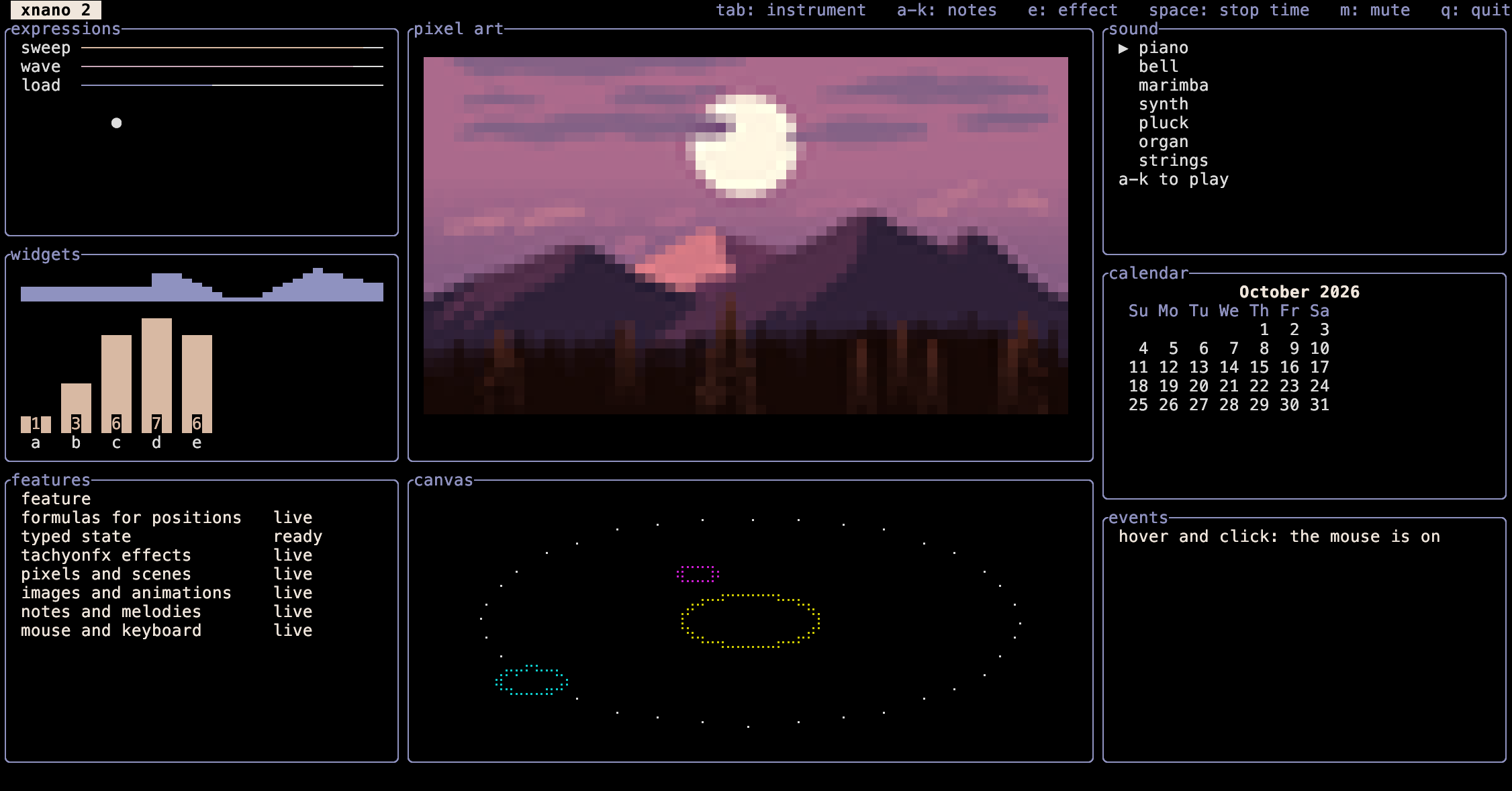
Every example below runs as written, and q quits it. The art and sound example
needs the audio extra (pip install "xnano[audio]"). The feature demo shows
most of what xnano can do: run it with python -m xnano (or xnano).
Put content on the screen
Write text, widgets and anything else onto a terminal and position it with numbers, percentages or words.
import xnano
from xnano.widgets import Gauge

with xnano.open(width=40, height=6) as terminal:
    terminal.write(
        'Hello, world!', x='center', border='rounded', padding={'horizontal': 2}
    )
    terminal.write(Gauge(0.6, label='60%'), y=4, width='100%')
    terminal.run(quit_on='q')
Move things with formulas
A position from xnano.expressions is a formula that is evaluated again on
every frame.
import xnano
from xnano.expressions import ParentWidth, TimeElapsed, Width

with xnano.open(width=40, height=3) as terminal:
    ball = terminal.write('●', y=1)
    ball.x = (ParentWidth - Width) * (TimeElapsed % 2 / 2)
    terminal.run(quit_on='q')
React with hooks
A hook runs a function when a key, the mouse, the clock or the state changes.
import xnano

with xnano.open(width=30, height=3) as terminal:
    label = terminal.write('press space', x='center', y=1)

    @terminal.hook(on='key', keys='space')
    def pressed(context: xnano.Context) -> None:
        label.text = f'space at {context.time.elapsed:.1f}s'

    terminal.run(quit_on='q')
Add effects
xnano.effect builds a tachyonfx effect that animates how content looks.
import xnano

with xnano.open(width=40, height=5) as terminal:
    title = terminal.write('xnano', x='center', y='center', border='rounded')
    title.update(
        xnano.effect('effect.fade_from', foreground='black', duration_milliseconds=1500)
    )
    terminal.run(quit_on='q')
Draw art and play sound
Pixel art is written as text, and notes and melodies play on the canvas. Sound
needs pip install "xnano[audio]".
import xnano

heart = xnano.draw(
    """
    .RR.RR.
    RRRRRRR
    .RRRRR.
    ..RRR..
    ...R...
    """,
    'R=#e03040',
)

with xnano.open(width=20, height=5) as terminal:
    terminal.write(heart, x='center')
    terminal.write('♪ C4 E4 G4', x='center', y=4)
    if terminal.audio.is_available:
        terminal.play('C4 E4 G4:2', instrument='bell')
    terminal.run(quit_on='q')
Install
You can install xnano with pip using your favorite package manager.
pip install xnano
To run untrusted or model-written Python against a canvas with xnano.monty,
add the monty extra: pip install "xnano[monty]".
xnano and its paired xnano-core dependency can be installed on Python 3.10+
on any of the following operating systems:
- Linux, x86_64 and aarch64: glibc distributions (
manylinuxwheels) and musl distributions such as Alpine (musllinuxwheels). Sound playback inxnano-audiouses the system ALSA library (libasound). Themusllinuxaudio wheels synthesize sound but cannot play it on a device. - macOS: x86_64 (Intel) and arm64 (Apple silicon).
- Windows: x86_64.
- WebAssembly (Pyodide): continuous integration
builds and tests only the
xnano-corewheel in Pyodide. The test imports its compiled modulexnano_core._xnano_coreand renders on a runtime without a screen. Thexnanopackage itself is not built or tested for Pyodide, andxnano-audioandxnano-imageare not built for WebAssembly.
On Linux, macOS and Windows every extension is an abi3 wheel, so one wheel per platform covers Python 3.10 and later.
Packages
xnano itself is built off of an ecosystem of several rust
(Pyo3) based packages that provide core and
multi-modal functionality to the library:
- xnano - The main
xnanopackage. - xnano-core - Python bindings for
xnanos's core ratatui based runtime. - xnano-audio - Audio playback & input support for
xnanowith the ability to compose audio content directly in python using MIDI patch instruments. (Built using []) - xnano-image - Image & animation loading/rendering
support for
xnanobuilt on ratatui-image. (Including native support for Kitty, iTerm2, Sixel and WebP images.)
Documentation
Documentation with browser-runnable examples are available @ Documentation.
Contributing
For information on how to contribute to xnano or any of its sub-packages
within this repository, please see Contributing to xnano.
This repository uses a UV &
Cargo workspace that can all be managed
through a set of make commands.
You can get started contributing to xnano by running the following commands:
git clone https://github.com/hsaeed3/xnano.git
cd xnano
make help

# Optionally install the development workspace.
# This first compiles all rust [crates](./crates/) and builds all python [packages](./packages/)
# for xnano's core extensions (xnano-core, xnano-audio, xnano-image).
# make install
License
xnano is released under the MIT License.
1 maintainer

Metadata
1 maintainer
Release files for xnano 2.0.0
For a detailed explanation of source distributions (sdists) and built distributions (wheels), please see the package formats documentation.
Source distribution (sdist)
| File | Size | Uploaded | Provenance | |
|---|---|---|---|---|
| xnano-2.0.0.tar.gz | 1.5 MB | Without provenance | Details |
Built distribution (wheel)
| File | Interpreter | ABI | Platform | Reset |
|---|---|---|---|---|
| xnano-2.0.0-py3-none-any.whl | Python 3 | none | any | Details |
Total release size: 2.2 MB
Release files / xnano-2.0.0.tar.gz
| Download URL | xnano-2.0.0.tar.gz |
|---|---|
| Size | 1.5 MB |
| Tags | Source |
|
SHA-256 checksum How to use checksums |
b3e5a0167157a78e20a280e87890acded7ff605ed4be66e5574cde13a212546d
|
|
BLAKE2b-256 checksum How to use checksums |
f229f6ab6454089d16b592049a991447d7a0382e0337c66219d3d9a79a29caaa
|
| Upload date | |
|
Uploaded using Trusted Publishing? What is trusted publishing? |
No |
| Uploaded via |
uv/0.13.1 {"installer":{"name":"uv","version":"0.13.1","subcommand":["publish"]},"python":null,"implementation":{"name":null,"version":null},"distro":{"name":"Ubuntu","version":"24.04","id":"noble","libc":null},"system":{"name":null,"release":null},"cpu":null,"openssl_version":null,"setuptools_version":null,"rustc_version":null,"ci":true}
|
Release files / xnano-2.0.0-py3-none-any.whl
| Download URL | xnano-2.0.0-py3-none-any.whl |
|---|---|
| Size | 632.5 kB |
| Tags | Python 3 |
|
SHA-256 checksum How to use checksums |
95fa78ca63f6cd6ebc042ab5d645616d0bdc244b3097d0bfb9fb22b9a7454aec
|
|
BLAKE2b-256 checksum How to use checksums |
7c6ab005473d7addab3baf99bb5f63afa824d021d8ea281dae0aafd3ca8fb308
|
| Upload date | |
|
Uploaded using Trusted Publishing? What is trusted publishing? |
No |
| Uploaded via |
uv/0.13.1 {"installer":{"name":"uv","version":"0.13.1","subcommand":["publish"]},"python":null,"implementation":{"name":null,"version":null},"distro":{"name":"Ubuntu","version":"24.04","id":"noble","libc":null},"system":{"name":null,"release":null},"cpu":null,"openssl_version":null,"setuptools_version":null,"rustc_version":null,"ci":true}
|
Security for xnano 2.0.0
Provenance
Provenance describes where a file came from. On PyPI, provenance is shared via attestations, which provide a verifiable record of the build or publishing details. View details, limitations and caveats.
No provenance found
None of the files in this release were uploaded with provenance metadata.
A note on package security
PyPI is a repository for distributing packages, not a service for auditing them. While third-party security researchers and our staff do their best to detect and remove malicious packages, PyPI cannot guarantee the quality, security or suitability of any given package.
To learn more about protecting yourself from malicious actors, visit our package security documentation.














