
AniWorld Downloader v4
AniWorld Downloader is a cross-platform tool for streaming and downloading content from AniWorld, Hanime, MangaFire, MegaKino, and SerienStream, with more support coming in the future. It runs on Windows, macOS, and Linux, providing a seamless experience for offline viewing or instant playback.









| Demo Menu |
|---|
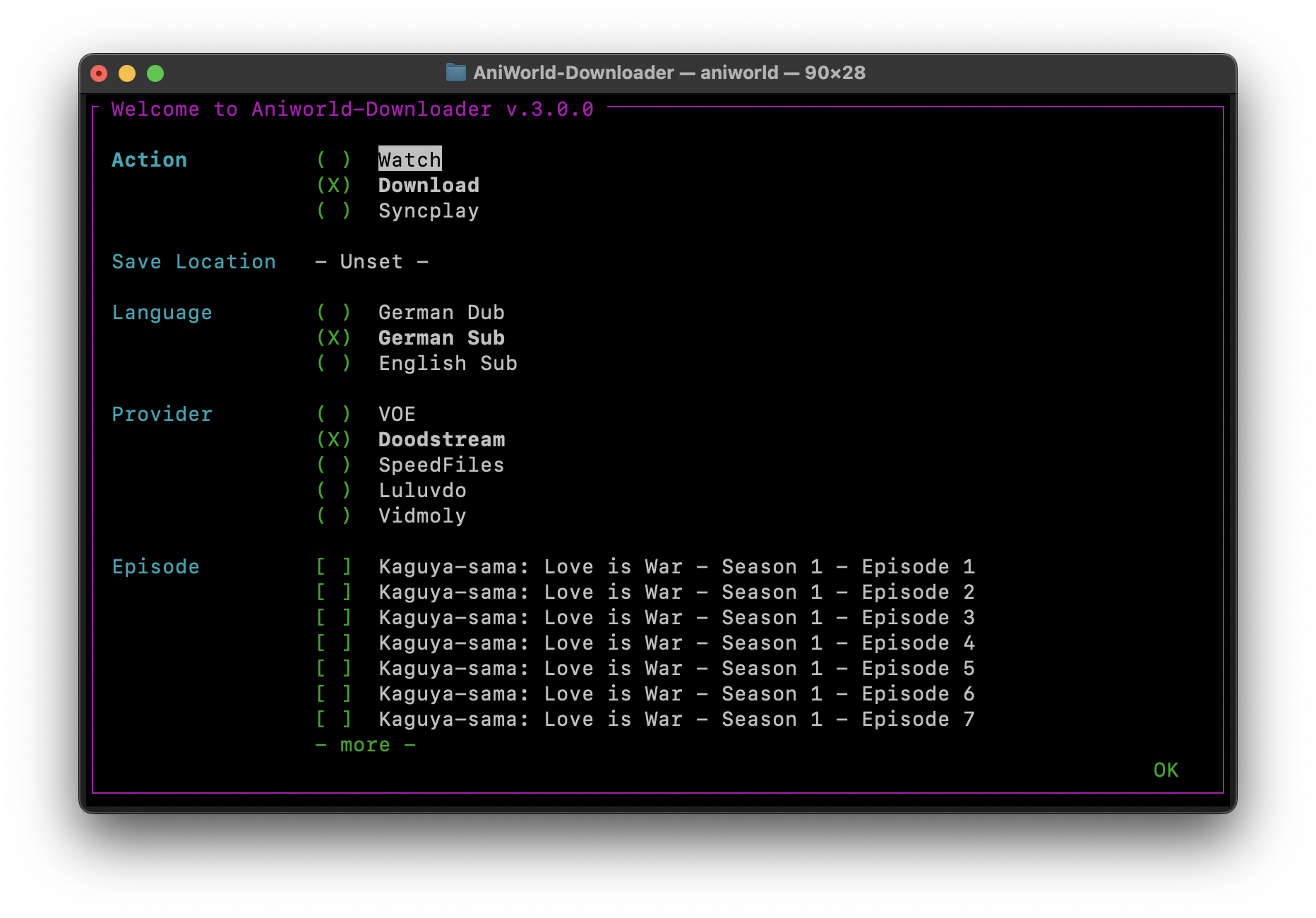 |
https://github.com/user-attachments/assets/d65c4a5c-827a-45d7-a904-78977fd9aef4
TL;DR - Quick Start
# Install stable release (needs Python installed)
pip install -U aniworld

# Or install latest GitHub commit (needs Git installed)
pip install --upgrade git+https://github.com/phoenixthrush/AniWorld-Downloader.git@models#egg=aniworld

# Launch AniWorld Downloader using Web UI
aniworld -w

# Using Menu
aniworld
Tip: Use the stable release for general use. The GitHub version includes the latest features and fixes but may be less stable.
Documentation
For full user guides, tutorials, and troubleshooting, visit the official documentation.
Features
- Downloading – Grab full series, individual seasons, or single episodes for offline viewing
- Streaming – Watch episodes instantly using mpv, IINA, or Syncplay
- Auto-Next Playback – Seamlessly move to the next episode without interruption
- Multiple Providers – Stream from various sources on aniworld.to and s.to
- Language Preferences – Switch between German Dub, English Sub, or German Sub
- Muxing – Automatically combine video and audio streams into a single file
- AniSkip Integration – Skip intros and outros on AniWorld for a smoother experience
- Group Watching – Sync anime and series sessions with friends via Syncplay
- Web Interface – Browse, download, and manage your queue with a modern web UI
- Docker Ready – Deploy easily using Docker or Docker Compose
Still in Development
This project is actively being improved. Current work in progress includes:
- implement GLOBAL_SESSION imports lazy loading
- fix episode download cleanup on KeyboardInterrupt in menu
- add support for aniskip feature on IINA
- Split Web UI SSO dependencies into separate
extrassection - Implement
keep-watchingargument for continuous playback - Fix Nuitka build crash: use Python 3.12 (non-MSVC builds unsupported on newer versions)
- Remove empty lines below actions when running
docker run -it
Supported Providers
| Provider | Status | Last Tested |
|---|---|---|
| VOE | ✅ Working | 07/26 |
| Vidoza | ✅ Working | 02/26 |
| Vidmoly | ✅ Working | 02/26 |
| Filemoon | ❌ Broken | 02/26 |
| Doodstream | ❌ Broken | 02/26 |
| Hanime | ⏳ Not Implemented | — |
| LoadX | ⏳ Not Implemented | — |
| Luluvdo | ⏳ Not Implemented | — |
| Streamtape | ⏳ Not Implemented | — |
Currently Prioritized Providers
- AniWorld – VOE, Filemoon, Vidmoly
- SerienStream – VOE, Vidoza
Docker
Build the AniWorld Downloader Docker image:
docker build -t aniworld .
Running the Container
- macOS / Linux (bash/zsh):
docker run -it --rm \
  -v "${PWD}/Downloads:/app/Downloads" \
  aniworld python -m aniworld
- Windows (PowerShell):
docker run -it --rm `
  -v "${PWD}\Downloads:/app/Downloads" `
  aniworld python -m aniworld
- Windows (CMD):
docker run -it --rm ^
  -v "%cd%\Downloads:/app/Downloads" ^
  aniworld python -m aniworld
Note: Mount your local
Downloadsfolder to/app/Downloadsin the container to save downloaded episodes. You can adjust the host path as needed.
Docker Compose (with Web UI)
Start AniWorld Downloader using Docker Compose:
docker-compose up -d --build
This command will:
- Build the Docker image if it hasn’t been built yet
- Start the container in detached mode (
-d) - Enable the Web UI for easier interaction
- Automatically restart the container unless stopped manually (
restart: unless-stopped)
To stop the container:
docker-compose down
Tip: Ensure your
docker-compose.ymlcorrectly configures volumes and ports if you want to persist downloads or access the Web UI externally.
Contributing
Contributions to AniWorld Downloader are highly appreciated! You can help improve the project in several ways:
- Report Bugs – Identify and report issues to improve functionality
- Suggest Features – Share ideas to expand the tool's capabilities
- Submit Pull Requests – Contribute code to fix bugs or add new features
- Improve Documentation – Help enhance user guides, tutorials, and technical documentation
Before submitting contributions, please check the repository for existing issues or feature requests to avoid duplicates.
Contributors

-
Lulu (since Sep 14, 2024)
-
Tmaster055 (since Oct 21, 2024)


Dependencies
AniWorld Downloader uses a small set of Python packages for networking, terminal UI, media handling, web features, authentication, and configuration.
Core dependencies
- niquests – HTTP requests
- npyscreen – Text-based terminal UI
- ffmpeg-python – Python bindings for FFmpeg (requires FFmpeg installed on your system)
- python-dotenv – Loads environment variables from a
.envfile - rich – Styled terminal output
- fake-useragent – Generates user-agent strings
- packaging – Version parsing and comparison
- cryptography – Cryptographic utilities
- patchright – Browser automation support for captcha handling
Web / server dependencies
- requests – Standard HTTP library
- flask – Web framework
- flask-wtf – Forms and CSRF protection for Flask
- authlib – OAuth and authentication helpers
- waitress – Production WSGI server
Platform-specific dependencies
- windows-curses – Enables curses support for
npyscreenon Windows (installed only on Windows and only for Python versions below 3.14)
All dependencies are installed automatically when AniWorld Downloader is installed with pip.
Credits
AniWorld Downloader builds upon the work of several outstanding open-source projects:
- mpv – A versatile media player used for seamless video streaming
- IINA – Modern macOS media player built on mpv, offering a sleek interface and advanced playback features
- Syncplay – Enables synchronized playback sessions with friends
- Anime4K – Real-time upscaler for enhancing anime video quality
- Aniskip – Provides opening and ending skip times for the Aniskip extension
- flag-icons – Collection of SVG country flags
- new-domain-check – Constant checks for new redirects on megakino
Other Cool Projects
-
Jellyfin AniWorld Downloader by SiroxCW – A Jellyfin plugin that lets you browse and download anime & series directly from AniWorld, fully integrated into your media server.
-
AniBridge by Zzackllack – A minimal FastAPI service that bridges anime and series streaming catalogues (AniWorld, SerienStream/s.to, MegaKino) with automation tools.
Support
If you need help with AniWorld Downloader, you have several options:
- Submit an issue on the GitHub Issues page – preferred for installation problems, bug reports, or feature requests, as it helps others benefit from shared solutions
- Contact directly via email at contact@phoenixthrush.com or on our Discord server. Join here
While email support is available, opening a GitHub issue is encouraged whenever possible.
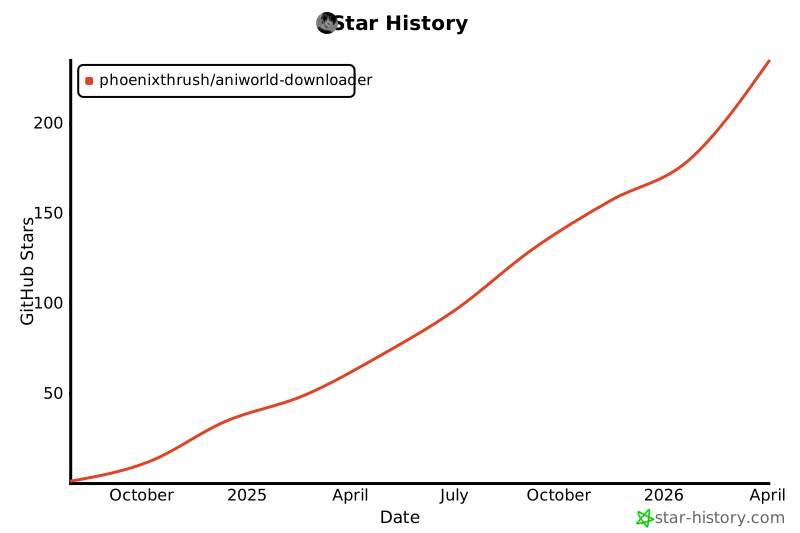
If you find AniWorld Downloader useful, please star the repository on GitHub. Your support is greatly appreciated and motivates continued development.
Thank you for using AniWorld Downloader!
Legal Disclaimer
AniWorld Downloader is a client-side tool that enables access to content hosted on third-party websites. It does not host, upload, store, or distribute any media itself.
This software is not intended to promote piracy or copyright infringement. You are solely responsible for how you use AniWorld Downloader and for ensuring that your use complies with applicable laws and the terms of service of the websites you access.
The developer provides this project "as is" and is not responsible for:
- Third-party content
- External links
- The availability, accuracy, legality, or reliability of any third-party service
If you have concerns about specific content, contact the relevant website owner, administrator, or hosting provider.
Star History
License
This project is licensed under the MIT License. For full terms and conditions, please see the LICENSE file included with this project.
1 maintainer

Download files
Download the file for your platform. If you're not sure which to choose, learn more about installing packages.
Source Distribution
Built Distribution
Filter files by name, interpreter, ABI, and platform.
If you're not sure about the file name format, learn more about wheel file names.
Copy a direct link to the current filters
File details
Details for the file aniworld-4.7.0.tar.gz.
File metadata
- Download URL: aniworld-4.7.0.tar.gz
- Upload date:
- Size: 204.7 kB
- Tags: Source
- Uploaded using Trusted Publishing? Yes
- Uploaded via:
twine/6.1.0 CPython/3.13.12
File hashes
| Algorithm | Hash digest | |
|---|---|---|
| SHA256 |
43ea8abbf4d546290b7b90e33a4c86b95e144853f69827514ad30b450344d42a
|
|
| MD5 |
bb00ca134c313ddeaa882bdb083251d7
|
|
| BLAKE2b-256 |
761b4703cc67dc1a27ba9d7abdea04dbca08a09d448fcfa8e255e61d1e918c17
|
Provenance
The following attestation bundles were made for aniworld-4.7.0.tar.gz:
Publisher:
publish.yaml on phoenixthrush/AniWorld-Downloader
-
Statement:
-
Statement type:
https://in-toto.io/Statement/v1 -
Predicate type:
https://docs.pypi.org/attestations/publish/v1 -
Subject name:
aniworld-4.7.0.tar.gz -
Subject digest:
43ea8abbf4d546290b7b90e33a4c86b95e144853f69827514ad30b450344d42a - Sigstore transparency entry: 2126247128
- Sigstore integration time:
-
Permalink:
phoenixthrush/AniWorld-Downloader@2d61390f25d0eb14c12f336b68a3910221be6e32 -
Branch / Tag:
refs/tags/v.4.7.0 - Owner: https://github.com/phoenixthrush
-
Access:
public
-
Token Issuer:
https://token.actions.githubusercontent.com -
Runner Environment:
github-hosted -
Publication workflow:
publish.yaml@2d61390f25d0eb14c12f336b68a3910221be6e32 -
Trigger Event:
release
-
Statement type:
File details
Details for the file aniworld-4.7.0-py3-none-any.whl.
File metadata
- Download URL: aniworld-4.7.0-py3-none-any.whl
- Upload date:
- Size: 231.1 kB
- Tags: Python 3
- Uploaded using Trusted Publishing? Yes
- Uploaded via:
twine/6.1.0 CPython/3.13.12
File hashes
| Algorithm | Hash digest | |
|---|---|---|
| SHA256 |
ec7292485f26d0468d310831c9bb04e945340652227b1cad2d6f538e74573418
|
|
| MD5 |
fb698cf82b4a7f5379211157e37c0afe
|
|
| BLAKE2b-256 |
4de55cef32644ce981f1c767ce2834c630c09cd4e153788e8e83894368556b04
|
Provenance
The following attestation bundles were made for aniworld-4.7.0-py3-none-any.whl:
Publisher:
publish.yaml on phoenixthrush/AniWorld-Downloader
-
Statement:
-
Statement type:
https://in-toto.io/Statement/v1 -
Predicate type:
https://docs.pypi.org/attestations/publish/v1 -
Subject name:
aniworld-4.7.0-py3-none-any.whl -
Subject digest:
ec7292485f26d0468d310831c9bb04e945340652227b1cad2d6f538e74573418 - Sigstore transparency entry: 2126247333
- Sigstore integration time:
-
Permalink:
phoenixthrush/AniWorld-Downloader@2d61390f25d0eb14c12f336b68a3910221be6e32 -
Branch / Tag:
refs/tags/v.4.7.0 - Owner: https://github.com/phoenixthrush
-
Access:
public
-
Token Issuer:
https://token.actions.githubusercontent.com -
Runner Environment:
github-hosted -
Publication workflow:
publish.yaml@2d61390f25d0eb14c12f336b68a3910221be6e32 -
Trigger Event:
release
-
Statement type:







