














App Mesh
One secure, lightweight daemon to run, schedule, and remote-control apps across machines.
🧭 Concepts
App Mesh gives you two capabilities: Hosting and Computing.
🎛 Hosting
Declare an app once. The daemon keeps it running.
- Lifecycle — start, stop, and recover the app after a crash or a daemon restart
- Scheduling — cron, fixed intervals, start and end dates, daily time windows
- Protection — health checks, CPU and memory limits, OS user, tenant isolation
- Any app — a native process or a Docker app
Think systemd on every machine. Or Kubernetes desired state, for any app.
🧮 Computing
Submit work to any node. Get the result back.
- Command or script — starts a new process, runs once
- Task message — reuses a warm app that is already running, no startup cost
- Parallel and control — fan out work across nodes; run sync or async, stream output, set timeouts
- Workflow — chain many work items into a DAG pipeline and run it natively
- AI — send task messages to a hosted LLM agent, or give coding agents a sandbox node to build and run
Think serverless, on your own machines.
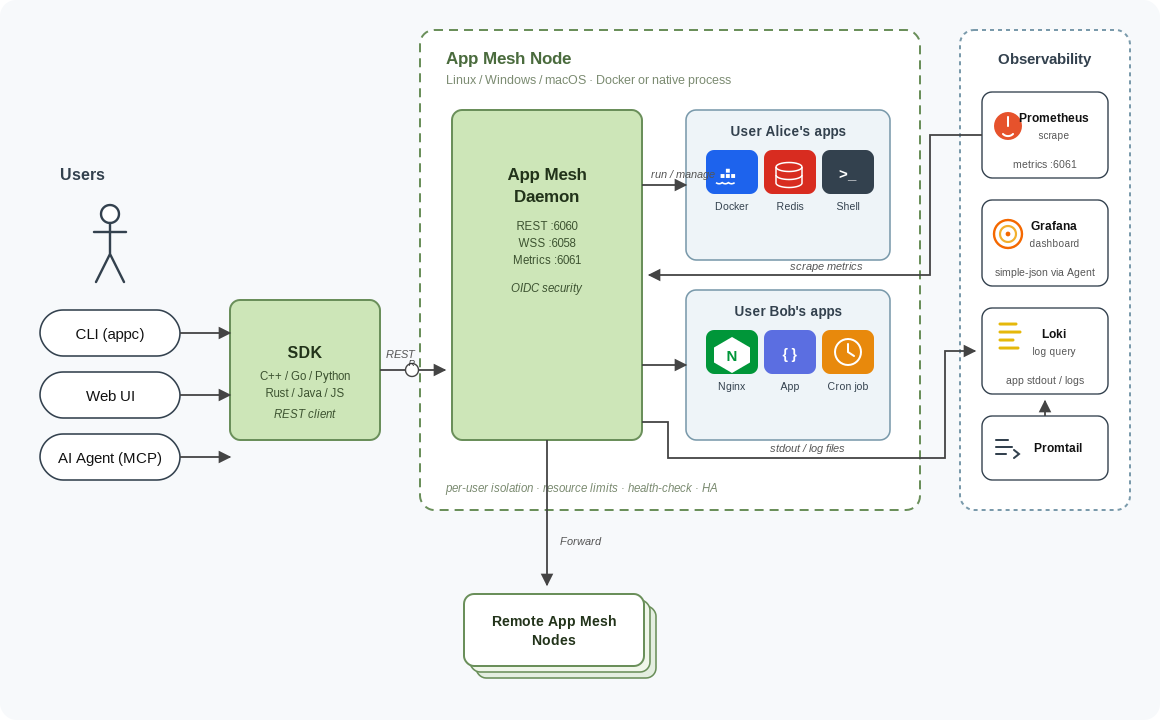
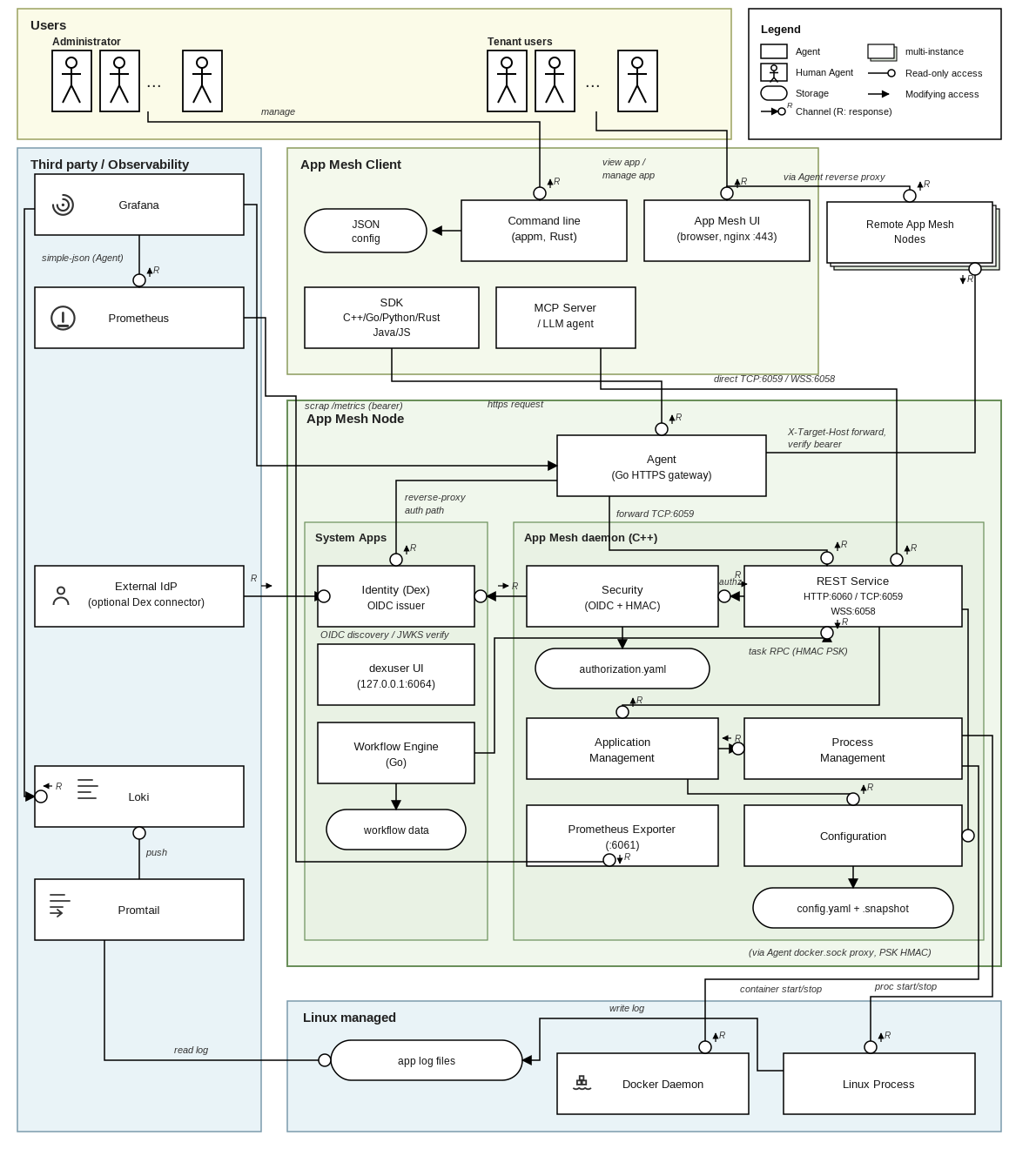
Internal component view
⚡ Quick Start
Start the daemon in Docker:
docker run -d --restart=always --name=appmesh --net=host -v appmesh-work:/opt/appmesh/work -v /var/run/docker.sock:/var/run/docker.sock laoshanxi/appmesh:latest
The appmesh-work volume persists authentication state and application
definitions; without it, a recreated container loses the administrator
password and every registered app. The container runs as UID 482 — grant that
identity access to the Docker socket to manage Docker apps.
Host your first app with the appm CLI — open a shell in the daemon container:
$ docker exec -ti appmesh bash

# Sign in once (non-interactive)
$ /opt/appmesh/script/appmesh-auth.sh print-initial-password | appm logon -u admin@appmesh.local --password-stdin

# List registered applications
$ appm ls
ID  NAME      OWNER   ENABLED  HEALTH  PID  USER     MEMORY  %CPU  RETURN
0   py-task   system  Yes      OK      574  appmesh  32.5Mi  0     -
1   py-exec   system  -        -       -    -        -       -     -
2   identity  system  Yes      OK      344  appmesh  40.5Mi  0     -
3   dexuser   system  Yes      OK      573  appmesh  17.5Mi  0     -
4   workflow  system  Yes      OK      575  appmesh  13.7Mi  0     -

# Register a new application
$ appm add -a myapp -c "python3 -u -c 'import time; [print(i, time.ctime()) or time.sleep(1) for i in range(10)]'"

# View its live output
$ appm ls -a myapp -o
0 Wed Sep 16 10:56:12 2026
1 Wed Sep 16 10:56:13 2026
2 Wed Sep 16 10:56:14 2026

# appm -h for more usage
Send a task message to a running app through the SDK. Mint an admin token first (see the authentication guide):
$ export APPMESH_BEARER_TOKEN=$(/opt/appmesh/script/appmesh-auth.sh print-initial-password \
    | /opt/appmesh/script/appmesh-auth.sh user-token)
import os
from appmesh import AppMeshClient
client = AppMeshClient(bearer_token=os.environ["APPMESH_BEARER_TOKEN"])

result_from_server = "0"
for i in range(10):
    task_data = f"print({result_from_server} + {i}, end='')"
    result_from_server = client.run_task(app_name="py-task", data=task_data)
    print(result_from_server)
For native packages (.deb/.rpm), systemd setup, and cluster initialization, see the Installation Guide and the Dockerfile.
🚀 Core Capabilities
| Pillar | Capability | What you get |
|---|---|---|
| Hosting | Application management | Full remote CRUD and control — cgroup limits, OS user, environment variables, Docker apps, stdin/stdout — with monitoring of start counts, exit codes, errors, and health checks |
| Hosting | Scheduling | Long- and short-running apps, periodic jobs, cron expressions, custom timings, and policy-driven start/exit behaviors |
| Computing | Remote execution | Run commands and scripts on any node; send in-memory tasks to running applications for high-performance computing |
| Computing | Workflow engine | GitHub-Actions-style YAML pipelines with DAG scheduling, running natively on App Mesh |
| Platform | Security | OAuth/OIDC bearer authentication (RFC 6750) with Principal-based RBAC and multi-tenant isolation; SSL/TLS on TCP/HTTP/WebSocket; HMAC-PSK internal verification |
| Platform | Observability | Built-in Prometheus exporter, Grafana datasource, Loki integration, host/app resource metrics |
| Platform | Extras | File upload/download API, remote shell execution, hot config reload, bash completion |
Runs on Linux, macOS, and Windows (x86 and ARM).
🔄 Workflow Pipeline
Define CI/CD pipelines as YAML — similar to GitHub Actions, but running natively on App Mesh with the built-in Workflow Engine:
- DAG scheduling — jobs run in dependency order, independent jobs in parallel
- 4 step types — shell commands, existing Apps, Task API messages, sub-workflows
- Error handling — retry with exponential backoff,
continue-on-error,finallycleanup blocks - Expressions —
${{ inputs.env }},${{ steps.build.stdout }},success(),failure(),always() - Remote execution — target specific nodes by label or hostname
appm workflow add -f pipeline.yaml        # register
appm workflow run pipeline -e env=prod -f # run and follow output
appm workflow runs pipeline               # view history
🤖 AI & LLM Integration
Agents are just managed Apps: the same RBAC, scheduling, secrets, health checks, and cluster forwarding as any other process — no sidecar, no privileged pod.
Agent runtime — not Claude-only
- LLM agent runtime — a thin wrapper over the Claude Agent SDK hosted as a managed App. Runs Claude (Anthropic API, Amazon Bedrock, Google Vertex), or any other model — DeepSeek, Qwen, GLM, MiniMax, or anything OpenAI-compatible behind a gateway. Model credentials stay in secured (
-z) env vars, never in files. - Sessions are stable working directories — send again with the same
session_idto continue a conversation,session_closeto wipe it; the agent itself stores no history.
Two consumption models, one substrate (design, SOP)
- Batch / DAG — a shared long-lived App answers each call with a final structured result; ideal for pipelines and batch scoring.
- Interactive chat — a per-session worker App streams tokens live to the web UI's Chat page; direct Task API + subscribe, no workflow engine in the path.
LLM as a workflow step
- The engine's
messagestep puts the model into the DAG:session_send/session_closepayloads, per-run session ids (${{ workflow.run_id }}), timeouts, failure propagation, and step-level resume — schedule it with cron, fan it out across nodes, or gate later steps on its answer.
Cluster-native LLM nodes
- The
laoshanxi/appmesh:llmimage ships the agent preinstalled and enabled. Run it as a dedicated node (seeappmesh_llmin the compose cluster); every peer reaches it with ordinary forwarding —appm -F appmesh_llm …routes exec, files, and tasks to the LLM node, and the web UI registers providers from a guided form (Agents → Register).
AI tooling around the mesh
- Remote sandbox for AI coding assistants — give agents an isolated build-and-run environment instead of your local shell.
- MCP server — manage App Mesh from AI clients over Model Context Protocol (Streamable HTTP with OAuth 2.1, RBAC enforced by the daemon).
- Remote execution skill for Codex and Claude Code, MCP bridge for relaying stdio MCP servers over WebSocket, and MQTT bridge for IoT scenarios.
🧰 Interfaces & SDKs
| Interface | Details |
|---|---|
| CLI | appm command reference |
| REST | REST APIs · OpenAPI spec |
| Web GUI | app-mesh-ui |
| SDKs | Python · Golang · Rust · Java · JavaScript |
💡 Success Stories
AI & automation
- Remote build-and-run sandbox for AI coding assistants
- LLM agent runtime hosted as an App Mesh app · architecture and workflow design (SOP)
- Manage App Mesh from AI clients via MCP (HTTP + OAuth)
Computing
- In-memory remote task execution
- Remote command and Python script execution
- Parallel task execution with the Python SDK
Operations & observability
- Observability stack with Grafana, Prometheus, and Loki
- Customize application startup and exit behavior
- Promote a native application into a managed microservice
- Secure REST-based file server
Platform & Kubernetes
- Run non-container applications on Kubernetes
- Kubernetes local-PV provisioning via Open Service Broker
🆚 Comparison
| Feature | App Mesh | systemd | crontab |
|---|---|---|---|
| Schedule accuracy | Seconds | Seconds | Minutes |
| Language | C++17 | C | C |
| Web GUI | √ | ||
| Command lines | √ | √ | √ |
| SDK | √ | ||
| Cron schedule expression | √ | √ | |
| Manage docker app | √ | ||
| Session login | √ | ||
| Manage stdout/stderr | √ | √ | |
| Health check | √ | ||
| Authentication | √ | ||
| Multi-tenant | √ | √ |
📚 Documentation
- Read the Docs — full documentation
- Feature Overview — the full capability map behind Hosting and Computing
- Installation Guide
- Security
- Workflow Guide
🔗 Library dependencies
Community & License
Questions and discussions are welcome on Gitter. Licensed under the MIT License.
1 maintainer

Metadata
1 maintainer
Release files for appmesh 3.0.15
For a detailed explanation of source distributions (sdists) and built distributions (wheels), please see the package formats documentation.
Built distribution (wheel)
| File | Interpreter | ABI | Platform | Actions Reset |
|---|---|---|---|---|
| appmesh-3.0.15-py3-none-any.whl | Python 3 | none | any | Details for appmesh-3.0.15-py3-none-any.whl |
Release files / appmesh-3.0.15-py3-none-any.whl
| Download URL | appmesh-3.0.15-py3-none-any.whl |
|---|---|
| Size | 64.7 kB |
| Tags | Python 3 |
|
SHA-256 checksum How to use checksums |
bc128aab73e10b0b3a9fe13865c58b6f7a3dc2d30fa524efb41c5f506dce2259
|
|
BLAKE2b-256 checksum How to use checksums |
9ee2ec07bd7b90538350139f52c5533c836d6765b28d8431fe1b7f6c4e5dd064
|
| Upload date | |
|
Uploaded using Trusted Publishing? What is trusted publishing? |
No |
| Uploaded via |
twine/7.0.0 CPython/3.13.16
|
Security for appmesh 3.0.15
Provenance
Provenance describes where a file came from. On PyPI, provenance is shared via attestations, which provide a verifiable record of the build or publishing details. View details, limitations and caveats.
No provenance found
None of the files in this release were uploaded with provenance metadata.
A note on package security
PyPI is a repository for distributing packages, not a service for auditing them. While third-party security researchers and our staff do their best to detect and remove malicious packages, PyPI cannot guarantee the quality, security or suitability of any given package.
To learn more about protecting yourself from malicious actors, visit our package security documentation.














