
Claude Status Bar
Your Claude Code usage, at a glance. 5h / 7d rate-limit bars, reset countdowns, model, context window, and prompt-cache freshness — inline in Claude Code's status line, or a floating HUD on the desktop app.





English · 简体中文 · Install · Documentation

[!IMPORTANT] macOS standalone users should upgrade to v3.32.5 now. Older onefile releases could leave a new ~11 MB PyInstaller
_MEI*runtime directory on every one-second refresh that was killed during startup. Re-running the installer switches to an onedir bundle and safely removes inactive leftovers:curl -fsSL https://raw.githubusercontent.com/leeguooooo/claude-code-usage-bar/main/install.sh | bash
Claude Code tells you almost nothing about where you stand against your rate limits.
claude-statusbar puts the numbers that matter on one quiet line at the bottom of your
terminal — so you never switch context to a separate window to answer "how much have I
got left, and when does it reset?"
Features
- Official 5h / 7d usage — the same rate-limit numbers Claude Code enforces, with reset countdowns and end-of-window projections (
→NN%), not a local guess. - Model & context window — current model and how full the context is (
Opus 4.8 · 350k/1M). - Prompt-cache countdown — see how long your cache stays warm (
cache 4m23s) so you know when the next turn pays full price. - Cost & balance — optional per-session cost, or live relay/API balance in no-quota setups.
- Two surfaces — inline
statusLinein the terminal, or an always-on-top floating HUD for the Claude desktop app (macOS). - 3 styles × 9 themes — switch the whole look with one command: battery-bar, capsule, or hairline.
- Fast by design — an optional daemon renders in well under 1% CPU even at a 1-second refresh.
- More when you want it — git branch & diff stats, session activity, AgentParty/Codex presence, IELTS writing-coach progress — each opt-in.
- Zero-dependency install — a single prebuilt binary (no Python needed) or a
pippackage. Auto-updates.
Install
Claude Code (terminal)
One line — no Python, no pip. Downloads a prebuilt standalone binary for your platform (macOS Apple Silicon, Linux x86_64) and wires up the status line:
curl -fsSL https://raw.githubusercontent.com/leeguooooo/claude-code-usage-bar/main/install.sh | bash
Security-conscious? Download and read it first — the header lists exactly what it touches. On platforms without a prebuilt binary it falls back to pip.
On macOS this one line does everything — it wires the terminal statusLine and, if the
Claude desktop app is installed, registers the floating desktop HUD to auto-start on login. The
macOS binary bundles the HUD, so there's no separate pip install '[hud]' and no extra config.
Prefer pip / uv, or want the desktop HUD extra? Install the Python package:
pip install claude-statusbar     # or: uv tool install / pipx install
cs --setup                       # wires the statusLine hook + installs the skill
Restart Claude Code and the bar appears at the bottom. Other paths (skill-only, plugin marketplace, Codex/AgentParty bridge) are in the install guide.
Deep dive: Is that
cache 4m23sline actually accurate? — how the prompt-cache countdown is computed
Claude desktop app (macOS) — cs hud
The desktop app has no status line, so cs hud adds an always-on-top floating panel with the
same official 5h / 7d usage (sampled by the desktop app itself, not an estimate) and your
active AgentParty channels.
If you used the curl … install.sh | bash one-liner above, the HUD is already installed —
the macOS binary bundles it and the installer auto-registers it when the desktop app is present.
The commands below are only for a manual/pip setup:
pip install 'claude-statusbar[hud]'   # adds PyObjC (macOS GUI deps)
cs hud install                        # launchd: auto-start on login + keep-alive
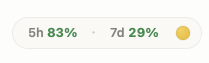
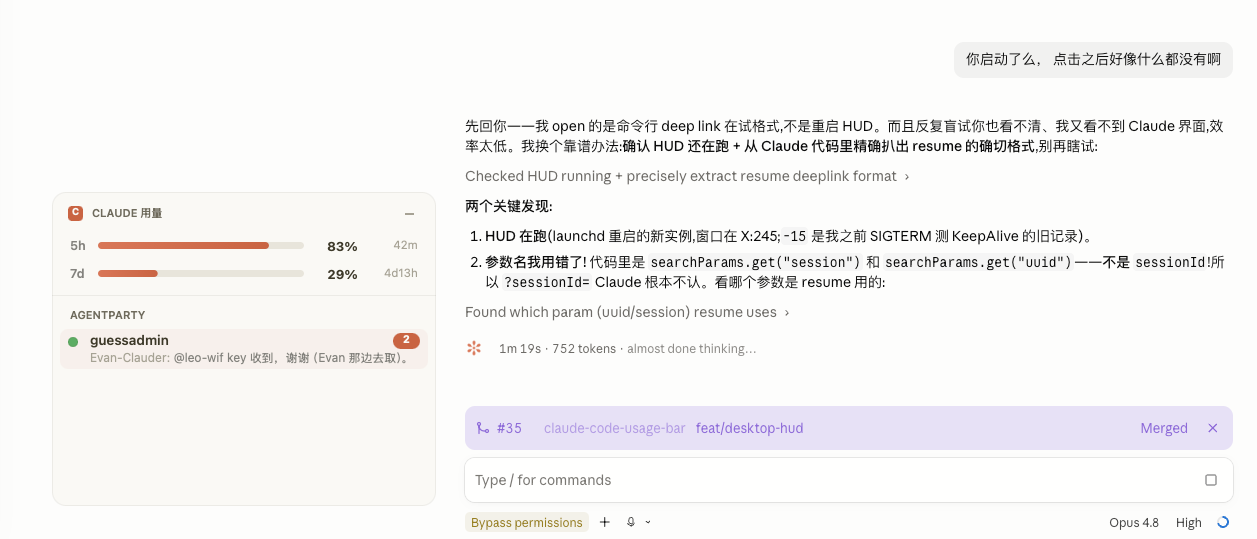
Collapsed pill → click to expand → drag anywhere; it hides when the desktop app isn't open. Full details in the Desktop HUD guide.
What it shows
The default bar — classic style, graphite theme:

At a full refresh it can render up to three lines, each segment optional:
| Line | Segments |
|---|---|
| Usage | 5h / 7d rate-limit bars, reset countdowns, end-of-window projections (→NN%), model & context window, prompt-cache countdown, optional session cost or relay balance |
| Project | git worktree marker (⑂ name (3) / ⑂ trunk (3) with the repo's worktree total, its own hue, leads the line), project name, git branch, session +/− lines, duration, version |
| Mode | session effort / thinking / fast / style |
Every icon, color threshold, and toggle is documented in the segment reference. Nine themes and three styles are in styles & themes.
Documentation
| Guide | What's inside |
|---|---|
| Install | Binary, PyPI, one-shot installer, skill-only, plugin, Codex bridge |
| What it shows | Full per-segment reference table |
| Styles & themes | 3 styles × 9 themes, previews, slash commands |
| Configuration | Config file, all show_* keys, env vars, JSON output, CLI cheatsheet |
Desktop HUD (cs hud) |
macOS floating panel for the Claude desktop app |
| Fast mode (daemon) | Sub-1% CPU daemon, launchd / systemd auto-start |
| No-quota mode | Relay / Bedrock / Vertex layout, context battery, balance |
| AgentParty / Codex bridge | Local workspace-presence line |
| Cache countdown | Data source + how cache 4m23s is computed |
| Troubleshooting | cs doctor, common problems, upgrading |
Comparison
There are a few good Claude Code usage monitors. They solve overlapping but distinct problems — pick the one that matches where you want the information.
| Tool | Lives in | Optimized for |
|---|---|---|
claude-statusbar (cs) |
Claude Code's statusLine (one line at the bottom) |
Glanceable while you work; zero context-switching |
| ccusage | Standalone TUI in a separate terminal window | Long-form usage analytics, cost breakdowns over weeks |
| Claude Code Usage Monitor | Standalone TUI with predictive burn-rate | Real-time burn-rate forecast for paid plans |
cs is intentionally one line of color and one decision per second. If you want a dashboard
with charts, daily/weekly aggregates, and burn-rate prediction, run a TUI in a side pane. The
two coexist nicely.
Integrations
prompt-language-coach — install the
plugin to track IELTS band progress. The bar then shows your writing level and trend
automatically (no config; appears when ~/.claude/language-progress.json exists):
... | Opus 4.8(350k/1M) | EN:6.0↑ JA:5.0→
↑ improved · ↓ dropped · → no change since last session.
Contributing
PRs welcome. The full contributor guide — local setup, test commands, architecture map, coding conventions, release flow — is in CONTRIBUTING.md. Security issues: SECURITY.md.
git clone https://github.com/leeguooooo/claude-code-usage-bar
cd claude-code-usage-bar
uv sync
PYTHONPATH=src uv run pytest tests/   # 900+ tests, ~3s
The render path is hot (up to 60×/min at refreshInterval: 1) — tests/test_import_perf.py
pins which modules can't be imported on the fast path. Read CONTRIBUTING.md before adding
dependencies.
Every version's changes: CHANGELOG.md · GitHub Releases.
Acknowledgments
- @marcwimmer — original
show_cache_agewidget (#9) - claude-monitor — token-usage analysis library used as the optional fast-path data source

Star history

Static snapshot taken at v3.3.x; click for the live chart.
1 maintainer

Download files
Download the file for your platform. If you're not sure which to choose, learn more about installing packages.
Source Distribution
Built Distribution
Filter files by name, interpreter, ABI, and platform.
If you're not sure about the file name format, learn more about wheel file names.
Copy a direct link to the current filters
File details
Details for the file claude_statusbar-3.40.1.tar.gz.
File metadata
- Download URL: claude_statusbar-3.40.1.tar.gz
- Upload date:
- Size: 306.0 kB
- Tags: Source
- Uploaded using Trusted Publishing? No
- Uploaded via:
twine/6.2.0 CPython/3.13.5
File hashes
| Algorithm | Hash digest | |
|---|---|---|
| SHA256 |
c58d4dd2f03fbeb0341566f12ce7093b3157ce6b616df5ae51154896b07f0300
|
|
| MD5 |
3c35b7c55292bf0c349bbe0045a09aae
|
|
| BLAKE2b-256 |
eca3b56675dd176913812eb752437cf0322c97e30b042e089b48d69a5817ae48
|
File details
Details for the file claude_statusbar-3.40.1-py3-none-any.whl.
File metadata
- Download URL: claude_statusbar-3.40.1-py3-none-any.whl
- Upload date:
- Size: 192.1 kB
- Tags: Python 3
- Uploaded using Trusted Publishing? No
- Uploaded via:
twine/6.2.0 CPython/3.13.5
File hashes
| Algorithm | Hash digest | |
|---|---|---|
| SHA256 |
ab3cc922e98ea42793f1fddbcdb6ba8924bb5cf2f71d72bcc1aab4be496494c2
|
|
| MD5 |
7cfe5d12c1f3b4f0292664cba3f6acf2
|
|
| BLAKE2b-256 |
06fda787b64ca6f75f87d71c82e8e37064406f892c6ee192f815e3c07a891c45
|







