
ClickNick
Better tools for AutomationDirect CLICK PLCs
Write, check, test, troubleshoot, and maintain CLICK ladder without replacing CLICK Programming Software.
Nickname autocomplete. Automated program checks. Offline testing. Readable project history. Optional AI-assisted ladder programming.
CLICK stays CLICK. ClickNick gives you better tools around it.
Documentation and tour: https://pyrung.com/clicknick/
ClickNick is a free, open-source Windows application. It runs locally, with no telemetry or required cloud service.
Install
ClickNick supports Windows 10 and 11 and CLICK Programming Software v2.60-v3.90.
1. Install uv
Open PowerShell and run:
powershell -ExecutionPolicy ByPass -c "irm https://astral.sh/uv/install.ps1 | iex"
Already have uv? Skip this step. Other installation methods are available in the uv documentation.
2. Install and run ClickNick
uv tool install clicknick
clicknick
To upgrade later, run uv tool upgrade clicknick. To try the latest release without installing it, run uvx clicknick@latest.
Then open your CLICK project as usual. ClickNick detects the open project and connects to it.
On Windows x64, a separate database driver normally isn't needed. If connecting fails, see connection help.
Install with pip instead
Python 3.11 or newer is required.
pip install clicknick
python -m clicknick
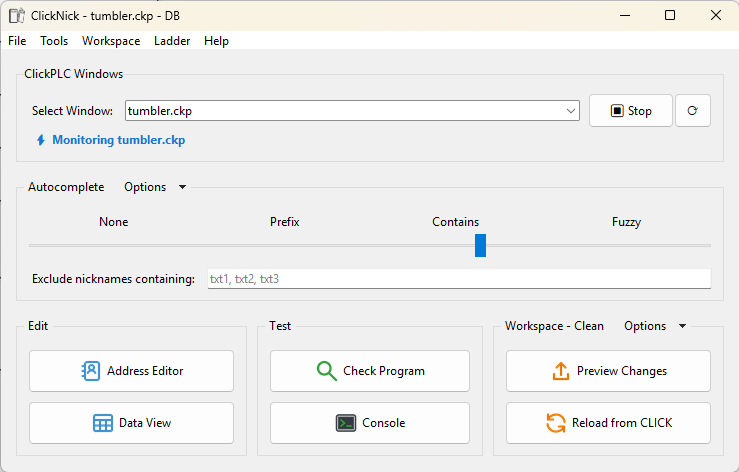
Make everyday CLICK programming easier
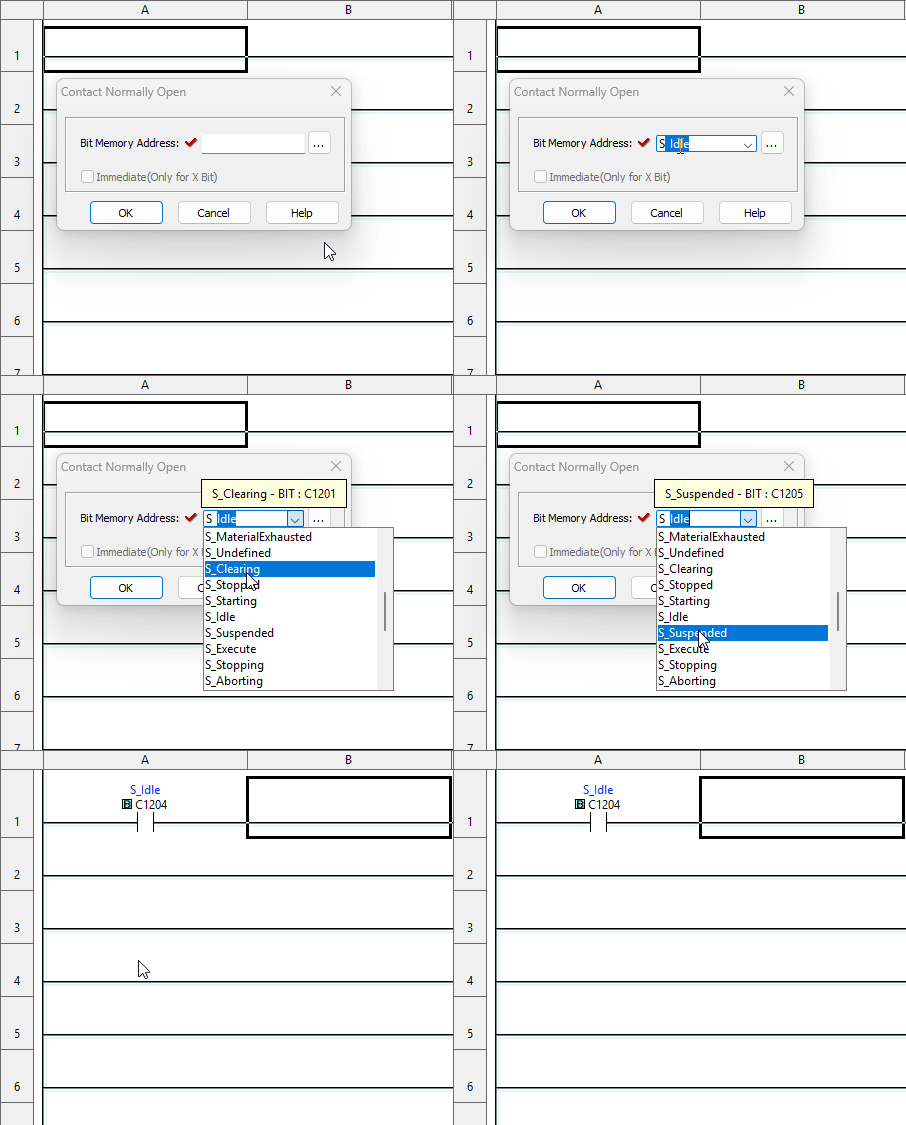
- Nickname autocomplete appears directly in CLICK instruction dialogs, so you can find
Valve5instead of rememberingC123. - Address Editor supports bulk nickname, comment, block, and annotation work with validation, search/replace, undo/redo, fill down, and structure cloning.
- Tag Browser organizes nicknames into a navigable hierarchy and recognizes related arrays.
- Data View tools add nickname lookup, grouped insertion, and drag-and-drop reordering.
- Project navigation filters show tag relationships such as inputs, outputs, upstream, downstream, and isolated tags.
ClickNick started by fixing a few editor annoyances - especially the need to remember addresses. You do not need Git, Python experience, an LLM, or a new programming environment to benefit from it. Start with autocomplete, open the Address Editor when it helps, and run Check Program when you want another set of eyes.
Check the program before running the machine
ClickNick automatically generates a readable, executable pyrung version of the saved ladder in the open CLICK project. This powers two built-in testing tools:
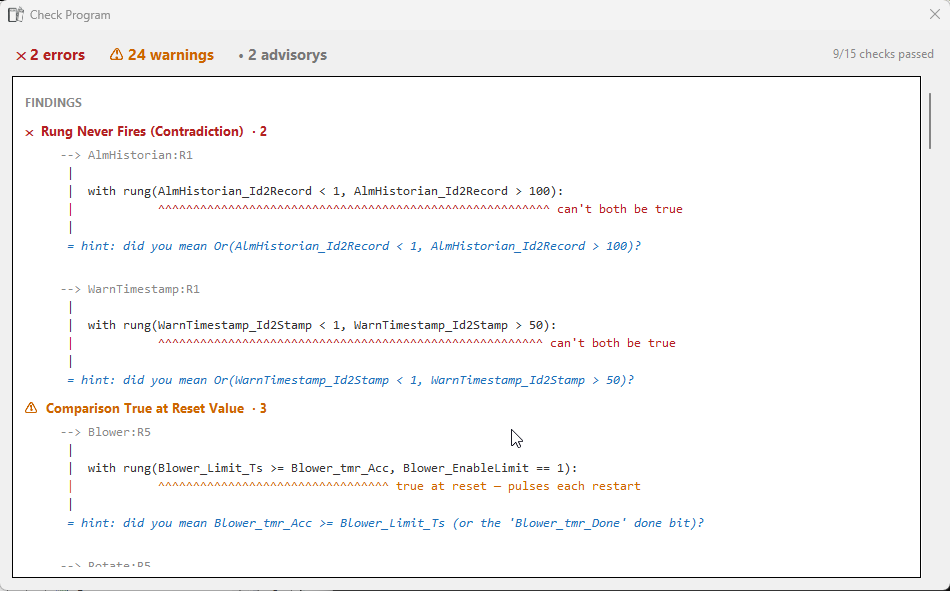
Check Program
Check Program catches common ladder mistakes and questionable patterns without running the machine. Findings include the relevant ladder source, severity, and a suggested fix.
Console
The Console is an offline CLICK test bench. It lets you:
- Run and inspect the program scan by scan.
- Force inputs and set up machine conditions without changing the live PLC.
- Work from saved PLC and tag data while troubleshooting.
- Ask why something happened - or why it did not.
- Ask how to reach a state, including routes that must pass through or avoid particular conditions.
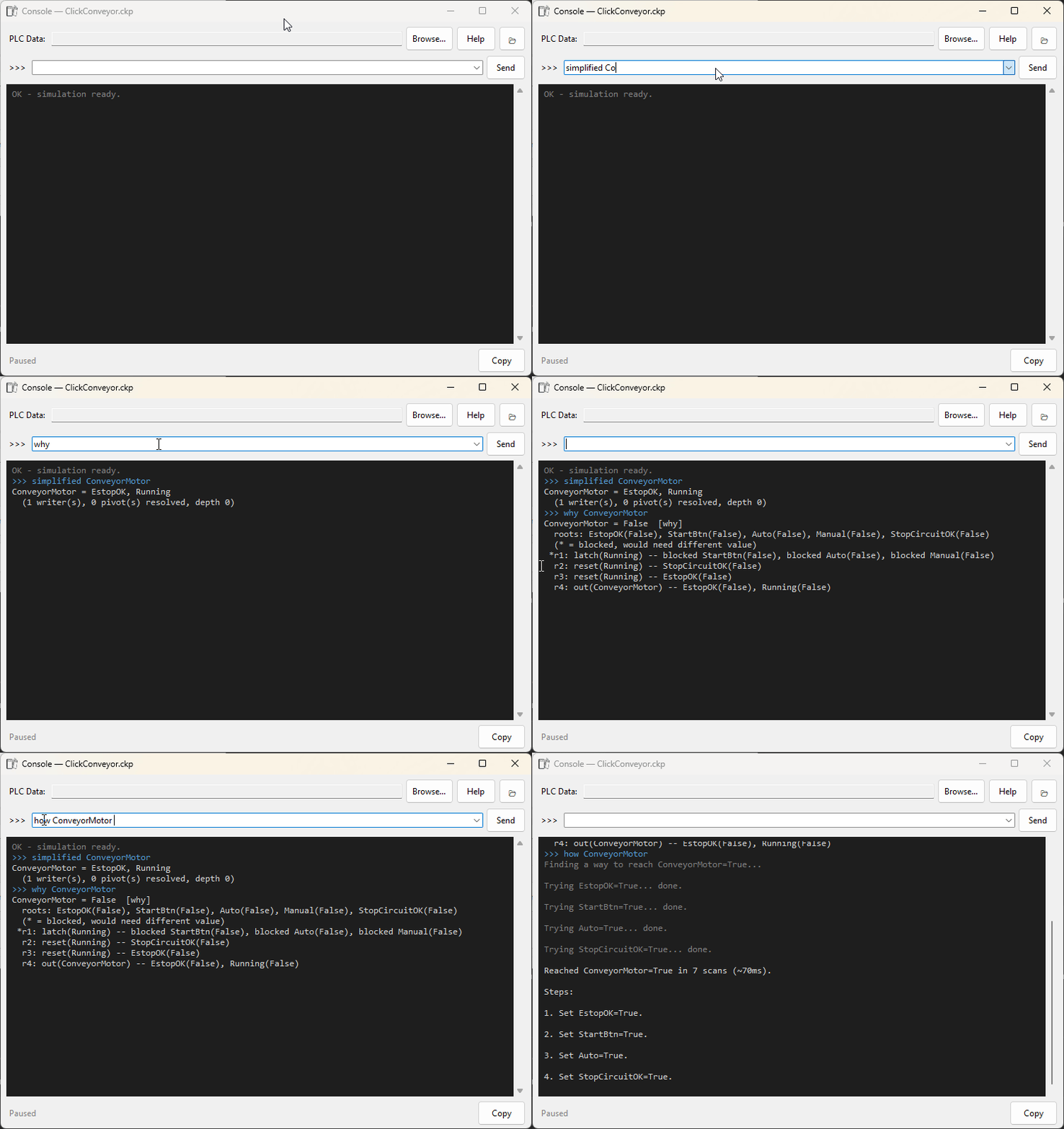
Save the project in CLICK before opening Check Program or Console so ClickNick can read the latest ladder files.
Keep engineering work with the machine
The generated pyrung project begins as a temporary workspace. That is convenient for quick checks and experiments. When you want tests, notes, and other engineering work to accumulate with the machine, create or select a persistent workspace folder from ClickNick.
In a workspace, you can:
- Read the ladder as ordinary, structured Python source with PLC scan semantics.
- Add automated tests alongside the ladder program.
- Keep notes, test fixtures, source history, and other project-specific files.
- Use normal software tools such as diffs, Git, editors, and coding agents.
- Edit generated ladder source and use Preview Changes to review the proposed CLICK rungs.
- Copy approved rung changes into CLICK through the guided paste workflow.
- Use Reload from CLICK to discard workspace changes and return to the saved CLICK program.
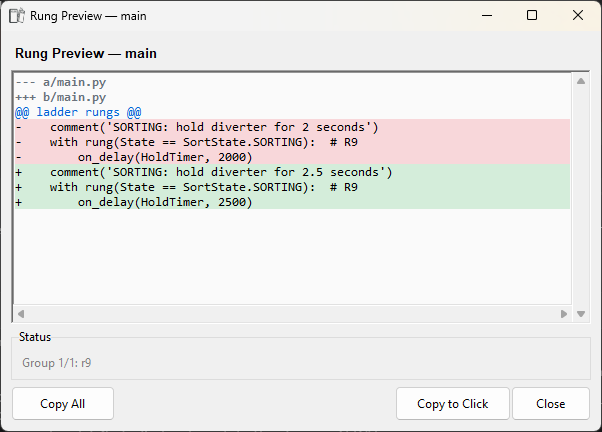
ClickNick preserves a recovery snapshot before regeneration replaces generated source. Files outside ClickNick's generated areas - such as your tests, notes, and editor configuration - remain yours.
How pyrung fits in
ClickNick is built on pyrung, the engine that runs your ladder as Python. That's what makes Check Program, the Console, and why / how possible, and it's what lets you run pytest, a diff, or a coding agent against the workspace. Edits go back the other way: Preview Changes shows the rung diff, Guided Paste puts the rungs on the clipboard, you paste and save in CLICK. How it fits.
Feature details
Nickname autocomplete
An autocomplete dropdown appears over CLICK instruction dialogs. Start typing a nickname and select from the filtered list; ClickNick inserts the address into CLICK.
- Choose prefix, partial/contains, or fuzzy abbreviation matching.
- Hover over a nickname to see its address comment.
- Hide system or internal addresses such as SC/SD and
__private__tags. - Keep autocomplete synchronized with Address Editor changes.
Address Editor
- Edit different address sections in multiple windows.
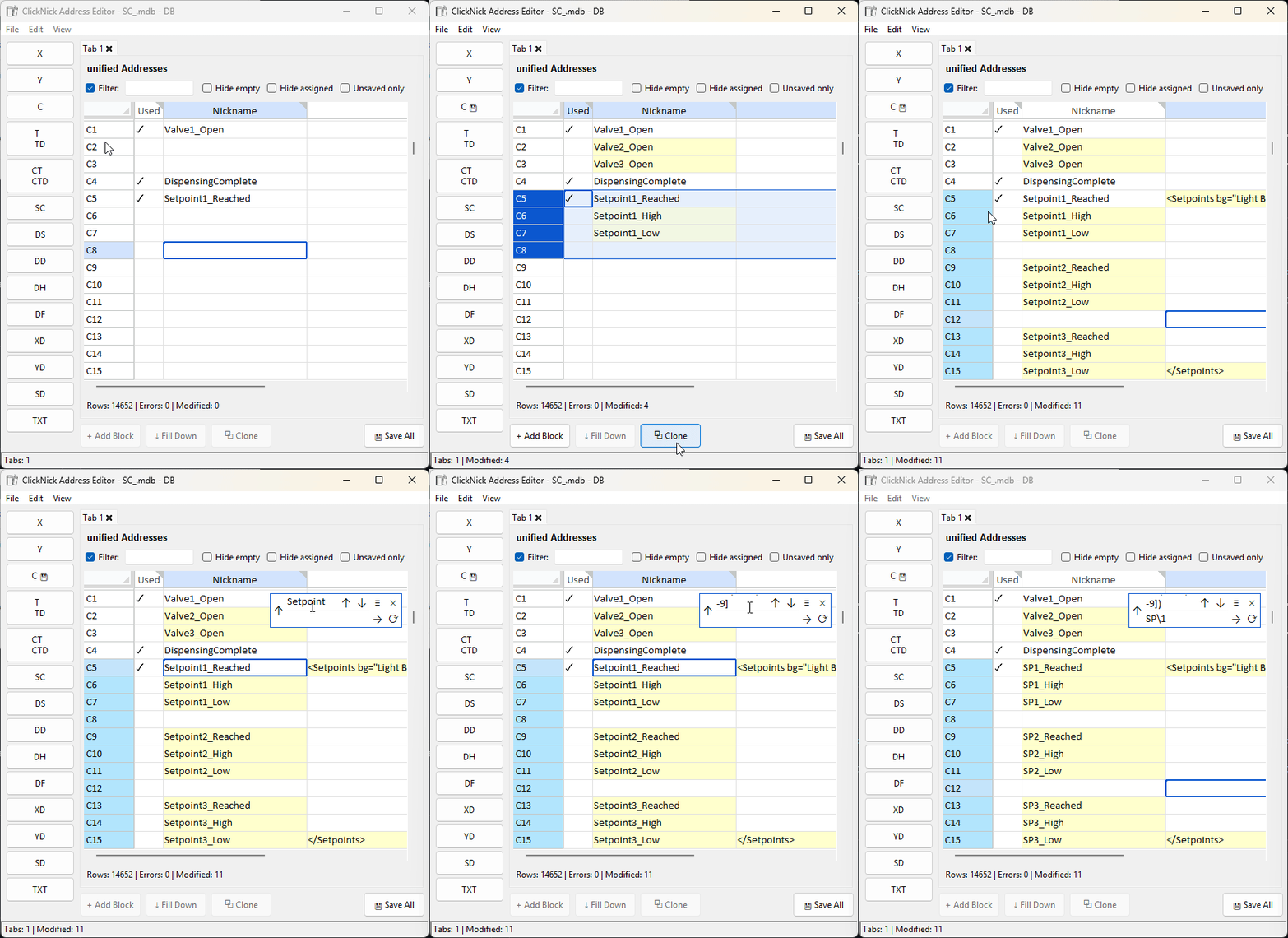
- Copy and paste multiple cells, then review changes before syncing them to CLICK.
- Detect duplicate nicknames and invalid values as you work.
- Fill a nickname pattern down a selection, such as
Alm1toAlm2,Alm3, and so on. - Clone related structures, such as
Alm1_IDandAlm1_Valinto the correspondingAlm2tags. - Create color-coded blocks for organization and navigation.
- Undo or redo an entire bulk operation as one edit.
Search with Ctrl+F and replace with Ctrl+R. Searches cover nickname and comment fields and can be limited to the current selection. The editor also accepts regular expressions, including ^ and $ anchors and capture groups such as \1 in replacements.
Tag Browser
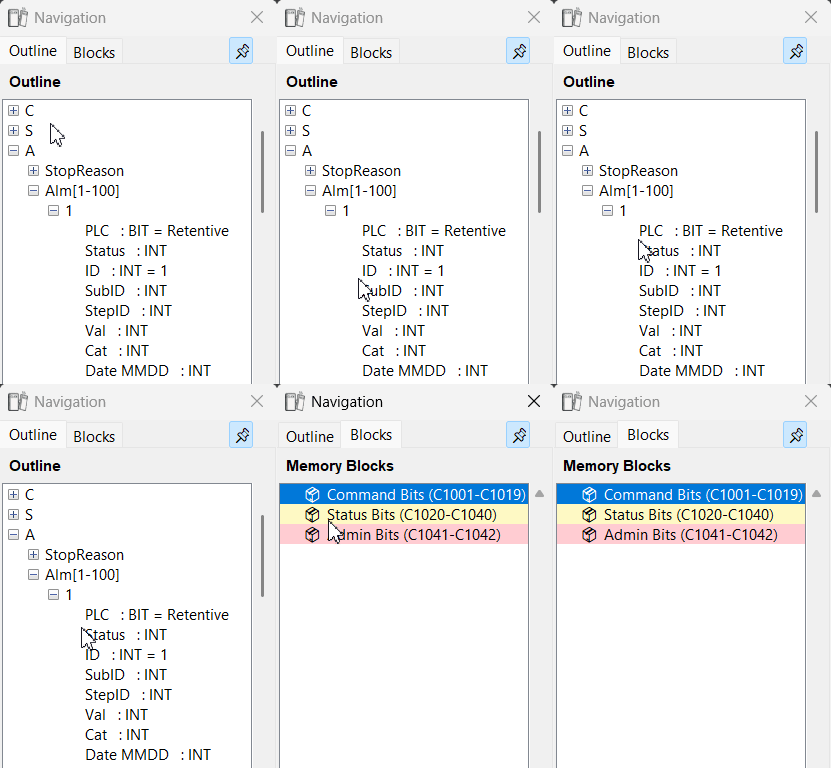
The Tag Browser turns a flat nickname list into an outline. Single underscores create hierarchy, so SupplyTank_Pump_Status becomes:
SupplyTank
└── Pump
    └── Status
Trailing numbers are recognized as arrays. Tags such as Alm1_id, Alm1_value, Alm2_id, and Alm2_value are grouped beneath Alm[1-2]. Double-click an item to edit it.
Data View Editor
- Load the
.cdvfiles from an open CLICK project into tabs. - Add addresses by nickname instead of raw address.
- Drag, cut, paste, and reorder entries freely.
- Insert a nickname, related structure, or whole block from the Tag Browser.
Project links
- Report a bug or request a feature
- Ask a question or share an idea
- View the source
- Read the changelog
- Read the license
ClickNick is beta software. Review Address Editor, Data View, and ladder changes before saving them in CLICK.
1 maintainer

Metadata
1 maintainer
Release files for clicknick 0.23.4
For a detailed explanation of source distributions (sdists) and built distributions (wheels), please see the package formats documentation.
Source distribution (sdist)
| File | Size | Uploaded | |
|---|---|---|---|
| clicknick-0.23.4.tar.gz | 555.5 kB | Details |
Built distribution (wheel)
| File | Interpreter | ABI | Platform | Reset |
|---|---|---|---|---|
| clicknick-0.23.4-py3-none-any.whl | Python 3 | none | any | Details |
Total release size: 894.6 kB
Release files / clicknick-0.23.4.tar.gz
| Download URL | clicknick-0.23.4.tar.gz |
|---|---|
| Size | 555.5 kB |
| Tags | Source |
|
SHA-256 checksum How to use checksums |
a7f105d9b1d3860ebb5d99ac2b117b118a81e802fb7847fbde42cab01b618fde
|
|
BLAKE2b-256 checksum How to use checksums |
e11c8fe0de4254360e932cc39028db085dfae743a76030385dfd621bb13c011d
|
| Upload date | |
|
Uploaded using Trusted Publishing? What is trusted publishing? |
Yes |
| Uploaded via |
twine/7.0.0 CPython/3.13.14
|
Provenance
Provenance describes where a file came from. On PyPI, provenance is shared via attestations, which provide a verifiable record of the build or publishing details. View details, limitations and caveats.


PyPI Publish Attestation
PyPI verified that this artifact, at this checksum, originated from the publisher listed below.
Signed by GitHub Actions, verified by PyPI on Oct 11, 2026.
Transparency logRelease files / clicknick-0.23.4-py3-none-any.whl
| Download URL | clicknick-0.23.4-py3-none-any.whl |
|---|---|
| Size | 339.1 kB |
| Tags | Python 3 |
|
SHA-256 checksum How to use checksums |
10f71d0b3a1f13e0ce438d42bdee73926ade9be22b96e1069d4794c8d92bc67a
|
|
BLAKE2b-256 checksum How to use checksums |
41f96ffc3249b80c1ac170f949f42c67014bfa86560c1d1fe12501149547b8f2
|
| Upload date | |
|
Uploaded using Trusted Publishing? What is trusted publishing? |
Yes |
| Uploaded via |
twine/7.0.0 CPython/3.13.14
|
Provenance
Provenance describes where a file came from. On PyPI, provenance is shared via attestations, which provide a verifiable record of the build or publishing details. View details, limitations and caveats.
PyPI Publish Attestation
PyPI verified that this artifact, at this checksum, originated from the publisher listed below.
Signed by GitHub Actions, verified by PyPI on Oct 11, 2026.
Transparency log













