
cmdbox
cmdbox is a command foundation for AI system development that lets you launch with minimal implementation. A single feature implementation can be exposed through CLI / REST API / MCP SV / Web UI / Edge UI / remote execution.
- Documentation: https://hamacom2004jp.github.io/cmdbox/
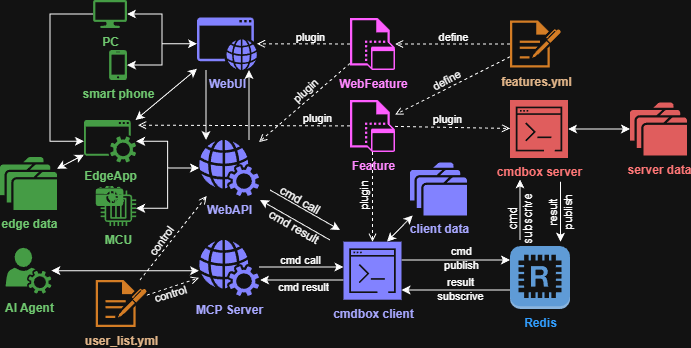
Why cmdbox for AI System Developers
- No repeated reimplementation
- Implement a
Featurecommand once, then use the same capability via CLI, Web UI, and REST API. - It is easy to promote a PoC CLI workflow into operational Web/API interfaces without rewriting business logic.
- Implement a
- AI-ready components out of the box
- Modes such as
agent,llm,mcpsv, anda2asvlet you manage agent execution, model operations, MCP exposure, and A2A integration on one platform. - You can separate tool execution, inference, knowledge retrieval, and external integration while keeping a consistent operational model.
- Modes such as
- Rich Web UI for daily operations
- Beyond APIs and CLI, cmdbox provides operational screens for commandlets, agents, filer, limiter, audit, and user management.
- Teams can run, monitor, and control workflows from a browser without building a separate admin console.
- Designed for remote execution
- Server-side commands can run through Redis, which fits node separation and scale-out architectures.
- Heavy workloads can be offloaded to servers while keeping client components lightweight.
- Fast, configuration-driven extensibility
features.ymldefines command discovery, aliases, argument rules, and agent execution rules, separating implementation from operations policy.- You can adjust exposed commands and execution policies without code changes, which is useful for environment-specific control.
- Built-in governance capabilities
- You can combine audit logging, authentication/authorization (signin / oauth2 / saml / rule settings), and limiter controls.
- It is easier to trace who executed which command under which conditions, enabling enterprise-grade operational control.
Problems It Solves Well
- You need to launch internal AI tools quickly
- Start with CLI features, then expose the same capabilities internally via Web and REST API.
- Multiple teams/environments need one shared foundation
- Run the same codebase across dev/stg/prod while switching execution policies through configuration.
- You need safe integration between agents and existing systems
- Combine MCP/A2A integration with authorization rules to control the scope of agent actions.
- You need usage control and cost governance for AI operations
- Use Limiter settings to enforce quotas/rate rules, prevent abuse, and keep usage and billing behavior predictable.
- Define reusable plans and billing policies (period-based or metered) to align access control with commercial and internal chargeback models.
What You Can Build
- Custom command development
- Support complex option definitions, client/server execution, and Web execution.
- Organize functionality by
mode/cmdand standardize execution through a shared option model.
- LLM integration
- Chat, embedding, and configuration save/load/list workflows.
- Manage model configurations and treat inference calls as operational commands.
- Agent integration
- Save/load agent settings, integrate MCP servers, and connect A2A servers.
- Expand agent capabilities in phases while keeping clear boundaries on exposed tools.
- Web UI operations
- Use built-in screens for commandlets, agents, filer, limiter, audit, and user management.
- Manage day-to-day operations from the browser while keeping the same backend command model.
- Operational controls
- Audit logs, authentication, command execution policy, and REST API controls.
- Publish safely with permissions segmented by organization or user group and full traceability.
- Configure plan and billing operations to support subscription-style access windows and metered charging models.
Typical Use Cases
- Internal knowledge search combining document processing + LLM
- Converting routine operations into commands and running them from Web UI with no-code interaction
- Letting agents call internal tools safely within controlled boundaries
- Running operational administration (filer, limiter, audit, and user control) from the built-in Web UI
Installation
pip install cmdbox[dev]
pip install cmdbox[app]
cmdbox -v
Docker Environment Setup
- Redis
cmdbox -m cmdbox -c redis_install
cmdbox -m cmdbox -c up -C redis
- PostgreSQL (used by some commands)
cmdbox -m cmdbox -c pgsql_install
cmdbox -m cmdbox -c up -C pgsql
- Full cmdbox suite
cmdbox -m cmdbox -c server_install
cmdbox -m cmdbox -c up -C cmdbox
Quick Start
cmdbox -m server -c start
cmdbox -m web -c start --signin_file .cmdbox/user_list.yml
cmdbox -m mcpsv -c start --signin_file .cmdbox/user_list.yml
cmdbox -m a2asv -c start --signin_file .cmdbox/user_list.yml
Tutorial
The tutorial content has moved to the following documentation:
docs_src/docs/tutorial.rst- Published tutorial: https://hamacom2004jp.github.io/cmdbox/docs/tutorial.html
- Full documentation: https://hamacom2004jp.github.io/cmdbox/
License
This project is licensed under the MIT License, see the LICENSE file for details
1 maintainer

Metadata
1 maintainer
Release files for cmdbox 0.8.5.4
For a detailed explanation of source distributions (sdists) and built distributions (wheels), please see the package formats documentation.
Source distribution (sdist)
| File | Size | Uploaded | |
|---|---|---|---|
| cmdbox-0.8.5.4.tar.gz | 2.5 MB | Details |
Built distribution (wheel)
| File | Interpreter | ABI | Platform | Reset |
|---|---|---|---|---|
| cmdbox-0.8.5.4-py3-none-any.whl | Python 3 | none | any | Details |
Total release size: 5.7 MB
Release files / cmdbox-0.8.5.4.tar.gz
| Download URL | cmdbox-0.8.5.4.tar.gz |
|---|---|
| Size | 2.5 MB |
| Tags | Source |
|
SHA-256 checksum How to use checksums |
82293ebc77ca3c623c8fb21140ac8d9e78d7a347dc1c4378881f378f844eec62
|
|
BLAKE2b-256 checksum How to use checksums |
ad6f2d302a73b51e6aa28dd6cca60ff5da877032dd270c37fff3254a3019a8cc
|
| Upload date | |
|
Uploaded using Trusted Publishing? What is trusted publishing? |
No |
| Uploaded via |
twine/6.2.0 CPython/3.11.8
|
Release files / cmdbox-0.8.5.4-py3-none-any.whl
| Download URL | cmdbox-0.8.5.4-py3-none-any.whl |
|---|---|
| Size | 3.2 MB |
| Tags | Python 3 |
|
SHA-256 checksum How to use checksums |
593be82b0f9998701209223ef8a283c610b3c1246e24d81e6019cdc15d039a9b
|
|
BLAKE2b-256 checksum How to use checksums |
7e2b796b3424ad5453f0ec2c783b9239dd8de1e02c922db1d3bc21b48b1e3c5c
|
| Upload date | |
|
Uploaded using Trusted Publishing? What is trusted publishing? |
No |
| Uploaded via |
twine/6.2.0 CPython/3.11.8
|














