
CytoDataFrame






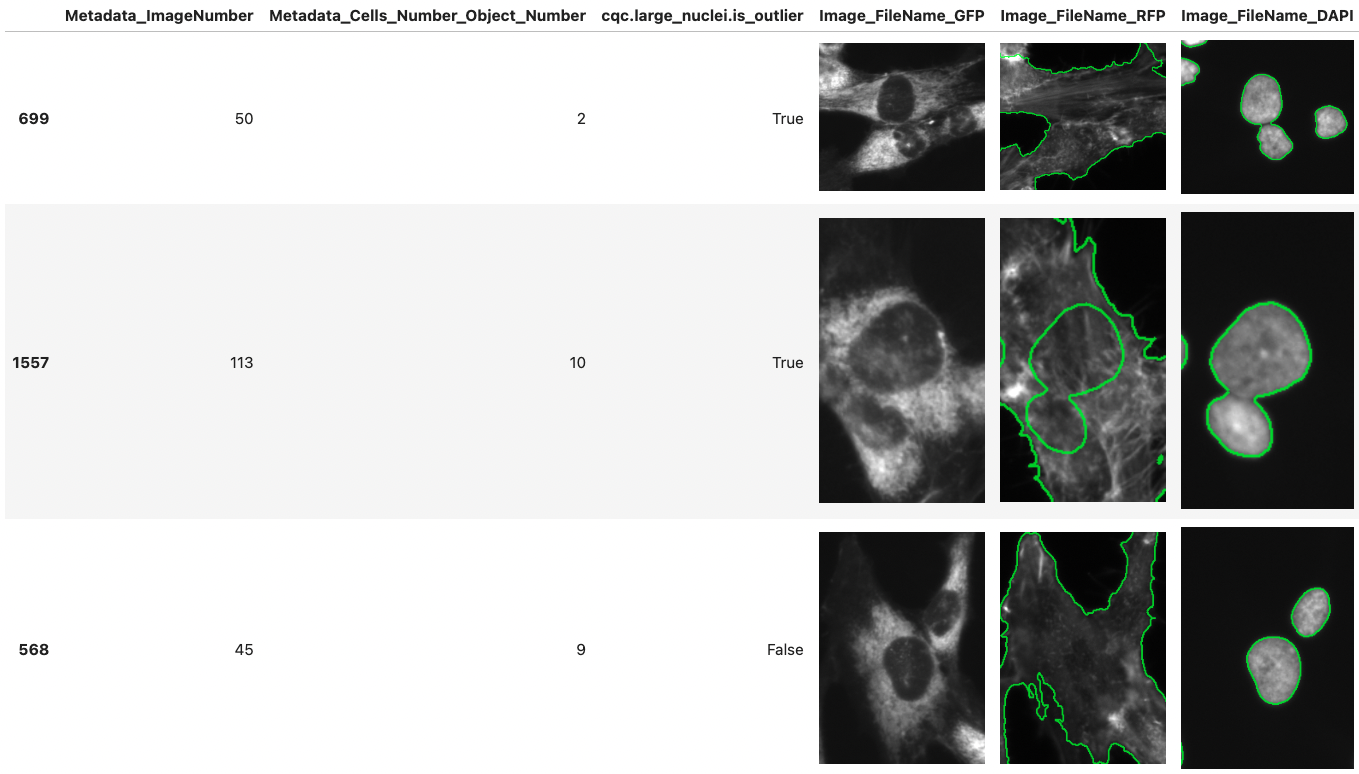
CytoDataFrame is an advanced in-memory data analysis format designed for single-cell profiling, integrating not only the data profiles but also their corresponding microscopy images and segmentation masks. Traditional single-cell profiling often excludes the associated images from analysis, limiting the scope of research. CytoDataFrame bridges this gap, offering a purpose-built solution for comprehensive analysis that incorporates both the data and images, empowering more detailed and visual insights in single-cell research.
CytoDataFrame is best suited for work within Jupyter notebooks. With CytoDataFrame you can:
- View image objects alongside their feature data using a Pandas DataFrame-like interface.
- Highlight image objects using mask or outline files to understand their segmentation.
- Merge multiple channels into a single single-cell crop composite (similar to a Fiji composite) with
display_options={"composite_channels": "all"}or a per-channel color mapping such asdisplay_options={"composite_channels": {"OrigDNA": "cyan", "OrigRNA": "#ff00ff"}}(colors may be names, hex codes, or RGB tuples; cyan/magenta/yellow read more clearly than red/green/blue where channels overlap). A color legend is shown with the table, anddisplay_options={"equalize_clip_limit": 0.01}gives a milder, less over-saturated result. - Adjust image displays on-the-fly using interactive slider widgets.
- Display image objects even when bounding box columns are missing, by cropping from compartment-center offsets or rendering whole fields of view.
- Automatically detect 3D image volumes and render interactive trame views in notebooks when 3D dependencies are installed (with graceful fallback otherwise).
For 3D notebook display behavior:
- 3D-aware rendering is enabled by default (
display_options={"auto_trame_for_3d": True}). - Disable automatic trame switching with
display_options={"auto_trame_for_3d": False}. - Force trame layout regardless of auto-detection with
display_options={"view": "trame"}.
For images without bounding box columns (e.g. older CellProfiler outputs or image-level data):
- Crop from compartment-center coordinates plus pixel offsets with
display_options={"offset_bounding_box": {"x_min": -20, "y_min": -20, "x_max": 20, "y_max": 20}}(requires compartment center columns such asNuclei_Location_Center_X/Y). - Render the full field of view without cropping with
display_options={"render_whole_image": True}(works even with no bounding box and no center columns).
For image formats and inline image data:
- CytoDataFrame reads image filename columns that point to
.tif/.tiff,.jpg/.jpeg,.png,.gif,.webp, or.jxl(JPEG XL) files, and it reads mask or outline files in the same formats. For animated GIFs and WebPs, it displays the first frame. - CytoDataFrame renders columns that hold raw encoded image bytes (for example a DuckDB
BLOBor a parquetbinarycolumn) inline as images, in both the standard table and the widget table. It embeds JPEG, PNG, GIF, and WebP bytes as-is (animations stay animated). It decodes JPEG XL bytes and shows them as PNG, because browsers can't reliably display JPEG XL. - CytoDataFrame displays inline image bytes as stored, without the brightness or contrast adjustments it applies to image files. The
widthandheightdisplay options set their size.
For row display in notebook/widget tables:
- CytoDataFrame respects pandas display settings (
display.max_rows,display.min_rows). - When the table is larger than
display.max_rows, the widget table inserts a midpoint ellipsis row (…) to indicate omitted rows. - You can control truncation behavior by changing pandas display options before rendering.
📓 Want to see CytoDataFrame in action? Check out our example notebook for a quick tour of its key features.
✨ CytoDataFrame development began within coSMicQC - a single-cell profile quality control package. Please check out our work there as well!
Installation
Install CytoDataFrame from source using the following:
# install from pypi
pip install cytodataframe

# or install directly from source
pip install git+https://github.com/cytomining/CytoDataFrame.git
Contributing, Development, and Testing
Please see our contributing documentation for more details on contributions, development, and testing.
References
2 maintainers


Release files for cytodataframe 0.3.6
For a detailed explanation of source distributions (sdists) and built distributions (wheels), please see the package formats documentation.
Source distribution (sdist)
| File | Size | Uploaded | |
|---|---|---|---|
| cytodataframe-0.3.6.tar.gz | 300.0 kB | Details |
Built distribution (wheel)
| File | Interpreter | ABI | Platform | Reset |
|---|---|---|---|---|
| cytodataframe-0.3.6-py3-none-any.whl | Python 3 | none | any | Details |
Total release size: 380.4 kB
Release files / cytodataframe-0.3.6.tar.gz
| Download URL | cytodataframe-0.3.6.tar.gz |
|---|---|
| Size | 300.0 kB |
| Tags | Source |
|
SHA-256 checksum How to use checksums |
57cff31209fe95f8dd4da87134a404fa45c326a97c9452de4ebc31182446e540
|
|
BLAKE2b-256 checksum How to use checksums |
c13cef0ef798fd6293342da8d7d2771213684463b3ab4f89ab5e59d289a0d275
|
| Upload date | |
|
Uploaded using Trusted Publishing? What is trusted publishing? |
Yes |
| Uploaded via |
twine/7.0.0 CPython/3.13.14
|
Provenance
Provenance describes where a file came from. On PyPI, provenance is shared via attestations, which provide a verifiable record of the build or publishing details. View details, limitations and caveats.


PyPI Publish Attestation
PyPI verified that this artifact, at this checksum, originated from the publisher listed below.
Signed by GitHub Actions, verified by PyPI on Sep 25, 2026.
Transparency logRelease files / cytodataframe-0.3.6-py3-none-any.whl
| Download URL | cytodataframe-0.3.6-py3-none-any.whl |
|---|---|
| Size | 80.4 kB |
| Tags | Python 3 |
|
SHA-256 checksum How to use checksums |
165ef3b3716efc41d6142ba0cd775216725e5f618e90877cc917940cabdab56a
|
|
BLAKE2b-256 checksum How to use checksums |
5e45da6587713272b75289e8471bb8868aa426d3302adb802dc9063bbbc517a5
|
| Upload date | |
|
Uploaded using Trusted Publishing? What is trusted publishing? |
Yes |
| Uploaded via |
twine/7.0.0 CPython/3.13.14
|
Provenance
Provenance describes where a file came from. On PyPI, provenance is shared via attestations, which provide a verifiable record of the build or publishing details. View details, limitations and caveats.
PyPI Publish Attestation
PyPI verified that this artifact, at this checksum, originated from the publisher listed below.
Signed by GitHub Actions, verified by PyPI on Sep 25, 2026.
Transparency log













