

🦊 Kitsune MCP
Let your agent test the MCP server it's building.
Edit a tool, reload("dev"), call it again. No client restart.
⭐ Saved you a restart? Star it on GitHub so others find it.













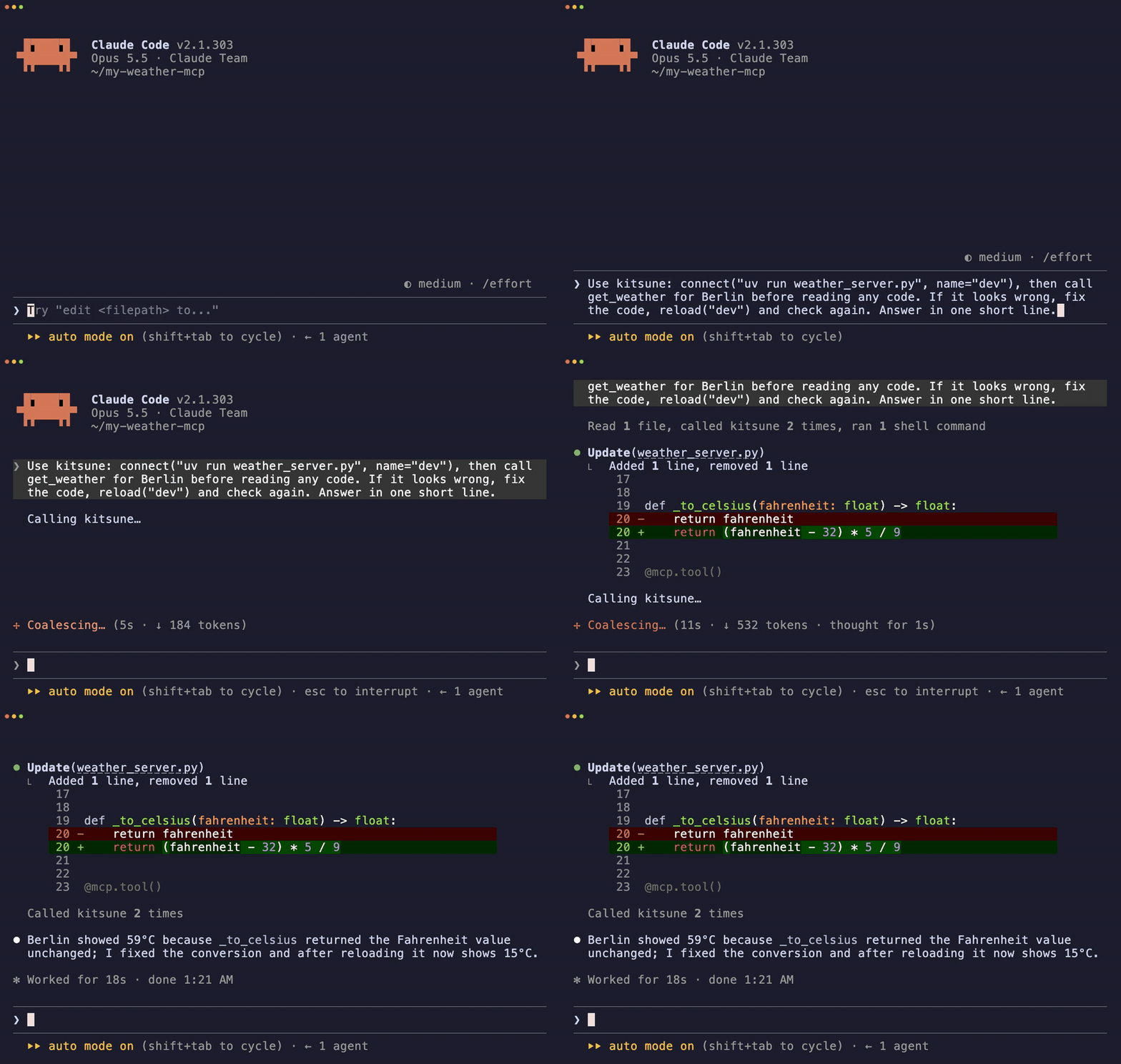
One prompt: Claude finds the bug, fixes it, reloads, checks again. Real recording, 31 s.
Why
Your agent edits an MCP tool, but the client still runs the old process. Someone has to restart it before the agent can test the fix.
With Kitsune, connect, call and reload are tools. The agent runs the whole loop itself:
connect("uv run my-mcp-server", name="dev")  # start your server
shapeshift("dev")  # its tools appear in the client
call("summarize", arguments={"url": "https://example.com"})

# … the agent (or you) edits the tool …

reload("dev")  # restart on fresh code, remount
call("summarize", arguments={"url": "https://example.com"})  # new code, same session
No Docker needed: connect() runs your own server as a plain local process, so the loop stays fast.
It also mounts any of 130,000+ servers from 7 registries mid-session. If Docker is installed, community packages run caged.
Try it: hot-reload tutorial · examples/demo-hot-reload/
Install
Claude Code
claude mcp add -s user kitsune -- uvx kitsune-mcp
Any other client (Claude Desktop, Cursor, Windsurf, Cline, Zed, …):
{
  "mcpServers": {
    "kitsune": { "command": "uvx", "args": ["kitsune-mcp"] }
  }
}
Also on PyPI (pip install kitsune-mcp, then "command": "kitsune-mcp") and npm (npx kitsune-mcp, delegates to uvx).
Requirements: Python 3.12+ · uv · node/npx for npm-based servers · Docker optional: not used for hot-reload, only to cage community servers when installed.
Three things it does
| Loop | What you get | |
|---|---|---|
| MCP REPL | connect → shapeshift → edit → reload → call |
Iterate on your own server without restarting the client |
| Long-tail reach | search → shapeshift → call → shapeshift() |
Use a server once without adding it to your config forever |
| Try before you trust | confirm=True + Docker cage + version pins |
Run community npm/PyPI code contained, not as your user |
Borrow a server you never configured
search("web scraping")
shapeshift("firecrawl", tools=["scrape_url"])  # mount one tool, not the whole server
call("scrape_url", arguments={"url": "https://example.com"})
shapeshift()  # drop it, session stays up
Try a community package, caged
search("pdf", registry="glama")
shapeshift("mcp-pdf-tools", confirm=True)  # npm/PyPI run in hardened Docker when available
call("extract_text", arguments={"path": "report.pdf"})
shapeshift()
Add credentials mid-session
auth("BRAVE_API_KEY", "sk-...")  # saved to ~/.kitsune/.env, no restart
shapeshift("brave", tools=["brave_web_search"])
Full live walkthrough: docs/demo-realtime.md.
When to use it, when not to
| Use Kitsune when… | Skip it when… |
|---|---|
| You're building an MCP server and want an edit/reload loop | You only use 1–3 trusted servers (configure them natively) |
| A task needs a server that isn't in your config | Every turn hits the same server (keep it always-on) |
| You want to evaluate community MCP code without installing it for good | You want lower token use: the base cost is ~1,774 tokens/turn, and modern clients already defer tool schemas |
| Your MCP config is crowded (GATEWAY) | You need a sub-second first call (cold mount takes ~1–15 s) |
How it works
shapeshift(server_id) picks a transport (stdio, HTTP+SSE, WebSocket, Docker), connects, reads tools/list, and registers each tool as a native tool with the server's real schema. The client receives notifications/tools/list_changed and sees first-class tools, with no wrapper in between. shapeshift() with no argument removes them and closes the connection.
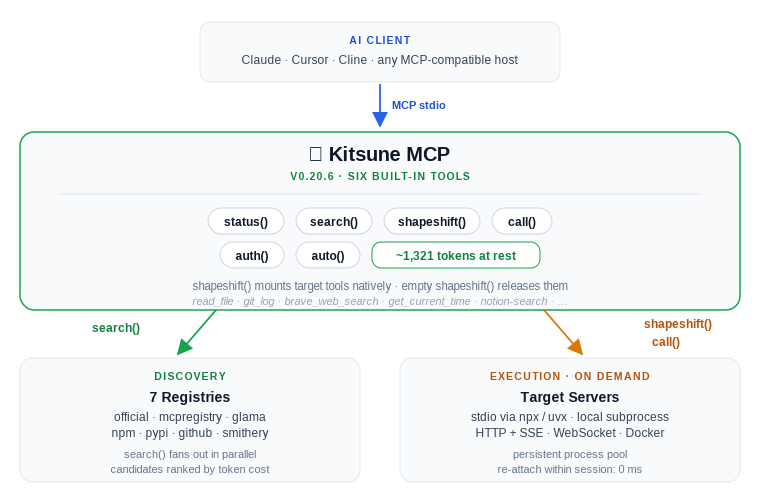
search() covers the official servers repo, the MCP Registry, Glama, npm, PyPI, GitHub (github:owner/repo) and Smithery (hosted servers, free API key).
Tools
Default profile: 9 tools, ~1,774 tokens/turn (measured with python examples/benchmark.py).
| Tool | Role |
|---|---|
connect(command, name) |
Start a persistent local server, e.g. the one you're developing |
reload(name) |
Release, restart on fresh code, remount, in one call |
release(name) |
Stop a persistent server |
search(query, registry?) |
Search 7 registries |
shapeshift(server_id?, tools=[…]) |
Mount a server's tools (all or a subset); no argument drops them |
call(tool_name, arguments) |
Call a tool; the server is inferred when mounted |
auth(var_or_server, value?) |
Set an env key or run an OAuth 2.1 browser flow |
auto(task, server_hint=) |
Search, mount and call in one step |
status() |
Current form, connection pool, session stats |
KITSUNE_TOOLS=all (or the kitsune-forge command) adds developer tools: inspect (schemas, credential check, token cost), test (quality score 0–100), bench (p50/p95 latency), compare, prewarm, craft, setup, and more. See docs/tools.md. Companion skills for Claude Code: kitsune-dev, kitsune-improve.
Safety, in short
- Community sources need consent. npm, PyPI and GitHub servers require
confirm=True. The model can set that flag itself, so real approval belongs in your client's tool-approval UI. connect()runs the command it is given, as your user, with no consent gate and no cage. It is meant for your own code. Approveconnectcalls in your client before the agent runs them.- Community packages run in a Docker cage by default when Docker is installed: no host filesystem,
--cap-drop ALL, read-only root, memory and PID limits. Credentials are passed by name, never in argv. - Version pins (TOFU). A later malicious publish doesn't silently replace a version you already ran.
- Opt-in action guard. A
~/.kitsune/policy.jsonchecks every downstream call against allow/ask/deny rules, path roots and a host allowlist.askgoes to you through MCP elicitation. - Install commands are validated and launched without a shell.
fetch()blocks private hosts and re-checks every redirect.
Don't run it unattended with production admin, billing or security credentials. The full model, including what it does not protect against: docs/safety.md.
More
- Configuration: env and
.envlookup, tool profiles, sandbox and trust settings, Smithery, GATEWAY, mount patterns - Performance: cold/warm latency and token cost compared with always-on servers
- Transports · Compatibility · Agent patterns · Worked scenarios
Why "Kitsune"?
In Japanese folklore the kitsune (狐) is known for what it can become: it borrows a form, uses that power, casts it off and returns to itself. That is the product loop.
I am not Japanese, and I use this name with the highest respect for the mythology and culture it comes from. The parallel felt too precise to ignore.
Contributing
make dev     # install with dev dependencies
make test    # pytest
make lint    # ruff
Issues and PRs welcome: github.com/kaiser-data/kitsune-mcp · CHANGELOG.md
MIT License · Python 3.12+ · Built on FastMCP
1 maintainer

Metadata
1 maintainer
Release files for kitsune-mcp 0.22.7
For a detailed explanation of source distributions (sdists) and built distributions (wheels), please see the package formats documentation.
Source distribution (sdist)
| File | Size | Uploaded | Provenance | Actions |
|---|---|---|---|---|
| kitsune_mcp-0.22.7.tar.gz | 1.2 MB | With provenance | Details for kitsune_mcp-0.22.7.tar.gz |
Built distribution (wheel)
| File | Interpreter | ABI | Platform | Actions Reset |
|---|---|---|---|---|
| kitsune_mcp-0.22.7-py3-none-any.whl | Python 3 | none | any | Details for kitsune_mcp-0.22.7-py3-none-any.whl |
Total release size: 1.4 MB
Release files / kitsune_mcp-0.22.7.tar.gz
| Download URL | kitsune_mcp-0.22.7.tar.gz |
|---|---|
| Size | 1.2 MB |
| Tags | Source |
|
SHA-256 checksum How to use checksums |
8dbca4b371fbd7104c7b08145c2931c58e0ed9ad453f7e6c6f0fc5865f86e71a
|
|
BLAKE2b-256 checksum How to use checksums |
6a45ff0f335069e66d42f8134c245612e3ae911de64a419fe5a82421be0f0e8f
|
| Upload date | |
|
Uploaded using Trusted Publishing? What is trusted publishing? |
Yes |
| Uploaded via |
twine/7.0.0 CPython/3.13.16
|
Provenance
Provenance describes where a file came from. On PyPI, provenance is shared via attestations, which provide a verifiable record of the build or publishing details. View details, limitations and caveats.


PyPI Publish Attestation
PyPI verified that this artifact, at this checksum, originated from the publisher listed below.
Signed by GitHub Actions, verified by PyPI on Oct 31, 2026.
Transparency logRelease files / kitsune_mcp-0.22.7-py3-none-any.whl
| Download URL | kitsune_mcp-0.22.7-py3-none-any.whl |
|---|---|
| Size | 132.0 kB |
| Tags | Python 3 |
|
SHA-256 checksum How to use checksums |
dae3ea795d160f369149f4daaf9d4c3e1c43bc962494eb6b96aa3b751555c2a3
|
|
BLAKE2b-256 checksum How to use checksums |
25bb1eb222f50ea1bd9b2ef2647cc6dbd3b099c979ae731bdfa0c41676e796e9
|
| Upload date | |
|
Uploaded using Trusted Publishing? What is trusted publishing? |
Yes |
| Uploaded via |
twine/7.0.0 CPython/3.13.16
|
Provenance
Provenance describes where a file came from. On PyPI, provenance is shared via attestations, which provide a verifiable record of the build or publishing details. View details, limitations and caveats.
PyPI Publish Attestation
PyPI verified that this artifact, at this checksum, originated from the publisher listed below.
Signed by GitHub Actions, verified by PyPI on Oct 31, 2026.
Transparency logSecurity for kitsune-mcp 0.22.7
Provenance
Provenance describes where a file came from. On PyPI, provenance is shared via attestations, which provide a verifiable record of the build or publishing details. View details, limitations and caveats.
Full provenance
Both files in this release have been uploaded with provenance metadata.
Attestation for kitsune_mcp-0.22.7.tar.gz
PyPI Publish Attestation
PyPI verified that this artifact, at this checksum, originated from the publisher listed below.
Signed by GitHub Actions, verified by PyPI on Oct 31, 2026.
Transparency logA note on package security
PyPI is a repository for distributing packages, not a service for auditing them. While third-party security researchers and our staff do their best to detect and remove malicious packages, PyPI cannot guarantee the quality, security or suitability of any given package.
To learn more about protecting yourself from malicious actors, visit our package security documentation.














