
linexcel





Data lineage analysis for Excel workbooks.
Extracts every formula, groups stretched patterns (R1C1 canonicalization), builds a dependency graph (cells, ranges, defined names, VBA), decomposes composite functions with step-by-step evaluation, and optionally documents calculations via the AI provider of your choice.
Install
uv add linexcel               # pip install linexcel
uv add linexcel[ai]           # + AI documentation (optional)
Note:
linexceldepends on formualizer, a Rust-based spreadsheet engine. Prebuilt wheels are available for Linux, macOS, and Windows. If no wheel matches your platform, a Rust toolchain is required to build from source.
Usage
Interactive web application
Start the application, then upload the main workbook and optional reference workbooks in the browser:
uv run linexcel serve --port 8765
# http://127.0.0.1:8765/
This separate path imports a structural graph without evaluating formulas. It shows source formulas, defined names, saved inputs and Excel caches; whole-column ranges remain compact. Selecting a cell starts an isolated, budgeted calculation using its complete supported dependency closure. Missing caches remain unknown. An unresolved dependency stops calculation rather than substituting a partial range or another formula's saved value. The graph and previous results remain available after a task failure.
The backend is Python (WSGI and isolated calculation workers). The browser
interface is HTML, CSS and JavaScript, with Cytoscape.js for the graph; it does
not run Python in the browser. Choose English or French in the interface, or
open /?lang=en. This choice is independent of the AI documentation language.
Large workbooks are indexed once on disk. The interactive path streams sparse OOXML records through native ZIP/XML parsers into SQLite (C), without loading an openpyxl workbook or a complete Python graph. Formula calculation uses the Rust engine. Shared strings and copied-formula memberships stay on disk; formatting only cells do not create nodes. The browser requests pages of at most 200 nodes and bounded graph neighborhoods. Search covers the disk index, including cells outside the current page. Counts describe the full index, and omitted graph neighbors remain explicit.
Uploads use resumable 8 MiB chunks, with a 256 MiB combined workbook/reference
limit by default. No base64 workbook copy is made in the browser. On the local
launcher, Open a local path copies a file directly from the server's disk
into an immutable project, bypassing browser transfer. --no-local-import
disables this option; it is disabled by default in embedded applications.
For example, allow more disk space for several large indexed workbooks with:
uv run linexcel serve --max-upload-mb 256 --max-storage-mb 8192
The compressed workbook size does not predict its expanded data or index size. Time, worker memory and disk quotas still apply. Errors in a worksheet or formula are reported locally; readable sheets remain browsable, and calculations that depend on incomplete data are refused. Refreshing an import publishes its new index atomically. A failed calculation leaves the index and other results usable. Operation history stores results on disk and loads the selected result only. Large decompositions have an explicit preview limit and a separate JSON download. Large ranges stream their literal inputs from SQLite to the calculation engine; formula dependencies and explicit cell references occupy the Python closure. Calculation coverage counts all selected inputs, while dependency cards keep a declared sample of at most 200 nodes, including in the export. A separate 20,000 explicitly traversed-node limit (excluding literal range members) protects dependency traversal; exceeding it refuses the calculation explicitly. Very large calculations can require a higher worker memory budget than the default 512 MiB even though browsing stays small. Captures are served as individual images with thumbnails, without embedding every image in the project response. Rendering remains an explicit, budgeted operation.
Explore the workbook graph starts a cancellable server task and saves a hierarchy on disk. It does not start Formualizer. Each view contains at most 32 groups or cells, plus the rest of the workbook. Click a group to expand it, use the breadcrumb to go back, or search for an exact cell reference to jump to its group. Positions and dependency counts are prepared by the server; the browser never downloads or lays out the entire workbook graph. The accessible list exposes each group's internal relationship count and weighted links between groups, including links outside the current group. Ranges remain grouped; unresolved or dynamic references retain the index's limitations. The saved graph is reused across sessions and invalidated after a successful structural reimport.
Import and graph construction have a separate default time budget of 600 seconds; targeted recalculation keeps its 120-second default. Both are adjustable under Limits per operation. Exact node references use the index directly; other searches still match substrings and can take longer on very large workbooks.
The Manual recalculation (lazy) checkbox controls a separate layer of laziness. Unchecked (the default), selecting a formula requests its targeted calculation and reuses the server cache when valid. Checked, selection reads saved evidence only; Recalculate explicitly runs the cell and its dependencies. The setting is remembered in this browser. Changing it does not launch a calculation or cancel an operation already running. No mode evaluates the whole workbook.
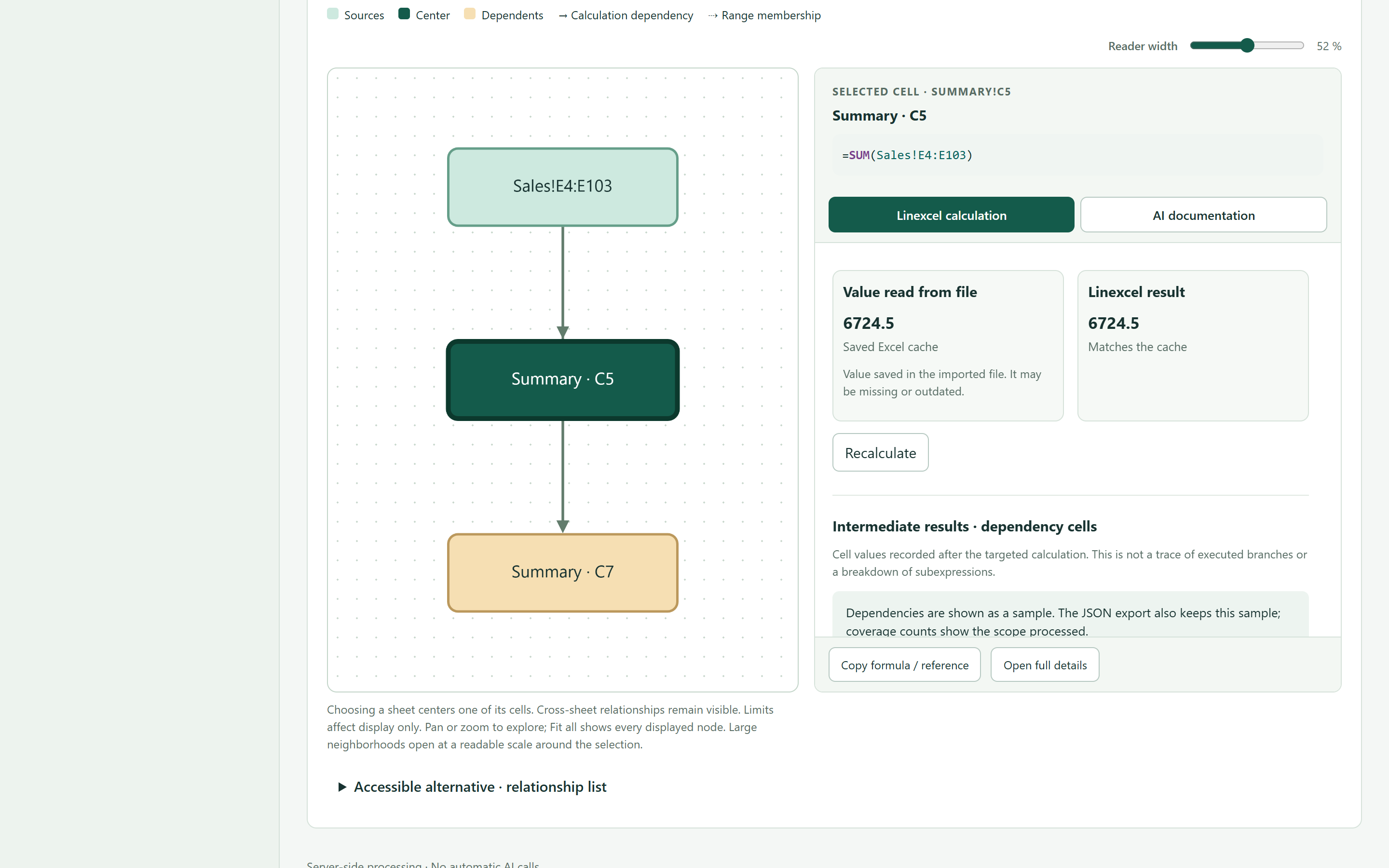
The graph opens Linexcel calculation first: compare the value saved in the file with the targeted result, then inspect intermediate dependency-cell values. These are engine snapshots, not a trace of executed branches or subexpressions. The separate AI documentation tab shares the graph's wide, adjustable reader. Long documents scroll inside the panel; on narrow screens it sits below the graph.
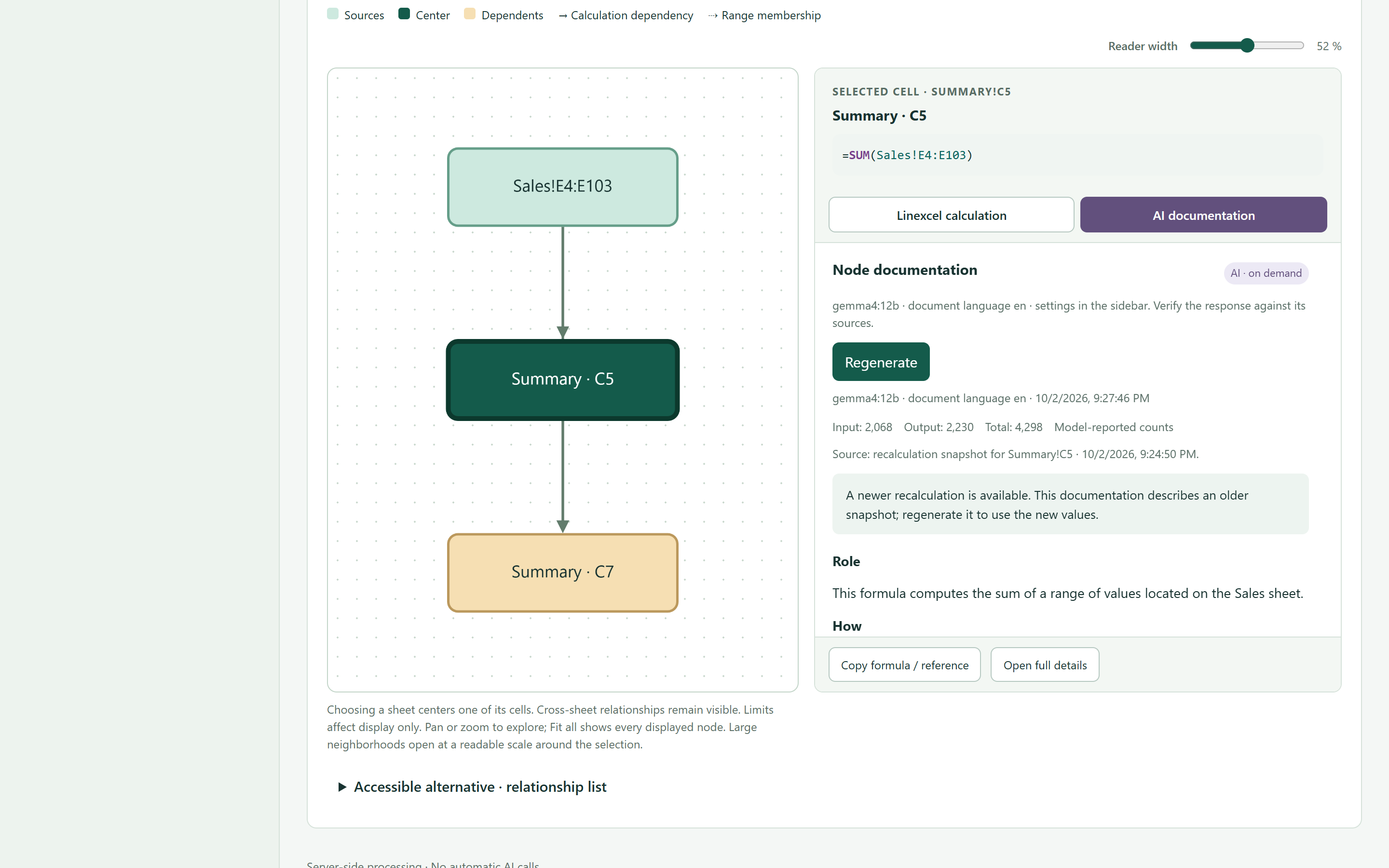
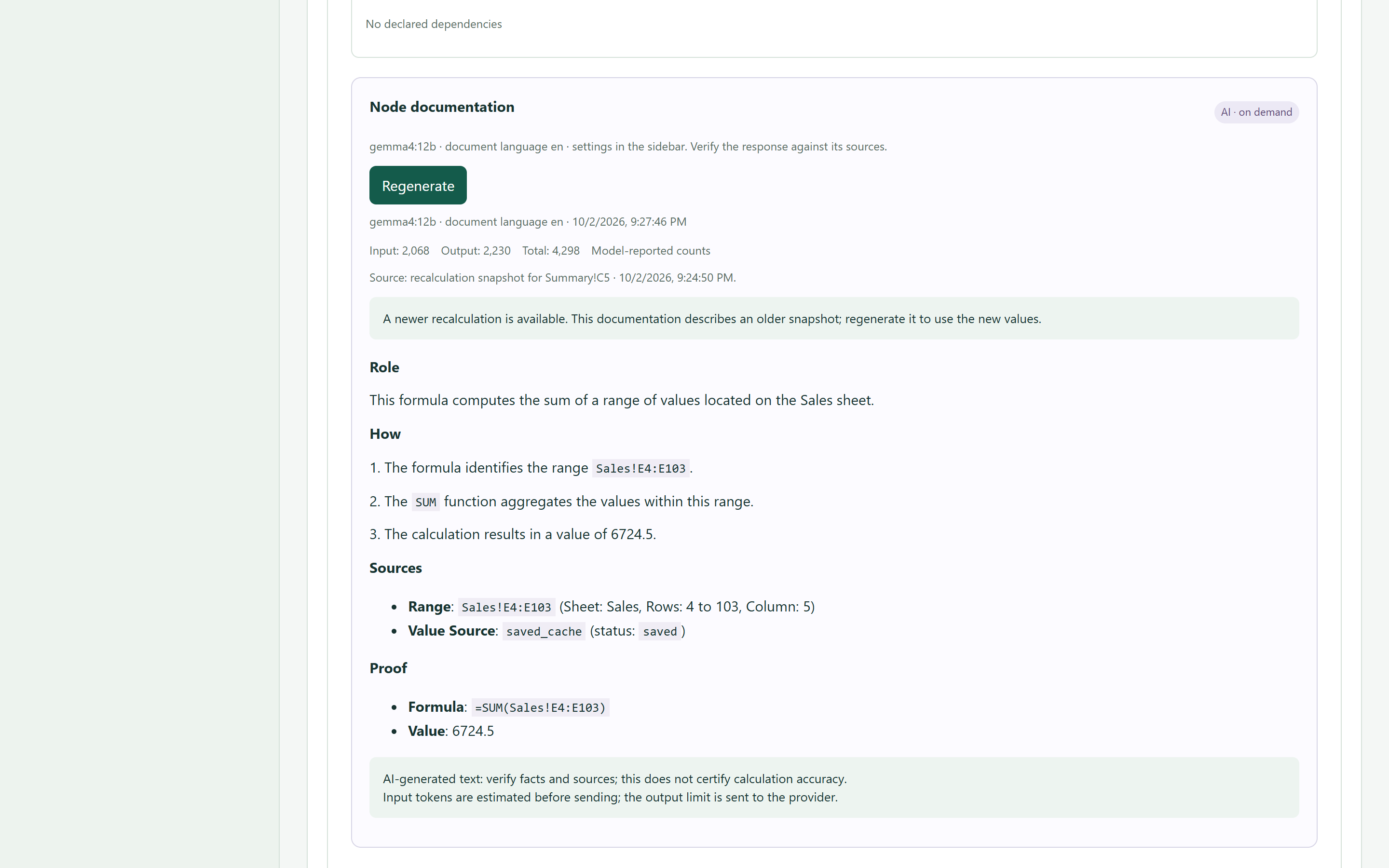
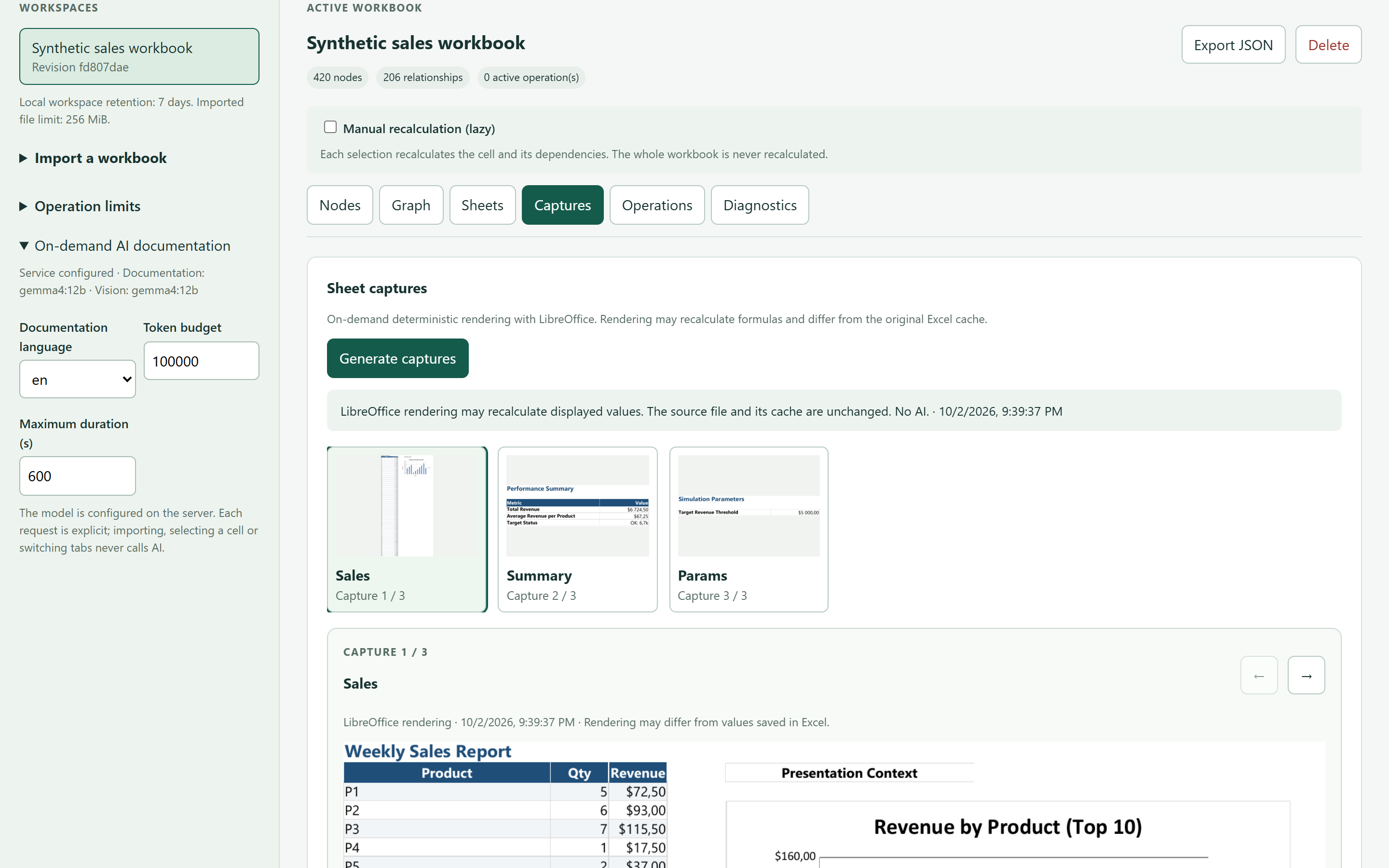
The interface provides sheets, a selected-node graph neighbourhood, dependency decomposition, cache comparison, task cancellation, deterministic screenshots and JSON export. Screenshots use the existing LibreOffice/Poppler renderer and can show LibreOffice-recalculated values; they never change the uploaded source. The deterministic features require no AI package, provider, Ollama process or account. Optional AI documentation is requested explicitly for a selected node, the workbook overview or one selected screenshot. Importing, selecting nodes, recalculating and rendering screenshots never request AI documentation by themselves.
Enable those buttons on a local server with the optional AI client and a running Ollama model:
uv run --extra ai --extra screenshots linexcel serve --ai --ai-model qwen3.8
qwen3.8 is currently recommended for documentation and vision. AI validation
is exploratory: model responses vary between runs and require review against
the source formulas, values and images.
The host configures the endpoint and text/vision models; browser requests cannot
override the endpoint or supply API keys. The interface shows the configured
model and keeps generated explanations separate from source formulas, caches
and calculation snapshots. AI output can be wrong, including about image
columns or value provenance; it is not proof that a formula was recalculated.
Use --ai-base-url, --ai-model, --ai-vision-model and --ai-token-budget
to configure the service; LINEXCEL_AI_API_KEY supplies an optional server-side
key. The default endpoint is local Ollama. AI tasks have a separate duration
and token budget in the interface. Input tokens are estimated before sending,
the output limit is sent to the provider, and reported usage is checked on
return. Image token accounting can remain estimated. Worker memory limits do
not limit the separate model server, and cancelling a task cannot guarantee
that a remote provider stops an already accepted request.
Each generated document shows input, output and total token usage separately;
missing provider counts remain unavailable rather than being reported as zero.
Drop the main workbook and its optional references into their separate upload areas using accessible file buttons or drag and drop, inspect or remove selected files, then follow transfer and import progress. Captures use a thumbnail gallery and a selected-image view rather than a full-size vertical image list. Operation details use bounded, highlighted JSON previews with image payloads omitted; explicit JSON downloads retain the complete result.
The interactive graph shows directed links between sources and their uses, with pan, zoom, fit-to-view, sheet navigation, search and back navigation. A selected node preview keeps its formula, value evidence and requested AI documentation beside the graph. Generate or refresh the same explanation from either the graph or the detail card. An accessible list provides the same navigation without requiring canvas interactions. Choosing a sheet in the graph moves the center onto that sheet. Explicit navigation to another sheet updates the selector to match the selected cell. Compact ranges show represented member cells and their full dimensions separately, without materializing blank positions. Display limits do not reduce the dependency closure used for calculation. The detail card includes the original formula, saved and recalculated values, source provenance, nearby text with cell coordinates, hidden-sheet/row/column context and dependency formulas. After a targeted calculation, dependency formula results are read from that same fresh engine operation. Saved caches, literal inputs and calculated values remain distinct; an unavailable engine result is never filled from the cache. Reading these results does not launch separate recalculations of volatile dependencies. Coverage describes the static formula closure, not which branches executed at runtime. Nearby text is a bounded contextual snippet, not an inferred business meaning or a change to calculation inputs.
Copied formula patterns are detected structurally without evaluating the workbook. Relative and absolute references remain distinct, and each sheet has its own groups. Group counts and members supplement the individual cells; a shared formula pattern never implies shared input values or an identical result. Unsupported reference syntax is kept separate conservatively. Older saved projects can refresh their structure without uploading their sources again.
Supported external references in this first version are single cells holding literal inputs, including typed Excel errors, in uploaded reference workbooks. Constant defined names and absolute named references respect sheet-local scope. Dynamic references, structured references, external formulas/ranges, relative or formula-defined names, array/data-table results, cycles and formulas needing omitted workbook metadata are reported as unsupported. Decomposition includes dependency formula values available from the calculation, not evaluated subexpression steps. The native engine can still differ from Excel; comparison with a saved value is evidence, not proof of Excel compatibility.
Compatibility corrections run within the calculation graph: SUMPRODUCT
ignores nonnumeric entries in separate array arguments, typed errors propagate
through concatenation, and comparisons distinguish numbers, text and Booleans.
An expression inside a SUMPRODUCT argument keeps its own arithmetic coercion.
Dependents consume these corrected values; source formulas and saved caches
remain unchanged. Reading a literal input requires no formula engine. Formula
evaluation continues to use formualizer with targeted Python corrections;
Polars is not required. These corrections are covered by independent arithmetic
and type-sensitive regression cases, not just agreement with saved values.
Text ordering involving punctuation or locale-specific collation can still
differ from Excel (for example, ="+">"^"). These comparisons retain the
engine's approximate ordering; a completed calculation is not a claim of full
Excel compatibility. Saved-value comparisons and source formulas remain visible.
Date calculations preserve numeric serials in both workbook calendars, including
Excel's fictitious leap day; source formatting supplies readable date context.
ISO date text is supported by the corrected date-part functions. Other textual
date formats still use the native parser and can depend on unsupported locale
rules; they are not inferred from the computer's regional settings.
Sources are immutable per imported project. Importing changed workbook or reference files creates a new content revision and fresh results. Completed tasks are cached against the sources, engine version and implementation; the Recalculate button forces a fresh calculation, including volatile formulas. Each displayed result retains its timestamp. Browser reconnection and server restart recover the task history; work interrupted by a server restart is explicitly marked failed and can be retried.
Embed the application
from linexcel.web import create_app

application = create_app(
    "/srv/private/linexcel",
    mount_path="/tools/linexcel",
    resolve_user=lambda environ: environ.get("my_host.authenticated_user_id"),
    max_workers=2,
    total_memory_mb=2048,
    max_upload_mb=256,
    max_storage_mb=2048,
    retention_days=7,
)
Mount this WSGI application in the host server. The host must populate the
authenticated identity itself; do not trust a caller-supplied identity header.
A missing identity returns 401. Storage paths and task access are scoped to
that identity. The standalone server binds only to loopback and scopes files
to a private browser cookie; it is a local launcher, not an internet-facing
authentication service. --mount-path, --data-dir, --workers,
--memory-mb and --retention-days configure the launcher. The default data
directory is ~/.linexcel; uploaded files and diagnostic formula text are private.
Use one application coordinator per data directory (an exclusive lock enforces this). Its shared queue limits worker concurrency and admission by the sum of requested memory budgets. Windows Job Objects enforce each worker tree's memory cap. On POSIX, the current limit is per-process address space; aggregate renderer memory requires host container/cgroup limits. Upload reads, graph pages and task-result previews are bounded. LibreOffice temporary disk use and overall service resources also require host resource limits. This first implementation is not a distributed worker pool.
Tasks have their own duration and memory limits, indeterminate running progress, error and cancellation state. Output/storage limits are checked during work and before publishing, with temporary output removed afterwards; host filesystem quotas remain necessary for a hard disk ceiling. Expired projects are purged on server startup, based on their import date. Delete removes a project, sources and results; running tasks must finish cancellation first. Host storage backup, periodic retention enforcement, distributed scheduling and full subexpression decomposition remain follow-up work.
Command line
No install needed — uvx fetches and runs it in one step:
uvx linexcel analyze workbook.xlsx           # -> workbook_lineage.html
uvx linexcel analyze workbook.xlsx --json graph.json --no-html
uvx linexcel analyze workbook.xlsx --refs-dir ./linked   # workbooks it reads
A workbook that reads '[Budget FY26.xlsx]Annual'!B4 depends on a file
linexcel does not have. It always names that file and the path the workbook
declares; --refs-dir points at a folder holding them, and the reference is
then read for real — the same folder is searched for the .xlam/.xla
add-ins whose VBA the workbook calls.
The default is deterministic: lineage only, no network, no key. --ai-docs
opts in, and needs the ai extra plus an OpenAI-compatible endpoint:
uvx --from "linexcel[ai]" linexcel analyze workbook.xlsx --ai-docs \
    --base-url http://localhost:11434/v1 --model qwen3.8 --language fr
--base-url, --model and --api-key also read LINEXCEL_AI_BASE_URL,
LINEXCEL_AI_MODEL and LINEXCEL_AI_API_KEY. Run linexcel analyze --help
for the full list, including --token-budget to cap what a run may cost.
Sheets can also be rendered and, separately, read by a multimodal model:
uvx linexcel analyze workbook.xlsx --screenshots shots/    # LibreOffice, local
uvx --from "linexcel[ai]" linexcel analyze workbook.xlsx \
    --screenshots shots/ --vision-docs --base-url ... --vision-model ...
--vision-docs is the only option that puts a picture of a sheet in a request,
so it is opt-in and independent of --ai-docs.
Python
from linexcel import analyze

result = analyze("workbook.xlsx")
result                        # interactive graph in marimo / Jupyter
result.save_html("out.html")  # standalone offline HTML viewer
result.stats                  # {totalFormulas, totalNodes, ...}
result.warnings               # list[str]
Everything above is local and needs no key. AI documentation is optional, and you choose the provider — nothing is sent anywhere until you name one:
# A local runtime keeps the workbook on your machine and costs nothing
docs = result.document(base_url="http://localhost:11434/v1", model="qwen3.8")
overview = result.document_workbook(base_url="http://localhost:11434/v1", model="qwen3.8")
result.save_html("out.html", docs=docs, workbook_doc=overview, language="en")
Any OpenAI-compatible endpoint works the same way — a local Ollama or vLLM
runtime, a gateway such as OpenRouter, a vendor's own API — and provider=
takes any callable for anything else. See
Choosing an AI provider.
Focus on what matters in a large workbook
After a confirmed memory failure, isolated analysis can make up to two recovery
attempts within the original time and memory budgets. Recovery reads a bounded
sample of stored cells, divided between worksheets, and reduces that sample
fourfold if it also runs out of memory. It returns formulas and Excel's saved
values only: no recalculation, dependency edges or decomposition. Dates may
remain raw Excel serial numbers. Missing cached values remain unknown.
The result keeps execution.status = "memory_limit", its failure evidence and
attempt history; a recovered inventory is still an incomplete analysis.
Use --memory-retries 0 (Python: ExecutionPolicy(memory_retries=0)) to disable
recovery. Targeted analysis is never replaced with an unrelated cell sample.
The existing max_cells_per_sheet limit bounds reading/extraction, not the
native engine's whole-workbook evaluation. Lowering it alone does not prevent
an evaluation memory failure. Recovery counts stored cell entries, so a distant
cell does not require materializing millions of empty cells before it.
Open the HTML report's Graph tab and use the sheet selector to focus on
one worksheet at a time. For example, select Summary to inspect its
calculations: directly connected nodes from other sheets stay visible and
dimmed, so you can still see where inputs come from and where results go.
Switch back to all sheets to restore the broader view. This filters the
display after analysis; it does not skip loading or analyzing worksheets.
If you only need to explain a particular output, target that cell from the start instead:
uvx linexcel analyze workbook.xlsx --target "Summary!B4" -o summary.html
result = analyze("workbook.xlsx", targets=["Summary!B4"])
result.save_html("summary.html")
Targeted analysis traces the output's static upstream dependencies, including
those on other sheets, without requesting global recalculation. It is useful
when only a few results matter in a large workbook. It does not guarantee that
only those cells are loaded; dynamic references such as INDIRECT and OFFSET
can also reach dependencies missing from the graph. Check the report's warnings.
See filtering and investigation and targeted analysis examples.
Features
- Sheet filtering — focus the interactive graph on one worksheet while retaining its directly connected cross-sheet neighbors
- Targeted analysis — trace selected output cells and their upstream dependencies with
--targetortargets= - Formula extraction via formualizer (Rust engine)
- Stretched pattern grouping — 1000 identical formulas → 1 node
- Dependency graph — cells, ranges, defined names, VBA procedures, Power Query queries
- Power Query lineage — each query with its M source, what it reads and the range it fills, so data from Get & Transform is not a dead end
- Step-by-step evaluation — each operator/function evaluated individually
- Standalone HTML viewer — Cytoscape.js embedded, fully offline, keyboard-navigable, light by default with a dark toggle
- Values you can check — what the file stores and what linexcel recomputed, always side by side, each named and each stated when it is missing; a stretched formula is compared cell by cell over a sample spanning the whole group
- Honest about what it cannot compute — volatile formulas (
TODAY,NOW,RAND) are shown as not recalculated rather than compared against the clock, and a cell reading another workbook names that file, its path, and whether it was read - Dependencies you can supply —
--refs-dirresolves linked workbooks and reads the VBA of the add-ins a file calls into - Workbook context — sheet previews, comments, merged ranges, frozen panes and hidden columns, plus optional LibreOffice-rendered screenshots
- AI documentation — vendor-neutral, grounded in deterministic lineage, with token accounting and a spend ceiling
- Screenshots a model can read — optional, opt-in: a multimodal model describes each rendered sheet, for the colour conventions and layout no extraction reaches
- Nine interface languages — for both the report and the AI prompts
- Command line —
uvx linexcel analyze workbook.xlsx, no install required
Roadmap
Shipped:
- Deterministic lineage — formula extraction, stretched-pattern grouping, dependency graph, VBA
- Step-by-step evaluation, with every value checked against the one stored in the file
- Standalone offline HTML viewer, in nine languages
- Workbook context and LibreOffice-rendered sheet screenshots
- AI documentation — any OpenAI-compatible endpoint, token accounting, spend ceiling
- Command-line interface, installable-free through
uvx - Power Query lineage (#34) — queries as nodes, with their M source, their sources and the range they fill
- Vision (#46) — an optional multimodal description of each sheet screenshot, for what a text dossier cannot carry
Planned:
-
formulasas a fallback (#37) — a second parser for the workbooks formualizer cannot read, so an unsupported construct degrades the graph instead of failing the analysis.
Documentation
| Guide | |
|---|---|
| Quick start | Analyse a workbook, explore it, export it |
| Lineage coverage | What is in the graph, and what is not |
| HTML export | The standalone offline report |
| Workbook context & screenshots | What a reader sees, not only what the file computes |
| Choosing an AI provider | Ollama, OpenRouter, any OpenAI-compatible endpoint, or your own callable |
| AI documentation | Evidence-based cards, quotation checks, token usage, token_budget= |
| Languages | The nine supported locales |
| Data handling | What leaves the machine, and when |
| API reference | LineageResult, analyzer, aidoc, powerquery, external, … |
Sample output
Every image below is captured from a real report by
scripts/capture_viewer.py, so they cannot drift from the viewer without the
readme-shots commit hook noticing.
The application images above come from scripts/capture_app.py, using the
generated Sales fixture, real English documentation and real sheet captures.
Its manifest records the fixture and image hashes and separate token counts;
--check verifies those assets without a browser or model. Both screenshot
checks also run in CI. Workbook sources and full validation reports stay local.
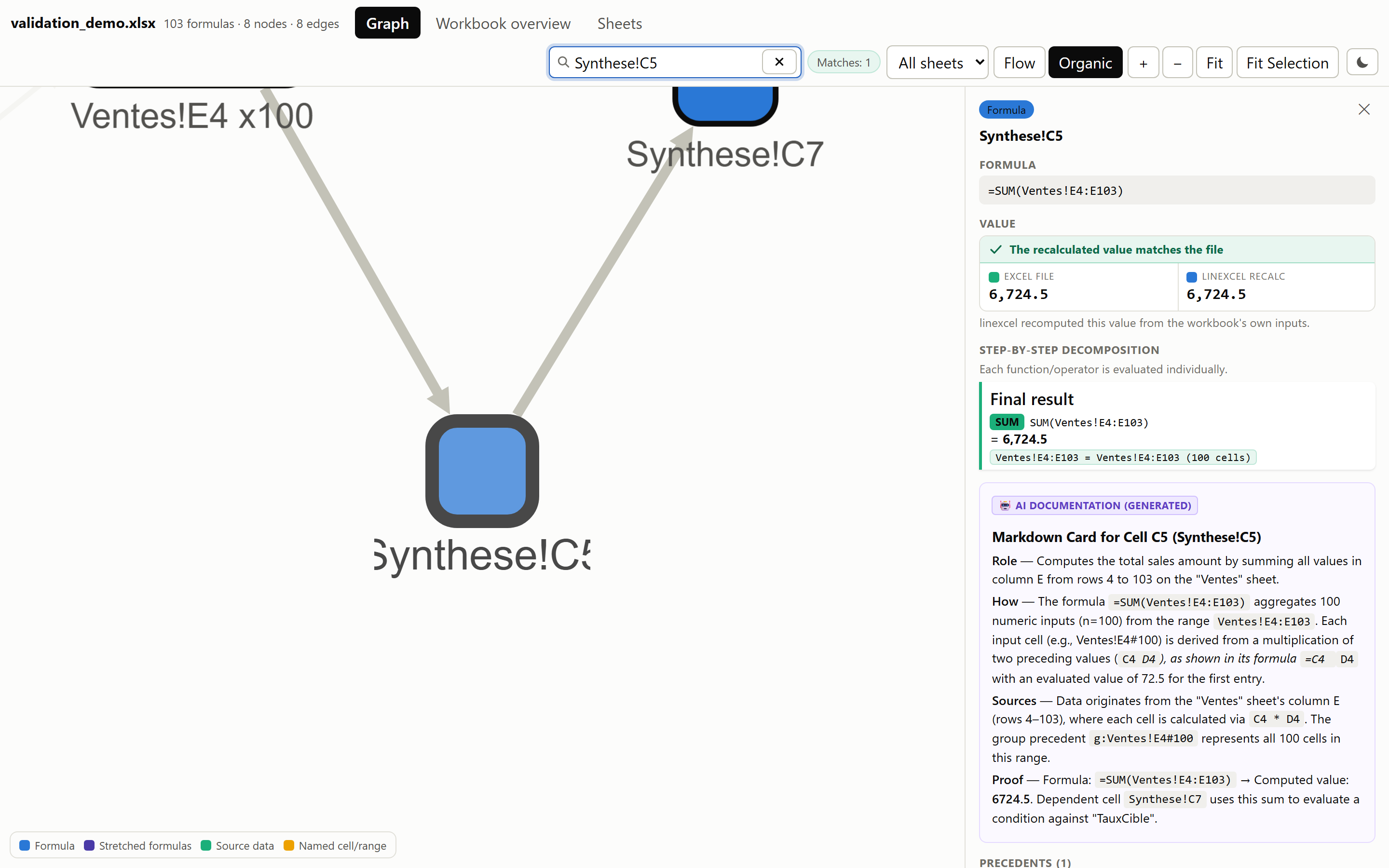
A node, documented
Formula, step-by-step evaluation, precedents and dependents, and the AI card written from that same deterministic dossier.
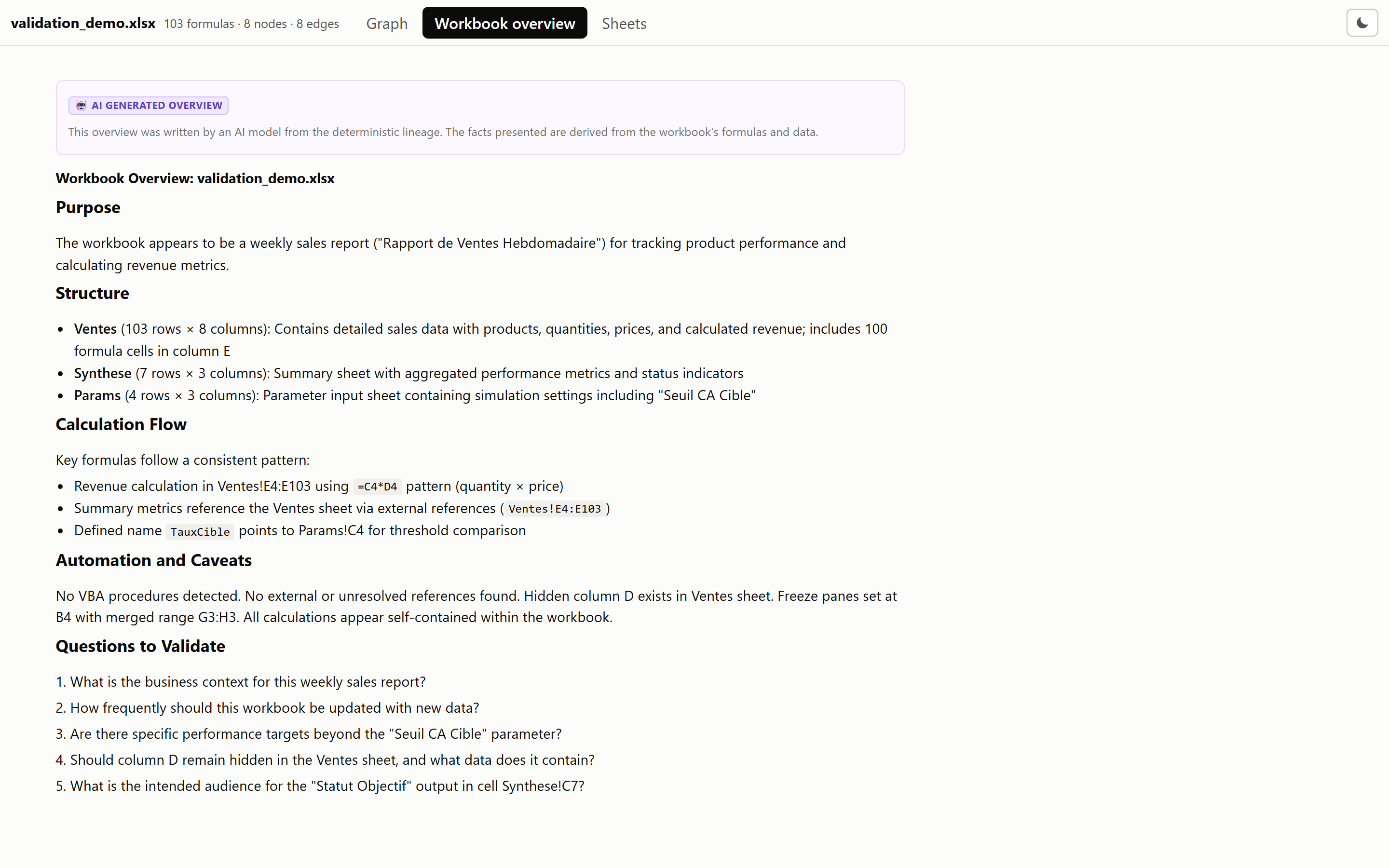
Workbook overview
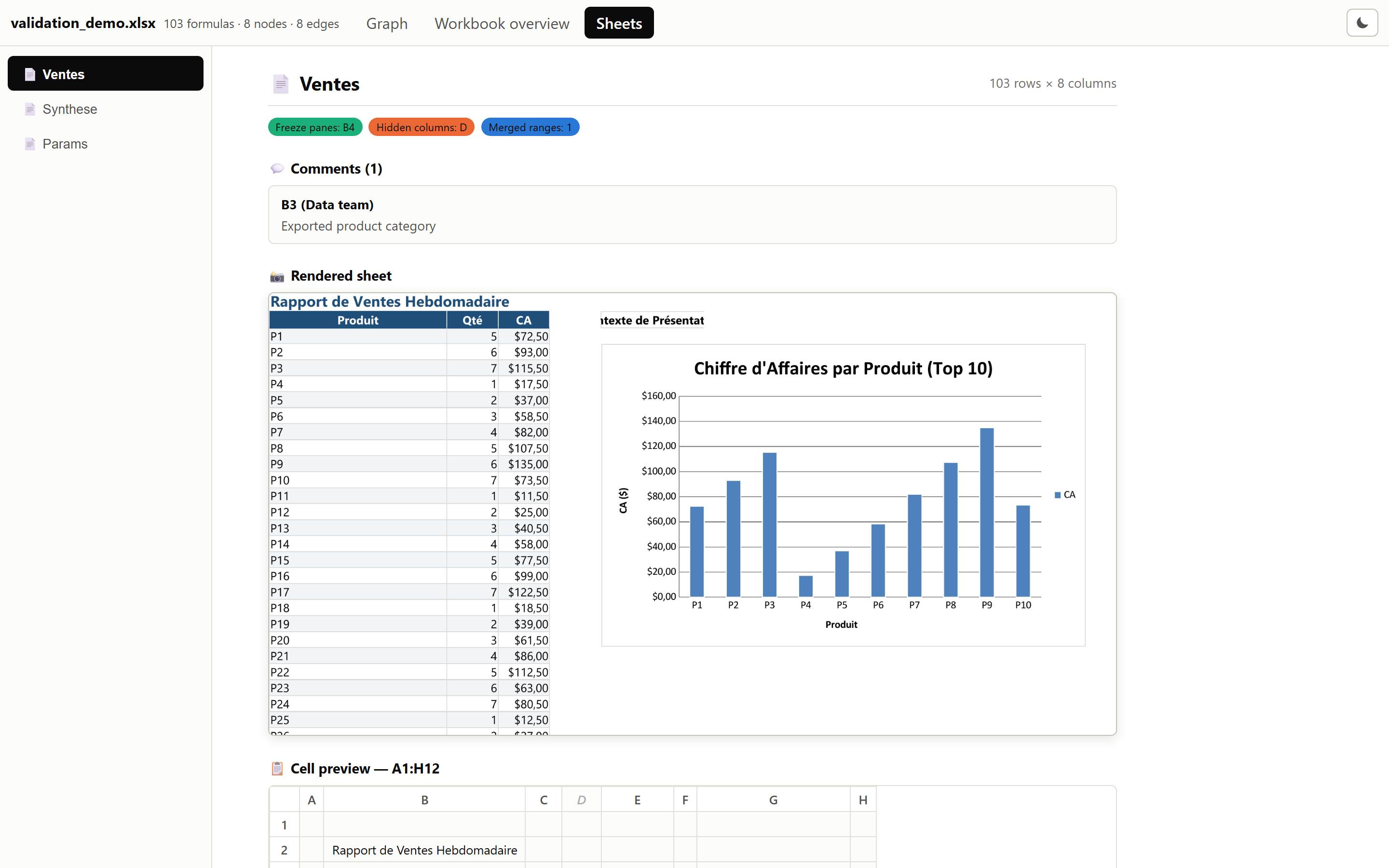
Sheet context
Each sheet rendered whole, over a grid of its first cells, alongside its comments, frozen panes, merged ranges and hidden columns.
Contributing
Run the local acceptance workflow before delivering changes: both fixtures, local Ollama documentation and image analysis, followed by inspection of dashboard tabs and sampled nodes. The script preserves each run and reports incomplete coverage as a failure. See AGENTS.md for the repository's validation requirements.
For additional local corpus coverage of the lazy application:
uv run python scripts/validate_lazy_corpus.py --corpus /path/to/corpus/files --output validation_screenshots/corpus/my-run
The corpus directory contains dataset subdirectories. This read-only probe
selects up to 80 OOXML workbooks per dataset across file sizes, then up to 12
formula targets per workbook across sheets and formula signatures. Imports and
calculations use isolated workers with explicit resource budgets. Each run keeps
its selection, hashes, outcomes and saved-value comparisons in a new ignored
directory. Legacy .xls files and archives are inventoried but not converted.
Cache agreement is observational evidence, not an Excel correctness oracle;
this supplementary sample does not replace the full acceptance workflow.
Security
Analysis is entirely local. AI documentation sends dossiers only to the provider you configure — see Data handling.
Please report vulnerabilities privately according to SECURITY.md. Do not include sensitive workbooks or credentials in public issues.
Changelog
See CHANGELOG.md.
License
MIT — see LICENSE.
1 maintainer

Metadata
1 maintainer
Release files for linexcel 1.14.0
For a detailed explanation of source distributions (sdists) and built distributions (wheels), please see the package formats documentation.
Source distribution (sdist)
| File | Size | Uploaded | |
|---|---|---|---|
| linexcel-1.14.0.tar.gz | 3.4 MB | Details |
Built distribution (wheel)
| File | Interpreter | ABI | Platform | Reset |
|---|---|---|---|---|
| linexcel-1.14.0-py3-none-any.whl | Python 3 | none | any | Details |
Total release size: 4.1 MB
Release files / linexcel-1.14.0.tar.gz
| Download URL | linexcel-1.14.0.tar.gz |
|---|---|
| Size | 3.4 MB |
| Tags | Source |
|
SHA-256 checksum How to use checksums |
0e03da8ad9371e2b92313e0f76f89222d20eaef299bab045bdee712ddb9aeb37
|
|
BLAKE2b-256 checksum How to use checksums |
e5e6bbc3e58fa5cb07ec0590b5ce1a8ede4e3101ebc25dc4b0dbefc0d874cf7f
|
| Upload date | |
|
Uploaded using Trusted Publishing? What is trusted publishing? |
Yes |
| Uploaded via |
uv/0.12.23 {"installer":{"name":"uv","version":"0.12.23","subcommand":["publish"]},"python":null,"implementation":{"name":null,"version":null},"distro":{"name":"Ubuntu","version":"24.04","id":"noble","libc":null},"system":{"name":null,"release":null},"cpu":null,"openssl_version":null,"setuptools_version":null,"rustc_version":null,"ci":true}
|
Release files / linexcel-1.14.0-py3-none-any.whl
| Download URL | linexcel-1.14.0-py3-none-any.whl |
|---|---|
| Size | 626.1 kB |
| Tags | Python 3 |
|
SHA-256 checksum How to use checksums |
4dd75c5482696cbce8223d534704df5feebe49ca3517ef866883640471f12ba6
|
|
BLAKE2b-256 checksum How to use checksums |
bf07028e2121da3b6afa02b0713a3b478073ff2cf6d8ffc10dbbb76aa8c69b93
|
| Upload date | |
|
Uploaded using Trusted Publishing? What is trusted publishing? |
Yes |
| Uploaded via |
uv/0.12.23 {"installer":{"name":"uv","version":"0.12.23","subcommand":["publish"]},"python":null,"implementation":{"name":null,"version":null},"distro":{"name":"Ubuntu","version":"24.04","id":"noble","libc":null},"system":{"name":null,"release":null},"cpu":null,"openssl_version":null,"setuptools_version":null,"rustc_version":null,"ci":true}
|














