
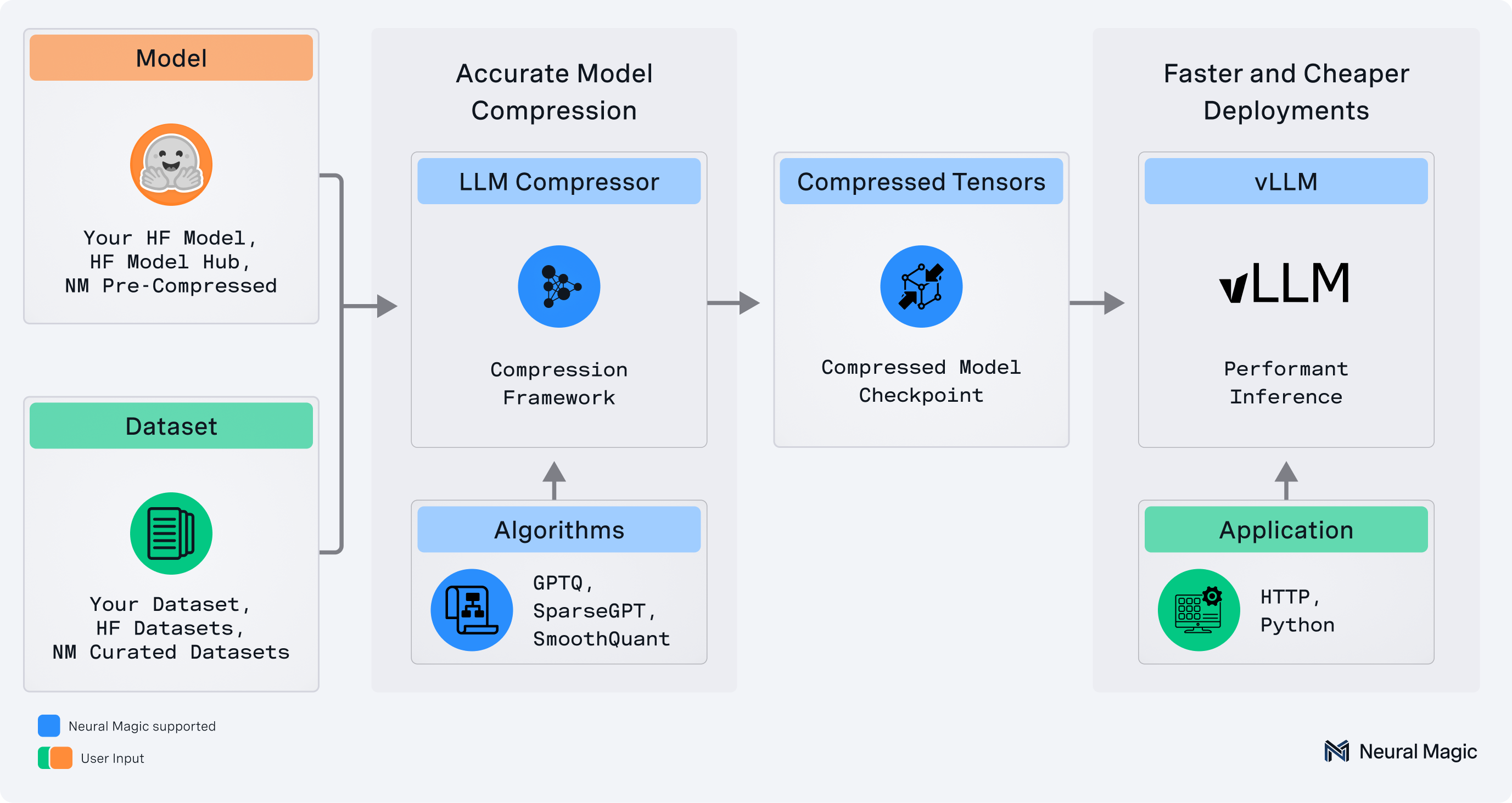
A library for compressing large language models utilizing the latest techniques and research in the field for both training aware and post training techniques. The library is designed to be flexible and easy to use on top of PyTorch and HuggingFace Transformers, allowing for quick experimentation.

Project description
 LLM Compressor
llmcompressor is an easy-to-use library for optimizing models for deployment with vllm, including:
- Comprehensive set of quantization algorithms for weight-only and activation quantization
- Seamless integration with Hugging Face models and repositories
safetensors-based file format compatible withvllm- Large model support via
accelerate
✨ Read the announcement blog here! ✨
🚀 What's New!
Big updates have landed in LLM Compressor! To get a more in-depth look, check out the deep-dive.
Some of the exciting new features include:
- QuIP and SpinQuant-style Transforms: The newly added
QuIPModifierandSpinQuantModifierallow users to quantize their models after injecting hadamard weights into the computation graph, reducing quantization error and greatly improving accuracy recovery for low bit weight and activation quantization. - DeepSeekV3-style Block Quantization Support: This allows for more efficient compression of large language models without needing a calibration dataset. Quantize a Qwen3 model to W8A8.
- Llama4 Quantization Support: Quantize a Llama4 model to W4A16 or NVFP4. The checkpoint produced can seamlessly run in vLLM.
- FP4 Quantization - now with MoE and non-uniform support: Quantize weights and activations to FP4 and seamlessly run the compressed model in vLLM. Model weights and activations are quantized following the NVFP4 configuration. See examples of fp4 activation support, MoE support, and Non-uniform quantization support where some layers are selectively quantized to fp8 for better recovery. You can also mix other quantization schemes, such as int8 and int4.
- Large Model Support with Sequential Onloading: As of llm-compressor>=0.6.0, you can now quantize very large language models on a single GPU. Models are broken into disjoint layers which are then onloaded to the GPU one layer at a time. For more information on sequential onloading, see Big Modeling with Sequential Onloading as well as the DeepSeek-R1 Example.
- Axolotl Sparse Finetuning Integration: Seamlessly finetune sparse LLMs with our Axolotl integration. Learn how to create fast sparse open-source models with Axolotl and LLM Compressor. See also the Axolotl integration docs.
Supported Formats
- Activation Quantization: W8A8 (int8 and fp8)
- Mixed Precision: W4A16, W8A16, NVFP4 (W4A4 and W4A16 support)
- 2:4 Semi-structured and Unstructured Sparsity
Supported Algorithms
- Simple PTQ
- GPTQ
- AWQ
- SmoothQuant
- SparseGPT
When to Use Which Optimization
Please refer to compression_schemes.md for detailed information about available optimization schemes and their use cases.
Installation
pip install llmcompressor
Get Started
End-to-End Examples
Applying quantization with llmcompressor:
- Activation quantization to
int8 - Activation quantization to
fp8 - Activation quantization to
fp4 - Weight only quantization to
fp4 - Weight only quantization to
int4using GPTQ - Weight only quantization to
int4using AWQ - Quantizing MoE LLMs
- Quantizing Vision-Language Models
- Quantizing Audio-Language Models
- Quantizing Models Non-uniformly
User Guides
Deep dives into advanced usage of llmcompressor:
Quick Tour
Let's quantize TinyLlama with 8 bit weights and activations using the GPTQ and SmoothQuant algorithms.
Note that the model can be swapped for a local or remote HF-compatible checkpoint and the recipe may be changed to target different quantization algorithms or formats.
Apply Quantization
Quantization is applied by selecting an algorithm and calling the oneshot API.
from llmcompressor.modifiers.smoothquant import SmoothQuantModifier
from llmcompressor.modifiers.quantization import GPTQModifier
from llmcompressor import oneshot

# Select quantization algorithm. In this case, we:
#   * apply SmoothQuant to make the activations easier to quantize
#   * quantize the weights to int8 with GPTQ (static per channel)
#   * quantize the activations to int8 (dynamic per token)
recipe = [
    SmoothQuantModifier(smoothing_strength=0.8),
    GPTQModifier(scheme="W8A8", targets="Linear", ignore=["lm_head"]),
]

# Apply quantization using the built in open_platypus dataset.
#   * See examples for demos showing how to pass a custom calibration set
oneshot(
    model="TinyLlama/TinyLlama-1.1B-Chat-v1.0",
    dataset="open_platypus",
    recipe=recipe,
    output_dir="TinyLlama-1.1B-Chat-v1.0-INT8",
    max_seq_length=2048,
    num_calibration_samples=512,
)
Inference with vLLM
The checkpoints created by llmcompressor can be loaded and run in vllm:
Install:
pip install vllm
Run:
from vllm import LLM
model = LLM("TinyLlama-1.1B-Chat-v1.0-INT8")
output = model.generate("My name is")
Questions / Contribution
- If you have any questions or requests open an issue and we will add an example or documentation.
- We appreciate contributions to the code, examples, integrations, and documentation as well as bug reports and feature requests! Learn how here.
Citation
If you find LLM Compressor useful in your research or projects, please consider citing it:
@software{llmcompressor2024,
    title={{LLM Compressor}},
    author={Red Hat AI and vLLM Project},
    year={2024},
    month={8},
    url={https://github.com/vllm-project/llm-compressor},
}
Release history Release notifications | RSS feed


Download files
Download the file for your platform. If you're not sure which to choose, learn more about installing packages.
Source Distribution
Built Distribution
Filter files by name, interpreter, ABI, and platform.
If you're not sure about the file name format, learn more about wheel file names.
Copy a direct link to the current filters
File details
Details for the file llmcompressor-0.7.1.2.tar.gz.
File metadata
- Download URL: llmcompressor-0.7.1.2.tar.gz
- Upload date:
- Size: 1.1 MB
- Tags: Source
- Uploaded using Trusted Publishing? Yes
- Uploaded via: twine/6.1.0 CPython/3.13.7
File hashes
| Algorithm | Hash digest | |
|---|---|---|
| SHA256 |
fbffe3a10b05b93411d1e4d1ca95355f5f242150bbefbefaf0fd3b1f0c1714ac
|
|
| MD5 |
eda5c6fdcfc5def158139a3fee2f3021
|
|
| BLAKE2b-256 |
0adaace2ba6201a6ae0d5c2e2e452a01faeddae1b00ebd55f55dc7762ec1f981
|
Provenance
The following attestation bundles were made for llmcompressor-0.7.1.2.tar.gz:
Publisher:
upload.yml on neuralmagic/llm-compressor-testing
-
Statement:
-
Statement type:
https://in-toto.io/Statement/v1 -
Predicate type:
https://docs.pypi.org/attestations/publish/v1 -
Subject name:
llmcompressor-0.7.1.2.tar.gz -
Subject digest:
fbffe3a10b05b93411d1e4d1ca95355f5f242150bbefbefaf0fd3b1f0c1714ac - Sigstore transparency entry: 1453080451
- Sigstore integration time:
-
Permalink:
neuralmagic/llm-compressor-testing@b7162bf4065a125f87a8548c0b1755a6ee01b1a7 -
Branch / Tag:
refs/heads/main - Owner: https://github.com/neuralmagic
-
Access:
private
-
Token Issuer:
https://token.actions.githubusercontent.com -
Runner Environment:
github-hosted -
Publication workflow:
upload.yml@b7162bf4065a125f87a8548c0b1755a6ee01b1a7 -
Trigger Event:
workflow_dispatch
-
Statement type:
File details
Details for the file llmcompressor-0.7.1.2-py3-none-any.whl.
File metadata
- Download URL: llmcompressor-0.7.1.2-py3-none-any.whl
- Upload date:
- Size: 263.8 kB
- Tags: Python 3
- Uploaded using Trusted Publishing? Yes
- Uploaded via: twine/6.1.0 CPython/3.13.7
File hashes
| Algorithm | Hash digest | |
|---|---|---|
| SHA256 |
00ed32ce4aaff53e8f58a88c80e8ac1e571c5f5f92d336b373b6bc8ca6ae7098
|
|
| MD5 |
6a270b81189bda6a215504f06d2cf857
|
|
| BLAKE2b-256 |
f7f7efdcde2093edd10c8f73fb17381fc047adbd71ad5f79451657b4c52d7e5e
|
Provenance
The following attestation bundles were made for llmcompressor-0.7.1.2-py3-none-any.whl:
Publisher:
upload.yml on neuralmagic/llm-compressor-testing
-
Statement:
-
Statement type:
https://in-toto.io/Statement/v1 -
Predicate type:
https://docs.pypi.org/attestations/publish/v1 -
Subject name:
llmcompressor-0.7.1.2-py3-none-any.whl -
Subject digest:
00ed32ce4aaff53e8f58a88c80e8ac1e571c5f5f92d336b373b6bc8ca6ae7098 - Sigstore transparency entry: 1453080483
- Sigstore integration time:
-
Permalink:
neuralmagic/llm-compressor-testing@b7162bf4065a125f87a8548c0b1755a6ee01b1a7 -
Branch / Tag:
refs/heads/main - Owner: https://github.com/neuralmagic
-
Access:
private
-
Token Issuer:
https://token.actions.githubusercontent.com -
Runner Environment:
github-hosted -
Publication workflow:
upload.yml@b7162bf4065a125f87a8548c0b1755a6ee01b1a7 -
Trigger Event:
workflow_dispatch
-
Statement type:






