
A toolset for compressing, deploying and serving LLM

Project description





👋 join us on Twitter, Discord and WeChat
News 🎉
- [2023/09] TurboMind supports Qwen-14B
- [2023/09] TurboMind supports InternLM-20B
- [2023/09] TurboMind supports all features of Code Llama: code completion, infilling, chat / instruct, and python specialist. Click here for deployment guide
- [2023/09] TurboMind supports Baichuan2-7B
- [2023/08] TurboMind supports flash-attention2.
- [2023/08] TurboMind supports Qwen-7B, dynamic NTK-RoPE scaling and dynamic logN scaling
- [2023/08] TurboMind supports Windows (tp=1)
- [2023/08] TurboMind supports 4-bit inference, 2.4x faster than FP16, the fastest open-source implementation🚀. Check this guide for detailed info
- [2023/08] LMDeploy has launched on the HuggingFace Hub, providing ready-to-use 4-bit models.
- [2023/08] LMDeploy supports 4-bit quantization using the AWQ algorithm.
- [2023/07] TurboMind supports Llama-2 70B with GQA.
- [2023/07] TurboMind supports Llama-2 7B/13B.
- [2023/07] TurboMind supports tensor-parallel inference of InternLM.
Introduction
LMDeploy is a toolkit for compressing, deploying, and serving LLM, developed by the MMRazor and MMDeploy teams. It has the following core features:
-
Efficient Inference Engine (TurboMind): Based on FasterTransformer, we have implemented an efficient inference engine - TurboMind, which supports the inference of LLaMA and its variant models on NVIDIA GPUs.
-
Interactive Inference Mode: By caching the k/v of attention during multi-round dialogue processes, it remembers dialogue history, thus avoiding repetitive processing of historical sessions.
-
Multi-GPU Model Deployment and Quantization: We provide comprehensive model deployment and quantification support, and have been validated at different scales.
-
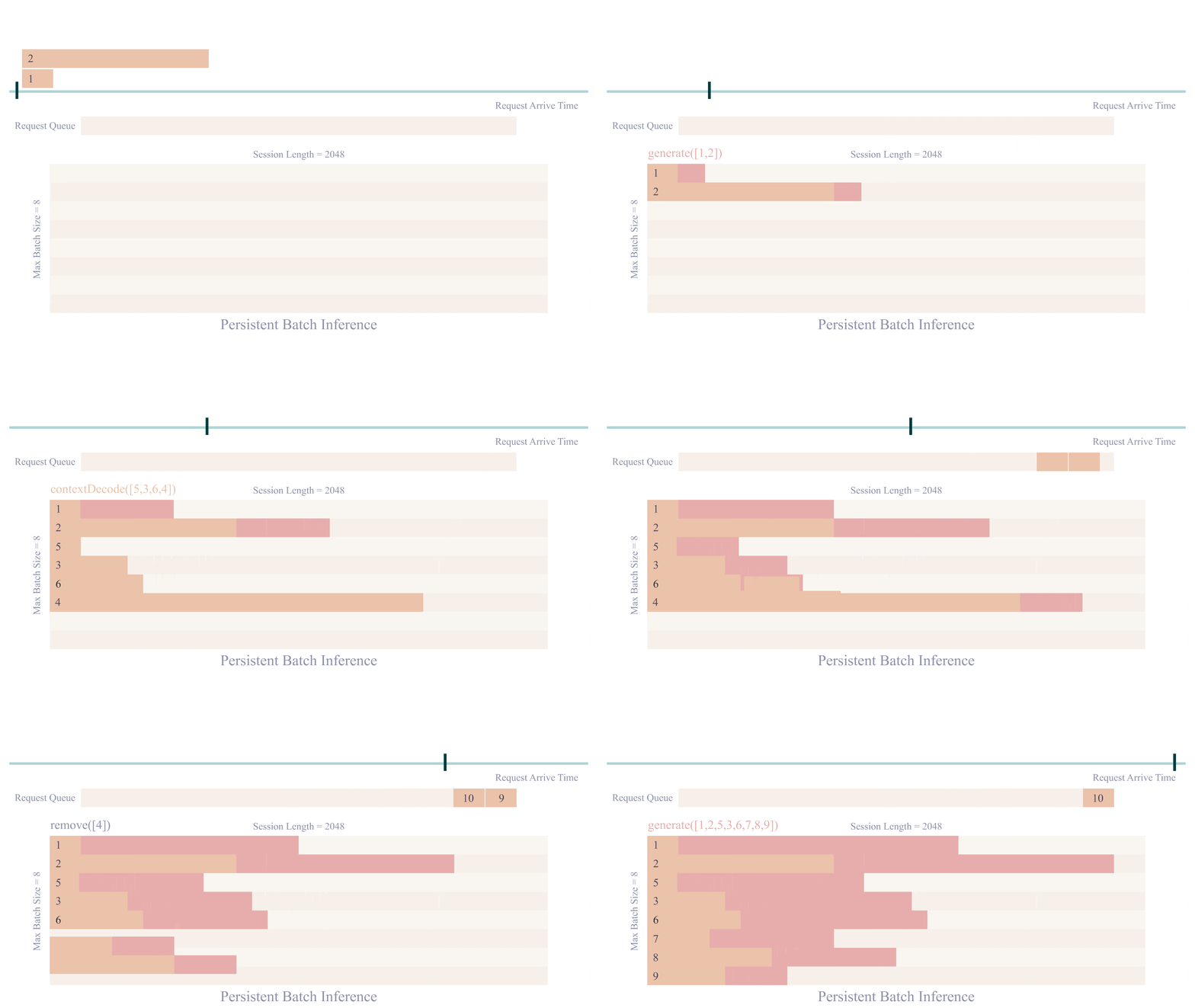
Persistent Batch Inference: Further optimization of model execution efficiency.
Supported Models
LMDeploy has two inference backends, Pytorch and TurboMind. You can run lmdeploy list to check the supported model names.
TurboMind
Note
W4A16 inference requires Nvidia GPU with Ampere architecture or above.
| Models | Tensor Parallel | FP16 | KV INT8 | W4A16 | W8A8 |
|---|---|---|---|---|---|
| Llama | Yes | Yes | Yes | Yes | No |
| Llama2 | Yes | Yes | Yes | Yes | No |
| SOLAR | Yes | Yes | Yes | Yes | No |
| InternLM-7B | Yes | Yes | Yes | Yes | No |
| InternLM-20B | Yes | Yes | Yes | Yes | No |
| QWen-7B | Yes | Yes | Yes | No | No |
| QWen-14B | Yes | Yes | Yes | No | No |
| Baichuan-7B | Yes | Yes | Yes | Yes | No |
| Baichuan2-7B | Yes | Yes | No | No | No |
| Code Llama | Yes | Yes | No | No | No |
Pytorch
| Models | Tensor Parallel | FP16 | KV INT8 | W4A16 | W8A8 |
|---|---|---|---|---|---|
| Llama | Yes | Yes | No | No | No |
| Llama2 | Yes | Yes | No | No | No |
| InternLM-7B | Yes | Yes | No | No | No |
Performance
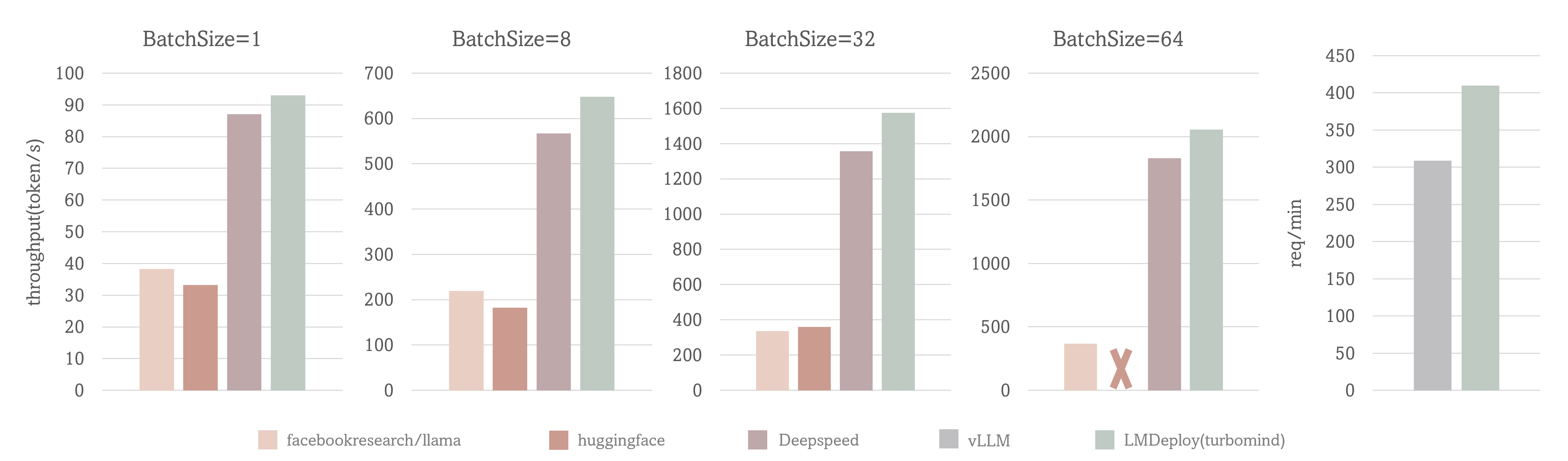
Case I: output token throughput with fixed input token and output token number (1, 2048)
Case II: request throughput with real conversation data
Test Setting: LLaMA-7B, NVIDIA A100(80G)
The output token throughput of TurboMind exceeds 2000 tokens/s, which is about 5% - 15% higher than DeepSpeed overall and outperforms huggingface transformers by up to 2.3x. And the request throughput of TurboMind is 30% higher than vLLM.
Quick Start
Installation
Install lmdeploy with pip ( python 3.8+) or from source
pip install lmdeploy
Deploy InternLM
Get InternLM model
# 1. Download InternLM model

# Make sure you have git-lfs installed (https://git-lfs.com)
git lfs install
git clone https://huggingface.co/internlm/internlm-chat-7b-v1_1 /path/to/internlm-chat-7b

# if you want to clone without large files – just their pointers
# prepend your git clone with the following env var:
GIT_LFS_SKIP_SMUDGE=1

# 2. Convert InternLM model to turbomind's format, which will be in "./workspace" by default
lmdeploy convert internlm-chat-7b /path/to/internlm-chat-7b
Inference by TurboMind
lmdeploy chat turbomind ./workspace
Note
When inferring with FP16 precision, the InternLM-7B model requires at least 15.7G of GPU memory overhead on TurboMind.
It is recommended to use NVIDIA cards such as 3090, V100, A100, etc. Disable GPU ECC can free up 10% memory, trysudo nvidia-smi --ecc-config=0and reboot system.
Note
Tensor parallel is available to perform inference on multiple GPUs. Add--tp=<num_gpu>onchatto enable runtime TP.
Serving with gradio
lmdeploy serve gradio ./workspace

Serving with Restful API
Launch inference server by:
lmdeploy serve api_server ./workspace --instance_num 32 --tp 1
Then, you can communicate with it by command line,
# restful_api_url is what printed in api_server.py, e.g. http://localhost:23333
lmdeploy serve api_client api_server_url
or webui,
# api_server_url is what printed in api_server.py, e.g. http://localhost:23333
# server_ip and server_port here are for gradio ui
# example: lmdeploy serve gradio http://localhost:23333 --server_name localhost --server_port 6006
lmdeploy serve gradio api_server_url --server_name ${gradio_ui_ip} --server_port ${gradio_ui_port}
Refer to restful_api.md for more details.
Serving with Triton Inference Server
Launch inference server by:
bash workspace/service_docker_up.sh
Then, you can communicate with the inference server by command line,
lmdeploy serve triton_client {server_ip_addresss}:33337
or webui,
lmdeploy serve gradio {server_ip_addresss}:33337
For the deployment of other supported models, such as LLaMA, LLaMA-2, vicuna and so on, you can find the guide from here
Inference with PyTorch
For detailed instructions on Inference pytorch models, see here.
Single GPU
lmdeploy chat torch $NAME_OR_PATH_TO_HF_MODEL \
    --max_new_tokens 64 \
    --temperture 0.8 \
    --top_p 0.95 \
    --seed 0
Tensor Parallel with DeepSpeed
deepspeed --module --num_gpus 2 lmdeploy.pytorch.chat \
    $NAME_OR_PATH_TO_HF_MODEL \
    --max_new_tokens 64 \
    --temperture 0.8 \
    --top_p 0.95 \
    --seed 0
You need to install deepspeed first to use this feature.
pip install deepspeed
Quantization
Weight INT4 Quantization
LMDeploy uses AWQ algorithm for model weight quantization
Click here to view the test results for weight int4 usage.
KV Cache INT8 Quantization
Click here to view the usage method, implementation formula, and test results for kv int8.
Warning
runtime Tensor Parallel for quantized model is not available. Please setup--tpondeployto enable static TP.
Contributing
We appreciate all contributions to LMDeploy. Please refer to CONTRIBUTING.md for the contributing guideline.
Acknowledgement
License
This project is released under the Apache 2.0 license.
Release history Release notifications | RSS feed


Download files
Download the file for your platform. If you're not sure which to choose, learn more about installing packages.
Source Distributions
Built Distributions
Filter files by name, interpreter, ABI, and platform.
If you're not sure about the file name format, learn more about wheel file names.
Copy a direct link to the current filters
File details
Details for the file lmdeploy-0.0.14-cp311-cp311-win_amd64.whl.
File metadata
- Download URL: lmdeploy-0.0.14-cp311-cp311-win_amd64.whl
- Upload date:
- Size: 55.8 MB
- Tags: CPython 3.11, Windows x86-64
- Uploaded using Trusted Publishing? No
- Uploaded via: twine/4.0.2 CPython/3.8.18
File hashes
| Algorithm | Hash digest | |
|---|---|---|
| SHA256 |
f85407fe7f37deae86cd92faae3e721a4d9bf0e1f88d315d216aed6b99aecf04
|
|
| MD5 |
274bc09d8562fa68a5c3a18346487eb5
|
|
| BLAKE2b-256 |
e64cacab4f33e65316c7b2621438bc5fe31aaa1f30ab6b1f2af28a86b0de9834
|
File details
Details for the file lmdeploy-0.0.14-cp311-cp311-manylinux2014_x86_64.whl.
File metadata
- Download URL: lmdeploy-0.0.14-cp311-cp311-manylinux2014_x86_64.whl
- Upload date:
- Size: 104.7 MB
- Tags: CPython 3.11
- Uploaded using Trusted Publishing? No
- Uploaded via: twine/4.0.2 CPython/3.8.18
File hashes
| Algorithm | Hash digest | |
|---|---|---|
| SHA256 |
baba036b52ceb9204f46cc1b8bee93e8205a4edbf53f34da69deab2754d00aba
|
|
| MD5 |
18933cae79633e9361e1fc6001d4aa75
|
|
| BLAKE2b-256 |
59d977edfdce774bde595a2a169724be06030a347ae3b333a8c44eefed7dea70
|
File details
Details for the file lmdeploy-0.0.14-cp310-cp310-win_amd64.whl.
File metadata
- Download URL: lmdeploy-0.0.14-cp310-cp310-win_amd64.whl
- Upload date:
- Size: 55.8 MB
- Tags: CPython 3.10, Windows x86-64
- Uploaded using Trusted Publishing? No
- Uploaded via: twine/4.0.2 CPython/3.8.18
File hashes
| Algorithm | Hash digest | |
|---|---|---|
| SHA256 |
39b9edf3b9612d7cdc625e0ba69095d9ad5119676321f107dca76ec9a538f4c4
|
|
| MD5 |
8c787852318f46e1305754c9e3dda15e
|
|
| BLAKE2b-256 |
df4d622936287658f712d8f7797983c2dc19486fac49944803a5930f53079acf
|
File details
Details for the file lmdeploy-0.0.14-cp310-cp310-manylinux2014_x86_64.whl.
File metadata
- Download URL: lmdeploy-0.0.14-cp310-cp310-manylinux2014_x86_64.whl
- Upload date:
- Size: 104.7 MB
- Tags: CPython 3.10
- Uploaded using Trusted Publishing? No
- Uploaded via: twine/4.0.2 CPython/3.8.18
File hashes
| Algorithm | Hash digest | |
|---|---|---|
| SHA256 |
32249dd788100eaf620cbc5dc545d7a570e75c6aae840e2b8f740822ae2c8baf
|
|
| MD5 |
1c4cf054c1307cd2d471a8566283616a
|
|
| BLAKE2b-256 |
97466f853ffcb211a0d9f518391169a5766d1379b80a38561ce1f6b28b04a5eb
|
File details
Details for the file lmdeploy-0.0.14-cp39-cp39-win_amd64.whl.
File metadata
- Download URL: lmdeploy-0.0.14-cp39-cp39-win_amd64.whl
- Upload date:
- Size: 55.8 MB
- Tags: CPython 3.9, Windows x86-64
- Uploaded using Trusted Publishing? No
- Uploaded via: twine/4.0.2 CPython/3.8.18
File hashes
| Algorithm | Hash digest | |
|---|---|---|
| SHA256 |
eec3337b15bece15ff927651bc2a959d1e21372506a4fe1831b959c25fb1ad52
|
|
| MD5 |
fe3a88f3470ecdb9385c92c85b28a6fd
|
|
| BLAKE2b-256 |
bd97281c610fe38ee249137f5ced0ed3b53bbb2bb6bbd6c5c8c664a0e8e2b678
|
File details
Details for the file lmdeploy-0.0.14-cp39-cp39-manylinux2014_x86_64.whl.
File metadata
- Download URL: lmdeploy-0.0.14-cp39-cp39-manylinux2014_x86_64.whl
- Upload date:
- Size: 104.7 MB
- Tags: CPython 3.9
- Uploaded using Trusted Publishing? No
- Uploaded via: twine/4.0.2 CPython/3.8.18
File hashes
| Algorithm | Hash digest | |
|---|---|---|
| SHA256 |
f615cbb10bd9f8d17500031591ed8dee742b3d7a9ce50f36c8c0cbe6b79047ca
|
|
| MD5 |
55e783e2bcf43eb1133249570153aa4f
|
|
| BLAKE2b-256 |
4304c5081639906d5e7b36d61e47d19442ad358705168afc59f391bd1070e472
|
File details
Details for the file lmdeploy-0.0.14-cp38-cp38-win_amd64.whl.
File metadata
- Download URL: lmdeploy-0.0.14-cp38-cp38-win_amd64.whl
- Upload date:
- Size: 55.8 MB
- Tags: CPython 3.8, Windows x86-64
- Uploaded using Trusted Publishing? No
- Uploaded via: twine/4.0.2 CPython/3.8.18
File hashes
| Algorithm | Hash digest | |
|---|---|---|
| SHA256 |
f3679bb94244b1e9ab86f5e18e2341236b7749d6fddfca3d4ab50f2b0003a4d8
|
|
| MD5 |
5efc161a934f891350b01dc84649ca5a
|
|
| BLAKE2b-256 |
e3794ace249d539188e943f9f4271a5241dc20f6d89ed9ce2de0c4aaaf9e3d63
|
File details
Details for the file lmdeploy-0.0.14-cp38-cp38-manylinux2014_x86_64.whl.
File metadata
- Download URL: lmdeploy-0.0.14-cp38-cp38-manylinux2014_x86_64.whl
- Upload date:
- Size: 104.7 MB
- Tags: CPython 3.8
- Uploaded using Trusted Publishing? No
- Uploaded via: twine/4.0.2 CPython/3.8.18
File hashes
| Algorithm | Hash digest | |
|---|---|---|
| SHA256 |
b94d1aed4fce598344833cd943d2d9aaa3632bdf978594ffd36644021f4088ac
|
|
| MD5 |
d49b51f08d2b6382e34271610e47c367
|
|
| BLAKE2b-256 |
3e15096d17f087f160d5f02be1a5664b7b42bce4d98e183b9a15bf42f231584b
|






