

nff — let coding agents iterate on hardware
docs · quick start · mcp tools · cli · platform · discord







nff is an MCP server that gives coding agents direct control over physical hardware — on the bench during development, and in the field for maintenance and diagnosis.
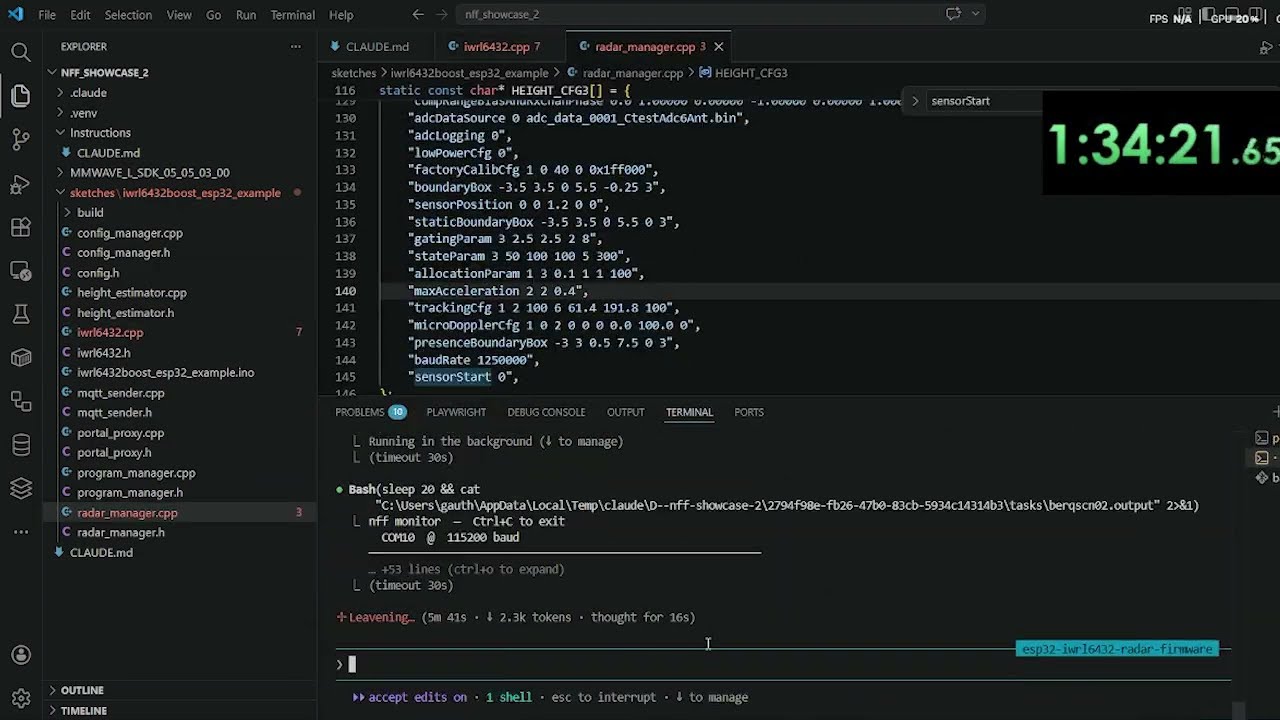
Connect your board over USB and Claude writes, compiles, flashes, and reads serial output autonomously. Deploy devices with the nff-sdk-c library and Claude can reach them remotely: capture crash state, diagnose failures, and push fixes — without physical access.
nff is the open-source bench CLI of the nff platform — an end-to-end, agent-driven system for developing, shipping, and operating ESP32-class firmware (bench → OTA → fleet diagnosis). This repo and the device library (
nff-sdk-c) are the two MIT-licensed pieces that run on your laptop and hardware; the hosted backend is proprietary.

you: "Run the sensor init sequence and assert the calibration values over serial"
LLM: [writes firmware] → [compiles] → [flashes ESP32] → [reads serial] → returns structured output

you: "Why did the unit in the field just hard-fault?"
LLM: [captures panic over OTA] → [reads registers + backtrace] → "Stack overflow in your sensor ISR at line 47"
features
- the bench loop, in one conversation — no switching between editor, terminal, and serial monitor. The agent iterates on firmware in response to serial output, catches exceptions, and reflashes.
- field maintenance when the firmware is dead — a crashed bare-metal MCU has no shell, no SSH, no process table. nff captures registers, stack, memory, and backtrace and routes them to a cloud agent that explains the failure and drives recovery. This is the gap Mender, balena, and similar OTA tools cannot fill: they need a living network client inside the firmware.
- ship it over the air —
nff ota deployturns the binary you just built into a staged, ECDSA-signed rollout with per-device tracking and automatic rollback;nff fleet --watchshows it land. ota → - board-universal — any of PlatformIO's ~1000+ boards across ~40 platforms (every ESP32 variant, RP2040/Pico, all STM32 families, AVR, SAMD, Teensy, nRF52, Uno R4, RISC-V…), toolchain auto-installed on first build. arduino-cli remains available as a second backend. boards →
- live on-chip debugging — real breakpoints, call stacks, and variable inspection over JTAG/SWD (OpenOCD + GDB, driven by nff). debug →
- local-first — compile, flash, monitor, debug, and the MCP tools need no account and never open a browser. Only OTA,
repair, andagentrequire a sign-in. - one Rust binary — self-contained, no Python runtime, and it self-updates in the background like Claude Code does.
get started
macOS / Linux:
curl -fsSL https://nanoforgeflow.com/install.sh | sh
Windows (PowerShell):
irm https://nanoforgeflow.com/install.ps1 | iex
Then plug in your board and run:
nff init      # detects the board, writes config, registers + starts the MCP server
nff doctor    # verify
Restart Claude Code so it picks up the MCP server, then just describe what you want:
you: "Flash sketches/blink_esp32 and confirm the LED is toggling over serial"
LLM: [compiles] → [flashes ESP32] → [reads serial] → "LED toggling at 1 Hz, confirmed"
Full install options, --cloud sign-in, and first-run detail: quick start →
mcp tools
34 tools over streamable HTTP on 127.0.0.1:3010/mcp, started in the background by nff init.
| Group | Tools | Covers |
|---|---|---|
| Bench | 7 | list_devices, compile, flash, serial_read/write, reset_device, get_device_info |
| Debug | 14 | breakpoints, call stack, variables, registers, memory, stepping, raw GDB |
| Field | 8 | diagnose (local, no login), repair (cloud, ELF-symbolized) + auth lifecycle |
| Fleet & OTA | 5 | ota_deploy, ota_status, ota_deployments, ota_devices, fleet_status |
Full signatures and return shapes: mcp tools →
demo
docs

everything lives at nanoforgeflow.com/docs: quick start · cli reference · configuration · mcp tools · using claude code · device sdk · provisioning · ota deploys · git-push deploys · fleet status · crash diagnosis · on-chip debug · power · security
In-repo reference (docs/): boards & USB ids · self-update & config · roadmap · architecture
contributing
Bugs and feature requests go to GitHub Issues; read CONTRIBUTING.md before opening a PR — adding a board is usually a two-line change. Please follow the Code of Conduct, and report vulnerabilities via SECURITY.md. Questions and ideas are welcome on Discord.
license
MIT — see LICENSE.
Copyright (c) 2026 Gauthier Lechevalier
1 maintainer

Download files
Download the file for your platform. If you're not sure which to choose, learn more about installing packages.
Source Distributions
Built Distributions
Filter files by name, interpreter, ABI, and platform.
If you're not sure about the file name format, learn more about wheel file names.
Copy a direct link to the current filters
File details
Details for the file nff-0.2.40-py3-none-win_amd64.whl.
File metadata
- Download URL: nff-0.2.40-py3-none-win_amd64.whl
- Upload date:
- Size: 4.8 MB
- Tags: Python 3, Windows x86-64
- Uploaded using Trusted Publishing? No
- Uploaded via: twine/7.0.0 CPython/3.12.13
File hashes
| Algorithm | Hash digest | |
|---|---|---|
| SHA256 |
1aac74686eee2c8284d59f1da5e5afb5f17067ad909d29c9091b1b84e552636d
|
|
| MD5 |
af4fdc0c3230e7969250205bc48d8149
|
|
| BLAKE2b-256 |
2a13bb0ae4e535348f1a395388b55bf28e4c1e63bbcde949919a2d699adcb522
|
File details
Details for the file nff-0.2.40-py3-none-manylinux_2_17_x86_64.manylinux2014_x86_64.whl.
File metadata
- Download URL: nff-0.2.40-py3-none-manylinux_2_17_x86_64.manylinux2014_x86_64.whl
- Upload date:
- Size: 5.6 MB
- Tags: Python 3, manylinux: glibc 2.17+ x86-64
- Uploaded using Trusted Publishing? No
- Uploaded via: twine/7.0.0 CPython/3.12.13
File hashes
| Algorithm | Hash digest | |
|---|---|---|
| SHA256 |
203bb46ceea82a65d21b07a60c0880b7adbd9371ec313839d48ccacec9bb4bec
|
|
| MD5 |
02aac48a8024903f79367b581f71a8c2
|
|
| BLAKE2b-256 |
9c6d88960b0c066be3ecdd12ec0b5f0175a8bd49c46ddd1d565f7ec76fd79a0d
|
File details
Details for the file nff-0.2.40-py3-none-macosx_11_0_arm64.whl.
File metadata
- Download URL: nff-0.2.40-py3-none-macosx_11_0_arm64.whl
- Upload date:
- Size: 4.7 MB
- Tags: Python 3, macOS 11.0+ ARM64
- Uploaded using Trusted Publishing? No
- Uploaded via: twine/7.0.0 CPython/3.12.13
File hashes
| Algorithm | Hash digest | |
|---|---|---|
| SHA256 |
e1f9a61b6dc383ae58435c9639c80778ae03279ce8041c1a91b86f43fe6450fa
|
|
| MD5 |
3452e2431e4a59068b37c90f62c12f8b
|
|
| BLAKE2b-256 |
22f0891f5e15df66d552d2d1d2c8ccc3db6de102b67eafb29d85661b92836121
|
File details
Details for the file nff-0.2.40-py3-none-macosx_10_12_x86_64.whl.
File metadata
- Download URL: nff-0.2.40-py3-none-macosx_10_12_x86_64.whl
- Upload date:
- Size: 4.9 MB
- Tags: Python 3, macOS 10.12+ x86-64
- Uploaded using Trusted Publishing? No
- Uploaded via: twine/7.0.0 CPython/3.12.13
File hashes
| Algorithm | Hash digest | |
|---|---|---|
| SHA256 |
1ff0ae4874ff3e62f41dccb89bf78d84cd6b0c5f4079d4025ab4c7844542ff37
|
|
| MD5 |
fd21ef8be03b3c0496ecb469e733cc0e
|
|
| BLAKE2b-256 |
0e0acc224feedf3e03dd4ceb6217a6a296c66ec4e8b49338ed5688be7ce86c55
|







