
PyCForge
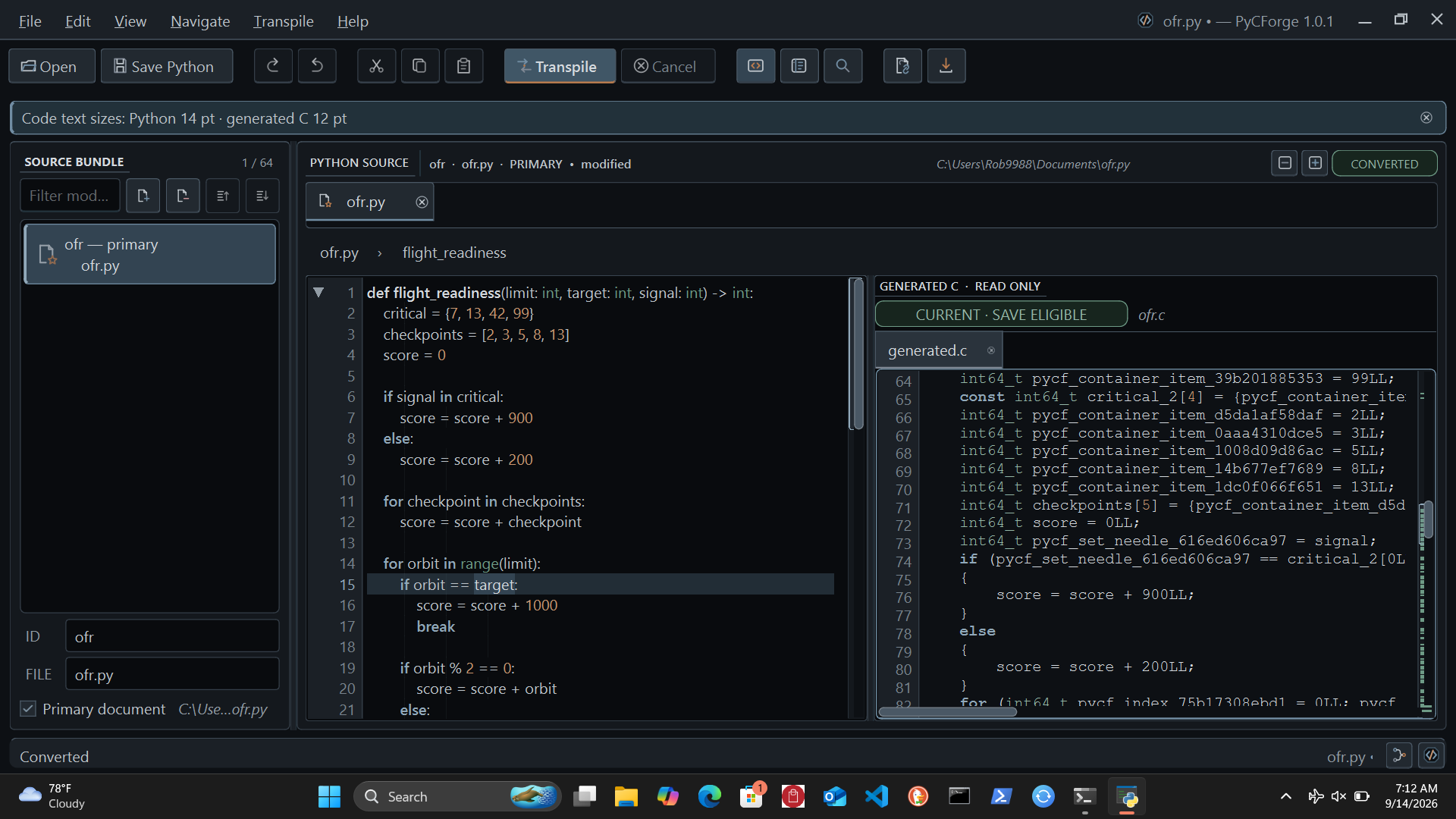
PyCForge is a Python-to-C source transpiler and PySide6 desktop IDE. It converts supported Python into readable C11 and brings editing, diagnostics, and generated-code inspection into one workspace, with a command-line interface and Python API for automated workflows.
Install, upgrade, and open
PyCForge supports Python 3.11–3.13. PySide6, NumPy, Numba, and the desktop application are installed automatically.
On Windows:
py -m pip install pycforge
py -m pycforge.ide
On macOS or Linux:
python -m pip install pycforge
python -m pycforge.ide
To upgrade an existing installation, use py -m pip install --upgrade pycforge
on Windows or python -m pip install --upgrade pycforge on macOS or Linux.
The installed pycforge-workspace command also opens the application.
The splash window prepares application resources, offline help, and Ting's
NumPy/Numba numerical routines before the workspace opens.
What PyCForge provides
- Python editing with tabs, split view, function folding, outline, search and replace, and a command palette.
- Side-by-side Python and read-only generated C, with diagnostics, conversion details, and history.
- Source bundles of up to 64 files for typed conversion, with ForgeLens navigation between mapped Python and C locations.
- Cancellable background conversion and clear identification of output that needs to be regenerated after an edit.
- Saved workspace layouts, independent Python and C text sizes, and searchable offline documentation.
Python-to-C conversion
Choose the conversion mode that matches the source and the C interface you need.
| Mode | Supported uses | Select with |
|---|---|---|
| Typed conversion | Annotated functions, scalar variables, module constants, string inspection, fixed containers, immutable records, imports between supplied source files, and bounded UTF-8 file operations. | Transpile Source Bundle or the default convert command. |
| Runtime value conversion | Constructed Unicode strings, shared mutable lists and class instances, mixed lists and tuples, union and container annotations, list comprehensions, lambdas with captured variables, defaults and keyword arguments, numeric text conversion, and practical string methods. | Transpile Runtime Values in the Transpile menu, or convert --runtime-values. |
Runtime value conversion accepts one source document. Its generated C includes the value and memory routines needed for strings, containers, objects, and closures. Lists and instances retain their identity when passed to functions; strings remain immutable. Annotations check values at function and assignment boundaries. Container annotations check their contents at those boundaries without permanently constraining writes through other aliases.
Runtime conversion includes these additional everyday Python forms:
- Default arguments, keyword calls, positional-only and keyword-only parameters,
including constructors, bound methods, and lambdas such as
lambda i=i: i. - Unicode
lower()andupper(),strip()/lstrip()/rstrip(), andsplit()with whitespace handling, separators, andmaxsplit. int()andfloat()from numeric strings, optional integer bases, float-to-string output, simple f-string fields, andprint(sep=..., end=...).- Empty
list(),tuple(),str(),int(),float(), andbool()calls.
Defaults retain Python's definition-time evaluation and shared mutable values.
Simple f-strings support ordinary fields and !s; format specifications and
!r / !a are outside this conversion set. Unsupported methods or argument
forms receive source diagnostics when the receiver type is known.
Both modes use signed 64-bit integers and documented Python forms. The bundled help provides separate operation tables, examples, C caller requirements, and limits for each mode.
First conversion
Save the following as input.py:
def add(left: int, right: int) -> int:
    return left + right
Open it in the workspace and choose Transpile Source Bundle, or run:
pycforge convert input.py --output generated.c
For runtime string construction, save this as greeting.py:
def greeting(name: str, *, suffix: str = "!") -> str:
    return f"Hello, {name.strip()}{suffix}"
pycforge convert greeting.py --runtime-values --output greeting.c
Ting agent integration
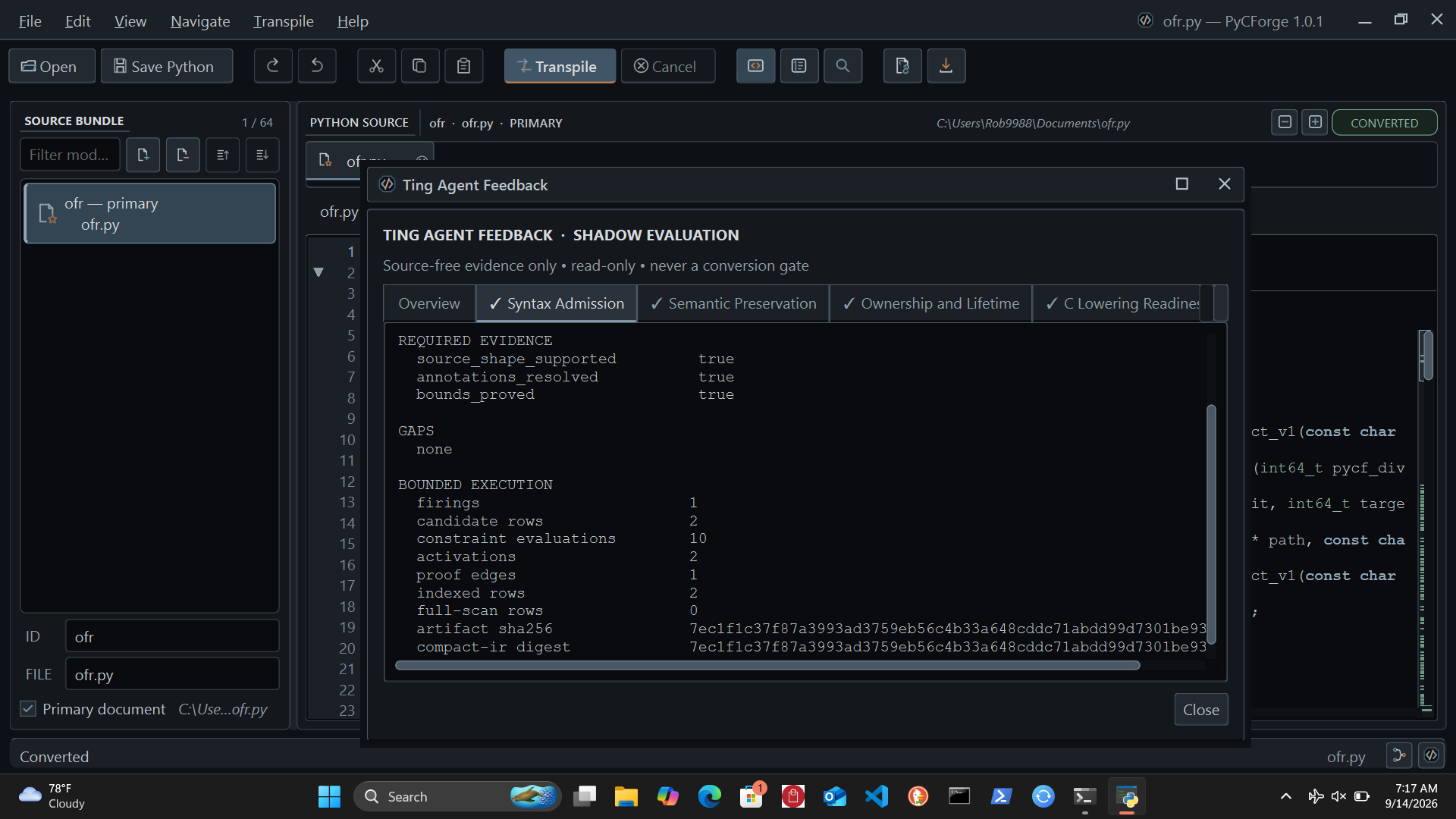
Six local Ting agents review syntax, semantics, ownership, C lowering, verification evidence, and resource requirements. Open the Ting control in the status bar to inspect their findings. The Flow Map displays the relationship between the conversion evidence and each review.
Ting feedback is advisory. It uses structural evidence, runs offline, and leaves source code and conversion results unchanged. A review describes the checks available for the selected conversion; external compilation and execution comparisons require your own toolchain and test inputs.
Built-in help and documentation
Press F1 or choose Help → PyCForge Help… to open the searchable offline guide. Its 20 pages cover installation, the workspace, both conversion modes, strings, containers, classes, defaults and keyword calls, function annotations, lambdas, comprehensions, file operations, diagnostics, Ting feedback, shortcuts, and C integration. Use the supported-conversions table to select a mode before converting a larger source file.
Command line and Python API
Use pycforge --help to view commands and options. For a structured result:
pycforge --format json convert input.py
Convert source text from Python:
from pycforge import ConversionRequest, PythonToCConverter

source = "def add(left: int, right: int) -> int:\n    return left + right\n"
result = PythonToCConverter().convert(
    ConversionRequest.from_source(source)
)

if result.generated_c is not None:
    print(result.generated_c)
for diagnostic in result.diagnostics:
    print(diagnostic.code, diagnostic.message)
The in-app API guide includes runtime value requests and multiple-file bundles.
Using generated C
PyCForge reads Python as source data and produces C source. It does not execute the supplied Python or compile, link, or run generated C. Review diagnostics, save a successful current result, and build it with your C11 toolchain. Follow the help's memory, input, and error-handling requirements for the selected mode, then compare C results with Python for representative inputs.
License
PyCForge is free software under the GNU General Public License v3.0 only.
The distribution includes LICENSE and third-party notices.
1 maintainer

Metadata
1 maintainer
Release files for pycforge 1.1.3
For a detailed explanation of source distributions (sdists) and built distributions (wheels), please see the package formats documentation.
Source distribution (sdist)
| File | Size | Uploaded | Provenance | |
|---|---|---|---|---|
| pycforge-1.1.3.tar.gz | 4.5 MB | Without provenance | Details |
Built distribution (wheel)
| File | Interpreter | ABI | Platform | Reset |
|---|---|---|---|---|
| pycforge-1.1.3-py3-none-any.whl | Python 3 | none | any | Details |
Total release size: 6.3 MB
Release files / pycforge-1.1.3.tar.gz
| Download URL | pycforge-1.1.3.tar.gz |
|---|---|
| Size | 4.5 MB |
| Tags | Source |
|
SHA-256 checksum How to use checksums |
2be6d33603fd620a45c3c5715617b857ba17fa94f21a1c8dfcde72355db8b723
|
|
BLAKE2b-256 checksum How to use checksums |
2c8b19c7cff808756369c79d99ff7826c8ffa103168ce7a16bb0c1a230df1ecf
|
| Upload date | |
|
Uploaded using Trusted Publishing? What is trusted publishing? |
No |
| Uploaded via |
twine/0.0.0 importlib_metadata/4.0.1 pkginfo/1.12.1.2 requests/2.25.1 requests-toolbelt/0.9.1 tqdm/4.61.1 CPython/3.9.16
|
Release files / pycforge-1.1.3-py3-none-any.whl
| Download URL | pycforge-1.1.3-py3-none-any.whl |
|---|---|
| Size | 1.8 MB |
| Tags | Python 3 |
|
SHA-256 checksum How to use checksums |
d8407118559d4e0db908286dda8e5c3f814bd2ed67d5ce9808b6402cce3805d6
|
|
BLAKE2b-256 checksum How to use checksums |
01896715911cc5bb9a49879c556d95405cf457432b5e013e23e02f3543b3be9a
|
| Upload date | |
|
Uploaded using Trusted Publishing? What is trusted publishing? |
No |
| Uploaded via |
twine/0.0.0 importlib_metadata/4.0.1 pkginfo/1.12.1.2 requests/2.25.1 requests-toolbelt/0.9.1 tqdm/4.61.1 CPython/3.9.16
|
Security for pycforge 1.1.3
Provenance
Provenance describes where a file came from. On PyPI, provenance is shared via attestations, which provide a verifiable record of the build or publishing details. View details, limitations and caveats.
No provenance found
None of the files in this release were uploaded with provenance metadata.
A note on package security
PyPI is a repository for distributing packages, not a service for auditing them. While third-party security researchers and our staff do their best to detect and remove malicious packages, PyPI cannot guarantee the quality, security or suitability of any given package.














