
PyCForge v1.3.19
PyCForge is a Python-to-C source transpiler and PySide6 desktop IDE. Edit Python, convert supported programs into readable C11, inspect the generated code, and compile with an optional native C toolchain—all from one workspace. A command-line interface and Python API bring the same conversion capabilities to scripts and other development tools.
Choose Typed conversion for annotated functions and direct C interfaces, or Runtime conversion for richer Python data and behavior: Unicode text, mutable containers, classes with single or multiple inheritance, decorated functions, closures, comprehensions, and file-processing programs spread across multiple source files.
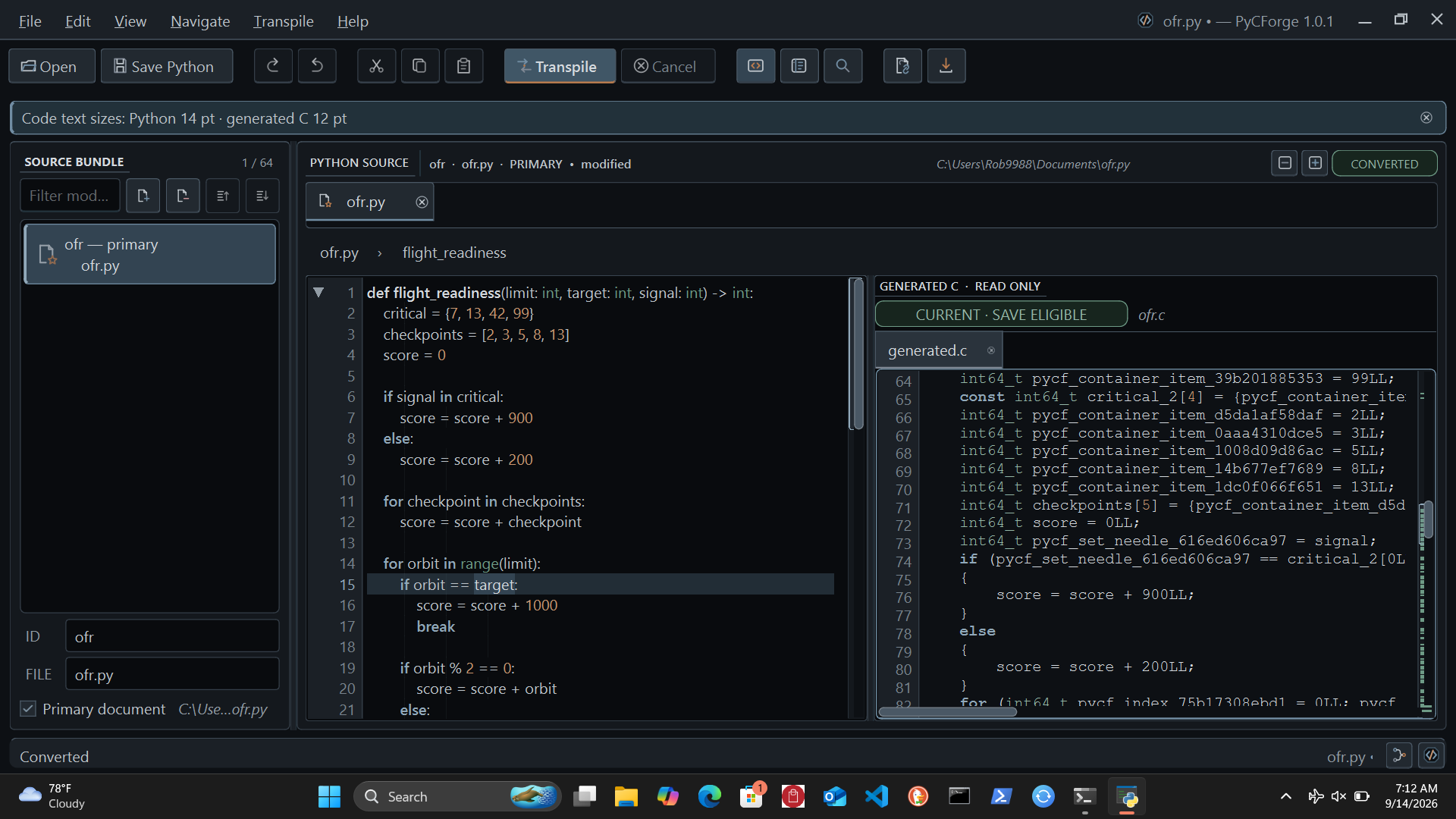
A workspace for Python and C
- Edit comfortably: tabbed Python documents, split views, function folding, an outline, multiple cursors, and a command palette.
- See the translation: side-by-side Python and read-only C, source diagnostics, conversion details, history, and searchable output. ForgeLens connects mapped Python and C locations in Typed mode.
- Work across files: supply up to 64 Python modules, keep their source together, and generate C from the selected primary document and its supplied dependencies.
- Keep a project together: save open Python modules in a portable
.pcfprojbundle, preview it before opening, and compare or restore named checkpoints. - Stay in control: cancel background conversions, see when edits make generated output stale, and choose where to save the C result.
- Make the workspace yours: saved layouts, independent Python and C text sizes, keyboard commands, and 22 searchable offline Help pages.
- Build from the IDE: select PCFC11, GCC/MinGW-w64, Clang/Apple Clang, MSVC, or Clang-cl and create object files or executables with build logs, diagnostics, cancellation, and a copyable report. Each compiler family remembers its settings.
Install and open
Use Python 3.11–3.13. Installation includes PySide6, NumPy, Numba, Jedi, autopep8, and their required supporting packages. Ting's local review runtime is bundled with PyCForge.
On Windows:
py -m pip install pycforge
py -m pycforge.ide
On macOS or Linux:
python -m pip install pycforge
python -m pycforge.ide
The installed pycforge-workspace command also opens the desktop app. Add --upgrade to the install command to update an existing installation. For a downloaded wheel, substitute its path for pycforge and allow pip to install dependencies; omit --no-deps.
PyCForge declares its application dependencies without version pins and does not reject installed dependency version numbers. The libraries retain their own compatibility requirements. Startup loads the application resources, offline Help, and local numerical routines before opening the workspace.
Conversion coverage
Select Transpile → Typed or Transpile → Runtime, then click Transpile or press Ctrl+Enter. The checkmark identifies the active mode, and the choice is remembered between launches. Choosing a mode does not start a conversion; changing it marks existing C output stale until you transpile again.
| Feature | Typed conversion | Runtime conversion |
|---|---|---|
| Functions | Annotated parameters and results, scalar locals, direct calls, and required keyword arguments. | Function values, defaults, positional-only and keyword-only parameters, variadic and expanded calls, decorators, bound methods, nested functions, and captured lambdas. |
| Text | String length, comparison, search, membership, prefix/suffix checks, and documented constant-text operations. | Constructed Unicode strings, concatenation/repetition, indexing/slicing, trimming, case conversion, split/join/replace, and formatting. |
| Lists and tuples | Fixed local homogeneous containers, literal indexing, and iteration. | Mixed and nested values, dynamic indexing, slice assignment/deletion, starred packing/unpacking, and shared containers passed into or returned from functions. |
| Dictionaries and sets | Fixed local dictionaries and numeric/Boolean set membership. | Ordered mutable dictionaries, merging, live views, mutable sets, frozen sets, set algebra, and supported hashable keys/elements. |
| Classes | Simple immutable records with numeric/Boolean fields. | Declared mutable fields, constructors, single and multiple inheritance, C3 method ordering, cooperative super(), overrides, and shared object identity. |
| Numbers | Documented scalar arithmetic and integer floor division/remainder. | Checked 64-bit integer arithmetic, floating floor division/remainder, powers, modular powers, bitwise operations, and shifts. |
| Branches and loops | Conditions, integer ranges, fixed-container loops, break/continue, and loop else. | Conditions, sequence/range/dictionary/view and supported iterator loops, short-circuit values, break/continue, and loop else. |
| Comprehensions | Use the supported explicit loops. | List, dictionary, and set comprehensions with multiple generators, filters, dependent iterables, and fixed or starred unpacking. |
| Multiple files | Up to 64 supplied modules with direct function imports. | Up to 64 supplied modules with function/class/constant imports, aliases, re-exports, and separate namespaces. |
| UTF-8 files | Bounded read/write entry points for C callers. | Connected read/process/write workflows across functions and modules, line iteration, sized reads, append, and automatic handle cleanup. |
| C integration | Direct scalar function interfaces and documented file ownership rules. | Generated value routines and a caller-owned memory context for strings, containers, objects, and closures. |
Text, collections, and everyday operations
Runtime conversion supports practical text-processing work: trim and normalize strings, split input into fields, join output, parse integer/float text, and build formatted reports. F-strings and str.format() support documented precision, alignment, width, and value conversions; nested containers can be printed with their supported Python representations.
Mutable lists support item and slice changes, append, extend, insert, pop, remove, sort, reverse, copy, clear, and index. Dictionaries preserve insertion order and support lookup, deletion, merging, updates, and live key/value/item views. Sets and frozen sets support membership, algebra, and subset comparisons. Passing mutable containers and instances between converted functions preserves their shared identity.
Everyday operations include sum, min, max, abs, round, any, all, stable sorted, lazy enumerate and zip, reversed, and supported iter/next use. These combine with comprehensions, classes, functions, defaults, and keyword calls to support connected processing tasks.
Functions, objects, and annotations
Runtime mode supports first-class functions, ordinary bound methods, nested functions, and lambdas that capture surrounding variables or default values. Closures can update enclosing bindings through nonlocal. Function and method decorators can retain state and forward *args and **kwargs.
Classes declare their fields and initialize instances through __init__. Single and multiple inheritance follow Python's C3 method resolution order, including diamond hierarchies, imported bases, overrides, and cooperative super() calls. Instances keep one shared set of fields, and isinstance and issubclass recognize every declared base. Constructors follow the calls written in the Python source.
Optional annotations include supported unions and container types. PyCForge checks annotated function, assignment, and field boundaries when generated Runtime C executes; ordinary Python does not enforce those annotations. Container annotations check their current contents at those boundaries; they do not permanently restrict later mutation through another alias.
Programs across multiple files
Open the required Python documents and choose the primary module before transpiling. Runtime imports can share functions, classes, and immutable scalar/tuple constants through aliases and re-exports. Each module has its own namespace; initialization occurs once per generated C context, preserving shared defaults and class identity.
The CLI accepts additional modules explicitly:
pycforge convert main.py --runtime-values --module helper=helper.py --output program.c
Repeat --module ID=PATH for additional files. Constants-only companion modules are supported. Imports resolve only against the supplied documents; PyCForge does not discover files or translate installed Python packages automatically.
Read, process, and write UTF-8 files
Runtime mode connects scoped open calls with string operations, collections, sorting, numeric parsing, and formatting. Read whole text or character-sized portions, iterate through lines, call processing helpers in another module, and write or append the result.
Supported file operations include read, readline, readlines, write, writelines, flush, and early close. Unicode filenames and documented newline handling are supported. Handles close on normal scope exits, return, break, continue, and runtime errors. Returned text remains available for subsequent processing. Help includes a complete multi-file report with input and output examples.
Python editing tools
Jedi provides offline completion, parameter hints, definition navigation, and name analysis. Autopep8 provides requested document or selection formatting. The compact Edit menu groups Selection, Lines, Find and Replace, Code, and Folding Functions; overflow submenus keep commands accessible on short displays.
- Write and navigate: completion with Ctrl+Space, parameter hints with Ctrl+Shift+Space, Go to Definition with F12, and return with Alt+Left. Automatic suggestions are optional.
- Edit several places: smart bracket/quote pairs, selection wrapping, and multiple cursors through Ctrl+D, Ctrl+Alt+L, or Alt+click; Escape returns to one cursor.
- Find and replace precisely: regular expressions, replacement within a captured selection, and reviewed replacement across open documents with Ctrl+Shift+H.
- Rename with review: F2 previews changes to statically resolved names in the current Python document before you apply them. Review dynamic references, string-based keyword names, and callers in other files separately.
- Format with undo: Alt+Shift+F formats the document; Ctrl+K, Ctrl+F formats a selection while preserving unselected lines. Formatting preserves the Python syntax tree.
- Browse and copy definitions: right-click the Python gutter to open Classes & Functions. A panel with a short progress bar covers the tree while definitions load, then disappears when the tree is ready. Double-click or press Enter to jump to a definition; the title-bar Copy icon copies its complete source, including decorators and indentation, without moving either editor view.
Completion and formatting are available independently of conversion coverage. Background analysis uses cached results, cancellation, and process deadlines; edits invalidate stale results. Cross-file replacement keeps undo history for each open document. Save edited buffers explicitly. Help explains the navigator's source-size limits and the boundaries of document-local rename.
Project bundles
Use File → Project → Save Project to bundle your open Python modules, current editor text, tab order, primary module, and conversion mode in one .pcfproj file. Open Project shows a preview and loads the bundle into a new working folder. Create Checkpoint and Project History let you name, compare, and restore earlier versions, with a recovery checkpoint saved before each restore.
Project saves include unsaved editor text; Save Python and Save All Python write the separate .py files. Bundles contain Python sources and checkpoints, so keep data files and other required resources separately. The built-in Help explains saving, restoring, and returning to a project.
First conversions
Save this as input.py, select Transpile → Typed, and click Transpile:
def add(left: int, right: int) -> int:
    return left + right
The equivalent command is:
pycforge convert input.py --output generated.c
For Runtime mode, save this as greeting.py:
def greeting(name: str, *, suffix: str = "!") -> str:
    return f"Hello, {name.strip()}{suffix}"
pycforge convert greeting.py --runtime-values --output greeting.c
These examples produce callable C functions. Use a C caller or provide an eligible entry function when building an executable.
Compile C
After transpiling, choose Transpile → Compile C… (Ctrl+Shift+Enter). Select the compiler family and executable, target, object or executable output, entry function, and optimization. The dialog shows build logs, diagnostics, elapsed time, cancellation, and Copy Report. Editing the source cancels a build that would otherwise use outdated input.
Executable entries take no arguments: Typed entries return int; Runtime entries return int or None. Runtime executable wrappers release their memory context before exiting. Install the chosen compiler and its matching system headers, libraries, and linker separately. MSVC and Clang-cl need a configured Visual Studio developer environment; PCFC11 0.1.1+ needs its adjacent include directory and a GCC-compatible assembler/linker, using MinGW-w64 UCRT64 on Windows.
For app.py containing def start() -> int: return 0:
python -m pycforge.build app.py --entry main.start --compiler-family gcc --compiler /path/to/gcc --output program
Add --runtime-values for Runtime conversion. The compiler-family choices are pcfc11, gcc, clang, msvc, and clang-cl; Help explains their target and optimization options. Conversion and C builds do not execute your Python or generated program. Use Tools → Run Python to run a saved Python module explicitly in a separate terminal. The generated Runtime C includes its value routines and does not require Python, PySide6, NumPy, Numba, or Ting when executed on a compatible host.
Ting agent feedback
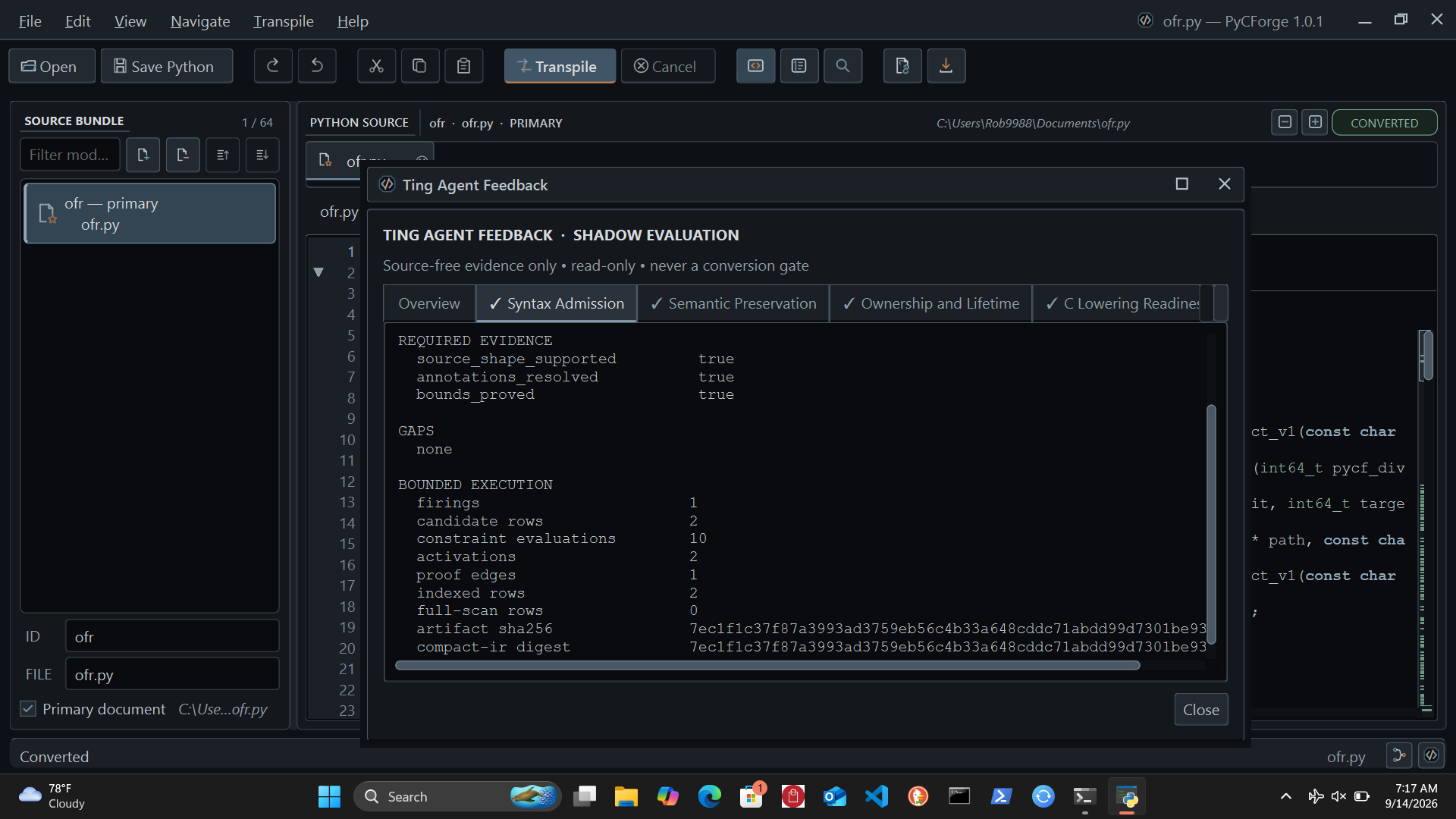
Six local Ting agents review syntax, semantics, ownership, C lowering, evidence, and resources. Open Ting in the status bar to inspect findings, and use the Flow Map to follow the conversion evidence behind each review.
Ting runs offline. Its feedback is advisory and leaves your source and conversion result unchanged. Each review identifies the checks available for that conversion; it does not replace compilation or comparison with your program's intended behavior.
Command line and Python API
Use pycforge --help for commands and options, or pycforge --format json convert input.py for structured output. Convert source text from Python with:
from pycforge import ConversionRequest, PythonToCConverter

source = "def add(left: int, right: int) -> int:\n    return left + right\n"
result = PythonToCConverter().convert(ConversionRequest.from_source(source))

if result.generated_c is not None:
    print(result.generated_c)
for diagnostic in result.diagnostics:
    print(diagnostic.code, diagnostic.message)
The in-app API guide also explains Runtime requests, source bundles, conversion summaries, and generated C interfaces.
Help and supported boundaries
Press F1 or choose Help → PyCForge Help… for 22 searchable offline pages covering the editor, conversion tables, examples, diagnostics, Ting, shortcuts, and C integration. Separate references describe Typed and Runtime behavior, including a multi-file read/process/write example. Selected PyCForge caveats boxes explain practical conversion details beside relevant examples.
PyCForge converts the documented Python forms. Integers use signed 64-bit values; generated Runtime values belong to a memory context and remain alive until it is destroyed. Exact ForgeLens mappings are available for Typed conversion. General third-party library translation, exception recovery, asynchronous code, generators, general reflection, dynamic bases, properties, static/class methods, writable module globals, and cyclic/relative/star imports are outside the supported forms. Consult Help for numeric rules, resource limits, and C caller requirements.
License
PyCForge is free software under the GNU General Public License v3.0 only. The distribution includes LICENSE and third-party notices.
Contact Robert Cecil rcttcr5@icloud.com for request or security assistance
1 maintainer

Metadata
1 maintainer
Release files for pycforge 1.3.19
For a detailed explanation of source distributions (sdists) and built distributions (wheels), please see the package formats documentation.
Source distribution (sdist)
| File | Size | Uploaded | Provenance | |
|---|---|---|---|---|
| pycforge-1.3.19.tar.gz | 7.8 MB | Without provenance | Details |
Built distribution (wheel)
| File | Interpreter | ABI | Platform | Reset |
|---|---|---|---|---|
| pycforge-1.3.19-py3-none-any.whl | Python 3 | none | any | Details |
Total release size: 9.8 MB
Release files / pycforge-1.3.19.tar.gz
| Download URL | pycforge-1.3.19.tar.gz |
|---|---|
| Size | 7.8 MB |
| Tags | Source |
|
SHA-256 checksum How to use checksums |
07718a84a41b637a393cbdff99c2a1992ac0648244f3804311dff2533790bc9e
|
|
BLAKE2b-256 checksum How to use checksums |
617d544bcb75507f814819167cd1ea837dcee09c0ef95e56d05e45bddbada21e
|
| Upload date | |
|
Uploaded using Trusted Publishing? What is trusted publishing? |
No |
| Uploaded via |
twine/0.0.0 importlib_metadata/4.0.1 pkginfo/1.12.1.2 requests/2.25.1 requests-toolbelt/0.9.1 tqdm/4.61.1 CPython/3.9.16
|
Release files / pycforge-1.3.19-py3-none-any.whl
| Download URL | pycforge-1.3.19-py3-none-any.whl |
|---|---|
| Size | 2.0 MB |
| Tags | Python 3 |
|
SHA-256 checksum How to use checksums |
46300cfabc74d17be72f1d9e1208c1bc952ea1ad39dcbb7e8347e7b1df0947ac
|
|
BLAKE2b-256 checksum How to use checksums |
fe57471d089bdbfbebc1e7e42bb227f0d7167de2c8bf01ccb496eddd6f91dbfd
|
| Upload date | |
|
Uploaded using Trusted Publishing? What is trusted publishing? |
No |
| Uploaded via |
twine/0.0.0 importlib_metadata/4.0.1 pkginfo/1.12.1.2 requests/2.25.1 requests-toolbelt/0.9.1 tqdm/4.61.1 CPython/3.9.16
|
Security for pycforge 1.3.19
Provenance
Provenance describes where a file came from. On PyPI, provenance is shared via attestations, which provide a verifiable record of the build or publishing details. View details, limitations and caveats.
No provenance found
None of the files in this release were uploaded with provenance metadata.
A note on package security
PyPI is a repository for distributing packages, not a service for auditing them. While third-party security researchers and our staff do their best to detect and remove malicious packages, PyPI cannot guarantee the quality, security or suitability of any given package.














