
PyCForge
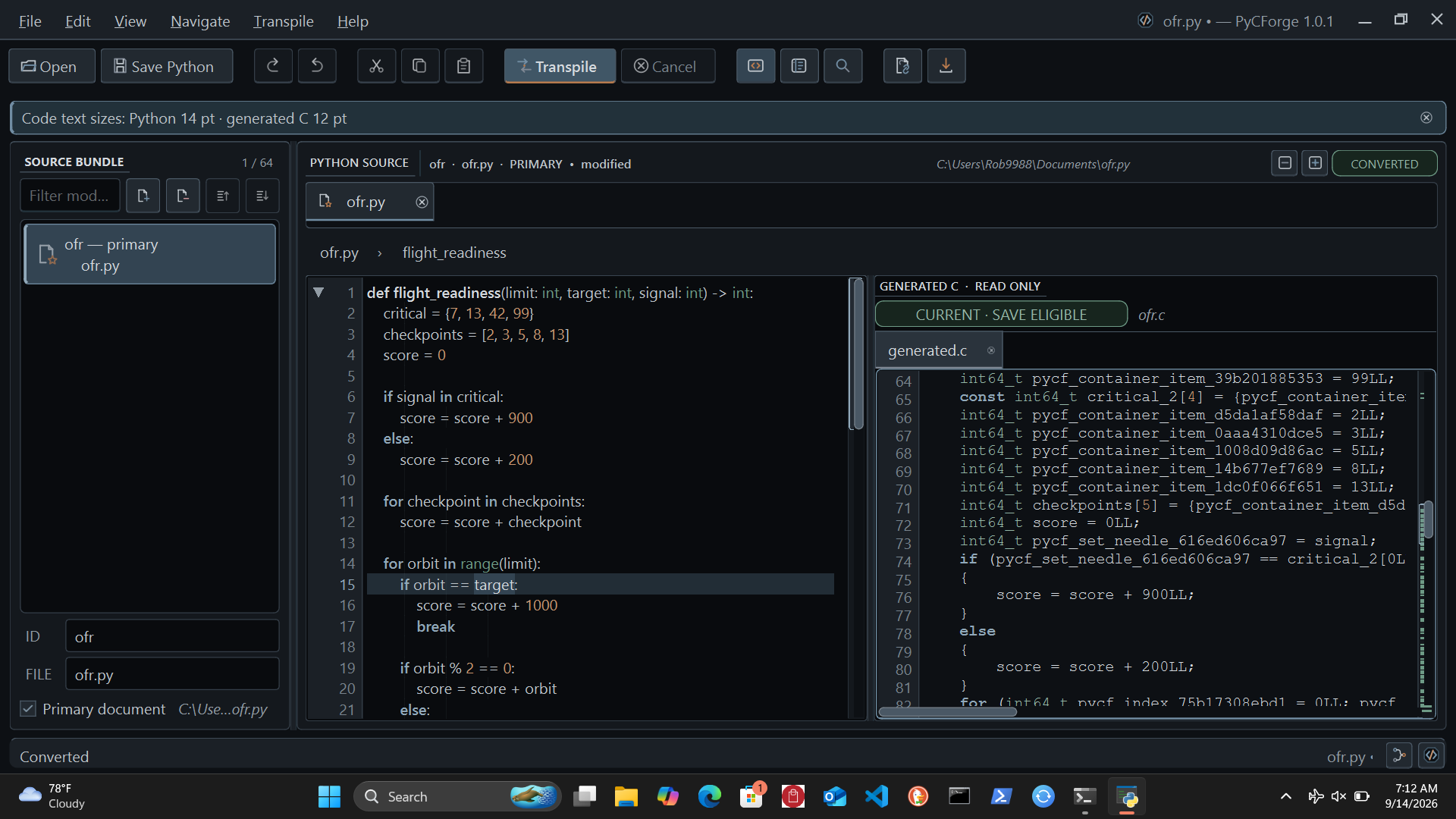
PyCForge is a Python-to-C source transpiler and PySide6 desktop IDE. It converts supported Python into readable C11 with editing, diagnostics, generated-code inspection, a command-line interface, and a Python API.
Install, upgrade, and open
PyCForge supports Python 3.11–3.13. PySide6, NumPy, Numba, and the desktop application are installed automatically. Jedi and autopep8, with their small Python dependencies, provide the offline editing tools.
Allow pip to install dependencies when installing or replacing a wheel; omit --no-deps. PyCForge declares its dependencies by name without version pins. Startup checks numerical dependency availability and executes its checked kernels; it does not reject installed version numbers. Dependencies retain their own compatibility requirements.
On Windows:
py -m pip install pycforge
py -m pycforge.ide
On macOS or Linux:
python -m pip install pycforge
python -m pycforge.ide
To upgrade an existing installation, use py -m pip install --upgrade pycforge on Windows or python -m pip install --upgrade pycforge on macOS or Linux. The installed pycforge-workspace command also opens the application. The splash window prepares application resources, offline help, and Ting's NumPy/Numba numerical routines before the workspace opens.
What PyCForge provides
- Python editing with tabs, split view, function folding, outline, search and replace, and a command palette; reliable module closing and fold-marker refresh.
- Side-by-side Python and read-only generated C, with diagnostics, conversion details, history, a normal C scrollbar, Find, and ForgeLens.
- Source bundles of up to 64 files in either mode; typed conversion includes ForgeLens navigation between mapped Python and C locations.
- Cancellable background conversion and clear identification of output that needs to be regenerated after an edit.
- Saved workspace layouts, independent Python and C text sizes, and searchable offline documentation.
Python editing
The compact Edit menu groups Selection, Lines, Find and Replace, Code, and Folding Functions. More Commands submenus keep commands reachable on short displays.
- Smart bracket/quote pairs, selection wrapping, and multiple cursors with Ctrl+D, Ctrl+Alt+L, or Alt+click; Escape returns to one cursor.
- Regular-expression search, replacement within a captured selection, and reviewed replacement across open documents (Ctrl+Shift+H).
- Offline completion (Ctrl+Space) and parameter hints (Ctrl+Shift+Space), with optional automatic suggestions.
- Go to Definition (F12), return (Alt+Left), and scope-aware rename with preview (F2) within the current Python document.
- Right-click the Python gutter for the Classes & Functions tree. Double-click or Enter goes to a definition. The left title-bar Copy icon copies its complete source, preserving decorators and indentation without moving either editor view. A brief label beside Copy identifies it.
- Undoable Format Document (Alt+Shift+F) and Format Selection (Ctrl+K, Ctrl+F), preserving Python's syntax tree.
Analysis and regex work have process deadlines; changed source invalidates pending results. Rename is document-local. Cross-file replacement edits open buffers with undo per document. Save explicitly; no backups are created. Completion is independent of conversion coverage. The gutter navigator scans on opening: up to 1 million characters and 4,096 definitions, including methods and nested functions. Complete syntax is required; changed source invalidates the list.
The editor batches occurrence selection, caches unchanged analysis, and moves outline parsing into a cancellable process. Typing defers passive work; gutter painting reads cached folds. Workers and caches have explicit budgets. Physical modifiers retain carets, completion replaces identifier tails, and selection formatting preserves unselected lines. Unsafe document-local renames are refused; dynamic and cross-file references still require review. Saving retains existing permissions. See installed Help for the detailed boundaries.
Python-to-C conversion
Choose Typed or Runtime under the Transpile menu. A checkmark shows the selected mode; choosing a mode does not start conversion. Click the existing Transpile button or press Ctrl+Enter to convert. The selection is remembered between launches, with Typed as the initial default. Changing modes marks previous C output stale until you convert again.
| Mode | Supported uses | Select with |
|---|---|---|
| Typed conversion | Annotated functions, scalar variables, module constants, string inspection, fixed containers, immutable records, imports between supplied source files, and bounded UTF-8 file operations. | Transpile → Typed, then click Transpile; or the default convert command. |
| Runtime value conversion | Constructed Unicode strings, shared mutable lists, ordered dictionaries, and class instances, mixed lists and tuples, union and container annotations, list/dictionary comprehensions, lambdas with captured variables, defaults and keyword arguments, numeric text conversion, practical string methods, and connected UTF-8 file workflows. | Transpile → Runtime, then click Transpile; or convert --runtime-values. |
Runtime value conversion accepts 1–64 explicitly supplied documents. The C includes the value and memory routines for strings, containers, objects, and closures. Lists, dictionaries, and instances retain their identity when passed to functions; strings remain immutable. Annotations check values at function and assignment boundaries. Container annotations check their contents at those boundaries without permanently constraining writes through other aliases.
Runtime imports between supplied files support module aliases, re-exports, imported functions/classes/constants, and immutable scalar/tuple module constants. Namespaces stay separate; imports preserve shared defaults and class identity. Initialization happens once per C context, in source order at import sites. Remaining supplied modules also initialize as explicit roots.
Open every required document, then select Runtime and transpile. From the CLI: pycforge convert main.py --runtime-values --module helper=helper.py --output result.c. Repeat --module ID=PATH for more files. Constants-only companions are accepted. Imports never discover files or installed packages. Relative/star/local imports, cycles, implicit packages, writable globals, and general module execution remain unsupported. Help explains exact module IDs and definition-order checks.
Everyday operations include: sum, min, max, abs, round, any, all, stable sorted, lazy enumerate/zip, list mutation methods, f-string precision/alignment, str.format(), and nested container printing. These work with existing classes, dictionaries, comprehensions, lambdas, defaults, keyword calls, and Unicode/numeric text operations across the supplied modules.
Runtime mode includes connected UTF-8 file workflows. Use scoped open calls for reads, sized reads, line iteration, writes, and append. Call processing helpers across modules; automatic cleanup covers all scope exits. Installed Help includes a complete multi-file report, input/output examples, newline rules, and limits. Runtime errors identify their source file and line. Values live until context destruction. Exception recovery, generators, and exact runtime ForgeLens mappings are unsupported.
Both modes use signed 64-bit integers and documented Python forms. The bundled help provides separate operation tables, examples, C caller requirements, and limits for each mode.
First conversion
Save the following as input.py:
def add(left: int, right: int) -> int:
    return left + right
Open it in the workspace, select Transpile → Typed, and click Transpile, or run:
pycforge convert input.py --output generated.c
For runtime string construction, save this as greeting.py:
def greeting(name: str, *, suffix: str = "!") -> str:
    return f"Hello, {name.strip()}{suffix}"
pycforge convert greeting.py --runtime-values --output greeting.c
Ting agent integration
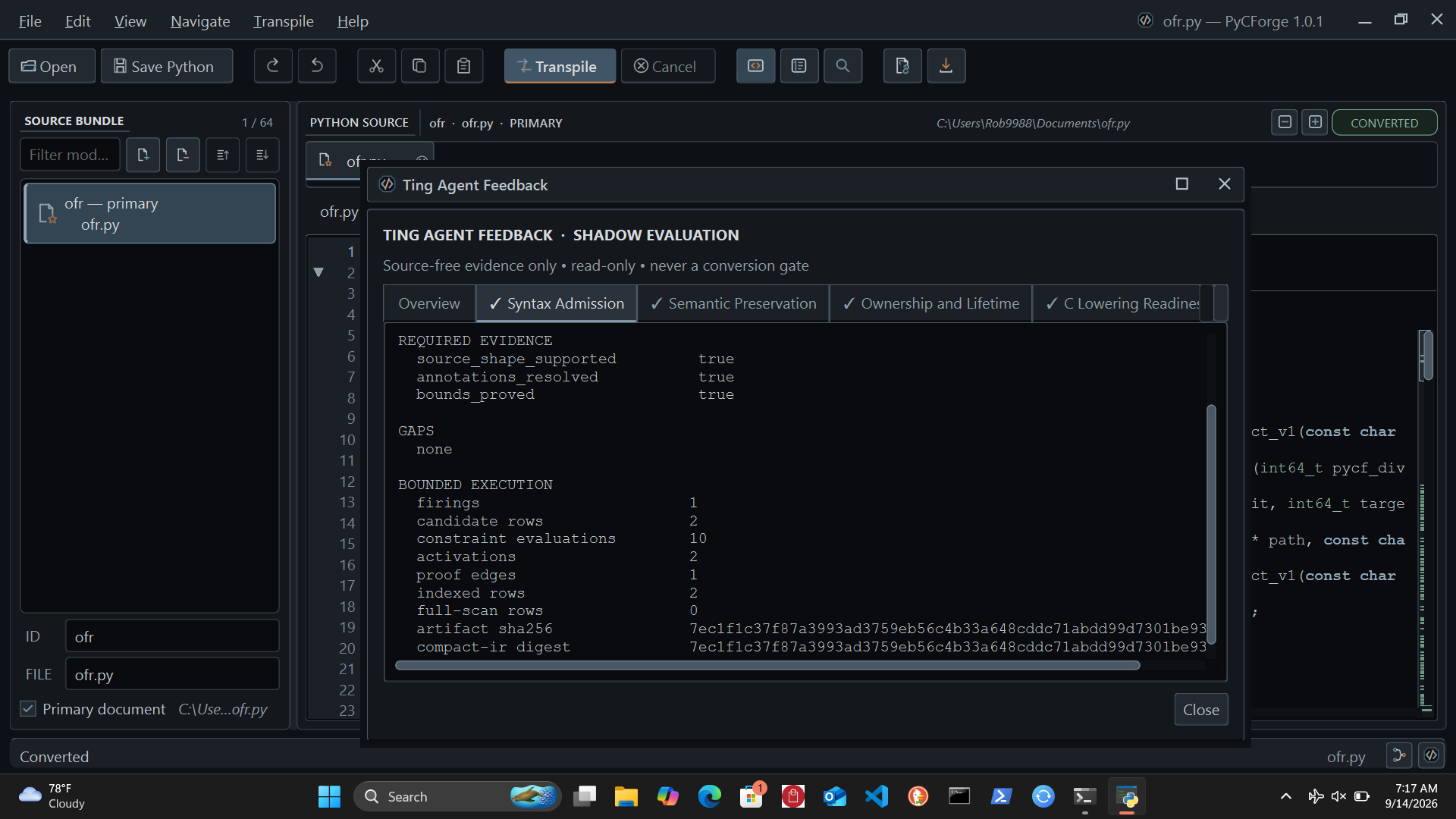
Six local Ting agents review syntax, semantics, ownership, C lowering, evidence, and resources. Open Ting in the status bar to inspect their findings. The Flow Map connects conversion evidence to each review.
Ting feedback is advisory. It uses structural evidence, runs offline, and leaves source code and conversion results unchanged. A review describes the checks available for the selected conversion; external compilation and execution comparisons require your own toolchain and test inputs.
Built-in help and documentation
Press F1 or choose Help → PyCForge Help… for 21 searchable offline pages. They cover installation, editing, conversion features, examples, diagnostics, Ting, shortcuts, and C integration. Consult the supported-conversions table first.
Command line and Python API
Use pycforge --help to view commands and options. For a structured result:
pycforge --format json convert input.py
Convert source text from Python:
from pycforge import ConversionRequest, PythonToCConverter

source = "def add(left: int, right: int) -> int:\n    return left + right\n"
result = PythonToCConverter().convert(
    ConversionRequest.from_source(source)
)

if result.generated_c is not None:
    print(result.generated_c)
for diagnostic in result.diagnostics:
    print(diagnostic.code, diagnostic.message)
The in-app API guide includes runtime value requests and multiple-file bundles.
Compile with PCFC11
Version 1.3.1 includes the full Typed and Runtime conversions, current editor, PCFC11 compilation and reliability fixes in one installation. After transpiling, choose Transpile → Compile with PCFC11… (Ctrl+Shift+Return). Select the compiler, target, executable or object output, entry and optimization. The dialog provides logs, diagnostics, timing, cancellation and Copy Report. Executable entries take no arguments: Typed returns int; Runtime returns int or None. Runtime contexts are destroyed before exit. Source edits cancel builds. PCFC11 0.1.1+ and a GCC-compatible assembler/linker are installed separately; Windows uses MinGW-w64 UCRT64. Keep PCFC11's include directory beside it.
For a file app.py containing def start() -> int: return 0, use:
python -m pycforge.build app.py --entry main.start --compiler /path/to/pcfc11 --output program
Add --runtime-values for Runtime. PyCForge never runs supplied Python or generated programs. Compare generated programs against Python with representative inputs using your own test process. Native Windows validation remains pending.
License
PyCForge is free software under the GNU General Public License v3.0 only. The distribution includes LICENSE and third-party notices.
The 1.3.1 reliability update binds deferred UI work to its Qt owner, cancels output projection on close, rejects special-file previews, reaps partially started outline workers, reduces source-artifact memory duplication and enforces token limits while reading. Typed and Runtime conversion, Jedi, autopep8, tooltips, gutter navigation and PCFC11 compilation remain available. The audit report records measured limits and Windows/laptop checks still needed.
1 maintainer

Metadata
1 maintainer
Release files for pycforge 1.3.1
For a detailed explanation of source distributions (sdists) and built distributions (wheels), please see the package formats documentation.
Source distribution (sdist)
| File | Size | Uploaded | Provenance | |
|---|---|---|---|---|
| pycforge-1.3.1.tar.gz | 24.0 MB | Without provenance | Details |
Built distribution (wheel)
| File | Interpreter | ABI | Platform | Reset |
|---|---|---|---|---|
| pycforge-1.3.1-py3-none-any.whl | Python 3 | none | any | Details |
Total release size: 26.0 MB
Release files / pycforge-1.3.1.tar.gz
| Download URL | pycforge-1.3.1.tar.gz |
|---|---|
| Size | 24.0 MB |
| Tags | Source |
|
SHA-256 checksum How to use checksums |
07f2e051f7c8388f7807949ddd43d23e81c0d4a19a9c9f9d5f3c9b72eed79a65
|
|
BLAKE2b-256 checksum How to use checksums |
7a62817d4ed25a04ba1b769b13272d9910a9859f48759f2ec2aac471ee517b88
|
| Upload date | |
|
Uploaded using Trusted Publishing? What is trusted publishing? |
No |
| Uploaded via |
twine/0.0.0 importlib_metadata/4.0.1 pkginfo/1.12.1.2 requests/2.25.1 requests-toolbelt/0.9.1 tqdm/4.61.1 CPython/3.9.16
|
Release files / pycforge-1.3.1-py3-none-any.whl
| Download URL | pycforge-1.3.1-py3-none-any.whl |
|---|---|
| Size | 1.9 MB |
| Tags | Python 3 |
|
SHA-256 checksum How to use checksums |
127e0546bacbb926d7dd19e2c4fd9584b8f813dbf0d2a5e5176f8f8b590e2052
|
|
BLAKE2b-256 checksum How to use checksums |
b107fbfbf08a3eb8996745c9db6c2aaf15f48c313a718a5dc1bd6bcc070a301a
|
| Upload date | |
|
Uploaded using Trusted Publishing? What is trusted publishing? |
No |
| Uploaded via |
twine/0.0.0 importlib_metadata/4.0.1 pkginfo/1.12.1.2 requests/2.25.1 requests-toolbelt/0.9.1 tqdm/4.61.1 CPython/3.9.16
|
Security for pycforge 1.3.1
Provenance
Provenance describes where a file came from. On PyPI, provenance is shared via attestations, which provide a verifiable record of the build or publishing details. View details, limitations and caveats.
No provenance found
None of the files in this release were uploaded with provenance metadata.
A note on package security
PyPI is a repository for distributing packages, not a service for auditing them. While third-party security researchers and our staff do their best to detect and remove malicious packages, PyPI cannot guarantee the quality, security or suitability of any given package.














