
Scanpath Studio
See how people read.
A free, open-source app for exploring eye movements in reading. Check data quality, compare readers, and create figures and scanpath videos — no coding required.
Try it online · Download the app · Browse the gallery
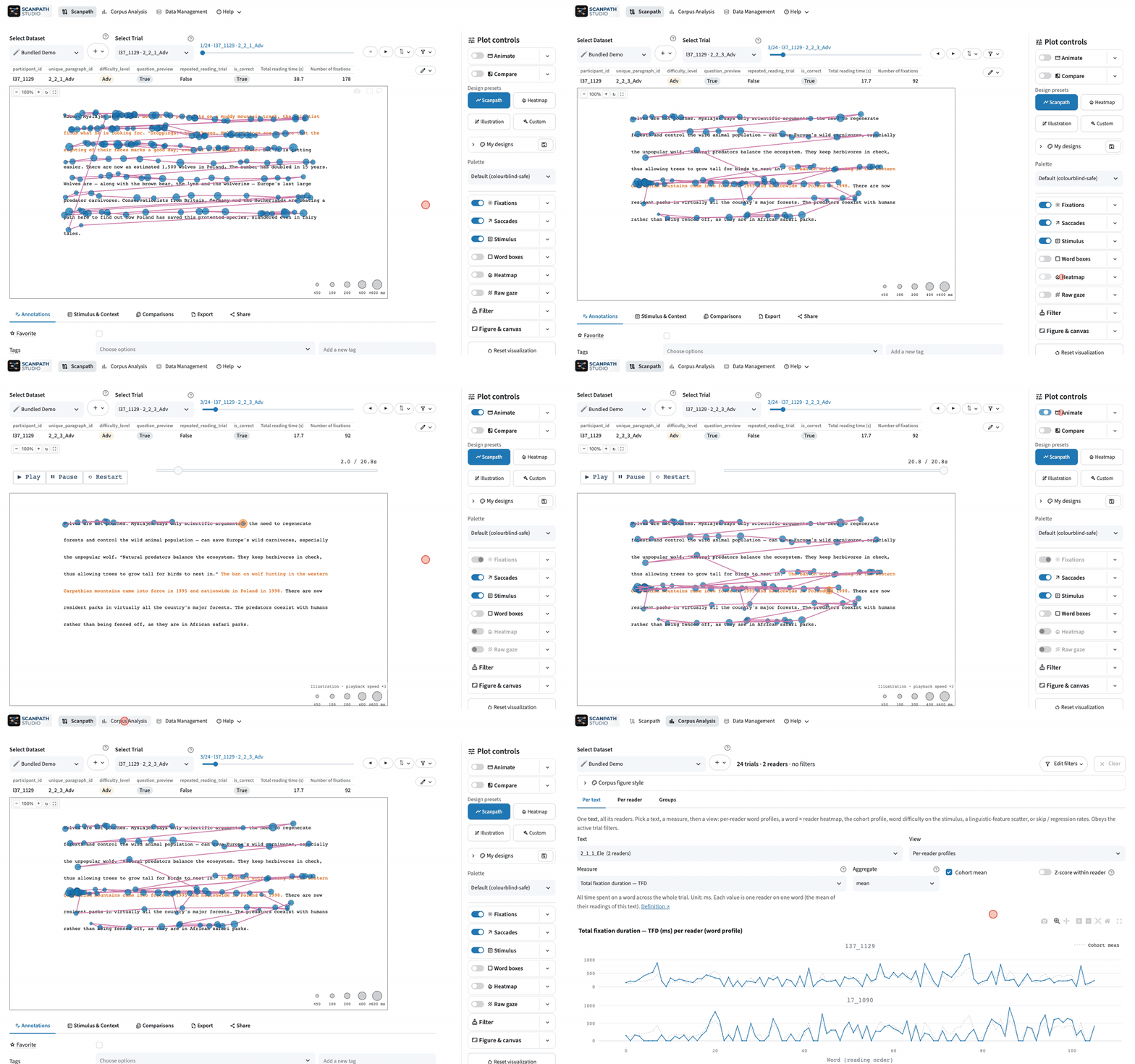



From your data to a figure
- Bring your own data. Load fixation and interest-area tables, with optional raw gaze and metadata. Data guide →
- Explore and replay. View fixations, saccades and heatmaps; filter trials, then star or tag the ones to revisit.
- Compare readings. Overlay two scanpaths or place them side by side, across readers, conditions or datasets.
- Analyze a corpus. Explore the reading measures in your data by text, reader or group.
- Export and share. Save publication-ready figures, GIF/MP4 replays or a batch of trials, and share a view with a link.
Follow a tutorial · See it in action
Run it on your computer
Download the desktop app — no Python needed:
Windows · macOS (Apple silicon) · Linux
Local installs keep your data on your machine. To try the app first, open the online demo with its bundled data.
Prefer pip? Install with Python 3.11–3.14
pip install scanpath-studio
scanpath-studio
Python & command line
Build a figure in the app, then copy its Python or CLI code from Share. The feature guides include scripting examples alongside the app instructions.
Research & community
Using Scanpath Studio in your research? Cite the software (Shubi et al., 2026). The bundled demo is a subset of OneStop Eye Movements.
Report a bug or request a feature · Contribute · Code of conduct
Developed with AI assistance. As with any research software, cross-check results before using them in published work.
1 maintainer

Metadata
1 maintainer
Release files for scanpath-studio 0.39.0
For a detailed explanation of source distributions (sdists) and built distributions (wheels), please see the package formats documentation.
Source distribution (sdist)
| File | Size | Uploaded | |
|---|---|---|---|
| scanpath_studio-0.39.0.tar.gz | 3.1 MB | Details |
Built distribution (wheel)
| File | Interpreter | ABI | Platform | Reset |
|---|---|---|---|---|
| scanpath_studio-0.39.0-py3-none-any.whl | Python 3 | none | any | Details |
Total release size: 6.2 MB
Release files / scanpath_studio-0.39.0.tar.gz
| Download URL | scanpath_studio-0.39.0.tar.gz |
|---|---|
| Size | 3.1 MB |
| Tags | Source |
|
SHA-256 checksum How to use checksums |
263f72db7ce132f6c3e2eea4828f801563c1881dbcfe36c97239bcc251ab2755
|
|
BLAKE2b-256 checksum How to use checksums |
37b8c74eb5ea12e3ac241110f49772ff804ece6f64fdc0c02e72e27f70458ddc
|
| Upload date | |
|
Uploaded using Trusted Publishing? What is trusted publishing? |
Yes |
| Uploaded via |
twine/7.0.0 CPython/3.13.14
|
Provenance
Provenance describes where a file came from. On PyPI, provenance is shared via attestations, which provide a verifiable record of the build or publishing details. View details, limitations and caveats.


PyPI Publish Attestation
PyPI verified that this artifact, at this checksum, originated from the publisher listed below.
Signed by GitHub Actions, verified by PyPI on Oct 17, 2026.
Transparency logRelease files / scanpath_studio-0.39.0-py3-none-any.whl
| Download URL | scanpath_studio-0.39.0-py3-none-any.whl |
|---|---|
| Size | 3.1 MB |
| Tags | Python 3 |
|
SHA-256 checksum How to use checksums |
7fda7714563a0568cbb4b610fd56d7b7d08e4a2be80edf35793c17d0d9af67ab
|
|
BLAKE2b-256 checksum How to use checksums |
29cffa6ae2c859dc79806b2b96c85f39844ba2a415fbc0da5c05173b12425b01
|
| Upload date | |
|
Uploaded using Trusted Publishing? What is trusted publishing? |
Yes |
| Uploaded via |
twine/7.0.0 CPython/3.13.14
|
Provenance
Provenance describes where a file came from. On PyPI, provenance is shared via attestations, which provide a verifiable record of the build or publishing details. View details, limitations and caveats.
PyPI Publish Attestation
PyPI verified that this artifact, at this checksum, originated from the publisher listed below.
Signed by GitHub Actions, verified by PyPI on Oct 17, 2026.
Transparency log













