spaCR website Linux, macOS, and Windows Python 3.9 through 3.15 Qt interface tests passed/total Codecov coverage GitHub issues conda-forge version PyPI version Docker images on GHCR PyPI Downloads API Documentation Interactive tutorials bioRxiv preprint Zenodo DOI Cite spaCR BSD 3-Clause spaCR PyPI download ranking over the previous 30 complete days

Website: einarolafsson.github.io/projects/spacr
spaCR
spaCR
← BackNext →
← BackNext →
Languages: English
Languages: English
spaCR. Spatial phenotype analysis of CRISPR screens. spaCR segments and measures single cells in microscopy images, integrates per-object phenotypes with sequencing-derived guide abundance, and estimates which genes are associated with phenotypic changes. Starting from plate images and FASTQ reads, it produces per-object measurements, trained classifiers, per-guide and per-gene effect estimates, and a ranked hit list. The segmentation, measurement, annotation and classification modules also run without a sequencing arm. Make Masks corrects segmentation masks and annotates independent, class-labelled rectangles with the Box tool for YOLO export. Boxes keep their own labels and history without changing source images or masks. See the feature guide for each tool. Images, masks and crops are files on disk. Measurements, annotations and model predictions are tables in the project's measurements.db SQLite database. Runs as a desktop application or headlessly on a workstation, server or cluster.
Try spaCR.
Try spaCR.
conda create -n spacr python=3.12 -y
conda activate spacr
python -m pip install spacr
spacr


Hardware support.
Hardware support.
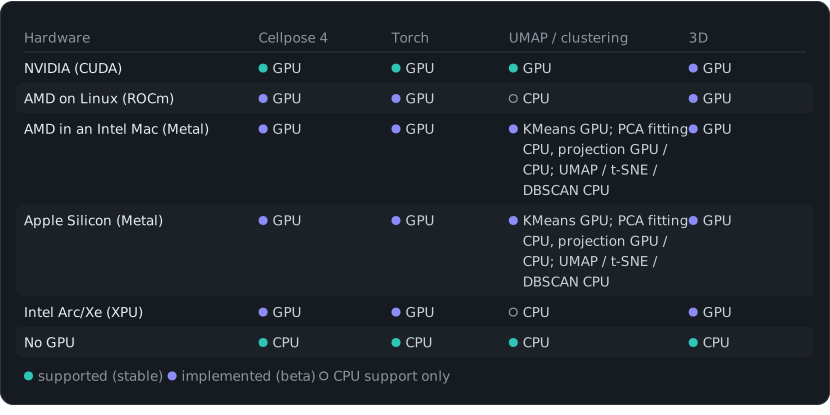
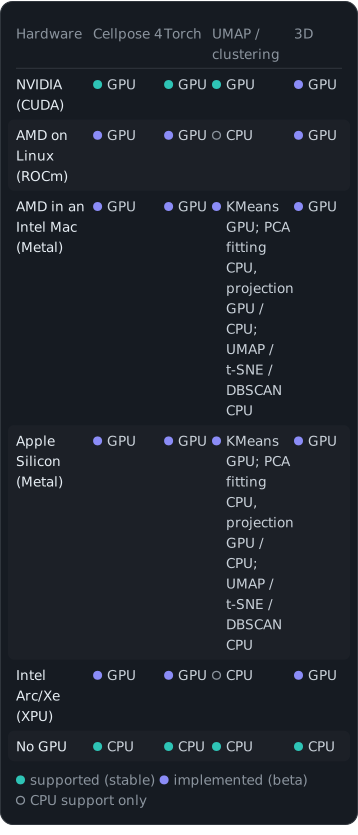
NVIDIA (CUDA): Cellpose 4 GPU, Torch GPU, UMAP / clustering GPU, 3D GPU. AMD on Linux (ROCm): Cellpose 4 GPU, Torch GPU, UMAP / clustering CPU, 3D GPU. AMD in an Intel Mac (Metal): Cellpose 4 GPU, Torch GPU, UMAP / clustering KMeans GPU; PCA fitting CPU, projection GPU / CPU; UMAP / t-SNE / DBSCAN CPU, 3D GPU. Apple Silicon (Metal): Cellpose 4 GPU, Torch GPU, UMAP / clustering KMeans GPU; PCA fitting CPU, projection GPU / CPU; UMAP / t-SNE / DBSCAN CPU, 3D GPU. Intel Arc/Xe (XPU): Cellpose 4 GPU, Torch GPU, UMAP / clustering CPU, 3D GPU. No GPU: Cellpose 4 CPU, Torch CPU, UMAP / clustering CPU, 3D CPU. supported (stable) implemented (beta) CPU support only.
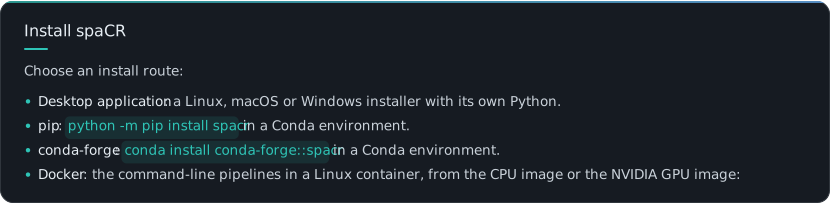
Install spaCR. Choose an install route: Desktop application: a Linux, macOS or Windows installer with its own Python. pip: python -m pip install spacr in a Conda environment. conda-forge: conda install conda-forge::spacr in a Conda environment. Docker: the command-line pipelines in a Linux container, from the CPU image or the NVIDIA GPU image:
docker run --rm ghcr.io/einarolafsson/spacr:1.5.1.6 spacr-run --list
docker run --rm --gpus all ghcr.io/einarolafsson/spacr:1.5.1.6-cuda12.4 spacr-run --list


The Docker guide (nightly, English) covers GPU setup, data mounts and pipeline commands.
Desktop application. The installers bundle their own Python. Conda is not required.
Download spaCR 1.5.1.6 for 64-bit LinuxDownload spaCR 1.5.1.6 for macOS 11+ (Intel and Apple silicon)Download spaCR 1.5.1.6 for Windows 10/11
On Linux, make the downloaded file executable and run it:
chmod +x SpaCR-*-Linux-x86_64-Online.run
./SpaCR-*-Linux-x86_64-Online.run

On macOS, open the .pkg. The current beta is not notarized; if Gatekeeper blocks it, choose System Settings → Privacy & Security → Open Anyway. For installation, updates, reinstallation, uninstallation, offline use and troubleshooting, see the current nightly installer guide (English). See system requirements for workstation and server recommendations and GPU compatibility tables.
current nightly installer guide (English)system requirements
PyPI installation. For the PyPI release, install spaCR with pip inside a Conda environment. Python 3.12 has the widest choice of optional scientific packages:
conda create -n spacr python=3.12 -y
conda activate spacr
python -m pip install --upgrade pip
python -m pip install spacr
spacr

spaCR supports Python 3.9 through 3.14, except Python 3.14.1, which torchvision excludes. Linux is recommended for the heaviest CUDA and ROCm workflows; macOS and Windows are also supported, and both use their GPUs — macOS through Metal, which covers Apple Silicon and the AMD cards in Intel Macs, and Windows through CUDA or DirectML. The standard installation includes the Qt desktop interface. For a server, cluster or CI runner, run the command-line pipelines without opening it:
python -m pip install spacr
spacr-run --list

Optional integrations are installed separately, for example spacr[zarr], spacr[omero], spacr[napari] and spacr[czi,nd2,lif]. See the installation guide (nightly, English) for the complete extras and Python-version compatibility table.
Conda-forge installation. The official conda-forge package installs spaCR and its desktop dependencies into the active environment:
conda create -n spacr python=3.12 -y
conda activate spacr
conda install conda-forge::spacr
spacr

Install from source. Clone the repository and install it in editable mode, so your working copy is the installed package and edits take effect without reinstalling:
git clone https://github.com/EinarOlafsson/spacr.git
cd spacr
conda create -n spacr python=3.12 -y
conda activate spacr
pip install -e .
spacr

This clones main, the default branch, which carries the latest release. Development happens on nightly; add --branch nightly to clone it instead. For a specific release:
git clone --branch v1.5.0.5 https://github.com/EinarOlafsson/spacr.git


To pull later changes, from inside the clone:
git pull
pip install -e .

Reinstall when dependencies or entry points change. Python edits take effect directly; spacr-doctor identifies the active installation.
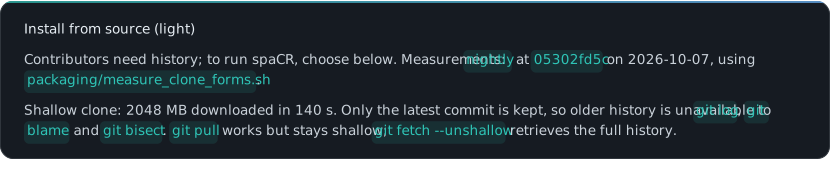
Install from source (light). Contributors need history; to run spaCR, choose below. Measurements: nightly at 05302fd5c on 2026-10-07, using packaging/measure_clone_forms.sh. Shallow clone: 2048 MB downloaded in 140 s. Only the latest commit is kept, so older history is unavailable to git log, git blame and git bisect. git pull works but stays shallow; git fetch --unshallow retrieves the full history.
git clone --depth 1 --branch nightly https://github.com/EinarOlafsson/spacr.git
cd spacr && pip install -e .

Runtime-only checkout: 104 MB on disk in 6 s (Git: 38 MB; files: 66 MB). It omits history, docs, tests, tools, features, example data and extended interface translations. --with-docs, --with-tests and --with-translations retain the corresponding documentation, tests and translations. The compact interface translations remain available.
curl -fsSL https://raw.githubusercontent.com/EinarOlafsson/spacr/nightly/packaging/install_from_source.sh -o install_spacr.sh
sh install_spacr.sh --branch nightly

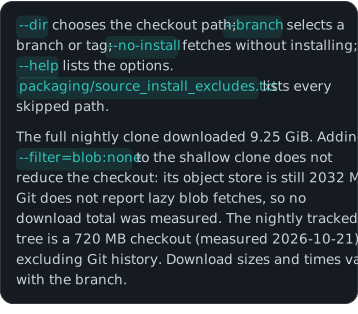

--dir chooses the checkout path; --branch selects a branch or tag; --no-install fetches without installing; --help lists the options. packaging/source_install_excludes.txt lists every skipped path. The full nightly clone downloaded 9.25 GiB. Adding --filter=blob:none to the shallow clone does not reduce the checkout: its object store is still 2032 MB. Git does not report lazy blob fetches, so no download total was measured. The nightly tracked tree is a 720 MB checkout (measured 2026-10-21), excluding Git history. Download sizes and times vary with the branch.
Command-line entry points.
spacr                                      # launch the Qt application
spacr-doctor                               # diagnose the installation
spacr-run --list                           # list headless modules
spacr-run --describe MODULE                # inspect a module contract
spacr-run MODULE --settings settings.csv   # execute a module
spacr-run validate --module MODULE \
    --settings settings.csv                # validate before running
spacr-repro RUN_DIR                        # replay a recorded run
spacr-download --list                      # what example data exists
spacr-download measure annotate            # fetch example sets by name
spacr-make-masks --folder DIR              # curate masks as a resumable queue
spacr-make-masks --folder DIR --order easy --limit 50

spacr-run --list lists modules with headless command-line entry points. GUI-only annotation, curation, comparison and exploration modules are omitted.
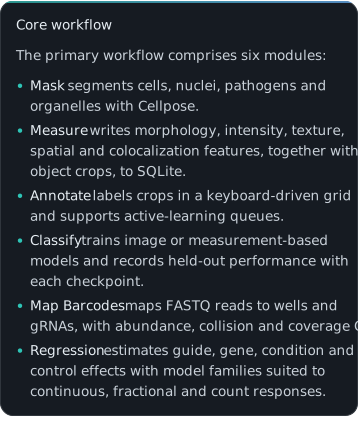
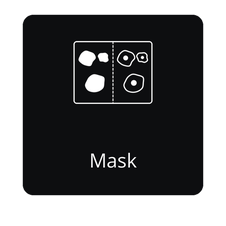
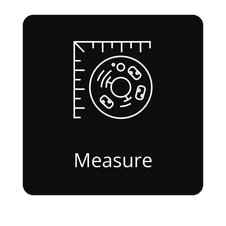
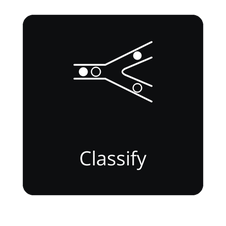
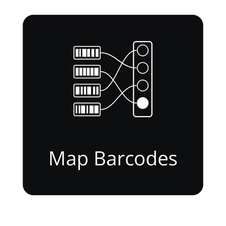
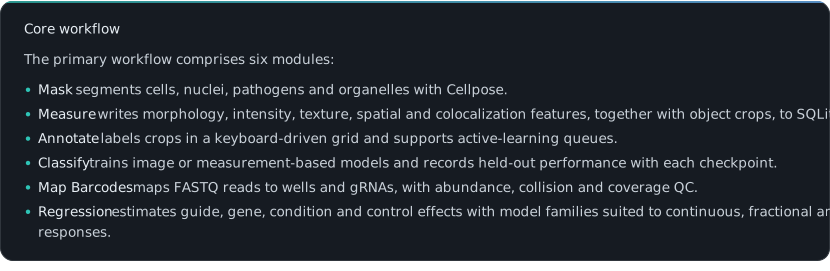
Core workflow. The primary workflow comprises six modules: Mask segments cells, nuclei, pathogens and organelles with Cellpose. Measure writes morphology, intensity, texture, spatial and colocalization features, together with object crops, to SQLite. Annotate labels crops in a keyboard-driven grid and supports active-learning queues. Classify trains image or measurement-based models and records held-out performance with each checkpoint. Map Barcodes maps FASTQ reads to wells and gRNAs, with abundance, collision and coverage QC. Regression estimates guide, gene, condition and control effects with model families suited to continuous, fractional and count responses.
spaCR modules.
spaCR modules.
Core. Core sequence from microscopy images through segmentation, measurements, annotations, classification, barcode mapping and regression.
Open the Mask APIOpen the Measure APIOpen the Annotate APIOpen the Classify APIOpen the Map Barcodes APIOpen the Regression API
Data. Import images and tables into spaCR projects and execute reproducible multi-plate workflows.
Open the Import APIOpen the Embeddings APIOpen the Run Compare APIOpen the Experiment Design APIOpen the Power / Design APIOpen the Dose–Response APIOpen the QC API
Tools. Point these at a project: edit masks by hand, stitch tiles, read an embedding, draw a gate, build a plot, check quality.
Open the Make Masks APIOpen the Align & Stitch APIOpen the Image UMAP APIOpen the Gate Editor APIOpen the Graph Builder API
Organism. Organism-specific image analysis and quantitative assay readouts.
Open the Toxoplasma API
Every module with a Home tile, in Home's order: the six pipeline modules first, then the rest. Select a tile to open that module's API page.
Other resources.
Other resources.
Interactive tutorials — guided workflows from installation through hit investigation.
Python API quickstart — run and validate pipelines from scripts, notebooks or a cluster.
Feature guide — capabilities, maturity and optional integrations.
Curated API reference — supported entry points by task, with the complete module reference one level deeper.
Language & translation guide — interface languages, contextual help and scientific-output policy.
Language & translation. The interface supports ten languages across navigation and Preferences. AI and LIVE controls, module descriptions and reviewed contextual help are also translated. Change the language under spaCR → Preferences → Language without restarting. Logs, paths, database values and measurements are never translated; scientific output remains canonical English. See the contextual-help policy.
Animated setting guidance. Settings with a visual explanation offer an Animation control in their tooltip. Browse the setting animation gallery or the Setting animation registry.
setting animation gallerySetting animation registry
Data. Reference datasets.
Open the BioStudies microscopy datasetOpen the Hugging Face testing datasetOpen the NCBI sequencing datasetOpen spaCRPowerOpen the bioRxiv preprint
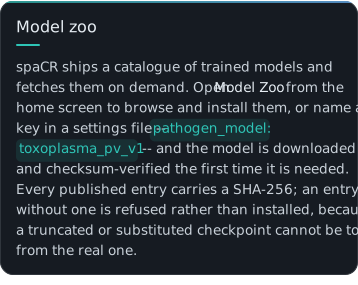
Model zoo. spaCR ships a catalogue of trained models and fetches them on demand. Open Model Zoo from the home screen to browse and install them, or name a key in a settings file -- pathogen_model: toxoplasma_pv_v1 -- and the model is downloaded and checksum-verified the first time it is needed. Every published entry carries a SHA-256; an entry without one is refused rather than installed, because a truncated or substituted checkpoint cannot be told from the real one.
Default models · held-out scores
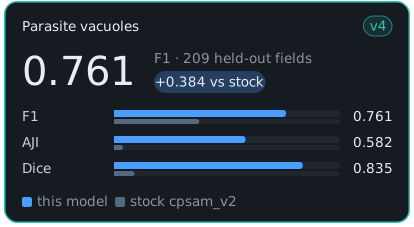
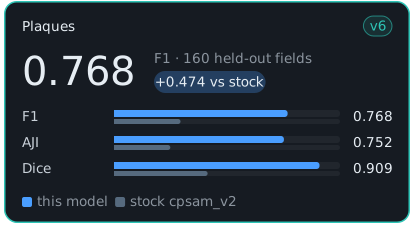
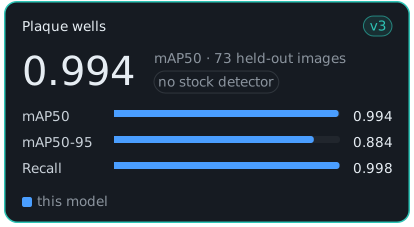
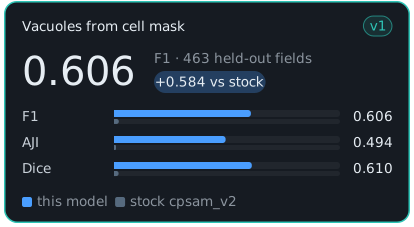
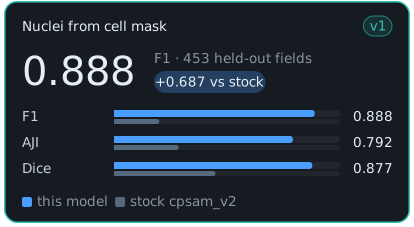
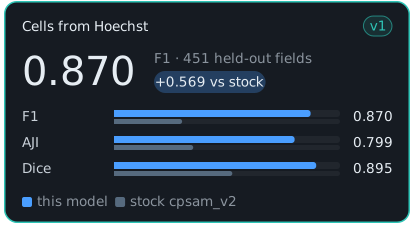
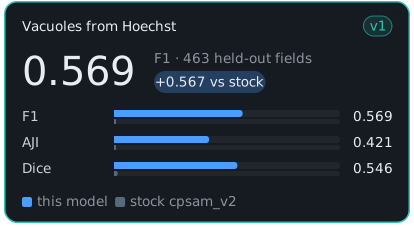
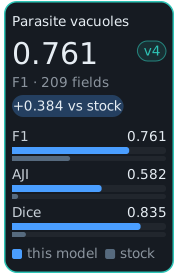
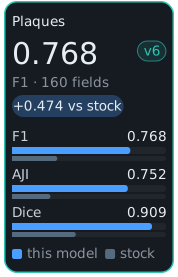
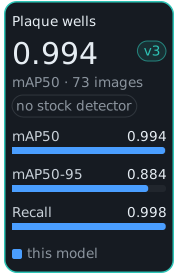
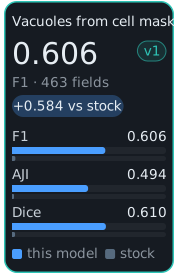
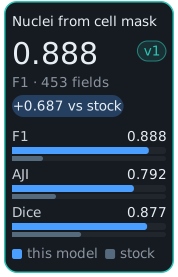
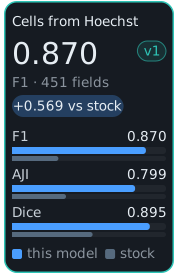
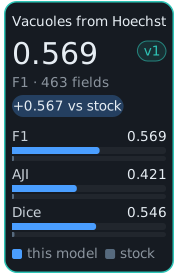
Score card of Parasite vacuoles v4 (toxoplasma_pv_v4, default): F1 0.761 on 209 held-out fields against 0.377 for stock cpsam_v2. F1 0.761 against stock cpsam_v2's 0.377 on the 209 strict hold-out fields at IoU 0.5; AJI 0.582 against 0.040.Score card of Plaques v6 (toxoplasma_plaque_v6, default): F1 0.768 on 160 held-out fields against 0.294 for stock cpsam_v2. F1 0.768 against stock cpsam_v2's 0.294 on the 160 strict hold-out fields at IoU 0.5; AJI 0.752 against 0.249.Score card of Plaque wells v3 (toxoplasma_well_detector_v3, default): mAP50 0.994 on 73 held-out images. Stock was not evaluated in this run; see the named incumbent comparison on the model card.Score card of Vacuoles from cell mask v1 (toxoplasma_from_cellmask_v1, default): F1 0.606 on 463 held-out fields against 0.021 for stock cpsam_v2. F1 0.606 against 0.021 for stock cpsam_v2 on 463 well-grouped held-out fields, at IoU 0.5.Score card of Nuclei from cell mask v1 (nuclei_from_cellmask_v1, default): F1 0.888 on 453 held-out fields against 0.201 for stock cpsam_v2. F1 0.888 against 0.201 for stock cpsam_v2 on 453 well-grouped held-out fields, at IoU 0.5.Score card of Cells from Hoechst v1 (cell_from_hoechst_v1, default): F1 0.870 on 451 held-out fields against 0.301 for stock cpsam_v2. F1 0.870 against stock cpsam_v2's 0.301 on 451 held-out fields at IoU 0.5 -- a delta of 0.569.Score card of Vacuoles from Hoechst v1 (toxoplasma_from_hoechst_v1, default): F1 0.569 on 463 held-out fields against 0.002 for stock cpsam_v2. F1 0.569 against 0.002 for stock cpsam_v2 on 463 well-grouped held-out fields, at IoU 0.5.




Older models.
Older models.
toxoplasma_pv_v3toxoplasma_pv_v2toxoplasma_pv_v1toxoplasma_plaque_v5toxoplasma_plaque_v4toxoplasma_plaque_v2toxoplasma_plaque_v1toxoplasma_well_detector_v2toxoplasma_well_detector_v1
Alternatives.
Alternatives.
toxoplasma_pv_v5toxoplasma_plaque_v3live_cell_v1
Mask generator
Mask generator
Diagnosing performance. Generate a hardware report and attach it to a performance-related issue:
python tools/spacr_hardware_report.py

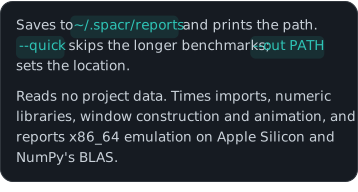
Saves to ~/.spacr/reports and prints the path. --quick skips the longer benchmarks; --out PATH sets the location. Reads no project data. Times imports, numeric libraries, window construction and animation, and reports x86_64 emulation on Apple Silicon and NumPy's BLAS.
Command-line reference. Every command below is installed by pip install spacr. All of them accept --help.
Launching the application.
spacr              # the desktop application
spacr-nav
spacr-navigator
spacr-tutorial     # the interactive tutorial library
spacr-server       # no first-run setup screen, for unattended launches


When spaCR will not start.
spacr-doctor       # diagnose the installation and say how to fix it
safespacr          # the least spaCR that can still change a setting

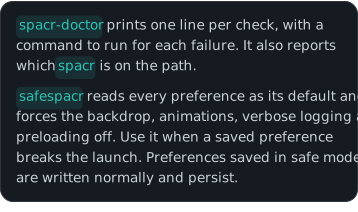

spacr-doctor prints one line per check, with a command to run for each failure. It also reports which spacr is on the path. safespacr reads every preference as its default and forces the backdrop, animations, verbose logging and preloading off. Use it when a saved preference breaks the launch. Preferences saved in safe mode are written normally and persist.
Running modules headlessly. No Qt, no display — for clusters, servers and CI.
spacr-run --list                              # modules with a headless entry
spacr-run --describe MODULE                   # what a module consumes and produces
spacr-run validate --module MODULE \
    --settings settings.csv                   # check settings before spending the run
spacr-run MODULE --settings settings.csv      # execute
spacr-remote --help                           # submit and monitor SSH, Slurm or cloud jobs

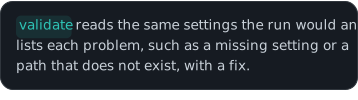

validate reads the same settings the run would and lists each problem, such as a missing setting or a path that does not exist, with a fix.
Inspecting a run. Every run is journalled to ~/.spacr/runs with its settings, hashed inputs, outputs, warnings, versions and seeds.
spacr-repro RUN_DIR        # replay a recorded run from its journal
spacr-workspace RUN_DIR    # what that run had open: databases, montages, views


Auditing data and installation.
spacr-db-audit DB      # SQLite health, integrity, locking, reader/writer probe
spacr-leakage          # classifier train/test leakage audit
spacr-plugins          # installed plugin registry and failure diagnostics


Environment.
Environment.
SPACR_LOG_LEVEL=DEBUG spacr      # verbose logging for one launch

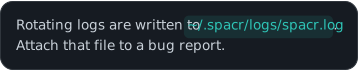
Rotating logs are written to ~/.spacr/logs/spacr.log. Attach that file to a bug report.
Contributing and support. Submit bug reports and focused feature requests through GitHub Issues. When reporting a failure, include the spaCR version, operating system, Python version, module settings and the relevant log excerpt. spacr-doctor collects most of this information; include the hardware report when reporting performance problems.
Licensing. New original spaCR material is licensed under the BSD 3-Clause with additional terms. Commercial use requires separate written permission; contact olafsson@med.umich.com. Earlier BSD grants and third-party licenses remain in effect; see LICENSE for scope and notices.
BSD 3-Clause with additional termsolafsson@med.umich.com
If spaCR contributed to published work, a citation is appreciated and is not a condition of the licence — see Citing spaCR below.
Tutorials. The interactive spaCR tutorial library provides installation and module walkthroughs. Available narration and languages are listed for each lesson.
Citing spaCR. If spaCR contributes to your research, cite: Olafsson EB, et al. A pooled image-based CRISPR screen identifies EAF1 as a T. gondii modulator of ESCRT subversion.
bioRxiv preprintsoftware archive
Other work citing spaCR.
Metabolic adaptability and nutrient scavenging in Toxoplasma gondii: insights from ingestion pathway-deficient mutants.
IRE1α promotes phagosomal calcium flux to enhance macrophage fungicidal activity.
Toxoplasma GRA8 engages the host ESCRT accessory protein ALG-2 and is necessary for parasite metabolic integrity.
Hydrogen sulfide dynamically upregulates copper uptake and localization.
spaCR: Spatial phenotype analysis of CRISPR-Cas9 screens (preprint version 1).
Acknowledgments. spaCR builds on open scientific software including NumPy, pandas, scikit-image, scikit-learn, Cellpose, PyTorch and Qt.

Metadata

Release files for spacr 1.5.1.6

For a detailed explanation of source distributions (sdists) and built distributions (wheels), please see the package formats documentation.

Source distribution (sdist)

Source distribution for spacr 1.5.1.6
File Size Uploaded Provenance Actions
spacr-1.5.1.6.tar.gz 60.0 MB With provenance Details for spacr-1.5.1.6.tar.gz

Built distribution (wheel)

Table of built distributions (wheels) for spacr 1.5.1.6
File Interpreter ABI Platform Actions
spacr-1.5.1.6-py3-none-any.whl Python 3 none any Details for spacr-1.5.1.6-py3-none-any.whl

Total release size: 110.2 MB

Release files / spacr-1.5.1.6.tar.gz

Download URL spacr-1.5.1.6.tar.gz
Size 60.0 MB
Tags Source
SHA-256 checksum
How to use checksums
b74115ddff22f8e61f0aaed227872051f2cfcc002a5a37e5606a3166a7b6352b
BLAKE2b-256 checksum
How to use checksums
bfbb7d18b5044b4529b0d4fe11d83be262689b4f903524f66b57eb4b87f9f018
Upload date
Uploaded using Trusted Publishing?
What is trusted publishing?
Yes
Uploaded via twine/7.0.0 CPython/3.13.16

Provenance

Provenance describes where a file came from. On PyPI, provenance is shared via attestations, which provide a verifiable record of the build or publishing details. View details, limitations and caveats.

PyPI Publish Attestation

PyPI verified that this artifact, at this checksum, originated from the publisher listed below.

Signed by GitHub Actions, verified by PyPI on Oct 29, 2026.

Transparency log

Release files / spacr-1.5.1.6-py3-none-any.whl

Download URL spacr-1.5.1.6-py3-none-any.whl
Size 50.2 MB
Tags Python 3
SHA-256 checksum
How to use checksums
f29e4b6ae0060aa0b4fba26c967b5b0e4fdcaa2fe316f7dd67f9d403ba78e88b
BLAKE2b-256 checksum
How to use checksums
e2235284bea69687b939f49adbe4d3fd3ddc9ff76a4e2f01f7a7fd984f97edf5
Upload date
Uploaded using Trusted Publishing?
What is trusted publishing?
Yes
Uploaded via twine/7.0.0 CPython/3.13.16

Provenance

Provenance describes where a file came from. On PyPI, provenance is shared via attestations, which provide a verifiable record of the build or publishing details. View details, limitations and caveats.

PyPI Publish Attestation

PyPI verified that this artifact, at this checksum, originated from the publisher listed below.

Signed by GitHub Actions, verified by PyPI on Oct 29, 2026.

Transparency log

Security for spacr 1.5.1.6

Provenance

Provenance describes where a file came from. On PyPI, provenance is shared via attestations, which provide a verifiable record of the build or publishing details. View details, limitations and caveats.

Full provenance

All 2 files in this release have been uploaded with provenance metadata.

Select from 2 files

Attestation for spacr-1.5.1.6.tar.gz

PyPI Publish Attestation

PyPI verified that this artifact, at this checksum, originated from the publisher listed below.

Signed by GitHub Actions, verified by PyPI on Oct 29, 2026.

Transparency log

A note on package security

PyPI is a repository for distributing packages, not a service for auditing them. While third-party security researchers and our staff do their best to detect and remove malicious packages, PyPI cannot guarantee the quality, security or suitability of any given package.

To learn more about protecting yourself from malicious actors, visit our package security documentation.

Release history Release notifications | RSS feed

This release

1.5.1.6 This release

2 release files Full provenance

Anthropic, PBC Visionary sponsor Bloomberg Visionary sponsor Hudson River Trading Visionary sponsor Meta Visionary sponsor NVIDIA Visionary sponsor Microsoft Sustainability sponsor Depot Continuous Integration AWS Cloud computing and Security Sponsor Datadog Monitoring Fastly CDN Google Download Analytics Sentry Error logging StatusPage Status page