
TenTags 🏷️



TenTags is a declarative template language and Intermediate Representation (IR) for HTML, Excel (.xlsx), PDF, and Word (.docx) table and document generation.
🚀 Current Release: 2.5.1
TenTags 2.5.1 restores independent closing order for style tags, including
style intervals that cross cell boundaries, while keeping structural
<url>, <cm>, and <rm> blocks strictly nested. Python 3.9 or newer is
required.
Install
pip install tentags
The original compact TenTags syntax can describe and render a complete table in one line:
import tentags

formula = '2,3,1,"#cbd5e1","solid-1",0,28,data(Product,Q1 Sales,Status;Laptops,<right>12000</right>,<center>Excellent</center>)'
html = tentags.render(formula)
Start Here: The Three Blocks
TenTags syntax is intentionally small. A table is described by only three blocks:
preamble
style(...)
data(...)
Geometry / Presentation / Content
These three blocks have separate responsibilities:
Geometry      -> preamble + scale(...)
Presentation  -> style(...)
Content       -> data(...)
| Layer | TenTags block | Responsibility |
|---|---|---|
| Geometry | preamble, including optional scale(...) |
Defines table topology, borders, stretching, base row height, and relative row and column proportions. |
| Presentation | style(...) |
Defines colors, typography, alignment, merging, and other visual appearance. |
| Content | data(...) |
Defines text, images, links, marks, values, and their positions in the logical grid. |
This separation keeps the document model declarative and renderer-independent. For example, scale(C1=1,5) means that column C should be the widest relative column; it does not encode an HTML percentage, an XLSX width, or a PDF point value. Each renderer maps the same logical geometry to its own physical format.
The recommended form is:
import tentags

preamble = '3,3,1,"#cbd5e1","solid-1",0,28'

style = """style(
<center>
<bg=blue><color=white><b>, , </b></color></bg>;
<bg=white>, </bg>, <bg=green></bg>;
<bg=#f8fafc>, </bg>, <bg=yellow></bg>
</center>
)"""

data = """data(
Product, Q1 Sales, Status;
Laptops, <right>12000</right>, <center>Excellent</center>;
Headphones, <right>3500</right>, <center>Good</center>
)"""

model = tentags.compile(preamble, style, data)
The same compiled model can be rendered to HTML, XLSX, or PDF.
1. Preamble
The preamble is the first line of a TenTags table. It defines the shape and global grid settings.
rows, cols, border_width, "border_color", "border_style", stretch, cell_height [, scale(...)]
Example:
3,3,1,"#cbd5e1","solid-1",0,28
| Position | Argument | Meaning |
|---|---|---|
| 1 | rows |
Number of table rows. |
| 2 | cols |
Number of table columns. |
| 3 | border_width |
Border width in pixels. |
| 4 | border_color |
Border color. You can use names such as "blue" or HEX such as "#cbd5e1". |
| 5 | border_style |
solid, dashed, dotted; suffix -1 enables inner grid borders, suffix -0 hides borders. |
| 6 | stretch |
0 keeps fixed row height, 1 allows cells to stretch. |
| 7 | cell_height |
Default row height in pixels. |
| Extension | scale(...) |
Optional relative row and column scaling for this table. |
The first two arguments must match your table grid. For example, 3,3,... means that style(...) and data(...) should each describe 3 rows and 3 columns.
Relative Grid Scale
scale(...) is an optional named part of the preamble:
5,4,1,"black","solid-1",0,28,scale(A1=1,3;C5=2,2)
Each entry has the form:
CellAddress=VerticalScale,HorizontalScale
Although the syntax uses A1 cell addresses, scale belongs to the logical grid, not to an individual cell. A1=1,3 applies vertical scale 1 to row 1 and horizontal scale 3 to column A.
In other words, the cell address selects two grid axes:
A1=2,3
   | |
   | +-- column A width = standard width x 3
   +---- row 1 height   = standard height x 2
The dimensions apply to the complete row and column. TenTags does not create a private width or height for only cell A1.
Only integer values from 1 to 5 are valid. 1 means the standard size. If several entries address the same row or column, TenTags takes the maximum value separately for each axis:
scale(A1=1,2;A3=3,1;A5=2,5)

Rows:    1=1, 3=3, 5=2
Column:  A=max(2,1,5)=5
Addresses must point to cells inside the current table. Ranges, marks, and external addresses are not allowed. With stretch=0, vertical scale multiplies the fixed cell_height. With stretch=1, it is a minimum/preferred row height and content may expand the row. Horizontal scale is mapped to renderer-native relative column widths. A vertical value greater than 1 requires cell_height greater than 0.
Renderer behavior is consistent at the logical level:
| Renderer | Horizontal scale | Vertical scale |
|---|---|---|
| HTML | Relative <colgroup> widths |
Row height or minimum content height |
| XLSX | Worksheet column widths | Worksheet row heights |
| Relative ReportLab table widths | PDF table row heights |
You can also generate the same preamble from Python structures:
preamble = tentags.serialize.preamble(
    5,
    4,
    border_color="black",
    border_style="solid-1",
    cell_height=28,
    scale={
        "A1": (1, 3),
        "C5": (2, 2),
    },
)
This produces exactly:
5,4,1,"black","solid-1",0,28,scale(A1=1,3;C5=2,2)
2. Style Block
The style(...) block describes presentation: background colors, text colors, font weight, alignment, merges, and other visual rules.
Rows are separated by semicolons (;). Columns are separated by commas (,):
style(
row1_col1, row1_col2, row1_col3;
row2_col1, row2_col2, row2_col3;
row3_col1, row3_col2, row3_col3
)
Example:
style = """style(
<center>
<bg=blue><color=white><b>, , </b></color></bg>;
<bg=white>, </bg>, <bg=green></bg>;
<bg=#f8fafc>, </bg>, <bg=yellow></bg>
</center>
)"""
TenTags tags are not limited to one cell. A tag remains active until its closing tag:
<center>is opened once before the first row and closed after the last row, so it applies to the whole table.<bg=blue>,<color=white>, and<b>are opened in the first cell and closed in the last cell of the first row, so they apply to that entire row.<bg=white>and<bg=#f8fafc>span the first two cells of their rows; the last cell receives its own background.
This is usually clearer and more compact than repeating the same complete tag in every cell.
TenTags supports the following color names:
black, white, red, green, blue, yellow,
gray, grey, silver, maroon, purple, fuchsia,
lime, olive, navy, teal, aqua, orange
Names are case-insensitive. gray and grey are aliases for the same color. Any other color can be written as an exact three- or six-digit HEX value, for example #fff, #1977ff, or #f8fafc.
In style(...), a cell may contain only tags and no text. That is normal:
<left><u><bg=#eff6ff></bg></u></left>
This still counts as a real style cell because it carries presentation for the matching data(...) cell.
3. Tags
Tags can be used in style(...) and data(...). In style(...), tags usually describe presentation for a cell. In data(...), tags usually wrap real content.
| Tag | Meaning | Example |
|---|---|---|
<b>...</b> |
Bold text. | <b>Total</b> |
<i>...</i> |
Italic text. | <i>Pending</i> |
<u>...</u> |
Underlined text. | <u>Open</u> |
<s>...</s> |
Strikethrough text. | <s>Cancelled</s> |
<fs=...> |
Font size. | <fs=16>Title</fs> |
<left> |
Left alignment. | <left>Name</left> |
<center> |
Center alignment. | <center>Status</center> |
<right> |
Right alignment. | <right>12000</right> |
<color=...> |
Text color. | <color=green>OK</color> |
<bg=...> |
Cell background. | <bg=yellow>Review</bg> |
<cm>...</cm> |
Create a native column merge. The top-left cell is the physical master; if empty, it displays the first following non-empty payload. | <cm>, Quarterly total, </cm> |
<rm>...</rm> |
Create a native row merge. The top-left cell is the physical master; if empty, it displays the first following non-empty payload. | <rm></rm> followed by <rm>Section</rm> |
<url=...>...</url> |
Link or navigation target. | <url=https://tentags.org>Site</url> |
<mark=...> |
Single tag that marks the current cell. | <mark=Summary><b>Total</b> |
<url=goto:...>...</url> |
Navigates to a marked cell or address. | <url=goto:Summary>Go to total</url> |
<img src=... w=... h=... m=...> |
Single image tag. w, h, and m are per-image pixel values; m means margin on all sides. h=auto calculates height from the supplied w and source proportions. |
<img src=logo.png w=120 h=auto m=15> |
<value=...> |
Insert value from a local cell or mark. | <value=B2> |
<br> |
Insert a hard line break inside the current cell. Consecutive tags create empty lines. | First line<br><br>Third line |
Single tags such as <mark=...>, <img ...>, <value=...>, and <br> are not closed.
wrap remains an automatic soft wrap when a cell is narrow. <br> is an explicit hard break and is rendered natively as <br> in HTML, \n with wrapped text in XLSX, a ReportLab line break in PDF, and a Word line break in DOCX.
Local paths and HTTP(S) image sources are embedded in PDF and XLSX output. Remote images are limited to 20 MB. XLSX images use openpyxl's standard drawing anchor over the worksheet grid.
PDF image layout follows the table geometry. Values such as w=120 and m=15 are examples, not constants: every image uses its own attributes. With stretch=1 and no scale affecting the image row or column, the cell expands naturally to the requested image size plus m on all sides. With stretch=0 or an applicable row/column scale, that geometry takes priority: PDF reserves the requested margin and proportionally fits the image into the remaining area. Row scale multiplies cell_height; column scale determines the relative PDF column width. If both limits apply, the stricter proportional limit is used. Images are never enlarged beyond their requested w/h dimensions.
Wrap an image in <url> to make it clickable. HTML wraps the native image in an anchor, PDF creates a link over the image cell including its margin, and XLSX assigns the hyperlink to the underlying worksheet cell:
<url=https://pycells.com><img src=https://pycells.com/assets/img/PyCells_mds.png w=100 h=auto m=15></url>
Internal image navigation uses the same goto: syntax:
<url=goto:Summary><img src=summary.png w=100 h=auto m=10></url>
4. Data Block
The data(...) block describes the actual table content. It uses the same grid rules as style(...):
data(
row1_col1, row1_col2, row1_col3;
row2_col1, row2_col2, row2_col3;
row3_col1, row3_col2, row3_col3
)
Example:
data = """data(
Product, Q1 Sales, Status;
Laptops, <right>12000</right>, <center>Excellent</center>;
Headphones, <right>3500</right>, <center>Good</center>
)"""
The first value goes to cell A1, the second to B1, the third to C1. After ;, the next row starts: A2, B2, C2, and so on.
For every explicit table:
preamble rows == style rows == data rows
preamble cols == style cols == data cols
5. One-Line Formula
TenTags also supports the original compact form: preamble and data(...) in one formula string.
import tentags

formula = '2,3,1,"#cbd5e1","solid-1",0,28,data(Product,Q1 Sales,Status;Laptops,<right>12000</right>,<center>Excellent</center>)'

model = tentags.parse(formula)
html = tentags.render_html(model)
The same formula can be written across several lines for readability:
formula = '''2,3,1,"#cbd5e1","solid-1",0,28,data(
Product, Q1 Sales, Status;
Laptops, <right>12000</right>, <center>Excellent</center>
)'''

model = tentags.parse(formula)
The separated preamble, style(...), and data(...) form is recommended for larger tables because styles and data are easier to maintain independently.
6. Render One Table To Files
import tentags

preamble = '3,3,1,"#cbd5e1","solid-1",0,28'

style = """style(
<center>
<bg=blue><color=white><b>, , </b></color></bg>;
<bg=white>, </bg>, <bg=green></bg>;
<bg=#f8fafc>, </bg>, <bg=yellow></bg>
</center>
)"""

data = """data(
Product, Q1 Sales, Status;
Laptops, <right>12000</right>, <center>Excellent</center>;
Headphones, <right>3500</right>, <center>Good</center>
)"""

model = tentags.compile(preamble, style, data)

html = tentags.render_html(model)
with open("sales_report.html", "w", encoding="utf-8") as f:
    f.write(html)

tentags.render_xlsx(model, "sales_report.xlsx")
tentags.render_pdf(model, "sales_report.pdf")
7. Use Data From A Database
TenTags does not need SQL, loops, or business logic inside the DSL. Use Python for data preparation, then serialize rows into TenTags.
import sqlite3
import tentags

conn = sqlite3.connect(":memory:")
conn.execute("CREATE TABLE sales (product TEXT, q1 INT, status TEXT)")
conn.executemany(
    "INSERT INTO sales VALUES (?, ?, ?)",
    [
        ("Laptops", 12000, "Excellent"),
        ("Smartphones", 24000, "Excellent"),
        ("Headphones", 3500, "Good"),
    ],
)

records = conn.execute("SELECT product, q1, status FROM sales").fetchall()

data_rows = [["Product", "Q1 Sales", "Status"]]
style_rows = [[
    "<bg=blue><color=white><b></b></color></bg>",
    "<bg=blue><color=white><right><b></b></right></color></bg>",
    "<bg=blue><color=white><center><b></b></center></color></bg>",
]]

for product, q1, status in records:
    status_bg = "green" if status == "Excellent" else "yellow"
    data_rows.append([
        product,
        q1,
        status,
    ])
    style_rows.append([
        "<bg=white></bg>",
        "<bg=white><right></right></bg>",
        f"<bg={status_bg}><center></center></bg>",
    ])

preamble = tentags.serialize.preamble(
    len(data_rows),
    3,
    border_color="#cbd5e1",
    border_style="solid-1",
    cell_height=28,
)
style = tentags.serialize.style(style_rows, expected_rows=len(data_rows), expected_cols=3)
data = tentags.serialize.data(data_rows, expected_rows=len(data_rows), expected_cols=3)

model = tentags.compile(preamble, style, data)
tentags.render_xlsx(model, "sales_from_db.xlsx")
The important separation is:
Python data -> TenTags DSL -> compile() -> IR -> HTML/PDF/XLSX
8. What Comes Next
After the basic three-block structure, TenTags also supports:
- MultiTable reports: several separate tables/lists in one HTML, XLSX, or PDF output.
- Addressing with
Table!List!A1,Table!List!A1:B3, andTable!List!Summary. - Navigation with
<mark=Summary>and<url=goto:Table!List!Summary>Open</url>. - Framework integrations for Django, Flask, FastAPI, and Jinja2.
- LLM bootstrap prompt through
tentags.get_prompt().
Design Principle
A new TenTags tag may be added only if all three conditions are true:
- It can be interpreted consistently by all renderers.
- It belongs to the logical document model, not to one renderer's physical representation.
- It cannot be expressed cleanly with existing TenTags primitives.
This keeps TenTags compact, predictable, and renderer-independent.
Dependencies
The TenTags parser, compiler, DSL, and Intermediate Representation are implemented by TenTags itself. The core uses the Python Standard Library; established open-source libraries are used only as optional output backends.
| Component | Purpose |
|---|---|
| Python Standard Library | Core implementation |
| openpyxl | Excel (.xlsx) rendering |
| ReportLab Open Source Toolkit | PDF rendering |
TenTags provides the document model and rendering logic; openpyxl and ReportLab write the already compiled IR to their target file formats.
📦 Installation
Install from PyPI via pip:
pip install tentags
🎨 Advanced Example: Beautiful Styled Table & Merges
Here is how a single, clean TenTags expression generates an enterprise-grade financial dashboard table featuring visually grouped headers (<cm>), custom font sizing (<fs>), cell background colors (<bg=>), text alignment (<left>, <right>), and custom typography (<b>, <i>, <color=>) across HTML, Excel, and PDF:
import tentags

# Define an advanced 4x4 styled financial performance grid using clean empty elements (, ,) inside merges
formula = '''4,4,1,"#cbd5e1","solid",0,45, data(
    <fs=18><bg=#1e293b><color=white><b><cm>Q3 Financial Performance Dashboard, , , , </cm></b></color></bg></fs>;
    <bg=#f1f5f9><b><left>Department</left></b></bg>, <bg=#f1f5f9><b><center>Revenue</center></b></bg>, <bg=#f1f5f9><b><center>Expenses</center></b></bg>, <bg=#f1f5f9><b><center>Net Profit</center></b></bg>;
    <left>Engineering</left>, <right>"$240,000"</right>, <right>"$180,000"</right>, <bg=#dcfce7><color=#166534><b><right>"+$60,000"</right></b></color></bg>;
    <left>Sales & Marketing</left>, <right>"$310,000"</right>, <right>"$210,000"</right>, <bg=#dcfce7><color=#166534><b><right>"+$100,000"</right></b></color></bg>
)'''

# Compile IR once — render to any backend
model = tentags.parse(formula)

# 1. Export to native Excel (.xlsx) with exact fonts, fills, and grid visibility
tentags.render_xlsx(model, "Q3_Financial_Dashboard.xlsx")

# 2. Export to vector PDF (.pdf) via ReportLab
tentags.render_pdf(model, "Q3_Financial_Dashboard.pdf")

# 3. Render to responsive HTML string with inline CSS
html_table = tentags.render_html(model)
print(html_table)
📋 Visual Structure & Styling Result:

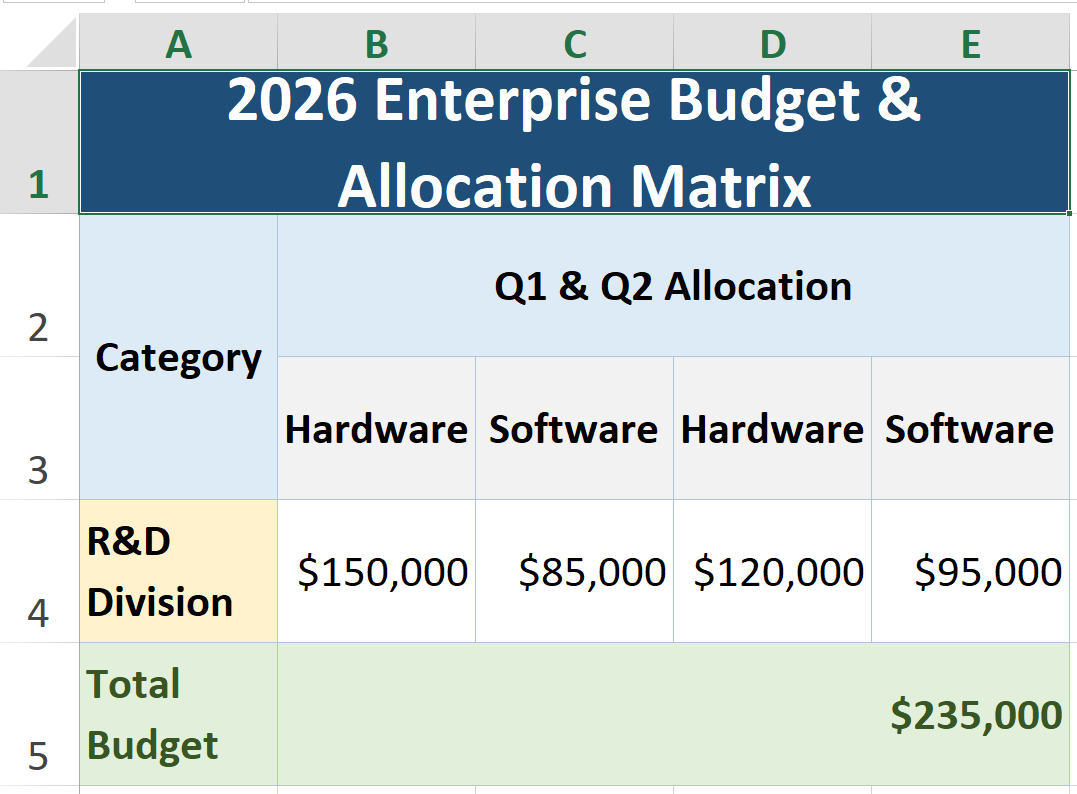
📊 Excel Matrix Example: Row Groups (<rm>), Column Groups (<cm>) & Colors
To see how TenTags shines as a native Excel spreadsheet generator, here is a 5x5 Enterprise Allocation Matrix utilizing native row merges (<rm>), column merges (<cm>), clean empty elements ( , , ), and classic Microsoft Excel color palettes (#1F4E78, #DDEBF7, #E2EFDA, #FFF2CC). The top-left cell remains the physical merge master; when it is empty, TenTags promotes the first following non-empty payload for display:
import tentags

# Define an Excel matrix with vertical row groups (<rm>) and horizontal column groups (<cm>)
excel_formula = '''5,5,1,"#B0C4DE","solid",0,35, data(
    <fs=16><bg=#1F4E78><color=white><b><cm>2026 Enterprise Budget & Allocation Matrix, , , , </cm></b></color></bg></fs>;
    <bg=#DDEBF7><b><rm><center>Category</center></rm></b></bg>, <bg=#DDEBF7><b><cm><center>Q1 & Q2 Allocation, </center></cm></b></bg>, <bg=#DDEBF7><b><cm><center>Q3 & Q4 Allocation, </center></cm></b></bg>;
    <bg=#DDEBF7><b><rm> </rm></b></bg>, <bg=#F2F2F2><b><center>Hardware</center></b></bg>, <bg=#F2F2F2><b><center>Software</center></b></bg>, <bg=#F2F2F2><b><center>Hardware</center></b></bg>, <bg=#F2F2F2><b><center>Software</center></b></bg>;
    <bg=#FFF2CC><b><left>R&D Division</left></b></bg>, <right>"$150,000"</right>, <right>"$85,000"</right>, <right>"$120,000"</right>, <right>"$95,000"</right>;
    <bg=#E2EFDA><color=#375623><b><left>Total Budget</left></b></color></bg>, <bg=#E2EFDA><color=#375623><b><cm><right>"$235,000", </right></cm></b></color></bg>, <bg=#E2EFDA><color=#375623><b><cm><right>"+$215,000", </right></cm></b></color></bg>
)'''

# Compile IR once — export to all three backends
model = tentags.parse(excel_formula)

# Export to native Excel (.xlsx)
tentags.render_xlsx(model, "Enterprise_Budget_Matrix.xlsx")

# Export to vector PDF (.pdf)
tentags.render_pdf(model, "Enterprise_Budget_Matrix.pdf")
🗓️ Visual Spreadsheet Grid Structure (A1:E5):
🛠️ API Reference
Module Constants & Metadata
tentags.__version__: Library version string (e.g.,'2.5.1').tentags.version_info: Version tuple for checking compatibility (e.g.,(2, 5, 1)).tentags.__author__: Author name ('Zhandos Mambetali').tentags.__license__: Project license ('Apache-2.0').tentags.__homepage__: Link to home website ('https://tentags.org').tentags.__url__: Canonical library URL ('https://tentags.org').tentags.__copyright__: Copyright notice ('Copyright (c) 2026 Zhandos Mambetali').
Diagnostic & Utility Helpers
tentags.info() -> None
Prints the package version, author, license, website, Python version, and availability of the HTML, PDF, and XLSX renderers.
tentags.features() -> dict
Checks the availability of optional rendering backends. Returns a dictionary:
{
    "html": True,
    "pdf": True,   # True if reportlab is installed
    "xlsx": True   # True if openpyxl is installed
}
tentags.get_prompt(print_output: bool = False) -> str
Returns the bundled LLM bootstrap prompt for teaching another model how to work with TenTags. Pass print_output=True to also print it:
import tentags

prompt = tentags.get_prompt()
tentags.get_prompt(print_output=True)
tentags.validate(formula: str) -> dict
Syntactically checks a TenTags formula's layout configuration and markup tag balance. Returns a status dictionary:
- Success:
{"status": "ok", "message": "Syntax OK"} - Failure:
{"status": "error", "message": "Missing closing tag </b>..."}
tentags.demo(name: str = "dashboard") -> None
Generates an HTML demo in the current directory and XLSX/PDF files when the corresponding optional backends are installed.
Supported templates: 'dashboard', 'invoice', 'table'. Example:
import tentags
tentags.demo("invoice") # Generates HTML, XLSX, and PDF invoices on the fly
Core API Functions
tentags.render(preamble_or_formula, style=None, data=None, context=None) -> str
Renders either a complete formula or decoupled preamble, style, and data blocks to a <table>...</table> HTML string.
preamble_or_formula: A complete formula such as'rows, cols, border_width, "border_color", "border_style", stretch, cell_height, data(...)', or a preamble used withstyleanddata.style: Optionalstyle(...)block for decoupled rendering.data: Optionaldata(...)block for decoupled rendering.context: Optional dictionary of variable names and their replacement values ({'VarName': 'Value'}).
tentags.parse(formula: str, context: dict = None) -> TableModel
Parses the formula into a structured TableModel instance containing 2D cell grids (CellDesc), BorderFlags, and styles without generating HTML.
tentags.compile(preamble, style, data, context: dict = None) -> TableModel
Builds a TableModel from decoupled preamble, style, and data blocks. Each block may be a TenTags string or a parsed cell grid.
Serializer API
The Serializer API converts ordinary Python structures into canonical TenTags DSL strings. It does not create IR and it does not replace the DSL: compile(preamble, style, data) remains the compiler entry point.
The canonical namespace is tentags.serialize. Top-level dumps_preamble(), dumps_style(), and dumps_data() remain available as compatible convenience aliases.
serialize.data() treats every ordinary Python value as untrusted content. It
quotes delimiters, backslashes, quotes, and tag-looking text so that values
cannot change the table shape or inject TenTags markup. Wrap only deliberately
constructed DSL fragments with tentags.trusted(...):
rows = [
    ["Literal <b>text</b>", tentags.trusted("<b>Bold DSL</b>")],
]
The first cell renders the angle brackets as text; the second cell is bold.
Do not wrap end-user, database, CSV, or network input with trusted().
This example deliberately keeps style as raw TenTags DSL, because TenTags styles can open a tag in one cell and close it later, allowing a tag to apply across a larger table region.
For LLMs and fully automatic generation, tentags.serialize.style(...) is still useful. It serializes a Python style matrix into style(...). Use it when each generated cell already has its own complete style expression:
style_rows = [
    ["<bg=blue><color=white><b></b></color></bg>"] * 3,
    ["<bg=white></bg>", "<bg=white></bg>", "<bg=green></bg>"],
    ["<bg=#f8fafc></bg>", "<bg=#f8fafc></bg>", "<bg=yellow></bg>"],
]

style = tentags.serialize.style(style_rows, expected_rows=3, expected_cols=3)
Use raw style(...) when you want TenTags tags to span across a larger region. Use tentags.serialize.style(...) when generated code benefits from a simple explicit matrix.
import tentags

rows = [
    ["Period", tentags.trusted("<right>Revenue</right>"), tentags.trusted("<center>Status</center>")],
    ["January", tentags.trusted("<right>125000</right>"), tentags.trusted("<center>Closed</center>")],
    ["July", tentags.trusted("<right>158900</right>"), tentags.trusted("<center>Review</center>")],
]

style = """style(
<center><u>
<bg=blue><color=white><b>, , </b></color></bg>;
<bg=white>, </bg>, <bg=green></bg>;
<bg=#f8fafc>, </bg>, <bg=yellow></bg>
</u></center>
)"""

preamble = tentags.serialize.preamble(len(rows), 3, border_color="#64748b", border_style="solid-1", cell_height=28)
data = tentags.serialize.data(rows, expected_rows=len(rows), expected_cols=3)

model = tentags.compile(preamble, style, data)
The generated data string is:
data(
"Period",<right>Revenue</right>,<center>Status</center>;
"January",<right>125000</right>,<center>Closed</center>;
"July",<right>158900</right>,<center>Review</center>
)
The same serializer pattern is useful for database-backed reports:
import sqlite3
import tentags

conn = sqlite3.connect("demo_output/finance.db")
conn.row_factory = sqlite3.Row
records = conn.execute("SELECT period, revenue, status FROM monthly_report").fetchall()
conn.close()

data_rows = [["Period", "Revenue", "Status"]]
style_rows = [[
    "<bg=blue><color=white><b></b></color></bg>",
    "<bg=blue><color=white><right><b></b></right></color></bg>",
    "<bg=blue><color=white><center><b></b></center></color></bg>",
]]

for record in records:
    status_bg = "green" if record["status"] == "Closed" else "yellow"
    data_rows.append([
        record["period"],
        record["revenue"],
        record["status"],
    ])
    style_rows.append([
        "<bg=white></bg>",
        "<bg=white><right></right></bg>",
        f"<bg={status_bg}><center></center></bg>",
    ])

preamble = tentags.serialize.preamble(len(data_rows), 3, border_color="#64748b", border_style="solid-1", cell_height=28)
style = tentags.serialize.style(style_rows, expected_rows=len(data_rows), expected_cols=3)
data = tentags.serialize.data(data_rows, expected_rows=len(data_rows), expected_cols=3)
model = tentags.compile(preamble, style, data)
tentags.serialize.preamble(rows, cols, border_width=1, border_color="#cbd5e1", border_style="solid", stretch=0, cell_height=30, scale=None) -> str
Serializes Python preamble values into a TenTags preamble string such as:
'9,5,1,"#64748b","solid-1",0,28'
Relative grid sizes can be serialized from a mapping:
preamble = tentags.serialize.preamble(
    5,
    4,
    cell_height=28,
    scale={
        "A1": (1, 3),
        "C5": (2, 2),
    },
)
This produces:
5,4,1,"#cbd5e1","solid",0,28,scale(A1=1,3;C5=2,2)
tentags.serialize.style(rows, expected_rows=None, expected_cols=None) -> str
Serializes a Python matrix into style(...). Cell values are raw TenTags style expressions; None becomes an empty cell.
tentags.serialize.data(rows, expected_rows=None, expected_cols=None) -> str
Serializes a Python matrix into data(...). Cell values are raw TenTags data expressions; None becomes an empty cell.
tentags.render_html(model: TableModel) -> str
Renders a previously parsed TableModel instance into an HTML string.
tentags.render_xlsx(model: TableModel, filepath_or_stream) -> None
Exports a TableModel directly to an Excel .xlsx file using openpyxl. Applies openpyxl.styles.Font (bold, italic, color), openpyxl.styles.PatternFill (background color), and openpyxl.styles.Border according to the table formula. Requires pip install tentags[excel].
tentags.render_pdf(model: TableModel, filepath_or_stream, settings=None) -> None
Exports a TableModel directly to a vector PDF file using ReportLab. Translates IR coordinates, selective grid visibility for cm/rm, background fills (BACKGROUND), fonts, alignments, and borders into native ReportLab TableStyle commands. Every logical cell retains its content and address.
An optional `progress_callback` argument can be passed to `render_pdf` and `multitable_pdf` to receive updates during long-running operations. The callback function should accept `(message: str, current: int = None, total: int = None, unit: str = None)`.
```python
tentags.render_pdf(model, "report.pdf", progress_callback=print)
```
Single-table PDF output defaults to A4 portrait with 36-point margins. The optional settings dictionary accepts page_size ("A3", "A4", "A5", "letter", "legal", or "tabloid"), orientation ("portrait" or "landscape"), and four margins in (left, right, top, bottom) order:
PDF_SETTINGS = {
    "page_size": "A4",
    "orientation": "landscape",
    "margins": (24, 24, 36, 36),
}

tentags.render_pdf(model, "report.pdf", settings=PDF_SETTINGS)
The defaults are available as tentags.DEFAULT_PDF_SETTINGS. Requires pip install tentags[pdf].
🗂️ Multi-Table Rendering
TenTags supports assembling several independent logical Lists/Tables into one HTML, XLSX, or PDF export. A multitable report is not one large grid: each List has its own preamble, style, data, title, and optional XLSX sheet name.
Because scale(...) belongs to the preamble, every MultiTable item may define its own independent row and column scales. Scale is not an HTML/PDF/XLSX export setting. In XLSX mode="stacked", separate tables share physical worksheet columns, so each worksheet column uses the maximum horizontal scale requested by the tables on that sheet.
Each table item uses PyCells-compatible logical naming:
table_definition = {
    "document": "Dashboard",       # logical Table / document name
    "table_name": "Menu",          # logical List name
    "sheet_name": "Menu",          # physical XLSX worksheet name
    "title": "Dashboard Menu",
    "preamble": '2,2,1,"#0f172a","solid",0,24',
    "style": "style(<bg=#dbeafe><b></b></bg>, <bg=#dbeafe><b></b></bg>; <bg=#eff6ff></bg>, <bg=#eff6ff></bg>)",
    "data": "data(<mark=Top>Section, Link; Invoice, <url=goto:Invoice!Items!A1>Open invoice</url>)",
}
Use named export settings for file output, table order, column validation, and renderer layout. These settings are part of the library API and are passed with settings=....
The Serializer API also works inside multitable items. Each table dictionary can receive preamble and data generated by tentags.serialize.preamble() and tentags.serialize.data(). style can remain raw TenTags DSL when you want tags to span across a larger table region.
import tentags

menu_rows = [
    [tentags.trusted("<mark=Top>Section"), "Link"],
    [
        "Invoice",
        tentags.trusted("<url=goto:Invoice!Items!A1>Open invoice</url>"),
    ],
]

tables = [
    {
        "document": "Dashboard",
        "table_name": "Menu",
        "sheet_name": "Menu",
        "title": "Dashboard Menu",
        "preamble": tentags.serialize.preamble(len(menu_rows), 2, border_color="#0f172a", border_style="solid", cell_height=24),
        "style": "style(<center><u><bg=#dbeafe><b></b></bg>, <bg=#dbeafe><b></b></bg>; <bg=#eff6ff></bg>, <bg=#eff6ff></bg></u></center>)",
        "data": tentags.serialize.data(menu_rows, expected_rows=len(menu_rows), expected_cols=2),
    },
    {
        "document": "Invoice",
        "table_name": "Items",
        "sheet_name": "Items",
        "title": "Invoice Items",
        "preamble": '2,2,1,"#7c2d12","solid",0,24',
        "style": "style(<bg=#ffedd5><b></b></bg>, <bg=#ffedd5><b></b></bg>; <bg=#fff7ed></bg>, <bg=#fff7ed></bg>)",
        "data": "data(Item, Total; Paper, <url=goto:Dashboard!Menu!Top>$25</url>)",
    },
]

TABLE_ORDER = ["Dashboard!Menu", "Invoice!Items"]
COLUMNS = {
    "Dashboard!Menu": ["Section", "Link"],
    "Invoice!Items": ["Item", "Total"],
}

HTML_SETTINGS = {
    "output": "demo_output/combined_report.html",
    "table_order": TABLE_ORDER,
    "columns": COLUMNS,
    "tables_per_row": 2,
    "html_title": "Combined Report",
    "layout": "grid",
    "cols": 2,
    "gap": "30px",
    "full_page": True,
}

XLSX_SHEETS_SETTINGS = {
    "output": "demo_output/combined_sheets.xlsx",
    "table_order": TABLE_ORDER,
    "columns": COLUMNS,
    "tables_per_sheet": 1,
    "mode": "sheets",
}

XLSX_STACKED_SETTINGS = {
    "output": "demo_output/combined_stacked.xlsx",
    "table_order": TABLE_ORDER,
    "columns": COLUMNS,
    "tables_per_sheet": "all",
    "stacked_sheet_name": "Report",
    "mode": "stacked",
    "gap": 3,
    "show_titles": True,
}

PDF_SETTINGS = {
    "output": "demo_output/combined_report.pdf",
    "table_order": TABLE_ORDER,
    "columns": COLUMNS,
    "tables_per_row": "auto",
    "tables_per_page": "auto",
    "gap": 16,
    "page_size": "A4",
    "orientation": "landscape",
    "page_break_after_each": False,
    "margins": (24, 24, 36, 36),
}

html = tentags.multitable_html(tables, settings=HTML_SETTINGS)
tentags.multitable_xlsx(tables, settings=XLSX_SHEETS_SETTINGS)
tentags.multitable_xlsx(tables, settings=XLSX_STACKED_SETTINGS)
tentags.multitable_pdf(tables, settings=PDF_SETTINGS)
Multi-Table API Reference
tentags.multitable_html(tables, ..., settings: dict = None) -> str
Assembles and renders multiple tables into a single HTML container or full HTML document.
settings["output"]: Optional HTML output path or writable stream.settings["table_order"]: Optional list of logical keys such asDashboard!Menu.settings["columns"]: Optional column header validation byTable!List.settings["tables_per_row"]/cols: Number of HTML grid columns.settings["html_title"]:<title>used whenfull_page=True.layout,gap,full_page: HTML renderer layout options.
tentags.multitable_xlsx(tables, filepath_or_stream=None, ..., settings: dict = None) -> None
Assembles and renders multiple tables into a single Excel .xlsx workbook.
-
settings["output"]: Optional XLSX output path or stream. -
settings["mode"]:'sheets'for one worksheet per List or'stacked'for one worksheet. -
settings["tables_per_sheet"]:1for sheets mode or'all'for stacked mode. -
settings["stacked_sheet_name"]: Worksheet name used by stacked mode. -
settings["gap"]andsettings["show_titles"]: Stacked worksheet layout options.An optional
progress_callbackargument can be passed torender_xlsxandmultitable_xlsxto receive updates during long-running operations. The callback function should accept(message: str, current: int = None, total: int = None, unit: str = None).tentags.render_xlsx(model, "report.xlsx", progress_callback=print)
tentags.multitable_xlsx(tables, "report.xlsx", progress_callback=print)
tentags.multitable_pdf(tables, filepath_or_stream=None, ..., settings: dict = None) -> None
Assembles and renders multiple tables into a single PDF document.
-
settings["output"]: Optional PDF output path or stream. -
settings["tables_per_row"]: Positive integer or'auto'. Auto computes how many tables fit across the page width. -
settings["tables_per_page"]: Positive integer or'auto'. Auto computes how many table blocks fit in page height. -
settings["gap"]: Spacing between table blocks in points. -
settings["page_size"]:'A3','A4','A5','letter','legal', or'tabloid'. -
settings["orientation"]:'portrait'or'landscape'. -
settings["margins"]:(left, right, top, bottom)in points. -
settings["page_break_after_each"]: Legacy/simple-flow page break flag when no multi-column layout is used.An optional
progress_callbackargument can be passed torender_pdfandmultitable_pdfto receive updates during long-running operations. The callback function should accept(message: str, current: int = None, total: int = None, unit: str = None).tentags.multitable_pdf(tables, "report.pdf", progress_callback=print)
🔌 Web Framework & Template Integrations (v2.0.0+)
TenTags comes with built-in integrations for popular Python web engines under tentags.contrib and Django package structures.
1. Django Template Tags
If tentags is added to INSTALLED_APPS in your Django settings.py, Django will automatically discover the template tags.
In your HTML template:
{% load tentags %}

<!-- Block tag (supports short {% tt %} alias as well) -->
{% tt %}
2, 1, 1, "black", "solid-1", 0, 50,
data(
    Item, Quantity;
    {{ product.name }}, {{ product.qty }}
)
{% endtt %}

<!-- Inline tag -->
{% tentags_inline formula_string %}
2. Jinja2 / Flask / FastAPI
TenTags provides a Jinja2 Extension (TenTagsExtension) and global helper function (tentags).
FastAPI Integration
FastAPI integration is optional. Install FastAPI and Jinja2 in the application that uses TenTags; use an ASGI server such as Uvicorn to run that application:
pip install fastapi jinja2 "uvicorn[standard]"
from fastapi.templating import Jinja2Templates
from tentags.contrib.fastapi import register_templates

templates = Jinja2Templates(directory="templates")
register_templates(templates)
Flask Integration
from flask import Flask
from tentags.contrib.flask import init_app

app = Flask(__name__)
init_app(app)
In your Jinja2 Templates:
<!-- Block Tag -->
{% tt %}
2, 2, 3, "blue", "solid", 0, 50,
data(
    A, B;
    C, D
)
{% endtt %}

<!-- Inline Function -->
{{ tentags('2, 2, 3, "blue", "solid", 0, 50, data(A, B; C, D)') }}
🧪 Running Tests
To run the standalone test suite:
python -m pytest
Generated output files are written under demo_output/, including:
demo_output/test_output.html— Summary HTML report of all rendered tablesdemo_output/test_output.xlsx— Basic Excel tabledemo_output/test_style_output.xlsx— Excel with styling tagsdemo_output/Q3_Financial_Dashboard.xlsx/.pdf— Financial dashboard in Excel and PDFdemo_output/Enterprise_Budget_Matrix.xlsx/.pdf— Enterprise budget matrix in Excel and PDF
PDF files require
pip install tentags[pdf](ReportLab).
📄 License
Licensed under the Apache License 2.0. Copyright (c) 2026 Zhandos Mambetali.
1 maintainer

Metadata
1 maintainer
Release files for tentags 2.5.1
For a detailed explanation of source distributions (sdists) and built distributions (wheels), please see the package formats documentation.
Source distribution (sdist)
| File | Size | Uploaded | |
|---|---|---|---|
| tentags-2.5.1.tar.gz | 155.5 kB | Details |
Built distribution (wheel)
| File | Interpreter | ABI | Platform | Reset |
|---|---|---|---|---|
| tentags-2.5.1-py3-none-any.whl | Python 3 | none | any | Details |
Total release size: 241.7 kB














