
TenTags 🏷️



TenTags is a declarative template language and Intermediate Representation (IR) for automated HTML, Excel (.xlsx), and PDF table and document generation.
💡 Why TenTags? (A Language for Programs & AI, Not Manual Editing)
While general markup formats are designed for humans to manually write text, TenTags is designed specifically as a Template DSL for programs, server engines, and AI agents.
Whether you are building backend report pipelines, ERP/CRM accounting modules, invoice generators, or LLM-driven document agents, generating clean TenTags strings via loops and f-strings is orders of magnitude simpler and safer than emitting verbose HTML strings with inline style="" or hundreds of lines of openpyxl / reportlab API calls:
# Programmatically generate high-fidelity reports with dynamic loops and f-strings:
formula = f'''
5,4,1,"#ccc","solid",0,40, data(
    <bg=#1e293b><color=white><b><cm>{report_title}, , , </cm></b></color></bg>;
    {generated_rows_from_db}
)'''
⚙️ Compiler & Data Pipeline Architecture
At its core, TenTags is a unified Intermediate Representation (IR) table compiler. Rather than manually writing long static strings, you generate TenTags formulas dynamically in your Python backend (e.g. from ORM models or database cursors), parse them into a TableModel AST, and compile them to any target format:
   Database / API
         ↓
    ORM / SQL / Objects
         ↓
  f-strings / Templates
         ↓
   TenTags Formula
         ↓
  [ Lexer ➔ Parser ]
         ↓
   TableModel (IR)
      ↙  ↓  ↘
   HTML Excel PDF  [Future: DOCX, SVG, Flutter...]
- 🎯 Target Audience: Backend developers (FastAPI, Django, Flask), ERP/CRM financial engines, automated invoice/receipt generators, and AI/LLM agents.
- 🤖 AI & LLM Native: LLMs generate exact, compact TenTags formulas reliably without CSS layout bugs or Excel/PDF API hallucinations.
- 🔀 Declarative Grid Merges: Effortlessly merge cells rightward across columns (
<cm>) and downward across rows (<rm>). - 🎨 Rich Typography & Styling: Inline control over font size (
<fs>), bold (<b>), italic (<i>), alignment (<left>,<center>,<right>), text color (<color=>), and cell fills (<bg=>). - 📊 Triple Backend Rendering: Directly compile your IR to high-fidelity HTML (
render_html), native Excel (.xlsx) (render_xlsx), or vector PDF (.pdf) (render_pdf). - ⚡ Lightweight & Modular Runtime: Pure Python runtime (
xml.etree.ElementTree) for DSL tokenization and HTML rendering. Optional Excel export (openpyxl) and PDF export (reportlab).
⚡ Quick Start: Programmatic Template Generation
TenTags shines when generating formatted tabular documents dynamically from Python objects:
import tentags

# 1. Your raw data source (e.g., query results from database/ORM)
employees = [
    {"name": "Alice Vance", "salary": "$120,000", "dept": "Engineering"},
    {"name": "Bob Miller", "salary": "$95,000", "dept": "Design"},
    {"name": "Charlie R.", "salary": "$110,000", "dept": "Product"}
]

# 2. Define styled header
header = (
    '<fs=16><bg=#1e293b><color=white><b>Name</b></color></bg></fs>, '
    '<fs=16><bg=#1e293b><color=white><b>Salary</b></color></bg></fs>, '
    '<fs=16><bg=#1e293b><color=white><b>Department</b></color></bg></fs>'
)

# 3. Format body rows dynamically
body_rows = ";\n".join(
    f"<b>{e['name']}</b>, <right>{e['salary']}</right>, <bg=#f1f5f9>{e['dept']}</bg>"
    for e in employees
)

# 4. Construct complete formula with global Preamble (rows, cols, borders, row_height)
formula = f'''
{len(employees) + 1},3,1,"#cbd5e1","solid",0,40, data(
    {header};
    {body_rows}
)
'''

# 5. Parse formula into Intermediate Representation (IR)
model = tentags.parse(formula)

# 6. Render to multiple backends
html_table = tentags.render_html(model)
tentags.render_xlsx(model, "Quarter_Report.xlsx")
tentags.render_pdf(model, "Quarter_Report.pdf")
↓ Faithful Visual Output across HTML, Excel (.xlsx) and PDF (.pdf):
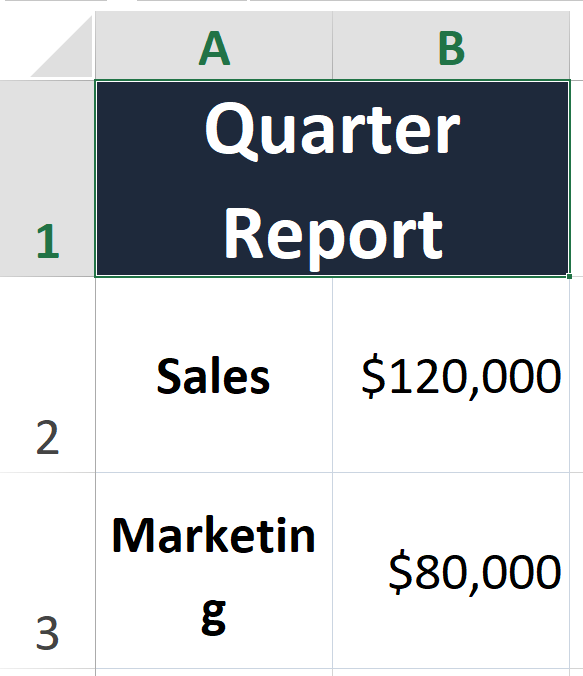
Quarter Report (Merged across 2 columns (<cm>), 16px Bold White text, Dark Slate #1e293b fill) |
— |
|---|---|
| Sales (Bold) | $120,000 (Right aligned) |
| Marketing (Bold) | $80,000 (Right aligned) |
⚙️ Formula Structure & Decoupled Presentation (TenTags v0.2.0+)
A TenTags formula consists of the Preamble (which defines global table structure, grid borders, and sizing) followed by either a single Data Block (legacy format), or decoupled Style and Data blocks (recommended for template reuse):
1. Unified Format (Legacy / Simple Tables)
 1   2   3      4         5     6   7
 ──  ──  ──  ───────   ───────  ─  ──
 4 , 4 , 1 ,"#cbd5e1","solid", 0, 45, data(...)
2. Decoupled Template Format (v0.2.0+)
4 , 4 , 1 ,"#cbd5e1","solid", 0, 45, style(...), data(...)
During compilation, the engine overlays the layout and formatting rules defined in style(...) (alignments, fonts, backgrounds, column/row merges) onto the raw content defined in data(...).
| Position | Parameter | Type | Description |
|---|---|---|---|
| 1 | rows |
int |
The total number of rows in the table grid. |
| 2 | cols |
int |
The total number of columns in the table grid. |
| 3 | border_width |
int / float |
The width of the grid lines in pixels. |
| 4 | border_color |
str |
HEX color string (e.g. "#cbd5e1", #1977ff) or CSS name (e.g. green, blue). Can be written with or without quotes. |
| 5 | border_style |
str |
Style of the grid lines (solid, dashed, or dotted). Suffix -1 (e.g. solid-1) enables inner grid borders. Suffix -0 (e.g. dashed-0) hides both outer and inner borders (borderless). Default (no suffix) draws only the outer border. Can be written with or without quotes. |
| 6 | stretch |
int |
Auto-stretching behavior. 0 maintains fixed cell heights, 1 stretches the grid. |
| 7 | cell_height |
int |
Default height of each row in pixels. |
Following these preamble parameters, the formula is completed by either the data(...) block or a pair of style(...) and data(...) blocks, where cells are defined row-by-row, separated by semicolons (;) and columns separated by commas (,).
🏷️ The 10 Tags in data(...)
TenTags derives its name from the 10 core structural and styling tags supported inside the data(...) argument block:
| # | Tag / Syntax | Type | Description | Example |
|---|---|---|---|---|
| 1 | <fs=...> |
Typography | Sets custom font size (font-size in HTML, size in Excel openpyxl). |
data(<fs=16>Heading</fs>, Text) |
| 2 | <b>...</b> |
Typography | Renders cell text in Bold font weight (font-weight: bold). |
data(<b>Total</b>, 100) |
| 3 | <i>...</i> |
Typography | Renders cell text in Italic font style (font-style: italic). |
data(<i>Pending</i>, Done) |
| 4 | <left> |
Alignment | Aligns cell content to the left (text-align: left). |
data(<left>Left aligned text) |
| 5 | <center> |
Alignment | Aligns cell content to the center (text-align: center). |
data(<center>Centered text) |
| 6 | <right> |
Alignment | Aligns cell content to the right (text-align: right). |
data(<right>Right aligned $5,000) |
| 7 | <color=...> |
Text Color | Sets custom HEX or CSS text color (color: ... / font color). |
data(<color=#ef4444>Error</color>, OK) |
| 8 | <bg=...> |
Background Fill | Sets cell background fill color (background-color: ... / PatternFill). |
data(<bg=#f8fafc>Summary</bg>, $500) |
| 9 | <cm>...</cm> |
Column Merge | Merges the cell rightward with adjacent columns (colspan). |
data(<cm>Merged Title, ,</cm>; A, B) |
| 10 | <rm>...</rm> |
Row Merge | Merges the cell downward with rows below it (rowspan). |
data(<rm>Date</rm>, Job; , Engineer) |
Note on Tag Transfer & Empty Elements: Notice how empty elements (such as
, ,or, ;) are used when adjacent cells are absorbed by a<cm>horizontal merge or<rm>vertical merge. TenTags automatically transfers and preserves all active tags across cell boundaries without requiring explicitNoneplaceholders.
📦 Installation
Install from PyPI via pip:
pip install tentags
For Excel (.xlsx) export, install the optional excel dependency:
pip install tentags[excel]
# or directly: pip install openpyxl
For PDF (.pdf) export, install the optional pdf dependency:
pip install tentags[pdf]
# or directly: pip install reportlab
To install all optional backends at once:
pip install tentags[all]
🎨 Advanced Example: Beautiful Styled Table & Merges
Here is how a single, clean TenTags expression generates an enterprise-grade financial dashboard table featuring merged headers (<cm>), custom font sizing (<fs>), cell background colors (<bg=>), text alignment (<left>, <right>), and custom typography (<b>, <i>, <color=>) across both HTML and Excel (.xlsx):
import tentags

# Define an advanced 4x4 styled financial performance grid using clean empty elements (, ,) inside merges
formula = '''4,4,1,"#cbd5e1","solid",0,45, data(
    <fs=18><bg=#1e293b><color=white><b><cm>Q3 Financial Performance Dashboard, , , , </cm></b></color></bg></fs>;
    <bg=#f1f5f9><b><left>Department</left></b></bg>, <bg=#f1f5f9><b><center>Revenue</center></b></bg>, <bg=#f1f5f9><b><center>Expenses</center></b></bg>, <bg=#f1f5f9><b><center>Net Profit</center></b></bg>;
    <left>Engineering</left>, <right>"$240,000"</right>, <right>"$180,000"</right>, <bg=#dcfce7><color=#166534><b><right>"+$60,000"</right></b></color></bg>;
    <left>Sales & Marketing</left>, <right>"$310,000"</right>, <right>"$210,000"</right>, <bg=#dcfce7><color=#166534><b><right>"+$100,000"</right></b></color></bg>
)'''

# Compile IR once — render to any backend
model = tentags.parse(formula)

# 1. Export to native Excel (.xlsx) with exact fonts, fills & merge_cells
tentags.render_xlsx(model, "Q3_Financial_Dashboard.xlsx")

# 2. Export to vector PDF (.pdf) via ReportLab
tentags.render_pdf(model, "Q3_Financial_Dashboard.pdf")

# 3. Render to responsive HTML string with inline CSS
html_table = tentags.render_html(model)
print(html_table)
📋 Visual Structure & Styling Result:

📊 Excel Matrix Example: Row Merges (<rm>), Column Merges (<cm>) & Colors
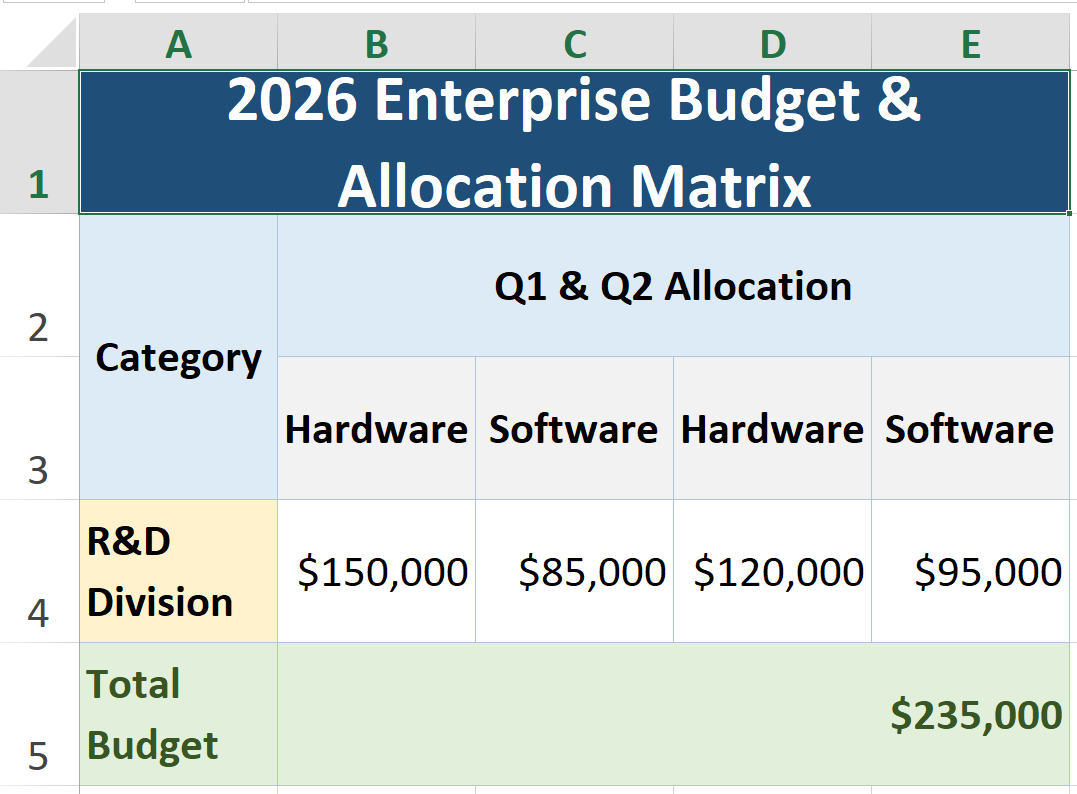
To see how TenTags shines as a native Excel spreadsheet generator, here is a 5x5 Enterprise Allocation Matrix utilizing combined row merges (<rm>), multi-column merges (<cm>), clean empty elements ( , , ), and classic Microsoft Excel color palettes (#1F4E78, #DDEBF7, #E2EFDA, #FFF2CC):
import tentags

# Define an Excel matrix with vertical row merges (<rm>) and horizontal column merges (<cm>)
excel_formula = '''5,5,1,"#B0C4DE","solid",0,35, data(
    <fs=16><bg=#1F4E78><color=white><b><cm>2026 Enterprise Budget & Allocation Matrix, , , , </cm></b></color></bg></fs>;
    <bg=#DDEBF7><b><rm><center>Category</center></rm></b></bg>, <bg=#DDEBF7><b><cm><center>Q1 & Q2 Allocation, </center></cm></b></bg>, <bg=#DDEBF7><b><cm><center>Q3 & Q4 Allocation, </center></cm></b></bg>;
    <bg=#DDEBF7><b><rm> </rm></b></bg>, <bg=#F2F2F2><b><center>Hardware</center></b></bg>, <bg=#F2F2F2><b><center>Software</center></b></bg>, <bg=#F2F2F2><b><center>Hardware</center></b></bg>, <bg=#F2F2F2><b><center>Software</center></b></bg>;
    <bg=#FFF2CC><b><left>R&D Division</left></b></bg>, <right>"$150,000"</right>, <right>"$85,000"</right>, <right>"$120,000"</right>, <right>"$95,000"</right>;
    <bg=#E2EFDA><color=#375623><b><left>Total Budget</left></b></color></bg>, <bg=#E2EFDA><color=#375623><b><cm><right>"$235,000", </right></cm></b></color></bg>, <bg=#E2EFDA><color=#375623><b><cm><right>"+$215,000", </right></cm></b></color></bg>
)'''

# Compile IR once — export to all three backends
model = tentags.parse(excel_formula)

# Export to native Excel (.xlsx)
tentags.render_xlsx(model, "Enterprise_Budget_Matrix.xlsx")

# Export to vector PDF (.pdf)
tentags.render_pdf(model, "Enterprise_Budget_Matrix.pdf")
🗓️ Visual Spreadsheet Grid Structure (A1:E5):
| # | Tag / Syntax | Type | Description | Example |
|---|---|---|---|---|
| 1 | <fs=...> |
Typography | Sets custom font size (font-size in HTML, size in Excel openpyxl). |
data(<fs=16>Heading</fs>, Text) |
| 2 | <b>...</b> |
Typography | Renders cell text in Bold font weight (font-weight: bold). |
data(<b>Total</b>, 100) |
| 3 | <i>...</i> |
Typography | Renders cell text in Italic font style (font-style: italic). |
data(<i>Pending</i>, Done) |
| 4 | <left> |
Alignment | Aligns cell content to the left (text-align: left). |
data(<left>Left aligned text) |
| 5 | <center> |
Alignment | Aligns cell content to the center (text-align: center). |
data(<center>Centered text) |
| 6 | <right> |
Alignment | Aligns cell content to the right (text-align: right). |
data(<right>Right aligned $5,000) |
| 7 | <color=...> |
Text Color | Sets custom HEX or CSS text color (color: ... / font color). |
data(<color=#ef4444>Error</color>, OK) |
| 8 | <bg=...> |
Background Fill | Sets cell background fill color (background-color: ... / PatternFill). |
data(<bg=#f8fafc>Summary</bg>, $500) |
| 9 | <cm>...</cm> |
Column Merge | Merges the cell rightward with adjacent columns (colspan). |
data(<cm>Merged Title</cm>, None; A, B) |
| 10 | <rm>...</rm> |
Row Merge | Merges the cell downward with rows below it (rowspan). |
data(<rm>Date</rm>, Job; <cm>, Engineer) |
Note on Tag Transfer: When merging (
<cm>,<rm>) or expanding ranges across styled cells (<fs>,<b>,<i>,<color>,<bg>,<left>,<center>,<right>), TenTags automatically transfers and preserves all formatting across cell boundaries in both HTML and Excel outputs.Dynamic Data Expressions: In addition to the 10 markup tags above, TenTags
data(...)supports dynamic line numbering (#), variable context substitution (VarName), CSV URL/file import (csv(...)), and cell range expansion (A1:B3).
🛠️ API Reference
tentags.render(formula: str, context: dict = None) -> str
Parses the input DSL formula string and returns a complete <table>...</table> HTML string.
formula: String in format'rows, cols, border_width, "border_color", "border_style", margin, row_height, data(...)'.context: Optional dictionary of variable names and their replacement values ({'VarName': 'Value'}).
tentags.parse(formula: str, context: dict = None) -> TableModel
Parses the formula into a structured TableModel instance containing 2D cell grids (CellDesc), BorderFlags, and styles without generating HTML.
tentags.render_html(model: TableModel) -> str
Renders a previously parsed TableModel instance into an HTML string.
tentags.render_xlsx(model: TableModel, output_filename: str) -> None
Exports a TableModel directly to an Excel .xlsx file using openpyxl. Applies openpyxl.styles.Font (bold, italic, color), openpyxl.styles.PatternFill (background color), and openpyxl.styles.Border according to the table formula. Requires pip install tentags[excel].
tentags.render_pdf(model: TableModel, output_filename: str) -> None
Exports a TableModel directly to a vector PDF file using ReportLab. Translates IR coordinates, merged cell regions (SPAN), background fills (BACKGROUND), fonts, alignments, and border grids into native ReportLab TableStyle commands. Automatically selects portrait or landscape page orientation based on column count. Requires pip install tentags[pdf].
🗂️ Multi-Table Rendering (v1.1.0+)
TenTags supports assembling and rendering multiple independent tables into a single output file (HTML Grid, Multi-Sheet or Stacked Excel workbook, or Multi-Page PDF report). This is highly useful for generating comprehensive reports where you want to reuse preambles and styling templates across different datasets.
Each table is defined as a dictionary containing its components:
table_definition = {
    "preamble": "3, 4, 1, #1977ff, solid-1",  # Optional: table structure & borders template
    "style": "style(<bg=white><center>...</center></bg>)",  # Optional: styling layout template
    "data": "data(Item, Qty; Wood, 10; Metal, 5)", # Required: table content
    "title": "Materials Summary",              # Optional: display title for PDF and stacked Excel
    "sheet_name": "Materials"                  # Optional: Worksheet name for Excel sheets mode
}
Example: Assembling a Multi-Table Report
import tentags

# Define reusable templates
common_preamble = '3, 4, 1, #1977ff, solid-1, 1'
common_style = 'style(<bg=white><center><b><cm>Report Section, , , </cm></b></center></bg>; <center><bg=white> , , , </bg></center>)'

# Define distinct datasets
data_materials = 'data(Item, Qty, Price, Total; Wood, 10, 150, 1500; Metal, 5, 300, 1500)'
data_tools = 'data(Tool, Qty, Condition, Status; Hammer, 2, New, Active; Drill, 1, Used, Active)'

# Assemble reports list
report_tables = [
    {
        "preamble": common_preamble,
        "style": common_style,
        "data": data_materials,
        "title": "Materials Summary Report",
        "sheet_name": "Materials"
    },
    {
        "preamble": common_preamble,
        "style": common_style,
        "data": data_tools,
        "title": "Tools Inventory Report",
        "sheet_name": "Tools"
    }
]

# 1. Compile to a multi-page PDF document
tentags.multitable_pdf(report_tables, "combined_report.pdf", page_size="A4", orientation="portrait", page_break_after_each=True)

# 2. Export to a single Excel workbook (each table on a separate sheet)
tentags.multitable_xlsx(report_tables, "combined_sheets.xlsx", mode="sheets")

# 3. Export to a single Excel workbook (tables stacked vertically on one sheet with gaps)
tentags.multitable_xlsx(report_tables, "combined_stacked.xlsx", mode="stacked", gap=3)

# 4. Generate an HTML 2-column Grid layout
html_grid = tentags.multitable_html(report_tables, layout="grid", cols=2, gap="30px")
Multi-Table API Reference
tentags.multitable_html(tables: list, layout: str = "vertical", cols: int = 1, gap: str = "24px", full_page: bool = False, context: dict = None) -> str
Assembles and renders multiple tables into a single HTML container string.
layout:'vertical'(stacked) or'grid'(using CSS Grid).cols: Number of columns in CSS Grid (only applicable whenlayout='grid').gap: CSS spacing between tables (e.g.,'20px','1.5rem').full_page: IfTrue, wraps the output in a complete HTML document with<html>and<body>tags.
tentags.multitable_xlsx(tables: list, filepath_or_stream, mode: str = "sheets", gap: int = 3, show_titles: bool = True, context: dict = None) -> None
Assembles and renders multiple tables into a single Excel .xlsx workbook.
mode:'sheets'(creates a separate Worksheet for each table) or'stacked'(renders all tables vertically on a single sheet).gap: Number of empty rows between stacked tables (only applicable whenmode='stacked').show_titles: IfTrue, renders the optional tabletitlein bold above each table (only applicable whenmode='stacked').
tentags.multitable_pdf(tables: list, filepath_or_stream, page_size: str = "letter", orientation: str = "portrait", page_break_after_each: bool = True, margins: tuple = (36, 36, 36, 36), context: dict = None) -> None
Assembles and renders multiple tables into a single PDF document.
page_size:'letter'or'A4'.orientation:'portrait'or'landscape'.page_break_after_each: IfTrue, places a page break after each table so they start on a fresh page.margins: Page margins tuple(left, right, top, bottom)in points (default:(36, 36, 36, 36)).
🧪 Running Tests
To run the standalone test suite and generate sample visual outputs:
python test_library.py
Generated output files include:
test_output.html— Summary HTML report of all rendered tablestest_output.xlsx— Basic Excel tabletest_style_output.xlsx— Excel with styling tagsQ3_Financial_Dashboard.xlsx/.pdf— Financial dashboard in Excel and PDFEnterprise_Budget_Matrix.xlsx/.pdf— Enterprise budget matrix in Excel and PDF
PDF files require
pip install tentags[pdf](ReportLab).
📄 License
Licensed under the MIT License. Copyright (c) 2026 Zhandos Mambetali.
1 maintainer

Download files
Download the file for your platform. If you're not sure which to choose, learn more about installing packages.
Source Distribution
Built Distribution
Filter files by name, interpreter, ABI, and platform.
If you're not sure about the file name format, learn more about wheel file names.
Copy a direct link to the current filters







