
TenTags 🏷️



TenTags is a declarative template language and Intermediate Representation (IR) for automated HTML, Excel (.xlsx), and PDF table and document generation.
🚀 Current Release: 2.1.3
TenTags 2.1.3 is a bugfix release that preserves multiline style(...) rows whose cells contain only tags and no text. This keeps style overlays correct for open tags spanning several rows, while preserving the Serializer API, Addressing Model, and Multitable Layout introduced in 2.1.0.
💡 Why TenTags? (A Language for Programs & AI, Not Manual Editing)
While general markup formats are designed for humans to manually write text, TenTags is designed specifically as a Template DSL for programs, server engines, and AI agents.
Whether you are building backend report pipelines, ERP/CRM accounting modules, invoice generators, or LLM-driven document agents, generating clean TenTags strings via loops and f-strings is orders of magnitude simpler and safer than emitting verbose HTML strings with inline style="" or hundreds of lines of openpyxl / reportlab API calls:
# Programmatically generate high-fidelity reports with dynamic loops and f-strings:
formula = f'''
5,4,1,"#ccc","solid",0,40, data(
    <bg=#1e293b><color=white><b><cm>{report_title}, , , </cm></b></color></bg>;
    {generated_rows_from_db}
)'''
⚙️ Compiler & Data Pipeline Architecture
At its core, TenTags is a unified Intermediate Representation (IR) table compiler. Rather than manually writing long static strings, you generate TenTags formulas dynamically in your Python backend (e.g. from ORM models or database cursors), parse them into a TableModel AST, and compile them to any target format:
   Database / API
         ↓
    ORM / SQL / Objects
         ↓
  f-strings / Templates
         ↓
   TenTags Formula
         ↓
  [ Lexer ➔ Parser ]
         ↓
   TableModel (IR)
      ↙  ↓  ↘
   HTML Excel PDF  [Future: DOCX, SVG, Flutter...]
- 🎯 Target Audience: Backend developers (FastAPI, Django, Flask), ERP/CRM financial engines, automated invoice/receipt generators, and AI/LLM agents.
- 🤖 AI & LLM Native: LLMs generate exact, compact TenTags formulas reliably without CSS layout bugs or Excel/PDF API hallucinations.
- 🔀 Declarative Grid Merges: Effortlessly merge cells rightward across columns (
<cm>) and downward across rows (<rm>). - 🎨 Rich Typography & Styling: Inline control over font size (
<fs>), bold (<b>), italic (<i>), alignment (<left>,<center>,<right>), text color (<color=>), and cell fills (<bg=>). - 📊 Triple Backend Rendering: Directly compile your IR to high-fidelity HTML (
render_html), native Excel (.xlsx) (render_xlsx), or vector PDF (.pdf) (render_pdf). - ⚡ Lightweight & Modular Runtime: Pure Python runtime (
xml.etree.ElementTree) for DSL tokenization and HTML rendering. Optional Excel export (openpyxl) and PDF export (reportlab).
🧭 Language Evolution Rule
A new TenTags tag may be added only if all three conditions are true:
- It can be interpreted consistently by all renderers.
- It belongs to the logical document model, not to one renderer's physical representation.
- It cannot be expressed cleanly with existing TenTags primitives.
This keeps TenTags compact, predictable, and renderer-independent.
⚡ Quick Start: Programmatic Template Generation
TenTags shines when generating formatted tabular documents dynamically from Python objects:
import tentags

# 1. Your raw data source (e.g., query results from database/ORM)
employees = [
    {"name": "Alice Vance", "salary": "$120,000", "dept": "Engineering"},
    {"name": "Bob Miller", "salary": "$95,000", "dept": "Design"},
    {"name": "Charlie R.", "salary": "$110,000", "dept": "Product"}
]

# 2. Define styled header
header = (
    '<fs=16><bg=#1e293b><color=white><b>Name</b></color></bg></fs>, '
    '<fs=16><bg=#1e293b><color=white><b>Salary</b></color></bg></fs>, '
    '<fs=16><bg=#1e293b><color=white><b>Department</b></color></bg></fs>'
)

# 3. Format body rows dynamically
body_rows = ";\n".join(
    f"<b>{e['name']}</b>, <right>{e['salary']}</right>, <bg=#f1f5f9>{e['dept']}</bg>"
    for e in employees
)

# 4. Construct a complete formula with the preamble (rows, columns, borders, stretch, row height)
formula = f'''
{len(employees) + 1},3,1,"#cbd5e1","solid",0,40, data(
    {header};
    {body_rows}
)
'''

# 5. Parse formula into Intermediate Representation (IR)
model = tentags.parse(formula)

# 6. Render to multiple backends
html_table = tentags.render_html(model)
tentags.render_xlsx(model, "Quarter_Report.xlsx")
tentags.render_pdf(model, "Quarter_Report.pdf")
The same parsed model can be rendered as HTML, Excel (.xlsx), or PDF.
⚙️ Formula Structure & Decoupled Presentation (TenTags v0.2.0+)
A TenTags formula consists of the Preamble (which defines global table structure, grid borders, and sizing) followed by either a single Data Block (legacy format), or decoupled Style and Data blocks (recommended for template reuse):
1. Unified Format (Legacy / Simple Tables)
 1   2   3      4         5     6   7
 ──  ──  ──  ───────   ───────  ─  ──
 4 , 4 , 1 ,"#cbd5e1","solid", 0, 45, data(...)
2. Decoupled Template Format (v0.2.0+)
4 , 4 , 1 ,"#cbd5e1","solid", 0, 45, style(...), data(...)
During compilation, the engine overlays the layout and formatting rules defined in style(...) (alignments, fonts, backgrounds, column/row merges) onto the raw content defined in data(...).
| Position | Parameter | Type | Description |
|---|---|---|---|
| 1 | rows |
int |
The total number of rows in the table grid. |
| 2 | cols |
int |
The total number of columns in the table grid. |
| 3 | border_width |
int |
The width of the grid lines in pixels. |
| 4 | border_color |
str |
HEX color string (e.g. "#cbd5e1", #1977ff) or CSS name (e.g. green, blue). Can be written with or without quotes. |
| 5 | border_style |
str |
Style of the grid lines (solid, dashed, or dotted). Suffix -1 (e.g. solid-1) enables inner grid borders. Suffix -0 (e.g. dashed-0) hides both outer and inner borders (borderless). Default (no suffix) draws only the outer border. Can be written with or without quotes. |
| 6 | stretch |
int |
Auto-stretching behavior. 0 maintains fixed cell heights, 1 stretches the grid. |
| 7 | cell_height |
int |
Default height of each row in pixels. |
Following these preamble parameters, the formula is completed by either the data(...) block or a pair of style(...) and data(...) blocks, where cells are defined row-by-row, separated by semicolons (;) and columns separated by commas (,).
🏷️ Tags in style(...) and data(...)
TenTags derives its name from the 10 core structural and styling tags supported inside style(...) and data(...) blocks:
| # | Tag / Syntax | Type | Description | Example |
|---|---|---|---|---|
| 1 | <fs=...> |
Typography | Sets custom font size (font-size in HTML, size in Excel openpyxl). |
data(<fs=16>Heading</fs>, Text) |
| 2 | <b>...</b> |
Typography | Renders cell text in Bold font weight (font-weight: bold). |
data(<b>Total</b>, 100) |
| 3 | <i>...</i> |
Typography | Renders cell text in Italic font style (font-style: italic). |
data(<i>Pending</i>, Done) |
| 4 | <left> |
Alignment | Aligns cell content to the left (text-align: left). |
data(<left>Left aligned text) |
| 5 | <center> |
Alignment | Aligns cell content to the center (text-align: center). |
data(<center>Centered text) |
| 6 | <right> |
Alignment | Aligns cell content to the right (text-align: right). |
data(<right>Right aligned $5,000) |
| 7 | <color=...> |
Text Color | Sets custom HEX or CSS text color (color: ... / font color). |
data(<color=#ef4444>Error</color>, OK) |
| 8 | <bg=...> |
Background Fill | Sets cell background fill color (background-color: ... / PatternFill). |
data(<bg=#f8fafc>Summary</bg>, $500) |
| 9 | <cm>...</cm> |
Column Merge | Joins adjacent cells horizontally. HTML suppresses the internal border; Excel and PDF create native merged regions. | data(<cm>Merged Title, ,</cm>; A, B) |
| 10 | <rm>...</rm> |
Row Merge | Joins cells vertically. Mark each participating cell with <rm>. |
data(<rm>Date</rm>, Job; <rm> </rm>, Engineer) |
Note on Tag Transfer & Empty Elements: Notice how empty elements (such as
, ,or, ;) are used when adjacent cells are absorbed by a<cm>horizontal merge or<rm>vertical merge. TenTags automatically transfers and preserves all active tags across cell boundaries without requiring explicitNoneplaceholders.
Important for
style(...)rows: A style cell may be empty by text but still meaningful because it carries active or closing tags, for example<bg=#eff6ff></bg></u></left>. Versions before 2.1.3 could incorrectly drop a final styled-empty row in multilinestyle(...)blocks. In 2.1.3 and later, these rows are preserved; when writing tests or LLM prompts, count them as real style rows.
Additional supported tags:
| Tag / Syntax | Description | Example |
|---|---|---|
<u>...</u> |
Underlines text. | data(<u>Underlined</u>) |
<s>...</s> |
Strikes through text. | data(<s>Cancelled</s>) |
<url=...>...</url> |
Creates a hyperlink. | data(<url=https://example.com>Open site</url>) |
<img src=... w=... h=... m=...> |
Adds a single image tag. m is margin in pixels. With stretch=1, the cell can grow with the image; with stretch=0, image height is forced to the preamble cell height and width becomes auto. |
data(<img src=logo.png w=120 h=auto m=15>) |
📦 Installation
Install from PyPI via pip:
pip install tentags
For Excel (.xlsx) export, install the optional excel dependency:
pip install tentags[excel]
# or directly: pip install openpyxl
For PDF (.pdf) export, install the optional pdf dependency:
pip install tentags[pdf]
# or directly: pip install reportlab
To install all optional backends at once:
pip install tentags[all]
🎨 Advanced Example: Beautiful Styled Table & Merges
Here is how a single, clean TenTags expression generates an enterprise-grade financial dashboard table featuring merged headers (<cm>), custom font sizing (<fs>), cell background colors (<bg=>), text alignment (<left>, <right>), and custom typography (<b>, <i>, <color=>) across both HTML and Excel (.xlsx):
import tentags

# Define an advanced 4x4 styled financial performance grid using clean empty elements (, ,) inside merges
formula = '''4,4,1,"#cbd5e1","solid",0,45, data(
    <fs=18><bg=#1e293b><color=white><b><cm>Q3 Financial Performance Dashboard, , , , </cm></b></color></bg></fs>;
    <bg=#f1f5f9><b><left>Department</left></b></bg>, <bg=#f1f5f9><b><center>Revenue</center></b></bg>, <bg=#f1f5f9><b><center>Expenses</center></b></bg>, <bg=#f1f5f9><b><center>Net Profit</center></b></bg>;
    <left>Engineering</left>, <right>"$240,000"</right>, <right>"$180,000"</right>, <bg=#dcfce7><color=#166534><b><right>"+$60,000"</right></b></color></bg>;
    <left>Sales & Marketing</left>, <right>"$310,000"</right>, <right>"$210,000"</right>, <bg=#dcfce7><color=#166534><b><right>"+$100,000"</right></b></color></bg>
)'''

# Compile IR once — render to any backend
model = tentags.parse(formula)

# 1. Export to native Excel (.xlsx) with exact fonts, fills & merge_cells
tentags.render_xlsx(model, "Q3_Financial_Dashboard.xlsx")

# 2. Export to vector PDF (.pdf) via ReportLab
tentags.render_pdf(model, "Q3_Financial_Dashboard.pdf")

# 3. Render to responsive HTML string with inline CSS
html_table = tentags.render_html(model)
print(html_table)
📋 Visual Structure & Styling Result:

📊 Excel Matrix Example: Row Merges (<rm>), Column Merges (<cm>) & Colors
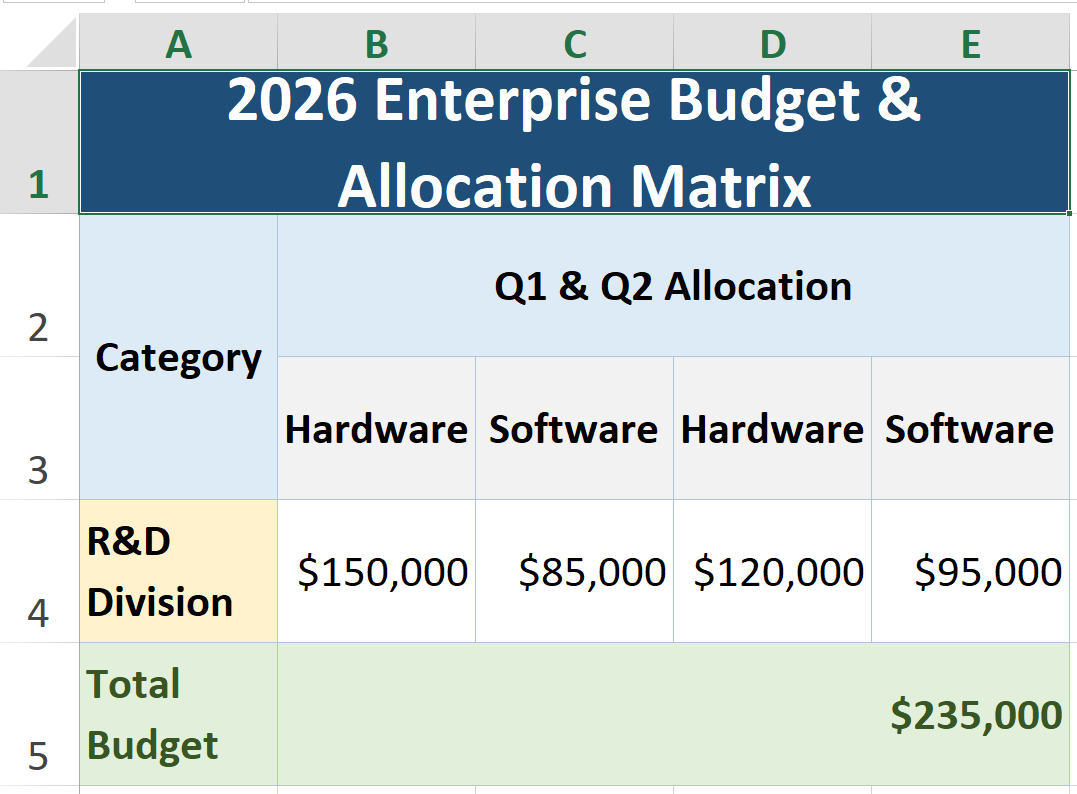
To see how TenTags shines as a native Excel spreadsheet generator, here is a 5x5 Enterprise Allocation Matrix utilizing combined row merges (<rm>), multi-column merges (<cm>), clean empty elements ( , , ), and classic Microsoft Excel color palettes (#1F4E78, #DDEBF7, #E2EFDA, #FFF2CC):
import tentags

# Define an Excel matrix with vertical row merges (<rm>) and horizontal column merges (<cm>)
excel_formula = '''5,5,1,"#B0C4DE","solid",0,35, data(
    <fs=16><bg=#1F4E78><color=white><b><cm>2026 Enterprise Budget & Allocation Matrix, , , , </cm></b></color></bg></fs>;
    <bg=#DDEBF7><b><rm><center>Category</center></rm></b></bg>, <bg=#DDEBF7><b><cm><center>Q1 & Q2 Allocation, </center></cm></b></bg>, <bg=#DDEBF7><b><cm><center>Q3 & Q4 Allocation, </center></cm></b></bg>;
    <bg=#DDEBF7><b><rm> </rm></b></bg>, <bg=#F2F2F2><b><center>Hardware</center></b></bg>, <bg=#F2F2F2><b><center>Software</center></b></bg>, <bg=#F2F2F2><b><center>Hardware</center></b></bg>, <bg=#F2F2F2><b><center>Software</center></b></bg>;
    <bg=#FFF2CC><b><left>R&D Division</left></b></bg>, <right>"$150,000"</right>, <right>"$85,000"</right>, <right>"$120,000"</right>, <right>"$95,000"</right>;
    <bg=#E2EFDA><color=#375623><b><left>Total Budget</left></b></color></bg>, <bg=#E2EFDA><color=#375623><b><cm><right>"$235,000", </right></cm></b></color></bg>, <bg=#E2EFDA><color=#375623><b><cm><right>"+$215,000", </right></cm></b></color></bg>
)'''

# Compile IR once — export to all three backends
model = tentags.parse(excel_formula)

# Export to native Excel (.xlsx)
tentags.render_xlsx(model, "Enterprise_Budget_Matrix.xlsx")

# Export to vector PDF (.pdf)
tentags.render_pdf(model, "Enterprise_Budget_Matrix.pdf")
🗓️ Visual Spreadsheet Grid Structure (A1:E5):
🛠️ API Reference
Module Constants & Metadata
tentags.__version__: Library version string (e.g.,'2.1.3').tentags.version_info: Version tuple for checking compatibility (e.g.,(2, 1, 3)).tentags.__author__: Author name ('Zhandos Mambetali').tentags.__license__: Project license ('Apache-2.0').tentags.__homepage__: Link to home website ('https://tentags.org').tentags.__url__: Canonical library URL ('https://tentags.org').tentags.__copyright__: Copyright notice ('Copyright (c) 2026 Zhandos Mambetali').
Diagnostic & Utility Helpers
tentags.info() -> None
Prints the package version, author, license, website, Python version, and availability of the HTML, PDF, and XLSX renderers.
tentags.features() -> dict
Checks the availability of optional rendering backends. Returns a dictionary:
{
    "html": True,
    "pdf": True,   # True if reportlab is installed
    "xlsx": True   # True if openpyxl is installed
}
tentags.get_prompt(print_output: bool = False) -> str
Returns the bundled LLM bootstrap prompt for teaching another model how to work with TenTags. Pass print_output=True to also print it:
import tentags

prompt = tentags.get_prompt()
tentags.get_prompt(print_output=True)
tentags.validate(formula: str) -> dict
Syntactically checks a TenTags formula's layout configuration and markup tag balance. Returns a status dictionary:
- Success:
{"status": "ok", "message": "Syntax OK"} - Failure:
{"status": "error", "message": "Missing closing tag </b>..."}
tentags.demo(name: str = "dashboard") -> None
Generates an HTML demo in the current directory and XLSX/PDF files when the corresponding optional backends are installed.
Supported templates: 'dashboard', 'invoice', 'table'. Example:
import tentags
tentags.demo("invoice") # Generates HTML, XLSX, and PDF invoices on the fly
Core API Functions
tentags.render(preamble_or_formula, style=None, data=None, context=None) -> str
Renders either a complete formula or decoupled preamble, style, and data blocks to a <table>...</table> HTML string.
preamble_or_formula: A complete formula such as'rows, cols, border_width, "border_color", "border_style", stretch, cell_height, data(...)', or a preamble used withstyleanddata.style: Optionalstyle(...)block for decoupled rendering.data: Optionaldata(...)block for decoupled rendering.context: Optional dictionary of variable names and their replacement values ({'VarName': 'Value'}).
tentags.parse(formula: str, context: dict = None) -> TableModel
Parses the formula into a structured TableModel instance containing 2D cell grids (CellDesc), BorderFlags, and styles without generating HTML.
tentags.compile(preamble, style, data, context: dict = None) -> TableModel
Builds a TableModel from decoupled preamble, style, and data blocks. Each block may be a TenTags string or a parsed cell grid.
Serializer API
The Serializer API converts ordinary Python structures into canonical TenTags DSL strings. It does not create IR and it does not replace the DSL: compile(preamble, style, data) remains the only compiler entry point.
The canonical namespace is tentags.serialize. Top-level dumps_preamble(), dumps_style(), and dumps_data() remain available as compatible convenience aliases.
import tentags

rows = [
    ["Period", "<right>Revenue</right>", "<center>Status</center>"],
    ["January", "<right>125000</right>", "<center>Closed</center>"],
    ["July", "<right>158900</right>", "<center>Review</center>"],
]

style_rows = [
    ["<bg=#0f172a><color=#ffffff><b></b></color></bg>"] * 3,
    ["<bg=#ffffff></bg>", "<bg=#ffffff></bg>", "<bg=#dcfce7></bg>"],
    ["<bg=#f8fafc></bg>", "<bg=#f8fafc></bg>", "<bg=#fef3c7></bg>"],
]

preamble = tentags.serialize.preamble(len(rows), 3, border_color="#64748b", border_style="solid-1", cell_height=28)
style = tentags.serialize.style(style_rows, expected_rows=len(rows), expected_cols=3)
data = tentags.serialize.data(rows, expected_rows=len(rows), expected_cols=3)

model = tentags.compile(preamble, style, data)
The same serializer pattern is useful for database-backed reports:
import sqlite3
import tentags

conn = sqlite3.connect("demo_output/finance.db")
conn.row_factory = sqlite3.Row
records = [dict(row) for row in conn.execute("SELECT period, revenue, status FROM monthly_report")]
conn.close()

data_rows = [["Period", "<right>Revenue</right>", "<center>Status</center>"]]
style_rows = [["<bg=#0f172a><color=#ffffff><b></b></color></bg>"] * 3]

for index, record in enumerate(records):
    base_bg = "#ffffff" if index % 2 == 0 else "#f8fafc"
    data_rows.append([
        record["period"],
        f"<right>{record['revenue']}</right>",
        f"<center>{record['status']}</center>",
    ])
    style_rows.append([f"<bg={base_bg}></bg>"] * 3)

preamble = tentags.serialize.preamble(len(data_rows), 3, border_color="#64748b", border_style="solid-1", cell_height=28)
style = tentags.serialize.style(style_rows, expected_rows=len(data_rows), expected_cols=3)
data = tentags.serialize.data(data_rows, expected_rows=len(data_rows), expected_cols=3)
model = tentags.compile(preamble, style, data)
tentags.serialize.preamble(rows, cols, border_width=1, border_color="#cbd5e1", border_style="solid", stretch=0, cell_height=30) -> str
Serializes Python preamble values into a TenTags preamble string such as:
'9,5,1,"#64748b","solid-1",0,28'
tentags.serialize.style(rows, expected_rows=None, expected_cols=None) -> str
Serializes a Python matrix into style(...). Cell values are raw TenTags style expressions; None becomes an empty cell.
tentags.serialize.data(rows, expected_rows=None, expected_cols=None) -> str
Serializes a Python matrix into data(...). Cell values are raw TenTags data expressions; None becomes an empty cell.
tentags.render_html(model: TableModel) -> str
Renders a previously parsed TableModel instance into an HTML string.
tentags.render_xlsx(model: TableModel, filepath_or_stream) -> None
Exports a TableModel directly to an Excel .xlsx file using openpyxl. Applies openpyxl.styles.Font (bold, italic, color), openpyxl.styles.PatternFill (background color), and openpyxl.styles.Border according to the table formula. Requires pip install tentags[excel].
tentags.render_pdf(model: TableModel, filepath_or_stream) -> None
Exports a TableModel directly to a vector PDF file using ReportLab. Translates IR coordinates, merged cell regions (SPAN), background fills (BACKGROUND), fonts, alignments, and border grids into native ReportLab TableStyle commands. Automatically selects portrait or landscape page orientation based on column count. Requires pip install tentags[pdf].
🗂️ Multi-Table Rendering
TenTags supports assembling several independent logical Lists/Tables into one HTML, XLSX, or PDF export. A multitable report is not one large grid: each List has its own preamble, style, data, title, and optional XLSX sheet name.
Each table item uses PyCells-compatible logical naming:
table_definition = {
    "document": "Dashboard",       # logical Table / document name
    "table_name": "Menu",          # logical List name
    "sheet_name": "Menu",          # physical XLSX worksheet name
    "title": "Dashboard Menu",
    "preamble": '2,2,1,"#0f172a","solid",0,24',
    "style": "style(<bg=#dbeafe><b></b></bg>, <bg=#dbeafe><b></b></bg>; <bg=#eff6ff></bg>, <bg=#eff6ff></bg>)",
    "data": "data(<mark=Top>Section, Link; Invoice, <url=goto:Invoice!Items!A1>Open invoice</url>)",
}
Use named export settings for file output, table order, column validation, and renderer layout. These settings are part of the library API and are passed with settings=....
The Serializer API also works inside multitable items. Each table dictionary can receive preamble, style, and data generated by tentags.serialize.preamble(), tentags.serialize.style(), and tentags.serialize.data().
import tentags

menu_rows = [
    ["<mark=Top>Section", "Link"],
    ["Invoice", "<url=goto:Invoice!Items!A1>Open invoice</url>"],
]

menu_style = [
    ["<bg=#dbeafe><b></b></bg>", "<bg=#dbeafe><b></b></bg>"],
    ["<bg=#eff6ff></bg>", "<bg=#eff6ff></bg>"],
]

tables = [
    {
        "document": "Dashboard",
        "table_name": "Menu",
        "sheet_name": "Menu",
        "title": "Dashboard Menu",
        "preamble": tentags.serialize.preamble(len(menu_rows), 2, border_color="#0f172a", border_style="solid", cell_height=24),
        "style": tentags.serialize.style(menu_style, expected_rows=len(menu_rows), expected_cols=2),
        "data": tentags.serialize.data(menu_rows, expected_rows=len(menu_rows), expected_cols=2),
    },
    {
        "document": "Invoice",
        "table_name": "Items",
        "sheet_name": "Items",
        "title": "Invoice Items",
        "preamble": '2,2,1,"#7c2d12","solid",0,24',
        "style": "style(<bg=#ffedd5><b></b></bg>, <bg=#ffedd5><b></b></bg>; <bg=#fff7ed></bg>, <bg=#fff7ed></bg>)",
        "data": "data(Item, Total; Paper, <url=goto:Dashboard!Menu!Top>$25</url>)",
    },
]

TABLE_ORDER = ["Dashboard!Menu", "Invoice!Items"]
COLUMNS = {
    "Dashboard!Menu": ["Section", "Link"],
    "Invoice!Items": ["Item", "Total"],
}

HTML_SETTINGS = {
    "output": "demo_output/combined_report.html",
    "table_order": TABLE_ORDER,
    "columns": COLUMNS,
    "tables_per_row": 2,
    "html_title": "Combined Report",
    "layout": "grid",
    "cols": 2,
    "gap": "30px",
    "full_page": True,
}

XLSX_SHEETS_SETTINGS = {
    "output": "demo_output/combined_sheets.xlsx",
    "table_order": TABLE_ORDER,
    "columns": COLUMNS,
    "tables_per_sheet": 1,
    "mode": "sheets",
}

XLSX_STACKED_SETTINGS = {
    "output": "demo_output/combined_stacked.xlsx",
    "table_order": TABLE_ORDER,
    "columns": COLUMNS,
    "tables_per_sheet": "all",
    "stacked_sheet_name": "Report",
    "mode": "stacked",
    "gap": 3,
    "show_titles": True,
}

PDF_SETTINGS = {
    "output": "demo_output/combined_report.pdf",
    "table_order": TABLE_ORDER,
    "columns": COLUMNS,
    "tables_per_row": "auto",
    "tables_per_page": "auto",
    "gap": 16,
    "page_size": "A4",
    "orientation": "landscape",
    "page_break_after_each": False,
    "margins": (24, 24, 36, 36),
}

html = tentags.multitable_html(tables, settings=HTML_SETTINGS)
tentags.multitable_xlsx(tables, settings=XLSX_SHEETS_SETTINGS)
tentags.multitable_xlsx(tables, settings=XLSX_STACKED_SETTINGS)
tentags.multitable_pdf(tables, settings=PDF_SETTINGS)
Multi-Table API Reference
tentags.multitable_html(tables, ..., settings: dict = None) -> str
Assembles and renders multiple tables into a single HTML container or full HTML document.
settings["output"]: Optional HTML output path or writable stream.settings["table_order"]: Optional list of logical keys such asDashboard!Menu.settings["columns"]: Optional column header validation byTable!List.settings["tables_per_row"]/cols: Number of HTML grid columns.settings["html_title"]:<title>used whenfull_page=True.layout,gap,full_page: HTML renderer layout options.
tentags.multitable_xlsx(tables, filepath_or_stream=None, ..., settings: dict = None) -> None
Assembles and renders multiple tables into a single Excel .xlsx workbook.
settings["output"]: Optional XLSX output path or stream.settings["mode"]:'sheets'for one worksheet per List or'stacked'for one worksheet.settings["tables_per_sheet"]:1for sheets mode or'all'for stacked mode.settings["stacked_sheet_name"]: Worksheet name used by stacked mode.settings["gap"]andsettings["show_titles"]: Stacked worksheet layout options.
tentags.multitable_pdf(tables, filepath_or_stream=None, ..., settings: dict = None) -> None
Assembles and renders multiple tables into a single PDF document.
settings["output"]: Optional PDF output path or stream.settings["tables_per_row"]: Positive integer or'auto'. Auto computes how many tables fit across the page width.settings["tables_per_page"]: Positive integer or'auto'. Auto computes how many table blocks fit in page height.settings["gap"]: Spacing between table blocks in points.settings["page_size"]:'letter'or'A4'.settings["orientation"]:'portrait'or'landscape'.settings["margins"]:(left, right, top, bottom)in points.settings["page_break_after_each"]: Legacy/simple-flow page break flag when no multi-column layout is used.
🔌 Web Framework & Template Integrations (v2.0.0+)
TenTags comes with built-in integrations for popular Python web engines under tentags.contrib and Django package structures.
1. Django Template Tags
If tentags is added to INSTALLED_APPS in your Django settings.py, Django will automatically discover the template tags.
In your HTML template:
{% load tentags %}

<!-- Block tag (supports short {% tt %} alias as well) -->
{% tt %}
2, 1, 1, "black", "solid-1", 0, 50,
data(
    Item, Quantity;
    {{ product.name }}, {{ product.qty }}
)
{% endtt %}

<!-- Inline tag -->
{% tentags_inline formula_string %}
2. Jinja2 / Flask / FastAPI
TenTags provides a Jinja2 Extension (TenTagsExtension) and global helper function (tentags).
FastAPI Integration
FastAPI integration is optional. Install FastAPI and Jinja2 in the application that uses TenTags; use an ASGI server such as Uvicorn to run that application:
pip install fastapi jinja2 "uvicorn[standard]"
from fastapi.templating import Jinja2Templates
from tentags.contrib.fastapi import register_templates

templates = Jinja2Templates(directory="templates")
register_templates(templates)
Flask Integration
from flask import Flask
from tentags.contrib.flask import init_app

app = Flask(__name__)
init_app(app)
In your Jinja2 Templates:
<!-- Block Tag -->
{% tt %}
2, 2, 3, "blue", "solid", 0, 50,
data(
    A, B;
    C, D
)
{% endtt %}

<!-- Inline Function -->
{{ tentags('2, 2, 3, "blue", "solid", 0, 50, data(A, B; C, D)') }}
🧪 Running Tests
To run the standalone test suite:
python -m pytest
Generated output files are written under demo_output/, including:
demo_output/test_output.html— Summary HTML report of all rendered tablesdemo_output/test_output.xlsx— Basic Excel tabledemo_output/test_style_output.xlsx— Excel with styling tagsdemo_output/Q3_Financial_Dashboard.xlsx/.pdf— Financial dashboard in Excel and PDFdemo_output/Enterprise_Budget_Matrix.xlsx/.pdf— Enterprise budget matrix in Excel and PDF
PDF files require
pip install tentags[pdf](ReportLab).
📄 License
Licensed under the Apache License 2.0. Copyright (c) 2026 Zhandos Mambetali.
1 maintainer

Download files
Download the file for your platform. If you're not sure which to choose, learn more about installing packages.
Source Distribution
Built Distribution
Filter files by name, interpreter, ABI, and platform.
If you're not sure about the file name format, learn more about wheel file names.
Copy a direct link to the current filters







