
 TurboQuantDB




An embedded vector database with a Python API. Built around the TurboQuant algorithm (arXiv:2504.19874) — two-stage quantization with zero training time and 5–10× compression at near-paper recall.
100k vectors at d=1536 fit in ~84 MB on disk (b=4) or ~47 MB (b=2) and run queries with ~200 MB RAM. No daemon, no
train()step, no eval set required to start.
Why TurboQuantDB?
- 🪶 Lightweight —
pip install tqdbis a 10 MB install with no Python dependencies beyond numpy. Runs in your process; no server, no sidecar. - 🧠 No training — codebooks are derived from a closed-form Beta(d/2) marginal at construction; vectors are quantized on the very first insert.
- 💾 5–10× disk compression with strong recall — benchmarked across d=65–3072 with recall / storage / latency trade-offs documented in
docs/BENCHMARKS.md. At d=1536, TQDB reaches near-paper recall under the benchmark configuration while cutting disk ~5×. - ⚡ Low query-time RAM — n=100k at d=200 needs ~17 MB for active search structures; d=1536 needs ~200 MB. Fits comfortably on a laptop.
- 🛡️ Crash-safe by default — writes go through a CRC-protected WAL with truncation guards; reopen replays automatically after crash or power loss. No manual
flush()for normal use. (WAL writes are batched for throughput; an explicitdb.checkpoint()forces durable persistence to a segment.) - 🌍 Cross-platform pre-built wheels — Linux (x86_64 + aarch64), macOS Apple Silicon, Windows. One
pip installeverywhere.
Use TQDB if you're building RAG / search on a laptop, edge device, or single VM and want compression without a training pipeline.
Look elsewhere if you need managed cloud, multi-node replication, SQL joins, or a full enterprise search platform. If your corpus is tiny (<10k vectors), raw-vector stores may be simpler and the compression benefit may not matter yet.
Install
pip install tqdb
Optional integration extras: tqdb[langchain], tqdb[llamaindex], tqdb[migrate] (Chroma + LanceDB import). Build from source: see DEVELOPMENT.md. Upgrading from v0.8 dense-mode databases: see docs/QUANTIZER_MODES.md.
Quick Start
Five lines, no domain knowledge — tqdb.open picks the defaults:
import numpy as np, tqdb

embedding = np.random.rand(1536).astype("f4")   # your embedding model's output
db = tqdb.open("./my_db", 1536)                 # reopen later with just tqdb.open("./my_db")
db.insert("doc1", embedding, document="Rust uses ownership for memory safety.")
print(db.search(embedding, top_k=5))
The full version, with a real embedding model and every knob spelled out:
import numpy as np
from sentence_transformers import SentenceTransformer
from tqdb import Database

model = SentenceTransformer("sentence-transformers/all-MiniLM-L6-v2")
dim = model.get_sentence_embedding_dimension()  # 384

db = Database.open("./my_db", dimension=dim, bits=4, metric="ip", rerank=True)

docs = [
    ("rust",   "Rust uses ownership and borrowing for memory safety."),
    ("python", "Python prioritizes readability and rapid prototyping."),
    ("vector", "A vector database stores embeddings for nearest-neighbour search."),
]
ids   = [d[0] for d in docs]
texts = [d[1] for d in docs]
db.insert_batch(ids, model.encode(texts, normalize_embeddings=True).astype("f4"), documents=texts)

q = model.encode("How do I avoid memory bugs?", normalize_embeddings=True).astype("f4")
for r in db.search(q, top_k=2):
    print(f"  [{r['score']:.3f}] {r['id']} — {r['document']}")
Output:
  [0.687] rust   — Rust uses ownership and borrowing for memory safety.
  [0.298] vector — A vector database stores embeddings for nearest-neighbour search.
➡️ Runnable end-to-end demo: examples/quickstart.py. RAG retriever loop: examples/rag.py. Migrate from Chroma: examples/migrate_from_chroma.py.
What makes TurboQuantDB different?
TurboQuantDB is built around a few deliberate design choices:
- Compression-first storage — embeddings are quantized on insert, so large corpora can fit on laptops, edge devices, and small VMs.
- Zero-training quantization — no PQ/IVF training phase, no sample corpus, no eval set required to start.
- Embedded-first deployment — the default path is
pip install tqdband in-process Python usage, not operating a separate service. - RAG-ready retrieval — document storage, MongoDB-style metadata filters, hybrid BM25+dense search, and LangChain/LlamaIndex integrations are built in.
- Durability without ceremony — writes go through a CRC-protected WAL, and crash recovery replays automatically on reopen.
- Server-capable when needed — an optional Axum HTTP server adds API keys, RBAC, quotas, async jobs, snapshots, restore, and Prometheus metrics.
Where TurboQuantDB fits
TurboQuantDB is not a managed vector database and not a distributed search cluster. It is built for developers who want compressed local vector search inside a Python or Rust application.
Use it for
- local / private RAG
- laptop-scale document search
- edge deployments
- compressed embedding stores
- bring-your-own-embedding workflows
- migration experiments from existing local vector stores
Use something else when you need
- multi-node clustering or replication
- managed cloud operations
- SQL joins and relational transactions
- enterprise search pipelines
- hosted embedding / reranking services
Benchmarks
All numbers below come from runs on a single Windows laptop; absolute values will differ on your hardware. Reproduction commands are in docs/BENCHMARKS.md. The three sub-tables below are distinct runs with different configs — read the "Config" line under each header carefully.
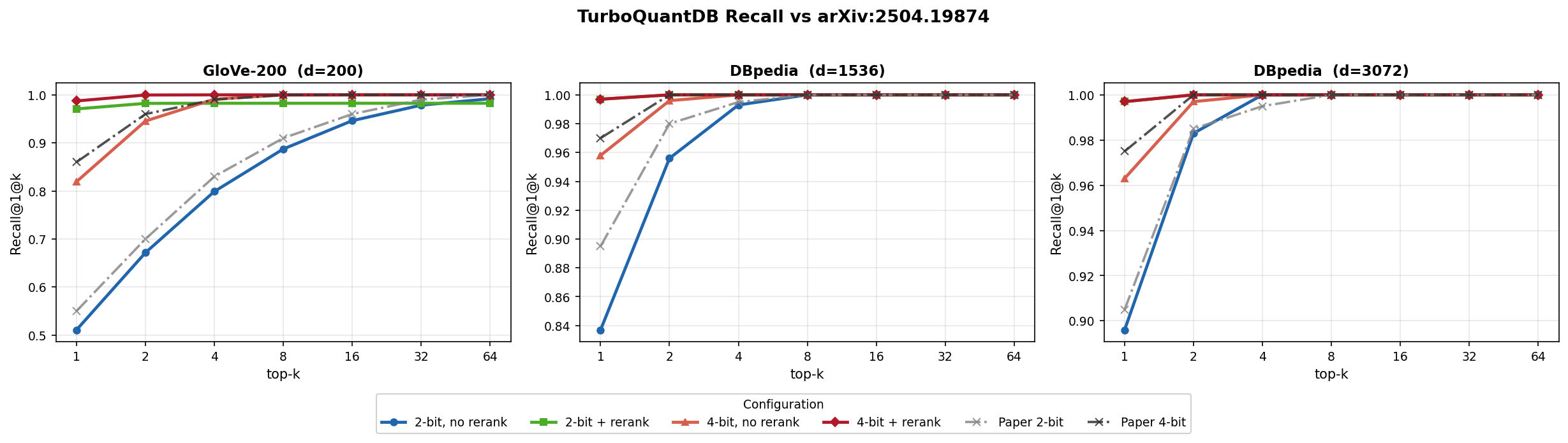
A. Paper-validation (n=100k, brute-force, fast_mode=True)
Config: dbpedia-1536, b=4, rerank=True, brute-force, quantizer_type=None (auto-selects "srht" at this dimension). Matches arXiv:2504.19874 Figure 5b's bit allocation; pin quantizer_type="dense" when you need the paper-faithful QR rotation.
| Metric | Value |
|---|---|
| Recall@1 | 99.7% |
| Recall@4 | 100.0% |
| Disk (incl. INT8 rerank vectors) | 230.4 MB |
Disk (codes only, rerank=False) |
83.6 MB |
| p50 latency (3-iter median) | 12.8 ms |
B. Rerank unlocks recall at low bit-rate (n=10k, brute-force, fast_mode=True)
Config: quantizer_type=None, brute-force, fast_mode=True. bits=2 + rerank=True matches bits=4 + rerank=True recall at ~10% less disk.
| Dataset | b=2, no rerank | b=4, no rerank | b=2 + rerank | b=4 + rerank |
|---|---|---|---|---|
| GloVe-200 (d=200) | 0.528 (1.8 MB) | 0.822 (2.3 MB) | 0.992 (3.8 MB) | 0.992 (4.2 MB) |
| arXiv-768 (d=768) | 0.426 (7.4 MB) | 0.696 (9.2 MB) | 0.978 (14.7 MB) | 0.978 (16.6 MB) |
| GIST-960 (d=960) | 0.294 (10.4 MB) | 0.566 (12.7 MB) | 0.974 (19.6 MB) | 0.974 (21.9 MB) |
C. Coverage across dimensions (n=10k, b=4, rerank=True, brute-force, fast_mode=True)
R@1 ≥ 0.87 across 9 benchmark datasets spanning d=65 to d=3072.
| Dataset | d | R@1 | Disk | p50 |
|---|---|---|---|---|
| lastfm-64 | 65 | 0.874 | 2.0 MB | 1.1 ms |
| deep-96 | 96 | 0.980 | 2.5 MB | 1.2 ms |
| glove-100 | 100 | 0.990 | 2.6 MB | 1.4 ms |
| glove-200 | 200 | 0.992 | 4.2 MB | 1.7 ms |
| nytimes-256 | 256 | 0.992 | 5.2 MB | 2.0 ms |
| arXiv-768 | 768 | 0.978 | 16.6 MB | 7.6 ms |
| GIST-960 | 960 | 0.974 | 21.9 MB | 7.3 ms |
| DBpedia-1536 | 1536 | 0.998 | 41.1 MB | 10.3 ms |
| DBpedia-3072 | 3072 | 1.000 | 117.0 MB | 46.8 ms |
Full tables (all 8 configs × 3 datasets) including ANN runs: docs/BENCHMARKS.md.
Config Advisor
Not sure whether to use b=2 or b=4, rerank, ANN, or fast mode? The interactive Config Advisor recommends settings from benchmark data for your embedding dimension and retrieval priorities, with adjustable weights for recall, compression, and speed.
👉 jyunming.github.io/TurboQuantDB/advisor.html

Migrate from Chroma or LanceDB
Already have a local vector store? TQDB can import an existing collection into a compressed TurboQuantDB database in one command — IDs, vectors, metadata, and document text are preserved.
pip install 'tqdb[migrate]'
python -m tqdb.migrate chroma   ./chroma_db ./tqdb_db
python -m tqdb.migrate lancedb  ./lancedb   ./tqdb_db --table docs
Programmatic API + verification example: examples/migrate_from_chroma.py. Full migration guide: docs/MIGRATION.md.
Hybrid retrieval
Dense vectors are good at semantic similarity, but RAG queries often include exact terms: paper IDs, product names, function names, error messages, or code symbols. TQDB maintains a BM25 keyword index from the document field and can fuse sparse + dense results with Reciprocal Rank Fusion.
results = db.search(
    query_vec,
    top_k=10,
    hybrid={"text": "error message WAL replay", "weight": 0.3, "rrf_k": 60},
)
Omit hybrid= for pure dense search — behaviour is unchanged. The BM25 index builds incrementally as documents are inserted; no separate train() or build_text_index() call required.
Text is analysed before indexing — Snowball stemming plus a stopword list — so "running shoes" retrieves a document that says "run shoe". On BEIR/scifact that lifts BM25 recall@10 from 0.773 to 0.808 and halves query latency (stopwords remove the highest-frequency postings). Configure or disable it at open time:
db = Database.open("./my_db", dimension=1536, text_language="german") # or "none"
Tuning weight blind is guesswork, so explain() returns the same ranking with each retriever's own verdict attached — which leg found the document, and where it placed it:
for r in db.explain(query_vec, text="error message WAL replay", top_k=3):
    print(r["id"], r["fused_score"], r["dense_rank"], r["sparse_rank"])
A None rank means that retriever never surfaced the document at all — usually the first thing worth knowing when a result looks wrong.
Framework integrations
pip install 'tqdb[langchain]'
pip install 'tqdb[llamaindex]'
TQDB ships native vector-store classes for LangChain v2 and LlamaIndex; both expose the same TurboQuantVectorStore class name in their respective namespaces. Use these for new RAG applications.
# LangChain v2
from tqdb.vectorstore import TurboQuantVectorStore as LCStore
store = LCStore.from_texts(texts, embedding=my_embedder, path="./db", dimension=384)

# LlamaIndex
from tqdb.llama_index import TurboQuantVectorStore as LIStore
vstore = LIStore.open("./db", dimension=1536)
For simple scripts and backward compatibility, the older tqdb.rag.TurboQuantRetriever wrapper remains available.
Detailed setup, pagination, hybrid wiring, and async patterns: LangChain integration | LlamaIndex integration.
Async API
For FastAPI / Starlette / async RAG services, AsyncDatabase exposes awaitable versions of every long-running operation. Calls are dispatched through a ThreadPoolExecutor, so concurrent awaits do not block the event loop; Rust engine calls release the GIL while they run.
import asyncio
from tqdb.aio import AsyncDatabase

async def main():
    db = await AsyncDatabase.open("./db", dimension=1536, bits=4)
    await db.insert("doc-1", vec, document="...")
    hits = await db.search(query_vec, top_k=5)
    await db.close()

asyncio.run(main())
Pass executor= to share a thread pool across multiple databases or to control its size.
Configurations for common goals
rerank=True stores raw INT8 vectors alongside compressed codes for exact second-pass rescoring. The default is rerank=False for compression-first storage; turn it on when you need the extra recall.
When do you actually need rerank? Below d ≈ 768 the recall lift from rerank is large (+15–30 pp R@1) and worth the disk. From d ≥ 1536 with
bits=4, brute-forcererank=Falsealready hits R@1 ≈ 0.96 — rerank pushes that to 0.997 but doubles disk. For most production embedding shapes (1536, 3072),rerank=Falseis the right default.
fast_mode=True (default) uses MSE-only quantization — optimal for d < 1536.
from tqdb import Database

# Best recall, any dimension — brute-force, default INT8 rerank
db = Database.open("./db", dimension=384, bits=4, rerank=True)
# DBpedia-1536 benchmark: R@1 ≈ 0.997 | ~231 MB disk
# arXiv-768 benchmark:    R@1 ≈ 0.98  | ~116 MB disk
# GloVe-200 benchmark:    R@1 ≈ 1.00  |  ~30 MB disk

# Compression-first rerank — same recall ceiling at ~31% less disk (b=4 only)
db = Database.open("./db", dimension=1536, bits=4,
                   rerank=True, rerank_precision="residual_int4")
# DBpedia-1536 benchmark: R@1 ≈ 0.985 (vs 0.995 int8)  |  ~158 MB disk (vs 230 MB int8)
# Note: at b=2 the residual is larger; int8 still preferred for compression-first b=2 setups.

# Best recall, high-d (d ≥ 1536) — also enable QJL residuals
db = Database.open("./db", dimension=1536, bits=4, rerank=True, fast_mode=False)

# Minimum disk — MSE codes only (no rerank file at all)
db = Database.open("./db", dimension=384, bits=4)

# Low latency at N ≥ 100k — HNSW index
db = Database.open("./db", dimension=384, bits=4, rerank=True)
db.create_index()
results = db.search(query, top_k=10, _use_ann=True)       # benchmarked p50 < 10 ms at d≥1536

# Tune rerank oversampling at query time (default 10×)
results = db.search(query, top_k=10, rerank_factor=20)    # higher recall, higher latency
Full configuration guide: docs/CONFIGURATION.md.
Rerank precision picker (rerank_precision=)
| Value | Disk per vector at d=1536 | Recall vs int8 (b=4) | When to pick |
|---|---|---|---|
"int8" (default) |
1540 B | baseline (R@1 ≈ 0.995) | Best recall; pick when disk isn't the bottleneck |
"residual_int4" |
772 B | −0 to −1pp at b=4 | Compression-first: same effective recall at half the disk |
"f16" |
3076 B | matches int8 | Higher precision needed for non-normalized vectors |
"f32" |
6144 B | exact | Debugging or when storage is free |
"int4" |
772 B | strictly worse than rerank=False |
Deprecated — kept for backward compat with existing dbs only |
Server Mode
For team deployments, the optional Axum server adds REST access, API-key auth, RBAC, quotas, async index/compaction/snapshot jobs, snapshot/restore, and Prometheus metrics. The binary is bundled in the tqdb wheel — no extra install on Linux x86-64, macOS, or Windows.
pip install tqdb
tqdb-server                            # listens on 127.0.0.1:8080
In the default local setup, the server can bootstrap an auth_store.json with a development API key (dev-key) under tenant dev. Replace it before production use. Three minimal curl examples — create a collection, insert vectors, query:
AUTH='Authorization: ApiKey dev-key'

# 1. Create a 3-dim collection (dimension is fixed at creation; production uses 384/768/1536)
curl -X POST http://127.0.0.1:8080/v1/tenants/dev/databases/main/collections \
  -H "$AUTH" -H 'Content-Type: application/json' \
  -d '{"name": "docs", "dimension": 3, "bits": 4}'

# 2. Insert two vectors (length must equal the collection dimension)
curl -X POST http://127.0.0.1:8080/v1/tenants/dev/databases/main/collections/docs/add \
  -H "$AUTH" -H 'Content-Type: application/json' \
  -d '{
    "ids": ["doc-1", "doc-2"],
    "embeddings": [[0.10, 0.20, 0.30], [0.40, 0.50, 0.60]],
    "metadatas": [{"source": "faq"}, {"source": "blog"}],
    "documents": ["FAQ entry", "Blog post"]
  }'

# 3. Query for the top 5 nearest neighbours
curl -X POST http://127.0.0.1:8080/v1/tenants/dev/databases/main/collections/docs/query \
  -H "$AUTH" -H 'Content-Type: application/json' \
  -d '{"query_embeddings": [[0.10, 0.20, 0.30]], "n_results": 5}'
Full endpoint reference, environment variables, and the Server Recovery Runbook: docs/SERVER_API.md.
Advanced features
- Two quantizer modes —
quantizer_type=Noneauto-selectsdensebelow d=1024 andsrhtat d>=1024. Pindensefor paper-faithful QR/no-padding storage orsrhtfor faster high-dimensional ingest and p50. Seedocs/QUANTIZER_MODES.md. - Optional ANN index — HNSW graph for low-latency search at n ≥ 100k; auto-fallback to brute-force when N is small.
- IVF coarse routing —
db.create_coarse_index(n_clusters=256)+nprobe=Nto score ~6% of the corpus at very large N. - MongoDB-style metadata filters —
$eq $ne $gt $gte $lt $lte $in $nin $exists $and $or $contains;$in / $nin / $oruse O(1) indexed fast-paths. - Per-query rerank tuning —
rerank_factor=exchanges recall and latency at query time, no rebuild required.
Preview: Multi-vector / ColBERT-style retrieval
MultiVectorStore lets each document hold N token vectors and scores queries with MaxSim (Σ_i max_j <q_i, d_j>), useful for late-interaction retrieval experiments.
This is currently a Python-layer wrapper over the single-vector engine; native engine-level support remains a future hardening item. The public API is designed to stay stable across that move. See docs/MULTI_VECTOR.md.
Python API at a glance
db = Database.open("./db", dimension=1536, bits=4, metric="ip", rerank=True)
db.insert("id", vector, metadata={"source": "docs"}, document="...")
hits = db.search(query, top_k=10, filter={"source": "docs"})
Supported operations:
insert/insert_batch/upsert/update/update_metadatadelete/delete_batch/get/get_many/list_all/list_ids/count/statssearch(brute /_use_ann=True/nprobe=N/hybrid={...}) and batchedquerycreate_index(HNSW),create_coarse_index(IVF)checkpoint(WAL flush + segment compaction)- container protocol:
len(db)/"id" in db
Full reference with every parameter and shape: docs/PYTHON_API.md.
Dataset Recovery (WAL)
TurboQuantDB replays wal.log automatically on reopen. For a local crash/power-loss recovery:
- Stop all writers to the DB directory.
- Make a copy of the DB folder (
manifest.json,live_codes.bin,live_ids.bin,wal.log, etc.). - Reopen the DB normally:
db = Database.open("./my_db")
- Validate state:
db.stats()["vector_count"]- sample
db.get(...)/db.search(...)
- Persist a clean post-recovery state:
db.checkpoint()   # flush WAL + compact
db.close()
If files are corrupted beyond WAL replay, restore from a snapshot/backup copy (server mode also supports snapshot/restore jobs; see docs/SERVER_API.md).
Troubleshooting
Database.open requires dimension — how do I find mine?
Embed one document and read the array shape:
vec = model.encode("hello")            # sentence-transformers
print(vec.shape)                       # (384,) → dimension=384
# Or: model.get_sentence_embedding_dimension()
For OpenAI text-embedding-3-small it's 1536; text-embedding-3-large is 3072. The dimension is fixed for the lifetime of the DB — it's persisted in manifest.json.
ImportError: DLL load failed / symbol not found on macOS Apple Silicon
You likely have an Intel-built wheel installed. Reinstall with the right architecture:
pip uninstall tqdb && pip install --no-cache-dir tqdb
If you still see the error, check python -c "import platform; print(platform.machine())" — should report arm64 on Apple Silicon.
WAL replay is slow on reopen for a large DB
Replay is O(uncheckpointed-writes). Run db.checkpoint() before close to flush the WAL into a segment so subsequent reopens skip the replay. Schedule this after big batch ingests.
Search returns scores near 0 or in unexpected ranges Two common causes:
- Forgot to L2-normalize embeddings before insert — for
metric="ip"(default), most embedding models expect normalized inputs to make IP scores meaningful (<a, b> = cos(a, b)only for unit vectors). Usemodel.encode(..., normalize_embeddings=True)or normalize manually. - Mixed
metric=between insert and query — the metric is fixed atDatabase.opentime and cannot be changed without rebuilding.
[Errno 22] Invalid argument / os error 1224 when resizing or replacing a DB file on Windows (pre-v0.8.5)
close() used to leave the memory mapping of live_codes.bin in place until the Database object was garbage-collected, so a still-referenced closed database blocked any resize of its files. Fixed in v0.8.5 — close() now releases every handle immediately, and Database is a context manager:
with Database.open("./my_db", dimension=384) as db:
    db.insert("a", vec)
# files are fully released here
Multi-query batch returned wrong scores under metric="cosine" (pre-v0.8.3)
Fixed in v0.8.3 — score_batch_brute was applying doc_norm on the cosine path. Upgrade to tqdb >= 0.8.3 or pass single queries through db.search(...) instead of db.query(...).
For more, see the closed GitHub issues and docs/CONFIGURATION.md.
Research Basis
This is an independent implementation of ideas from the TurboQuant paper. The algorithm itself was authored by the original researchers.
Zandieh, A., Daliri, M., Hadian, M., & Mirrokni, V. (2025). TurboQuant: Online Vector Quantization with Near-optimal Distortion Rate. arXiv:2504.19874
@article{zandieh2025turboquant,
  title={TurboQuant: Online Vector Quantization with Near-optimal Distortion Rate},
  author={Zandieh, Amir and Daliri, Majid and Hadian, Majid and Mirrokni, Vahab},
  journal={arXiv preprint arXiv:2504.19874},
  year={2025}
}
License
Apache License 2.0 — see LICENSE.
1 maintainer

Release files for tqdb 0.9.0
For a detailed explanation of source distributions (sdists) and built distributions (wheels), please see the package formats documentation.
Source distribution (sdist)
| File | Size | Uploaded | |
|---|---|---|---|
| tqdb-0.9.0.tar.gz | 1.4 MB | Details |
Built distributions (wheels)
Total release size: 59.2 MB
Release files / tqdb-0.9.0.tar.gz
| Download URL | tqdb-0.9.0.tar.gz |
|---|---|
| Size | 1.4 MB |
| Tags | Source |
|
SHA-256 checksum How to use checksums |
950241ea97aaa533efc2c7411e9e6ad1106c234ae58493a7315f42625c38af78
|
|
BLAKE2b-256 checksum How to use checksums |
8a1debd1145dead27edab278f4a99aa449d0f0f57c6022f73013d9d55dd26b57
|
| Upload date | |
|
Uploaded using Trusted Publishing? What is trusted publishing? |
Yes |
| Uploaded via |
maturin/1.15.0
|
Release files / tqdb-0.9.0-cp313-cp313-win_amd64.whl
| Download URL | tqdb-0.9.0-cp313-cp313-win_amd64.whl |
|---|---|
| Size | 3.8 MB |
| Tags | CPython 3.13 Windows x86-64 |
|
SHA-256 checksum How to use checksums |
af0b1a76f8da3a9064a93f6ed651f98338f03b81bae69f24c95c67e22c95b651
|
|
BLAKE2b-256 checksum How to use checksums |
478e7b39db7dce1d2aab99c773565856bc5bf4a230dba5fb3c79e6de40f87dd7
|
| Upload date | |
|
Uploaded using Trusted Publishing? What is trusted publishing? |
Yes |
| Uploaded via |
maturin/1.15.0
|
Release files / tqdb-0.9.0-cp313-cp313-manylinux_2_28_aarch64.whl
| Download URL | tqdb-0.9.0-cp313-cp313-manylinux_2_28_aarch64.whl |
|---|---|
| Size | 1.4 MB |
| Tags | CPython 3.13 Linux glibc 2.28+ ARM64 |
|
SHA-256 checksum How to use checksums |
defcc5f3ca8954583df3d97c985cb5029cf8c3e3e622e089f5a6ed40b681af24
|
|
BLAKE2b-256 checksum How to use checksums |
9909fab82050debe0b9ae952a3aa892b0121f611ffac4be4e6fd7315013e4d8b
|
| Upload date | |
|
Uploaded using Trusted Publishing? What is trusted publishing? |
Yes |
| Uploaded via |
maturin/1.15.0
|
Release files / tqdb-0.9.0-cp313-cp313-manylinux_2_17_x86_64.manylinux2014_x86_64.whl
| Download URL | tqdb-0.9.0-cp313-cp313-manylinux_2_17_x86_64.manylinux2014_x86_64.whl |
|---|---|
| Size | 4.2 MB |
| Tags | CPython 3.13 Linux glibc 2.17+ x86-64 |
|
SHA-256 checksum How to use checksums |
93c2d027a8ba2ca53c2b5ec0ab9497ddf5afafff388913c8888c9963c6982b86
|
|
BLAKE2b-256 checksum How to use checksums |
28fb37ac62dc7a2028c588a038173dd2957b96568cd452536e82fce6f5303477
|
| Upload date | |
|
Uploaded using Trusted Publishing? What is trusted publishing? |
Yes |
| Uploaded via |
maturin/1.15.0
|
Release files / tqdb-0.9.0-cp313-cp313-macosx_10_12_x86_64.macosx_11_0_arm64.macosx_10_12_universal2.whl
| Download URL | tqdb-0.9.0-cp313-cp313-macosx_10_12_x86_64.macosx_11_0_arm64.macosx_10_12_universal2.whl |
|---|---|
| Size | 5.0 MB |
| Tags | CPython 3.13 macOS 10.12+ universal2 (ARM64, x86-64) macOS 10.12+ x86-64 macOS 11.0+ ARM64 |
|
SHA-256 checksum How to use checksums |
024bd79bac7b0b4690057fce351bfad59bc7be709ffd487f8341e19966aa6a87
|
|
BLAKE2b-256 checksum How to use checksums |
9c4e2cf2f4042123377c42c58d0a2b4e7c320055aeab7af159f9ad9f258fcae5
|
| Upload date | |
|
Uploaded using Trusted Publishing? What is trusted publishing? |
Yes |
| Uploaded via |
maturin/1.15.0
|
Release files / tqdb-0.9.0-cp312-cp312-win_amd64.whl
| Download URL | tqdb-0.9.0-cp312-cp312-win_amd64.whl |
|---|---|
| Size | 3.8 MB |
| Tags | CPython 3.12 Windows x86-64 |
|
SHA-256 checksum How to use checksums |
81f295751a1a19fd00941466e0e40eec572f4937550e73ec4d2c67747916c1df
|
|
BLAKE2b-256 checksum How to use checksums |
933244a02e7801dd1d5230af82c9a8cffccbcb78409d680e3bf28f700485dd89
|
| Upload date | |
|
Uploaded using Trusted Publishing? What is trusted publishing? |
Yes |
| Uploaded via |
maturin/1.15.0
|
Release files / tqdb-0.9.0-cp312-cp312-manylinux_2_28_aarch64.whl
| Download URL | tqdb-0.9.0-cp312-cp312-manylinux_2_28_aarch64.whl |
|---|---|
| Size | 1.4 MB |
| Tags | CPython 3.12 Linux glibc 2.28+ ARM64 |
|
SHA-256 checksum How to use checksums |
31d85b921d13f3350cdec9008b5f58dc9fb19d926275ae3048fb9633b5a23d00
|
|
BLAKE2b-256 checksum How to use checksums |
66c003513688d9049c3e854e717fec548aeee956d40950243152cf9b0e27f144
|
| Upload date | |
|
Uploaded using Trusted Publishing? What is trusted publishing? |
Yes |
| Uploaded via |
maturin/1.15.0
|
Release files / tqdb-0.9.0-cp312-cp312-manylinux_2_17_x86_64.manylinux2014_x86_64.whl
| Download URL | tqdb-0.9.0-cp312-cp312-manylinux_2_17_x86_64.manylinux2014_x86_64.whl |
|---|---|
| Size | 4.2 MB |
| Tags | CPython 3.12 Linux glibc 2.17+ x86-64 |
|
SHA-256 checksum How to use checksums |
be94c0b8a2df26ef232dc3d2431e2db9f4482d6d800db40169b767c8d62321b9
|
|
BLAKE2b-256 checksum How to use checksums |
bb44c4e3dd2f7dc1eb509ce60237d932219d68926131075004de68407d117c6f
|
| Upload date | |
|
Uploaded using Trusted Publishing? What is trusted publishing? |
Yes |
| Uploaded via |
maturin/1.15.0
|
Release files / tqdb-0.9.0-cp312-cp312-macosx_10_12_x86_64.macosx_11_0_arm64.macosx_10_12_universal2.whl
| Download URL | tqdb-0.9.0-cp312-cp312-macosx_10_12_x86_64.macosx_11_0_arm64.macosx_10_12_universal2.whl |
|---|---|
| Size | 5.0 MB |
| Tags | CPython 3.12 macOS 10.12+ universal2 (ARM64, x86-64) macOS 10.12+ x86-64 macOS 11.0+ ARM64 |
|
SHA-256 checksum How to use checksums |
4962d2eba40f92a2e5e7c08d0004e5f784c7e5f3043a78422ae50a69c142d531
|
|
BLAKE2b-256 checksum How to use checksums |
8007c0ef2b8370003820178f02c84998fc8473c937c07e5196c68710471a5182
|
| Upload date | |
|
Uploaded using Trusted Publishing? What is trusted publishing? |
Yes |
| Uploaded via |
maturin/1.15.0
|
Release files / tqdb-0.9.0-cp311-cp311-win_amd64.whl
| Download URL | tqdb-0.9.0-cp311-cp311-win_amd64.whl |
|---|---|
| Size | 3.8 MB |
| Tags | CPython 3.11 Windows x86-64 |
|
SHA-256 checksum How to use checksums |
9e55b4f4eece2556203e2938922f7ae223eba4cb891e1547dda4a0735ad498a0
|
|
BLAKE2b-256 checksum How to use checksums |
d8a65794a5763e2b3edcb219318aa715415caabe06d3921bc45c138bf95c61a3
|
| Upload date | |
|
Uploaded using Trusted Publishing? What is trusted publishing? |
Yes |
| Uploaded via |
maturin/1.15.0
|
Release files / tqdb-0.9.0-cp311-cp311-manylinux_2_28_aarch64.whl
| Download URL | tqdb-0.9.0-cp311-cp311-manylinux_2_28_aarch64.whl |
|---|---|
| Size | 1.4 MB |
| Tags | CPython 3.11 Linux glibc 2.28+ ARM64 |
|
SHA-256 checksum How to use checksums |
5313ac704947f052e7122900629305b92eca7eb6c69fc4c08839fa7ba5335f18
|
|
BLAKE2b-256 checksum How to use checksums |
4b9c4a8c64d3cd3b526ec1fca051d029e6052627f3b229479f1a1d4b76b82410
|
| Upload date | |
|
Uploaded using Trusted Publishing? What is trusted publishing? |
Yes |
| Uploaded via |
maturin/1.15.0
|
Release files / tqdb-0.9.0-cp311-cp311-manylinux_2_17_x86_64.manylinux2014_x86_64.whl
| Download URL | tqdb-0.9.0-cp311-cp311-manylinux_2_17_x86_64.manylinux2014_x86_64.whl |
|---|---|
| Size | 4.2 MB |
| Tags | CPython 3.11 Linux glibc 2.17+ x86-64 |
|
SHA-256 checksum How to use checksums |
dedd8c436a377236dc1199e1fddcab79d54dc3966281a8fc92da21470bb8daed
|
|
BLAKE2b-256 checksum How to use checksums |
30bbf1a958d99ad52a4a0ad2c435823a5c3dbc3afdedfbb70146fcbfdfdfc5f4
|
| Upload date | |
|
Uploaded using Trusted Publishing? What is trusted publishing? |
Yes |
| Uploaded via |
maturin/1.15.0
|
Release files / tqdb-0.9.0-cp311-cp311-macosx_10_12_x86_64.macosx_11_0_arm64.macosx_10_12_universal2.whl
| Download URL | tqdb-0.9.0-cp311-cp311-macosx_10_12_x86_64.macosx_11_0_arm64.macosx_10_12_universal2.whl |
|---|---|
| Size | 5.0 MB |
| Tags | CPython 3.11 macOS 10.12+ universal2 (ARM64, x86-64) macOS 10.12+ x86-64 macOS 11.0+ ARM64 |
|
SHA-256 checksum How to use checksums |
7826735f00bf60f83a0e4ab121b57a534b1ab653dd2d9ef42de0c253d40bf36f
|
|
BLAKE2b-256 checksum How to use checksums |
65bede1e5e843b12b93a964de612f11e9b62efcf2cc619a36b15ca729168d91b
|
| Upload date | |
|
Uploaded using Trusted Publishing? What is trusted publishing? |
Yes |
| Uploaded via |
maturin/1.15.0
|
Release files / tqdb-0.9.0-cp310-cp310-win_amd64.whl
| Download URL | tqdb-0.9.0-cp310-cp310-win_amd64.whl |
|---|---|
| Size | 3.8 MB |
| Tags | CPython 3.10 Windows x86-64 |
|
SHA-256 checksum How to use checksums |
821dbd2952e71aa5ac579be1fc589a84bc56634cca4ed3f6e1c1d5f6905de444
|
|
BLAKE2b-256 checksum How to use checksums |
3a5836625b63d4251c0bf12da060a62c6c936129bd1666ea0f40398d87255d8f
|
| Upload date | |
|
Uploaded using Trusted Publishing? What is trusted publishing? |
Yes |
| Uploaded via |
maturin/1.15.0
|
Release files / tqdb-0.9.0-cp310-cp310-manylinux_2_28_aarch64.whl
| Download URL | tqdb-0.9.0-cp310-cp310-manylinux_2_28_aarch64.whl |
|---|---|
| Size | 1.4 MB |
| Tags | CPython 3.10 Linux glibc 2.28+ ARM64 |
|
SHA-256 checksum How to use checksums |
eadf8d3d85e2d792968fced4b1f53aea85d283fbaa4300345072128ac8b5a78d
|
|
BLAKE2b-256 checksum How to use checksums |
d29a9c37a266b29b8484648952c352e570526dfcf0fa9dc036d1cedb47494c06
|
| Upload date | |
|
Uploaded using Trusted Publishing? What is trusted publishing? |
Yes |
| Uploaded via |
maturin/1.15.0
|
Release files / tqdb-0.9.0-cp310-cp310-manylinux_2_17_x86_64.manylinux2014_x86_64.whl
| Download URL | tqdb-0.9.0-cp310-cp310-manylinux_2_17_x86_64.manylinux2014_x86_64.whl |
|---|---|
| Size | 4.2 MB |
| Tags | CPython 3.10 Linux glibc 2.17+ x86-64 |
|
SHA-256 checksum How to use checksums |
1936c3ecef852be75bf66d8b083629d0f2a1686e558deb735801bdcf686d9d6c
|
|
BLAKE2b-256 checksum How to use checksums |
9f50f0df1490f229f29a78c80d32b4985d1b1b491be2bc1b14f7ff19c5463924
|
| Upload date | |
|
Uploaded using Trusted Publishing? What is trusted publishing? |
Yes |
| Uploaded via |
maturin/1.15.0
|
Release files / tqdb-0.9.0-cp310-cp310-macosx_10_12_x86_64.macosx_11_0_arm64.macosx_10_12_universal2.whl
| Download URL | tqdb-0.9.0-cp310-cp310-macosx_10_12_x86_64.macosx_11_0_arm64.macosx_10_12_universal2.whl |
|---|---|
| Size | 5.0 MB |
| Tags | CPython 3.10 macOS 10.12+ universal2 (ARM64, x86-64) macOS 10.12+ x86-64 macOS 11.0+ ARM64 |
|
SHA-256 checksum How to use checksums |
291bc6502e791c6bd8094d52d52024dafd3d40e7f8e3b2300c826199ecf95f86
|
|
BLAKE2b-256 checksum How to use checksums |
1885ee7625df737c9dc05fd1cb091317803ff4898a689f940a1c176c61dd6305
|
| Upload date | |
|
Uploaded using Trusted Publishing? What is trusted publishing? |
Yes |
| Uploaded via |
maturin/1.15.0
|














