
What could go wrong giving full shell access to chatgpt?

Project description
Enable shell access on chatgpt.com
A custom gpt on chatgpt web app to interact with your local shell.


🚀 Highlights
- ⚡ Full Shell Access: No restrictions, complete control.
- ⚡ Create, Execute, Iterate: Ask the gpt to keep running compiler checks till all errors are fixed, or ask it to keep checking for the status of a long running command till it's done.
- ⚡ Interactive Command Handling: Supports interactive commands using arrow keys, interrupt, and ansi escape sequences.
- ⚡ REPL support: [beta] Supports python/node and other REPL execution.
🪜 Steps:
- Run the cli client in any directory of choice.
- Share the generated id with this GPT:
https://chatgpt.com/g/g-Us0AAXkRh-wcgw-giving-shell-access - The custom GPT can now run any command on your cli
Client
You need to keep running this client for GPT to access your shell. Run it in a version controlled project's root.
Option 1: using uv [Recommended]
$ curl -LsSf https://astral.sh/uv/install.sh | sh
$ uvx wcgw@latest
Option 2: using pip
Supports python >=3.10 and <3.13
$ pip3 install wcgw
$ wcgw
This will print a UUID that you need to share with the gpt.
Chat
Open the following link or search the "wcgw" custom gpt using "Explore GPTs" on chatgpt.com
https://chatgpt.com/g/g-Us0AAXkRh-wcgw-giving-shell-access
Finally, let the chatgpt know your user id in any format. E.g., "user_id=" followed by rest of your instructions.
NOTE: you can resume a broken connection
wcgw --client-uuid $previous_uuid
How it works
Your commands are relayed through a server to the terminal client. You could host the server on your own. For public convenience I've hosted one at https://wcgw.arcfu.com thanks to the gcloud free tier plan.
Chatgpt sends a request to the relay server using the user id that you share with it. The relay server holds a websocket with the terminal client against the user id and acts as a proxy to pass the request.
It's secure in both the directions. Either a malicious actor or a malicious Chatgpt has to correctly guess your UUID for any security breach.
Showcase
Unit tests and github actions
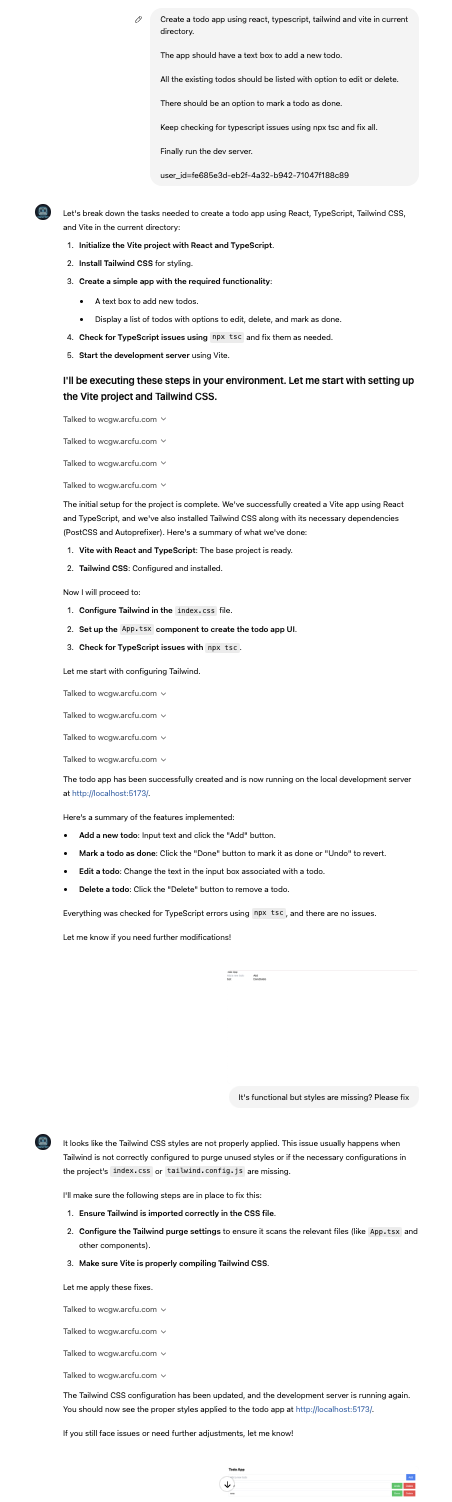
Create a todo app using react + typescript + vite
Privacy
The relay server doesn't store any data. I can't access any information passing through it and only secure channels are used to communicate.
You may host the server on your own and create a custom gpt using the following section.
Creating your own custom gpt and the relay server.
I've used the following instructions and action json schema to create the custom GPT. (Replace wcgw.arcfu.com with the address to your server)
https://github.com/rusiaaman/wcgw/blob/main/gpt_instructions.txt https://github.com/rusiaaman/wcgw/blob/main/gpt_action_json_schema.json
Run the server
gunicorn --worker-class uvicorn.workers.UvicornWorker --bind 0.0.0.0:443 src.wcgw.relay.serve:app --certfile fullchain.pem --keyfile privkey.pem
If you don't have public ip and domain name, you can use ngrok or similar services to get a https address to the api.
The specify the server url in the wcgw command like so
wcgw --server-url https://your-url/v1/register
Claude Support
WCGW now supports Claude Desktop through the MCP protocol, allowing you to use Claude's capabilities directly from your desktop environment. This integration enables seamless interaction between Claude and your local shell.
[Optional] Local shell access with openai API key
Add OPENAI_API_KEY and OPENAI_ORG_ID env variables.
Clone the repo and run to install wcgw_local command
pip install .
Then run
wcgw_local --limit 0.1 # Cost limit $0.1
You can now directly write messages or press enter key to open vim for multiline message and text pasting.
Release history Release notifications | RSS feed


Download files
Download the file for your platform. If you're not sure which to choose, learn more about installing packages.
Source Distribution
Built Distribution
Filter files by name, interpreter, ABI, and platform.
If you're not sure about the file name format, learn more about wheel file names.
Copy a direct link to the current filters
File details
Details for the file wcgw-1.4.0.tar.gz.
File metadata
- Download URL: wcgw-1.4.0.tar.gz
- Upload date:
- Size: 214.7 kB
- Tags: Source
- Uploaded using Trusted Publishing? No
- Uploaded via: twine/5.1.1 CPython/3.9.20
File hashes
| Algorithm | Hash digest | |
|---|---|---|
| SHA256 |
cd9fbe77e4f88345906a9d0b0ab509a6514f428eb2560a6222f329047cf4d946
|
|
| MD5 |
a6098bee2db710c44a17c377becd9553
|
|
| BLAKE2b-256 |
9a404df8d277f5d008e88d2fc632dacb0c74fde1c791a60681585870059e0b93
|
File details
Details for the file wcgw-1.4.0-py3-none-any.whl.
File metadata
- Download URL: wcgw-1.4.0-py3-none-any.whl
- Upload date:
- Size: 30.6 kB
- Tags: Python 3
- Uploaded using Trusted Publishing? No
- Uploaded via: twine/5.1.1 CPython/3.9.20
File hashes
| Algorithm | Hash digest | |
|---|---|---|
| SHA256 |
61bcc71af14c80594f8e32cffa32056894761fc009e71a21a24b9fbb7c04c198
|
|
| MD5 |
361fb599e77680945fc9e903d4464632
|
|
| BLAKE2b-256 |
92dfb336d3b9de077305f6a4ffb19fd20aa8b068fdb2b4e99dc993240075cfe1
|






