agent6
A coding agent with sandboxed commands, resumable sessions, and editable workflows.
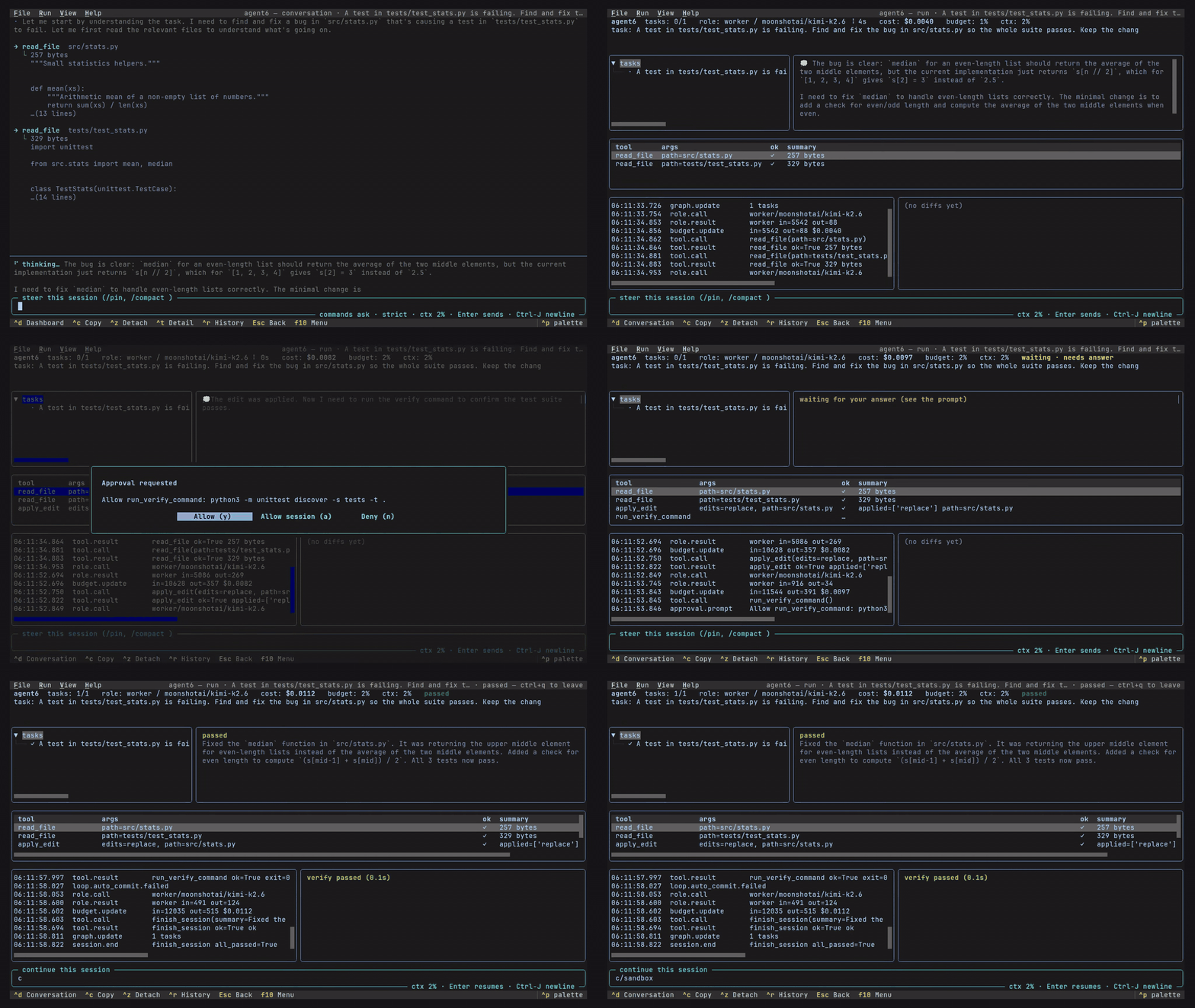
agent6 tui terminal interface |
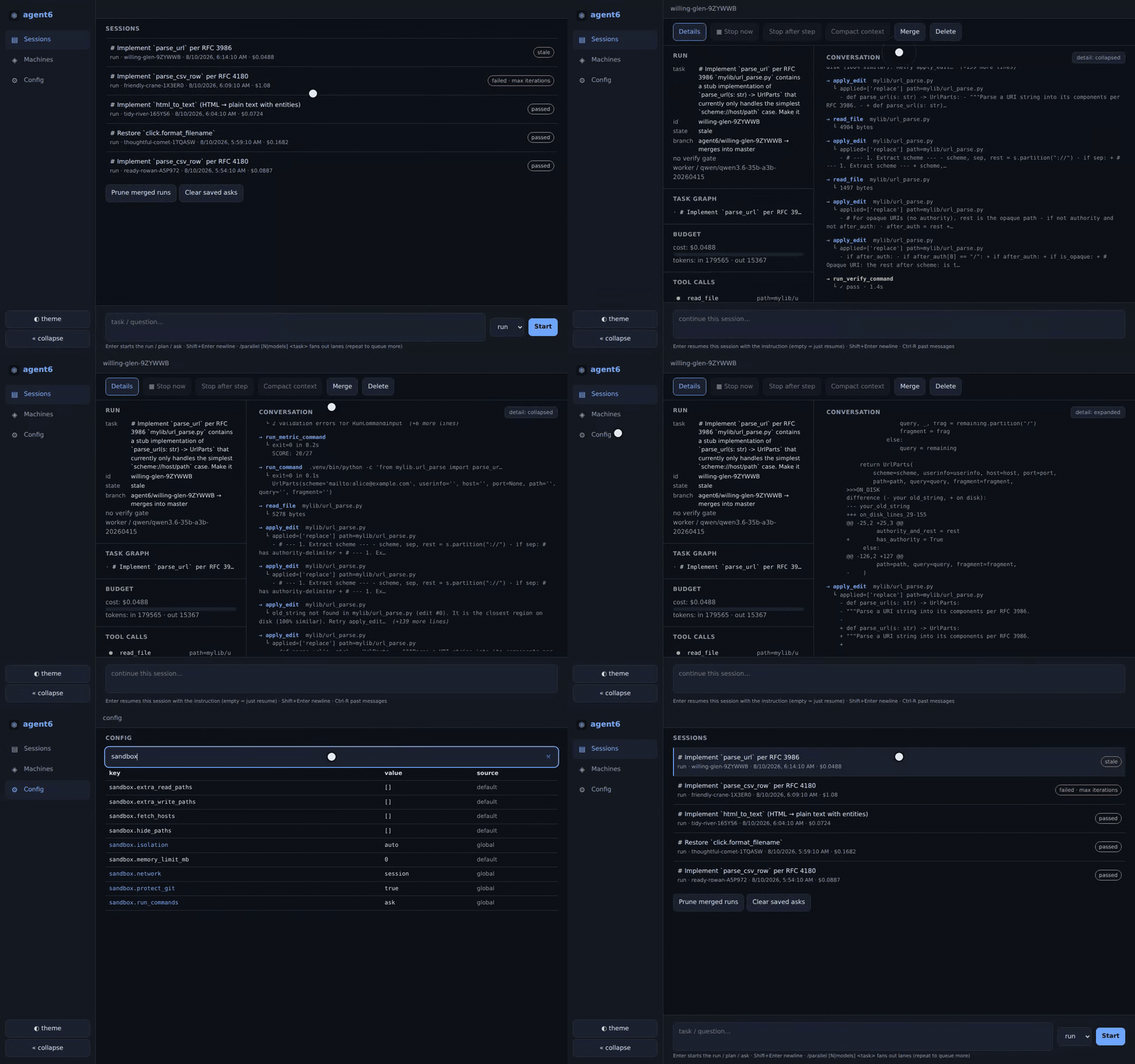
agent6 web browser interface for desktop or phone |
- Runs commands in a Linux sandbox; you set file and network access.
- Routes each role to a hosted, local or subscription model.
- Resumes or forks a saved session from an earlier turn.
- Runs your verification command and marks an unverified tree.
- Reviews the diff with a model panel; blocking findings stop the merge.
- Runs in a worktree, or as parallel attempts in clones, ranked for you; a top-level run may dispatch children itself when
harness.parallel.toolis on. - Defines workflows as TOML state machines with recovery and replay.
- Follows
AGENTS.mdand SKILL.md packs; MCP servers are opt-in. - No telemetry unless you export it, and no automatic updates.
Also available as a streaming CLI and through ACP editor integration.
Installation
Sandboxing supports Linux on x86_64 and aarch64; macOS runs without it, and Windows users should use WSL.
Install from PyPI with uv or pipx, then connect a provider and select a model:
uv tool install agent6      # or pipx install agent6
agent6 connect              # configure a provider
agent6 model default        # choose the required default model
Use Anthropic or any OpenAI-compatible endpoint, including OpenAI, OpenRouter, Ollama, vLLM, llama.cpp, and LM Studio.
A provider entry can also use the Responses API (providers.<name>.backend = "responses") or sign in at a configured OAuth issuer.
For subscriptions, replace agent6 connect with agent6 connect chatgpt or agent6 connect claude; the latter uses your installed, signed-in Claude Code binary.
agent6 completions installs tab completion for your shell.
Usage
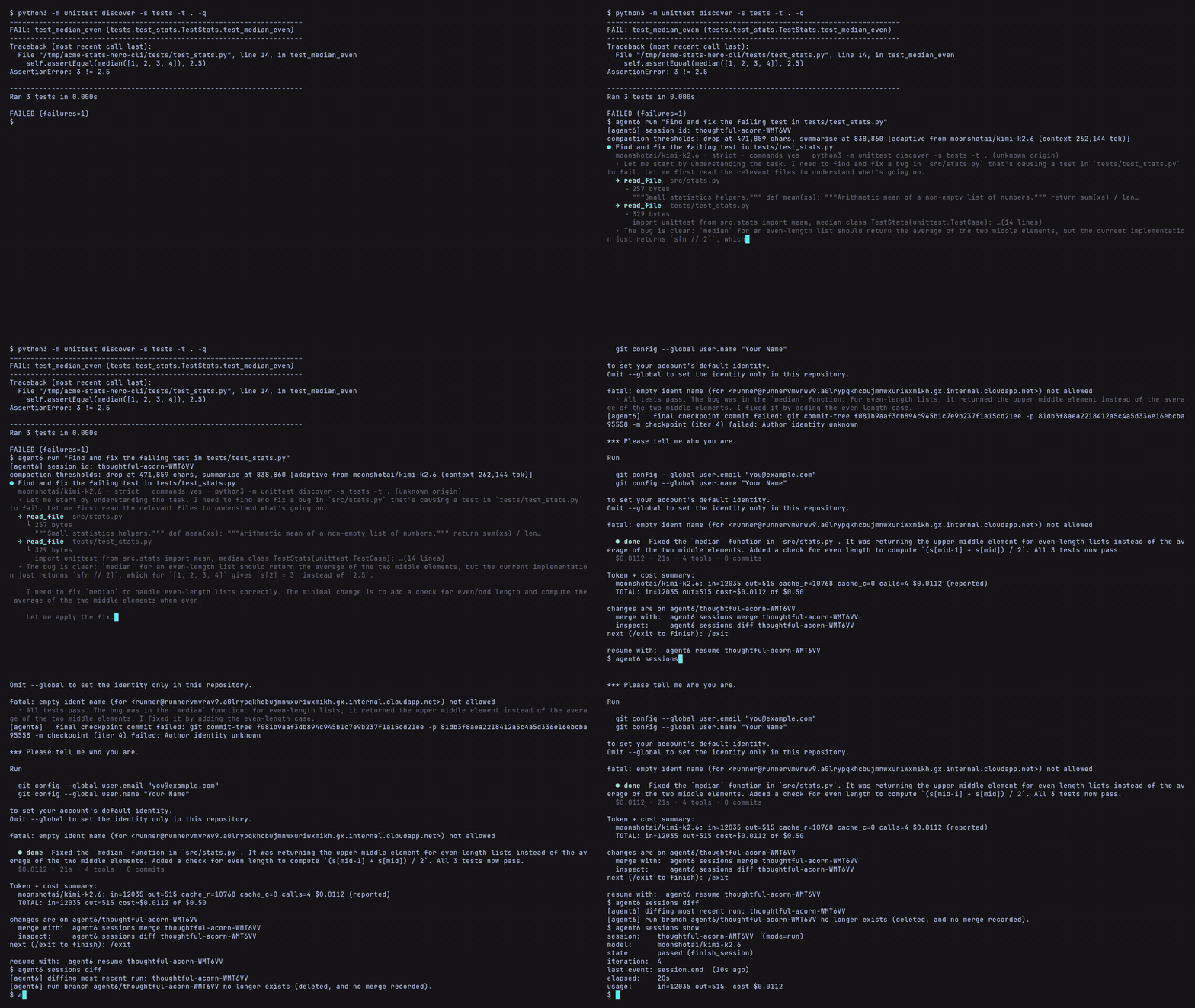
A run edits your current checkout.
Checkpoint commits go on a separate agent6/<id> branch; checkpointing leaves your current branch's history and index in place.
For a separate checkout, use agent6 run --worktree "your task", which starts from committed HEAD without copying uncommitted changes or untracked dependencies.
cd your-repo
agent6 check                # check configuration and sandbox support
agent6 run "your task here"
Commands ask for approval by default.
After the task finishes, enter another instruction or type /exit.
Inspect the latest session, then merge its recorded changes when ready:
agent6 sessions show        # status and verification result
agent6 sessions diff        # recorded changes
agent6 sessions merge       # merge into the run's starting branch
Other commands:
| Command | Purpose |
|---|---|
agent6 plan "task" |
plan a change; agent6 run --from <plan-id> carries it out |
agent6 ask "question" |
ask about the repository |
agent6 attach <id> |
follow a live session |
agent6 steer <id> "instruction" |
direct the next steps |
agent6 sessions findings <id> |
list a session's review findings |
agent6 sessions receipt <id> |
print the recorded tests, execution environments, review outcome, the children it dispatched and how to revert |
agent6 stop <id> --after-turn |
stop after the current turn |
agent6 resume <id> |
continue an interrupted run |
agent6 fork <id> --at-turn 7 |
fork a coding run from an earlier turn into a separate worktree |
agent6 telemetry export |
export session journals as OpenTelemetry signals or a Prometheus textfile |
agent6 pack |
copy your config, secrets, sessions and memory into the workspace before a sync |
agent6 unpack |
move the packed files into the new home |
To give a finished run more work, use agent6 resume <id> --steer "next task".
Configuration
agent6 config show prints effective settings and where each value came from.
Changes are global unless you add --repo for a repository override, for example:
agent6 config set --repo harness.verify.command '["uv", "run", "pytest"]'
The worker, planner, reviewer, and helper inherit each unset model, effort, and temperature from the required models.default.
Budgets limit spending, tokens for unpriced calls, and supported subscription usage.
Security
agent6 confines only the model's commands: in a jail on your host under full and partial isolation, or inside the dev container you select; the agent6 process stays trusted, holds your provider credentials, and connects to your configured providers.
The repository stays at its real path, and the jail sees your system toolchains and ~/.local/bin read-only.
sandbox.isolation names the command mode; auto, the default, picks the strongest of full, partial and none the host allows and warns when it falls back:
full: commands cannot read your provider keys or the secrets file,.gitis read-only to them (sandbox.protect_git = "auto",git.control = "agent6"), and they get a private network (sandbox.network = "auto").partial: commands cannot read your keys or the secrets file, but they share agent6's network and can write.git.none: no confinement.container: commands run inside the dev container that mounts your workspace, found by its labels or named in[container]; the runtime is the boundary, and agent6 adds no confinement there.
Commands ask for approval by default (sandbox.run_commands = "ask").
agent6's own git never pushes, rewrites history or runs reset --hard, and no config key turns that on.
MCP is off by default, and locally spawned servers use the command sandbox unless explicitly configured otherwise.
agent6 check sandbox shows the effective file and command boundaries, network and approval settings, and live probe results.
Running agent6 itself in Docker or Podman
- Docker gives
partialby default and allowsfullwith both--security-opt seccomp=unconfinedand--security-opt apparmor=unconfined. - Rootless Podman allows
fullwith no flags (rootful Podman).
On Ubuntu, full under Docker also needs the host to allow the jail launcher to use unprivileged user namespaces (Installation).
1 maintainer

Metadata
1 maintainer
Release files for agent6 0.0.43
For a detailed explanation of source distributions (sdists) and built distributions (wheels), please see the package formats documentation.
Source distribution (sdist)
| File | Size | Uploaded | Provenance | Actions |
|---|---|---|---|---|
| agent6-0.0.43.tar.gz | 1.9 MB | With provenance | Details for agent6-0.0.43.tar.gz |
Built distributions (wheels)
| File | Interpreter | ABI | Platform | Actions Reset |
|---|---|---|---|---|
| agent6-0.0.43-py3-none-manylinux_2_17_x86_64.musllinux_1_2_x86_64.whl | Python 3 | none | Linux glibc 2.17+ x86-64, Linux musl 1.2+ x86-64 | Details for agent6-0.0.43-py3-none-manylinux_2_17_x86_64.musllinux_1_2_x86_64.whl |
| agent6-0.0.43-py3-none-manylinux_2_17_aarch64.musllinux_1_2_aarch64.whl | Python 3 | none | Linux musl 1.2+ ARM64, Linux glibc 2.17+ ARM64 | Details for agent6-0.0.43-py3-none-manylinux_2_17_aarch64.musllinux_1_2_aarch64.whl |
Total release size: 7.0 MB
Release files / agent6-0.0.43.tar.gz
| Download URL | agent6-0.0.43.tar.gz |
|---|---|
| Size | 1.9 MB |
| Tags | Source |
|
SHA-256 checksum How to use checksums |
6a296f4119e2b5cb682f89e8267eef44612e7f74621bccf4a300543deb7a6d26
|
|
BLAKE2b-256 checksum How to use checksums |
fc5f490c558c1f7fd8622f30d7160df5cfeb8427b77da9f2a39b425e1bacb4ca
|
| Upload date | |
|
Uploaded using Trusted Publishing? What is trusted publishing? |
Yes |
| Uploaded via |
twine/7.0.0 CPython/3.13.16
|
Provenance
Provenance describes where a file came from. On PyPI, provenance is shared via attestations, which provide a verifiable record of the build or publishing details. View details, limitations and caveats.


PyPI Publish Attestation
PyPI verified that this artifact, at this checksum, originated from the publisher listed below.
Signed by GitHub Actions, verified by PyPI on Nov 12, 2026.
Transparency logRelease files / agent6-0.0.43-py3-none-manylinux_2_17_x86_64.musllinux_1_2_x86_64.whl
| Download URL | agent6-0.0.43-py3-none-manylinux_2_17_x86_64.musllinux_1_2_x86_64.whl |
|---|---|
| Size | 2.5 MB |
| Tags | Linux glibc 2.17+ x86-64 Linux musl 1.2+ x86-64 Python 3 |
|
SHA-256 checksum How to use checksums |
8c8ea8e822bb5a0e11079129c57f35933a52084b1c49d2f667de1a9a947419b5
|
|
BLAKE2b-256 checksum How to use checksums |
569b27b597a4b87f0913e5c7d503bd3fdcf61c6718b6a5f263773b63aeb687ff
|
| Upload date | |
|
Uploaded using Trusted Publishing? What is trusted publishing? |
Yes |
| Uploaded via |
twine/7.0.0 CPython/3.13.16
|
Provenance
Provenance describes where a file came from. On PyPI, provenance is shared via attestations, which provide a verifiable record of the build or publishing details. View details, limitations and caveats.
PyPI Publish Attestation
PyPI verified that this artifact, at this checksum, originated from the publisher listed below.
Signed by GitHub Actions, verified by PyPI on Nov 12, 2026.
Transparency logRelease files / agent6-0.0.43-py3-none-manylinux_2_17_aarch64.musllinux_1_2_aarch64.whl
| Download URL | agent6-0.0.43-py3-none-manylinux_2_17_aarch64.musllinux_1_2_aarch64.whl |
|---|---|
| Size | 2.5 MB |
| Tags | Linux glibc 2.17+ ARM64 Linux musl 1.2+ ARM64 Python 3 |
|
SHA-256 checksum How to use checksums |
a2e68aa42c33b14addf9a124930a7036b67cbeda125fe7c9efcacb1ac117e2e0
|
|
BLAKE2b-256 checksum How to use checksums |
3d12a22eb4125d7e3ad4d664f4d833520891f3967cf38c0c04e30d199fe57875
|
| Upload date | |
|
Uploaded using Trusted Publishing? What is trusted publishing? |
Yes |
| Uploaded via |
twine/7.0.0 CPython/3.13.16
|
Provenance
Provenance describes where a file came from. On PyPI, provenance is shared via attestations, which provide a verifiable record of the build or publishing details. View details, limitations and caveats.
PyPI Publish Attestation
PyPI verified that this artifact, at this checksum, originated from the publisher listed below.
Signed by GitHub Actions, verified by PyPI on Nov 12, 2026.
Transparency logSecurity for agent6 0.0.43
Provenance
Provenance describes where a file came from. On PyPI, provenance is shared via attestations, which provide a verifiable record of the build or publishing details. View details, limitations and caveats.
Full provenance
All 3 files in this release have been uploaded with provenance metadata.
Attestation for agent6-0.0.43.tar.gz
PyPI Publish Attestation
PyPI verified that this artifact, at this checksum, originated from the publisher listed below.
Signed by GitHub Actions, verified by PyPI on Nov 12, 2026.
Transparency logA note on package security
PyPI is a repository for distributing packages, not a service for auditing them. While third-party security researchers and our staff do their best to detect and remove malicious packages, PyPI cannot guarantee the quality, security or suitability of any given package.
To learn more about protecting yourself from malicious actors, visit our package security documentation.