
bx





BarcelonaBeta + XNAT = BX
The interested reader may find a description of bx in its native ecosystem in J. Huguet et al., Frontiers in Neuroscience (2021) (doi:10.3389/fnins.2021.633438).
Example:
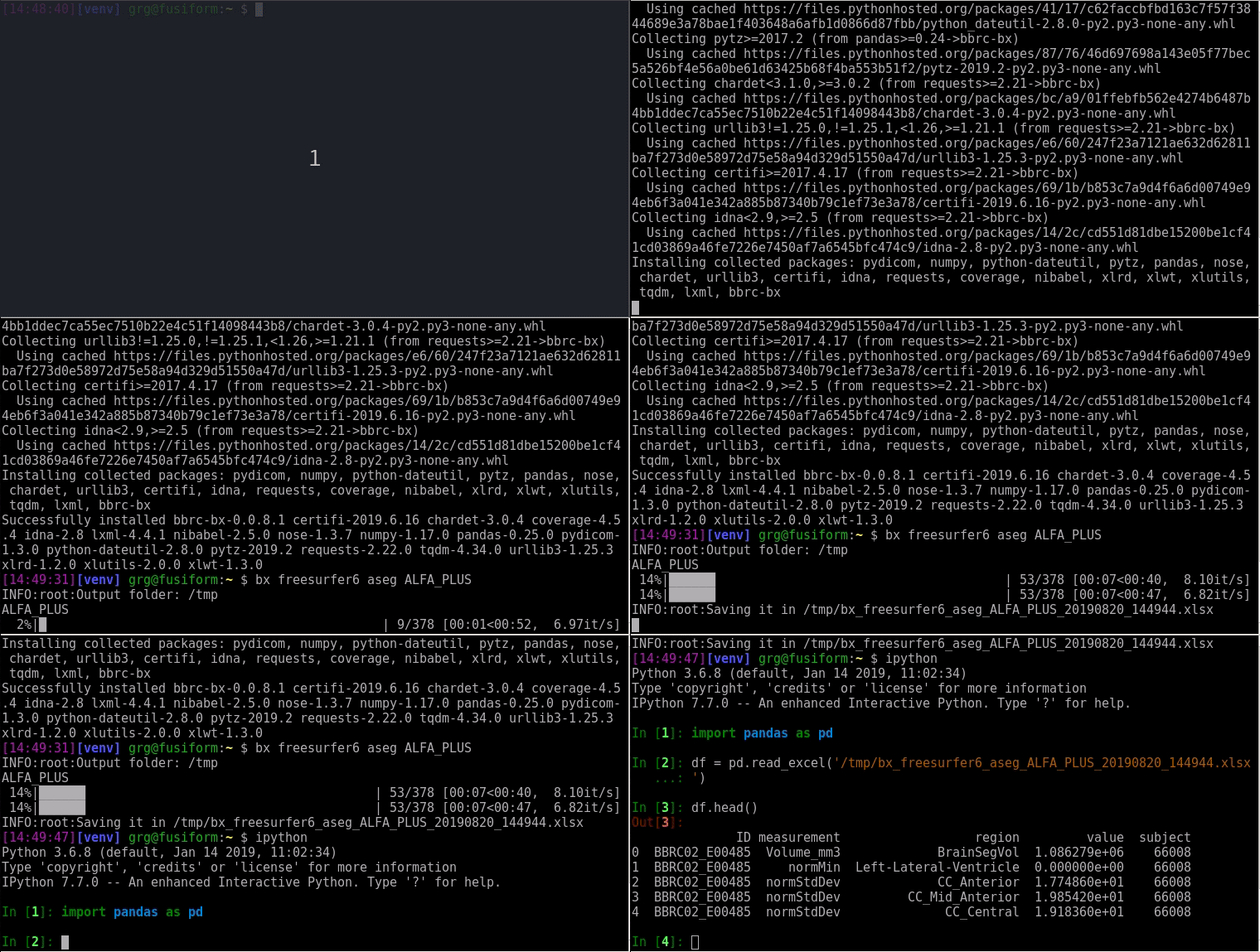
Usage
bx <command> <subcommand> <resource_id> --config /path/to/.xnat.cfg --dest /tmp
resource_id may be a reference to a whole XNAT project, some specific imaging
session (as found in the table returned by bx id PROJECT_ID) or a 'list' of
sessions (a list of existing lists may be obtained by bx lists show).
ALPS:
ALPS - Diffusion Tensor Imaging analysis ALong the Perivascular Space
Available subcommands:
 `stats`:		create an Excel table with `ALPS` metrics
 `diffusion`:	create an Excel table with `FA` and `MD` diffusion metrics in ALPS ROIs
 `files`:       download all `ALPS` outputs (parametric maps, DTI tensors, transformations, everything...)
 `snapshot`:	download snapshots from the `ALPS` pipeline
 `report`:      download the validation report issued by bbrc-validator
 `tests`:       create an Excel table with all automatic test outcomes from bbrc-validator

Usage:
 bx alps <subcommand> <resource_id>

References:
  - X. Liu, G. Barisano, et al., Aging and Disease, 2023. DOI: 10.14336/AD.2023.0321-2
  - T. Taoka et al., Magnetic Resonance in Medical Sciences, 2024. DOI: 10.2463/mrms.rev.2023-0175
  - T. Taoka et al. Japanese Journal of Radiology, 2017. DOI: 10.1007/s11604-017-0617-z
ANTS:
ANTS - Advanced Normalization Tools
Available subcommands:
 `files`:		download all `ANTS` outputs
 `snapshot`:	download a snapshot from the `ANTS` pipeline
 `report`:		download the validation report issued by `ANTSValidator`
 `tests`:		creates an Excel table with all automatic test outcomes from `ANTSValidator`

Usage:
 bx ants <subcommand> <resource_id>
ARCHIVING:
Archiving - Collect automatic tests from MRI or PET session Validators.
Available subcommands:
 `mri`:		creates an Excel table with all automatic test outcomes from `ArchivingValidator`
 `pet`:		creates an Excel table with all automatic test outcomes from `PetSessionValidator`
 `tau`:		creates an Excel table with all automatic test outcomes from `TauPetSessionValidator`

Usage:
 bx archiving <subcommand> <resource_id>
ASHS:
ASHS (Hippocampal subfield segmentation)
Available subcommands:
 `files`:		download all `ASHS` outputs (segmentation maps, volumes, everything...)
 `volumes`:		creates an Excel table with all hippocampal subfield volumes
 `snapshot`:	download a snapshot from the `ASHS` pipeline
 `report`:		download the validation report issued by `ASHSValidator`
 `tests`:		creates an Excel table with all automatic test outcomes from `ASHSValidator`

Usage:
 bx ashs <subcommand> <resource_id>

References:
- Yushkevich PA. et al., Human Brain Mapping, 2014. DOI: 10.1002/hbm.22627
ASL3D:
Cerebral perfusion quantification of reconstructed 3D Arterial Spin Labeling MRI.
Available subcommands:
 `perfusion`:       creates an Excel table with global perfusion values.
 `aal`:             creates an Excel table with regional perfusion values (in AAL atlas).
 `maps`:            download the calibrated perfusion maps
 `files`:           download all 3D-ASL QUANTIFICATION outputs (perfusion maps, files, everything...)
 `snapshot`:        download a snapshot from the 3D-ASL QUANTIFICATION pipeline
 `report`:          download the validation report issued by bbrc-validator
 `tests`:           create an Excel table with all automatic test outcomes from bbrc-validator

Usage:
 bx asl3d <subcommand> <resource_id>

References:
- Chappell MA. et al., Imaging Neuroscience, 2023. DOI: 10.1162/imag_a_00041
BAMOSARTERIAL:
Quantification of BAMOS WMH lesions per brain arterial territories
Available subcommands:
 `files`:		download all `BAMOS_ARTERIAL` outputs
 `stats`:       create an Excel table with lesions stats per arterial territory
 `snapshot`:    download a snapshot from the `BAMOS_ARTERIAL` pipeline
 `report`:      download the validation report issued by `BAMOSArterialValidator`
 `tests`:       create an Excel table with all automatic test outcomes from bbrc-validator


Usage:
 bx bamosarterial <subcommand> <resource_id>

References:
- Liu, CF. et al. Scientific Data, 2023. DOI: 10.1038/s41597-022-01923-0
BAMOS:
BAMOS (Bayesian MOdel Selection for white matter lesion segmentation)
Available subcommands:
 `files`:		download all `BAMOS` outputs
 `volumes`:		create an Excel table with global lesion volumes
 `layers`:		download `layer` (i.e. depth) maps
 `lobes`:		download lobar segmentation maps
 `stats`:		create an Excel table with lesions stats per lobe and depth
 `snapshot`:	download a snapshot from the `BAMOS` pipeline
 `report`:		download the validation report issued by `BAMOSValidator`
 `tests`:		create an Excel table with all automatic test outcomes from bbrc-validator


Usage:
 bx bamos <subcommand> <resource_id>

References:
- Sudre et al., IEEE TMI, 2015
BASIL:
BASIL - Bayesian Inference for Arterial Spin Labeling MRI. Arterial Spin Labeling (ASL) MRI is a non-invasive method for the quantification of perfusion.
Available subcommands:
 `perfusion`:	creates an Excel table with global perfusion and arrival-time values.
 `stats`:		creates an Excel table with regional perfusion values (in Harvard-Oxford atlas).
 `aal`:			creates an Excel table with regional perfusion values (in AAL atlas).
 `maps`:		download the calibrated perfusion maps
 `files`:		download all BASIL-ASL outputs (perfusion maps, files, everything...)
 `snapshot`:	download a snapshot from the BASIL-ASL pipeline
 `report`:		download the validation report issued by bbrc-validator
 `tests`:		create an Excel table with all automatic test outcomes from bbrc-validator

Usage:
 bx basil <subcommand> <resource_id>

References:
- Chappell MA., IEEE Transactions on Signal Processing, 2009.
- Chappell MA. et al., Imaging Neuroscience, 2023. DOI: 10.1162/imag_a_00041
BRAAK:
Extract morphometric/metabolic measurements based on Braak staging.
Morphometric values are based on regional volumes or cortical thickness
as estimated individually by FreeSurfer with respect to each specific stage
 (namely, Braak_I_II, Braak_III_IV and Braak_V_VI). For each of them, the
mean value in all the regions related to the specific stage is returned.

Metabolic data refer to FDG update associated with each stage as defined
by their corresponding ROIs. Masks of each stage were defined based on the
CerebrA atlas (Manera et al.).

Available subcommands:
 `volumes`:		creates an Excel table with regional volumes for each stage
 `thickness`:	creates an Excel table with cortical thickness for each stage
 `fdg`:			creates an Excel table with the FDG uptake for each stage

Usage:
 bx braak <subcommand> <resource_id>

References:
- Braak et al., Acta Neuropathol. 2006
- Schöll et al., Neuron. 2016
- Manera et al.,  Scientific Data. 2020
CAT12:
CAT12 - Gray/white matter segmentation
Available subcommands:
 `files`:		download all `CAT12` outputs (segmentation maps, warp fields, everything...)
 `volumes`:		creates an Excel table with GM/WM/CSF volumes
 `snapshot`:	download a snapshot from the segmentation results
 `report`:		download the validation report issued by `CAT12Validator`
 `tests`:		creates an Excel table with all automatic test outcomes from `CAT12Validator`

Usage:
 bx cat12 <subcommand> <resource_id>
CENTAUR:
CenTauR - Framework for standardized Tau PET quantification
Available subcommands:
 `centaurz`:        creates an Excel table with CenTauRz scores
 `files`:           download all outputs from the `CENTAURZ` pipeline
 `mri`:             creates an Excel table with details from associated MRI sessions
 `regional`:        creates an Excel table with CenTauR ROI-wise quantification results
 `snapshot`:        download snapshots from `CenTaurZValidator` pipeline
 `report`:          download the validation report issued by `CenTaurZValidator`
 `tests`:           collect all automatic test outcomes from `CenTaurZValidator`

Usage:
 bx centaur <subcommand> <resource_id>

References:
 - Villemagne V.L. et al., 2023. DOI: 10.1002/dad2.12454
DARTEL:
DARTEL - Smoothed, spatially normalized and Jacobian scaled gray matter images in MNI space
Available subcommands:
 `maps`:		download the MNI-normalized gray matter maps
 `template`:	download cohort-specific DARTEL template
 `report`:		download the validation report issued by `DartelNorm2MNIValidator`
 `tests`:		create an Excel table with all automatic test outcomes from bbrc-validator

Usage:
 bx dartel <subcommand> <resource_id>

References:
 Ashburner J., Neuroimage, 2007. DOI: 10.1016/j.neuroimage.2007.07.007
SPM12:
SPM12 - Gray/white matter segmentation
Available subcommands:
 `files`:		download all `SPM12` outputs (segmentation maps, warp fields, everything...)
 `volumes`:		creates an Excel table with GM/WM/CSF volumes
 `snapshot`:	download a snapshot from the segmentation results
 `report`:		download the validation report issued by `SPM12Validator`
 `tests`:		creates an Excel table with all automatic test outcomes from `SPM12`
 `rc`:			downloads rc* files (DARTEL imports)

Usage:
 bx spm12 <subcommand> <resource_id>
DONSURF:
DONSURF - Diffusion ON SURFace
Available subcommands:
 `files`:		download all `recon-all` outputs (segmentation maps, files, everything...)
 `aparc`:		create an Excel table with all `aparc` measurements
 `snapshot`:	download a snapshot from the `recon-all` pipeline
 `report`:		download the validation report issued by bbrc-validator
 `tests`:		create an Excel table with all automatic test outcomes from bbrc-validator

Usage:
 bx donsurf <subcommand> <resource_id>

References:
  - Montal V. et al., Alzheimers Dement, 2017. DOI: 10.1016/j.jalz.2017.09.013
DTIFIT:
DTIFIT - Processing of Diffusion-weighted Imaging data
Available subcommands:
 `maps`:		download parametric maps (FA, MD, AxD, RD)
 `files`:		download all `*DTIFIT` outputs (including parametric maps)
 `report`:		download the validation report issued by `*DTIFITValidator`
 `snapshot`:	download a snapshot with FA map, RGB tensor and TOPUP distortion correction map
 `tests`:		create an Excel table with all automatic test outcomes from bbrc-validator


Usage:
 bx dtifit <subcommand> <resource_id>
FMRIPREP:
fMRIPrep - Preprocessing of fMRI data.
Available subcommands:
 `files`:           download all `FMRIPREP` outputs (preprocessed BOLD, confounds, segmentations, everything...)
 `report`:          download the validation report issued by `FMRIPrepValidator`
 `tests`:           create an Excel table with all automatic test outcomes from bbrc-validator

Usage:
 bx fmriprep <subcommand> <resource_id>

References:
- Esteban O, et al., Nat Methods 16, 111–116 (2019).
FREESURFER6:
FreeSurfer v6.0.0
Available subcommands:
 `files`:			download all `recon-all` outputs (segmentation maps, files, everything...)
 `aseg`:			create an Excel table with all `aseg` measurements
 `aparc`:			create an Excel table with all `aparc` measurements
 `hippoSfVolumes`:	save an Excel table with hippocampal subfield volumes
 `snapshot`:		download a snapshot from the `recon-all` pipeline
 `report`:			download the validation report issued by bbrc-validator
 `tests`:			create an Excel table with all automatic test outcomes from bbrc-validator

Usage:
 bx freesurfer6 <subcommand> <resource_id>
FREESURFER6HIRES:
FreeSurfer v6.0.0 (-hires option)
Available subcommands:
 `files`:			download all `recon-all` outputs (segmentation maps, files, everything...)
 `aseg`:			create an Excel table with all `aseg` measurements
 `aparc`:			create an Excel table with all `aparc` measurements
 `hippoSfVolumes`:	save an Excel table with hippocampal subfield volumes
 `snapshot`:		download a snapshot from the `recon-all` pipeline
 `report`:			download the validation report issued by bbrc-validator
 `tests`:			create an Excel table with all automatic test outcomes from bbrc-validator

Usage:
 bx freesurfer6hires <subcommand> <resource_id>
FREESURFER7:
FreeSurfer v7.1.1
Available subcommands:
 `files`:			download all `recon-all` outputs (segmentation maps, files, everything...)
 `aseg`:			create an Excel table with all `aseg` measurements
 `aparc`:			create an Excel table with all `aparc` measurements
 `amygNucVolumes`:	save an Excel table with amygdalar volumes
 `brainstem`:		save an Excel table with brainstem substructures volumes
 `thalamus`:		save an Excel table with thalamic nuclei volumes
 `hypothalamus`:	save an Excel table with hypothalamic subunits volumes
 `jack`:			compute the cortical AD signature with FS7 results
 `hippoSfVolumes`:	save an Excel table with hippocampal subfield volumes
 `snapshot`:		download a snapshot from the `recon-all` pipeline
 `report`:			download the validation report issued by bbrc-validator
 `tests`:			create an Excel table with all automatic test outcomes from bbrc-validator

Usage:
 bx freesurfer7 <subcommand> <resource_id>
FREESURFER7EXTRAS:
FreeSurfer v7.2.0 (extra segmentation modules)
Available subcommands:
 `files`:		download all extra segmentation modules outputs (segmentation maps, files, everything...)
 `snapshot`:	download a snapshot from the extra segmentation modules pipeline
 `report`:		download the validation report issued by bbrc-validator
 `tests`:		create an Excel table with all automatic test outcomes from bbrc-validator

Usage:
 bx freesurfer7extras <subcommand> <resource_id>
FSLANAT:
FSL_ANAT - General pipeline for processing T1w structural image
Available subcommands:
 `volumes`:         create an Excel table with GM/WM/CSF volumes
 `subcortical`:     create an Excel table with subcortical volumes (Harvard-Oxford atlas)
 `maps`:            download the GM/WM/CSF segmentation maps
 `files`:           download all `FSL_ANAT` outputs (segmentation maps, warp fields, everything...)
 `snapshot`:        download QC snapshots from the `FSL_ANAT` pipeline
 `report`:          download the validation report issued by `FSLANATValidator`
 `tests`:           create an Excel table with all automatic tests outcomes from bbrc-validator

Usage:
 bx fslanat <subcommand> <resource_id>

References:
- Smith SM, et al., NeuroImage, 2004.
- Jenkinson M, et al., NeuroImage, 2012.
ID:
Return generic information like subject/session labels, parent project.
Usage:
 bx id <resource_id>
LCMODEL:
LCModel - Quantification and tissue-correction of MR Spectroscopy images.
Available subcommands:
 `stats`:           creates an Excel table with metabolite concentrations and global signal quality stats
 `correction`:      creates an Excel table with tissue correction parameters
 `files`:           download all LCModel outputs (stats, tissue correction, masks, everything...)
 `snapshot`:        download snapshots from the LCMODEL pipeline
 `report`:          download the validation report issued by `LCModelValidator`
 `tests`:           create an Excel table with all automatic test outcomes from bbrc-validator

Usage:
 bx lcmodel <subcommand> <resource_id>

References:
- Provencher SW., Magnetic Resonance in Medicine, 1993.
LISTS:
Manage experiment lists curated by BarcelonaBeta.
Available subcommands:
 `show`:		display all existing lists (usage: bx lists show)

Usage:
 bx lists <subcommand>
MRTRIX3:
MRtrix3 - Diffusion MRI tractography and structural connectivity.
Available subcommands:
 `connectome`:	download the structural connectivity matrices (Desikan-Killiany atlas)
 `files`:		download all `MRTRIX3` outputs (streamlines, segmentations, everything...)
 `report`:		download the validation report issued by `MRtrix3Validator`
 `snapshot`:	download snapshots from the MRTRIX3 pipeline
 `tests`:		create an Excel table with all automatic test outcomes from bbrc-validator

Usage:
 bx mrtrix3 <subcommand> <resource_id>

References:
- Tournier JD et al., NeuroImage 202 (2019).
NIFTI:
Download NIfTI images from a given sequence (SeriesDesc).
Available subcommands:
 `usable`:		download `usable` images (default)
 `all`:			download all images found
User is then asked for sequence name (ex: T1, T2, DWI). Has to match with
the one in XNAT (wildcards accepted).

Usage:
 bx nifti <subcommand> <resource_id>
PYMENT:
Brain Age prediction.
Available subcommands:
 `predictions`:	creates an Excel table with raw and bias-corrected predictions
 `files`:		download all `PYMENT` outputs
 `snapshot`:	download snapshots from the `PYMENT` pipeline
 `report`:		download the validation report issued by `PYMENTValidator`
 `tests`:		create an Excel table with all automatic test outcomes from bbrc-validator

Usage:
 bx pyment <subcommand> <resource_id>

References:
- Leonardsen E.H. et al., NeuroImage, 2022
- Peng H. et al., Medical Image Analysis, 2021
FDG:
18F-fluorodeoxyglucose PET imaging data
Available subcommands:
 `landau`:		creates an Excel table with the Landau's metaROI signature
 `maps`:		download the normalized FDG maps in MNI space
 `files`:		download all outputs from the `FDG_QUANTIFICATION2` pipeline
 `mri`:		    creates an Excel table with details from associated MRI sessions
 `regional`:	creates an Excel table with the regional quantification results
 `aging`:		creates an Excel table with the aging composite ROI
 `snapshot`:	download snapshots from `FDG_QUANTIFICATION2` pipeline
 `report`:		download the validation report issued by `FDGQuantificationValidator`
 `tests`:		collect all automatic test outcomes from `FDGQuantificationValidator`

Usage:
 bx fdg <subcommand> <resource_id>

References:
- Landau et al., Ann Neurol., 2012
FTM:
18F-flutemetamol PET imaging data
Available subcommands:
 `centiloids`:	creates an Excel table with centiloid scales
 `maps`:		download the normalized FTM maps
 `files`:		download all outputs from the `FTM_QUANTIFICATION2` pipeline
 `mri`:			creates an Excel table with details from associated MRI sessions
 `regional`:	creates an Excel table with the regional quantification results
 `snapshot`:	download snapshots from `FTM_QUANTIFICATION2` pipeline
 `report`:		download the validation report issued by `FTMQuantificationValidator`
 `tests`:		collect all automatic test outcomes from `FTMQuantificationValidator`

Usage:
 bx ftm <subcommand> <resource_id>

References:
 - Klunk et al., Alzheimers Dement., 2015
TAU:
18F-RO-948 tau PET imaging data
Available subcommands:
 `maps`:		    download the harmonized Tau PET maps in native T1w space
 `files`:           download all outputs from the `TAU_QUANTIFICATION` pipeline
 `mri`:             creates an Excel table with details from associated MRI sessions
 `regional`:        creates an Excel table with regional quantification results
 `snapshot`:        download snapshots from `TauQuantificationValidator` pipeline
 `report`:          download the validation report issued by `TauQuantificationValidator`
 `tests`:           collect all automatic test outcomes from `TauQuantificationValidator`

Usage:
 bx tau <subcommand> <resource_id>
PETPREPROCESSING:
Preprocessing of PET imaging data
Available subcommands:
 `files`:           download all outputs from the `PET_PREPROCESSING` pipeline
 `snapshot`:        download snapshots from `PETPreprocessingValidator` pipeline
 `report`:          download the validation report issued by `PETPreprocessingValidator`
 `tests`:           collect all automatic test outcomes from `PETPreprocessingValidator`

Usage:
 bx petpreprocessing <subcommand> <resource_id>
TEASL:
TE-ASL - Quantification of cerebral perfusion from time-encoded Arterial Spin Labeling MRI.
Available subcommands:
 `perfusion`:       create an Excel table with global perfusion and arterial arrival-time values.
 `stats`:           create an Excel table with regional perfusion values (Harvard-Oxford atlas).
 `aal`:             create an Excel table with regional perfusion values (AAL atlas).
 `maps`:            download calibrated perfusion and arrival time maps
 `files`:           download all `TE_ASL` outputs (perfusion maps, files, everything...)
 `snapshot`:        download QC snapshots from the `TE_ASL` pipeline
 `report`:          download the validation report issued by `TEASLValidator`
 `tests`:           create an Excel table with all automatic tests outcomes from bbrc-validator

Usage:
 bx teasl <subcommand> <resource_id>

References:
- Chappell MA. et al., Imaging Neuroscience, 2023. DOI: 10.1162/imag_a_00041
- Chappell MA. et al., Magnetic Resonance in Medicine, 2011. DOI: 10.1002/mrm.22641
QSMXT:
QSMxT - QSM processing and analysis pipeline. Quantitative susceptibility mapping (QSM) is an MRI technique for quantifying magnetic susceptibility within biological tissue.
Available subcommands:
 `stats`:		creates an Excel table with regional QSM values (in FreeSurfer aseg atlas).
 `maps`:		download the reconstructed QSM maps
 `files`:		download all `QSMxT` outputs (QSM maps, segmentations, everything...)
 `report`:		download the validation report issued by `QSMxTValidator`
 `tests`:		create an Excel table with all automatic test outcomes from bbrc-validator

Usage:
 bx qsmxt <subcommand> <resource_id>

References:
- Stewart AW et al., Magnetic Resonance in Medicine, 2022.
REFACE:
MRI_REFACE - Facial anonymization
Available subcommands:
 `nifti`:		download refaced NIfTI images from `MRI_REFACE`
 `files`:		download all `MRI_REFACE` output files (images, renders, transforms)
 `snapshot`:	download QC snapshots from the `MRI_REFACE` pipeline
 `report`:		download the validation report issued by `MRIRefaceValidator`
 `tests`:		create an Excel table with automatic test outcomes from bbrc-validator

Usage:
 bx reface <subcommand> <resource_id>

References:
- Schwarz C.G. et al., NeuroImage, 2021
SCANDATES:
Collect acquisition dates from imaging sessions.
Usage:
 bx scandates <resource_id>
SIGNATURE:
Download composite measurements labeled as 'signatures' of Alzheimer's Disease
Available subcommands:
 `jack`:		based on FreeSurfer's cortical thickness and local cortical gray matter volumes
 `dickerson`:	based on Dickerson's cortical signatures (see references below)

Usage:
 bx signature <subcommand> <resource_id>

Jack's AD signature is calculated in two versions,
weighted and not weighted. Weighted means that the formula has been
applied by normalizing each ROI value by local surface area (as explained
in the papers).
Not-weighted versions correspond to mean values across regions.

Examples:

`bx signature jack` will return Jack's signature, based on thickness and grayvol values.
`bx signature dickerson` will return AD and aging signatures, based only on
thickness values as they do not have any "grayvol" version.

References:
- Jack et al., Alzheimers Dement. 2017
- Dickerson et al., Neurology, 2011
- Bakkour et al., NeuroImage, 2013
XCPD:
XCP-D - Resting State fMRI postprocessing and functional connectivity.
Available subcommands:
 `conmat`:          download the functional connectivity matrix (Desikan-Killiany atlas)
 `timeseries`:      download the parcellated BOLD time-series (Desikan-Killiany atlas)
 `files`:           download all `XCP_D` outputs (denoised BOLD data, segmentations, everything...)
 `report`:          download the validation report issued by `XCPDValidator`
 `snapshot`:        download snapshots from the XCPD pipeline
 `tests`:           create an Excel table with all automatic test outcomes from bbrc-validator

Usage:
 bx xcpd <subcommand> <resource_id>

References:
- Ciric R, et al., Nat Protoc 13 (2018).
- Mehta K., Salo T. et al., bioRxiv (2023). DOI: 10.1101/2023.11.20.567926
Dependencies
Requires bbrc-pyxnat>=1.6.4 and
the libraries listed in requirements.txt.
Install
pip install bbrc-bx
Development
Please contact us for details on how to contribute.



Release files for bbrc-bx 0.9.2
For a detailed explanation of source distributions (sdists) and built distributions (wheels), please see the package formats documentation.
Source distribution (sdist)
| File | Size | Uploaded | |
|---|---|---|---|
| bbrc_bx-0.9.2.tar.gz | 2.1 MB | Details |
Built distribution (wheel)
| File | Interpreter | ABI | Platform | Reset |
|---|---|---|---|---|
| bbrc_bx-0.9.2-py3-none-any.whl | Python 3 | none | any | Details |
Total release size: 4.1 MB
Release files / bbrc_bx-0.9.2.tar.gz
| Download URL | bbrc_bx-0.9.2.tar.gz |
|---|---|
| Size | 2.1 MB |
| Tags | Source |
|
SHA-256 checksum How to use checksums |
0b17d307adf350b242f7d77825ea310faf5c05282cf06306650b0c4302ed4ca4
|
|
BLAKE2b-256 checksum How to use checksums |
ce64136e3450aef47f76f7fda3f723dfae8e67291d1e2d31e7d6cb7710ea52c7
|
| Upload date | |
|
Uploaded using Trusted Publishing? What is trusted publishing? |
No |
| Uploaded via |
twine/7.0.0 CPython/3.10.12
|
Release files / bbrc_bx-0.9.2-py3-none-any.whl
| Download URL | bbrc_bx-0.9.2-py3-none-any.whl |
|---|---|
| Size | 2.1 MB |
| Tags | Python 3 |
|
SHA-256 checksum How to use checksums |
2d1574ca539f7b75f6e2c4ad0def40d6ce276ab302705317f0f0f055675195ab
|
|
BLAKE2b-256 checksum How to use checksums |
962666a78d7fa715365d1a408767e7da224d38b35828e69adbd55eaa62e91f3b
|
| Upload date | |
|
Uploaded using Trusted Publishing? What is trusted publishing? |
No |
| Uploaded via |
twine/7.0.0 CPython/3.10.12
|














