
Claude Status Bar
Your Claude Code usage, at a glance. 5h / 7d rate-limit bars, reset countdowns, model, context window, and prompt-cache freshness — inline in Claude Code's status line, or a floating HUD on the desktop app.





English · 简体中文 · Install · Documentation

Claude Code tells you almost nothing about where you stand against your rate limits.
cs puts the numbers that matter on one quiet line at the bottom of your terminal:
how much you have left, and when it resets.
| Line | Segments |
|---|---|
| Usage | 5h / 7d rate-limit bars, reset countdowns, end-of-window projections (→NN%), model & context window, prompt-cache countdown, optional session cost or relay balance |
| Project | git worktree marker (⑂ name (3) / ⑂ worktree (3)), project name, branch, session +/− lines, duration, version |
- Official numbers — the same 5h / 7d limits Claude Code enforces, not a local guess.
- Prompt-cache countdown —
❄ 4m23stells you when the next turn pays full price. - Two surfaces — the terminal
statusLine, or a floating HUD for the Claude desktop app (macOS). - Fast — native cache reader plus a background daemon; well under 1% CPU at one refresh per second.
- Opt-in extras — cost, relay balance, git ahead/behind, activity, IP checks, IELTS writing-coach progress.
Install
curl -fsSL https://raw.githubusercontent.com/leeguooooo/claude-code-usage-bar/main/install.sh | bash
A prebuilt binary for macOS Apple Silicon and Linux x86_64 — no Python needed. On macOS it also registers the desktop HUD when the Claude app is installed. Other platforms fall back to pip.
Windows (PowerShell, no admin):
irm https://raw.githubusercontent.com/leeguooooo/claude-code-usage-bar/main/install.ps1 | iex
pip / uv:
pip install claude-statusbar     # or: uv tool install / pipx install
cs --setup                       # wires the statusLine hook + installs the skill
Restart Claude Code and the bar appears. cs upgrades itself every 6 hours; if you're stuck on
an old version, run cs upgrade or re-run the one-liner
(why). More paths in the install guide.
Customize
Three looks — aurora with block bars (default), aurora with a thin line, and classic:


cs theme                         # pick one with a live preview (↑/↓, Enter)
cs config set bar_glyph thin     # thin ━ line instead of ■ blocks (default)
cs config set style classic      # the original battery-bar look
cs preview                       # all three looks, with your real numbers
cs config show                   # every key, and which ones you changed
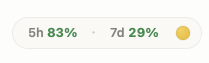
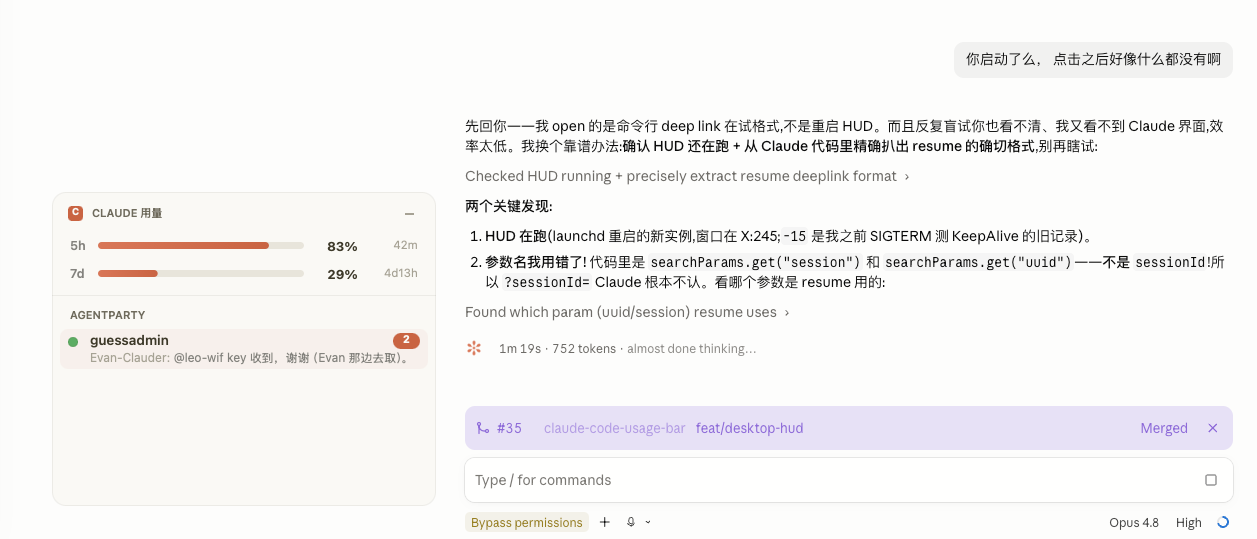
Desktop app (macOS) — cs hud
The desktop app has no status line, so cs hud adds an always-on-top floating panel with the
same official usage. The one-liner installs it; for pip use pip install 'claude-statusbar[hud]' && cs hud install.
Documentation
| Guide | What's inside |
|---|---|
| Install | Binary, PyPI, skill-only, plugin, Codex bridge |
| What it shows | Every segment, icon and color threshold |
| Looks | The three looks, slash commands |
| Configuration | All keys, env vars, JSON output |
| Desktop HUD | The macOS floating panel |
| Fast mode (daemon) | Daemon, auto-start, refresh and caching |
| No-quota mode | Relay / Bedrock / Vertex layout and balance |
| Cache countdown | How ❄ 4m23s is computed |
| Troubleshooting | cs doctor, IP checks, upgrading |
Want charts and weekly cost breakdowns instead of one line? Run
ccusage or
Claude Code Usage Monitor in a
side pane — they coexist with cs.
Contributing
PRs welcome — see CONTRIBUTING.md (setup, tests, architecture, release flow) and SECURITY.md. Changes per version: CHANGELOG.md.
Acknowledgments
- @marcwimmer — original
show_cache_agewidget (#9) - claude-monitor — token-usage analysis library used as the optional fast-path data source

Author
Built by 郭立 (Guo Li / leeguoo) — leeguoo.com · GitHub · X · more tools in the *-use family.
1 maintainer

Metadata
1 maintainer
Release files for claude-statusbar 3.51.0
For a detailed explanation of source distributions (sdists) and built distributions (wheels), please see the package formats documentation.
Source distribution (sdist)
| File | Size | Uploaded | Provenance | |
|---|---|---|---|---|
| claude_statusbar-3.51.0.tar.gz | 353.8 kB | With provenance | Details |
Built distribution (wheel)
| File | Interpreter | ABI | Platform | Reset |
|---|---|---|---|---|
| claude_statusbar-3.51.0-py3-none-any.whl | Python 3 | none | any | Details |
Total release size: 571.0 kB
Release files / claude_statusbar-3.51.0.tar.gz
| Download URL | claude_statusbar-3.51.0.tar.gz |
|---|---|
| Size | 353.8 kB |
| Tags | Source |
|
SHA-256 checksum How to use checksums |
91b1a668c8481d7a9a576a6e422be8a637e8dd8e2a696b69fd05e40a1d77ec70
|
|
BLAKE2b-256 checksum How to use checksums |
15ed70a574051493e61b255a1d27154735b8d298e2187986fec2e457a8726250
|
| Upload date | |
|
Uploaded using Trusted Publishing? What is trusted publishing? |
Yes |
| Uploaded via |
twine/7.0.0 CPython/3.13.16
|
Provenance
Provenance describes where a file came from. On PyPI, provenance is shared via attestations, which provide a verifiable record of the build or publishing details. View details, limitations and caveats.


PyPI Publish Attestation
PyPI verified that this artifact, at this checksum, originated from the publisher listed below.
Signed by GitHub Actions, verified by PyPI on Oct 22, 2026.
Transparency logRelease files / claude_statusbar-3.51.0-py3-none-any.whl
| Download URL | claude_statusbar-3.51.0-py3-none-any.whl |
|---|---|
| Size | 217.1 kB |
| Tags | Python 3 |
|
SHA-256 checksum How to use checksums |
6d884b41aabe1958db9f9b1230092c53ed5a4e6486ac9ee9327aa04f5042d8ce
|
|
BLAKE2b-256 checksum How to use checksums |
88fe09b5a5924a107681df9053360979d8909df13b22c71cfa25892cea25b51e
|
| Upload date | |
|
Uploaded using Trusted Publishing? What is trusted publishing? |
Yes |
| Uploaded via |
twine/7.0.0 CPython/3.13.16
|
Provenance
Provenance describes where a file came from. On PyPI, provenance is shared via attestations, which provide a verifiable record of the build or publishing details. View details, limitations and caveats.
PyPI Publish Attestation
PyPI verified that this artifact, at this checksum, originated from the publisher listed below.
Signed by GitHub Actions, verified by PyPI on Oct 22, 2026.
Transparency logSecurity for claude-statusbar 3.51.0
Provenance
Provenance describes where a file came from. On PyPI, provenance is shared via attestations, which provide a verifiable record of the build or publishing details. View details, limitations and caveats.
Full provenance
All 2 files in this release have been uploaded with provenance metadata.
Attestation for claude_statusbar-3.51.0.tar.gz
PyPI Publish Attestation
PyPI verified that this artifact, at this checksum, originated from the publisher listed below.
Signed by GitHub Actions, verified by PyPI on Oct 22, 2026.
Transparency logA note on package security
PyPI is a repository for distributing packages, not a service for auditing them. While third-party security researchers and our staff do their best to detect and remove malicious packages, PyPI cannot guarantee the quality, security or suitability of any given package.














