

myGeeKy
Find GitHub people who share your research — and will actually follow you back.
Your CV, your repos, your ORCID & Google Scholar papers → people and projects worth your time.






Quick start · Live panel · How it works · Safety · All settings
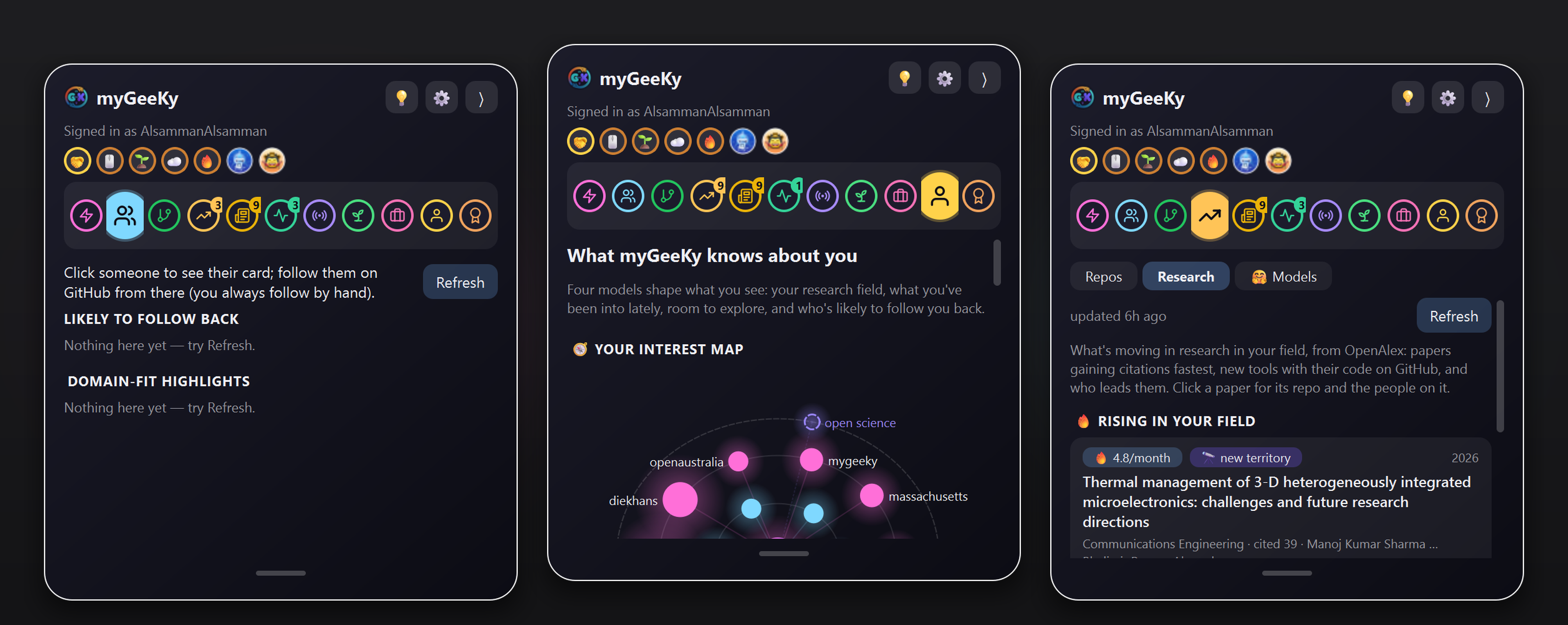
Real screenshots, real data: the Live feed, people likely to follow back, and repos you could contribute to.
Why this exists: I don't have Facebook. I only want to follow people I can genuinely learn from — and who might learn something from me too. myGeeKy is a GitHub-friendly alternative for people like me: we want real friends, and we're wary of fake ones.
✨ Highlights
|
🧬 Knows your field, not just your language |
🔁 Ranks by real follow-back odds |
|
🛠️ Repos you could improve |
🪟 A glass panel on your screen edge |
|
☁️ Your data, on every computer |
🛡️ Suggest-only, by design |
🚀 Quick start
pip install "mygeeky[gui,pdf]"
mygeeky init          # GitHub username (required); CV, ORCID, Google Scholar (optional)
mygeeky run           # who to follow
mygeeky contribute    # which repos to improve
mygeeky gui           # the live panel
init asks a few questions — only your GitHub username is required, every
other answer can be skipped and changed later. Details in
Quick start below.
🪟 The live panel
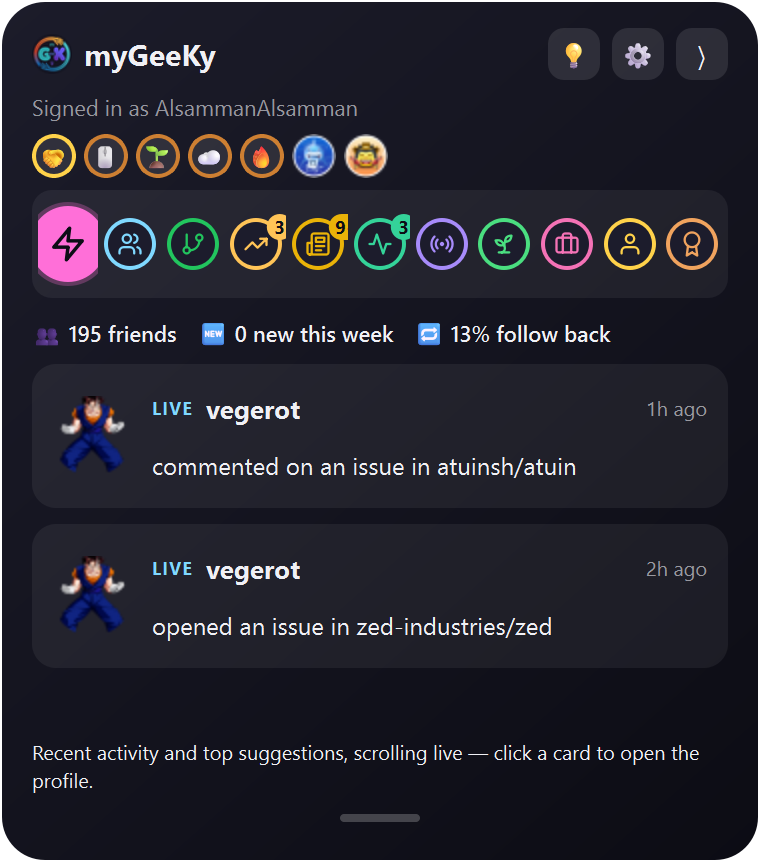 Live — friends' activity + top suggestions, scrolling |
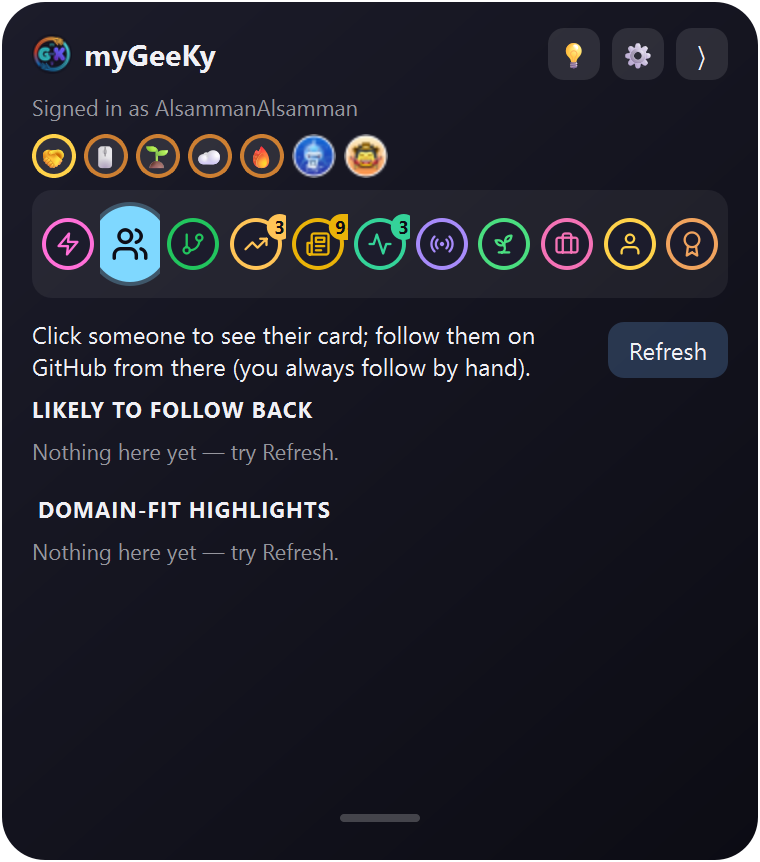 Suggestions — click someone to open them; they leave the list |
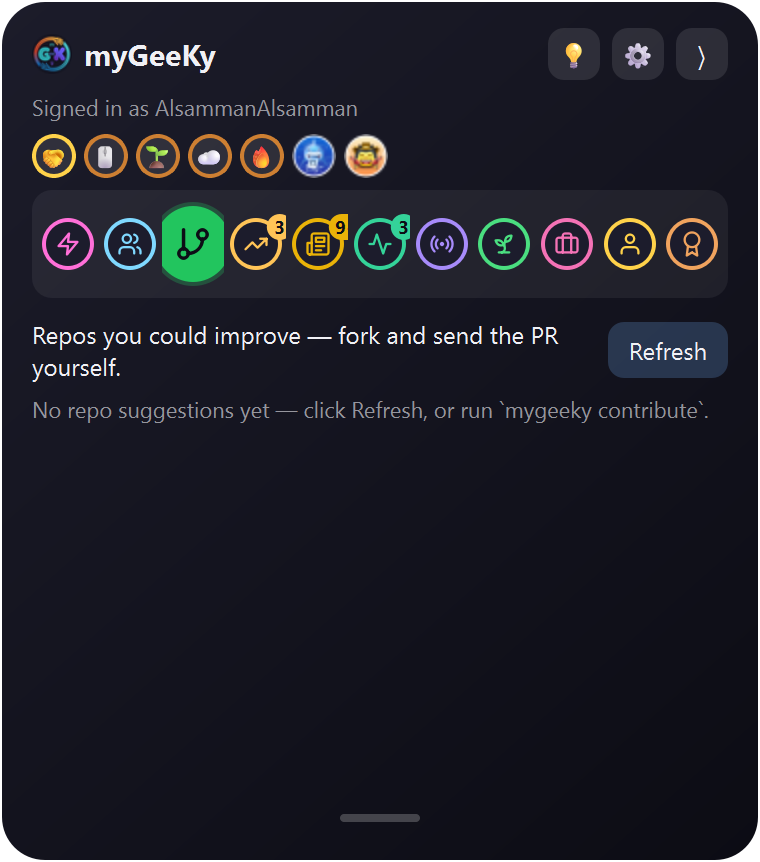 Repos — projects in your field with starter issues |
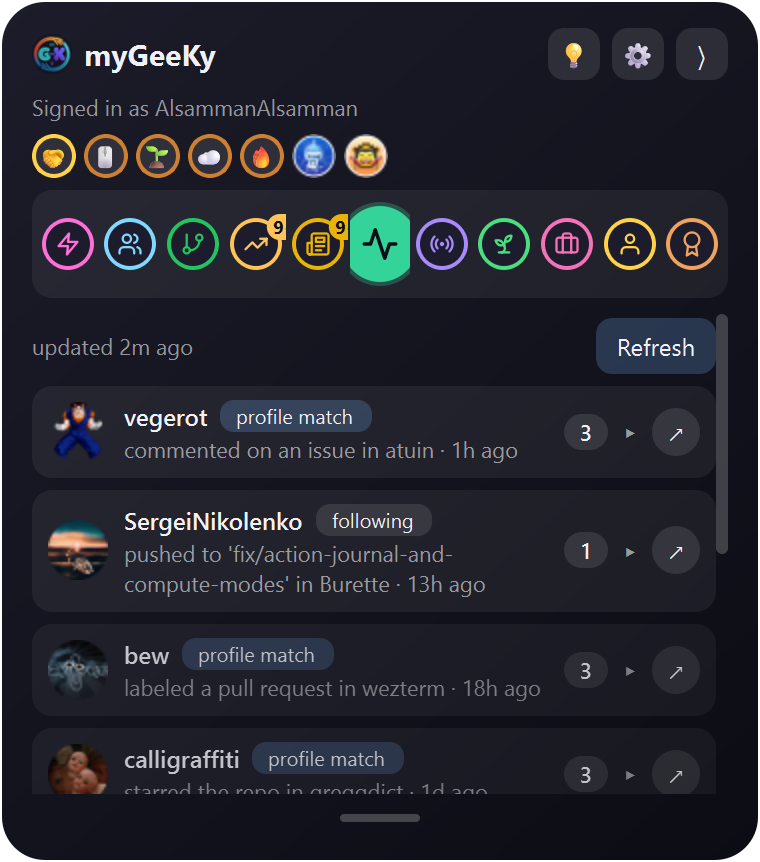 Activity — one card per person; click to expand |
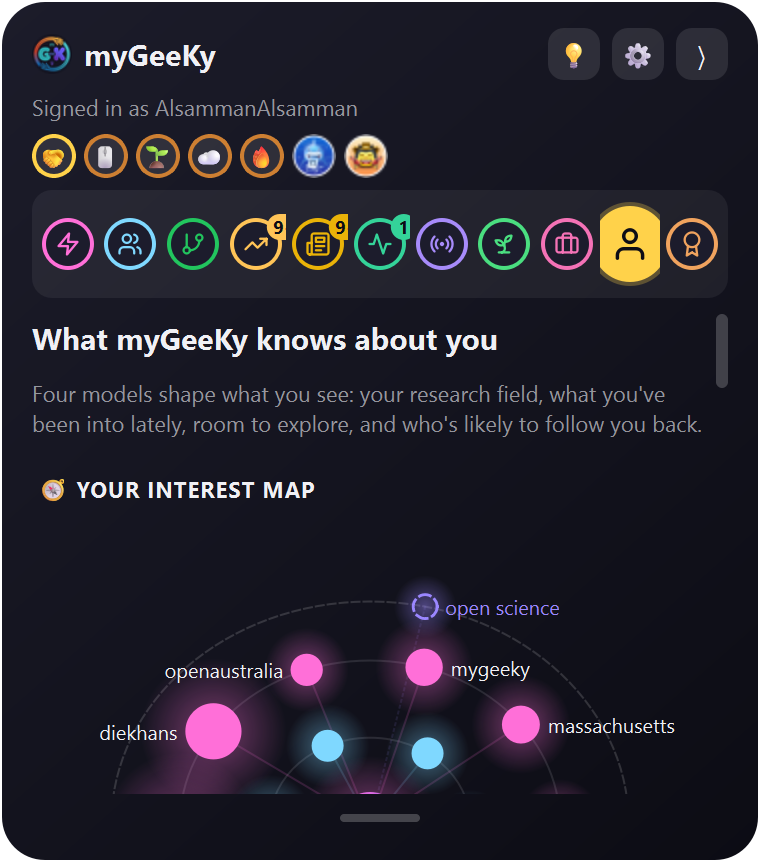 Model — how good it is, what it learned, and the trend |
 Folded — just the icon on the screen edge, half-transparent until you hover it |
More in Live glass panel below.
How it works
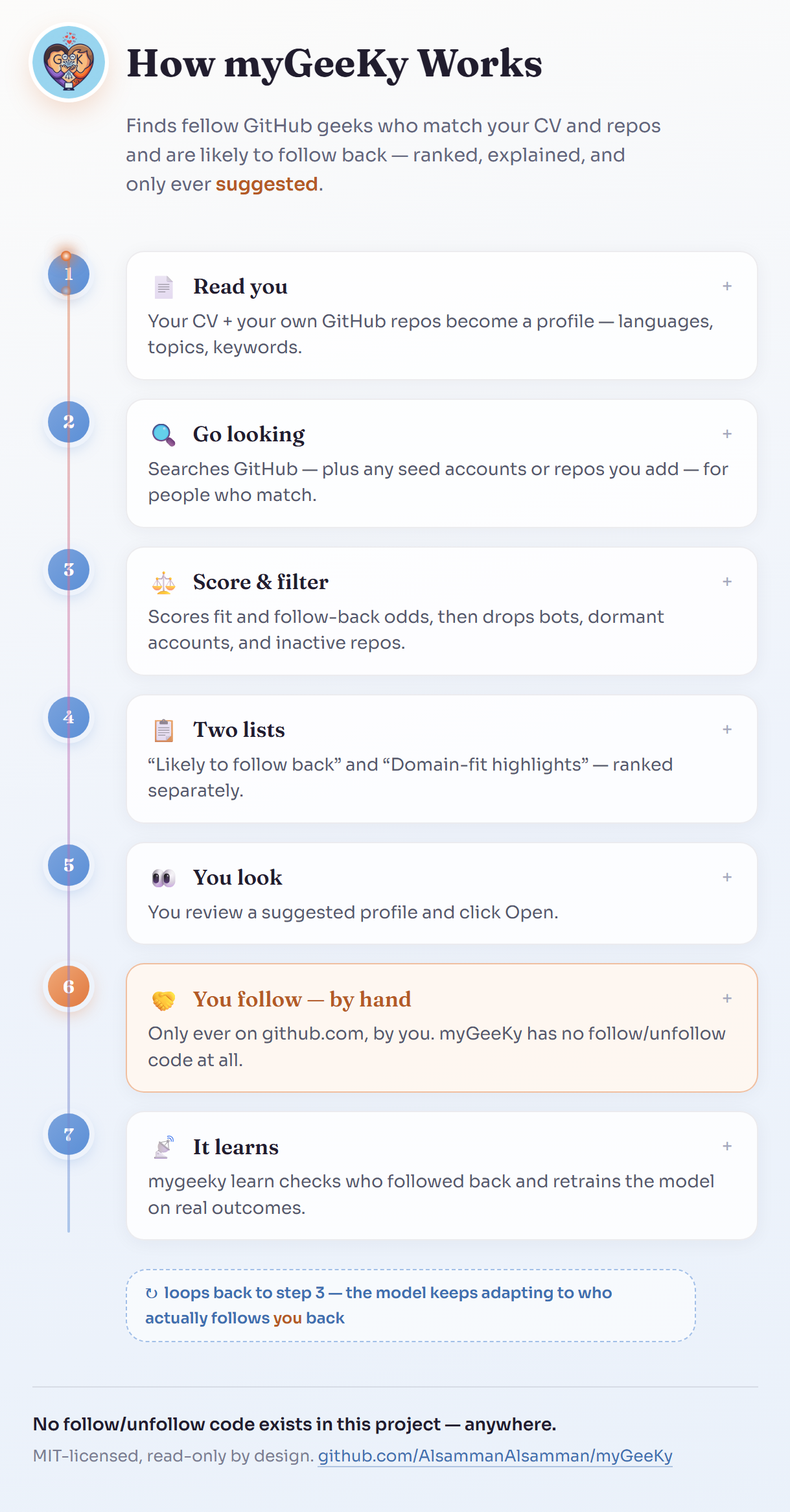
GitHub's Markdown renderer strips <script> tags (security), so it can't
run a live JS diagram inline — the image below is a preview of a real,
animated, click-to-expand HTML/JS page that ships in this repo at
docs/flowchart.html:
▶ Open the live interactive version
— real vanilla JS (click any step to expand it), served straight off this
repo via githack, no build step, no server.
(If that link is ever slow/unavailable: clone the repo and open
docs/flowchart.html directly in a browser — it's fully self-contained,
zero dependencies.)
The pink "You follow — by hand" step is the only place a follow ever happens — myGeeKy has no follow/unfollow code anywhere in the project; see Safety.
What it does
- Understands you — reads your CV (txt/md/pdf), your own GitHub repos (languages, topics, descriptions) and, if you give them, your ORCID/OpenAlex and Google Scholar publications to build a profile of what you're into, and auto-derives a weighted "domain vocabulary" from that corpus (not a hardcoded field-specific wordlist).
- Collects candidates from multiple sources, not just a plain search:
the owners and contributors of active repos matching your research terms
(ranked first — a plain language search mostly returns famous accounts),
GitHub user search (language/location/follower filters), followers of
well-known accounts in your field (
seed_accounts), stargazers of relevant repos (seed_repos), stargazers of your own repos, and optionally second-degree contacts (people followed by people you already follow). Candidates corroborated by more than one source get a small ranking boost. - Filters out noise before scoring: accounts following more than
max_followingpeople (a growth-hacking/mass-follow pattern, not genuine engagement), dormant/throwaway-looking accounts, organizations, and — for the top-ranked candidates — a real per-repo activity check (a maintained repo pushed to recently, or a freshly-created one; a profile'supdated_atalone can just reflect a bio edit). - Scores each surviving candidate on:
- content similarity to your CV/repos (TF-IDF + cosine similarity)
- how likely they are to follow back (their own following/follower ratio);
for the follow-back list, accounts that follow almost nobody relative to
their audience, or have more than
followback_max_followers, are skipped - how active their account is
- once you've used it a while: a learned model (see below)
- Suggests two ranked lists, not one — printed, or returned as JSON.
Nothing is followed automatically:
- Likely to follow back — the blended score above.
- Domain-fit highlights — ranked purely by match to your CV/repos, independent of follow-back likelihood. A senior domain expert who follows almost no one on GitHub is exactly who the follow-back score would otherwise bury, and is often the best actual match.
- Learns from real outcomes, not just from waiting:
mygeeky bootstrapseeds the model immediately from accounts you already follow (checks, read-only, who already follows you back) — so you get real training data on day one instead of waiting weeks.mygeeky learn(meant to run weekly) looks at who you actually followed since the last check, checks whether they followed back, and retrains a logistic-regression model on the growing set of outcomes — reporting cross-validated AUC so you can see how trustworthy it is, and excluding mass-follow outliers from training.
Repos you could improve (mygeeky contribute)
Beyond people, myGeeKy suggests repositories you could fork, improve, and realistically get merged, matched to your CV, repos, and publications:
mygeeky contribute          # search + rank (a few minutes; GitHub's search API is rate-limited)
mygeeky contribute --last   # re-print the last results
mygeeky contribute --json   # for scripts / AI agents
- Your profile is turned into a handful of search terms: your
publications' OpenAlex keywords, topics used across your repos, and the
CV vocabulary. Explicit
topics/contribute_extra_termsalways come first. - GitHub is searched for active, non-archived, non-fork repos matching
those terms that have open
good first issue/help wantedissues. - Each repo is ranked on fit (content similarity, a language you use, recency), then the top few get the check that actually predicts a merge: of its recently closed PRs from outside contributors, how many did the maintainers merge? Bot PRs and insiders' own PRs don't count.
- Each suggestion lists its unassigned, recent starter issues and a plain-language "why".
As with people, this only ever suggests: there is no fork, PR, or comment code anywhere. You open the repo, fork it, and send the PR yourself.
Your profile: CV + GitHub + ORCID/OpenAlex + Google Scholar
mygeeky profile refresh --cv ~/cv.pdf --orcid 0000-0002-1825-0097 \
    --scholar "https://scholar.google.com/citations?user=XXXXXXXXXXXX"   # all remembered
mygeeky profile refresh     # after updating your CV: re-extract the PDF, re-fetch publications
mygeeky profile show        # what myGeeKy knows about you (no network)
- CV: PDF/txt/md, converted to text (
pip install "mygeeky[pdf]"for PDF). - ORCID (public API) and OpenAlex (looked up by your ORCID): your publication titles, abstracts, keywords and research topics. They're free and need no key. They feed both people matching and repo suggestions.
- Google Scholar (optional): your research interests and up to 100 paper
titles, read from your own public profile page. Scholar has no API and limits
automated access, so this is one request per
profile refresh, never part of a normal run; if Google refuses it, the last fetched copy is kept and ORCID/OpenAlex still cover your publications.
Use it from any computer (mygeeky sync)
Your myGeeKy data can live in a private GitHub repo, so the model keeps learning no matter which machine you run it on:
mygeeky sync init                      # creates <you>/mygeeky-data (private) and pushes
mygeeky sync init --repo you/other     # or use/choose another private repo
mygeeky sync pull | push | status
On a new computer: pip install mygeeky, then gh auth login and
mygeeky sync init again. It pulls your config, CV text, publications,
history and training data. mygeeky pipeline (the weekly job) then does
pull → learn → run → contribute → push automatically.
- It refuses to sync to a public repo.
- Never synced: any token, caches, logs, and the pickled model. Loading a pickle that came over the network could run code, so the model is retrained locally from the synced training data instead.
.jsonllogs use git'sunionmerge, so two machines in the same week merge cleanly.- Git uses your own
gh/git credentials. myGeeKy's API client stays read-only.
Install
pip install mygeeky
(For PDF CVs: pip install "mygeeky[pdf]".)
Quick start
mygeeky init      # asks for your GitHub username, CV, and the kind of people you're looking for
mygeeky run       # get your first batch of suggestions
mygeeky init asks a short set of questions — all optional, all editable
later:
- Your GitHub username (the only required answer)
- Your CV (a file path, pasted text, or skip)
- Your ORCID iD and your Google Scholar profile URL (each optional)
- Languages / topics / keywords / locations you're looking for
- Optional extra candidate sources: well-known accounts in your field, relevant repos
- Follower-count range,
max_following, minimum repo count, how many suggestions per run
Then it offers to store a GitHub token (see Safety — this is
handled very deliberately), and — if a token is set up — offers to run
mygeeky bootstrap immediately so you're not starting the learning model
from zero.
Everyday use
mygeeky run                 # search + rank + suggest (two lists: followback + domain-fit)
mygeeky run --json          # same, as JSON (for scripts / AI agents)
mygeeky suggestions         # re-print the last run's results without re-querying GitHub
mygeeky bootstrap           # seed the model from accounts you already follow (run once, early)
mygeeky learn               # check who you followed since last time, learn from who followed back
mygeeky contribute          # repos you could fork, improve, and get merged
mygeeky profile refresh     # re-read your CV + publications (ORCID/OpenAlex)
mygeeky sync push|pull      # keep your data in your private GitHub repo
mygeeky pipeline            # sync pull, learn, run, contribute, sync push — the weekly job
mygeeky gui                 # launch the live glass panel (needs `pip install "mygeeky[gui]"`)
Running it weekly
myGeeKy doesn't run in the background by itself — you decide when it's allowed to touch your OS's task scheduler:
mygeeky schedule show          # print the exact command/cron line for your OS (does nothing)
mygeeky schedule install --yes # actually register it (Windows Task Scheduler / cron)
mygeeky schedule remove        # undo it
The scheduled job runs mygeeky pipeline — i.e. it checks and learns
from what you did last week, then produces new suggestions. It still never
follows anyone.
Live glass panel (optional GUI)
pip install "mygeeky[gui]"
mygeeky gui          # (or the standalone `mygeeky-gui` command)
A small, translucent, always-on-top panel docked to the edge of your
screen (Windows and Linux), built with PySide6/Qt
— native widgets, not a webview. (An earlier version used pywebview; its
WebView2-on-Windows transparency turned out to be a confirmed, currently
inconsistent upstream bug that even its maintainer can't reproduce reliably
across machines — see pywebview#1611.
Qt's WA_TranslucentBackground is the mature, well-supported way apps
actually get real per-pixel window transparency on Windows.) Click the
folded tab to expand it; click the arrow to fold it back to a slim strip.
- Suggestions tab — both lists from
mygeeky run(avatar, bio, score), each with an Open → button that opens their GitHub profile in your browser. That's the only thing a click ever does — myGeeKy still never follows anyone; a "Refresh" button re-runs a real search on demand. People you open or already follow drop off, and older unseen suggestions move up to fill their place. Once the list is empty, the panel searches again by itself, but no more often thangui_suggestions_auto_refresh_hours(default 6;0turns it off), to stay well inside GitHub's rate limits. - Repos tab — the results of
mygeeky contribute: repos you could improve, each with why it fits you, its top starter issues, and Fork → / Open → buttons. Those buttons only open the GitHub page; forking and the PR stay yours. It shows the last run's results, and "Refresh" runs a new repo search only when you click it. - Activity tab — a live feed of what people you follow are actually
doing (pushes, merged PRs, new repos, releases, stars...), from GitHub's
own events API, plus the recent activity of your best profile matches
(your top
gui_activity_match_peoplesuggestions, scored against your CV, ORCID and repos), tagged "profile match". Grouped into one card per person with their latest action and a count; click a card to expand everything they did, or ↗ to open their profile. Strangers acting on repos of orgs you follow are filtered out. Refreshes automatically, but no more often thangui_activity_refresh_minutes(default 5) — about one API call per matched person, not a full search. - Model tab — an animated ring with your model's cross-validated AUC and
a plain-language grade, tiles for examples / follow-backs / follow-back
rate / retrains, bars showing what the trained model rewards and
penalizes, and a trend chart (hover a point for details) so you can watch
it actually improve as you run
mygeeky bootstrap/learn.
⚙ Settings — click the small gear icon in the header to open a compact panel with:
- Theme, switchable live (no restart needed): Midnight Glass (dark, cool-toned, the default), Frosted White (light, warm, iOS-control-center-like), and Vibrant Aurora (saturated, colorful, leans into the geeky/hearts branding).
- Transparency, a slider from 0% (fully opaque) to 100% (fully transparent), applied live as you drag.
Both choices are saved (gui_theme, gui_opacity) and remembered next time
you open the panel.
Clicking a person in the Suggestions list (or a suggestion in the Live tab)
opens their profile and removes them from the list — they're added to your
excluded list, so later runs skip them too. People you follow from the browser
drop out on the next activity refresh (within gui_activity_refresh_minutes).
Folded, the panel shrinks to just the app icon on the screen edge, half-transparent until you hover it. It always stays inside the screen it's on, including on multi-monitor setups.
Config: gui_dock_side ("right"/"left"), gui_expanded_width,
gui_folded_width, gui_folded_height, gui_folded_opacity, gui_panel_height_fraction, gui_activity_refresh_minutes, gui_suggestions_auto_refresh_hours,
gui_activity_limit, gui_theme ("midnight"/"frosted"/"aurora"),
gui_opacity (0.0-1.0, note the settings panel's slider shows this
inverted, as "Transparency") — same mygeeky config set mechanism as
everything else.
No LLM/AI is used anywhere in the GUI (or the rest of myGeeKy) — the suggestions, activity feed, and model chart are all built from the same TF-IDF/logistic-regression pipeline the CLI uses, so there's no API cost and nothing to configure to make it work. (There's deliberately no way to plug in a Claude subscription either — that kind of auth is scoped to Claude Code itself and isn't something a third-party tool can piggyback on; if you ever want AI-written explanations, that'd be a separate opt-in using your own API key or a local model, not something myGeeKy needs.)
Rendering note: the panel is genuinely transparent (real per-pixel alpha, confirmed on Windows 11), but it's a flat translucency, not a blurred "frosted glass" effect — Windows' native DWM Acrylic/Mica backdrop was tried and turned out to conflict with Qt's own transparency on tested hardware, reliably making the window opaque instead, so it isn't wired up. On Linux, real transparency depends on your compositor/window manager the same way it does for any Qt app.
All parameters (adjustable, or leave at the defaults)
mygeeky config show
mygeeky config set max_followers 3000
mygeeky config set languages "Python, Rust, Go"
mygeeky config reset
Full parameter table — every key, what it does, and its default
| Key | Meaning | Default |
|---|---|---|
languages |
languages you're looking for | [] (any) |
topics |
topics/interests you're looking for | [] (any) |
keywords |
extra free-text interests fed into matching | [] |
locations |
optional location filter | [] (any) |
min_followers / max_followers |
candidate follower-count range | 0 / 20000 |
max_following |
reject candidates following more than this (growth-hacking signal) | 500 |
min_public_repos |
minimum public repos a candidate must have | 2 |
require_followers_or_following / min_followers_gate / min_following_gate |
drop dormant/throwaway accounts with neither | true / 5 / 5 |
exclude_organizations |
skip org accounts | true |
exclude_already_following |
skip people you already follow | true |
exclude_users |
usernames to never suggest | [] |
seed_accounts |
candidates = followers of these well-known accounts | [] |
seed_repos |
candidates = stargazers of these owner/repo repos |
[] |
include_own_stargazers |
candidates = people who starred your own repos | true |
include_second_degree / second_degree_sample |
candidates = who a sample of your followees follow (expensive) | false / 15 |
source_max_pages |
pages fetched per candidate source | 3 |
activity_check_top_n |
how many top-ranked candidates get the real per-repo activity check | 150 |
max_repo_push_age_days / recent_upload_days / min_maintain_span_days |
real activity QC thresholds | 365 / 120 / 60 |
domain_vocab_size / domain_highlight_count |
size of the auto-derived domain vocabulary / highlight list | 25 / 15 |
search_pages |
GitHub search pages scanned per query | 3 |
max_candidates_per_run |
cap on candidates evaluated per run | 60 |
max_suggestions_returned |
cap on follow-back suggestions shown per run | 15 |
similarity_threshold |
minimum blended score to be suggested | 0.08 |
content_similarity_weight / follow_back_ratio_weight / activity_weight |
heuristic scoring weights | 0.5 / 0.3 / 0.2 |
rate_limit_sleep_seconds / search_pause_seconds |
pacing for normal vs. GitHub's tighter search-API rate limit | 1.5 / 2.1 |
cv_path / orcid_id / scholar_id |
CV file, ORCID iD and Google Scholar user id used by mygeeky profile refresh |
"" / "" / "" |
include_domain_repo_people / domain_repo_terms / domain_repo_count |
candidates = owners/contributors of active repos matching your profile terms | true / 6 / 20 |
followback_min_ratio / followback_max_followers |
follow-back list only: skip accounts with following/followers below this, or more followers than this | 0.05 / 3000 |
contribute_extra_terms |
terms always searched by contribute, e.g. gwas, snakemake |
[] |
contribute_min_stars / contribute_max_stars |
star range for repo suggestions | 10 / 20000 |
contribute_pushed_within_days |
a suggested repo must have been pushed to this recently | 90 |
contribute_queries / contribute_check_top_n / contribute_max_returned |
search terms used / repos given the maintainer check / results shown | 10 / 25 / 10 |
sync_repo / sync_auto |
private data repo (set by sync init) / whether pipeline pulls+pushes |
"" / true |
min_training_samples |
labeled examples needed before the ML model kicks in | 8 |
ml_blend_weight |
how much the learned model influences the final score once trained | 0.5 |
training_mass_follow_outlier |
exclude training examples from accounts following more than this | 3000 |
gui_dock_side |
which screen edge the live panel docks to ("right"/"left") |
"right" |
gui_expanded_width / gui_folded_width / gui_folded_height |
panel size in pixels, expanded vs. folded (the folded icon) | 380 / 58 / 58 |
gui_folded_opacity |
folded icon's opacity (fully opaque while hovered) | 0.5 |
gui_panel_height_fraction |
panel height as a fraction of the screen height | 0.25 |
gui_activity_refresh_minutes |
minimum minutes between automatic activity-feed refreshes | 5 |
gui_activity_limit |
how many recent activity events to show | 30 |
gui_suggestions_auto_refresh_hours |
once the follow-back list is empty, search again by itself if the last search is at least this old (0 = only on Refresh) |
6 |
gui_theme |
glass style ("midnight"/"frosted"/"aurora") |
"midnight" |
gui_opacity |
whole-window transparency, adjustable via the ⚙ settings panel | 1.0 |
Safety
- No follow/unfollow code exists in this project.
github_client.pyonly implements read endpoints (GET). There is no method that callsPUT /user/following/*, so myGeeKy cannot follow anyone even by accident, regardless of what token scope you provide. - Your GitHub token is never written to a file. It's requested with
hidden input (
getpass) and stored only in your OS's encrypted secret store via thekeyringpackage (Windows Credential Locker / macOS Keychain / Linux Secret Service).mygeeky auth statusshows where it's coming from — never the value. An environment variable (MYGEEKY_GITHUB_TOKEN) is supported as an explicit, opt-in fallback for CI/agent contexts. - Token fallback to the GitHub CLI. If no keyring token or env var is
set, myGeeKy uses
gh auth tokenwhenghis logged in. This is still only used for GET requests. - Sync writes only to your own private data repo, through
gitwith your own credentials, never through myGeeKy's API client. - Minimal token scope. myGeeKy only reads public profile/repo/follower data — create your token with no scopes at all, or a fine-grained token limited to read-only public repositories/followers. Never grant it write or admin scopes.
- All local state (config, CV text, suggestion history, the learned model) lives under your OS's standard config/data directories, not inside this project folder, so nothing personal ever ends up in a repo or a published package by accident.
- The GUI follows the same rule.
open_profile()(the only thing a click in the panel can trigger) refuses to open anything that isn't ahttps://github.com/...URL, and there's no other code path from the panel to the network beyond the read-only suggestion/activity fetches described above.
Using myGeeKy from an AI agent / script
Every result-producing command supports --json:
mygeeky run --json
Example output shape
{
  "followback": [
    {
      "username": "example-geek",
      "profile_url": "https://github.com/example-geek",
      "score": 0.4123,
      "score_breakdown": {"heuristic": 0.41, "ml_proba": null, "blended": 0.41},
      "features": {
        "content_similarity": 0.31,
        "follow_back_ratio": 0.9,
        "activity_recency": 1.0,
        "shared_languages": 0.5,
        "shared_topics": 0.33
      },
      "domain_fit": 0.62,
      "followers": 120,
      "following": 140,
      "public_repos": 34,
      "bio": "...",
      "sources": ["search:language:Python followers:0..20000 ...", "starred_your_repo:you/tool"],
      "n_sources": 2,
      "timestamp": "2026-09-17T12:00:00+00:00",
      "list": "followback"
    }
  ],
  "domain_highlights": [
    { "...": "same shape, ranked by domain_fit instead of score", "list": "domain" }
  ]
}
An agent can read this list and present it to you — it should never be wired up to auto-follow anyone; that defeats the entire point of this tool.
How the "learning" works
Bootstrapping, retraining, and how to read the AUC
Bootstrapping (day one): mygeeky bootstrap looks at accounts you
already follow, checks (read-only) whether each one follows you back,
and logs (features, followed_back) as a training example immediately —
so the model has real data from the start instead of an empty cold start
that only grows by however many people you manually follow each week.
Ongoing (weekly): mygeeky learn compares your current GitHub
following list against a snapshot taken at the last check. Anyone new is a
person you chose to follow. It checks whether they followed back and
logs the same kind of training example.
In both cases: once there are at least min_training_samples examples
with both outcomes represented (excluding accounts following more than
training_mass_follow_outlier, a growth-hacking outlier that would
distort the model), a scikit-learn LogisticRegression model is trained
and its prediction is blended into future scores (ml_blend_weight
controls how much). myGeeKy reports the model's cross-validated AUC each
time it retrains, so you can judge how trustworthy it is rather than take
it on faith — with a small training set, treat it as directional, not
precise. This is intentionally simple and transparent rather than a black
box — you can inspect score_breakdown on every suggestion to see the
heuristic and learned components separately.
Two lists, on purpose
mygeeky run produces a followback list (ranked by the blended
score above) and a domain_highlights list (ranked purely by
domain_fit, an auto-derived match to your CV/repo vocabulary,
independent of follow-back likelihood). These optimize for different
things: some of the best domain-specific matches — senior researchers,
niche maintainers — follow almost no one on GitHub, so the reciprocation
model correctly scores them low even though they may be the best actual
fit. Both lists go through the same activity-QC and bot/dormant filters.
License
MIT — see LICENSE.
1 maintainer

Metadata
1 maintainer
Release files for mygeeky 0.2.6
For a detailed explanation of source distributions (sdists) and built distributions (wheels), please see the package formats documentation.
Source distribution (sdist)
| File | Size | Uploaded | Provenance | |
|---|---|---|---|---|
| mygeeky-0.2.6.tar.gz | 489.7 kB | Without provenance | Details |
Built distribution (wheel)
| File | Interpreter | ABI | Platform | Reset |
|---|---|---|---|---|
| mygeeky-0.2.6-py3-none-any.whl | Python 3 | none | any | Details |
Total release size: 948.1 kB
Release files / mygeeky-0.2.6.tar.gz
| Download URL | mygeeky-0.2.6.tar.gz |
|---|---|
| Size | 489.7 kB |
| Tags | Source |
|
SHA-256 checksum How to use checksums |
629187edfdbe72c649a8659724eb52ba775cf29962ee5b5f28f301dad319a1ba
|
|
BLAKE2b-256 checksum How to use checksums |
b0ff58849c8cbdc034ae727697df9927cb803e9efaf667f2615e4e28cce413ec
|
| Upload date | |
|
Uploaded using Trusted Publishing? What is trusted publishing? |
No |
| Uploaded via |
twine/7.0.0 CPython/3.12.10
|
Release files / mygeeky-0.2.6-py3-none-any.whl
| Download URL | mygeeky-0.2.6-py3-none-any.whl |
|---|---|
| Size | 458.4 kB |
| Tags | Python 3 |
|
SHA-256 checksum How to use checksums |
f6599aee9c9e648b76764a99423c5040ed8a77dccc9aeb957696c33a01e5d163
|
|
BLAKE2b-256 checksum How to use checksums |
39704a79bfc3f72cf2710986bf02a8ae439353b316eb7d69cf7f73ac20ce7fbe
|
| Upload date | |
|
Uploaded using Trusted Publishing? What is trusted publishing? |
No |
| Uploaded via |
twine/7.0.0 CPython/3.12.10
|
Security for mygeeky 0.2.6
Provenance
Provenance describes where a file came from. On PyPI, provenance is shared via attestations, which provide a verifiable record of the build or publishing details. View details, limitations and caveats.
No provenance found
None of the files in this release were uploaded with provenance metadata.
A note on package security
PyPI is a repository for distributing packages, not a service for auditing them. While third-party security researchers and our staff do their best to detect and remove malicious packages, PyPI cannot guarantee the quality, security or suitability of any given package.














