

myGeeKy
Your corner of GitHub: the people, projects and pulse of your field.
From your CV, repos, ORCID and Google Scholar papers: who to follow, what to contribute to,
what's rising, and a friendly 👋 from fellow geeks. All in one small panel.








What's inside · ▶ Watch the video · Get started · Live panel · Signals · Safety · All settings
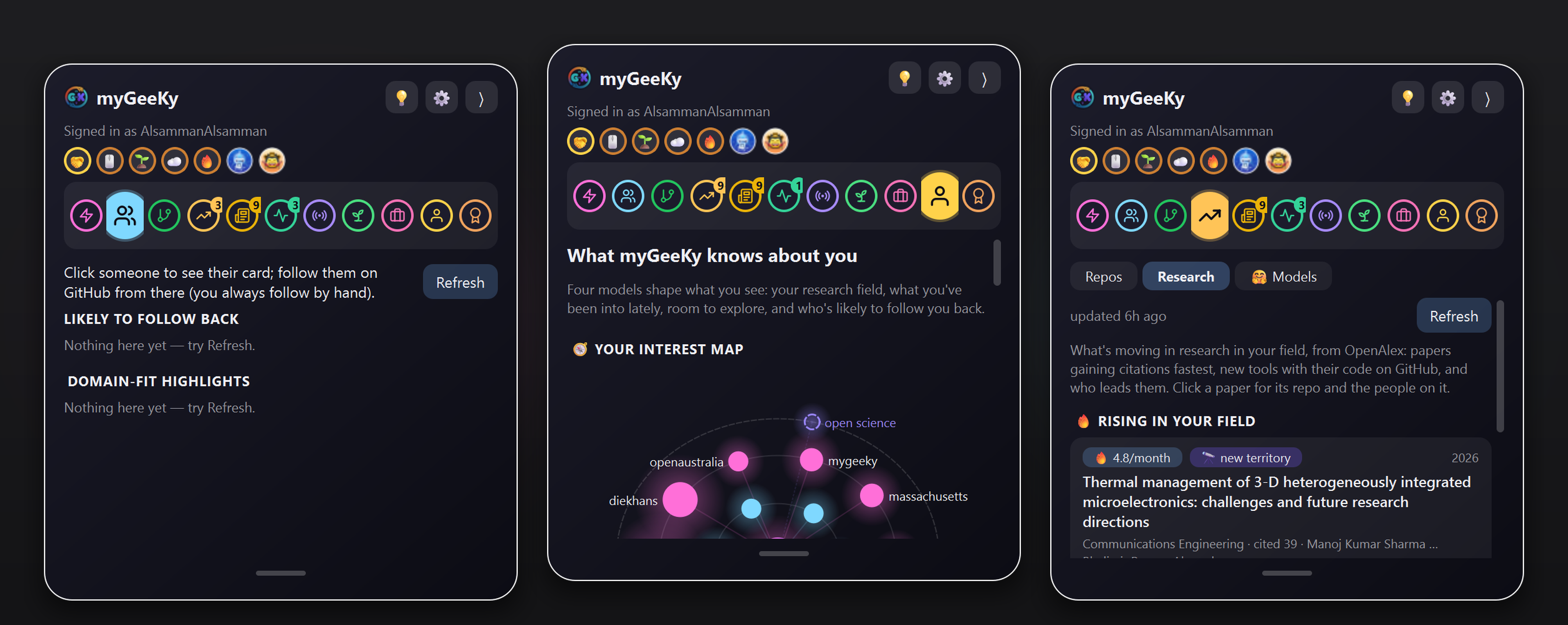
Real screenshots, real data: the Live feed, people worth following, and repos you could contribute to.
Why this exists: I don't have Facebook. I wanted a real circle in my field: people I can genuinely learn from (and who might learn something from me too), projects where my work would actually be welcome, and a feel for where the field is moving. GitHub has all of that, but scattered and buried under famous accounts. myGeeKy gathers it in one place.
🧭 What's inside
One profile (your CV, your repos, and optionally your ORCID/OpenAlex and Google Scholar papers) powers everything:
| What you get | Command | Panel tab | |
|---|---|---|---|
| 👥 People | Who shares your research and is likely to follow back, plus domain experts who rarely follow anyone | mygeeky run |
Suggestions |
| 🛠️ Projects | Repos in your field you could improve: open starter issues, maintainers who merge outside PRs | mygeeky contribute |
Repos |
| 📈 Pulse | Your field's popular repos ranked by momentum (stars gained, commits, PyPI downloads), plus new Product Hunt launches in your field | mygeeky market |
Market |
| 🗞️ News new | New papers and discussions about your interests, from arXiv, bioRxiv and Hacker News | mygeeky news |
News |
| 📰 Activity | What the people you follow, and your best matches, are doing right now | (in the panel) | Activity · Live |
| 👋 Signals | Emoji-only signals between myGeeKy users, and a 🤝 handshake when it's mutual | mygeeky beacon |
Signals |
| 🧠 Learning | What you click, follow, star and fork tunes everything above, and a model learns who follows you back. 🔭 20% of every list stays open for new territory | mygeeky interests |
Model |
| ☁️ Sync | Your data in a private GitHub repo you own, on every computer | mygeeky sync |
✨ Highlights
|
🧬 Knows your field, not just your language |
👥 People worth following |
|
🛠️ Repos you could improve |
📈 The pulse of your field |
|
👋 Signals, without words new |
🪟 A glass panel on your screen edge |
|
🛡️ Suggest-only, by design |
☁️ Yours, on every computer |
|
🪄 One-click Windows installer new |
🤖 Scriptable |
🚀 Get started in 3 steps
▶ Watch the 2-minute video: install, set up, and a tour of the panel
1 · Install
🪟 Windows: the installer (easiest)
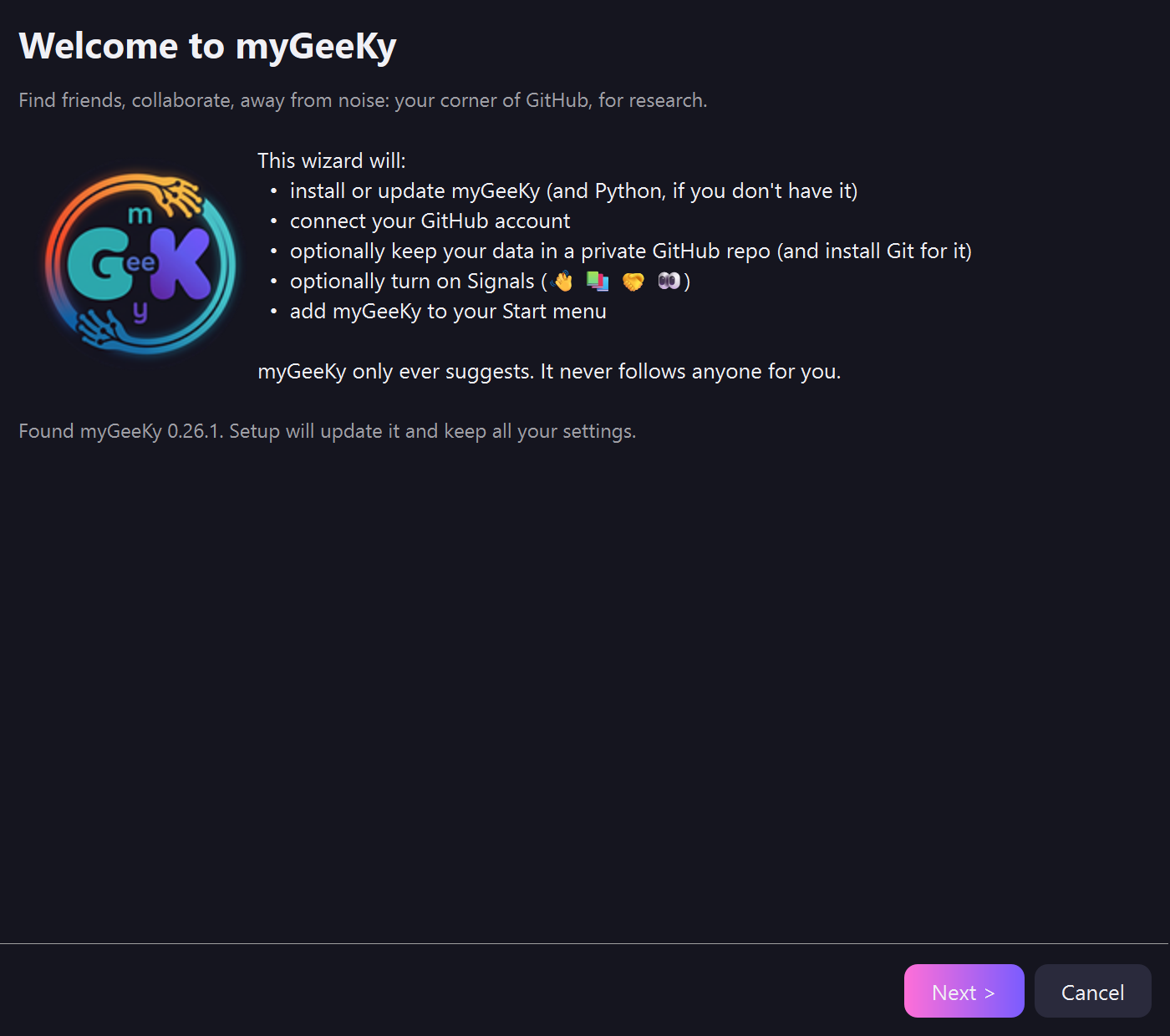
- Download MyGeeKySetup.exe (under Assets on the latest release).
- Open it and click Next → Next → Finish.
It does everything for you, and you don't need anything installed first:
- Python: set up if you don't have it (just for you, no admin rights).
- myGeeKy and its GUI library.
- Git, only if you choose sync.
It also asks who you are, stores your GitHub token safely, connects your private sync repo, walks you through Signals, and adds myGeeKy to the Start menu. Uninstall it any time from Settings → Apps.
Windows may say "Windows protected your PC" because the installer isn't code-signed yet. Click More info → Run anyway.
If you use the installer, you're done: skip to step 3.
🐍 macOS, Linux, or Windows without the installer
pip install mygeeky
2 · Tell it who you are
(The installer already did this.) With pip, run:
mygeeky init
Only your GitHub username is required. Your CV, ORCID iD and Google Scholar profile are optional, and they make the matches much better. It also asks for a read-only GitHub token:
- Open github.com/settings/personal-access-tokens/new. Pick a long Expiration (90 days or a year): myGeeKy reminds you a week before a token ends (see Token expiry).
- Repository access: Public repositories.
- Click Add permissions under Account → Followers → Read-only.
- Generate token, then paste it when asked. It's stored in your OS keyring, never in a file.
3 · Open your panel
mygeeky gui
The first time, it sets up its GUI library by itself (about a minute). Then:
mygeeky run           # people in your field worth following
mygeeky contribute    # repos you could improve
mygeeky market        # what's rising in your field
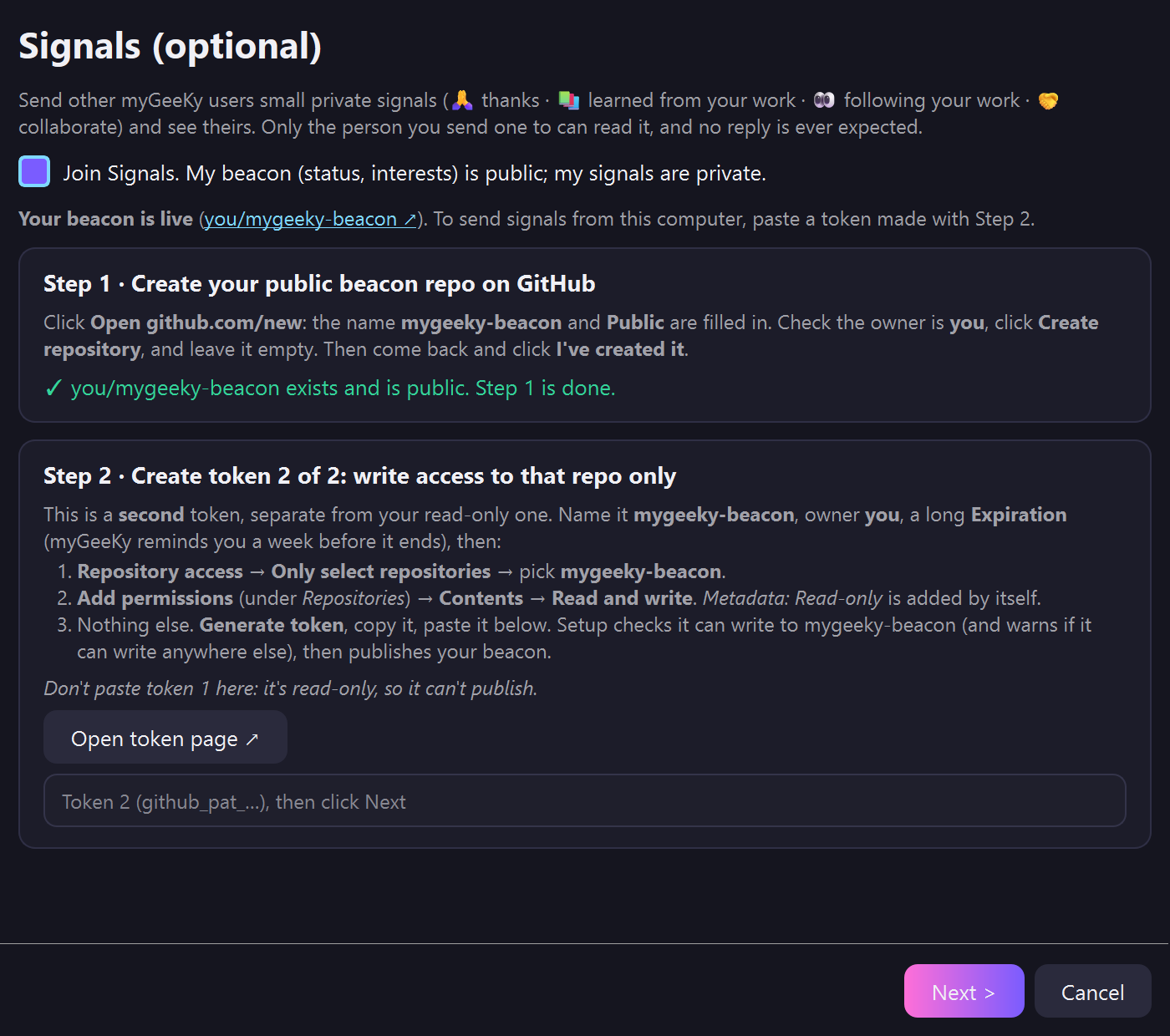
4 · Optional: join Signals 👋
mygeeky beacon init
It walks you through two things on github.com, in this order:
- create a public repo named
mygeeky-beacon; - create a second token (separate from your read-only one) that can write to that repo only. It can only be made once the repo exists.
It checks each step before going on. The Windows installer does the same on its Signals page, where Step 2 unlocks once Step 1 is verified. Details in Join Signals, step by step.
Something didn't work?
'mygeeky' is not recognized: usepython -m mygeekyinstead, e.g.python -m mygeeky init. It offers to fix your PATH for next time.- Others can't see you in Signals: run
mygeeky beacon check. - More: see If something goes wrong on Windows.
🪟 The live panel
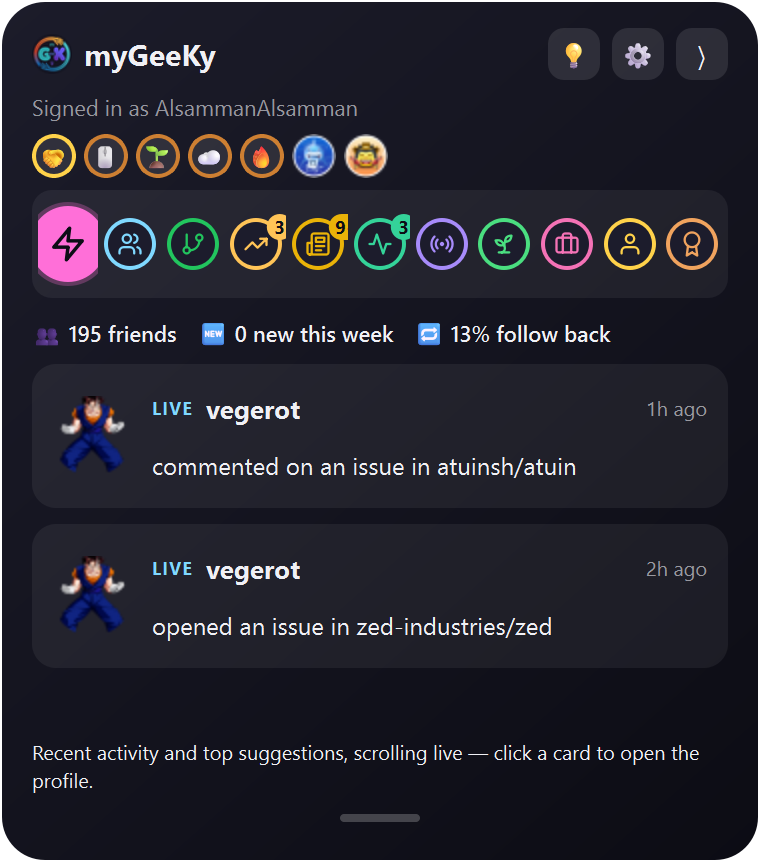 Live — friends' activity + top suggestions, scrolling |
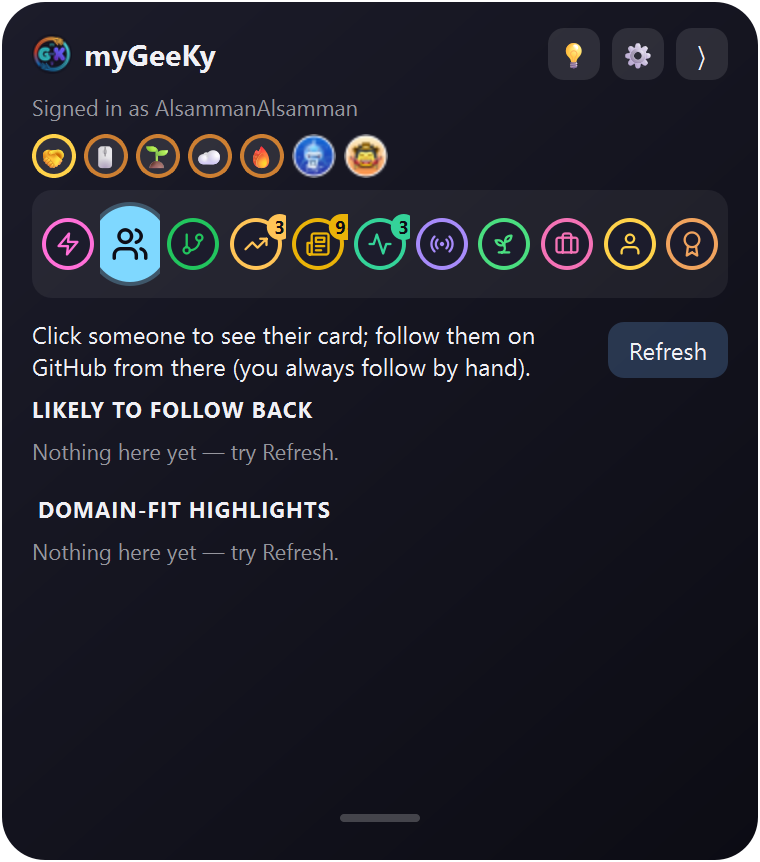 Suggestions — click someone to open them; they leave the list |
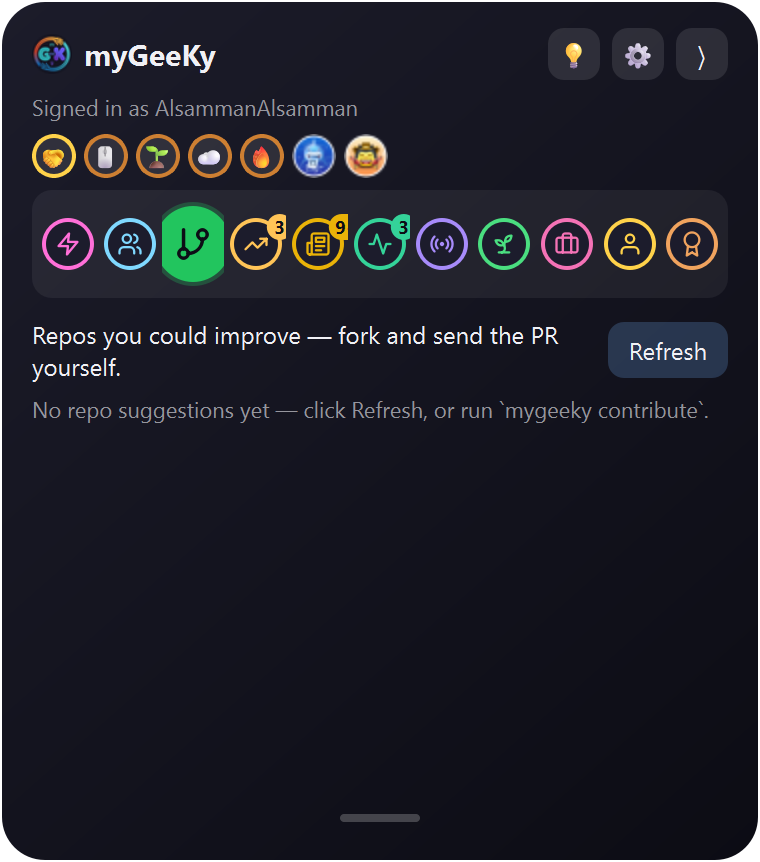 Repos — projects in your field with starter issues |
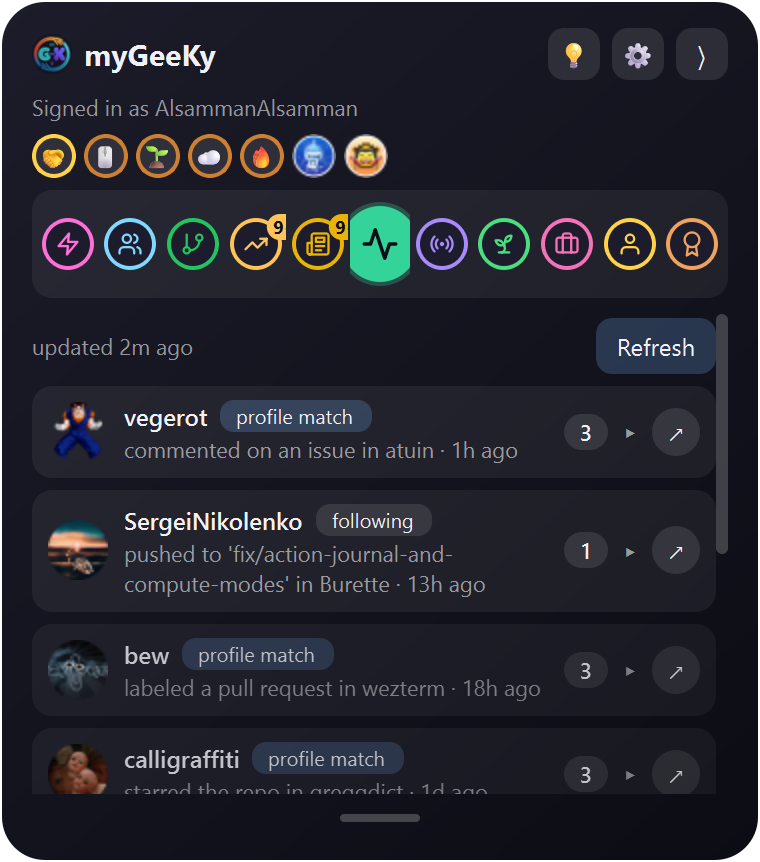 Activity — one card per person; click to expand |
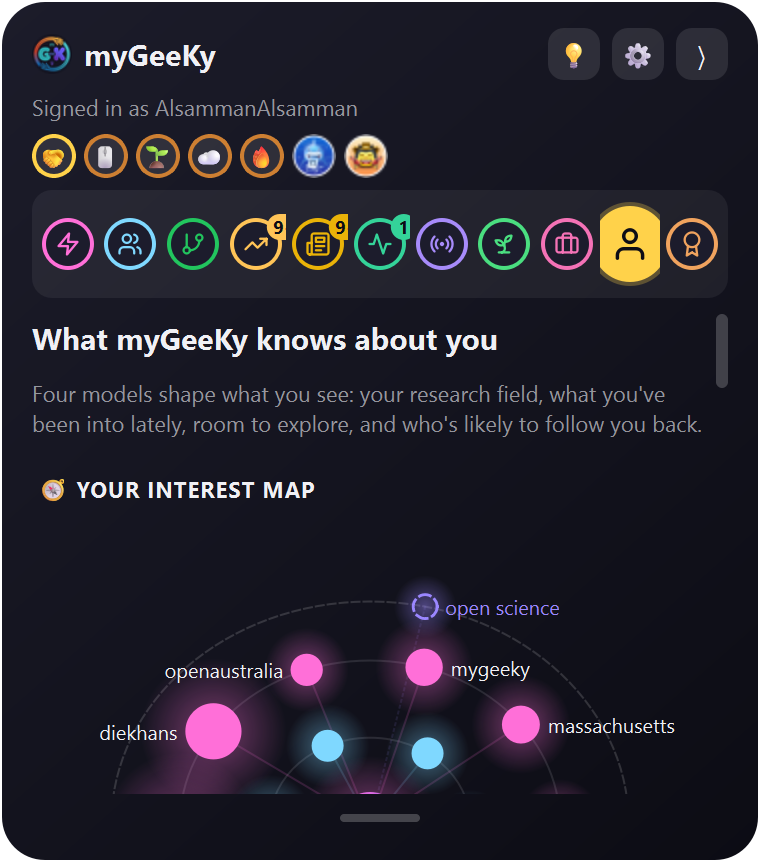 Model — how good it is, what it learned, and the trend |
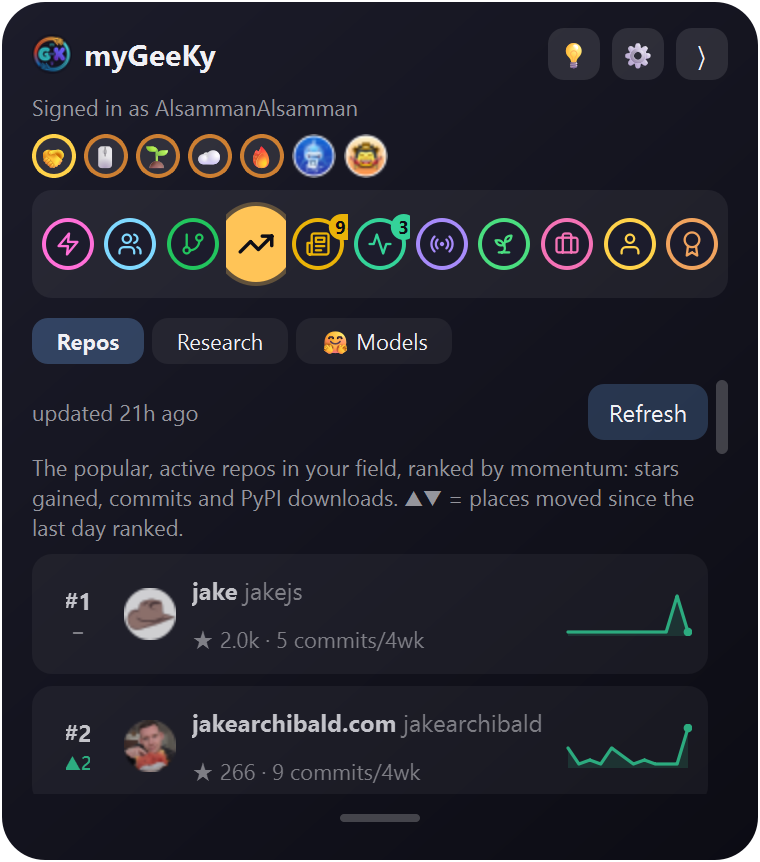 Market — your field's repos as a stock race |
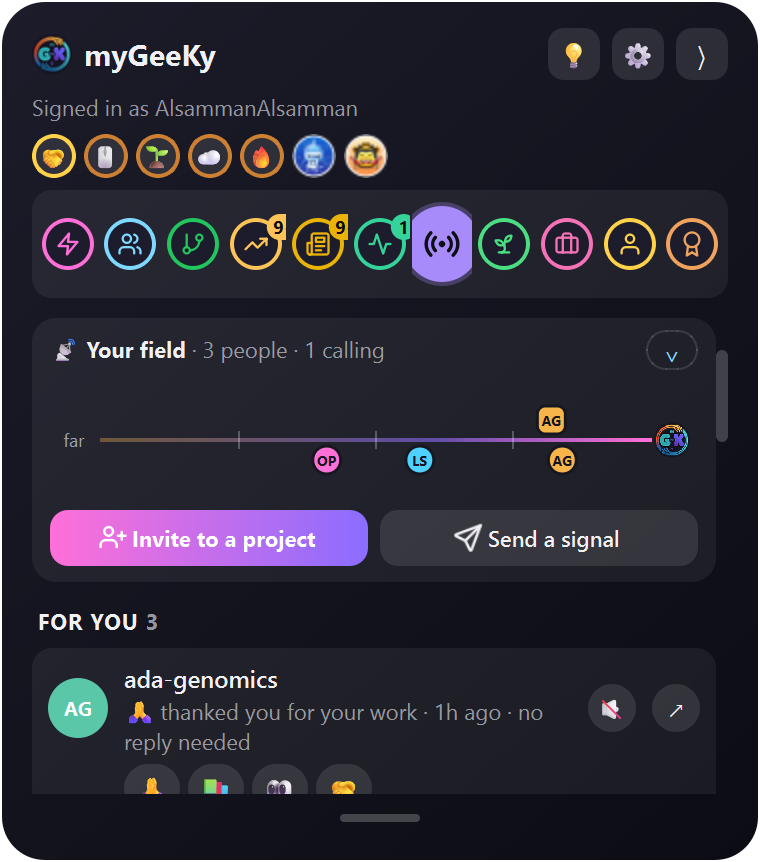 Signals — emoji signals from other myGeeKy users (example data) |
 Folded — just the icon on the screen edge; every few minutes a few small hearts drift up and fade (turn off in ⚙) |
More in Live glass panel below.
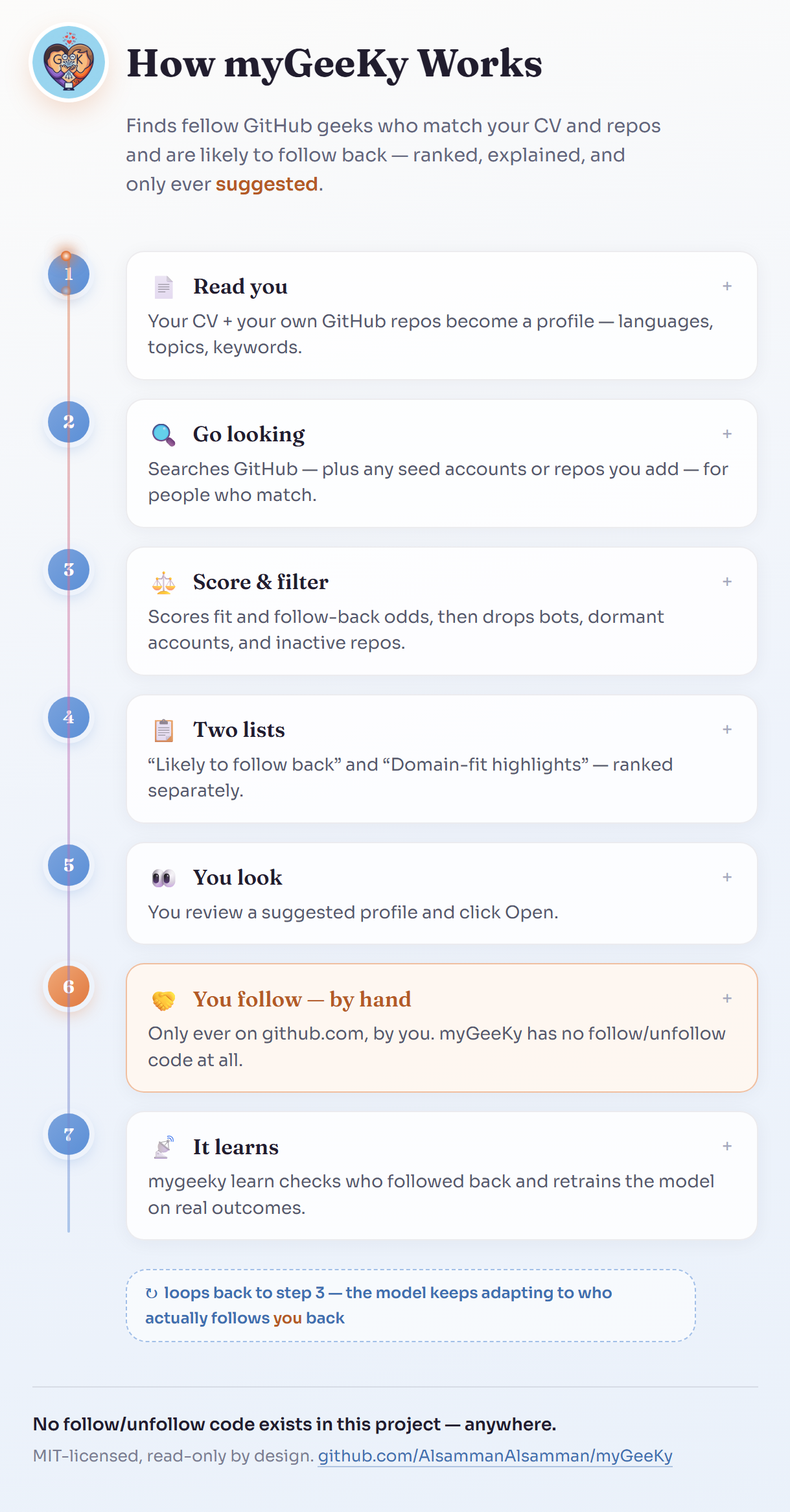
How it works
GitHub's Markdown renderer strips <script> tags (security), so it can't
run a live JS diagram inline — the image below is a preview of a real,
animated, click-to-expand HTML/JS page that ships in this repo at
docs/flowchart.html:
▶ Open the live interactive version
— real vanilla JS (click any step to expand it), served straight off this
repo via githack, no build step, no server.
(If that link is ever slow/unavailable: clone the repo and open
docs/flowchart.html directly in a browser — it's fully self-contained,
zero dependencies.)
The pink "You follow — by hand" step is the only place a follow ever happens — myGeeKy has no follow/unfollow code anywhere in the project; see Safety.
Finding people (mygeeky run)
How the people suggestions are made:
- Understands you — reads your CV (txt/md/pdf), your own GitHub repos (languages, topics, descriptions) and, if you give them, your ORCID/OpenAlex and Google Scholar publications to build a profile of what you're into, and auto-derives a weighted "domain vocabulary" from that corpus (not a hardcoded field-specific wordlist).
- Collects candidates from multiple sources, not just a plain search:
the owners and contributors of active repos matching your research terms
(ranked first — a plain language search mostly returns famous accounts),
GitHub user search (language/location/follower filters), followers of
well-known accounts in your field (
seed_accounts), stargazers of relevant repos (seed_repos), stargazers of your own repos, and optionally second-degree contacts (people followed by people you already follow). Candidates corroborated by more than one source get a small ranking boost. - Filters out noise before scoring: accounts following more than
max_followingpeople (a growth-hacking/mass-follow pattern, not genuine engagement), dormant/throwaway-looking accounts, organizations, and — for the top-ranked candidates — a real per-repo activity check (a maintained repo pushed to recently, or a freshly-created one; a profile'supdated_atalone can just reflect a bio edit). - Scores each surviving candidate on:
- content similarity to your CV/repos (TF-IDF + cosine similarity)
- how likely they are to follow back (their own following/follower ratio);
for the follow-back list, accounts that follow almost nobody relative to
their audience, or have more than
followback_max_followers, are skipped - how active their account is
- once you've used it a while: a learned model (see below)
- Suggests two ranked lists, not one — printed, or returned as JSON.
Nothing is followed automatically:
- Likely to follow back — the blended score above.
- Domain-fit highlights — ranked purely by match to your CV/repos, independent of follow-back likelihood. A senior domain expert who follows almost no one on GitHub is exactly who the follow-back score would otherwise bury, and is often the best actual match.
- Learns from real outcomes, not just from waiting:
mygeeky bootstrapseeds the model immediately from accounts you already follow (checks, read-only, who already follows you back) — so you get real training data on day one instead of waiting weeks.mygeeky learn(meant to run weekly) looks at who you actually followed since the last check, checks whether they followed back, and retrains a logistic-regression model on the growing set of outcomes — reporting cross-validated AUC so you can see how trustworthy it is, and excluding mass-follow outliers from training.
Repos you could improve (mygeeky contribute)
Beyond people, myGeeKy suggests repositories you could fork, improve, and realistically get merged, matched to your CV, repos, and publications:
mygeeky contribute          # search + rank (a few minutes; GitHub's search API is rate-limited)
mygeeky contribute --last   # re-print the last results
mygeeky contribute --json   # for scripts / AI agents
- Your profile is turned into a handful of search terms: your
publications' OpenAlex keywords, topics used across your repos, and the
CV vocabulary. Explicit
topics/contribute_extra_termsalways come first. - GitHub is searched for active, non-archived, non-fork repos matching
those terms that have open
good first issue/help wantedissues. - Each repo is ranked on fit (content similarity, a language you use, recency), then the top few get the check that actually predicts a merge: of its recently closed PRs from outside contributors, how many did the maintainers merge? Bot PRs and insiders' own PRs don't count.
- Each suggestion lists its unassigned, recent starter issues and a plain-language "why".
As with people, this only ever suggests: there is no fork, PR, or comment code anywhere. You open the repo, fork it, and send the PR yourself.
Your field's repos as a market board (mygeeky market)
Not repos to contribute to — the projects your field actually runs on, ranked like a stock board by momentum:
mygeeky market              # snapshot (once a day) + print the board
mygeeky market --refresh    # snapshot again now
mygeeky market --last       # print the saved board, no network
mygeeky market --json       # for scripts / AI agents
#1    +2  bioconda/bioconda-recipes   *1.9k (+31)  752 commits/4wk
#2   NEW  biotite-dev/biotite         * 976 (+9)   pypi 391.1k/wk +117%  6 commits/4wk
#3    -1  rgcgithub/regenie           * 270 (+3)   1 commits/4wk
- The watchlist (
market_size, default 25) is picked weekly by searching GitHub for your profile terms, as text and as topics, among repos withmarket_min_stars+ stars pushed in the lastmarket_pushed_within_days. Your terms take turns filling it, so broad ones like "genome" can't crowd out "gwas". Repos only get in when they clearly belong to the field: your terms in their own name/description, or a real share of their topics — not "bioinformatics" as one tag among twenty, not AMD's "SEV-SNP", not awesome-lists, courses or AI-agent tooling borrowing the words.market_pinnedrepos always stay on. - Signals: stars (GitHub has no star history for normal tokens, so star momentum builds from myGeeKy's own daily snapshots — "collecting" for the first days), commits over the last 4 weeks (52 weeks of history come at once), and — when the repo publishes a PyPI package whose page links back to it — real PyPI downloads per week and their change, from pypistats.org with mirrors excluded.
- Ranking: a weighted average of each repo's percentile on the signals it actually has, so tools that aren't on PyPI (PLINK, GATK, …) aren't pushed down for lacking downloads. ▲▼ shows places moved since the last day ranked.
About 3 GitHub API calls per repo, once a day. In the panel it's the
Market tab, refreshed in the background when it's older than
market_refresh_hours (default 12).
Product Hunt launches in your field. Under the board, the Market also
lists recent Product Hunt launches. Launches
that mention your profile terms come first (tagged your field), then the
rest by upvotes. Product Hunt has no search, so launches are pulled from a few
topics (market_ph_topics), from the last market_ph_days (30). It's
read-only and needs a free Product Hunt developer token:
mygeeky auth producthunt          # walks you through creating the token; stored in the OS keyring
mygeeky market --refresh          # board + launches
Your profile: CV + GitHub + ORCID/OpenAlex + Google Scholar
mygeeky profile refresh --cv ~/cv.pdf --orcid 0000-0002-1825-0097 \
    --scholar "https://scholar.google.com/citations?user=XXXXXXXXXXXX"   # all remembered
mygeeky profile refresh     # after updating your CV: re-extract the PDF, re-fetch publications
mygeeky profile show        # what myGeeKy knows about you (no network)
- CV: PDF/txt/md, converted to text.
- ORCID (public API) and OpenAlex (looked up by your ORCID): your publication titles, abstracts, keywords and research topics. They're free and need no key. They feed both people matching and repo suggestions.
- Google Scholar (optional): your research interests and up to 100 paper
titles, read from your own public profile page. Scholar has no API and limits
automated access, so this is one request per
profile refresh, never part of a normal run; if Google refuses it, the last fetched copy is kept and ORCID/OpenAlex still cover your publications.
Use it from any computer (mygeeky sync)
Your myGeeKy data can live in a private GitHub repo, so the model keeps learning no matter which machine you run it on. It's optional, and it needs Git. On Windows the installer installs Git for you when you tick sync; otherwise get Git for Windows.
mygeeky sync init                      # creates <you>/mygeeky-data (private) and pushes
mygeeky sync init --repo you/other     # or use/choose another private repo
mygeeky sync pull | push | status
On a new computer: pip install mygeeky, then gh auth login and
mygeeky sync init again. It pulls your config, CV text, publications,
history and training data. mygeeky pipeline (the weekly job) then does
pull → learn → run → contribute → push automatically.
- It refuses to sync to a public repo.
- Never synced: any token, caches, logs, and the pickled model. Loading a pickle that came over the network could run code, so the model is retrained locally from the synced training data instead.
.jsonllogs use git'sunionmerge, so two machines in the same week merge cleanly.- Git uses your own
gh/git credentials. myGeeKy's API client stays read-only.
News for your field (mygeeky news)
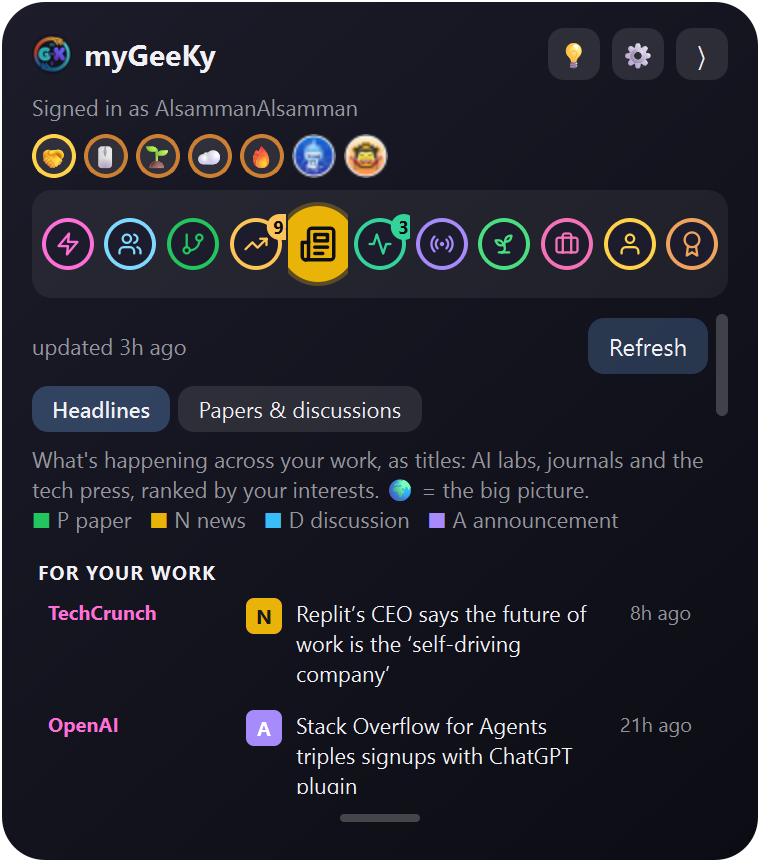
New preprints and discussions that match your interests, from free and constantly updated sources, with no accounts or keys:
- arXiv: new preprints (AI, CS, statistics, quantitative biology, ...).
- bioRxiv: the last days' biology preprints.
- Hacker News: what developers are discussing.
Each item says why it's there (matches gwas, fine mapping). Items are ranked by how well they match your interests and how new they are. A single generic word like "stress" isn't enough on its own (physics uses it too); it takes two of your terms, or one specific phrase. One source being down never empties the feed.
mygeeky news              # the saved news (refreshed every 6 hours)
mygeeky news --refresh    # fetch now
It learns what you're into, and keeps room to explore
Everything you do teaches myGeeKy a little about your interests:
| You | Counts as |
|---|---|
| fork a repo | strongest signal |
| follow someone new | strong |
| star a repo | strong |
| click a repo (Repos, Market) | medium |
| click a news item | medium |
| click a suggested person | light |
From each one it keeps a few terms (topics, words from the description
or bio, never the full text). Recent actions count more: each one fades to
half after interest_half_life_days (30). A single stray click isn't enough to
change anything; repeated interest is. What it learns tunes who it searches
for, which repos it suggests, which repos the Market watches, and the News.
Follows, stars and forks are picked up from your public GitHub activity.
🔭 New territory. A profile that only follows your clicks shuts you in a
bubble. So 20% of every list (explore_share) is kept for things outside
your usual interests, from fields that rotate daily, marked 🔭 new territory.
If one catches your eye, clicking it teaches myGeeKy that the new area
interests you too.
mygeeky interests          # what it has learned, and today's new territory
mygeeky interests --reset  # forget it (your CV, papers and topics stay)
The Model tab shows it too, under What you're into lately. Turn learning
off with mygeeky config set interest_learning false, or exploration with
mygeeky config set explore_share 0.
Signal other myGeeKy users, without words (mygeeky beacon)
myGeeKy users can send each other emoji-only signals, and myGeeKy never needs a server for it: everything goes through GitHub.
| Signal | Means | |
|---|---|---|
| 👋 | wave |
"I noticed you" |
| 📚 | learn |
"I learn from your work" |
| 🤝 | collab |
"I'd like to work with you" |
| 👀 | watching |
"I'm following your progress" |
| 🔥 | kudos --repo owner/name |
"this repo of yours is great" |
Join Signals, step by step
Signals is the one part of myGeeKy where you do two things on github.com
yourself. Run mygeeky beacon init (or tick Join Signals in the Windows
installer): it opens each page for you, waits while you do it, and checks that
each step worked before going on.
Step 1: create your public beacon repo.
- Open github.com/new?name=mygeeky-beacon.
The name
mygeeky-beaconand Public are filled in. - Check that the owner is you, then click Create repository. Leave it
empty; myGeeKy writes the files. (If the GitHub CLI
ghis installed and logged in, myGeeKy creates the repo for you instead.)
Step 2: create a second token, one that can write to that repo only. This is separate from the read-only token you made when you set myGeeKy up, and it can only be made after Step 1: GitHub only lets a token be limited to a repo that already exists.
- Open github.com/settings/personal-access-tokens/new.
Name it
mygeeky-beacon, with Resource owner set to you, and a long Expiration. - Repository access → Only select repositories → pick
mygeeky-beacon. The permission list only appears after you pick the repo, so do Step 1 first. - Under Repositories, click Add permissions → Contents, and set it to Read and write. (On the older page: Repository permissions → Contents → Read and write.) Metadata: Read-only is added by itself; that's fine.
- Add nothing else. Click Generate token, copy it (it starts with
github_pat_), and paste it whenmygeeky beacon initasks.
Step 3: done. myGeeKy tests the token by publishing your beacon.json,
stores the token in your OS keyring, and reads it back from GitHub to make
sure others can see you. Your repo should now contain beacon.json.
Not showing up? Run mygeeky beacon check. It changes nothing and lists
what's missing:
| What you see | What it means | Fix |
|---|---|---|
| repo "doesn't exist yet" | Step 1 wasn't done, or under another account | Create mygeeky-beacon under your own account |
| repo "is private" | Nobody can read your beacon | Repo Settings → Change visibility → Public |
| "GitHub refused the write" | The token can't write | Make a new token with Contents: Read and write |
| "token can't see" the repo | The token is for other repos | Choose Only select repositories → mygeeky-beacon |
| "beacon.json isn't published" | Setup stopped before Step 3 | Run mygeeky beacon init again |
Adding the topic mygeeky-beacon to the repo (⚙ next to About) is
optional: myGeeKy finds beacons by their name as well.
Using it
mygeeky beacon init                  # one-time setup, as above
mygeeky beacon check                 # what's missing, if others can't see you
mygeeky beacon people                # fellow myGeeKy users, those sharing your interests first
mygeeky beacon send alice wave       # or: learn | collab | watching | kudos --repo alice/tool
mygeeky beacon inbox                 # signals sent to you -- 🤝 handshake = you both signalled
mygeeky beacon status open-to-collab # or learning, heads-down, seeking-reviewers, mentoring, none
mygeeky beacon sent | unsend alice | block troll | unblock troll
In the panel, the Signals tab shows what people sent you and who else is around, with one-click 👋 📚 🤝 👀 buttons. Incoming signals also lead the Live tab's rotation.
How it works: each user's beacon is a public repo named mygeeky-beacon
(ideally also tagged with that topic), holding one beacon.json file. It lists the signals you
sent, your status, and a few interest tags taken from your topics,
keywords and languages (turn those off with beacon_share_interests false).
myGeeKy finds other beacons with a normal repo search and reads the ones that
name you. Someone who signalled you also gets a boost in your
suggestions.
- It's public. Anyone can read who you signalled, and when.
- There's no text, so there's nothing to moderate. Signals and statuses come from fixed lists.
Everything read from other people's beacons is validated and shown as plain
text.
blockhides a person for good. - Signals expire after
beacon_gesture_ttl_days(90). You can sendbeacon_daily_limit(20) per day. - A separate, single-repo token.
initasks for a fine-grained token with access to only<you>/mygeeky-beaconand only Contents: Read and write. It's stored in your OS keyring under its own entry. Your main token stays read-only.
Install
pip install mygeeky
That's all: PDF CVs work out of the box, and the panel's GUI library (Qt) is
set up automatically the first time you run mygeeky gui. (pip install
"mygeeky[gui,pdf]" still works too; the extras just aren't needed any more.)
On Windows you can use MyGeeKySetup.exe instead (see the top of this page).
To build it yourself: pip install pyinstaller build, then
python installer/build.py, which writes dist/MyGeeKySetup-<version>.exe.
Updating
myGeeKy tells you when a new version is out: a banner in the panel with an Update button (it updates and restarts the panel by itself), and a one-line note in the terminal. Or run:
mygeeky update            # update now
mygeeky update --check    # only say whether there's a newer version
It asks PyPI at most once a day, sending nothing about you. Turn it off with
mygeeky config set check_for_updates false. (A developer install made with
pip install -e . is never touched; update it with git pull.)
Token expiry
GitHub tokens expire on the date you chose when you made them. myGeeKy reads
that date from GitHub (once a day) and, from a week before, reminds you: a
banner in the panel with Renew on GitHub and Paste new token, and a
note in the terminal. To renew, open the token on
github.com/settings/personal-access-tokens,
click Regenerate token, and paste the new one (in the panel, or with
mygeeky auth login for token 1 and mygeeky beacon init for token 2).
mygeeky auth status # both tokens and when they expire
If something goes wrong on Windows
Every error says what went wrong, naming the file or program involved, and the full details are saved for you to send:
- Installer:
~/.mygeeky/setup.log. The error message has an Open the setup log link. mygeekycommand and panel: the error says where it saved its report (anerror-<date>.txtin myGeeKy'slogsfolder).
Please attach that file when you open an issue.
If you don't have Python, or only have the Microsoft Store Python, the installer sets up a regular Python 3.12 just for you: with winget when your PC has it, otherwise straight from python.org. No admin rights needed.
'mygeeky' is not recognized: pip put the command in a folder that isn't on your PATH (common with the Microsoft Store Python). Usepython -m mygeekyinstead, e.g.python -m mygeeky init. It offers once to add that folder to your PATH, so plainmygeekyworks in new terminals.OSError: [Errno 2] No such file or directory: ...PySide6\qml\...with a Long Path hint, from installing PySide6 yourself: the Microsoft Store Python's package folder is too deep for Qt's files. You don't need to install Qt by hand.mygeeky guisets it up in a short folder (~/.mygeeky/qt) that avoids the limit, no admin rights needed. If you'd rather,MyGeeKySetup.exesets up a regular Python instead.
Quick start
mygeeky init      # asks for your GitHub username, CV, and the kind of people you're looking for
mygeeky run       # get your first batch of suggestions
mygeeky init asks a short set of questions — all optional, all editable
later:
- Your GitHub username (the only required answer)
- Your CV (a file path, pasted text, or skip)
- Your ORCID iD and your Google Scholar profile URL (each optional)
- Languages / topics / keywords / locations you're looking for
- Optional extra candidate sources: well-known accounts in your field, relevant repos
- Follower-count range,
max_following, minimum repo count, how many suggestions per run
Then it offers to store a GitHub token (see Safety — this is
handled very deliberately), and — if a token is set up — offers to run
mygeeky bootstrap immediately so you're not starting the learning model
from zero.
Everyday use
mygeeky run                 # search + rank + suggest (two lists: followback + domain-fit)
mygeeky run --json          # same, as JSON (for scripts / AI agents)
mygeeky suggestions         # re-print the last run's results without re-querying GitHub
mygeeky bootstrap           # seed the model from accounts you already follow (run once, early)
mygeeky learn               # check who you followed since last time, learn from who followed back
mygeeky contribute          # repos you could fork, improve, and get merged
mygeeky market              # momentum board of the popular, active repos in your field
mygeeky profile refresh     # re-read your CV + publications (ORCID/OpenAlex)
mygeeky sync push|pull      # keep your data in your private GitHub repo
mygeeky pipeline            # sync pull, learn, run, contribute, sync push — the weekly job
mygeeky gui                 # launch the live glass panel
Running it weekly
myGeeKy doesn't run in the background by itself — you decide when it's allowed to touch your OS's task scheduler:
mygeeky schedule show          # print the exact command/cron line for your OS (does nothing)
mygeeky schedule install --yes # actually register it (Windows Task Scheduler / cron)
mygeeky schedule remove        # undo it
The scheduled job runs mygeeky pipeline — i.e. it checks and learns
from what you did last week, then produces new suggestions. It still never
follows anyone.
Live glass panel (optional GUI)
mygeeky gui # (or the standalone `mygeeky-gui` command)
The first run sets up Qt (PySide6, about 80 MB) by itself. It uses this
Python's normal package folder when Windows' path limit allows, and otherwise
a short private folder, ~/.mygeeky/qt (or $MYGEEKY_QT_DIR).
A small, translucent, always-on-top panel docked to the edge of your
screen (Windows and Linux), built with PySide6/Qt
— native widgets, not a webview. (An earlier version used pywebview; its
WebView2-on-Windows transparency turned out to be a confirmed, currently
inconsistent upstream bug that even its maintainer can't reproduce reliably
across machines — see pywebview#1611.
Qt's WA_TranslucentBackground is the mature, well-supported way apps
actually get real per-pixel window transparency on Windows.) Click the
folded tab to expand it; click the arrow to fold it back to a slim strip.
- Suggestions tab — both lists from
mygeeky run(avatar, bio, score), each with an Open → button that opens their GitHub profile in your browser. That's the only thing a click ever does — myGeeKy still never follows anyone; a "Refresh" button re-runs a real search on demand. People you open or already follow drop off, and older unseen suggestions move up to fill their place. Once the list is empty, the panel searches again by itself, but no more often thangui_suggestions_auto_refresh_hours(default 6;0turns it off), to stay well inside GitHub's rate limits. - Market tab — the
mygeeky marketboard: rank, ▲▼ places moved, stars (+ this week), PyPI downloads/week (± change), commits, and a green/red sparkline of weekly downloads (or commits for non-PyPI tools). Click a row to open the repo. It refreshes itself in the background. - Repos tab — the results of
mygeeky contribute: repos you could improve, each with why it fits you, its top starter issues, and Fork → / Open → buttons. Those buttons only open the GitHub page; forking and the PR stay yours. It shows the last run's results, and "Refresh" runs a new repo search only when you click it. - Activity tab — a live feed of what people you follow are actually
doing (pushes, merged PRs, new repos, releases, stars...), from GitHub's
own events API, plus the recent activity of your best profile matches
(your top
gui_activity_match_peoplesuggestions, scored against your CV, ORCID and repos), tagged "profile match". Grouped into one card per person with their latest action and a count; click a card to expand everything they did, or ↗ to open their profile. Strangers acting on repos of orgs you follow are filtered out. Refreshes automatically, but no more often thangui_activity_refresh_minutes(default 5) — about one API call per matched person, not a full search. - Model tab — an animated ring with your model's cross-validated AUC and
a plain-language grade, tiles for examples / follow-backs / follow-back
rate / retrains, bars showing what the trained model rewards and
penalizes, and a trend chart (hover a point for details) so you can watch
it actually improve as you run
mygeeky bootstrap/learn.
⚙ Settings — click the small gear icon in the header to open a compact panel with:
- Theme, switchable live (no restart needed): Midnight Glass (dark, cool-toned, the default), Frosted White (light, warm, iOS-control-center-like), and Vibrant Aurora (saturated, colorful, leans into the geeky/hearts branding).
- Transparency, a slider from 0% (fully opaque) to 100% (fully transparent), applied live as you drag.
Both choices are saved (gui_theme, gui_opacity) and remembered next time
you open the panel.
Clicking a person in the Suggestions list (or a suggestion in the Live tab)
opens their profile and removes them from the list — they're added to your
excluded list, so later runs skip them too. People you follow from the browser
drop out on the next activity refresh (within gui_activity_refresh_minutes).
Folded, the panel shrinks to just the app icon on the screen edge, half-transparent until you hover it. It always stays inside the screen it's on, including on multi-monitor setups.
Config: gui_dock_side ("right"/"left"), gui_expanded_width,
gui_folded_width, gui_folded_height, gui_folded_opacity, gui_panel_height_fraction, gui_activity_refresh_minutes, gui_suggestions_auto_refresh_hours,
gui_activity_limit, gui_theme ("midnight"/"frosted"/"aurora"),
gui_opacity (0.0-1.0, note the settings panel's slider shows this
inverted, as "Transparency") — same mygeeky config set mechanism as
everything else.
No LLM/AI is used anywhere in the GUI (or the rest of myGeeKy) — the suggestions, activity feed, and model chart are all built from the same TF-IDF/logistic-regression pipeline the CLI uses, so there's no API cost and nothing to configure to make it work. (There's deliberately no way to plug in a Claude subscription either — that kind of auth is scoped to Claude Code itself and isn't something a third-party tool can piggyback on; if you ever want AI-written explanations, that'd be a separate opt-in using your own API key or a local model, not something myGeeKy needs.)
Rendering note: the panel is genuinely transparent (real per-pixel alpha, confirmed on Windows 11), but it's a flat translucency, not a blurred "frosted glass" effect — Windows' native DWM Acrylic/Mica backdrop was tried and turned out to conflict with Qt's own transparency on tested hardware, reliably making the window opaque instead, so it isn't wired up. On Linux, real transparency depends on your compositor/window manager the same way it does for any Qt app.
All parameters (adjustable, or leave at the defaults)
mygeeky config show
mygeeky config set max_followers 3000
mygeeky config set languages "Python, Rust, Go"
mygeeky config reset
Full parameter table — every key, what it does, and its default
| Key | Meaning | Default |
|---|---|---|
languages |
languages you're looking for | [] (any) |
topics |
topics/interests you're looking for | [] (any) |
keywords |
extra free-text interests fed into matching | [] |
locations |
optional location filter | [] (any) |
min_followers / max_followers |
candidate follower-count range | 0 / 20000 |
max_following |
reject candidates following more than this (growth-hacking signal) | 500 |
min_public_repos |
minimum public repos a candidate must have | 2 |
require_followers_or_following / min_followers_gate / min_following_gate |
drop dormant/throwaway accounts with neither | true / 5 / 5 |
exclude_organizations |
skip org accounts | true |
exclude_already_following |
skip people you already follow | true |
exclude_users |
usernames to never suggest | [] |
seed_accounts |
candidates = followers of these well-known accounts | [] |
seed_repos |
candidates = stargazers of these owner/repo repos |
[] |
include_own_stargazers |
candidates = people who starred your own repos | true |
include_second_degree / second_degree_sample |
candidates = who a sample of your followees follow (expensive) | false / 15 |
source_max_pages |
pages fetched per candidate source | 3 |
activity_check_top_n |
how many top-ranked candidates get the real per-repo activity check | 150 |
max_repo_push_age_days / recent_upload_days / min_maintain_span_days |
real activity QC thresholds | 365 / 120 / 60 |
domain_vocab_size / domain_highlight_count |
size of the auto-derived domain vocabulary / highlight list | 25 / 15 |
search_pages |
GitHub search pages scanned per query | 3 |
max_candidates_per_run |
cap on candidates evaluated per run | 60 |
max_suggestions_returned |
cap on follow-back suggestions shown per run | 15 |
similarity_threshold |
minimum blended score to be suggested | 0.08 |
content_similarity_weight / follow_back_ratio_weight / activity_weight |
heuristic scoring weights | 0.5 / 0.3 / 0.2 |
rate_limit_sleep_seconds / search_pause_seconds |
pacing for normal vs. GitHub's tighter search-API rate limit | 1.5 / 2.1 |
cv_path / orcid_id / scholar_id |
CV file, ORCID iD and Google Scholar user id used by mygeeky profile refresh |
"" / "" / "" |
include_domain_repo_people / domain_repo_terms / domain_repo_count |
candidates = owners/contributors of active repos matching your profile terms | true / 6 / 20 |
followback_min_ratio / followback_max_followers |
follow-back list only: skip accounts with following/followers below this, or more followers than this | 0.05 / 3000 |
contribute_extra_terms |
terms always searched by contribute, e.g. gwas, snakemake |
[] |
contribute_min_stars / contribute_max_stars |
star range for repo suggestions | 10 / 20000 |
contribute_pushed_within_days |
a suggested repo must have been pushed to this recently | 90 |
contribute_queries / contribute_check_top_n / contribute_max_returned |
search terms used / repos given the maintainer check / results shown | 10 / 25 / 10 |
market_size / market_terms |
repos on the market board / profile terms searched to pick them | 25 / 8 |
market_min_stars / market_pushed_within_days |
a board repo needs this many stars and a push this recent | 50 / 180 |
market_pinned |
owner/repo always on the board, e.g. snakemake/snakemake, chrchang/plink-ng |
[] |
market_ph_topics / market_ph_days / market_ph_size |
Product Hunt topics to read, how far back, and how many launches to show (needs mygeeky auth producthunt) |
developer-tools, open-source, github, artificial-intelligence, science, health / 30 / 10 |
market_refresh_hours |
the panel re-snapshots the board once it's this old | 12 |
beacon_enabled |
set by mygeeky beacon init; signals are off until then |
false |
beacon_status |
your status (open-to-collab, learning, heads-down, seeking-reviewers, mentoring) |
"" |
beacon_share_interests |
publish your topics/keywords/languages as interest tags in your beacon | true |
beacon_blocked |
people whose signals are never shown | [] |
beacon_daily_limit / beacon_gesture_ttl_days |
signals you can send per day / days before a signal expires | 20 / 90 |
beacon_refresh_minutes / beacon_max_users |
minimum minutes between re-reading beacons / beacons read per refresh | 30 / 60 |
interest_learning / interest_half_life_days |
learn from your clicks, follows, stars and forks / days until an action counts half | true / 30 |
explore_share |
share of every list kept for 🔭 new territory outside your interests | 0.2 |
news_sources / news_size / news_refresh_hours / news_days |
where news comes from, how many items, how often to refresh, how far back | arxiv, biorxiv, hackernews / 25 / 6 / 7 |
check_for_updates |
check PyPI once a day and offer an Update button when a new version is out | true |
sync_repo / sync_auto |
private data repo (set by sync init) / whether pipeline pulls+pushes |
"" / true |
min_training_samples |
labeled examples needed before the ML model kicks in | 8 |
ml_blend_weight |
how much the learned model influences the final score once trained | 0.5 |
training_mass_follow_outlier |
exclude training examples from accounts following more than this | 3000 |
gui_dock_side |
which screen edge the live panel docks to ("right"/"left") |
"right" |
gui_expanded_width / gui_folded_width / gui_folded_height |
panel size in pixels, expanded vs. folded (the folded icon) | 380 / 76 / 76 |
gui_hearts_enabled / gui_hearts_interval_minutes |
a few small hearts drift up from the folded icon, fade and vanish (toggle in the panel's ⚙ settings) | true / 3 |
gui_folded_opacity |
folded icon's opacity (fully opaque while hovered) | 0.5 |
gui_panel_height_fraction |
panel height as a fraction of the screen height | 0.25 |
gui_activity_refresh_minutes |
minimum minutes between automatic activity-feed refreshes | 5 |
gui_activity_limit |
how many recent activity events to show | 30 |
gui_suggestions_auto_refresh_hours |
once the follow-back list is empty, search again by itself if the last search is at least this old (0 = only on Refresh) |
6 |
gui_theme |
glass style ("midnight"/"frosted"/"aurora") |
"midnight" |
gui_opacity |
whole-window transparency, adjustable via the ⚙ settings panel | 1.0 |
Safety
- No follow/unfollow code exists in this project.
github_client.pyonly implements read endpoints (GET). There is no method that callsPUT /user/following/*, so myGeeKy cannot follow anyone even by accident, regardless of what token scope you provide. - Your GitHub token is never written to a file. It's requested with
hidden input (
getpass) and stored only in your OS's encrypted secret store via thekeyringpackage (Windows Credential Locker / macOS Keychain / Linux Secret Service).mygeeky auth statusshows where it's coming from — never the value. An environment variable (MYGEEKY_GITHUB_TOKEN) is supported as an explicit, opt-in fallback for CI/agent contexts. - Token fallback to the GitHub CLI. If no keyring token or env var is
set, myGeeKy uses
gh auth tokenwhenghis logged in. This is still only used for GET requests. - News sends only your search terms to arXiv, bioRxiv and Hacker News (public, read-only APIs). What you click is learned locally, as a few terms per action, and only syncs to your own private data repo.
- Update checks are one read-only request to PyPI's public API, at most
once a day, carrying nothing about you. Updating only happens when you click
Update or run
mygeeky update. - Sync writes only to your own private data repo, through
gitwith your own credentials, never through myGeeKy's API client. - Beacons are the one opt-in write. After
mygeeky beacon init, myGeeKy writesbeacon.json/README.mdin your own publicmygeeky-beaconrepo, and nothing else. The writer has no parameter that could point it at another repo or file. It uses a second, fine-grained token scoped to that single repo, and never falls back togh. - Minimal token scope. myGeeKy only reads public profile/repo/follower data — create your token with no scopes at all, or a fine-grained token limited to read-only public repositories/followers. Never grant it write or admin scopes.
- All local state (config, CV text, suggestion history, the learned model) lives under your OS's standard config/data directories, not inside this project folder, so nothing personal ever ends up in a repo or a published package by accident.
- The GUI follows the same rule.
open_profile()(the only thing a click in the panel can trigger) refuses to open anything that isn't ahttps://github.com/...URL, and there's no other code path from the panel to the network beyond the read-only suggestion/activity fetches described above, except the Signals tab's emoji buttons. Once you've runmygeeky beacon init, those publish to your own beacon repo.
Using myGeeKy from an AI agent / script
Every result-producing command supports --json:
mygeeky run --json
Example output shape
{
  "followback": [
    {
      "username": "example-geek",
      "profile_url": "https://github.com/example-geek",
      "score": 0.4123,
      "score_breakdown": {"heuristic": 0.41, "ml_proba": null, "blended": 0.41},
      "features": {
        "content_similarity": 0.31,
        "follow_back_ratio": 0.9,
        "activity_recency": 1.0,
        "shared_languages": 0.5,
        "shared_topics": 0.33
      },
      "domain_fit": 0.62,
      "followers": 120,
      "following": 140,
      "public_repos": 34,
      "bio": "...",
      "sources": ["search:language:Python followers:0..20000 ...", "starred_your_repo:you/tool"],
      "n_sources": 2,
      "timestamp": "2026-09-17T12:00:00+00:00",
      "list": "followback"
    }
  ],
  "domain_highlights": [
    { "...": "same shape, ranked by domain_fit instead of score", "list": "domain" }
  ]
}
An agent can read this list and present it to you — it should never be wired up to auto-follow anyone; that defeats the entire point of this tool.
How the "learning" works
Bootstrapping, retraining, and how to read the AUC
Bootstrapping (day one): mygeeky bootstrap looks at accounts you
already follow, checks (read-only) whether each one follows you back,
and logs (features, followed_back) as a training example immediately —
so the model has real data from the start instead of an empty cold start
that only grows by however many people you manually follow each week.
Ongoing (weekly): mygeeky learn compares your current GitHub
following list against a snapshot taken at the last check. Anyone new is a
person you chose to follow. It checks whether they followed back and
logs the same kind of training example.
In both cases: once there are at least min_training_samples examples
with both outcomes represented (excluding accounts following more than
training_mass_follow_outlier, a growth-hacking outlier that would
distort the model), a scikit-learn LogisticRegression model is trained
and its prediction is blended into future scores (ml_blend_weight
controls how much). myGeeKy reports the model's cross-validated AUC each
time it retrains, so you can judge how trustworthy it is rather than take
it on faith — with a small training set, treat it as directional, not
precise. This is intentionally simple and transparent rather than a black
box — you can inspect score_breakdown on every suggestion to see the
heuristic and learned components separately.
Two lists, on purpose
mygeeky run produces a followback list (ranked by the blended
score above) and a domain_highlights list (ranked purely by
domain_fit, an auto-derived match to your CV/repo vocabulary,
independent of follow-back likelihood). These optimize for different
things: some of the best domain-specific matches — senior researchers,
niche maintainers — follow almost no one on GitHub, so the reciprocation
model correctly scores them low even though they may be the best actual
fit. Both lists go through the same activity-QC and bot/dormant filters.
License
MIT — see LICENSE.
1 maintainer

Metadata
1 maintainer
Release files for mygeeky 0.5.2
For a detailed explanation of source distributions (sdists) and built distributions (wheels), please see the package formats documentation.
Source distribution (sdist)
| File | Size | Uploaded | Provenance | |
|---|---|---|---|---|
| mygeeky-0.5.2.tar.gz | 731.3 kB | Without provenance | Details |
Built distribution (wheel)
| File | Interpreter | ABI | Platform | Reset |
|---|---|---|---|---|
| mygeeky-0.5.2-py3-none-any.whl | Python 3 | none | any | Details |
Total release size: 1.4 MB
Release files / mygeeky-0.5.2.tar.gz
| Download URL | mygeeky-0.5.2.tar.gz |
|---|---|
| Size | 731.3 kB |
| Tags | Source |
|
SHA-256 checksum How to use checksums |
21c4d9549716c60c347d92205d20c6810a4e75831727aa229b6c89c377e99340
|
|
BLAKE2b-256 checksum How to use checksums |
d895f51ec1b45f8f29f94c8b0d8cb6786b07ed6c3e1c2fd1152defffa234400b
|
| Upload date | |
|
Uploaded using Trusted Publishing? What is trusted publishing? |
No |
| Uploaded via |
twine/7.0.0 CPython/3.12.10
|
Release files / mygeeky-0.5.2-py3-none-any.whl
| Download URL | mygeeky-0.5.2-py3-none-any.whl |
|---|---|
| Size | 671.3 kB |
| Tags | Python 3 |
|
SHA-256 checksum How to use checksums |
2b08ea5a426bcecaf89cf04f35d58864dbd725c5a76425f9ebf84ad992d00e2c
|
|
BLAKE2b-256 checksum How to use checksums |
f5f8e52e6645ca91c9bac4c6c96c635f412a713107e6443f01d917c2979d08dc
|
| Upload date | |
|
Uploaded using Trusted Publishing? What is trusted publishing? |
No |
| Uploaded via |
twine/7.0.0 CPython/3.12.10
|
Security for mygeeky 0.5.2
Provenance
Provenance describes where a file came from. On PyPI, provenance is shared via attestations, which provide a verifiable record of the build or publishing details. View details, limitations and caveats.
No provenance found
None of the files in this release were uploaded with provenance metadata.
A note on package security
PyPI is a repository for distributing packages, not a service for auditing them. While third-party security researchers and our staff do their best to detect and remove malicious packages, PyPI cannot guarantee the quality, security or suitability of any given package.














