
Performance plots for Python code snippets

Project description






perfplot extends Python's timeit by testing snippets with input parameters (e.g., the size of an array) and plotting the results. (By default, perfplot asserts the equality of the output of all snippets, too.)
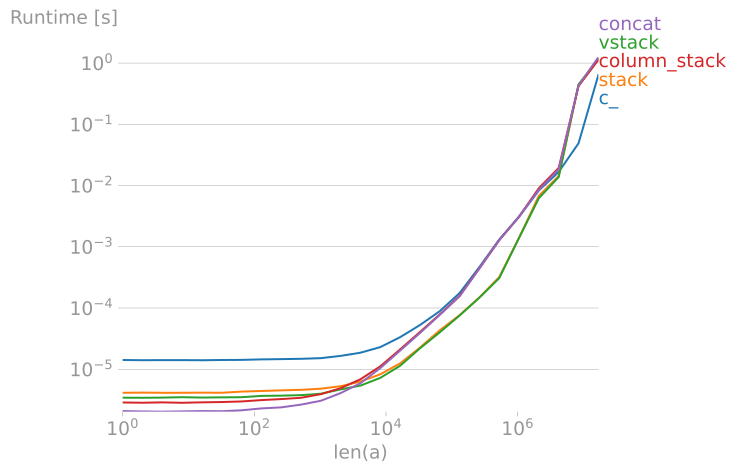
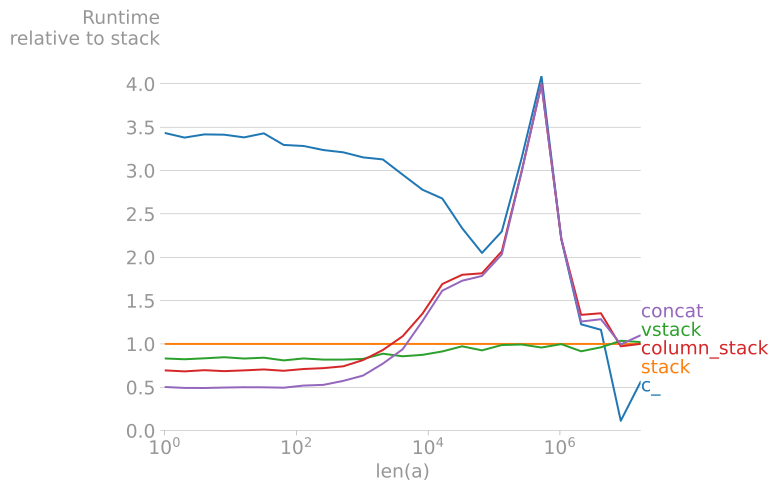
For example, to compare different NumPy array concatenation methods, the script
import numpy
import perfplot

perfplot.show(
    setup=lambda n: numpy.random.rand(n),  # or simply setup=numpy.random.rand
    kernels=[
        lambda a: numpy.c_[a, a],
        lambda a: numpy.stack([a, a]).T,
        lambda a: numpy.vstack([a, a]).T,
        lambda a: numpy.column_stack([a, a]),
        lambda a: numpy.concatenate([a[:, None], a[:, None]], axis=1),
    ],
    labels=["c_", "stack", "vstack", "column_stack", "concat"],
    n_range=[2 ** k for k in range(15)],
    xlabel="len(a)",
    # More optional arguments with their default values:
    # title=None,
    # logx="auto",  # set to True or False to force scaling
    # logy="auto",
    # equality_check=numpy.allclose,  # set to None to disable "correctness" assertion
    # automatic_order=True,
    # colors=None,
    # target_time_per_measurement=1.0,
    # time_unit="s",  # set to one of ("auto", "s", "ms", "us", or "ns") to force plot units
    # relative_to=1,  # plot the timings relative to one of the measurements
    # flops=lambda n: 3*n,  # FLOPS plots
)
produces
 |
 |
|---|
Clearly, stack and vstack are the best options for large arrays.
Benchmarking and plotting can be separated, too. This allows multiple plots of the same data, for example:
out = perfplot.bench(
    # same arguments as above
    )
out.show()
out.save("perf.png")
Other examples:
- Making a flat list out of list of lists in Python
- Most efficient way to map function over numpy array
- numpy: most efficient frequency counts for unique values in an array
- Most efficient way to reverse a numpy array
- How to add an extra column to an numpy array
- Initializing numpy matrix to something other than zero or one
Installation
perfplot is available from the Python Package Index, so simply do
pip3 install perfplot --user
to install or upgrade.
Testing
To run the perfplot unit tests, check out this repository and type
pytest
License
perfplot is published under the MIT license.
Release history Release notifications | RSS feed


Download files
Download the file for your platform. If you're not sure which to choose, learn more about installing packages.
Source Distribution
Built Distribution
Filter files by name, interpreter, ABI, and platform.
If you're not sure about the file name format, learn more about wheel file names.
Copy a direct link to the current filters
File details
Details for the file perfplot-0.7.0.tar.gz.
File metadata
- Download URL: perfplot-0.7.0.tar.gz
- Upload date:
- Size: 6.6 kB
- Tags: Source
- Uploaded using Trusted Publishing? No
- Uploaded via: twine/3.1.1 pkginfo/1.5.0.1 requests/2.22.0 setuptools/42.0.2 requests-toolbelt/0.9.1 tqdm/4.40.0 CPython/3.7.5
File hashes
| Algorithm | Hash digest | |
|---|---|---|
| SHA256 |
126939949486426763b05839e8b3e82021b9a3dce5c00a1e611e47e3ea486776
|
|
| MD5 |
de13417948352252839782e6552d2367
|
|
| BLAKE2b-256 |
0defc236a783d92e1acea50f44e06258cce5a3b00979393fdb81f21a168f1904
|
File details
Details for the file perfplot-0.7.0-py3-none-any.whl.
File metadata
- Download URL: perfplot-0.7.0-py3-none-any.whl
- Upload date:
- Size: 7.8 kB
- Tags: Python 3
- Uploaded using Trusted Publishing? No
- Uploaded via: twine/3.1.1 pkginfo/1.5.0.1 requests/2.22.0 setuptools/42.0.2 requests-toolbelt/0.9.1 tqdm/4.40.0 CPython/3.7.5
File hashes
| Algorithm | Hash digest | |
|---|---|---|
| SHA256 |
5a93776a8e141facc0951d4f98927e1c54e0ba502609ca7ae72ab92a87d6ccdc
|
|
| MD5 |
19508d30b8be65ae1b7bb2f625e6d164
|
|
| BLAKE2b-256 |
984a8c132627c6227336a41762386ae578c61ecb5fc372a17ff79463fd13fd9c
|






