
PyCForge v1.3.133
PyCForge can transpile and compile an entire supported Python program, including programs split across supplied modules. It combines Python-to-C conversion, an integrated PCFC11 compiler workflow and a PySide6 desktop IDE. Edit source, inspect the generated C11, and build native programs in one workspace. A command-line interface and Python API bring the same conversion capabilities to scripts and other development tools.
Choose Typed conversion for annotated functions and direct C interfaces, or Runtime conversion for richer Python data and behavior: Unicode text, mutable containers, classes with single or multiple inheritance, decorated functions, closures, comprehensions, and file-processing programs spread across multiple source files.
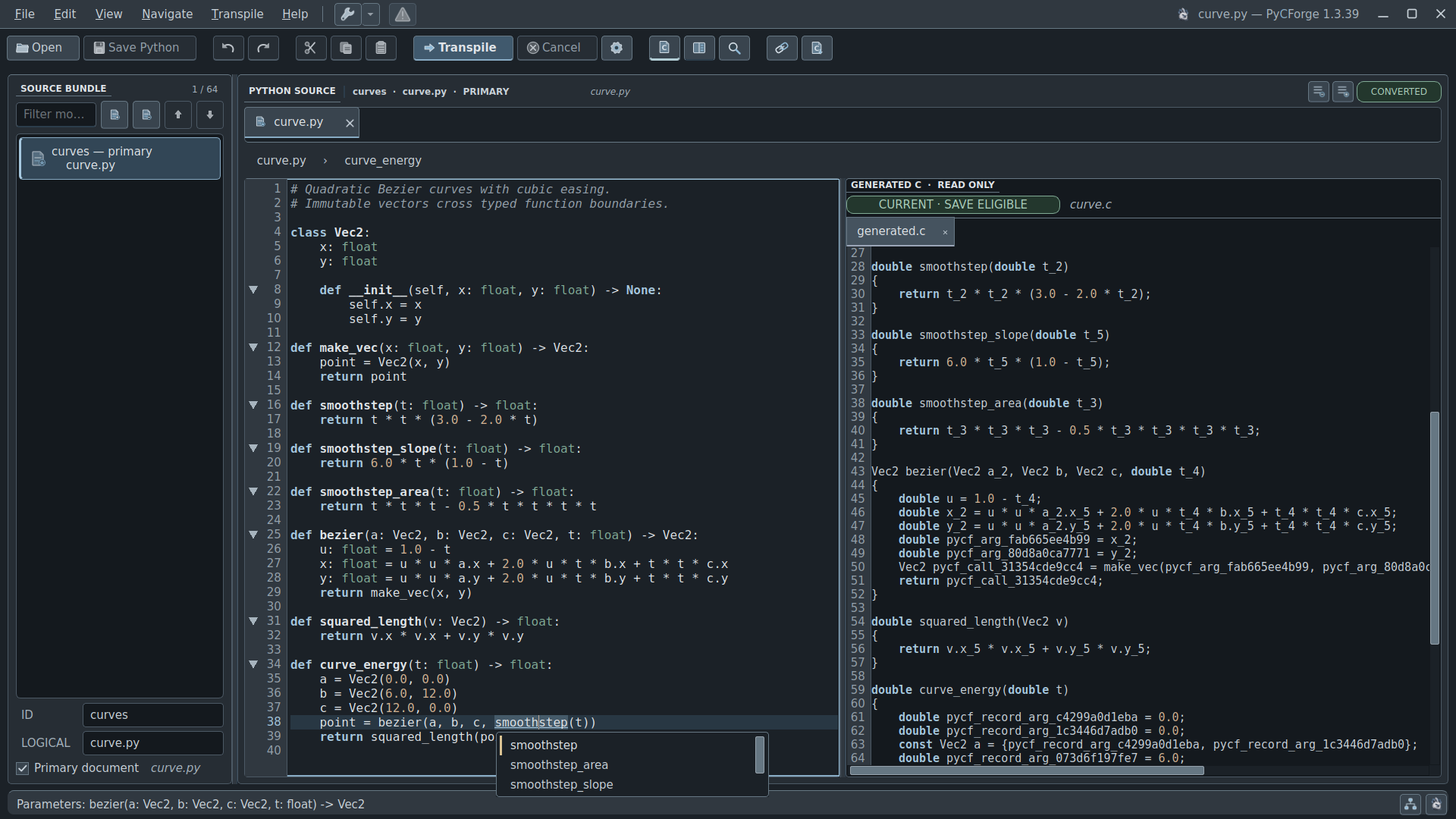
A workspace for Python and C
- Edit comfortably: tabbed Python documents, split views, function folding, an outline, multiple cursors, and a command palette.
- Check Python code: use the wrench menu to scan current editor text. Python analysis and four Ting agents check supported module/function paths, helper arguments and returns, local calls, and mutable defaults. Optional open-module tracing follows supplied imports. Click a finding to reach its code; results remain until re-scan, and Cancel clears the panels.
- Quick conversion diagnostics: an amber warning-triangle button beside Tools opens the current failed conversion’s one-line diagnostics. Click a row to highlight its source; editing immediately disables outdated navigation.
- See the translation: side-by-side Python and read-only C, source diagnostics, conversion details, history, and searchable output. ForgeLens connects mapped Python and C locations in Typed and Runtime modes.
- Work across files: supply up to 64 Python modules, keep their source together, and generate C from the selected primary document and its supplied dependencies.
- Keep a project together: save open Python modules in a portable
.pcfprojbundle, preview it before opening, and compare or restore named checkpoints. - Stay in control: cancel background conversions, see when edits make generated output stale, and choose where to save the C result.
- Make the workspace yours: saved layouts, independent Python and C text sizes, keyboard commands, and 33 searchable offline Help pages.
- Build from the IDE: use the dedicated PCFC11 Compile button, or choose GCC/MinGW-w64, Clang/Apple Clang, MSVC, or Clang-cl. Create objects or executables with remembered settings, build logs, diagnostics, cancellation, and a copyable report.
Install and open
Use Python 3.11–3.13. Installation includes PySide6, NumPy, Numba, Jedi, autopep8, and their required supporting packages. Ting's local review runtime is bundled with PyCForge.
On Windows:
py -m pip install pycforge
py -m pycforge.ide
On macOS or Linux:
python -m pip install pycforge
python -m pycforge.ide
The installed pycforge-workspace command also opens the desktop app. Add --upgrade to the install command to update an existing installation. For a downloaded wheel, substitute its path for pycforge and allow pip to install dependencies; omit --no-deps. PyCForge declares its application dependencies without version pins and does not reject installed dependency version numbers. The libraries retain their own compatibility requirements. Startup loads the application resources, offline Help, and local numerical routines before opening the workspace.
Conversion coverage
Select Transpile → Typed or Transpile → Runtime, then click Transpile or press Ctrl+Enter. The checkmark identifies the active mode, and the choice is remembered between launches. Choosing a mode does not start a conversion; changing it marks existing C output stale until you transpile again.
| Feature | Typed conversion | Runtime conversion |
|---|---|---|
| Functions | Annotated scalar parameters and results, scalar locals, direct calls, and required keyword arguments; positional immutable-record parameters, inline constructors, factory results, forwarding, and returns. | Function values, defaults, positional-only and keyword-only parameters, variadic and expanded calls, decorators, bound methods, nested functions, and captured lambdas. |
| Text | String length, comparison, search, membership, prefix/suffix checks, and documented constant-text operations. | Constructed Unicode strings, concatenation/repetition, indexing/slicing, trimming, case conversion, split/join/replace, and formatting; rsplit, splitlines, partition/rpartition, removeprefix/removesuffix, center, ljust/rjust, zfill, and expandtabs. |
| Lists and tuples | Fixed local homogeneous scalar or record containers, literal indexing, and ordered iteration. | Mixed and nested values, dynamic indexing, slice assignment/deletion, starred packing/unpacking, and shared containers passed into or returned from functions. |
| Dictionaries and sets | Fixed local dictionaries and numeric/Boolean set membership. | Ordered mutable dictionaries, merging, live views, mutable sets, frozen sets, set algebra, and supported hashable keys/elements. |
| Classes | Exact immutable records with 1–64 scalar or nested record fields; local aliases and initialized class annotations; field reads from constructors and factory results. Parameters and returns across supplied modules become C structs passed by value. | Declared mutable fields, constructors, single and multiple inheritance, C3 method ordering, cooperative super(), overrides, and shared object identity. |
| Numbers | Documented scalar arithmetic and integer floor division/remainder. | Checked 64-bit integer arithmetic, floating floor division/remainder, powers, modular powers, bitwise operations, and shifts. |
| Branches and loops | Conditions, integer ranges, fixed-container loops, break/continue, and loop else. | Conditions, sequence/range/dictionary/view and supported iterator loops, short-circuit values, break/continue, and loop else. |
| Comprehensions | Use the supported explicit loops. | List, dictionary, and set comprehensions with multiple generators, filters, dependent iterables, and fixed or starred unpacking. |
| Exception handling | Documented C status reporting for supported file operations; Python exception handlers are not supported. | Selected try/except/else/finally forms and supported built-in raise statements, including recovery across calls and supplied modules; resource exhaustion remains terminal. |
| Multiple files | Up to 64 supplied modules with direct function and immutable-record imports, aliases, and record-only companions. | Up to 64 supplied modules with function/class/constant imports, aliases, re-exports, and separate namespaces. |
| UTF-8 files | Bounded read/write entry points for C callers. | Connected read/process/write workflows across functions and modules, line iteration, sized reads, append, exclusive creation, tell/bounded seek, r+/w+/a+/x+ update modes, and automatic handle cleanup. |
| C integration | Direct scalar and record-value interfaces; optional separate .c/.h pairs per module, shared type declarations, and an ABI manifest; documented file ownership rules. |
Generated value routines and a caller-owned memory context for strings, containers, objects, and closures. |
| Memory lifetime | Scalar and nested records use inline C value copies without heap allocation; fixed record collections use local arrays. Documented ownership rules apply to file buffers. | Context-owned values with explicit or managed collection between calls, plus opt-in collection at generated statement and loop boundaries. Generated and C-registered roots retain live values; native and open-file regions defer collection. |
Text, collections, and everyday operations
Runtime conversion supports practical text-processing work: trim and normalize strings, split input into fields, join output, parse integer/float text, and build formatted reports. F-strings and str.format() support documented precision, alignment, width, and value conversions; nested containers can be printed with their supported Python representations.
Mutable lists support item and slice changes, append, extend, insert, pop, remove, sort, reverse, copy, clear, and index. Dictionaries preserve insertion order and support lookup, deletion, merging, updates, and live key/value/item views. Sets and frozen sets support membership, algebra, and subset comparisons. Passing mutable containers and instances between converted functions preserves their shared identity.
Everyday operations include sum, min, max, abs, round, any, all, stable sorted, lazy enumerate and zip, reversed, and supported iter/next use. These combine with comprehensions, classes, functions, defaults, and keyword calls to support connected processing tasks.
Functions, objects, and annotations
Typed mode accepts immutable records with int/float/bool fields and nested records as positional function parameters and return values. Constructors and record-returning calls can appear directly in arguments and returns; fields can be read from their results or through nested records. Locals support record aliases, exact initialized class annotations, chained assignment, and flat tuple/list-literal unpacking. Fixed local lists and tuples hold 1–64 records of one exact class, with literal indexing and ordered loops. Import a record class directly from its defining supplied module, with an optional alias, to use it across modules; structurally identical classes remain distinct types.
Generated C copies the complete record by value, including nested fields. Layouts are acyclic, with up to eight record levels and 256 expanded scalar fields per record; fixed record collections allow up to 4096 scalar fields in total. Record locals and parameters support same-class reassignment in branches and loops, with initialization required on every path reaching a read. Field mutation, identity and whole-record equality checks, record keyword calls, defaults, and recursive record calls remain outside the supported forms. The HTML Help includes complete factory, nested-record, local-binding, collection, and external C caller examples, with the exact supported forms and limits.
Runtime mode supports first-class functions, ordinary bound methods, nested functions, and lambdas that capture surrounding variables or default values. Closures can update enclosing bindings through nonlocal. Function and method decorators can retain state and forward *args and **kwargs.
Classes declare their fields and initialize instances through __init__. Single and multiple inheritance follow Python's C3 method resolution order, including diamond hierarchies, imported bases, overrides, and cooperative super() calls. Instances keep one shared set of fields, and isinstance and issubclass recognize every declared base. Constructors follow the calls written in the Python source.
Optional annotations include supported unions and container types. PyCForge checks annotated function, assignment, and field boundaries when generated Runtime C executes; ordinary Python does not enforce those annotations. Container annotations check their current contents at those boundaries; they do not permanently restrict later mutation through another alias.
Programs across multiple files
Open the required Python documents and choose the primary module before transpiling. Runtime imports can share functions, classes, and immutable scalar/tuple constants through aliases and re-exports. Each module has its own namespace; initialization occurs once per generated C context, preserving shared defaults and class identity.
pycforge convert main.py --runtime-values --module helper=helper.py --output program.c
Repeat --module ID=PATH for additional files. Constants-only companion modules are supported. Ordinary imports resolve only against the supplied documents; PyCForge does not discover files or translate installed Python packages automatically.
Runtime mode uses *import declarations to select registered conversion expansions. Bundled math, NumPy, JSON, bounded itertools, CSV and struct packages appear in Tools → Register Conversion Imports…, with availability and searchable Import Help…. Each package exposes a defined set of calls; registration does not imply whole-library compatibility. Files containing *import must be transpiled rather than run as ordinary Python.
- Math:
*import math as mprovides classification, roots, trigonometric/hyperbolic functions, exponentials/logarithms, powers/remainders, error functions,floor,ceil,trunc, andpi,e,tau,inf,nan.log(x, base)accepts an optional positional base;iscloseaccepts named values and keyword-only tolerances. Other exports are positional-only. Integer results must fit int64; domain and overflow errors are checked. - NumPy:
*import numpy as npprovides owned rank-one and rank-two finitefloat64arrays, copies and checked indexing/assignment. Vector operations include arithmetic including/and/=,divide/true_divide,negative,absolute,sqrt,concatenate, and min/max/argmin/argmax/sum/mean reductions. Failed in-place division preserves the array and its aliases. Vector reductions accept axisNone,0or-1; empty extrema inputs and mixed-sign zero value extrema are refused. Sum and mean use fixed pairwise float64 accumulation; empty sum returns zero, while empty mean and intermediate sum overflow are refused. Rounding may differ from NumPy. Assignment shares identity; copies own their storage.arrayandfullrequiredtype="float64". Matrices support rectangular construction,a[row, col], shape/size/ndim,len, copying and nestedtolist(). Matching matrices supportnp.add(a, b)andnp.subtract(a, b), returning independent storage. Matrixsumandmeanreturn a scalar foraxis=None, column results foraxis=0(or-2), and row results foraxis=1(or-1). Axis results own independent vector storage.np.reshape(a, shape, copy=True)creates independent vector or matrix storage in C order; one-1dimension may be inferred.np.matmul(a, b)multiplies two matrices with matching inner dimensions into independent storage, using separately rounded products and fixed pairwise accumulation.np.matvec(matrix, vector)andnp.vecmat(vector, matrix)return independent vectors with matching inner dimensions and the same bounded accumulation rules. Matrix operators, row views, slicing, higher ranks and general broadcasting are outside this profile. - JSON and CSV:
*import jsonprovidesloadsanddumpsforNone, booleans, strings, finite numbers, lists/tuples and string-key dictionaries, with Unicode escaping and separator options. Values use int64 integers, at most 64 nested containers and 1 MiB of text. Hooks, streams and nonfinite numbers are unsupported. Import Help gives exact signatures and limits.*import csvsupplies sequence and dictionary readers/writers, automatic or supplied headers,writeheader, six quoting modes, escaping and reusable dialects. Read rows andline_num, or usewriterowandwriterowsinside a text-filewithblock; catch format errors withcsv.Error. Import Help specifies call signatures, format limits, ownership and qualified Python differences. - Binary records:
*import structprovides portablepack,unpackandcalcsizeusing immutable owned bytes and explicit byte order. Integer, finite floating-point, boolean and fixed byte fields use checked ranges and predictable storage. Import Help gives supported formats, size limits and errors. - Itertools:
*import itertools as itsupplies lazychain,isliceandpairwiseover supported Runtime iterables.chainaccepts up to eight inputs; calls use positional arguments. Iterators retain inputs and share state through aliases. Import Help specifies consumption, cleanup and extreme-index qualifications.
The separate PyCForge SDK lets developers create, check conversions and package extensions as .pcfplugin files using PyCForge’s standardized authoring files. The SDK invokes no C compiler; PyCForge owns Crucible’s compilation compatibility. Register a package in PyCForge, declare *import package_name as ext, then call its supported members, such as ext.function(...). The SDK is for authoring expansions; bundled imports work without it.
After a successful current Typed conversion, export separate C modules from the File menu. The ZIP contains a source/header pair for each module, shared type declarations, and an ABI manifest describing the generated interfaces and ownership. Compile each generated .c file once and link the objects with your C caller. Record layouts and signatures are included. Regenerate and rebuild the complete export after source, bundle, or converter changes; a stable binary ABI is not promised. Separate module export is not available in Runtime mode.
Read, process, and write UTF-8 files
Runtime mode connects scoped open calls with string operations, collections, sorting, numeric parsing, and formatting. Read whole text or character-sized portions, iterate through lines, call processing helpers in another module, and write or append the result.
Supported file operations include read, readline, readlines, write, writelines, flush, tell, bounded seek, and early close. Unicode filenames and documented newline handling are supported. Position bookmarks belong to the same open handle; they are not arbitrary byte or character offsets. Exclusive creation and r+, w+, a+, and x+ update modes are supported. Switching between reading and writing requires a successful explicit seek; read-derived nonzero bookmarks do not permit writes. Handles close on normal scope exits, return, break, continue, and runtime errors. Returned text remains available for subsequent processing. Help includes complete file-processing examples and the positioning rules.
Python editing tools
Jedi provides offline completion, parameter hints, definition navigation, and name analysis. Autopep8 provides requested document or selection formatting. The compact Edit menu groups Selection, Lines, Find and Replace, Code, and Folding Functions; overflow submenus keep commands accessible on short displays.
- Write and navigate: completion with Ctrl+Space, parameter hints with Ctrl+Shift+Space, Go to Definition with F12, and return with Alt+Left. Automatic suggestions are optional. Registered
*importnamespaces and aliases offer their supported functions, constants, declared call hints and accepted named arguments. - Edit several places: smart bracket/quote pairs, selection wrapping, and multiple cursors through Ctrl+D, Ctrl+Alt+L, or Alt+click; Escape returns to one cursor.
- Find and replace precisely: regular expressions, replacement within a captured selection, and reviewed replacement across open documents with Ctrl+Shift+H.
- Rename with review: F2 previews changes to statically resolved names in the current Python document before you apply them. Review dynamic references, string-based keyword names, and callers in other files separately.
- Function Tools: place the cursor inside a function and click Select Function on the left of the breadcrumb row beneath the tabs, then click the translucent FNC ASSIGN button. Copy the complete function or names from a scrolling parameter/local list, and preview function or variable renames. Apply renames globally includes resolved references in the open project; unchecked limits changes to the current document. Undo rename restores the last unchanged edit across its affected documents.
- Format with undo: Alt+Shift+F formats the document; Ctrl+K, Ctrl+F formats a selection while preserving unselected lines. Formatting preserves the Python syntax tree.
- Browse and copy definitions: right-click the Python gutter to open Classes & Functions. A panel with a short progress bar covers the tree while definitions load, then disappears when the tree is ready. Double-click or press Enter to jump to a definition; the left-side title-bar Copy icon copies its complete source, including decorators and indentation, without moving either editor view. Definition navigation, the source outline, and function folding support valid
*importdeclarations in the original editor text.
Completion and formatting are available independently of conversion coverage. Background analysis uses cached results, cancellation, and process deadlines; edits invalidate stale results. Cross-file replacement keeps undo history for each open document. Save edited buffers explicitly. Help explains the navigator's source-size limits and the boundaries of document-local rename.
Project bundles
Use File → Project → Save Project to bundle your open Python modules, current editor text, tab order, primary module, and conversion mode in one .pcfproj file. Open Project shows a preview and loads the bundle into a new working folder. Create Checkpoint and Project History let you name, compare, and restore earlier versions, with a recovery checkpoint saved before each restore.
Project saves include unsaved editor text; Save Python and Save All Python write the separate .py files. Bundles contain Python sources and checkpoints, so keep data files and other required resources separately. The built-in Help explains saving, restoring, and returning to a project.
First conversions
Save this as input.py, select Transpile → Typed, and click Transpile:
def add(left: int, right: int) -> int:
    return left + right
pycforge convert input.py --output generated.c
For Runtime mode, save this as greeting.py:
def greeting(name: str, *, suffix: str = "!") -> str:
    return f"Hello, {name.strip()}{suffix}"
pycforge convert greeting.py --runtime-values --output greeting.c
Compile C
PCFC11 0.2.53 is integrated into PyCForge for a direct transpile-to-compile workflow. Its source, headers, licenses and tests are included. The copper Compile button beside Transpile (Ctrl+Shift+Enter) offers O0/O1 optimization, object or executable output, diagnostics and cancellation. Executable entries take no arguments: Typed returns int; Runtime returns int or None. Use Object file for callable functions without an eligible entry. Compiler paths are verified and read-only; choose your program output location. Editing source cancels outdated builds, and unsuccessful builds preserve previous output. Compilation does not run your program.
If PCFC11 is missing, Compile opens guided setup; Transpile → Build PCFC11… also opens it. Supply native 64-bit Python 3.11+ and GCC paths. Windows x64 needs complete MinGW-w64 UCRT64; Linux x86-64 needs GCC, binutils and system C headers/libraries. Setup builds PCFC11 and runs small verification programs in a fixed, versioned local application-data folder, independent of pip. On Windows, bundled native tests also check register preservation, unwinding, integer updates and stack growth before the compiler is ready; no separate test download or Bash commands are needed. Startup checks compiler identity and recorded executable, source/header and GCC-driver fingerprints. Missing or changed files require setup. Builds are explicit; unsuccessful rebuilds preserve the previous compiler. Setup can offer a compatible, verified previous build for continued use, with the failed attempt kept visible. No installers or toolchain downloads are included. For an independent compiler working copy:
python -m pycforge.pcfc11 --extract ./compilers
cd compilers/PCFC11-0.2.53
python tools/build.py
On Windows, use your native Python command and pass --cc "C:\msys64\ucrt64\bin\gcc.exe". Help → Build PCFC11 from source covers setup, locations, manual builds and tests. Transpile → Other C Compilers… offers other toolchains; MSVC and Clang-cl need a Visual Studio developer environment. PCFC11 compiles generated C with PyCForge Runtime garbage collection: explicit collection between calls and opt-in collection at generated safe points. The generated Runtime supplies the collector and value routines; the compiled program needs no Python interpreter. Offline Help explains enabling GC and retaining live C-side values.
Ting agent feedback
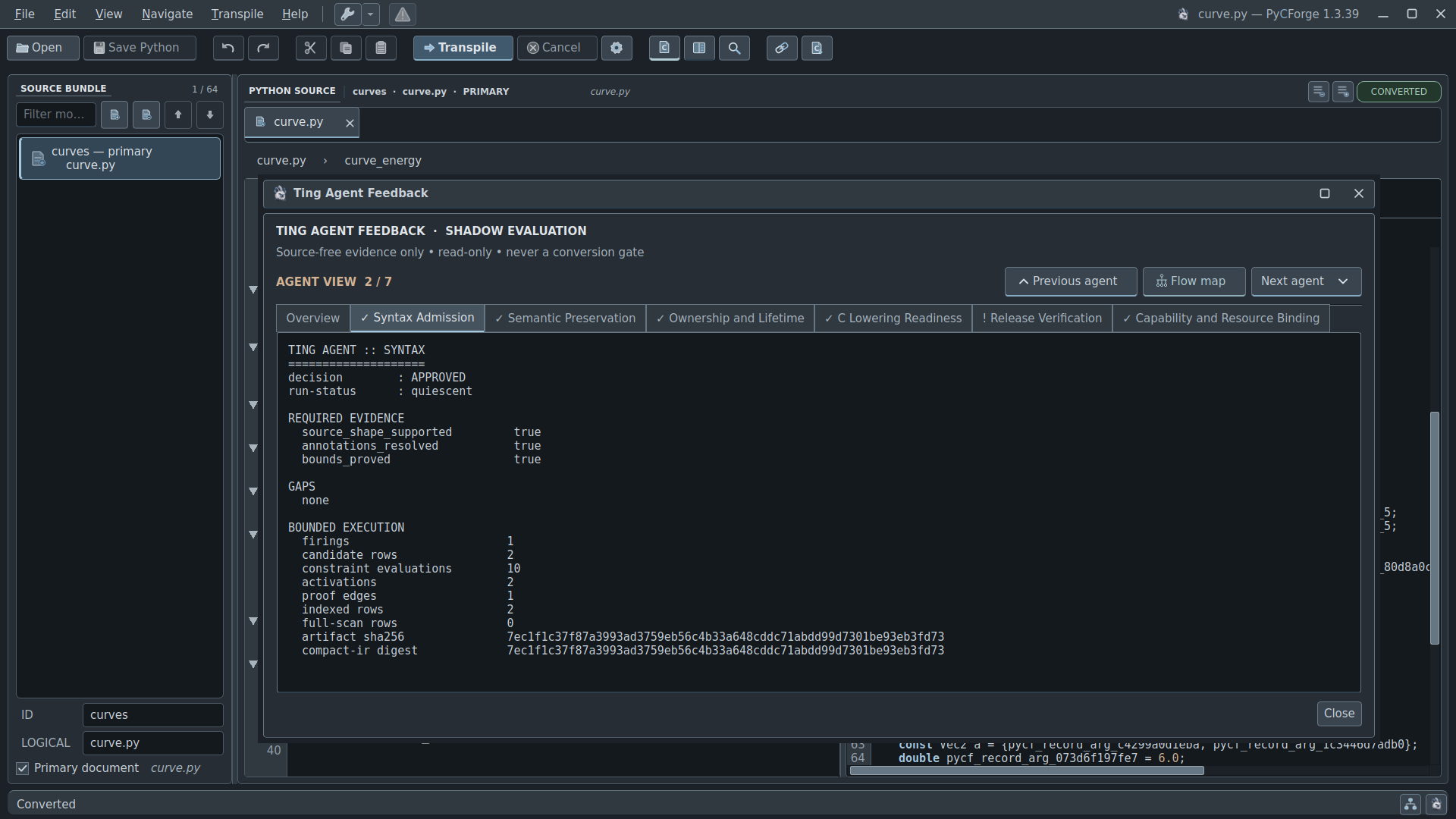
Six local Ting agents review syntax, semantics, ownership, C lowering, evidence, and resources. Open Ting in the status bar to inspect findings, and use the Flow Map to follow their evidence. Each finding states its scope, with unknowns and contradictions alongside supported checks. Verify execution… explicitly compiles and runs trusted generated code against declared input, output, and exit expectations; Ting binds the results to the current source, C, cases, compiler, and environment. Incomplete runs cannot establish a pass. Edits, context changes, and new conversions retire previous reports. Ting runs offline and remains advisory. A supported finding covers only its named check; matching declared cases does not establish general Python/C equivalence.
Command line and Python API
Use pycforge --help for commands and options, or pycforge --format json convert input.py for structured output. Convert source text from Python with:
from pycforge import ConversionRequest, PythonToCConverter
source = "def add(left: int, right: int) -> int:\n    return left + right\n"
result = PythonToCConverter().convert(ConversionRequest.from_source(source))

if result.generated_c is not None:
    print(result.generated_c)
for diagnostic in result.diagnostics:
    print(diagnostic.code, diagnostic.message)
The Python API supports integration into other applications through structured requests and results, diagnostics, progress callbacks, and cooperative cancellation. Its in-app guide documents these contracts, threading responsibilities, Runtime requests, source bundles, and generated C interfaces.
Help and supported boundaries
Press F1 or choose Help → PyCForge Help… for 33 searchable offline pages covering the editor, conversion tables, examples, diagnostics, Ting, shortcuts, and C integration. Separate references describe Typed and Runtime behavior, including a multi-file read/process/write example. Selected PyCForge caveats boxes explain practical conversion details beside relevant examples.
PyCForge converts the documented Python forms. Integers use signed 64-bit values; generated Runtime values belong to a memory context. Destroying the context releases them. C callers can collect unreachable values at documented idle boundaries or opt into collection at generated safe points while retaining live roots. Automatic collection is disabled by default and does not reset resource budgets. Exact ForgeLens mappings and generated-C structural checks cover Typed and Runtime conversion; they do not replace compilation and behavior testing.
Runtime exception recovery supports a documented set of built-in errors; exception objects, except … as … bindings, custom exception classes, bare re-raise, and chaining remain unsupported. Resource exhaustion is terminal and skips Python handlers and finally bodies; automatic file cleanup still runs. General third-party library translation, asynchronous code, generators, general reflection, dynamic bases, properties, static/class methods, writable module globals, and cyclic/relative/star imports are outside the supported forms. Consult Help for numeric rules, resource limits, and C caller requirements.
License
PyCForge is free software under the GNU General Public License v3.0 only. The distribution includes LICENSE and third-party notices.
Conversion bug tracker
Confirmed conversion issues and the release containing each fix. Regression tests cover the reported cases and related edge cases; this record is not a guarantee that every Python program converts without defects.
| Issue | Summary and correction | Fixed in |
|---|---|---|
| F01 · Container text | Tuples inside sets and frozen sets could appear as false recursion markers. Active-container tracking now preserves their contents while retaining genuine cycle detection. | 1.3.21 |
| F02 · Floating-point sum | Compensated sum() could change negative zero to positive zero. A zero correction now preserves the accumulator's sign. |
1.3.21 |
| F06 · Strict C compilation | String constant folding could leave unused assigned locals and fail strict warning builds. Unread locals with only side-effect-free string-literal assignments are removed. | 1.3.21 |
| 1.3.32 F01 · Iterator errors | Recoverable dictionary/set iterator errors could become ordinary exhaustion on retry, including through wrappers. Recoverable errors now remain retryable, while ordinary exhausted iterators stay exhausted. | 1.3.32 |
| 1.3.32 F02 · Strict zip | After its first length mismatch, strict zip could stop checking inputs. Repeated next calls now retry the inputs and preserve the expected errors and consumption. |
1.3.32 |
| 1.3.32 F03 · Zip consumption | Non-strict zip could skip later left-to-right partial consumption after an empty result. Each next call now retries its inputs in order. |
1.3.32 |
| 1.3.32 F04 · File iterator rewind | enumerate and zip over files could remain exhausted after EOF and rewind. They now resume from the same open file after seek(0). |
1.3.32 |
| 1.3.32 F05 · Dictionary input pairs | dict and dict.update could consume too little of an invalid pair iterable. Pair validation now consumes the complete bounded inner iterable before checking its length, preserving earlier successful updates. |
1.3.32 |
| Private record fields | External __field reads could generate C even though Python raises AttributeError. Typed conversion now rejects name-mangled record fields before lowering. |
1.3.42 |
| Nested record imports | Nested field annotations could refer to imports declared after the class definition. Those imports must now precede the class, matching Python's name availability. | 1.3.42 |
| Async-only diagnostics | Async-only input could be reported as having no function. Conversion now identifies the unsupported definition and explains that an eligible synchronous function is required. | 1.3.42 |
| Record declaration validation | Conflicting record annotations could be lost during scalar normalization. Original record declarations are now checked before normalization, and invalid redeclarations are rejected. | 1.3.43 |
| Expanded-call GC lifetime | Review found unrooted temporary argument-packing storage during nested calls. Collection is deferred through expanded-argument assembly and dispatch, with error-path cleanup and result rooting. | 1.3.72 |
| Sign of a declared NaN constant | Runtime conversion now gives math.nan and independent scalar NaN constants a consistent positive sign. copysign can observe that sign across the supported compiler paths. |
1.3.83 |
Crucible powers PyCForge's Typed and Runtime conversion. Its conversion pipeline combines deterministic C generation, source-mapped diagnostics, and explicit checks on supported Python forms. Regression coverage includes Python-versus-C execution, multi-module programs, and separately compiled C interfaces. The practical HTML Help documents how to use that scope and where its boundaries lie.
Contact Robert Cecil rcttcr5@icloud.com for request or security assistance
1 maintainer

Metadata
1 maintainer
Release files for pycforge 1.3.133
For a detailed explanation of source distributions (sdists) and built distributions (wheels), please see the package formats documentation.
Source distribution (sdist)
| File | Size | Uploaded | Provenance | Actions |
|---|---|---|---|---|
| pycforge-1.3.133.tar.gz | 16.9 MB | Without provenance | Details for pycforge-1.3.133.tar.gz |
Built distribution (wheel)
| File | Interpreter | ABI | Platform | Actions Reset |
|---|---|---|---|---|
| pycforge-1.3.133-py3-none-any.whl | Python 3 | none | any | Details for pycforge-1.3.133-py3-none-any.whl |
Total release size: 26.4 MB
Release files / pycforge-1.3.133.tar.gz
| Download URL | pycforge-1.3.133.tar.gz |
|---|---|
| Size | 16.9 MB |
| Tags | Source |
|
SHA-256 checksum How to use checksums |
aa79a7e0057467648fd79aaa1454d865ff04c466fc9d707883cd217d47de2181
|
|
BLAKE2b-256 checksum How to use checksums |
df490cc6382bee7f3ea41e0a60f3e09a83a2b4b70b04c917f7fdd2279bf49589
|
| Upload date | |
|
Uploaded using Trusted Publishing? What is trusted publishing? |
No |
| Uploaded via |
twine/0.0.0 importlib_metadata/4.0.1 pkginfo/1.12.1.2 requests/2.25.1 requests-toolbelt/0.9.1 tqdm/4.61.1 CPython/3.9.16
|
Release files / pycforge-1.3.133-py3-none-any.whl
| Download URL | pycforge-1.3.133-py3-none-any.whl |
|---|---|
| Size | 9.5 MB |
| Tags | Python 3 |
|
SHA-256 checksum How to use checksums |
f926d4c897bf238ab64b68eb5a53452dae19ba6e44ad788fb34124071fd3b79a
|
|
BLAKE2b-256 checksum How to use checksums |
394a0bc49bcae01e6a0b38e4a5f5ac22151cab0d1f83a0e2a20aeeb1d562ca75
|
| Upload date | |
|
Uploaded using Trusted Publishing? What is trusted publishing? |
No |
| Uploaded via |
twine/0.0.0 importlib_metadata/4.0.1 pkginfo/1.12.1.2 requests/2.25.1 requests-toolbelt/0.9.1 tqdm/4.61.1 CPython/3.9.16
|
Security for pycforge 1.3.133
Provenance
Provenance describes where a file came from. On PyPI, provenance is shared via attestations, which provide a verifiable record of the build or publishing details. View details, limitations and caveats.
No provenance found
None of the files in this release were uploaded with provenance metadata.
A note on package security
PyPI is a repository for distributing packages, not a service for auditing them. While third-party security researchers and our staff do their best to detect and remove malicious packages, PyPI cannot guarantee the quality, security or suitability of any given package.
To learn more about protecting yourself from malicious actors, visit our package security documentation.














