
SpliceCraft
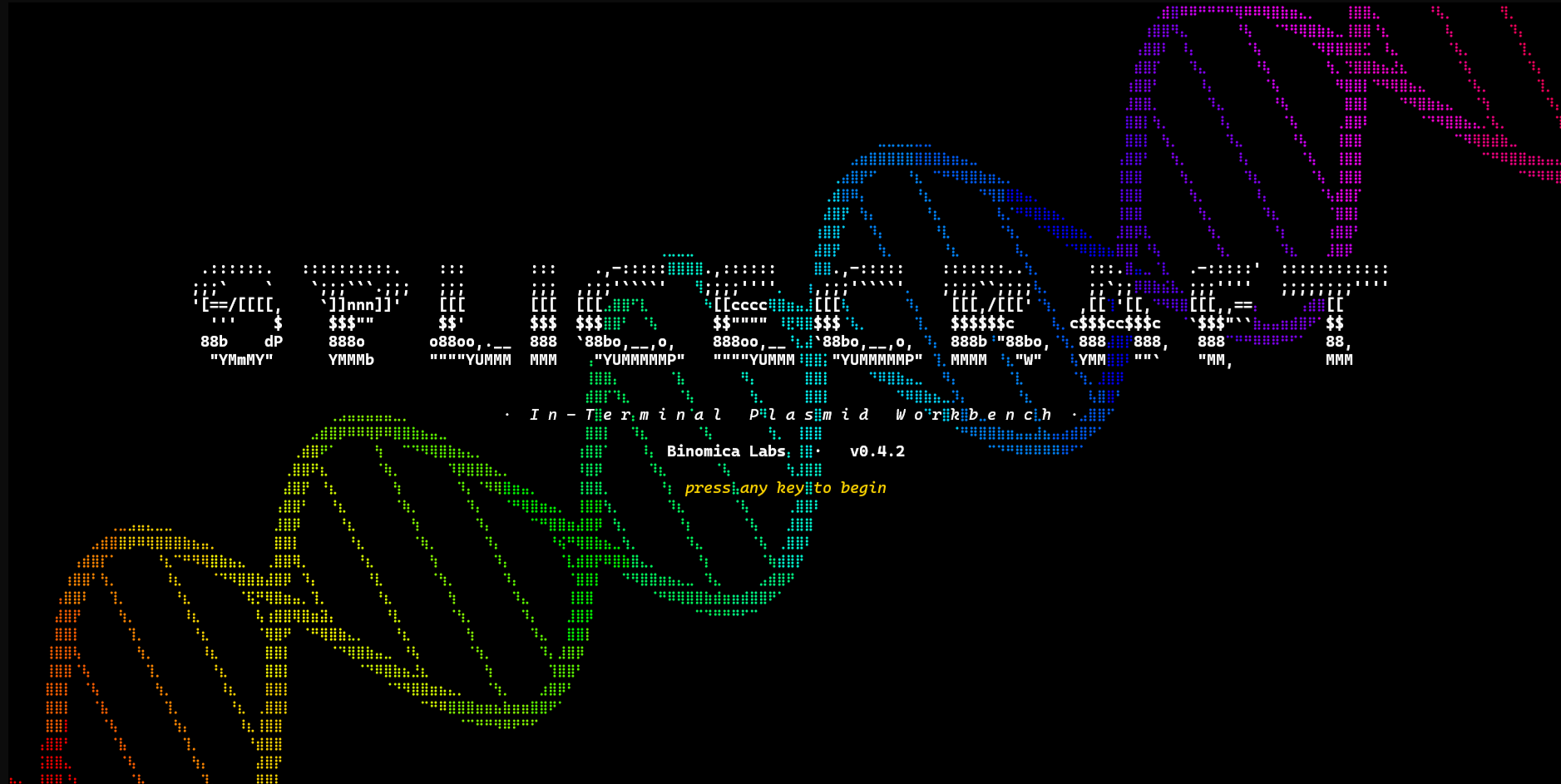







Your whole cloning workflow, in the terminal.
SpliceCraft is a plasmid workbench that runs where you already work. Open a map, edit the sequence, design primers, plan a Golden Braid or MoClo assembly, BLAST a hit, check your Sanger reads, and keep a lab notebook — all from the keyboard, in one place, no browser tab and no cloud account. Circular and linear maps render as crisp Unicode braille graphics in any modern terminal, and export to publication-quality PNG or SVG.
It's built by a practicing bioengineer for daily bench work: the bug reports come from real cloning, and so do the fixes.
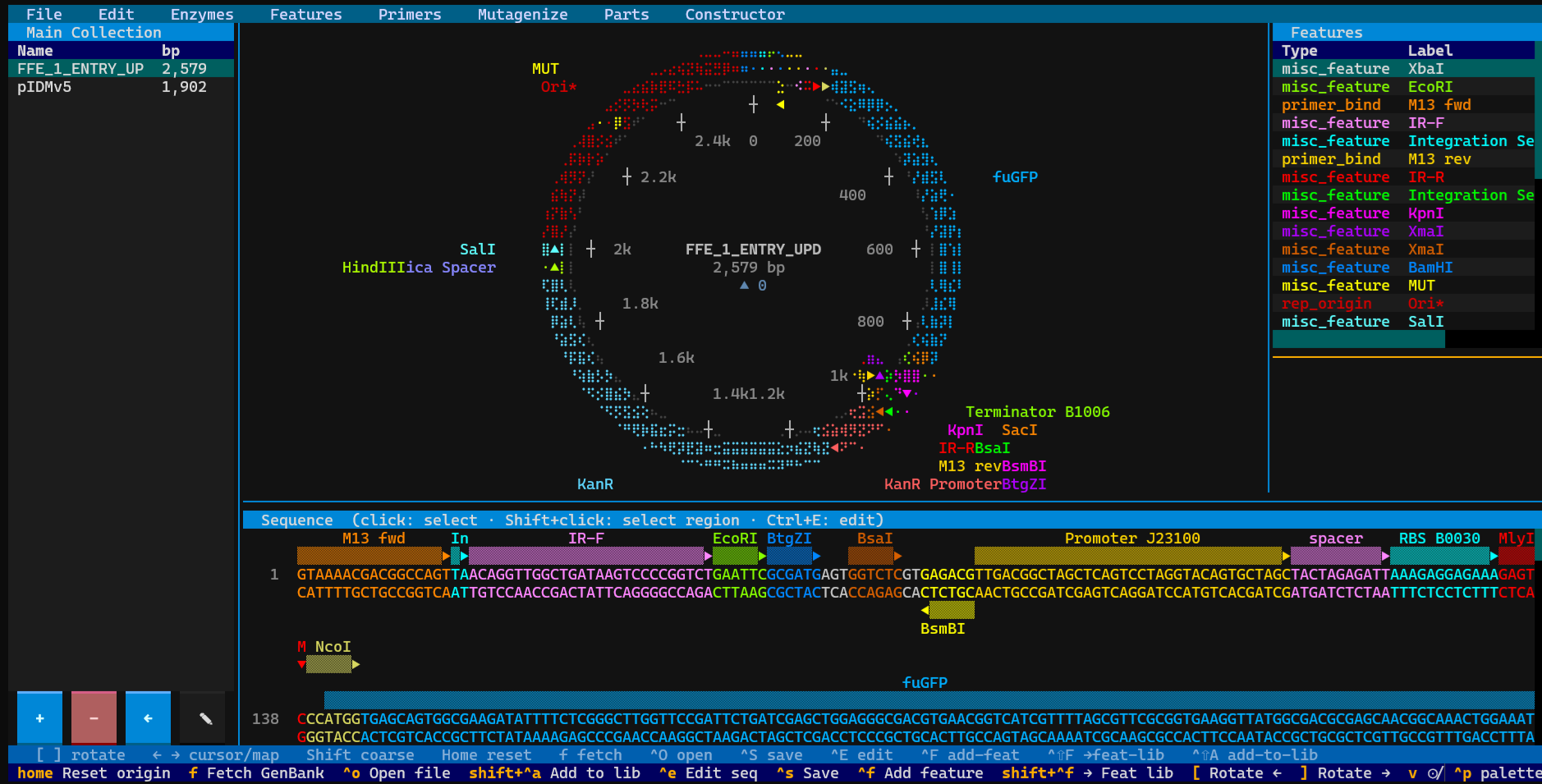
Why give it a try:
- Fast and local. No Electron, no web app, no login.
pipx install splicecraftand you're designing in seconds. - It does the whole job. View → edit → design → clone → simulate → verify → document — one tool that understands how those steps connect.
- It guards your data like it's irreplaceable (because it is — see below).
- It's scriptable. A 260+ endpoint local API and a stdlib CLI let an agent or a shell script drive every workflow.
Quick start
pipx install splicecraft
splicecraft                      # empty canvas
splicecraft L09137               # fetch pUC19 from NCBI on launch
splicecraft myplasmid.gb         # local GenBank or .dna
Press ? once running for the keyboard reference, or Ctrl+K for a fuzzy
command palette that jumps straight to any tool by name.
x86-64 Linux, Intel macOS, and Windows install entirely from prebuilt wheels.
On ARM64 Linux and Apple Silicon, one dependency (primer3-py) has no
ARM wheel and compiles at install, so install a C toolchain first
(sudo apt install build-essential python3-dev, or xcode-select --install).
On Windows, use Windows Terminal — the console is auto-configured for
UTF-8 + ANSI at startup, though this path is CI-tested via mocks and not yet
confirmed on real Windows hardware. If braille shows as boxes, toggle
'ASCII plasmid map' in Settings → Display.
Full matrix: docs/PLATFORMS.md · other install methods:
docs/install.md.
A workhorse that just works
Your plasmid library is months — sometimes years — of work, so SpliceCraft is built to be a daily driver you never have to worry about:
- Your data is sacred. Every save is atomic, backed up (
.bak+ rotating timestamps + daily snapshots), and guarded by a "suspicious shrink" refusal that won't replace a 156 MB library with an empty file. Name collisions always ask — skip / copy / overwrite — and self-updates snapshot everything first. Bulk actions preview what they'll do, and one press ofuputs the whole batch back. - The biology is correct, and proven. Palindromes, Type IIS, origin-spanning cuts, wrap-around features, non-standard genetic codes, and IUPAC are pinned to the base — behind 4,000+ tests plus property-based fuzzing on the biology, crash-injection on the save path, and concurrency fuzzing on the data layer.
- We go looking for trouble. A long list of sacred invariants
(
CLAUDE.md) and multi-pass pre-release audits hunt edge cases, data-loss windows, races, and security gaps before they reach you.
Details: docs/data-safety.md ·
SECURITY.md.
A guided tour
Everything hangs off a menu bar across the top, read left to right. Full
reference: docs/features.md.
BLAST
Search without leaving the app (Ctrl+B). Local runs BLASTN / BLASTP /
HMMscan against your own library in-process via pyhmmer — no external
blast+ to install — with a one-click Pfam-A / NCBIfam downloader. Online
sends DNA, protein, a feature, or a whole plasmid to NCBI or EMBL-EBI and
tables the hits, with a Cancel that really stops. Agents can only search online
once you tick the setting for it, so a script can never silently ship your
sequences off-box.
Enzymes
Drive the restriction overlay — all sites, unique cutters, 6+/4+ bp, or just the Golden Braid connectors. Multi-cutters wear a live superscript cut-count (EcoRI², BsaI³) that ticks down as you edit a site out. Build named enzyme collections from the 200+ NEB catalog plus your own customs; the active collection scopes every scan. Ask by whichever name your supplier uses — Eco31I finds BsaI's sites, LguI finds SapI's, AarI finds PaqCI's.
Features
A library for your reusable annotations — promoters, RBSs, tags, CDSs. Capture a region off any plasmid, then drop it onto another to annotate or splice it in. It ships pre-loaded: Presets opens a catalogue of 116 common elements across 20 categories — AmpR, KanR and eight more markers, the pUC, p15A, f1, SV40, 2μ and R6Kγ origins, T7 through CMV, EF-1α, U6, GAL1 and 35S promoters, terminators and polyA signals, EGFP, mCherry and luciferase, His/FLAG/HA/Myc/V5 tags, TEV and thrombin sites, loxP, FRT and attR. Search it, tick what you want, and copy it into your library. Every sequence was pulled out of a public GenBank record rather than typed from memory, and each entry cites the accession and how many independent submissions carry it byte-for-byte. Already have the plasmid open? File ▸ Annotate from library + presets draws its markers, origin, promoters and polylinker for you, on both strands and across the origin, with a preview before anything lands and one Ctrl+Z to take it all back. Pasting a new one instead? New plasmid ▸ Annotate from library does the same as you create it. Ctrl+F finds a subsequence fuzzily on both strands; Ctrl+C on a CDS copies the protein rather than the DNA. Alt+Shift+R flips the whole record end-for-end with every feature re-framed; Alt+Shift+O re-cuts a circular plasmid so the cursor becomes base 1 — a real, undoable edit, refused on a linear record. File ▸ Find ORFs runs a wrap-aware six-frame scan.
Primers
A full-screen Primer3 designer for detection, cloning, Golden Braid, and generic primers, each with a Designed → Ordered → Validated lifecycle. The Primer Check tab runs in-silico PCR across your library: one primer lists every plasmid it anneals to with % identity, strand, and position; two add the amplicon length and the feature amplified, ranked ✓ / ⚠ / ~ / ✗. Binding is judged on the 3′ end, so a 5′ cloning tail lowers identity rather than vanishing. The library organises into collections with fuzzy search, and exports order-ready CSV — generic or the IDT bulk-upload template.
Mutato
Site-directed mutagenesis. Point at a CDS, name the change (L54A), and
SpliceCraft designs the SOE-PCR primers — falling back to a 2-primer
modified-outer strategy near the ends, and only offering the shortcut when the
primer genuinely carries the change, so you never amplify wild-type by
accident. It also turns a pasted protein into an orderable CDS with
frequency-matched codon optimization.
Its Scrub tab cures a whole plasmid of restriction sites with no cloning: pick the enzymes and SpliceCraft finds the minimal point changes that kill each site — silent across every overlapping reading frame, never spawning a new one, and reported when a site can't be cured silently. Apply cure re-circularizes by QuikChange or Golden Braid, really digesting and ligating each amplicon, so History reads as a genuine assembly.
Synthesis
A gene-synthesis composer in three tabs. DNA is a scrolling linear editor with strand markers, feature stripes, live translation, feature-aware paste, click-to-highlight restriction sites, and zoom-to-overview. Its side panel lists your own snippets and the preset catalogue together, so a T7 promoter or a His tag is two keystrokes away; an inserted preset carries its GenBank accession into the annotation. Protein fills codons in from your chosen table as you type, with a built-in motif library (His6, FLAG, HA, TEV, P2A, NLS, +30) and a tabbed codon-table manager that builds tables from an NCBI genome, a local CDS file, Kazusa, or TSV. Operon Design reverse-designs every RBS in its real assembled context, and domesticates a natural operon by curing forbidden Type IIS sites with primer-encoded synonymous edits.
Compose a part, hit Clone Fragment, and pick a path: a modular grammar hands it to the Domesticator; Gibson or Traditional open the Constructor. Ordering synthetic instead? L0 Fragment wraps the sequence in the correct nested overhangs for direct synthesis — two-tier aware, so a category pair nests inside the entry vector's external pair automatically.
Parts
Your Parts Bin — the Level-0 blocks for grammar-based assembly, in per-grammar bins. Multiple bins live side by side as collections, so a yeast toolkit and a plant toolkit never get mixed up.
Constructor
The assembly bench: Traditional, Gibson, Golden Braid, MoClo, or your own
grammar, driven by a 4-source part picker. Every assembly lands as one library
entry carrying every parent feature forward, so you can trace a finished L3
construct back to its L0 parts. A cloning site the ligation puts back together
reads as intact rather than broken in two, and each junction's sticky overhang
is labelled with the bases that actually anneal there. A linear donor — a
stored fragment, a gBlock — clones like one: cutting it at both ends releases
your insert and discards the two off-cut ends, the way you would on a gel.
Traditional cloning also answers the question the product alone can't: what
else will grow on the plate. A backbone whose two ends match each other —
one enzyme, two blunt cutters, or a pair like SalI and XhoI that both leave
TCGA — closes with no insert at all, and that empty vector is where most empty
colonies come from. Simulate flags it, says whether a diagnostic digest could
even spot it, and names the fix. Double inserts, a shorter chain closing
without the rest, and flipped or swapped fragments are listed too; a reaction
with no such route says so outright.
Deleted something by mistake? u brings it
back — the last 100 deletions of the session are undoable.
Ordered a synthetic fragment and it arrived? New Part from Syn Frag runs the cloning — cutting fragment and entry vector, ligating, closing the circle — then files the part and saves the finished L0 plasmid with its History. A fragment whose ends don't match the type you picked is turned away rather than filed as a part that can't assemble.
Simulator
In-silico PCR and agarose gels. Pick a template, run the PCR, then save the
amplicon or send it to a gel lane. Gels render at 0.5–4% on a real
Helling–Goodman–Boyer mobility curve; stack lanes, save a gel to reload later,
or cite it as &<gel> in your notebook.
CRISPR
Scan the open plasmid for guide sites — SpCas9, SaCas9 or LbCas12a — and get
ranked with the concerns named rather than scored: a TTTT that stops Pol III
mid-transcript, a GC window out of range, a spacer that folds on itself. Pick one
and the annealed cloning oligos land on your clipboard, with the 5' G added only
when the spacer needs one. It will not claim to check off-targets
genome-wide — that needs an index this program doesn't have, so it searches the
plasmid in front of you and tells you how many base pairs that was. And there's
no efficiency score, because a number that looked like one and wasn't would be
worse than the flags you can check.
Alt+Shift+G edits a residue and lets the DNA follow: pick a CDS, a residue
number and the new amino acid, and the codon it resolves to is shown — through
the strand, the reading frame offset, any introns and the origin — before
anything changes.
Sequencing
Verify constructs against real reads. Drop in a Plasmidsaurus .zip or fetch a
run straight from their API, then walk run → sample → target and Align: the
read lands as a colored bar (blue match / red mismatch / gray gap / magenta
inverted) on the linear map — click it to jump the sequence panel to that exact
spot. A region that went in backwards is recognised as such instead of
being written off as a bad alignment: SpliceCraft re-checks the parts that
don't match against the reverse complement and marks the ones that do. Bulk
auto-align matches a whole folder in one pass. The Verification Report
grades every construct (✓ verified / ⚠ near / ~ partial / ⇄ inverted /
✗ divergent), and a true sub-100% identity never rounds up to "100%".
Drop in a Sanger .ab1 and Check against canvas asks the question you
actually care about: is that mismatch real? Both ends of every trace are
unreliable, so SpliceCraft reads the basecall quality under each difference and
reports "1 real change, 1 in unreliable basecalls" rather than a flat count —
which is what stops a good clone reading as divergent because the chemistry ran
out. A read with no recorded quality says so instead of guessing.
Hand the API a raw FASTQ and it answers a different question: is this culture one thing? Per-base allele fractions across all the reads, so a sub-population shows up as "this base is 10% T" rather than being averaged away. It matters because a consensus is a single read — a population of escapers each carrying a different inactivating mutation, none of them dominant, consenses back to wild type and looks perfectly clean. Differences sitting in unreliable basecalls are excluded and counted separately, because at 1% the instrument's own error floor looks like a sub-population. Tell it the platform — nanopore, Illumina or Sanger — and the noise floor matches the instrument; homopolymer indels are shown but don't get a vote, because every sequencer miscalls run length. The verdict reads the shape of the distribution rather than counting positions, so one clone's platform noise doesn't masquerade as a mixed culture.
Expression
Two questions a plasmid map alone won't answer. Where does transcription start and stop — a σ70 promoter scan and an intrinsic-terminator scan, both wrap-aware, one record per hairpin. And what else transcribes this gene: SpliceCraft walks the circle from every promoter to every CDS and reports the ones that reach it, the terminators in between, and whether they actually stop anything. A plasmid is a circle with no ends, so checking the terminators downstream of a cassette — the natural thing to do — cannot see a read-through arriving from behind. It separates "nothing is aimed at this gene" from "nothing the host polymerase can read reaches it", which is the difference between a cassette that is silent by design and one that is silent in the strain you actually transformed. Codon analysis reads an existing CDS the way the optimiser writes one: GC3, CAI, rare-codon load, tandem rare runs, the worst window, and the 5' ramp on its own.
Experiments
A genuine lab notebook in markdown: a split-pane editor, entries grouped into
projects, and live colored cross-references — type @plasmid, !action,
or &gel and Ctrl+G jumps to the source. Attach images, previewed inline,
and spellcheck with F7. Attachments are no longer images only — the
.ab1 the vendor sent, the plate-reader CSV, a supplier PDF all live with
the entry, images previewing inline and everything else listing as a file.
It reads back, too. The filter box narrows the open project as you type
(#tag filters by tag); Ctrl+F searches every project — words that must
all appear, in the title, the tags or the body, with the matching line shown
beside each hit. From the other direction, n on a library row answers what
did I already write about this plasmid? and opens those entries.
Protocol pulls a plasmid's recorded build steps straight into the entry, so
you stop retyping what the program already knows — and because it only writes
steps that were actually recorded, there is no invented transformation in it.
Steps does the opposite for work not yet done: pick the bench actions and
you get a heading per step with its tag. Copy starts a new entry from one
you already wrote. Ctrl+E exports an entry or a whole project to Markdown
(the body verbatim, so it pastes back with its refs intact) or to a standalone
HTML page with the stylesheet inlined, ready to print or send.
History
Every plasmid remembers how it was made. History opens with a Protocol — a numbered recipe that reads left → right like the bench — above a lineage tree you can drill into as deep as you like. Pick any step and you get everything the record holds: what it did and where, the conditions, the primers with each binding site's position, strand and Tm, the fragment's end chemistry, and the enzymes regenerated.
If a record claims something the plasmid doesn't bear out — a site that isn't
there, a primer that no longer binds — the view says so instead of presenting
it as fact. It only ever reports: your sequences and your history are never
edited to make a warning disappear. Lineage rides along through .dna import /
export, and recover-history-from-dna finds the original by sequence — even
under a different name — to put a lost build record back.
BABS
A chat assistant that lives next to your plasmids: a direct conversation with a local Ollama model — no cloud, no API key, nothing leaves your machine. Streaming markdown answers, a ❤ context lifebar, slash commands, and a copy-pasteable transcript (Ctrl+E exports it).
Flip Agent on and Babs can drive SpliceCraft herself, calling the same
endpoints the --agent API exposes — read the plasmid, design primers, run a
digest, clone, manage the library, even drive the OT-2 — with everything
showing up live in the app. She asks before every write by default;
destructive whole-library wipes are never reachable, and physical robot
motion always asks first. Turn Corpus on and answers come grounded in a
research corpus with cited sources, grown by the built-in paper scraper and
topic-focused Learn crawls, or by indexing your own library into a pack
that is private by construction. Online database lookups (FPbase, UniProt,
Europe PMC, NCBI, patents) stay off until you tick the setting, and even then
only your query string is sent — never your sequence. Whatever she reads online
is treated as data, never as instructions, and once she has read something from
the web, even hands-off mode asks before she changes your data. Any local model
works: one without native tool calling gets a JSON protocol that Ollama
enforces, and — from a source checkout — scripts/babs_eval.py grades your models on
everyday tasks.
Needs Ollama running locally; splicecraft babs-setup bootstraps the engine in
one command. Details: docs/features.md.
AUTOLAB
SpliceCraft drives an Opentrons OT-2 liquid handler. Find Robots scans your network for OT-2s; the Deck draws the robot top-down as a clickable grid you fill with labware; the Designer builds an ordered step sequence (transfer, distribute, consolidate, mix, delay, pause). A Library tab binds a deck plate to a plasmid collection so wells map to your plasmids — then cherry-pick, replate by identity, or normalise DNA to a target ng/µL. Compile to a real Opentrons protocol, analyze on the robot's simulate, and run it behind Arm + a clean analysis + health, calibration, pipette and door checks, with live Pause / Resume / Abort and a telemetry panel (state, progress + ETA, fault banner). Every bit of it is scriptable.
File & Settings
File opens / fetches (NCBI) / saves / exports (GenBank · FASTA · GFF3 ·
map image as PNG/SVG, one plasmid or a whole collection), bulk-imports a
folder, and restores from backup; every GenBank it writes stamps a traceable
Created by SpliceCraft v… COMMENT. Exports are checked against the published
format specs — the NCBI/INSDC GenBank layout, the ENA EMBL flat file, GFF3 1.26
— by validators written from those documents, and then re-read with parsers
that did not come from this project, so what leaves SpliceCraft opens anywhere;
and files arrive tolerantly, byte-order marks, Windows encodings and odd line
endings included. It also hosts the selection → cloning
hub (Alt+Shift+P): highlight any DNA and pick Traditional, Golden Braid /
MoClo, or Gibson — each opens pre-loaded with the selection and its features.
Migrate Data packages your entire setup into one checksum-verified .zip
to move between machines; Master Delete is a triple-gated full wipe.
Settings collects every toggle plus the grammar, entry-vector,
enzyme-collection, and codon-table editors.
Scripting
A 260+ endpoint localhost JSON API (splicecraft --agent, or --headless for
a no-UI server with a /healthz probe) and a stdlib-only CLI
(splicecraft-cli, including a call passthrough to every endpoint) drive
every workflow. /tools self-describes each endpoint's request schema.
--agent --read-only attaches alongside a running GUI — every read answers,
every write returns 409 naming the process holding the lock, and nothing on
disk changes. See docs/agent-api.md and
docs/cli.md.
Documentation
| Topic | Where |
|---|---|
| Install methods | docs/install.md |
| First five seconds with pUC19 | docs/getting-started.md |
| Full feature list | docs/features.md |
| Keybindings + menus | docs/keybindings.md |
| Data safety + backups | docs/data-safety.md |
| Agent API (HTTP) | docs/agent-api.md |
| CLI sidecar | docs/cli.md |
| Architecture | docs/architecture.md |
| Sacred invariants | CLAUDE.md |
| Contributing | CONTRIBUTING.md |
| Security policy | SECURITY.md |
| Changelog | CHANGELOG.md |
Tests
python3 -m pytest -n auto -q                  # full suite (~5–6 min on 8 cores)
python3 -m pytest tests/test_dna_sanity.py    # biology correctness only (< 2 s)
All tests run offline against synthetic SeqRecords and monkeypatched data
paths; the autouse _protect_user_data fixture guarantees no test can write to
real user files.
Maintenance
Actively maintained by a practicing bioengineer running real cloning workflows
in it daily; releases typically go out the same week a problem surfaces at the
bench. Issues and PRs welcome — see CONTRIBUTING.md before
opening a non-trivial one.
Citing SpliceCraft
If SpliceCraft did part of the work in something you publish, please cite it.
Every release is archived on Zenodo with its own DOI, so
a methods section can point at the exact version that produced the design. The
concept DOI 10.5281/zenodo.21960400
always resolves to the newest release.
splicecraft --citation # APA reference + BibTeX, pinned to your version
The repository also ships a CITATION.cff, so GitHub's Cite
this repository button exports APA or BibTeX directly.
License
MIT
1 maintainer

Release files for splicecraft 1.2.69
For a detailed explanation of source distributions (sdists) and built distributions (wheels), please see the package formats documentation.
Source distribution (sdist)
| File | Size | Uploaded | |
|---|---|---|---|
| splicecraft-1.2.69.tar.gz | 4.8 MB | Details |
Built distribution (wheel)
| File | Interpreter | ABI | Platform | Reset |
|---|---|---|---|---|
| splicecraft-1.2.69-py3-none-any.whl | Python 3 | none | any | Details |
Total release size: 7.7 MB
Release files / splicecraft-1.2.69.tar.gz
| Download URL | splicecraft-1.2.69.tar.gz |
|---|---|
| Size | 4.8 MB |
| Tags | Source |
|
SHA-256 checksum How to use checksums |
710f906fa030a544d1b9dd1444dd188edf89044498c0f516b6a3671c681c4939
|
|
BLAKE2b-256 checksum How to use checksums |
bc716fa8cff12965f8da0d7bea6fd79d4979839b6617fb878bb82125d524e795
|
| Upload date | |
|
Uploaded using Trusted Publishing? What is trusted publishing? |
Yes |
| Uploaded via |
twine/7.0.0 CPython/3.13.14
|
Provenance
Provenance describes where a file came from. On PyPI, provenance is shared via attestations, which provide a verifiable record of the build or publishing details. View details, limitations and caveats.


PyPI Publish Attestation
PyPI verified that this artifact, at this checksum, originated from the publisher listed below.
Signed by GitHub Actions, verified by PyPI on Sep 22, 2026.
Transparency logRelease files / splicecraft-1.2.69-py3-none-any.whl
| Download URL | splicecraft-1.2.69-py3-none-any.whl |
|---|---|
| Size | 2.9 MB |
| Tags | Python 3 |
|
SHA-256 checksum How to use checksums |
0b0e1a6004fab455c9b1c2a579e083a2667d5d06ec8e7d86effe3e07732cc8f1
|
|
BLAKE2b-256 checksum How to use checksums |
88363ad0878f124096acabcd3a5a0c543d11cde204775c6228175c12834880ae
|
| Upload date | |
|
Uploaded using Trusted Publishing? What is trusted publishing? |
Yes |
| Uploaded via |
twine/7.0.0 CPython/3.13.14
|
Provenance
Provenance describes where a file came from. On PyPI, provenance is shared via attestations, which provide a verifiable record of the build or publishing details. View details, limitations and caveats.
PyPI Publish Attestation
PyPI verified that this artifact, at this checksum, originated from the publisher listed below.
Signed by GitHub Actions, verified by PyPI on Sep 22, 2026.
Transparency log













