
 LLM Compressor


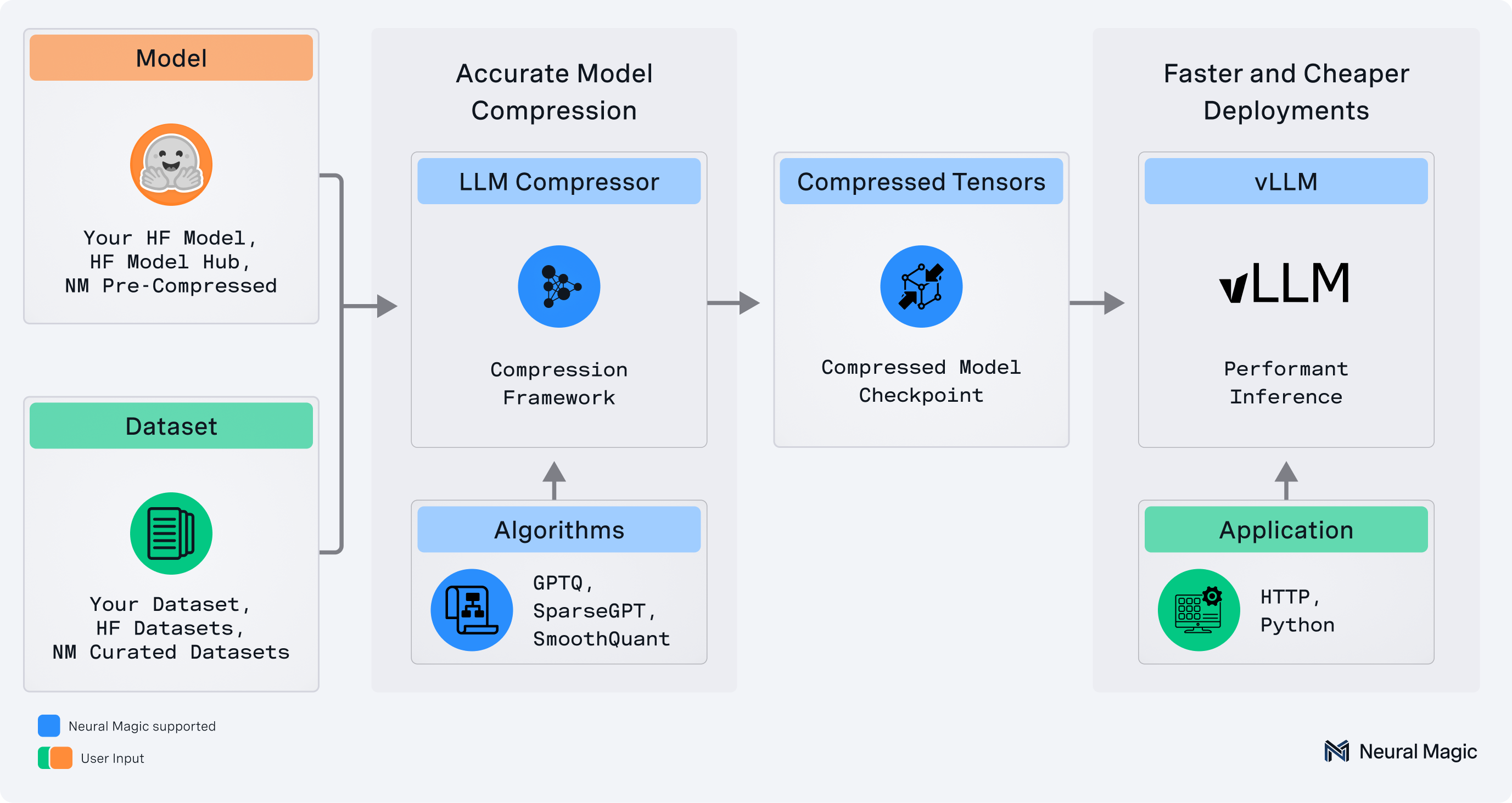
llmcompressor is an easy-to-use library for optimizing models for deployment with vllm, including:
- Comprehensive set of quantization algorithms for weight-only and activation quantization
- Seamless integration with Hugging Face models and repositories
safetensors-based file format compatible withvllm- Large model support via
accelerate
✨ Read the announcement blog here! ✨
💬 Join us on the vLLM Community Slack and share your questions, thoughts, or ideas in:
#sig-quantization#llm-compressor
🚀 What's New!
Big updates have landed in LLM Compressor! To get a more in-depth look, check out the LLM Compressor overview.
Some of the exciting new features include:
- Batched Calibration Support: LLM Compressor now supports calibration with batch sizes > 1. A new
batch_sizeargument has been added to thedataset_argumentsenabling the option to improve quantization speed. Defaultbatch_sizeis currently set to 1 - New Model-Free PTQ Pathway: A new model-free PTQ pathway has been added to LLM Compressor, called
model_free_ptq. This pathway allows you to quantize your model without the requirement of Hugging Face model definition and is especially useful in cases whereoneshotmay fail. This pathway is currently supported for data-free pathways only i.e FP8 quantization and was leveraged to quantize the Mistral Large 3 model. Additional examples have been added illustrating how LLM Compressor can be used for Kimi K2 - Extended KV Cache and Attention Quantization Support: LLM Compressor now supports attention quantization. KV Cache quantization, which previously only supported per-tensor scales, has been extended to support any quantization scheme including a new
per-headquantization scheme. Support for these checkpoints is on-going in vLLM and scripts to get started have been added to the experimental folder - Generalized AWQ Support: The AWQModifier has been updated to support quantization schemes beyond W4A16 (e.g W4AFp8). In particular, AWQ no longer constrains that the quantization config needs to have the same settings for
group_size,symmetric, andnum_bitsfor each config_group - AutoRound Quantization Support: Added
AutoRoundModifierfor quantization using AutoRound, an advanced post-training algorithm that optimizes rounding and clipping ranges through sign-gradient descent. This approach combines the efficiency of post-training quantization with the adaptability of parameter tuning, delivering robust compression for large language models while maintaining strong performance - Experimental MXFP4 Support: Models can now be quantized using an
MXFP4pre-set scheme. Examples can be found under the experimental folder. This pathway is still experimental as support and validation with vLLM is still a WIP. - R3 Transform Support: LLM Compressor now supports applying transforms to attention in the style of SpinQuant's R3 rotation. Note: this feature is currently not yet supported in vLLM. An example applying R3 can be found in the experimental folder
Supported Formats
- Activation Quantization: W8A8 (int8 and fp8)
- Mixed Precision: W4A16, W8A16, NVFP4 (W4A4 and W4A16 support)
- 2:4 Semi-structured and Unstructured Sparsity
Supported Algorithms
- Simple PTQ
- GPTQ
- AWQ
- SmoothQuant
- SparseGPT
- AutoRound
When to Use Which Optimization
Please refer to compression_schemes.md for detailed information about available optimization schemes and their use cases.
Installation
pip install llmcompressor
Get Started
End-to-End Examples
Applying quantization with llmcompressor:
- Activation quantization to
int8 - Activation quantization to
fp8 - Activation quantization to
fp4 - Weight only quantization to
fp4 - Weight only quantization to
int4using GPTQ - Weight only quantization to
int4using AWQ - Weight only quantization to
int4using AutoRound - KV Cache quantization to
fp8 - Attention quantization to
fp8(experimental) - Attention quantization to
nvfp4with SpinQuant (experimental) - Quantizing MoE LLMs
- Quantizing Vision-Language Models
- Quantizing Audio-Language Models
- Quantizing Models Non-uniformly
User Guides
Deep dives into advanced usage of llmcompressor:
Quick Tour
Let's quantize TinyLlama with 8 bit weights and activations using the GPTQ and SmoothQuant algorithms.
Note that the model can be swapped for a local or remote HF-compatible checkpoint and the recipe may be changed to target different quantization algorithms or formats.
Apply Quantization
Quantization is applied by selecting an algorithm and calling the oneshot API.
from llmcompressor.modifiers.smoothquant import SmoothQuantModifier
from llmcompressor.modifiers.quantization import GPTQModifier
from llmcompressor import oneshot

# Select quantization algorithm. In this case, we:
#   * apply SmoothQuant to make the activations easier to quantize
#   * quantize the weights to int8 with GPTQ (static per channel)
#   * quantize the activations to int8 (dynamic per token)
recipe = [
    SmoothQuantModifier(smoothing_strength=0.8),
    GPTQModifier(scheme="W8A8", targets="Linear", ignore=["lm_head"]),
]

# Apply quantization using the built in open_platypus dataset.
#   * See examples for demos showing how to pass a custom calibration set
oneshot(
    model="TinyLlama/TinyLlama-1.1B-Chat-v1.0",
    dataset="open_platypus",
    recipe=recipe,
    output_dir="TinyLlama-1.1B-Chat-v1.0-INT8",
    max_seq_length=2048,
    num_calibration_samples=512,
)
Inference with vLLM
The checkpoints created by llmcompressor can be loaded and run in vllm:
Install:
pip install vllm
Run:
from vllm import LLM
model = LLM("TinyLlama-1.1B-Chat-v1.0-INT8")
output = model.generate("My name is")
Questions / Contribution
- If you have any questions or requests open an issue and we will add an example or documentation.
- We appreciate contributions to the code, examples, integrations, and documentation as well as bug reports and feature requests! Learn how here.
Citation
If you find LLM Compressor useful in your research or projects, please consider citing it:
@software{llmcompressor2024,
    title={{LLM Compressor}},
    author={Red Hat AI and vLLM Project},
    year={2024},
    month={8},
    url={https://github.com/vllm-project/llm-compressor},
}
1 maintainer

Metadata
1 maintainer
Release files for llmcompressor 0.9.0.5
For a detailed explanation of source distributions (sdists) and built distributions (wheels), please see the package formats documentation.
Source distribution (sdist)
| File | Size | Uploaded | |
|---|---|---|---|
| llmcompressor-0.9.0.5.tar.gz | 1.2 MB | Details |
Built distribution (wheel)
| File | Interpreter | ABI | Platform | Reset |
|---|---|---|---|---|
| llmcompressor-0.9.0.5-py3-none-any.whl | Python 3 | none | any | Details |
Total release size: 1.4 MB
Release files / llmcompressor-0.9.0.5.tar.gz
| Download URL | llmcompressor-0.9.0.5.tar.gz |
|---|---|
| Size | 1.2 MB |
| Tags | Source |
|
SHA-256 checksum How to use checksums |
83bc7c8a8433032afe93173e8c7a6a1216a33822d6a6c278e9f578f4da811c26
|
|
BLAKE2b-256 checksum How to use checksums |
934e04812995cdf3160a2ca965207540e967db01a0f2f70ff15fdde23a04c674
|
| Upload date | |
|
Uploaded using Trusted Publishing? What is trusted publishing? |
Yes |
| Uploaded via |
twine/6.1.0 CPython/3.13.7
|
Provenance
Provenance describes where a file came from. On PyPI, provenance is shared via attestations, which provide a verifiable record of the build or publishing details. View details, limitations and caveats.


PyPI Publish Attestation
PyPI verified that this artifact, at this checksum, originated from the publisher listed below.
Signed by GitHub Actions, verified by PyPI on Oct 10, 2026.
Transparency logRelease files / llmcompressor-0.9.0.5-py3-none-any.whl
| Download URL | llmcompressor-0.9.0.5-py3-none-any.whl |
|---|---|
| Size | 282.1 kB |
| Tags | Python 3 |
|
SHA-256 checksum How to use checksums |
c7b3521c4cfca6adaf35b9ea87cd9fed49008f4742e0f6cef385d66b6edf583a
|
|
BLAKE2b-256 checksum How to use checksums |
e57f360fc9453f0b9f2053ddefcdf0d270dabac9afe5a642d961e3f58e8653b0
|
| Upload date | |
|
Uploaded using Trusted Publishing? What is trusted publishing? |
Yes |
| Uploaded via |
twine/6.1.0 CPython/3.13.7
|
Provenance
Provenance describes where a file came from. On PyPI, provenance is shared via attestations, which provide a verifiable record of the build or publishing details. View details, limitations and caveats.
PyPI Publish Attestation
PyPI verified that this artifact, at this checksum, originated from the publisher listed below.
Signed by GitHub Actions, verified by PyPI on Oct 10, 2026.
Transparency log













