
This release is a pre-release and may not be stable for production use.



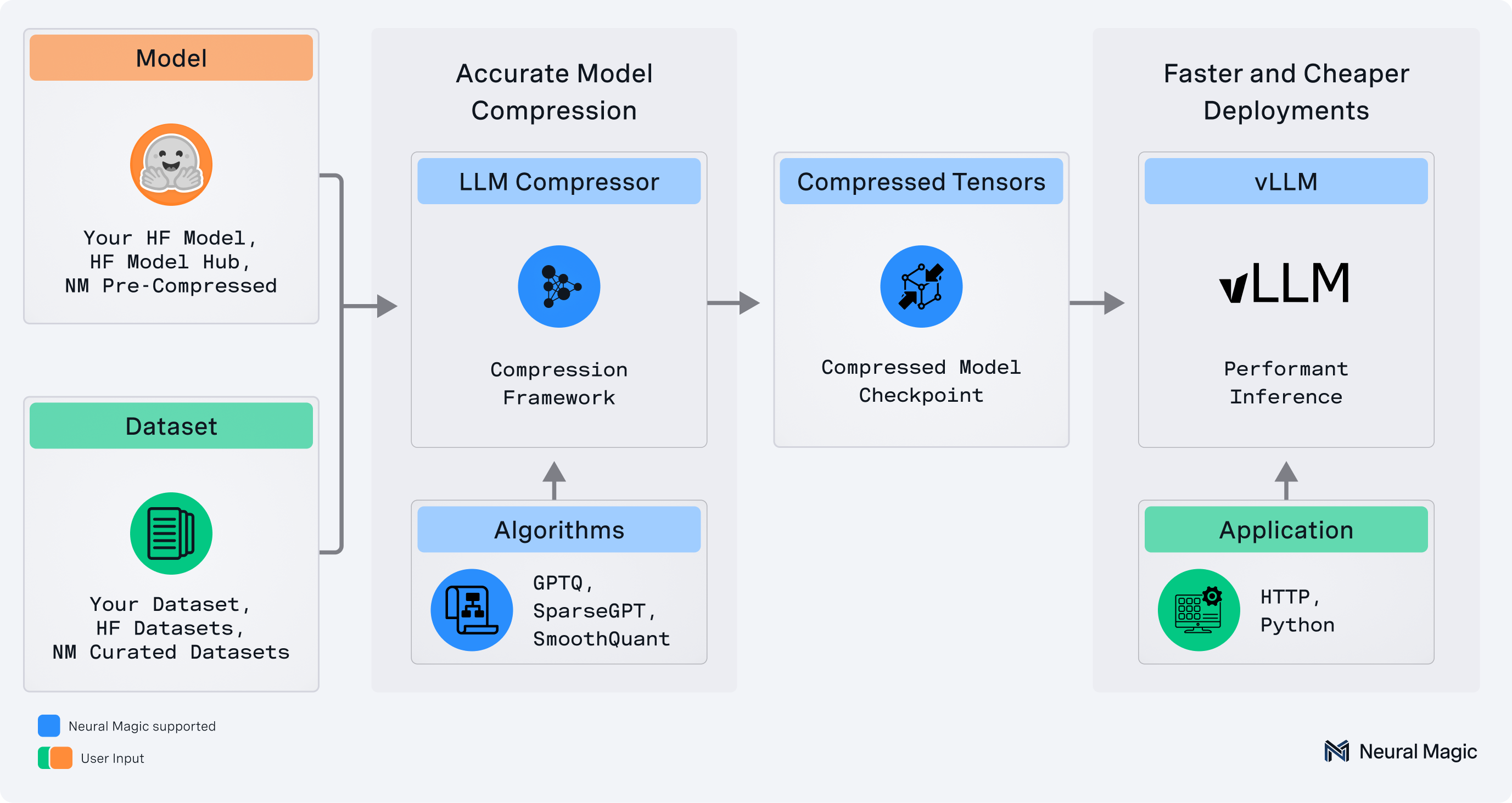
llmcompressor is the fast, efficient, and easy-to-use library for optimizing models for deployment with vLLM, including:
- Comprehensive set of quantization algorithms and transforms for weight, activation, KV cache, and attention quantization
- Seamless integration with Hugging Face models and repositories
- Models saved in the
compressed-tensorsformat, compatible with vLLM - DDP and disk offloading support for compressing very large models with hardware efficiency
✨ Read the announcement blog here! ✨
📊 Help us improve by taking our 1-minute user survey
💬 Join us on the vLLM Community Slack and share your questions, thoughts, or ideas in:
#sig-quantization#llm-compressor
🚀 What's New!
Big updates have landed in LLM Compressor! To get a more in-depth look, check out the LLM Compressor overview.
Some of the exciting new features include:
- Hy3 NVFP4+FP8 Quantized Checkpoint: A quantized checkpoint for Hy3 has been created by the Red Hat AI team, combining NVFP4 quantization of MoE layers with FP8 quantization of attention layers to significantly reduce VRAM requirements while maintaining accuracy recovery.
- GLM-5.2 NVFP4+FP8 Example and Checkpoints: Quantized checkpoints for GLM-5.2 have been created by the Red Hat AI team using DDP + disk offloading in under 2 hours. The full precision model requires 1.6T of VRAM, but NVFP4 quantization of MoE layers and FP8 quantization of attention layers reduces the model size by >70% while maintaining state-of-the-art accuracy recovery on GPQA.
- REAP Expert Pruning Modifier: REAP reduces the VRAM requirements to run Mixture-of-Experts models by structurally removing less-relevant experts in each layer. With relevancy proxied by a saliency metric calculated from calibration forward pass data, REAP achieves a desired expert sparsity (set by the user) while aiming to minimize the impact of the pruned experts. The modifier implementation is in
modifiers/pruning/reapand can be used as a template for implementing other expert pruning algorithms. Examples and additional documentation can be found below: - Transformers v5 Support: LLM Compressor now supports Transformers v5, including updated MoE calibration workflows. Improved MoE calibration is powered by the
modeling/moeclasses, which provide linearization, expert-aware context management, and architecture-specific mappings for models like Llama 4 and GraniteMoE. - Day-0 DiffusionGemma Support: LLM Compressor now supports quantization of DiffusionGemma models on day zero. Quantized checkpoints generated by the Red Hat team are available on the HF Hub:
- Nemotron 3 Ultra Quantized Checkpoints: Quantized FP8 and Int4 checkpoints for Nemotron 3 Ultra have been created by the Red Hat team and posted to the HF Hub using a model_free_ptq example. Consider using:
- DeepSeek-V4-Flash and Kimi-K2.6 Quantized Checkpoints: Quantized checkpoints for DeepSeek-V4-Flash and Kimi-K2.6 have been generated by the Red Hat team and posted to the HF hub. Consider using:
- DeepSeek-V4-Flash-NVFP4-FP8 — 163B DeepSeek-V4-Flash quantized to NVFP4 weights with FP8 KV cache
- Kimi-K2.6-NVFP4 — Kimi-K2.6 quantized to NVFP4 (weights and activations), targeting NVIDIA Blackwell GPUs
- Kimi-K2.6-FP8-BLOCK — 1T parameter Kimi-K2.6 quantized to FP8 block format (weights and activations), compatible with DeepGEMM FP8 kernels
- Qwen3.6 NVFP4 Generated Checkpoint: An NVFP4 quantized checkpoint has been generated by the RedHat team and posted to the HF hub. Qwen3.6 follows the same architecture as Qwen3.5, so existing LLM Compressor examples can be used for this model by swapping out the target model string.
Supported Precisions and Types
- Activation Quantization: W8A8 (int8 and fp8), W4AFP8, Microscale (NVFP4, MXFP4, MXFP8)
- Mixed Precision: W4A16, W8A16, MXFP8A16, MXFP4A16, NVFP4A16
- Attention and KV Cache Quantization: FP8, NVFP4
- Low/Arbitrary-bit Quantization: WNA4, WNA8, WNA16
Supported Algorithms
- Simple PTQ
- GPTQ
- AWQ
- SmoothQuant
- AutoRound
- Rotation-based (SpinQuant, QuIP)
- REAP expert pruning
Quantizing your model, step-by-step
Please refer to our step-by-step compression guide for detailed information about selecting quantization schemes, algorithms, and their use cases.
Additional information about LLM Compressor functionality is also available in our User Guides
Installation
pip install llmcompressor
Get Started
End-to-End Examples
Applying quantization with llmcompressor:
Weight and Activation Quantization
- Activation quantization to
int8 - Activation quantization to
fp8 - Activation quantization to MXFP8
- Activation quantization to
fp4(NVFP4) - Activation quantization to
fp4(MXFP4) - Activation quantization to
fp4using AutoRound - Activation quantization to
fp8and weight quantization toint4
Weight Only Quantization
- Weight only quantization to
fp4(NVFP4 format) - Weight only quantization to
fp4(MXFP4 format) - Weight only quantization to
int4using GPTQ - Weight only quantization to
int4using AWQ - Weight only quantization with AutoRound (
wNa16)
Attention and KV Cache Quantization
- KV Cache quantization to
fp8 - KV Cache quantization to
fp8using per-head - Attention quantization to
fp8 - Attention quantization to
NVFP4with SpinQuant (experimental)
Architecture-Specific Quantization
Non-Uniform Quantization
Big Model Quantization Support
Model-Free Definition Quantization
DDP Quantization
Quick Tour
Let's quantize Qwen3-30B-A3B with FP8 weights and activations using the Round-to-Nearest algorithm.
Note that the model can be swapped for a local or remote HF-compatible checkpoint and the recipe may be changed to target different quantization algorithms or formats.
Apply Quantization
Quantization is applied by selecting an algorithm and calling the oneshot API.
from compressed_tensors.offload import dispatch_model
from transformers import AutoModelForCausalLM, AutoTokenizer

from llmcompressor import oneshot
from llmcompressor.modifiers.quantization import QuantizationModifier

MODEL_ID = "Qwen/Qwen3-30B-A3B"

# Load model.
model = AutoModelForCausalLM.from_pretrained(MODEL_ID)
tokenizer = AutoTokenizer.from_pretrained(MODEL_ID)

# Configure the quantization algorithm and scheme.
# In this case, we:
#   * quantize the weights to FP8 using RTN with block_size 128
#   * quantize the activations dynamically to FP8 during inference
recipe = QuantizationModifier(
    targets="Linear",
    scheme="FP8_BLOCK",
    ignore=["lm_head", "re:.*mlp.gate$"],
)

# Apply quantization.
oneshot(model=model, recipe=recipe)

# Confirm generations of the quantized model look sane.
print("========== SAMPLE GENERATION ==============")
dispatch_model(model)
input_ids = tokenizer("Hello my name is", return_tensors="pt").input_ids.to(
    model.device
)
output = model.generate(input_ids, max_new_tokens=20)
print(tokenizer.decode(output[0]))
print("==========================================")

# Save to disk in compressed-tensors format.
SAVE_DIR = MODEL_ID.split("/")[1] + "-FP8-BLOCK"
model.save_pretrained(SAVE_DIR)
tokenizer.save_pretrained(SAVE_DIR)
Inference with vLLM
The checkpoints created by llmcompressor can be loaded and run in vllm:
Install:
pip install vllm
Run:
from vllm import LLM
model = LLM("Qwen/Qwen3-30B-A3B-FP8-BLOCK")
output = model.generate("My name is")
Questions / Contribution
- If you have any questions or requests open an issue and we will add an example or documentation.
- We appreciate contributions to the code, examples, integrations, and documentation as well as bug reports and feature requests! Learn how here.
Citation
If you find LLM Compressor useful in your research or projects, please consider citing it:
@software{llmcompressor2024,
    title={{LLM Compressor}},
    author={Red Hat AI and vLLM Project},
    year={2024},
    month={8},
    url={https://github.com/vllm-project/llm-compressor},
}
1 maintainer

Metadata
1 maintainer
Release files for llmcompressor 0.12.1a20260728
For a detailed explanation of source distributions (sdists) and built distributions (wheels), please see the package formats documentation.
Source distribution (sdist)
| File | Size | Uploaded | Provenance | Actions |
|---|---|---|---|---|
| llmcompressor-0.12.1a20260728.tar.gz | 3.0 MB | With provenance | Details for llmcompressor-0.12.1a20260728.tar.gz |
Built distribution (wheel)
| File | Interpreter | ABI | Platform | Actions Reset |
|---|---|---|---|---|
| llmcompressor-0.12.1a20260728-py3-none-any.whl | Python 3 | none | any | Details for llmcompressor-0.12.1a20260728-py3-none-any.whl |
Total release size: 3.3 MB
Release files / llmcompressor-0.12.1a20260728.tar.gz
| Download URL | llmcompressor-0.12.1a20260728.tar.gz |
|---|---|
| Size | 3.0 MB |
| Tags | Source |
|
SHA-256 checksum How to use checksums |
6488631aa2257f6d5a94c0ecab0ed3964448085b7b77bd77e6bd81c7dce0ff66
|
|
BLAKE2b-256 checksum How to use checksums |
82e14c6573461d3b072df0648b5b9909527164cd1556327c555a5fb4ebb49f49
|
| Upload date | |
|
Uploaded using Trusted Publishing? What is trusted publishing? |
Yes |
| Uploaded via |
twine/6.1.0 CPython/3.13.7
|
Provenance
Provenance describes where a file came from. On PyPI, provenance is shared via attestations, which provide a verifiable record of the build or publishing details. View details, limitations and caveats.


PyPI Publish Attestation
PyPI verified that this artifact, at this checksum, originated from the publisher listed below.
Signed by GitHub Actions, verified by PyPI on Jul 29, 2026.
Transparency logRelease files / llmcompressor-0.12.1a20260728-py3-none-any.whl
| Download URL | llmcompressor-0.12.1a20260728-py3-none-any.whl |
|---|---|
| Size | 322.8 kB |
| Tags | Python 3 |
|
SHA-256 checksum How to use checksums |
47e3a8dac5335e71a8f0ae768b8786b04f891ea7a6667228a30b063d4de70a1c
|
|
BLAKE2b-256 checksum How to use checksums |
5cc292ebf2695b48b67c1f2476f7f19fd41c33fa207770e8f7acc17138d92c41
|
| Upload date | |
|
Uploaded using Trusted Publishing? What is trusted publishing? |
Yes |
| Uploaded via |
twine/6.1.0 CPython/3.13.7
|
Provenance
Provenance describes where a file came from. On PyPI, provenance is shared via attestations, which provide a verifiable record of the build or publishing details. View details, limitations and caveats.
PyPI Publish Attestation
PyPI verified that this artifact, at this checksum, originated from the publisher listed below.
Signed by GitHub Actions, verified by PyPI on Jul 29, 2026.
Transparency logSecurity for llmcompressor 0.12.1a20260728
Provenance
Provenance describes where a file came from. On PyPI, provenance is shared via attestations, which provide a verifiable record of the build or publishing details. View details, limitations and caveats.
Full provenance
Both files in this release have been uploaded with provenance metadata.
Attestation for llmcompressor-0.12.1a20260728.tar.gz
PyPI Publish Attestation
PyPI verified that this artifact, at this checksum, originated from the publisher listed below.
Signed by GitHub Actions, verified by PyPI on Jul 29, 2026.
Transparency logA note on package security
PyPI is a repository for distributing packages, not a service for auditing them. While third-party security researchers and our staff do their best to detect and remove malicious packages, PyPI cannot guarantee the quality, security or suitability of any given package.
To learn more about protecting yourself from malicious actors, visit our package security documentation.














