
v_ase




v_ase is a local, ASE-native 3D workspace for structures, trajectories, and volumetric fields. Open a file from the terminal or Python, inspect and edit it in a browser, analyze atomistic data, and export projects, figures, movies, offline HTML, or reusable 3D scenes.
Documentation · PyPI · Changelog · Issues
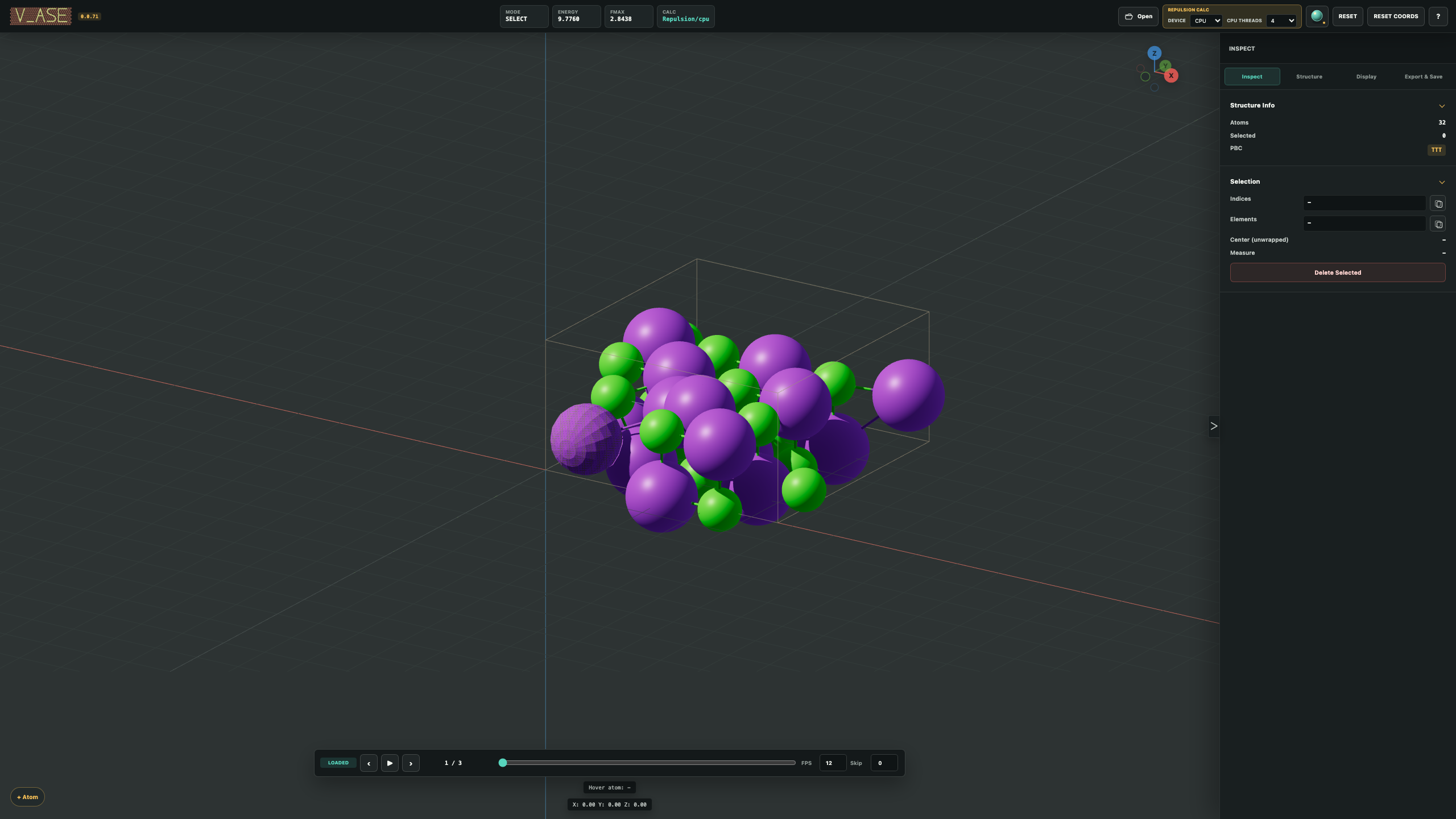
Quick start
Install from PyPI:
python -m pip install v_ase-gui
Open a file in lightweight View mode:
v_ase gui POSCAR
v_ase gui trajectory.extxyz
v_ase gui CHGCAR
Start in Edit, or build from an empty editable document:
v_ase gui structure.vasp --interactive
v_ase gui
No Node.js installation or hosted account is required. v_ase runs a loopback-only local server and opens the interface in a normal browser. Closing the final v_ase page releases the default blocking process.
Five-minute tour
- Middle-drag to orbit, Shift + middle-drag to pan, and use the wheel to zoom.
- Left-click an atom; Shift-click or Shift-box inverts the current selection.
- Select two, three, or four atoms in order to measure distance, angle, or torsion.
- Switch to Edit, select atoms, press
Escto focus the viewport, then useG,R, or physicalS. Type a value and pressEnterfor an exact edit. - Use Export > Save Project for a complete
.vase, or include the interactive rendered view to create a restorable offline HTML project.
Continue with Installation and First session.
Why v_ase?
| Area | What it provides |
|---|---|
| ASE-native workflow | One Atoms, a sequence of frames, or a supported path; caller-owned objects are copied |
| Direct structure editing | Exact move/rotate/scale, copy/paste, atom and molecule insertion, ASE bulk building, constraints, undo/redo |
| Periodic systems | Visual and physical supercells, wrapping, commensurate 2D cells, registry maps, rigid translation |
| Trajectories and analysis | Lazy/indexed playback, displacement, stored forces and arrays, RDF and finite pair distributions |
| Scalar fields | VASP density/potential/ELF, Gaussian Cube and XSF, isosurfaces, planes, and compatible field combinations |
| Figure preparation | Per-label and per-atom styling, custom colormaps, pairwise bonds, flat 2D or shaded 3D, exact Render Area |
| Portable output | Structures, .vase, offline HTML, PNG/JPEG/WebP/PDF, MOV/AVI, Blender, OBJ, and optional Rhino 3DM |
| Human–AI collaboration | Exact semantic state, structured operations, shared GUI revisions, and verified rendering/export |
The detailed workflows, scientific meanings, limits, and verification steps are kept in the versioned documentation instead of duplicated in this README.
Python and notebooks
from ase.build import molecule
from v_ase import view

atoms = molecule("H2O")
view(atoms)                         # View mode
edited = view(atoms, viz_only=False)  # Edit; returns a detached Atoms
For a non-blocking session:
editor = view(atoms, block=False)
print(editor.url)
current = editor.get_atoms()
editor.close()
Jupyter automatically uses an inline view. Switch subsequent calls with:
%v_ase inline
%v_ase browser
%v_ase auto
See the Python API and notebook guide.
Remote data
Install the same release locally and remotely, then keep the source data and backend calculations on the SSH host while rendering in a local browser:
v_ase gui USER@SERVER:/absolute/path/to/trajectory.extxyz
v_ase creates and cleans the private tunnel automatically. Exact remote Python selection, jump hosts, lazy trajectories, and failure recovery are covered in Notebooks and remote systems.
Work with an external AI agent
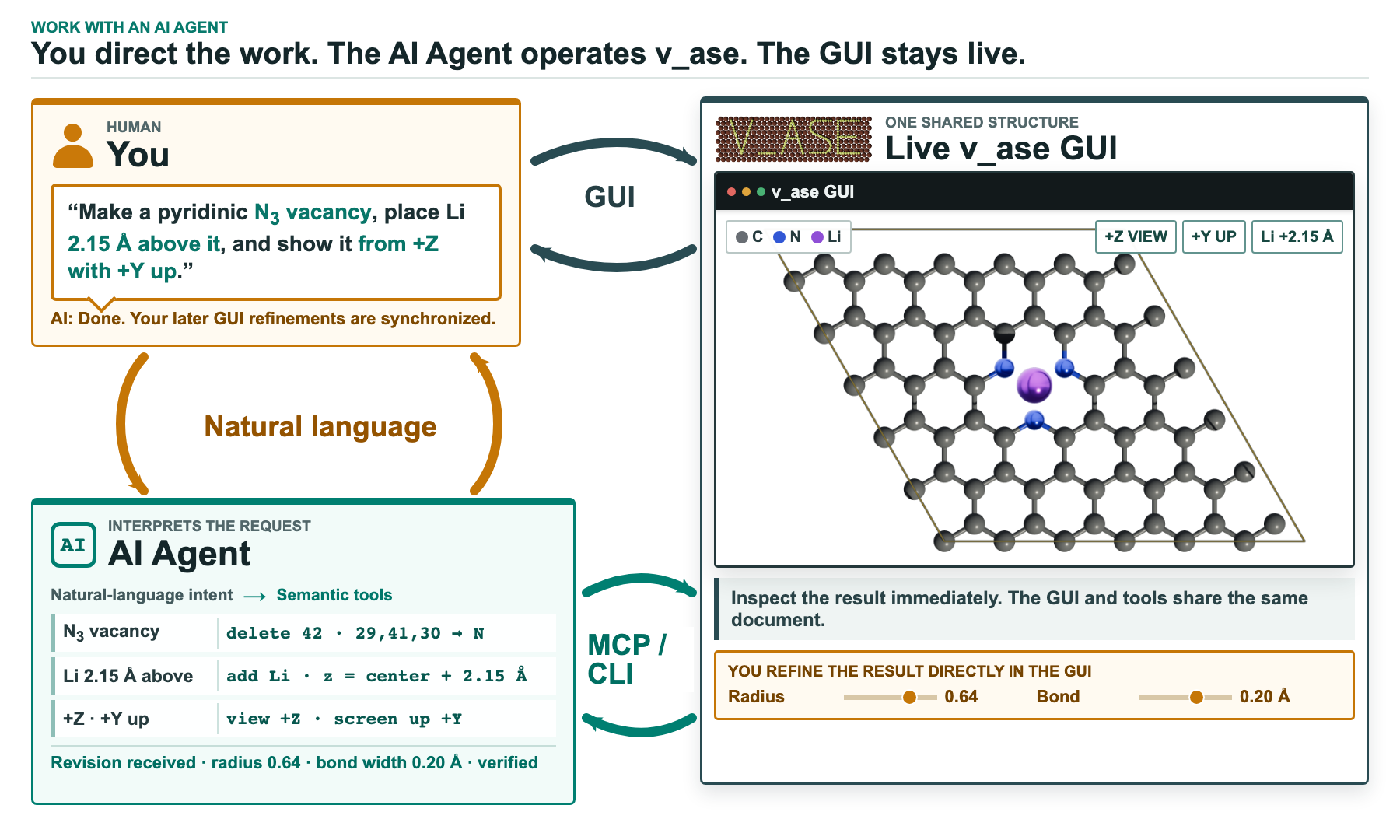
You describe the scientific result to an external AI Agent; the Agent uses the Skill and structured CLI/API; the result appears in the same live GUI. A manual GUI edit becomes the next document revision before another agent mutation.
v_ase does not contain an LLM or interpret natural language. It exposes exact semantic state and a revisioned loopback bridge:
v_ase gui STRUCTURE --interactive --cli
v_ase api "$COMMAND_URL" schema
v_ase api "$COMMAND_URL" capabilities
v_ase api "$COMMAND_URL" describe --params '{"includePositions":true}'
The first CLI stdout line is a JSON handshake; later lines are collaboration
events, not a stdin command loop. Semantic state can reduce token use and
repeated image interpretation, while decoded renders remain the visual source
of truth. Render and export commands omit Base64 data from terminal output by
default; agents use --save OUTPUT to write the artifact without spending
context on encoded pixels.
Read AI-agent integration
and the bundled canonical
SKILL.md
before automation.
Save, export, and share
| Goal | Choose |
|---|---|
| Resume all scientific and visual work | Compact .vase project |
| Resume work and preview in a browser | Save Project with interactive rendered view |
| Share only an offline interactive scene | Export HTML View without project embedding |
| Publish a figure | PNG, lossless WebP, JPEG, or rendered PDF |
| Publish a trajectory | H.264 MOV or MPEG-4 AVI |
| Continue in a 3D tool | Blender script, OBJ/MTL ZIP, or optional Rhino 3DM |
Standalone HTML opens from file:// without v_ase, Python, a server, or a CDN.
The lightweight HTML View is intentionally not editable; embed the project or
keep the .vase when full recovery matters.
Rhino export requires one optional extra:
python -m pip install "v_ase-gui[rhino]"
See Projects, rendering, and export and Supported formats.
Documentation map
| Need | Guide |
|---|---|
| Install and open the first structure | Installation · First session |
| Understand tabs, View/Edit, and state | Workspace model |
| Select, transform, build, and add atoms/molecules | Editing structures |
| Follow reproducible fixtures | Worked examples |
| Use constraints and relaxation | Constraints and relaxation |
| Analyze trajectories, properties, and RDF | Trajectories and analysis |
| Inspect density, potential, ELF, Cube, or XSF | Volumetric fields |
| Match interfaces and registry | Periodic cells and interfaces |
| Look up commands and shortcuts | CLI · Shortcuts |
| Diagnose an error | Troubleshooting |
The documentation uses Sphinx, MyST Markdown, and the Read the Docs theme. Build the exact strict site locally:
python -m pip install -r docs/requirements.txt
make -C docs html
Output is written to docs/_build/html.
Development
git clone https://github.com/lgyEthan/v_ase.git
cd v_ase
python -m pip install -e ".[dev]"
python -m playwright install chromium
pytest
Documentation and release requirements are in Contributing documentation and the Release Checklist.
Citation
If v_ase supports published work, cite the exact software version. Citation
metadata is provided in CITATION.cff.
License
v_ase is licensed under the
GNU Affero General Public License v3.0 or later
(AGPL-3.0-or-later). The bundled Three.js module retains its MIT license.
1 maintainer

Download files
Download the file for your platform. If you're not sure which to choose, learn more about installing packages.
Source Distribution
Built Distribution
Filter files by name, interpreter, ABI, and platform.
If you're not sure about the file name format, learn more about wheel file names.
Copy a direct link to the current filters
File details
Details for the file v_ase_gui-0.2.35.tar.gz.
File metadata
- Download URL: v_ase_gui-0.2.35.tar.gz
- Upload date:
- Size: 19.3 MB
- Tags: Source
- Uploaded using Trusted Publishing? No
- Uploaded via:
twine/6.2.0 CPython/3.13.5
File hashes
| Algorithm | Hash digest | |
|---|---|---|
| SHA256 |
1f3b04bc6264e0f1a5305493e7b348d1dad632e048505167b207608832b96c51
|
|
| MD5 |
9be2fbbda9d33d89e249163ce9526046
|
|
| BLAKE2b-256 |
d894eb791d48eacc36e1b97c787eeb800e0430a21877c04435be671fe92a951c
|
File details
Details for the file v_ase_gui-0.2.35-py3-none-any.whl.
File metadata
- Download URL: v_ase_gui-0.2.35-py3-none-any.whl
- Upload date:
- Size: 7.6 MB
- Tags: Python 3
- Uploaded using Trusted Publishing? No
- Uploaded via:
twine/6.2.0 CPython/3.13.5
File hashes
| Algorithm | Hash digest | |
|---|---|---|
| SHA256 |
e857192494567f0e6904b08c5d01e3db7ae933a8fea05d885e9461e66cb75bab
|
|
| MD5 |
06fe60d1068d89a65d9c172fc63a037a
|
|
| BLAKE2b-256 |
66df9df4ad58985e74b9782c27fdafc3e9304ab7b9d802c7700e4e3d6d010f36
|














