
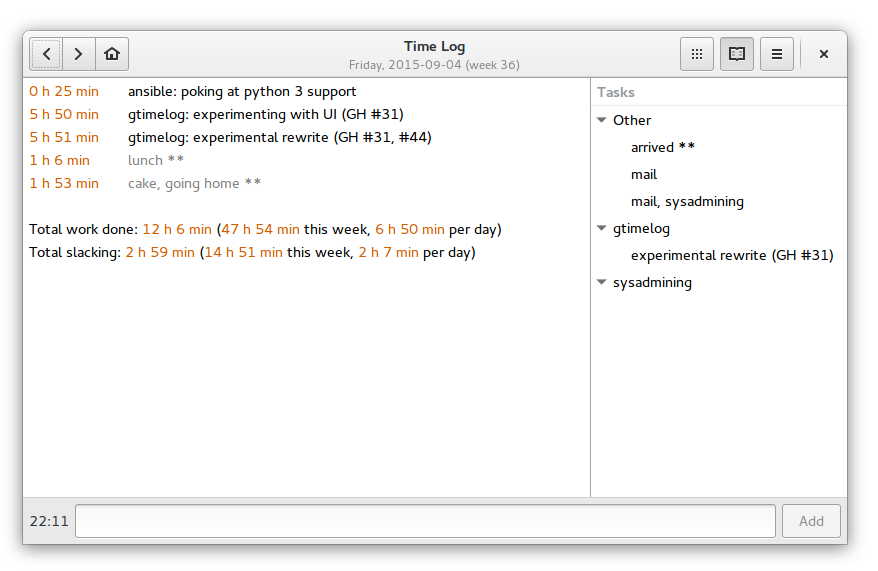
GTimeLog is a simple app for keeping track of time.



Installing
GTimeLog is packaged for Debian and Ubuntu:
sudo apt-get install gtimelog
For Ubuntu, sometimes a newer version can usually be found in the PPA:
Fedora also holds a package of gtimelog to be installed with:
sudo dnf install gtimelog
You can fetch the latest released version from PyPI
$ pip install gtimelog
$ gtimelog
You can run it from a source checkout (without an explicit installation step):
$ git clone https://github.com/gtimelog/gtimelog
$ cd gtimelog
$ ./gtimelog
System requirements:
Python (3.6+)
PyGObject
gobject-introspection type libraries for Gtk, Gdk, GLib, Gio, GObject, Pango, Soup, Secret
GTK+ 3.18 or newer
Documentation
This is work in progress:
docs/index.rst contains an overview
docs/formats.rst describes the file formats
Resources
Website: https://gtimelog.org
Mailing list: gtimelog@googlegroups.com (archive at https://groups.google.com/group/gtimelog)
IRC: #gtimelog on chat.libera.net
Source code: https://github.com/gtimelog/gtimelog
Report bugs at https://github.com/gtimelog/gtimelog/issues
There’s an old bugtracker at https://bugs.launchpad.net/gtimelog
I sometimes also browse distribution bugs:
Credits
GTimeLog was mainly written by Marius Gedminas <marius@gedmin.as>.
Barry Warsaw <barry@python.org> stepped in as a co-maintainer when Marius burned out. Then Barry got busy and Marius recovered.
Many excellent contributors are listed in CONTRIBUTORS.rst
Changelog
0.12.0 (2024-04-03)
This version talks to an SMTP server instead of relying on /usr/sbin/sendmail for email sending. This should work even in flatpaks.
New command line options: –prefs, –email-prefs.
Use libsecret instead of gnome-keyring.
GTK 3.18 or newer is now required (GH: #131).
Soap 3.0 is now required (GH: #238).
Fixed an AttributeError in the undocumented remote task list feature (GH: #153).
Make the undocumented remote task list feature validate TLS certificates (GH: #214).
Add Python 3.8, 3.9, 3.10, 3.11, and 3.12 support.
Drop Python 2.7, 3.5, and 3.6 support.
Add support for positive time offset syntax in entries.
Focus the task entry on Ctrl+L (GH: #213).
Change entry search to be fuzzy. It is now only required to enter characters of the entry in the correct order to find an entry.
Enforce minimum and maximum size for the task pane (GH: #219).
Task pane now preserves the order of task groups to match the order in tasks.txt (GH: #224).
Grouped task entries can now be sorted by start date, name, duration or according to tasks.txt order (GH: #228).
Add the ability to change the last entry using Ctrl+Shift+BackSpace (GH: #247).
0.11.3 (2019-04-23)
Use a better workaround for window.present() not working on Wayland.
Fix a rare AssertionError on quit.
Fix problem with “Edit log” and “Edit tasks” menu entries on Windows (GH: #133).
Do not include *** entries in slacking total (GH: #138).
Show average time per day spent on filtered tasks (GH: #146).
Drop Python 3.4 support.
0.11.2 (2018-11-03)
Window menu now includes items previously shown only in the app menu: Preferences, About (GH: #126).
Keyboard shortcuts window (press Ctrl+Shift+?).
Dropped the help page (there was only one and it was only listing keyboard shortcuts, and it was also incomplete and had no translations).
Bugfix: if timelog.txt was a symlink, changes to the symlink target would not get noticed automatically (GH: #128).
Older versions
See the full changelog.


Release files for gtimelog 0.12.0
For a detailed explanation of source distributions (sdists) and built distributions (wheels), please see the package formats documentation.
Source distribution (sdist)
| File | Size | Uploaded | |
|---|---|---|---|
| gtimelog-0.12.0.tar.gz | 300.3 kB | Details |
Built distribution (wheel)
| File | Interpreter | ABI | Platform | Reset |
|---|---|---|---|---|
| gtimelog-0.12.0-py2.py3-none-any.whl | Python 2, Python 3 | none | any | Details |
Total release size: 552.6 kB
Release files / gtimelog-0.12.0.tar.gz
| Download URL | gtimelog-0.12.0.tar.gz |
|---|---|
| Size | 300.3 kB |
| Tags | Source |
|
SHA-256 checksum How to use checksums |
8eccde32fb11f2dd3a7e28d14693dea5052b9922aacef14235232e109be236ab
|
|
BLAKE2b-256 checksum How to use checksums |
c146fb29d38591d424b7c3db181e5a825f491be68ce92ac941528bc798aac845
|
| Upload date | |
|
Uploaded using Trusted Publishing? What is trusted publishing? |
No |
| Uploaded via |
twine/4.0.2 CPython/3.11.6
|
Release files / gtimelog-0.12.0-py2.py3-none-any.whl
| Download URL | gtimelog-0.12.0-py2.py3-none-any.whl |
|---|---|
| Size | 252.3 kB |
| Tags | Python 2 Python 3 |
|
SHA-256 checksum How to use checksums |
829304963720dbb0e8d4634caab42fa21a7ae755b1b4c2495e4e63e7cb1d0911
|
|
BLAKE2b-256 checksum How to use checksums |
dc7b328bbf1da13f05b1219e555d87155897dc9c34d7cd8865dbaf2af7de931d
|
| Upload date | |
|
Uploaded using Trusted Publishing? What is trusted publishing? |
No |
| Uploaded via |
twine/4.0.2 CPython/3.11.6
|














